Page 297 of 792
2974-5. Using the driving support systems
4
Driving
RX450h_RX450hL_U
When driving on highways and freeways with white or yellow lines, this function
alerts the driver when the vehicle might depart from its lane and provides assis-
tance by operating the steering wheel to keep the vehicle in its lane. Further-
more, the system also provides steering assistance when dynamic radar cruise
control with full-speed range is operat ing to keep the vehicle in its lane.
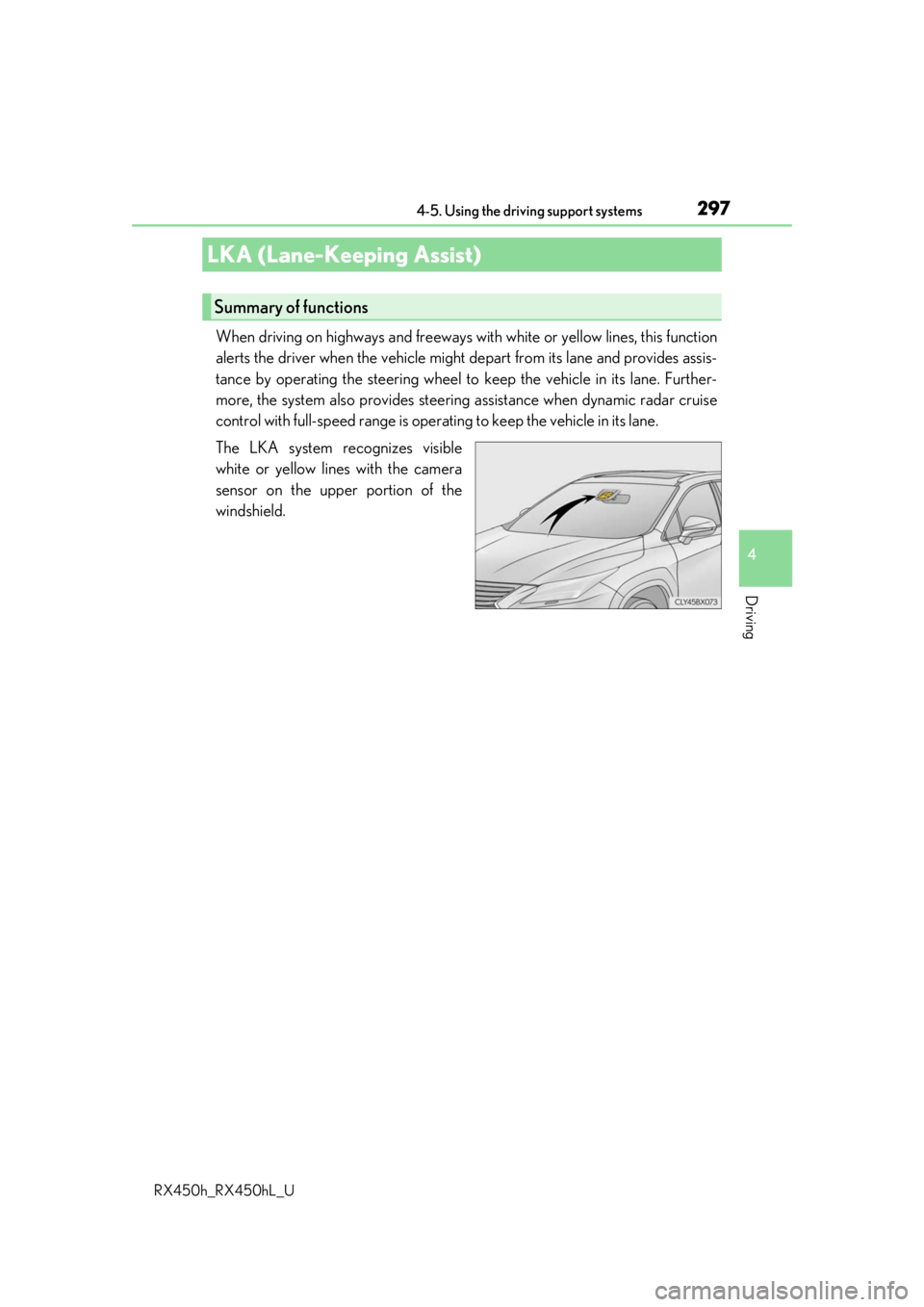
The LKA system recognizes visible
white or yellow lines with the camera
sensor on the upper portion of the
windshield.
LKA (Lane-Keeping Assist)
Summary of functions
Page 300 of 792

3004-5. Using the driving support systems
RX450h_RX450hL_U
WARNING
■Before using LKA system
Do not rely solely upon the LKA system. LKA is not a system which automatically
drives the vehicle or reduces the amount of attention that must be paid to the area in
front of the vehicle. The driver must always assume full responsibility for driving safely
by always paying careful attention to the surrounding conditions and operate the steer-
ing wheel to correct the path of the vehicle. Also, make sure to take adequate breaks
when fatigued, such as from driv ing for a long period of time.
Failure to perform appropriate driving operat ions and pay careful attention may lead to
an accident, resulting in death or serious injury.
■To avoid operating LKA by mistake
When not using the LKA system, use the LKA switch to turn the system off.
■Situations unsuitable for LKA
Do not use the LKA system in the following situations.
The system may not operate properly and lead to an accident, resulting in death or
serious injury.
●A spare tire, tire chains, etc., are equipped.
●When the tires have been excessively worn, or when the tire inflation pressure is low.
●Tires which differ by structure, manufacturer, brand or tread pattern are used.
●Objects or patterns that could be mistaken for white (yellow) lines are present on the
side of the road (guardrails, cu rbs, reflective poles, etc.).
●Vehicle is driven on a snow-covered road.
●White (yellow) lines are difficult to see due to rain, snow, fog, dust, etc.
●Asphalt repair marks, white (yellow) line marks, etc., are present due to road repair.
●Vehicle is driven in a temporary lane or restricted lane due to construction work.
●Vehicle is driven on a road surface which is slippery due to rainy weather, fallen snow,
freezing, etc.
●Vehicle is driven in traffic lanes ot her than on highways and freeways.
●Vehicle is driven in a construction zone.
●When your vehicle is towing a trailer or during emergency towing
■Preventing LKA system malfunctions and operations perf ormed by mistake
●Do not modify the headlights or place stickers, etc., on the surface of the lights.
●Do not modify the suspension etc. If the suspension etc. needs to be replaced, con-
tact your Lexus dealer.
●Do not install or place anything on the hood or grille. Also, do not install a grille guard
(bull bars, kangaroo bar, etc.).
●If your windshield needs repair s, contact your Lexus dealer.
Page 306 of 792
3064-5. Using the driving support systems
RX450h_RX450hL_U
In vehicle-to-vehicle distance control mode, the vehicle automatically a\
cceler-
ates, decelerates and stops to match the speed changes of the preceding vehicle
even if the accelerator pedal is not depr essed. In constant speed control mode,
the vehicle runs at a fixed speed.
Use the dynamic radar cruise control with full-speed range on freeways and
highways.
●Vehicle-to-vehicle distance control mode ( P. 309)
●Constant speed control mode ( P. 315)
Vehicle-to-vehicle distance switch
Display
Set speed
Indicators
Cruise control switch
Dynamic radar cruise control with full-speed range
Summary of functions
1
2
3
4
5
Page 308 of 792

3084-5. Using the driving support systems
RX450h_RX450hL_U
WARNING
■Situations unsuitable for dynamic rada r cruise control with full-speed range
Do not use dynamic radar cruise control with full-speed range in any of the following
situations.
Doing so may result in inappropriate speed control and could cause an accident result-
ing in death or serious injury.
●Roads where there are pedestrians, cyclers, etc.
●In heavy traffic
●On roads with sharp bends
●On winding roads
●On slippery roads, such as thos e covered with rain, ice or snow
●On steep downhills, or where there are sudden changes between sharp up and down
gradients
Vehicle speed may exceed the set speed when driving down a steep hill.
●At entrances to freeways and highways
●When weather conditions are bad enough that they may prevent the sensors from
detecting correctly (fog, snow, sandstorm, heavy rain, etc.)
●When there is rain, snow, etc. on the fron t surface of the radar sensor or camera sen-
sor
●In traffic conditions that require frequent repeated a cceleration and deceleration
●When your vehicle is towing a trailer or during emergency towing
●When an approach warning buzzer is heard often
Page 316 of 792

3164-5. Using the driving support systems
RX450h_RX450hL_U
■Dynamic radar cruise control with full-speed range can be set when
●The shift lever is in D or range 4 or higher of S has been selected.
●Range 4 or higher has been selected by using the paddle shift switch.
(vehicles with padd le shift switches)
●Vehicle speed is at or abov e approximately 30 mph (50 km/h). However, when a pre-
ceding vehicle is detected, the dynamic ra dar cruise control with full-speed range can
be set even if the vehicle speed is below approximately 30 mph (50 km/h).
■Accelerating after setting the vehicle speed
The vehicle can accelerate by operating the accelerator pedal. After accelerating, the
set speed resumes. However, during vehicle-to-vehicle distance control mode, the vehi-
cle speed may decrease below the set speed in order to maintain the distance to the pre-
ceding vehicle.
■When the vehicle stops while follow-up cruising
●Pushing the lever up while the vehicle ahead stops will resume follow-up cruising if the
vehicle ahead starts off within approximat ely 3 seconds after the switch is pressed.
●If the vehicle ahead starts off within 3 seco nds after your vehicle stops, follow-up cruis-
ing will be resumed.
■Automatic cancelation of vehicle- to-vehicle distance control mode
Vehicle-to-vehicle distance control mode is automatically canceled in the following situ-
ations.
●Actual vehicle speed falls below approximately 25 mph (40 km/h) when there are no
vehicles ahead.
●The preceding vehicle leaves the lane when yo ur vehicle is following at a vehicle speed
at or below approximately 25 mph (40 km/h ). Otherwise, the sensor cannot properly
detect the vehicle. (“Radar Cruise Contro l Not Available No Preceding Vehicles” is
displayed on the multi-information display)
●VSC is activated.
●TRAC is activated for a period of time.
●When the VSC or TRAC system is turned off.
●The sensor cannot detect correctly because it is covered in some way.
●Pre-collision braking is activated.
●The parking brake is operated.
●The vehicle is stopped by system control on a steep incline.
●The following are detected when the vehicle has been stopped by system control:
• The driver is not wearing a seat belt.
• The driver’s door is opened.
• The vehicle has been stopped for about 3 minutes
If vehicle-to-vehicle distance control mode is automatically canceled for any other rea-
son, there may be a malfunction in th e system. Contact your Lexus dealer.
Page 318 of 792
3184-5. Using the driving support systems
RX450h_RX450hL_U
●Motorcycles travelin g in the same lane
●When water or snow thrown up by the surrounding vehicles hinders the detecting of
the sensor
■Conditions under which the ve hicle-to-vehicle distance control mode may not function
correctly
In the case of the following conditions, o perate the brake pedal (or accelerator pedal,
depending on the situ ation) as necessary.
As the sensor may not be able to correctly detect vehicles ahead, the system may not
operate properly.
●When the vehicle ahead of you decelerates suddenly
●When your vehicle is pointing upwards
(caused by a heavy load in the luggage com-
partment, etc.)
●Preceding vehicle has an extremely high
ground clearance
●When the road curves or when the lanes are
narrow
●When steering wheel operation or your posi-
tion in the lane is unstable
Page 321 of 792

3214-5. Using the driving support systems
4
Driving
RX450h_RX450hL_U
Press “” or “ ” of the meter control switches, select .
Press “ ” or “ ” of the meter control switches, select “BSM”.
Press “ ” or “ ” of the meter control switch es, select “BSM” or “RCTA”.
■Outside rear view mirror indicator visibility
In strong sunlight, the outside rear view mirror indicator may be difficult to see.
■Hearing the RCTA buzzer
The RCTA buzzer may be difficult to hear over loud noises, such as if the audio system
volume is high.
■When there is a malfunction in the Blind Spot Monitor
If a system malfunction is detected due to any of the following, a warning message will be
displayed: ( P. 667)
●A sensor is malfunctioning
●A sensor is dirty or covere d with snow or a sticker
●The outside temperature is extremely high or low
●Sensor voltage is abnormal
●A sensor is misaligned
■Certification for the Blind Spot Monitor
For vehicles sold in the U.S.A.
For vehicles sold in Canada
Turning the BSM function/RCTA function on/off
1
2
3
Page 330 of 792

3304-5. Using the driving support systems
RX450h_RX450hL_U
■Conditions under which the RCTA fu nction will not detect a vehicle
The RCTA function is not designed to detect the following types of vehicles and/or
objects:
●Vehicles approaching from directly behind
●Vehicles backing up in a parkin g space next to your vehicle
●Guardrails, walls, signs, parked vehi cles and similar stationary objects*
●Small motorcycles, bicycles, pedestrians, etc.*
●Vehicles moving away from your vehicle
●Vehicles approaching from the parking spaces next to your vehicle*
*
: Depending on the conditions, detection of a vehicle and/or object may occur.
■Conditions under which the RCTA function may not function correctly
●The RCTA function may not detect vehicles correctly in the following situations:
• When the sensor is misaligned due to a stro ng impact to the sensor or its surround-
ing area
• When mud, snow, ice, a sticke r, etc. is covering the sensor or surrounding area on
the rear bumper
• When driving on a road surf ace that is wet with standing water during bad weather,
such as heavy rain, snow, or fog
• When multiple vehicles are approaching wi th only a small gap between each vehicle
• When a vehicle is approaching at high speed
• When towing a trailer (vehicles with towing package)
●Vehicles that the sensors cannot detect due to
obstructions
• When backing up on a slope with a sharp change in grade