2019 LEXUS RX450H turn
[x] Cancel search: turnPage 563 of 792

5636-5. Using the other interior features
6
Interior features
RX450h_RX450hL_U
■Enabling 2-way communication with a garage door (only available for com-
patible devices)
When enabled, 2-way communication allows you to check the status of the
opening and closing of a garage door through indicators in your vehicle.
2-way communication is only available if the garage door opener motor used
is a compatible device. (To check devi ce compatibility, refer to www.Home-
Link.com.)
Within 5 seconds after programming the garage door opener has been
completed, if the garage door op ener motor is trained to HomeLink
®,
both garage door operation indicator s will flash rapidly (green) and the
light on the garage door opener moto r will blink twice, indicating that 2-
way communication is enabled.
If the indicators do not flash, perform and within the first 10 presses of
the HomeLink
® button after programming has been completed.
Press a programmed HomeLink
® button to operate a garage door.
Within 1 minute of pressing the HomeLink
® button, after the garage door
operation has stopped, press the “Learn” or “Smart” button on the garage
door opener motor. Within 5 seconds of the establishment of 2-way com-
munication with the garage door opener, both garage door operation indi-
cators in the vehicle will flash rapidly (green) and the light on the garage
door opener motor will blink twice, indicating that 2-way communication is
enabled.
■Reprogramming a single HomeLink® button
When the following procedure is performed, buttons which already have
devices registered to them can be overwritten: With one hand, press and hold the desired HomeLink
® button.
When the HomeLink
® indicator starts flashing (orange), continue to hold
the HomeLink® button and perform “Programming HomeLink®” (it
takes 20 seconds for the HomeLink® indicator to start flashing).
Press the appropriate HomeLink
® button. The HomeLink® indicator light
should turn on.
Operating HomeLink®
1
23
2
3
1
2
1
Page 567 of 792
5676-5. Using the other interior features
6
Interior features
RX450h_RX450hL_U
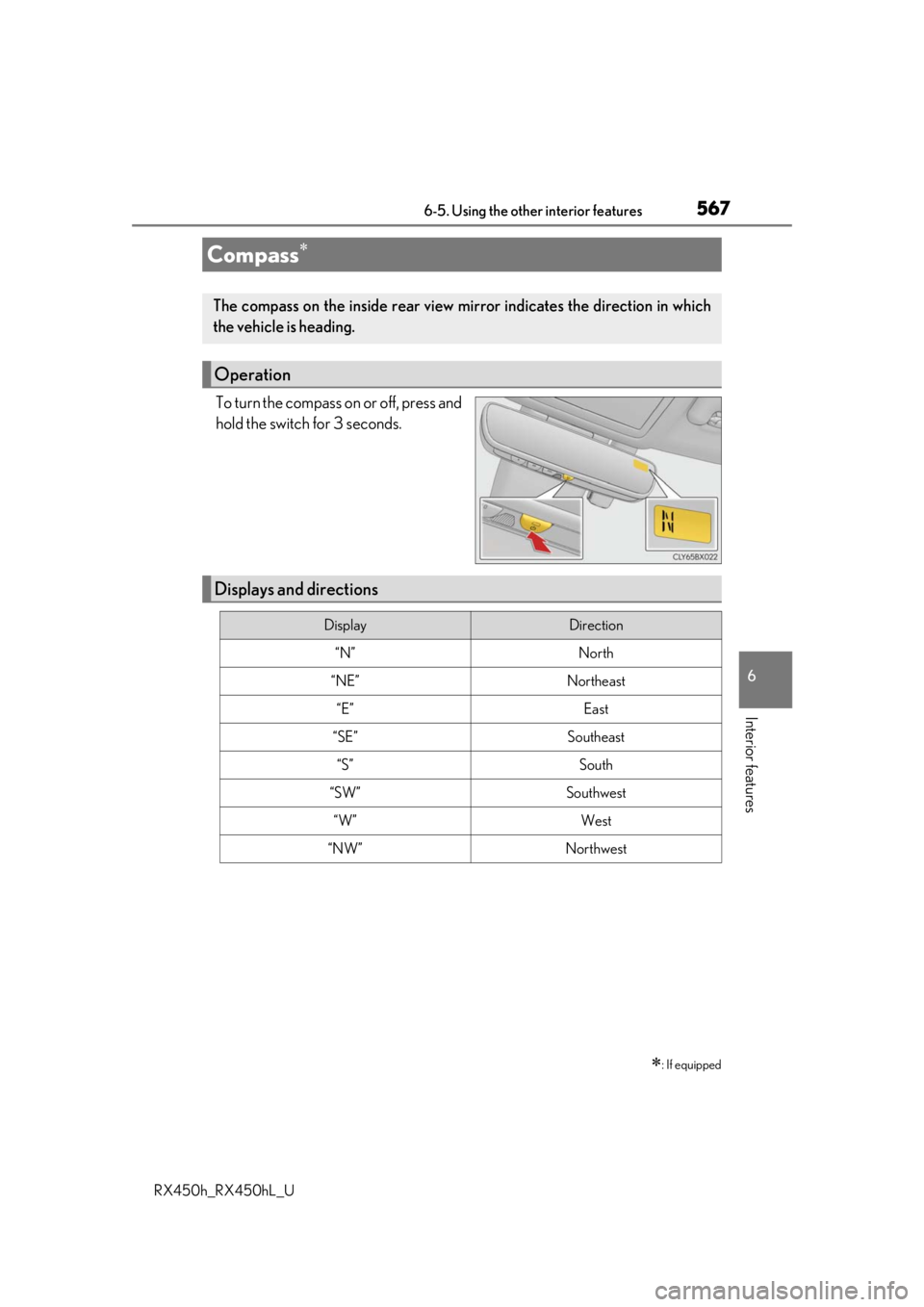
To turn the compass on or off, press and
hold the switch for 3 seconds.
Compass
: If equipped
The compass on the inside rear view mirror indicates the direction in which
the vehicle is heading.
Operation
Displays and directions
DisplayDirection
“N”North
“NE”Northeast
“E”East
“SE”Southeast
“S”South
“SW”Southwest
“W”West
“NW”Northwest
Page 569 of 792
5696-5. Using the other interior features
6
Interior features
RX450h_RX450hL_U
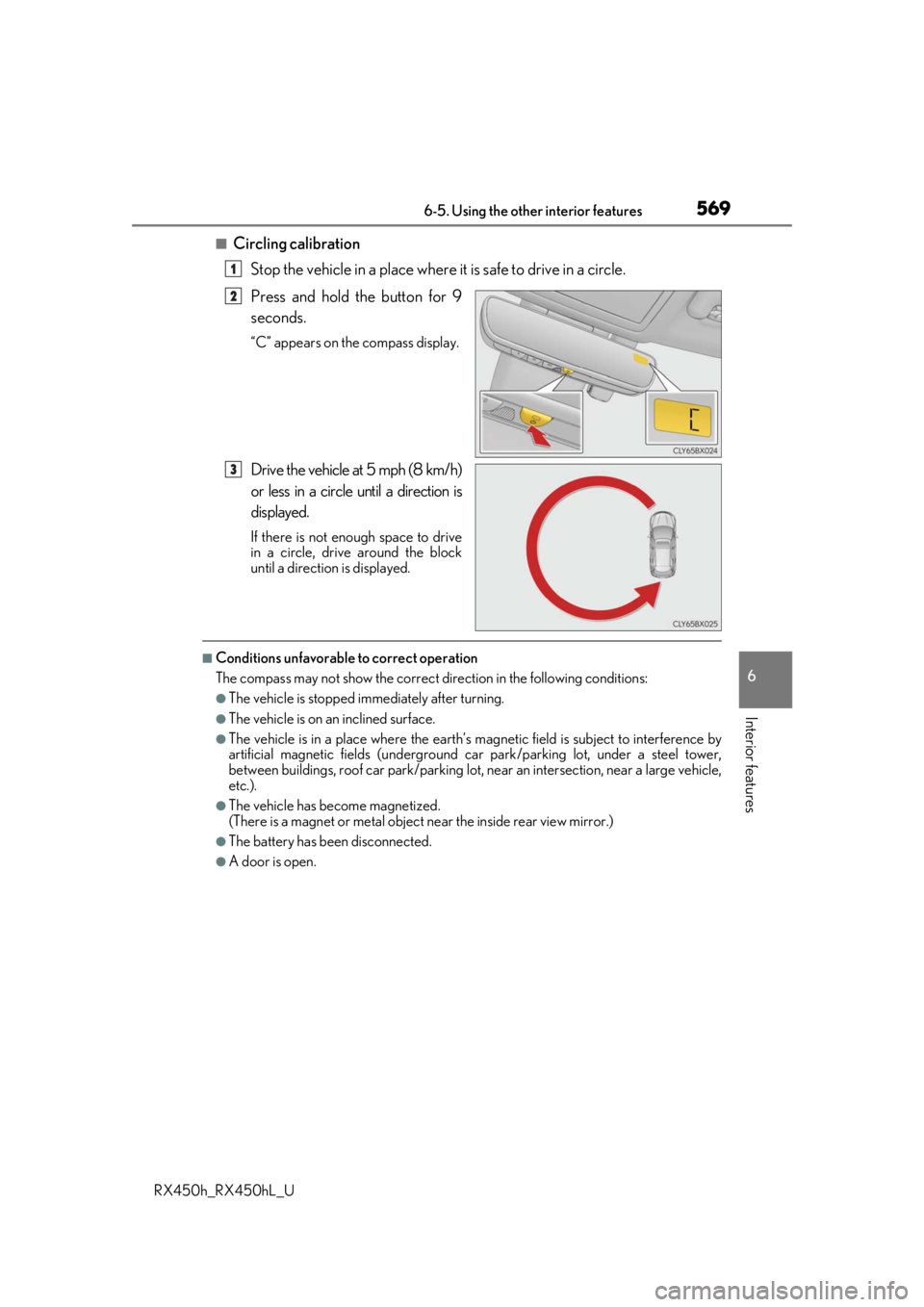
■Circling calibrationStop the vehicle in a place where it is safe to drive in a circle.
Press and hold the button for 9
seconds.
“C” appears on the compass display.
Drive the vehicle at 5 mph (8 km/h)
or less in a circle until a direction is
displayed.
If there is not enough space to drive
in a circle, drive around the block
until a direction is displayed.
■Conditions unfavorable to correct operation
The compass may not show the correct di rection in the following conditions:
●The vehicle is stopped immediately after turning.
●The vehicle is on an inclined surface.
●The vehicle is in a place where the earth’s magnetic field is subject to interference by
artificial magnetic fields (underground car park/parking lot, under a steel tower,
between buildings, roof car park/parking lot, near an intersection, near a large vehicle,
etc.).
●The vehicle has become magnetized.
(There is a magnet or metal object near the inside rear view mirror.)
●The battery has been disconnected.
●A door is open.
1
2
3
Page 573 of 792

5736-5. Using the other interior features
6
Interior features
RX450h_RX450hL_U
■Safety Connect Services Information
●Phone calls using the vehicles Bluetooth® technology will not be possible during Safety
Connect.
●Safety Connect is available be ginning Fall 2009 on select Lexus models (in the contig-
uous United States only). Contact with th e Safety Connect response center is depen-
dent upon the telematics device being in operative condition, cellular connection
availability, and GPS sa tellite signal reception, which can limit the ability to reach the
response center or receive emergency se rvice support. Enrollment and Telematics
Subscription Service Agreement required. A variety of subscription terms is available;
charges vary by subscription term selected and location.
●Automatic Collision Notification, Emergenc y Assistance and Stolen Vehicle Location
will function in the United States, includin g Hawaii and Alaska, Puerto Rico and in Can-
ada, and Enhanced Roadside Assistance will function in the United States, Puerto Rico
and in Canada.
●Automatic Collision Notification, Emergency Assistance, Stolen Vehicle Location and
Enhanced Roadside Assistance will not func tion in the United States Virgin Islands.
No Safety Connect services will function outs ide of the United States in countries other
than Canada.
For vehicles first sold in the USVI, no Safety Connect services will function in and out-
side the United States Virgin Islands.
●Safety Connect services are not subject to section 255 of the Telecommunications Act
and the device is not TTY compatible.
■Languages
The Safety Connect response ce nter will offer support in multiple languages. The Safety
Connect system will offer voice prompts in English, Spanish and French. Please indicate
your language of ch oice when enrolling.
■When contacting the response center
You may be unable to contact the resp onse center if the network is busy.
When the power switch is turned to ON mode, the red indicator light comes on
for 2 seconds then turns off. Afterward, the green indicator light comes on, indi-
cating that the service is active.
The following indicator light patterns indicate specific system usage conditions:
●Green indicator light on = Active service
●Green indicator light flashing = Safety Connect call in process
●Red indicator light (except at vehicle start-up) = System malfunction (contact
your Lexus dealer)
●No indicator light (off) = Safety Connect service not active
Safety Connect LED light Indicators
Page 580 of 792
580
RX450h_RX450hL_U7-1. Maintenance and care
●Working from top to bott
om, liberally apply water to the vehicle body, wheel
wells and underside of the vehicl e to remove any dirt and dust.
●Wash the vehicle body using a sponge or soft cloth, such as a chamois.
●For hard-to-remove marks, use car wa sh soap and rinse thoroughly with
water.
●Wipe away any water.
●Wax the vehicle when the waterproof coating deteriorates.
If water does not bead on a clean surface, apply wax when the vehicle body is cool.
■Self-restoring coat
The vehicle body has a self-restoring coating that is resistant to small surface scratches
caused in a car wash etc.
●The coating lasts for 5 to 8 years from when the vehicle is delivered from the plant.
●The restoration time differs depending on the depth of the scratch and outside tem-
perature. The restoration ti me may become shorter when the coating is warmed by
applying warm water.
●Deep scratches caused by keys, coins, etc. cannot be restored.
●Do not use wax that contain abrasives.
■Automatic car washes
●Before washing the vehicle:
• Fold the mirrors
• Turn off the power back door
Start washing from the front of the vehicle. Extend the mirrors before driving.
●Brushes used in automatic car washes may scratch the vehicle surface and harm your
vehicle’s paint.
●Rear spoiler may not be wash able in some automatic car washes. There may also be an
increased risk of damage to vehicle.
■High pressure car washes
●Do not allow the nozzles of the car wash to come within close proximity of the windows.
●Before using the car wash, check that the fuel filler door on your vehicle is closed prop-
erly.
Cleaning and protecting the vehicle exterior
Perform the following to protect the ve hicle and maintain it in prime condi-
tion:
Page 581 of 792
5817-1. Maintenance and care
7
Maintenance and care
RX450h_RX450hL_U
■Note for a smart access system with push-button start
●If the door handle becomes wet while the electronic key is within the effective range,
the door may lock and unlock repeatedly. Place the key in a position 6 ft. (2 m) or more
separate from the vehicle while the vehicle is being washed. (Take care to ensure that
the key is not stolen.)
●If the electronic key is inside the vehicle and a door handle becomes wet during a car
wash, a buzzer will sound outside the vehicle. To turn off the alarm, lock all the doors.
●Set the electronic key to battery-saving mode to disable the sm art access system with
push-button start. ( P. 159)
■Aluminum wheels
●Remove any dirt immediately by using a neutral detergent.
●Wash detergent off with water immediately after use.
●To protect the paint from damage, make sure to observe the following precautions.
• Do not use acidic, alkaline or abrasive detergent
• Do not use hard brushes
• Do not use detergent on the wheels when they are hot, such as after driving or park-
ing in hot weather
■Bumpers
Do not scrub with abrasive cleaners.
■Front side windows water-repellent coating
●The following precautions can extend the effectiveness of the water-repellent coating.
• Remove any dirt, etc. from the front side windows regularly.
• Do not allow dirt and dust to accumulate on the windows for a long period.Clean the windows with a soft, damp cloth as soon as possible.
• Do not use wax or glass cleaners that co ntain abrasives when cleaning the windows.
• Do not use any metallic objects to remove condensation build up.
●When the water-repellent performance has become insufficient, the coating can be
repaired. Contact your Lexus dealer.
Page 591 of 792

5917-2. Maintenance
7
Maintenance and care
RX450h_RX450hL_U
Vehicle exterior
ItemsCheck points
Doors• Do the doors operate smoothly?
Engine hood• Does the engine hood lock system work properly?
Fluid leaks• There should not be any signs of fluid leakage after
the vehicle has been parked.
Tires
• Is the tire inflation pressure correct?
• The tires should not be damaged or excessively worn.
• Have the tires been rotated according to the mainte- nance schedule?
• The wheel nuts should not be loose.
Windshield wipers/
rear window wiper
•The wiper blades should no t show any signs of crack-
ing, splitting, wear, contamination or deformation.
• The wiper blades should clear the windshield/rear
window without streaking or skipping.
WARNING
■If the hybrid system is operating
Turn the hybrid system off and ensure that there is adequate ventilation before per-
forming maintenance checks.
Page 598 of 792

5987-3. Do-it-yourself maintenance
RX450h_RX450hL_U
With the engine at operating temperatur e and turned off, check the oil level on
the dipstick.
■Checking the engine oil
Park the vehicle on level ground. Afte r warming up the engine and turning
off the hybrid system, wait more than 5 minutes for the oil to drain back into
the bottom of the engine.
Holding a rag under the end, pull
the dipstick out.
Wipe the dipstick clean.
Reinsert the dipstick fully.
Holding a rag under the end, pull
the dipstick out and check the oil
level.
Low
Normal
Excessive
The shape of the dipstick may dif-
fer depending on the type of vehi-
cle or engine.
Wipe the dipstick and reinsert it fully.
Engine oil
1
2
3
4
5
1
2
3
6