4985-12. Other function
RX450h_RX450hL_U
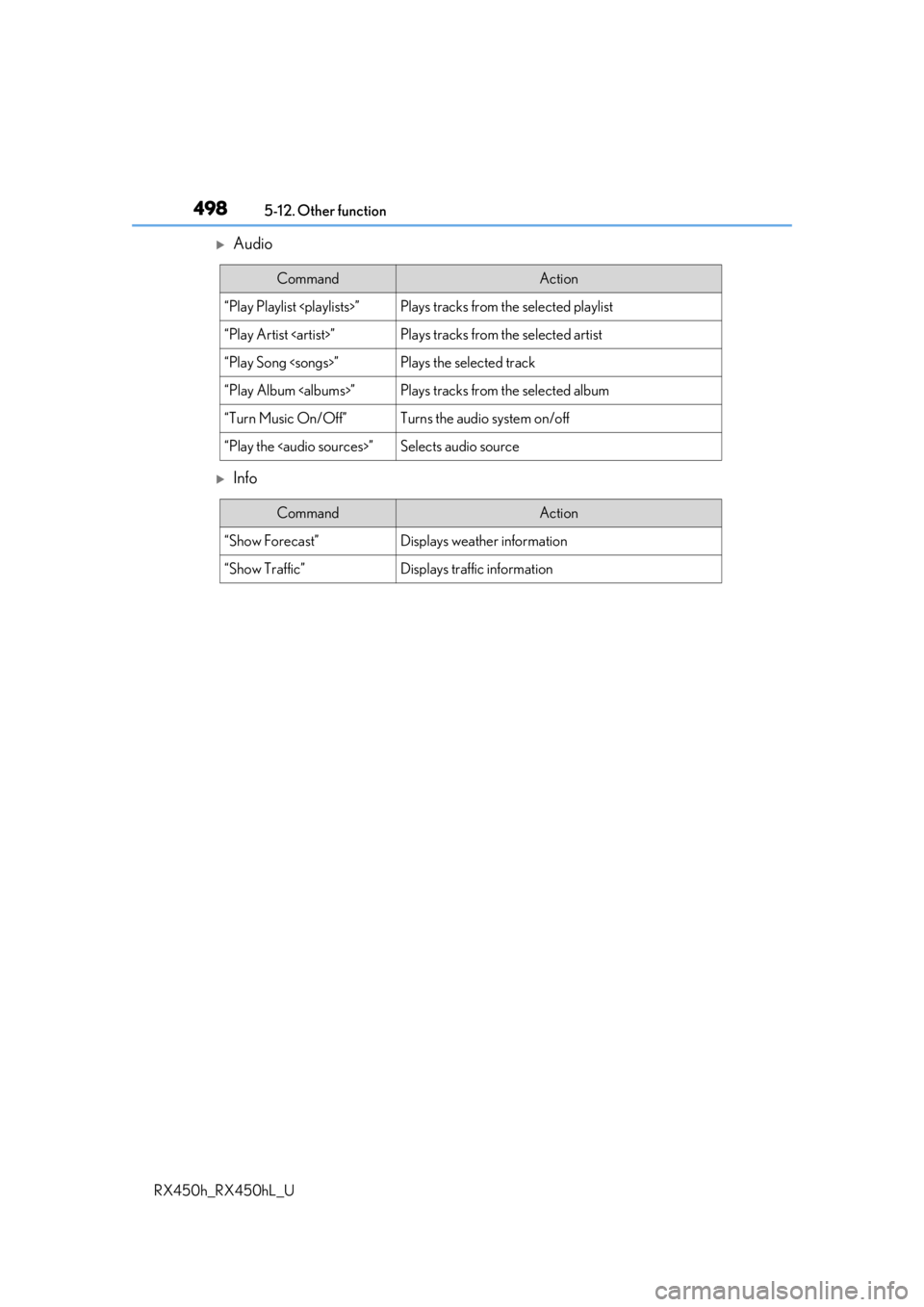
Audio
Info
CommandAction
“Play Playlist ”Plays tracks from the selected playlist
“Play Artist ”Plays tracks from the selected artist
“Play Song ”Plays the selected track
“Play Album ”Plays tracks from the selected album
“Turn Music On/Off”Turns the audio system on/off
“Play the
Page 503 of 792
5036-1. Basic operation of the Remote Touch screen
6
Interior features
RX450h_RX450hL_U
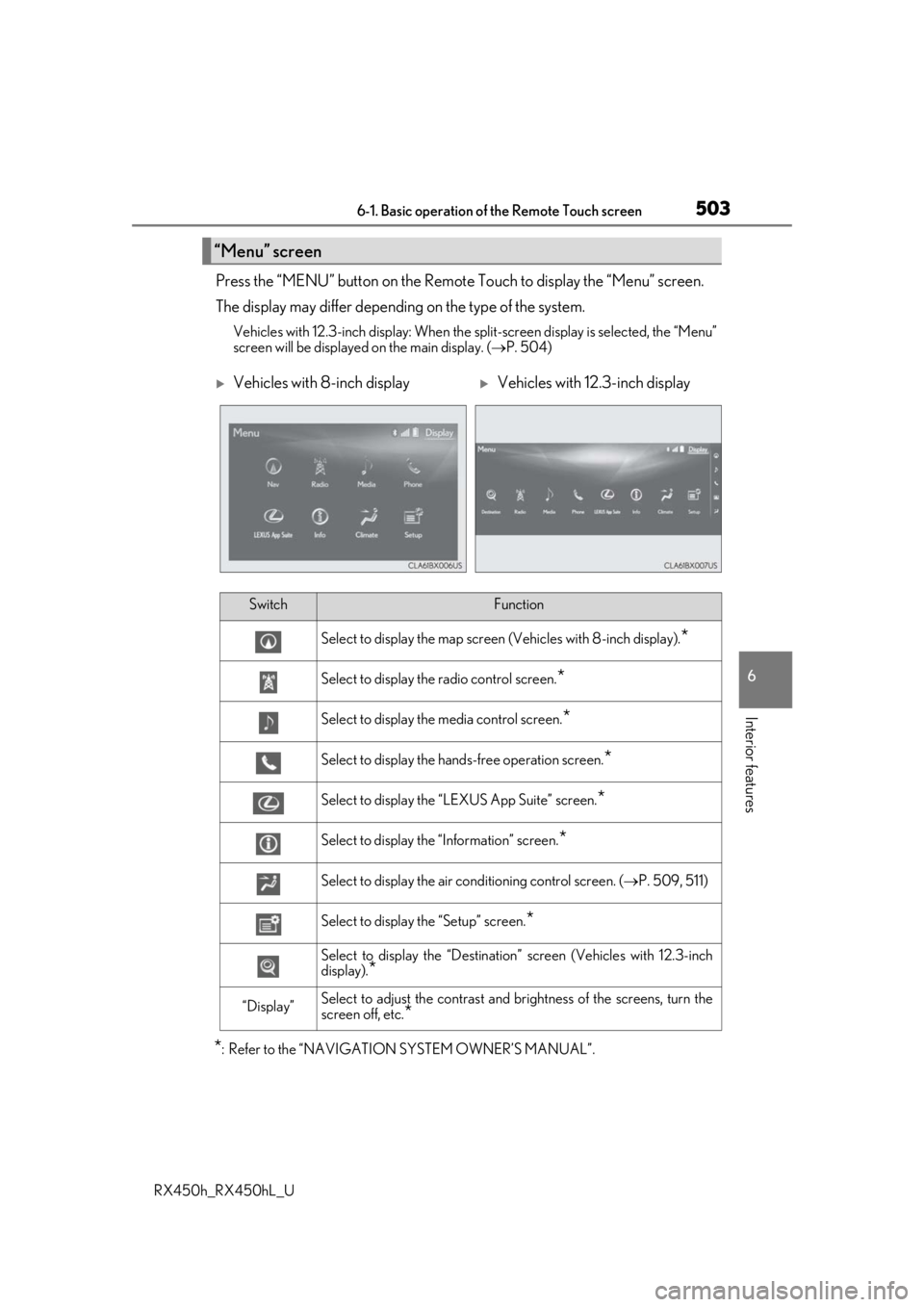
Press the “MENU” button on the Remote Touch to display the “Menu” screen.
The display may differ depending on the type of the system.
Vehicles with 12.3-inch display: When the split-screen display is selected, the “Menu”
screen will be displayed on the main display. ( P. 504)
*: Refer to the “NAVIGATION SYSTEM OWNER’S MANUAL”.
“Menu” screen
Vehicles with 8-inch displayVehicles with 12.3-inch display
SwitchFunction
Select to display the map screen (Vehicles with 8- inch display).*
Select to display the radio control screen.*
Select to display the media control screen.*
Select to display the hands-free operation screen.*
Select to display the “LEXUS App Suite” screen.*
Select to display the “Information” screen.*
Select to display the air conditioning control screen. ( P. 509, 511)
Select to display the “Setup” screen.*
Select to display the “Destination ” screen (Vehicles with 12.3-inch
display).
*
“Display”Select to adjust the contrast and brightness of the screens, turn the
screen off, etc.
*
Page 508 of 792
5086-2. Using the air conditioning system and defogger
RX450h_RX450hL_U
■Adjusting the temperature setting
Press to increase the temperature and to decrease the tem-
perature.
■Adjusting the fan speed setting
Press to increase the fan speed and to decrease the fan speed.
Press the “OFF” button to turn the fan off.
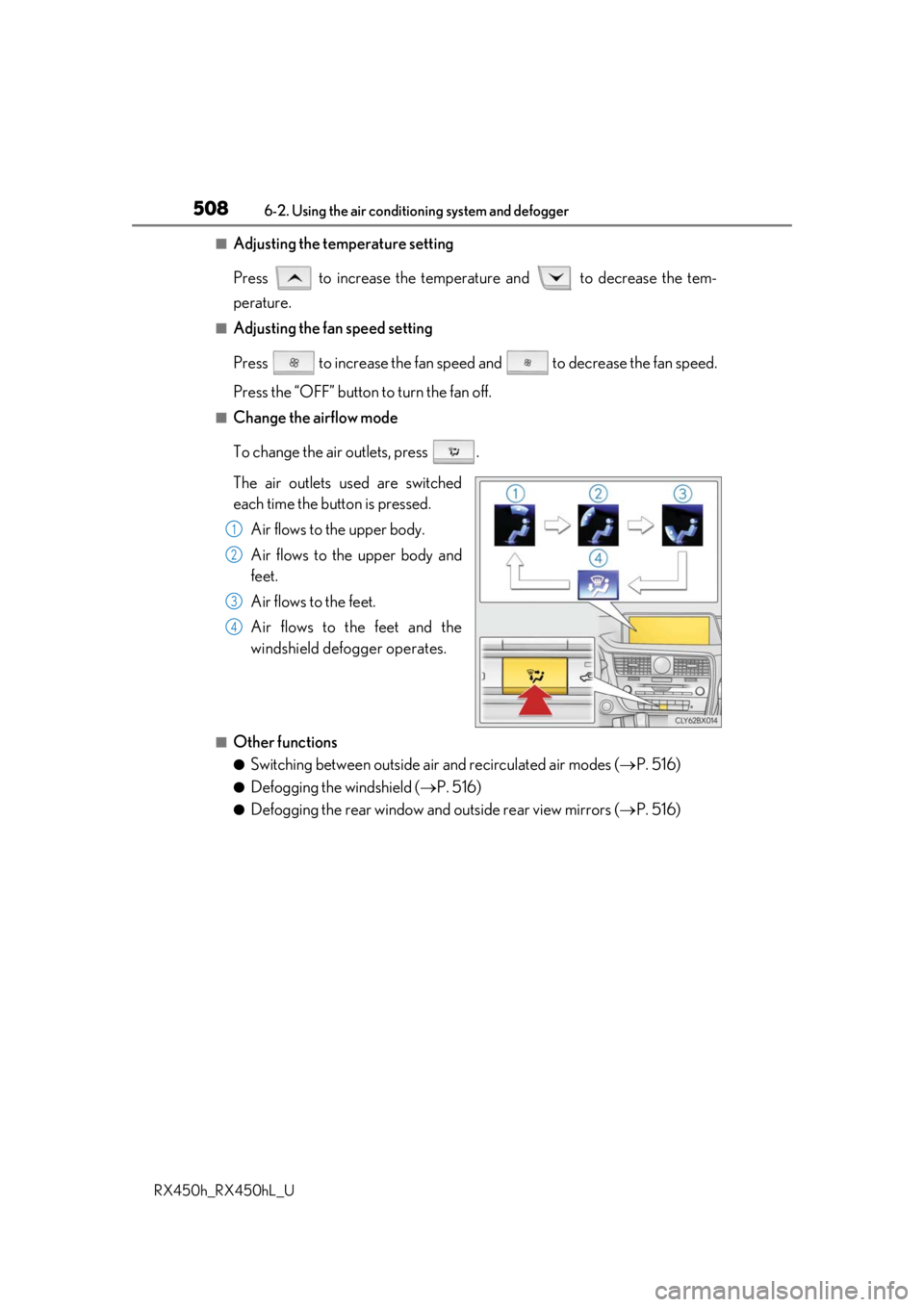
■Change the airflow mode
To change the air outlets, press .
The air outlets used are switched
each time the button is pressed. Air flows to the upper body.
Air flows to the upper body and
feet.
Air flows to the feet.
Air flows to the feet and the
windshield defogger operates.
■Other functions
●Switching between outside air and recirculated air modes ( P. 516)
●Defogging the windshield ( P. 516)
●Defogging the rear window and outside rear view mirrors ( P. 516)
1
2
3
4
Page 509 of 792
5096-2. Using the air conditioning system and defogger
RX450h_RX450hL_U
6
Interior features
Lexus Display Audio screen
Adjust the left-hand side tempera-
ture setting
Adjust the fan speed setting
Select to set auto mode on/off
Select to set eco mode on/off
( P. 519)
Select to set cooling and dehumidifi-
cation function on/off
If the indicator is turned off, the system will blow ambient temperature air
or heated air.
Display the option control screen ( P. 510)
Select the air flow mode
Adjust the right-hand side temperature setting
Navigation system screen
Adjust the left-hand side tempera-
ture setting
Adjust the fan speed setting
Select the air flow mode
Adjust the right-hand side tempera-
ture setting
Display the option control screen
( P. 510)
Select to set automatic mode on/off
Select to set cooling and dehumidification function on/off
If the indicator is turned off, the system will blow ambient temperature air
or heated air.
Select to set eco mode on/off ( P. 519)
Control screen (RX450h)
1
2
3
4
5
6
7
8
1
2
3
4
5
6
7
8
Page 510 of 792
5106-2. Using the air conditioning system and defogger
RX450h_RX450hL_U
■Option control screen
Select on the air conditioning control screen to display the option
control screen. The functions can be switched on and off.
Prevent ice from building up on the windshield and wiper blades (if
equipped) ( P. 516)
Select to set S-FLOW mode ( P. 514)
■Side display operation screen (Vehicle s with a navigation system [12.3-inch
display])
Select the air flow mode
Adjust the left-hand side tem-
perature setting
Adjust the fan speed setting
Adjust the right-hand side tem-
perature setting
Select to set auto mode on/off
Select to set cooling and dehu-
midification function on/off
If the indicator is turned off, the system will blow ambient temperature air
or heated air.
Lexus Display Audio screenNavigation system screen
1
2
1
2
3
4
5
6
Page 511 of 792
5116-2. Using the air conditioning system and defogger
RX450h_RX450hL_U
6
Interior features
Lexus Display Audio screen
Adjust the left-hand side tempera-
ture setting
Adjust the fan speed setting
Select to set auto mode on/off
Select to set eco mode on/off
( P. 519)
Select to set cooling and dehumidifi-
cation function on/off
If the indicator is turned off, the system will blow ambient temperature air
or heated air.
Adjust the temperature for driver, passe nger and rear seats separately (“3-
ZONE” mode) ( P. 513)
Display the rear air condit ioning control screen (P. 515)
Display the option control screen ( P. 512)
Select the air flow mode
Adjust the right-hand side temperature setting
Navigation system screen
Adjust the left-hand side tempera-
ture setting
Adjust the fan speed setting
Select the air flow mode
Adjust the right-hand side tempera-
ture setting
Display the option control screen
( P. 512)
Select to set automatic mode on/off
Select to set cooling and dehumidification function on/off
If the indicator is turned off, the system will blow ambient temperature air
or heated air.
Adjust the temperature for driver, passe nger and rear seats separately (“3-
ZONE” mode) ( P. 513)
Select to set eco mode on/off ( P. 519)
Display the rear air condit ioning control screen (P. 515)
Control screen (RX450hL)
1
2
3
4
5
6
7
8
9
10
1
2
3
4
5
6
7
8
9
10
Page 512 of 792
5126-2. Using the air conditioning system and defogger
RX450h_RX450hL_U
■Option control screen
Select on the air conditioning control screen to display the option
control screen. The functions can be switched on and off.
Prevent ice from building up on the windshield and wiper blades (if
equipped) ( P. 516)
Select to set S-FLOW mode ( P. 514)
■Side display operation screen (Vehicle s with a navigation system [12.3-inch
display])
Select the air flow mode
Adjust the left-hand side tem-
perature setting
Adjust the fan speed setting
Adjust the right-hand side tem-
perature setting
Select to set auto mode on/off
Select to set cooling and dehu-
midification function on/off
If the indicator is turned off, the system will blow ambient temperature air
or heated air.
Adjust the temperature for driver, passenger and rear seats separately (“3-
ZONE” mode) ( P. 513)
Lexus Display Audio screenNavigation system screen
1
2
1
2
3
4
5
6
7
Page 513 of 792
5136-2. Using the air conditioning system and defogger
RX450h_RX450hL_U
6
Interior features
■Using the automatic mode Press the “AUTO” button or select “A UTO” on the air conditioning control
screen.
Press to switch to automatic air intake mode. (if equipped)
The air conditioning system automati cally switches between outside air
and recirculated air modes.
Adjust the temperature setting.
To stop the operation, press the “OFF” button.
■Automatic mode indicator
If the fan speed setting or air flow modes are operated, the automatic mode
indicator goes off. However, automati c mode for functions other than that
operated is maintained.
■Adjusting the temperature for driv er and passenger seats separately
(“DUAL” mode) (RX450h)
To turn on the “DUAL” mode, perfor m any of the following procedures:
●Press “DUAL” button.
●Adjust the temperature setting of th e passenger side with the passenger
side temperature adjustment button.
The indicator comes on when the “DUAL” mode is on.
■Adjusting the temperature for driver, passenger and rear seats separately
(“3-ZONE” mode) (RX450hL)
To turn on the “3-ZONE” mode, perf orm any of the following procedures:
●Select “3-ZONE” on the air conditioning control screen.
●Select “3-ZONE” on the side displa y operation screen. (Vehicles with a
navigation system [12.3-inch display])
●Adjust the temperature setting of th e passenger side with the passenger
side temperature adjustment button.
The indicator comes on when the “3-ZONE” mode is on.
Air conditioning controls
1
2
3
4