Page 469 of 792

4695-9. Bluetooth® Phone
5
Lexus Display Audio system
RX450h_RX450hL_U
Go to message screen: “MENU” button “Phone” “Messages”
Select a message.
Moving the controller to the left while on the message list screen displays the setting
screen. ( P. 477)
Move the controller to the right while on the message screen and then select an
account to display a message list for the selected account.
Selecting “Next” or “Previous” disp lays the next or previous message.
If a message is too long, select “R ead More” to display the full text.
■Option menu
Move the controller to the left while on the message screen.
Select a prepared message and
send a reply message
Call a sender
If more than one phone number is
registered for a sender, a phone
number selection screen will be dis-
played.
Call a phone number written in a message
Select “Play” to have a message read out loud.
Select “Stop” to stop this function.
Select “Mark Unread” to mark E-mail th at has been read as unread. Select
“Mark Read” to mark E-mail that has not been read as read.
Using a Bluetooth® phone message
Once a MAP-profile compatible Bluetooth® phone is registered, you can
check the E-mail/SMS/MMS and reply to a message using the following pro-
cedures:
Checking messages
Message screen
1
2
1
2
3
4
5
Page 470 of 792

4705-9. Bluetooth® Phone
RX450h_RX450hL_U
Move the controller to the left while on the message screen.
Select “Quick Message” to display the “Quick Message” screen.
Select the desired message and then select “Send”.
■Editing a quick message Move the controller to the left while on the message screen.
Select “Quick Message” and move the cursor to the desired message.
Move the controller to the left and select “Edit”.
To return to the default message after editing, select “Default”.
This function is available when the “E-mail Notification Popup” or\
“SMS/MMS
Notification Popup” are set to on. ( P. 473)
“Incoming E-mail Display” or “Inco ming SMS/MMS Display” are set to
“Drop-Down”
When E-mail/SMS/MMS are received, the incoming message is displayed
on the upper side of the screen with a sound.
“Incoming E-mail Display” or “Incoming SMS/MMS Display” are set to “Full
Screen”
When E-mail/SMS/MMS are received, th e incoming message screen is dis-
played with a sound and it can be operated on the screen.
Check the message
Refuse to check the message
Call to receive the message
sender’s phone number
Replying to a message
Receiving a message popup function
1
2
3
1
2
3
1
2
3
Page 471 of 792
4715-9. Bluetooth® Phone
5
Lexus Display Audio system
RX450h_RX450hL_U
Volume switch
During an incoming call: Adjusts the
ring tone volume
During speaking on the phone:
Adjusts in call volume
The voice guidance volume cannot be
adjusted using this button.
Talk switch
Press: Turns the voice command system on
Press and hold: Turns the voice command system off
On-hook switch• End call
•Refuse call
Off-hook switch • Start call
• Receiving
• Phone top screen display
Using the steering wheel switches
The steering wheel switches can be used to operate a connected cellular
phone.
Operating a phone using the steering wheel switches
1
2
3
4
Page 472 of 792
4725-9. Bluetooth® Phone
RX450h_RX450hL_U
Go to “Phone Settings”: “MENU” button “Setup” “Phone”
Register and connect a Bluetooth
®
device ( P. 451)
Adjust the call volume and message
readout volume ( P. 472)
Change display settings ( P. 473)
Change the contact/call history set-
tings ( P. 474)
Change messaging settings
( P. 477)
Change the ring tone type
Adjust the ring tone volume
Adjust in call tone volume
Change the incoming SMS/MMS
tone type
Adjust the incoming SMS/MMS
tone volume
Change the incoming e-mail tone
type
Adjust the incoming e-mail tone vol-
ume
Adjust the message readout volume
Bluetooth® phone settings
You can adjust the hands-free sy stem to your desired settings.
“Phone Settings” screen
1
2
3
4
5
Sound settings
1
2
3
4
5
6
7
8
Page 473 of 792
4735-9. Bluetooth® Phone
5
Lexus Display Audio system
RX450h_RX450hL_U
Change the incoming call display
Set the new SMS/MMS notification
display on/off
Change the incoming SMS/MMS
display
Set the new e-mail notification dis-
play on/off
Change the incoming e-mail display.
Set the phonebook/history transfer
status notification display on/off
■To return to the default volume settings
Move the controller to the left and then select “Default”.
Display settings
1
2
3
4
5
6
Page 475 of 792

4755-10. Phonebook
5
Lexus Display Audio system
RX450h_RX450hL_U
■Return to the default settings
Move the controller to the left and select “Default”.
You can transfer the phone numbers in your Bluetooth® phone to the system.
Operation methods differ between PBAP compatible and PBAP incompatible
Bluetooth
® phones. If your cellular phone does not support either PBAP or
OPP services, you canno t transfer contacts.
For PBAP compatible Bluetooth® phones
Go to “Automatic Transfer”: “MENU” button “Setup” “Phone” “Con-
tacts/Call History” “Automatic Transfer”
Select to set the automatic phone-
book download on/off
With this setting on, phonebook data will
be automatically transferred.
Depending on the cellular phone, call
history will be also transferred.
Select to update contacts from the
connected phone
Select to set the display of contact
images on/off
For PBAP compatible Bluetooth® phones when “Automatic Transfer” is set to
off and PBAP incompatible Bluetooth® phones
Go to “Transfer Contacts from Phone”: “MENU” button “Setup” “Phone”
“Contacts/Call History” “Transfer Contacts from Phone”
Select to transfer the contact from
the connected cellular phone and
replace the current one
Select to transfer the desired con-
tact data from the connected cellu-
lar phone to add to the current one
■Return to the default automatic transfer settings
Move the controller to the left and select “D efault” on the “Automatic Transfer” screen.
Transferring a phone number
1
2
3
1
2
Page 477 of 792
4775-10. Phonebook
5
Lexus Display Audio system
RX450h_RX450hL_U
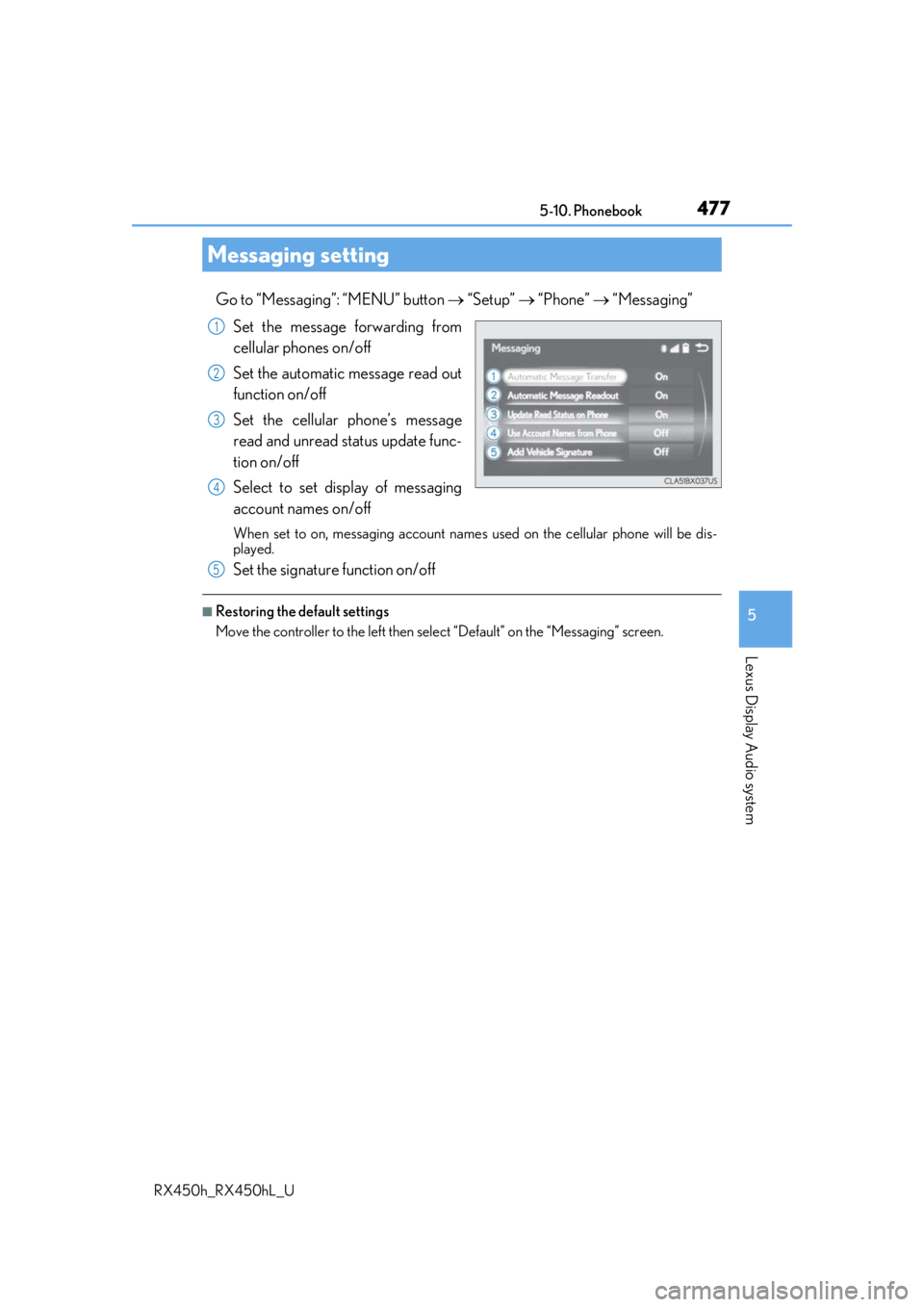
Go to “Messaging”: “MENU” button “Setup” “Phone” “Messaging”
Set the message forwarding from
cellular phones on/off
Set the automatic message read out
function on/off
Set the cellular phone’s message
read and unread status update func-
tion on/off
Select to set display of messaging
account names on/off
When set to on, messaging account names used on the cellular phone will be dis-
played.
Set the signature function on/off
■Restoring the default settings
Move the controller to the left then select “Default” on the “Messaging” screen.
Messaging setting
1
2
3
4
5
Page 479 of 792

4795-11. Bluetooth®
5
Lexus Display Audio system
RX450h_RX450hL_U
When registering/connecting a cellular phone
When making/receiving a call
A cellular phone cannot be registered.
An incorrect passcode was entered on the cellular phone.
Enter the correct passcode on the cellular phone.
The registration operation has not been completed on the cellular phone side.
Complete the registration operation on the cellular phone (approve registration
on the phone).
Old registration information remains on either this system or the cellular phone.
Delete the existing registration informat ion from both this system and the cellu-
lar phone, then register the cellular phone you wish to connect to this system.
( P. 451)
A Bluetooth® connection cannot be made.
Another Bluetooth® device is already connected.
Manually connect the cellular phone you wish to use to this system. ( P. 454)
Bluetooth® function is not enabled on the cellular phone.
Enable the Bluetooth® function on the cellular phone.
A call cannot be made/received.
Your vehicle is in a “No Service” area.
Move to where “No Service” no longer appears on the display.