Page 480 of 792

4805-11. Bluetooth®
RX450h_RX450hL_U
When using the phonebook
When using the Bluetooth® message function
Phonebook data cannot be transferred manually/automatically.
The profile version of the connected cellular phone may not be compatible with trans-
ferring phonebook data.
For a list of specific devices which operat ion has been confirmed on this system,
check with your Lexus dealer or the following website:
http://www.lexus. com/MobileLink
Automatic phonebook transfer function on this system is set to off.
Set automatic phonebook transfer function on this system to on. ( P. 474)
Passcode has not been entered on the cellular phone.
Enter the passcode on the cellular phone if requested (default passcode: 1234).
Transfer operation on the ce llular phone has not completed.
Complete transfer operation on the ce llular phone (approve transfer operation
on the phone).
Phonebook data cannot be edited.
Automatic phonebook transfer function on this system is set to on.
Set automatic phonebook transfer function on this system to off. ( P. 474)
Messages cannot be viewed.
Message transfer is not en abled on the cellular phone.
Enable message transfer on the cellular phone (approve message transfer on the
phone).
Automatic transfer function on this system is set to off.
Set automatic transfer function on this system to on. ( P. 474)
New message notifications are not displayed.
Notification of SMS/MMS/E-mail recept ion on this system is set to off.
Set notification of SMS/MMS/E-mail re ception on this system to on. (P. 473)
Automatic message transfer function is not enabled on the cellular phone.
Enable automatic transfer func tion on the cellular phone.
Page 481 of 792
4815-11. Bluetooth®
5
Lexus Display Audio system
RX450h_RX450hL_U
In other situations
Even though all conceivable measures have been taken, the symptom status does not
change.
The cellular phone is not close enough to this system.
Bring the cellular phone closer to this system.
The cellular phone is the most likely cause of the symptom.
Turn the cellular phone off, remove and reinstall the battery pack, and then
restart the cellular phone.
Enable the cellular phone’s Bluetooth
® connection.
Stop the cellular phone’s security software and close all applications.
Before using an application installed on the cellular phone, carefully check its
source and how its operation might affect this system.
Page 483 of 792

4835-11. Bluetooth®
5
Lexus Display Audio system
RX450h_RX450hL_U
■Bluetooth® antenna
The antenna is built into the display.
If the portable audio player is behind the se at or in the glove box or console box, or is
touching or covered by metal objects, the connection status may deteriorate.
If the cellular phone is behind the seat or in the console box, or touching or covered by
metal objects, the connection status may deteriorate.
■Battery charge/signal status
●This display may not correspond exactly wi th the portable audio player or cellular
phone itself.
●This system does not have a charging function.
●The portable audio player or cellular phone battery will be depleted quickly when the
device is connected to Bluetooth®.
■When using the Bluetooth® audio and hands-free system at the same time
The following problems may occur.
●The Bluetooth® audio connection may be interrupted.
●Noise may be heard during Bluetooth® audio playback.
■About the contact in this system
The following data is stored for every registered cellular phone. When another phone is
connecting, you cannot read the registered data.
●Contact data
●Call history
●Favorite
●Message
When removing a Bluetooth® phone from the system, the above-mentioned data is also
deleted.
■About Bluetooth®
Page 485 of 792
4855-11. Bluetooth®
5
Lexus Display Audio system
RX450h_RX450hL_U
■Certification
Page 487 of 792

4875-11. Bluetooth®
5
Lexus Display Audio system
RX450h_RX450hL_U
WARNING
■While driving
Do not operate the portable audio player, cellular phone or connect a device to the
Bluetooth
® system.
■Caution regarding interference with electronic devices
●Your audio unit is fitted with Bluetooth® antennas. People with implantable cardiac
pacemakers, cardiac resynchronization ther apy-pacemakers or implantable cardio-
verter defibrillators should maintain a re asonable distance between themselves and
the Bluetooth
® antennas. The radio waves may affe ct the operation of such devices.
●Before using Bluetooth® devices, users of any electrical medical device other than
implantable cardiac pacemakers, cardiac resynchronization therapy-pacemakers or
implantable cardioverter defi brillators should consult the manufacturer of the device
for information about its operation under th e influence of radio waves. Radio waves
could have unexpected effects on the operation of such medical devices.
NOTICE
■When leaving the vehicle
Do not leave your portable au dio player or cellular phone in the vehicle. The inside of
the vehicle may become hot, causing damage to the portable audio player or cellular
phone.
Page 488 of 792
488
RX450h_RX450hL_U5-12. Other function
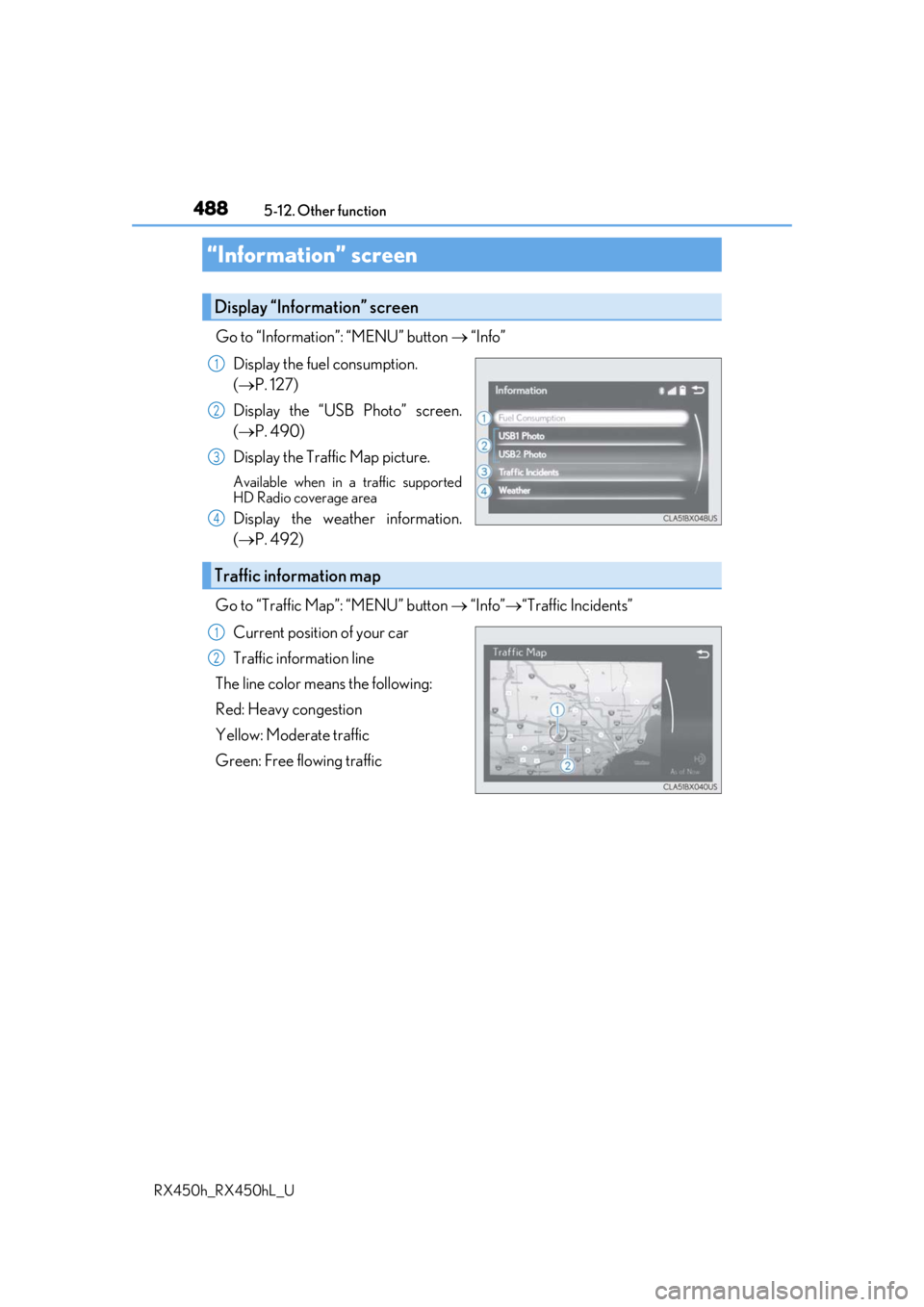
Go to “Information”: “MENU” button
“Info”
Display the fuel consumption.
( P. 127)
Display the “USB Photo” screen.
( P. 490)
Display the Traffic Map picture.
Available when in a traffic supported
HD Radio coverage area
Display the weather information.
( P. 492)
Go to “Traffic Map”: “MENU” button “Info” “Traffic Incidents”
Current position of your car
Traffic information line
The line color means the following:
Red: Heavy congestion
Yellow: Moderate traffic
Green: Free flowing traffic
“Information” screen
Display “Information” screen
1
2
3
4
Traffic information map
1
2
Page 489 of 792
4895-12. Other function
5
Lexus Display Audio system
RX450h_RX450hL_U
■Certification for U.S. owners
Page 490 of 792
4905-12. Other function
RX450h_RX450hL_U
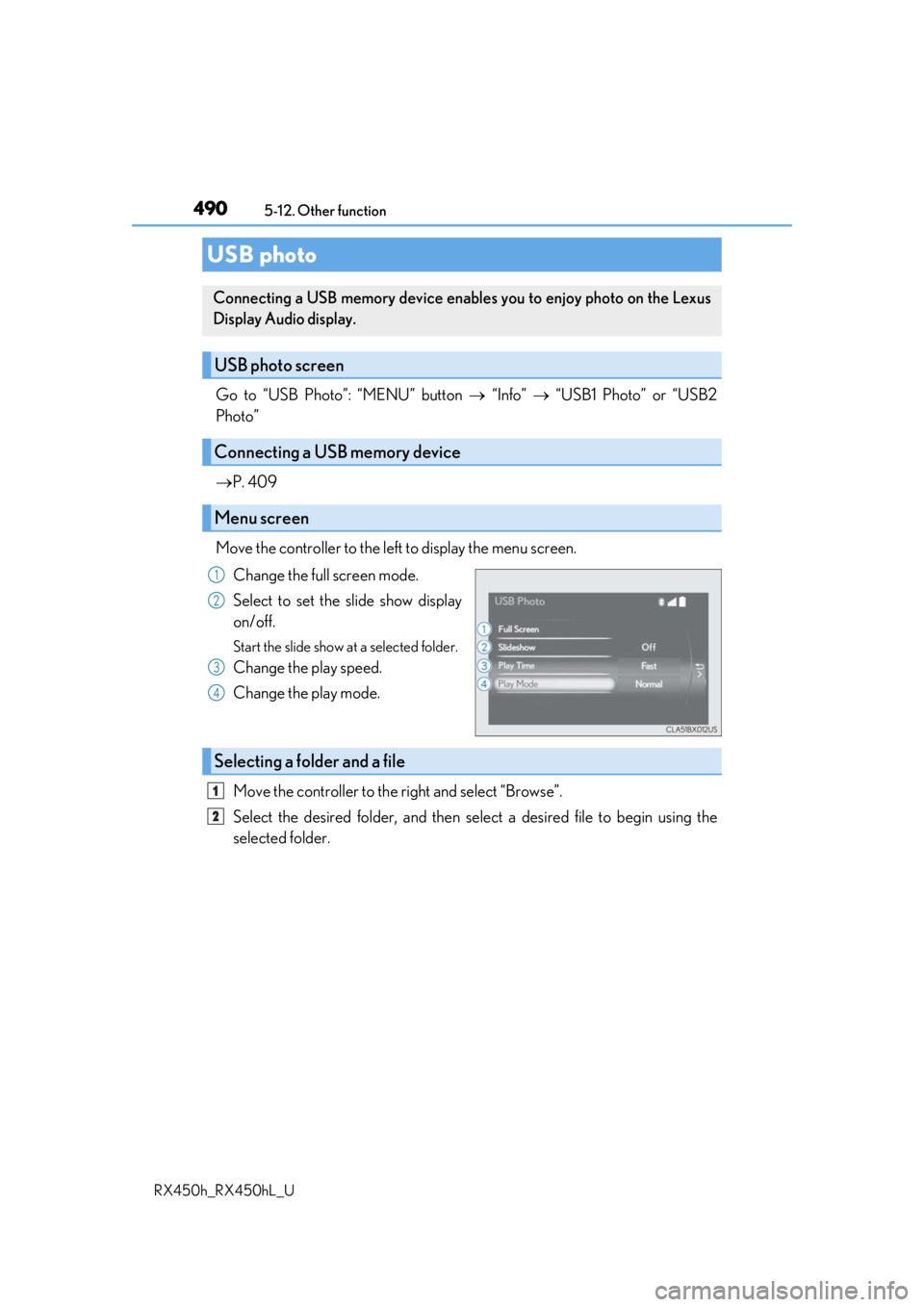
Go to “USB Photo”: “MENU” button “Info” “USB1 Photo” or “USB2
Photo”
P. 409
Move the controller to the left to display the menu screen. Change the full screen mode.
Select to set the slide show display
on/off.
Start the slide show at a selected folder.
Change the play speed.
Change the play mode.
Move the controller to the right and select “Browse”.
Select the desired folder, and then sele ct a desired file to begin using the
selected folder.
USB photo
Connecting a USB memory device enables you to enjoy photo on the Lexus
Display Audio display.
USB photo screen
Connecting a USB memory device
Menu screen
1
2
3
4
Selecting a folder and a file
1
2