Page 471 of 777

470 5-10. Phonebook
RX350/RX350L_U You can register the desired contact from the phonebook. Up to 15 contacts per
phone can be registered.
Go to “Add Favorite”: “MENU” button “Setup” “Phone” “Contacts/
Call History” “Add Favorite”
Choose the contact to register.
Go to “Remove Favorite”: “MENU” button “Setup” “Phone” “Con-
tacts/Call History” “Remove Favorite”
Select the desired contacts. You can select all contacts by selecting “Select All”.
Move the controller to the left and select “Remove”.
Go to “Delete Contact ”: “MENU” button “Setup” “Phone” “Con-
tacts/Call History” “Delete Contact”
Select the desired contacts. You can select all contacts by selecting “Select All”.
Move the controller to the left and select “Delete”.■
Phonebook data
Phonebook data is managed separately for every registered phone. When one phone is
connected, you cannot read the registered data of the other phones. ■
When transferring contacts
Transfer contacts while the engine is running.
If the cellular phone is OPP or PBAP compatible, you may need to input “1234” on the
cellular phone for OB EX certification.■
When you have selected “Replace Contacts” or “Add Contact” to transfer contacts
If the cellular phone does not support OPP service, you cannot use these functions. You
can transfer the phonebook data only by operating your phone. ■
Transferring contacts while Bluetooth ®
audio is playing
Bluetooth ®
audio will disconnect. It will reconnect automatically when data transfer fin-
ishes. It may not reconnect dependin g on the phone which is connected.Registering favorites 1
2
Removing favorites
Deleting the contacts data 1
2
3
1
2
3
Page 476 of 777
4755-11. Bluetooth ®
5
Lexus Display Audio system
RX350/RX350L_U
In other situations Even though all conceivable measures have been taken, the symptom status does not
change.
The cellular phone is not clos e enough to this system.
Bring the cellular phone closer to this system.
The cellular phone is the most likely cause of the symptom.
Turn the cellular phone off, remove and reinstall the battery pack, and then
restart the cellular phone.
Enable the cellular phone’s Bluetooth ®
connection.
Stop the cellular phone’s security software and close all applications.
Before using an application installed on the cellular phone, carefully check its
source and how its operation might affect this system.
Page 514 of 777
5136-2. Using the air conditioning system and defogger
6
Interior features
RX350/RX350L_U ■
Switching between outside air and recirculated air modes
Type A
Press . The mode switches between (recirculated air mode) and (outside
air mode) modes each time the button is pressed.
Type B
Press . The mode switches between (recir culated air mode), automatic and
(outside air mode) modes each time the button is pressed.
When the system is switched to automatic mode, the air conditioning system oper-
ates automatically.■
Defogging the windshield
Defoggers are used to defog the wi ndshield and front side windows.
Press . Set the outside/recirculated air mode button to outside air mode if the recirculated
air mode is used. (It may switch automatically.)
To defog the windshield and the side wind ows early, turn the air flow and tempera-
ture up.
To return to the previous mode, press again when the windshield is
defogged.■
Defogging the rear window and outside rear view mirrors
Defoggers are used to defog the rear window and to remove raindrops, dew
and frost from the outside rear view mirrors.
Press . The defoggers will automatically turn off after a period of time.
■
Windshield wiper de-icer (if equipped)
This feature is used to prevent ice fr om building up on the windshield and
wiper blades.
Select on the option control screen. When the windshield wiper de-icer is on , is displayed on the air condition-
ing control screen.
The windshield wiper de-icer will automati cally turn off after a period of time.Other functions
Page 528 of 777
5276-3. Using the interior lights
6
Interior features
RX350/RX350L_U ●
Illuminated entry system: Th e lights automatically turn on/off according to engine
switch mode, the presence of the electronic key, whether the doors are locked/
unlocked, and whether the doors are opened/closed. ●
If the interior lights remain on when the engine switch is turned off, the lights will go off
automatically after 20 minutes. ●
In the following cases, the interior lights and front personal lights may not respond as
normal.
• When water, dirt, etc., have adhered to the lens surface
• When operated with a wet hand
• When wearing gloves, etc. ●
Some functions can be customized. ( P. 722)
NOTICE ●
Never remove the lens for the front interior light and fron t personal lights. Otherwise,
the lights will be damaged. If the lens need to remove, contact your Lexus dealer.●
To prevent battery discharge, do not leave the lights on longer than necessary when
the engine is off.
Page 531 of 777
530 6-4. Using the storage features
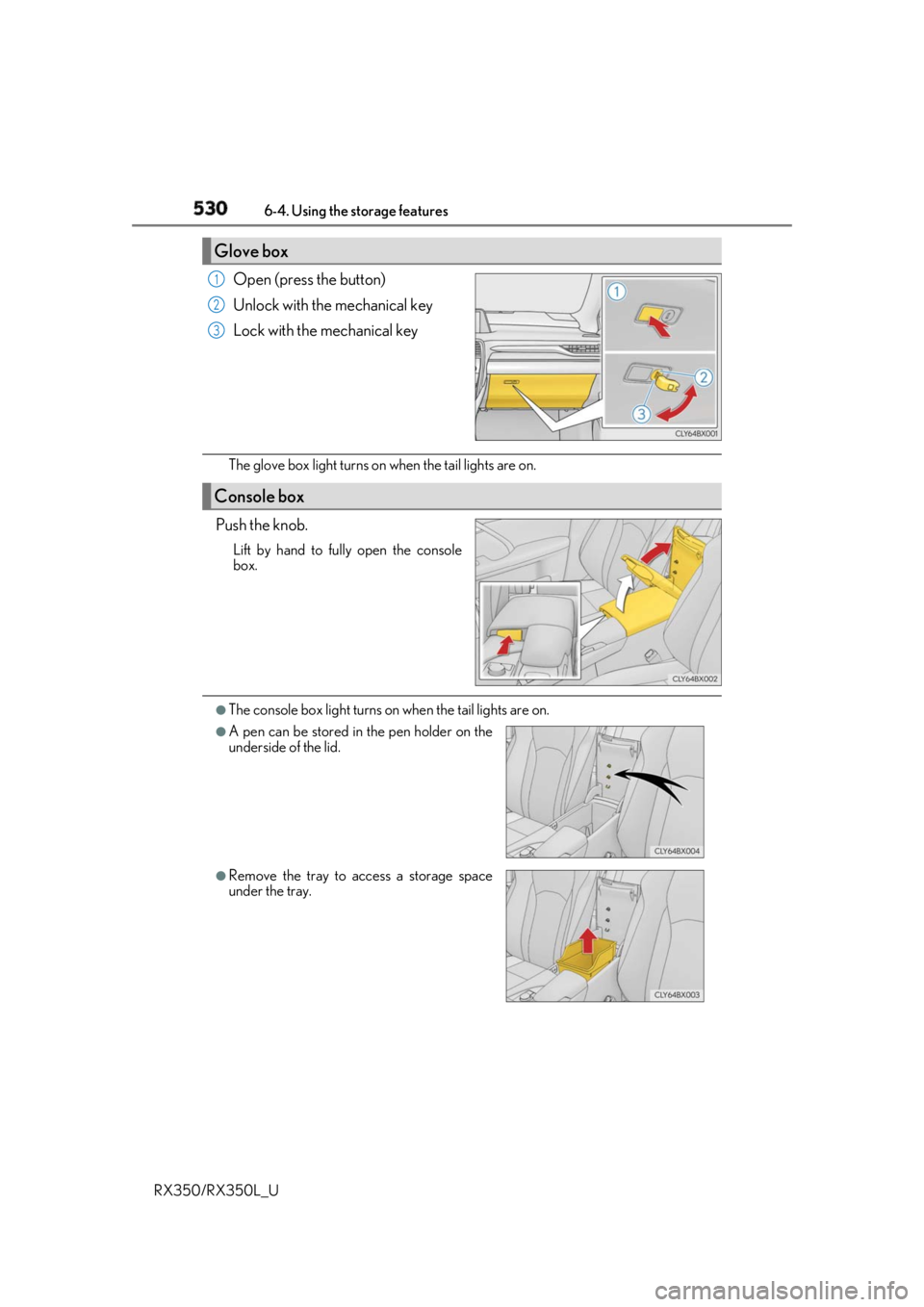
RX350/RX350L_U Open (press the button)
Unlock with the mechanical key
Lock with the mechanical key
The glove box light turns on when the tail lights are on.
Push the knob. Lift by hand to fully open the console
box.
●
The console box light turns on when the tail lights are on.Glove box 1
2
3
Console box ●
A pen can be stored in the pen holder on the
underside of the lid.
●
Remove the tray to access a storage space
under the tray.
Page 538 of 777
5376-4. Using the storage features
6
Interior features
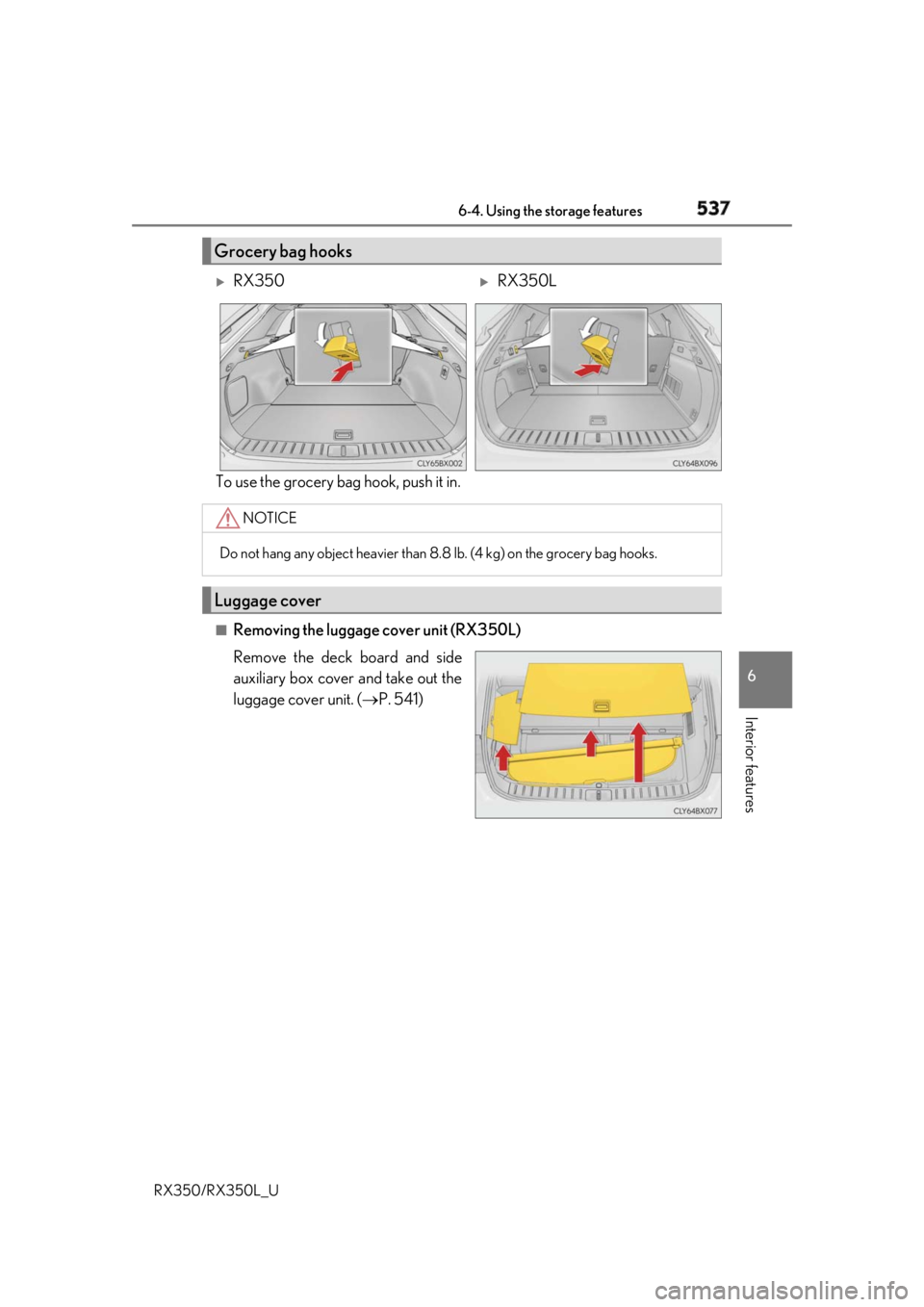
RX350/RX350L_U To use the grocery bag hook, push it in.
■
Removing the luggage cover unit (RX350L)
Remove the deck board and side
auxiliary box cover and take out the
luggage cover unit. ( P. 541)Grocery bag hooks
RX350
RX350L
NOTICE
Do not hang any object heavier than 8. 8 lb. (4 kg) on the grocery bag hooks.
Luggage cover
Page 542 of 777
5416-4. Using the storage features
6
Interior features
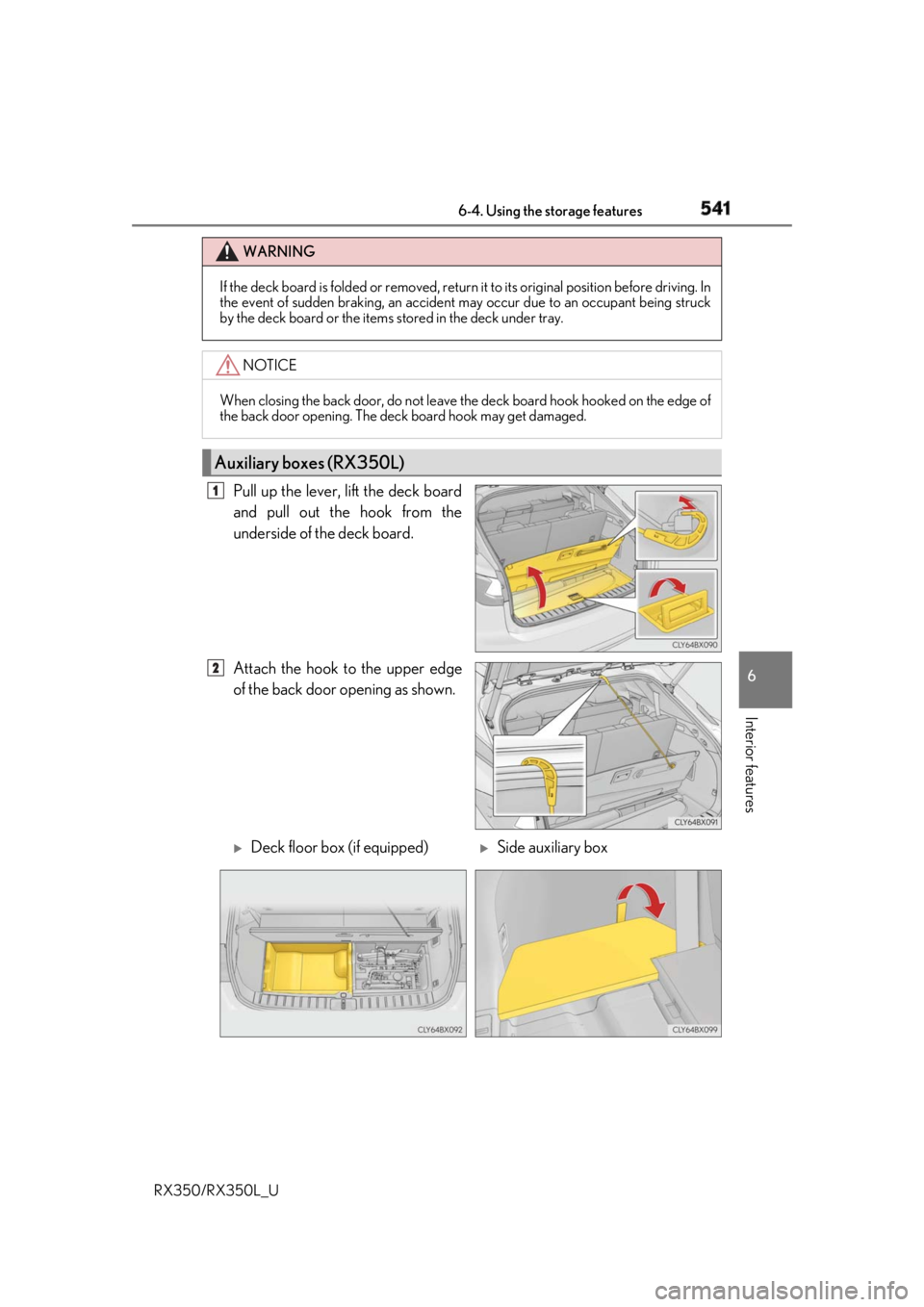
RX350/RX350L_U Pull up the lever, lift the deck board
and pull out the hook from the
underside of the deck board.
Attach the hook to the upper edge
of the back door opening as shown. WARNING
If the deck board is folded or removed, return it to its original position before driving. In
the event of sudden braking, an accident may occur due to an occupant being struck
by the deck board or the items stored in the deck under tray.
NOTICE
When closing the back door, do not leave th e deck board hook hooked on the edge of
the back door opening. The deck board hook may get damaged.
Auxiliary boxes (RX350L) 1
2
Deck floor box (if equipped)
Side auxiliary box
Page 543 of 777
542 6-4. Using the storage features
RX350/RX350L_U WARNING ●
If the deck board is folded or removed, return it to its original position before driving.
In the event of sudden braking, an accident may occur due to an occupant being
struck by the deck board or the items stored in the deck under tray.
NOTICE
When closing the back door, do not leave th e deck board hook hooked on the edge of
the back door opening. The deck board hook may get damaged. ●
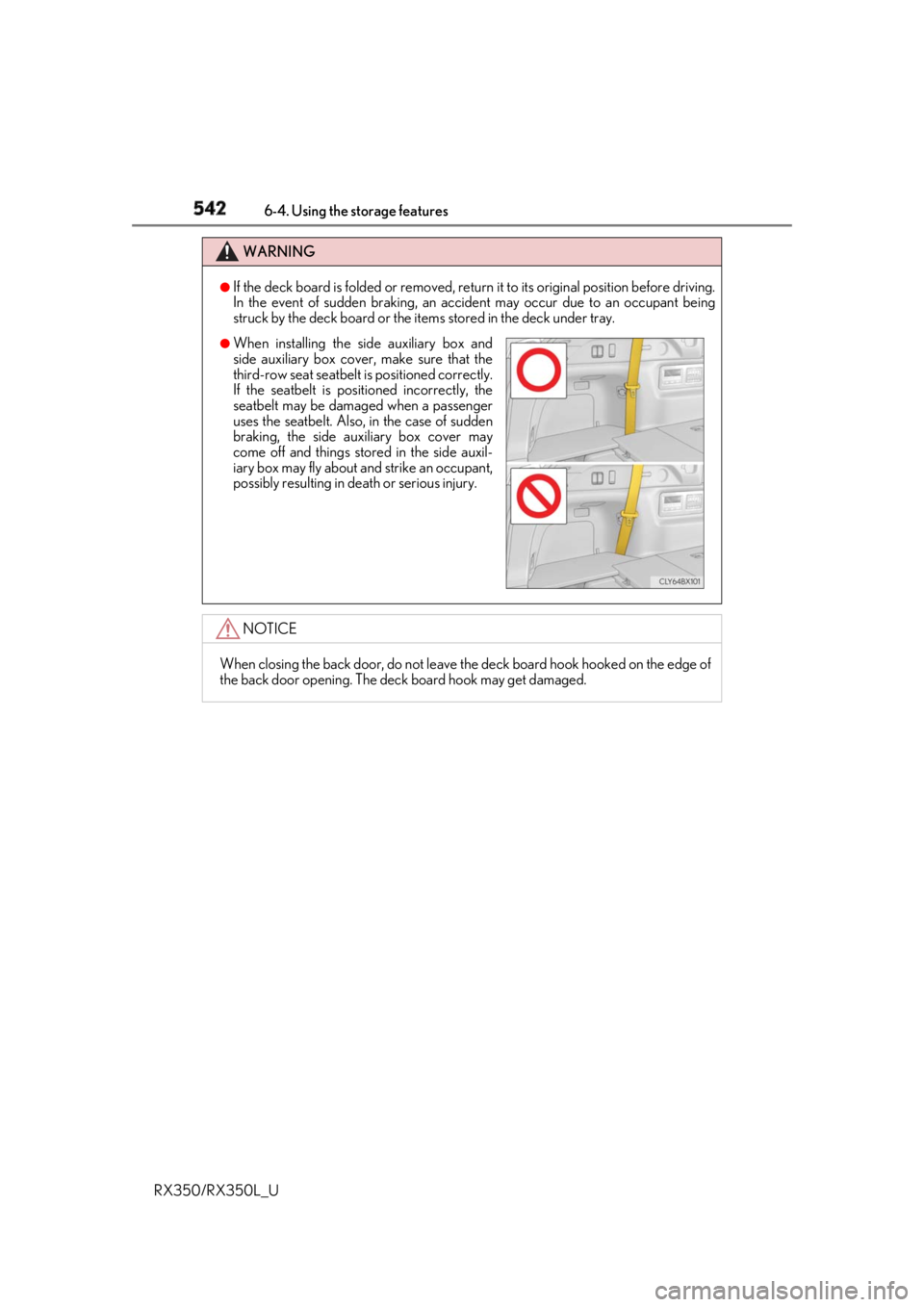
When installing the side auxiliary box and
side auxiliary box cover, make sure that the
third-row seat seatbelt is positioned correctly.
If the seatbelt is posi tioned incorrectly, the
seatbelt may be damaged when a passenger
uses the seatbelt. Also, in the case of sudden
braking, the side auxiliary box cover may
come off and things stor ed in the side auxil-
iary box may fly about and strike an occupant,
possibly resulting in death or serious injury.