Page 109 of 777

108 2. Instrument cluster
RX350/RX350L_U The head-up display is linked to the meters and navigation system (if equipped)
and projects a variety of information in front of the driver, such as the current
vehicle speed and route guid ance to a set destination.
Navigation system-linked display area (if equipped) ( P. 111)Displays the following items, which are linked to the navigation system:
•Street name
• Route guidance to destination
•Compass
Message display area ( P. 110)Displays the following items:
• Warning/Message (if equipped)
• Audio system operation status
• Outside temperature
/ icon ( P. 110)
Driving assist system status display area (if equipped) Displays the operational stat us of the following systems:
• Dynamic radar cruise control with full-speed range ( P. 300)
• LKA (Lane-Keeping Assist) ( P. 291)
• Intuitive parking assist ( P. 326)
• Intelligent Clearance Sonar (ICS) ( P. 336)
Displayed content is the same as that disp layed on the multi-information display. For
details, refer to the explanations of each system.Head-up display
: If equippedSummary of functions
1
2
3
4
Page 110 of 777
1092. Instrument cluster
2
Instrument cluster
RX350/RX350L_U Vehicle speed display area Displays the following items:
• Vehicle speed
• Speed limit (vehicles with a na vigation system) (U.S.A. only)
Eco Driving Indicator/Tachometer ( P. 111)
Shift position display ( P. 236, 240)
HUD (Head-up display) switch ( P. 109)
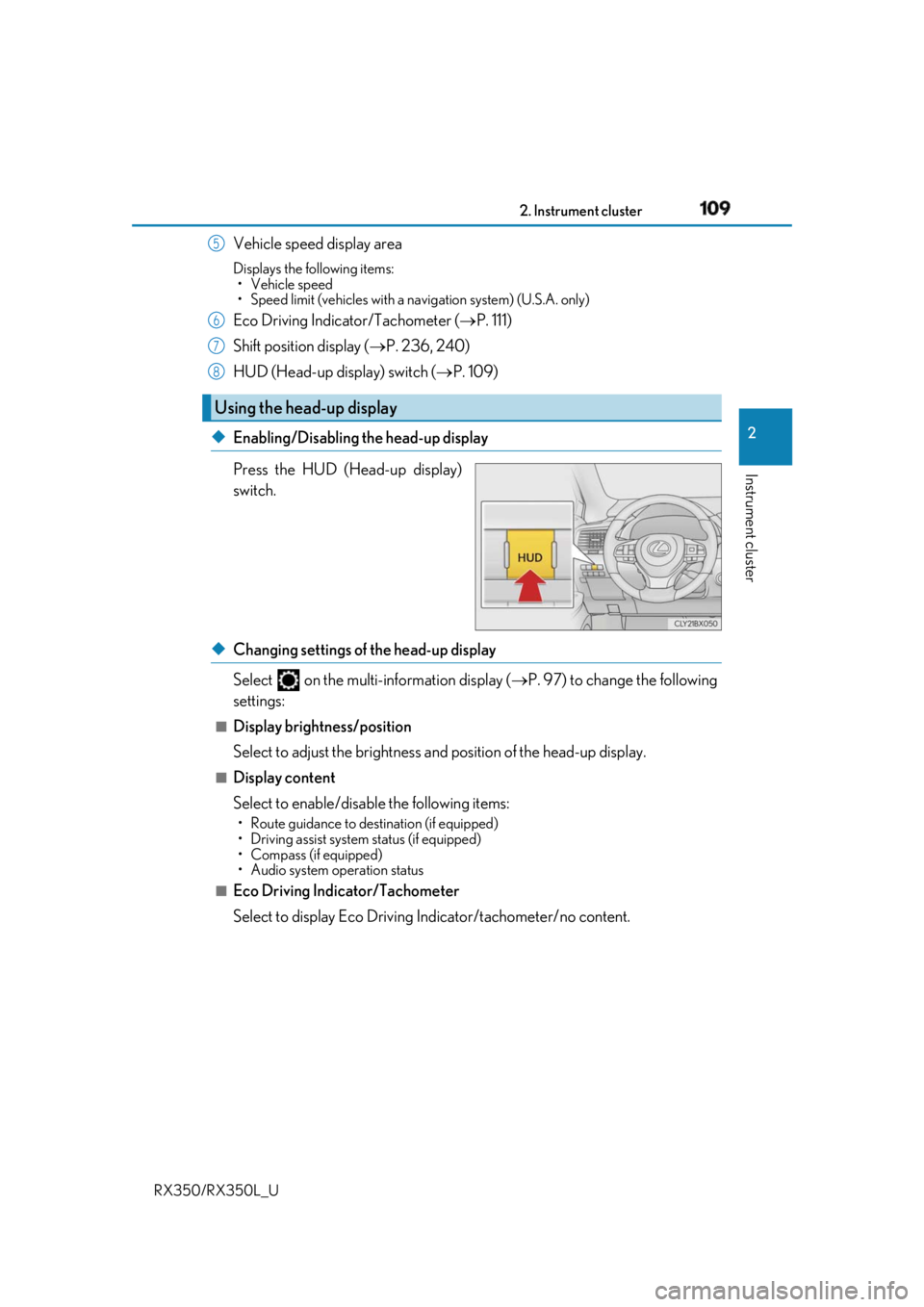
◆ Enabling/Disabling the head-up display
Press the HUD (Head-up display)
switch.
◆ Changing settings of the head-up display
Select on the multi-information display ( P. 97) to change the following
settings: ■
Display brightness/position
Select to adjust the brightness and position of the head-up display. ■
Display content
Select to enable/disable the following items: • Route guidance to destination (if equipped)
• Driving assist system status (if equipped)
• Compass (if equipped)
• Audio system operation status
■
Eco Driving Indicator/Tachometer
Select to display Eco Driving Indicator/tachometer/no content. Using the head-up display 5
6
7
8
Page 111 of 777

110 2. Instrument cluster
RX350/RX350L_U Displays the following multi-in formation display linked icons:
: Master warning icon
Displayed when a warning message is displayed on the multi-information
display. ( P. 661)
: Information icon
Displayed when a suggestion/advice po p-up display is displayed on the
multi-information display. ( P. 105)
Displays the following items in the appropriate situation: ■
Warning/Message (if equipped)
Displays the following system warning/messages: • Pre-collision warning (pre-collision system)
• Alert from the Intelligent Clearance Sonar system
• Notification message (Dynamic radar cruise control with full-speed range)■
Audio system operation status
Displayed when the audio system is operated. ■
Outside temperature
Displayed in the following situations: • When the engine switch is turned to IGNITION ON mode
• When the low outside temperature indicator is flashing
Displayed content is the same as that disp layed on the multi-information display. For
details, refer to the explanation of the outs ide temperature displa y on the multi-infor-
mation display. ( P. 86)/ icons
Message display area
Page 115 of 777
114 2. Instrument cluster
RX350/RX350L_U Audio system screen
“MENU” button
Lexus Display Audio controller
“MENU” button
Remote Touch knob
“ENTER” button
* 1
: Vehicles with a Lexus Display Audio sys-
tem
* 2
: Vehicles with a navigation system
Fuel consumption information Fuel consumption information can be displayed on the audio system.
Vehicles with a navigation system (1 2.3-inch display): Th e fuel consumption
information can be displayed and operated on the side display.
* 1
* 21
2
3
4
5
6
Page 116 of 777

1152. Instrument cluster
2
Instrument cluster
RX350/RX350L_U
Lexus Display Audio screen
Press the “MENU” button on the Lexus Display Audio controller, then select
“Info” on the “Menu” screen, and then select “Fuel Consumption”.If the “Trip Information” screen does not appear, move the controller to the right and
select “Trip Information”.
Fuel consumption in the past 15 min-
utes
Current fuel consumption
Average vehicle speed since the
engine was started.
Elapsed time since the engine was
started.
Cruising range ( P. 117)
Navigation system screen
Press the “MENU” button on the Remote Touch, then select on the “Menu”
screen, and then select “Fuel Consumption”. If the “Past Record” screen is disp layed, select “Trip Information”.
Resetting the consumption data
Fuel consumption in the past 15 min-
utes
Current fuel consumption
Average vehicle speed since the
engine was started.
Elapsed time since the engine was
started.
Cruising range ( P. 117)
Average fuel consumption for the past 15 minutes is divided by color into past
averages and averages attained since the engine switch was last turned to IGNI-
TION ON mode. Use the displayed average fuel consumption as a reference.
The image is an example only.Trip information 1
2
3
4
5
1
2
3
4
5
6
Page 117 of 777

116 2. Instrument cluster
RX350/RX350L_U
Lexus Display Audio screen
Press the “MENU” button on the Lexus Display Audio controller, then select
“Info” on the “Menu” screen, and then select “Fuel Consumption”.If the “Past Record” screen does not appe ar, move the controller to the right and
select “Past Record”.
Previous fuel consumption record
Current fuel consumption
Best recorded fuel consumption
Navigation system screen
Press the “MENU” button on the Remote Touch, then select on the “Menu”
screen, and then select “Fuel Consumption”. If the “Trip Information” screen is displayed, select “Past Record”.
Resetting the past record data
Best recorded fuel consumption
Average fuel consumption
Previous fuel consumption record
Updating the average fuel con-
sumption data
The average fuel consumption history is di vided by color into past averages and
the average fuel consumption since the last updated. Use the displayed average
fuel consumption as a reference.
The image is an example only.Past record 1
2
3
1
2
3
4
5
Page 118 of 777
1172. Instrument cluster
2
Instrument cluster
RX350/RX350L_U ■
Updating the past record data
Vehicles with a Lexus Display Audio system
Update the average fuel consumption by mo ving the controller to the left and select
“Update” to measure the curre nt fuel consumption again.
Vehicles with a navigation system
Update the average fuel cons umption by selecting “Update” to measure the current fuel
consumption again. ■
Resetting the data
Vehicles with a Lexus Display Audio system
The fuel consumption data can be deleted by moving the controller to the left and select
“Clear”.
Vehicles with a navigation system
The fuel consumption data can be deleted by selecting “Clear”. ■
Cruising range
Displays the estimated maximum distance that can be driven with the quantity of fuel
remaining.
This distance is computed based on your average fuel consumption.
As a result, the actual distance that can be driven may differ from that displayed.
Page 135 of 777

134 3-2. Opening, closing and locking the doors
RX350/RX350L_U The power back door settings can be ch anged on the multi-information display.
( P. 97)
The position at which the power back d oor will stop when opened automatically
can be changed.
When setting using the switch
Stop the power back door at the desired position. ( P. 131, 133)
Press and hold the switch on
the lower part of the power back
door for 2 seconds.
• When setting is complete, a
buzzer will sound 4 times.
• The next time the power back
door is opened, it will stop at that
position.
When setting using the multi-information display
The open position can be set usin g the multi-information display. ( P. 90)
When setting on the audio system screen
The open position can be set on the audio system screen. ( P. 725)
Priority for the open position is give n to the last position set using the
switch, multi-information displa y, or audio system screen.
To return the adjusted open posi tion to the default position ( P. 138)Changing the setting of the power back door system
Adjusting the open position of the power back door 1
2