2019 LEXUS NX300H change time
[x] Cancel search: change timePage 170 of 460
1704-2. Driving procedures
LEXUS NX300h Owners Manu-
al_USA_M78287_en
4Release the brake pedal and check
that the display on the instrument
cluster is off.
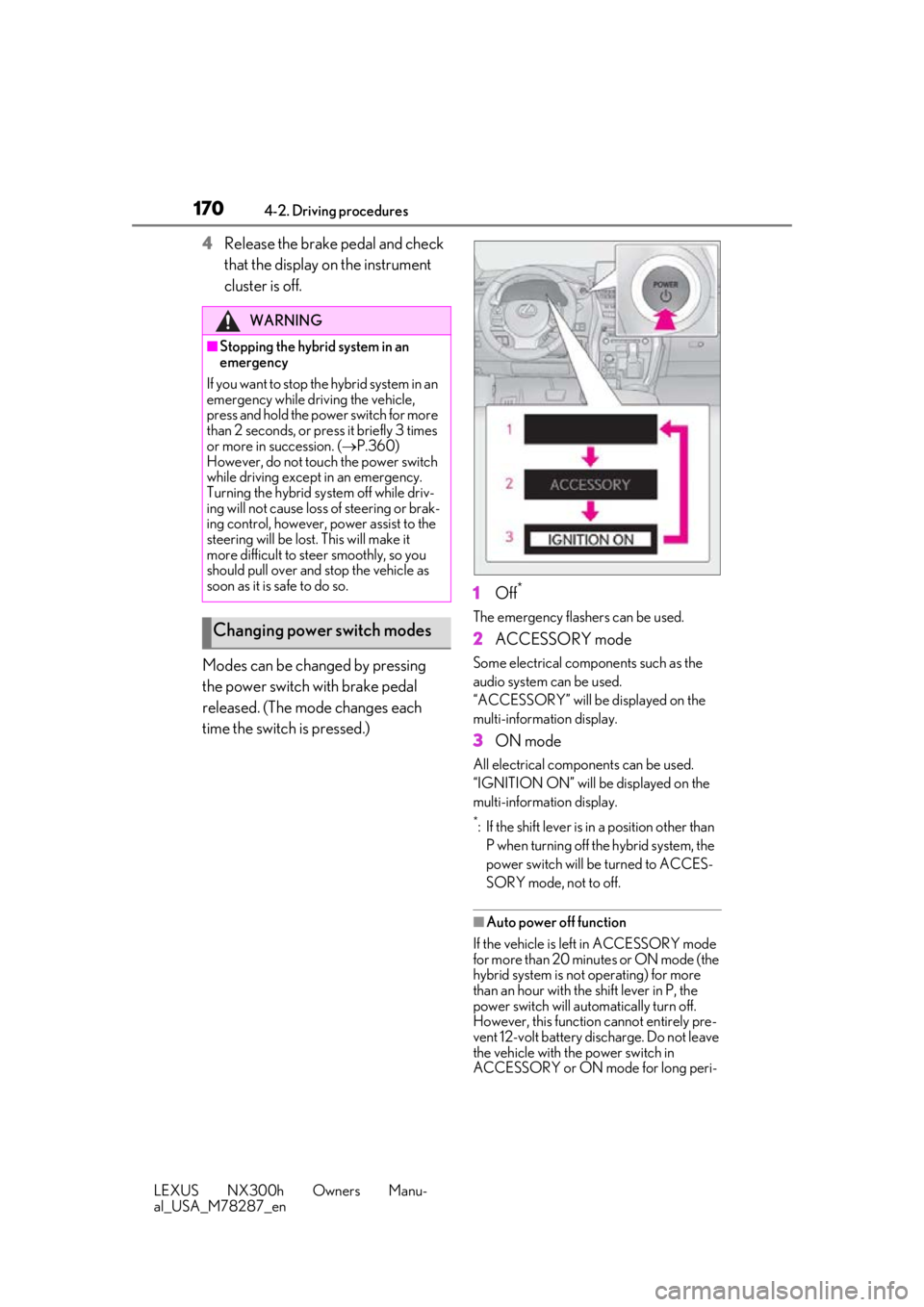
Modes can be changed by pressing
the power switch with brake pedal
released. (The mode changes each
time the switch is pressed.) 1
Off
*
The emergency flashers can be used.
2ACCESSORY mode
Some electrical components such as the
audio system can be used.
“ACCESSORY” will be displayed on the
multi-information display.
3ON mode
All electrical components can be used.
“IGNITION ON” will be displayed on the
multi-information display.
*: If the shift lever is in a position other than
P when turning off the hybrid system, the
power switch will be turned to ACCES-
SORY mode, not to off.
■Auto power off function
If the vehicle is left in ACCESSORY mode
for more than 20 minutes or ON mode (the
hybrid system is not operating) for more
than an hour with the shift lever in P, the
power switch will automatically turn off.
However, this function cannot entirely pre-
vent 12-volt battery discharge. Do not leave
the vehicle with the power switch in
ACCESSORY or ON mode for long peri-
WARNING
■Stopping the hybrid system in an
emergency
If you want to stop the hybrid system in an
emergency while driving the vehicle,
press and hold the power switch for more
than 2 seconds, or press it briefly 3 times
or more in succession. ( P.360)
However, do not touch the power switch
while driving except in an emergency.
Turning the hybrid sy stem off while driv-
ing will not cause loss of steering or brak-
ing control, however, power assist to the
steering will be lost. This will make it
more difficult to st eer smoothly, so you
should pull over and stop the vehicle as
soon as it is safe to do so.
Changing power switch modes
Page 176 of 460

1764-2. Driving procedures
LEXUS NX300h Owners Manu-
al_USA_M78287_en
■Shift ranges and their functions
You can choose from 6 levels of
accelerating force and engine brak-
ing force.
A lower shift range will provide
greater accelerating force and
engine braking force than a higher
shift range, and the engine revolu-
tions will also increase.
■Downshifting restriction warning
buzzer
To help ensure safety and driving perfor-
mance, downshifting operation may some-
times be restricted. In some circumstances,
downshifting may not be possible even
when the shift lever or paddle shift switch is
operated. (A buzzer will sound twice.)
1 Right turn
2 Lane change to the right (move the
lever partway and release it)
The right hand signals will flash 3
times.
3 Lane change to the left (move the
lever partway and release it)
The left hand signals will flash 3
times.
4 Left turn
■Turn signals can be operated when
The power switch is in ON mode.
■If the indicator flashes faster than usual
Check that a light bulb in the front or rear
turn signal lights has not burned out.
■Customization
P.427
Turn signal lever
Operating instructions
Page 204 of 460

2044-5. Using the driving support systems
LEXUS NX300h Owners Manu-
al_USA_M78287_en
■Enabling/disabling the pre-colli-
sion system
The pre-collision system can be
enabled/disabled on the multi-informa-
tion display as following:
The system is automatically enabled each
time the power switch is turned to ON
mode.
1 Press “ ” or “ ” of meter con-
trol switches and select .
2 Press “ ” or “ ” of meter con-
trol switches and select , and
press .
3 Press “ ” or “ ” of meter con-
trol switches and select “PCS”, and
press to select the desired set-
ting (on/off).
If the system is disabled, the PCS warn-
ing light will turn on and a message will
be displayed on the multi-information
display.
■Changing the pre-collision warn-
ing timing
The pre-collision warning timing can
be changed on the multi-information
display as following:
The operation timing setting is retained
when the power switch is turned off.
1 Press “ ” or “ ” of meter con-
trol switches and select .
2 Press “ ” or “ ” of meter con-
trol switches and select , and
press .
3 Press “ ” or “ ” of meter con-
trol switches and select “Sensitiv-
ity”, and press to select the
desired setting.
WARNING
●When a compact spare tire or an
emergency tire puncture repair kit is
used
●If equipment (snow plow, etc.) that may
obstruct the radar sensor or camera
sensor is temporarily installed to the
vehicle
Changing settings of the pre-col-
lision system
Page 208 of 460

2084-5. Using the driving support systems
LEXUS NX300h Owners Manu-
al_USA_M78287_enrounding brightness
changes suddenly,
such as at the entrance or exit of a tunnel
• When a very bright light, such as the sun
or the headlights of oncoming traffic,
shines directly in to the camera sensor
• When the surrounding area is dim, such
as at dawn or dusk, or while at night or in
a tunnel
• After the hybrid system has started the
vehicle has not been driven for a certain
amount of time
• While making a left/right turn and for a
few seconds after makin g a left/right turn
• While driving on a curve and for a few seconds after driving on a curve
• If your vehicle is skidding
• If the front of the vehicle is raised or low- ered
• If the wheels are misaligned
• If a wiper blade is blocking the camera sensor
• The vehicle is wobbling.
• The vehicle is being driven at extremely high speeds.
• When driving on a hill
• If the radar sensor or camera sensor is misaligned
●In some situations such as the following,
sufficient braking force may not be
obtained, preventing the system from
performing properly:
• If the braking functions cannot operate to their full extent, such as when the brake
parts are extremely cold, extremely hot,
or wet
• If the vehicle is not properly maintained (brakes or tires are excessively worn,
improper tire inflation pressure, etc.)
• When the vehicle is being driven on a gravel road or other slippery surface
●Some pedestrians such as the following
may not be detected by the radar sensor
and camera sensor, preventing the sys-
tem from operating properly: • Pedestrians shorter than approximately
3.2 ft. (1 m) or taller than approximately
6.5 ft. (2 m)
• Pedestrians wearing oversized clothing (a rain coat, long skirt, etc.), making their
silhouette obscure
• Pedestrians who are carrying large bag- gage, holding an umbrella, etc., hiding
part of their body
• Pedestrians who are bending forward or squatting
• Pedestrians who are pushing a stroller,
wheelchair, bicycle or other vehicle
• Groups of pedestrians which are close together
• Pedestrians who are wearing white and look extremely bright
• Pedestrians in the dark, such as at night
or while in a tunnel
• Pedestrians whose clothing appears to be nearly the same color or brightness as
their surroundings
• Pedestrians near walls, fences, guardrails, or large objects
• Pedestrians who are on a metal object (manhole cover, steel plate, etc.) on the
road
• Pedestrians who are walking fast
• Pedestrians who are changing speed abruptly
• Pedestrians running out from behind a vehicle or a large object
• Pedestrians who are extremely close to
the side of the vehicle (outside rear view
mirror, etc.)
■If the PCS warning light flashes or illumi-
nates and a warning message is dis-
played on the multi-information display
The pre-collision system may be temporar-
ily unavailable or there may be a malfunc-
tion in the system.
●In the following situations, the warning
light will turn off, the message will disap-
pear and the system will become opera-
tional when normal operating conditions
return:
• When the radar sensor or camera sensor or the area around either sensor is hot,
such as in the sun
• When the radar sensor or camera sensor or the area around either sensor is cold,
such as in an extremely cold environment
• When a front sensor is dirty or covered
Page 216 of 460

2164-5. Using the driving support systems
LEXUS NX300h Owners Manu-
al_USA_M78287_enIf a different warning message is displayed,
follow the instructions
displayed on the
screen.
■Customization
The following settings can be changed. For how to change settings, refer to P.421.
“Lane Departure
Alert Unavailable”
The LDA system is
temporarily can-
celed due to a mal-
function in a sensor
other than the cam-
era sensor.
Turn the LDA
system off and
follow the appro-
priate trouble-
shooting
procedures for
the warning
message. After-
ward, drive the
vehicle for a
short time, and
then turn the
LDA system
back on.
“Lane Departure
Alert Unavailable Below Approx 50km/h”
The LDA system
cannot be used as
the vehicle speed is
less than approxi-
mately 32 mph (50
km/h).
Drive the vehicle
at approxi-
mately 32 mph
(50 km/h) or
more.
FunctionSetting details
Lane departure alert
functionAdjust alert sensitiv- ity
Adjust alert type
Warning messageDetails/Actions
Steering control functionTurn steering wheel
assistance on and off
Vehicle sway warn- ing function
Turn function on and off
Adjust alert sensitiv-ity
FunctionSetting details
Page 219 of 460

2194-5. Using the driving support systems
LEXUS NX300h Owners Manu-
al_USA_M78287_en
4
Driving
This mode employs a radar sensor to detect the presence of vehicles up to approx-
imately 328 ft. (100 m) ahead, determines the current vehicle-to-vehicle following
distance, and operates to maintain a suit able following distance from the vehicle
ahead.
Note that vehicle-to-vehicle distance will close in when traveling on downhill slopes.
Example of constant speed cruising
When there are no vehicles ahead
The vehicle travels at the speed set by the driver. The desired vehicle-to-vehicle distance
can also be set by operating the vehicle-to-vehicle distance switch.
Example of deceleration cruising and follow-up cruising
When a preceding vehicle driving slower than the set speed appears
When a vehicle is detected running ahead of you, the system automatically decelerates
your vehicle. When a greater reduction in vehicle speed is necessary, the system applies
the brakes (the stop lights will come on at this time). The sy stem will respond to changes in
the speed of the vehicle ahead in order to maintain the vehicle-to-vehicle distance set by
the driver. Approach warning warns you when th e system cannot decelerate sufficiently to
prevent your vehicle from closing in on the vehicle ahead.
When the vehicle ahead of you stops, your vehi cle will also stop (vehicle is stopped by sys-
tem control). After the vehicle ahead starts off, pushing the cruise control lever up or
depressing the accelerator pedal will resume follow-up cruising.
Example of acceleration
When there are no longer any preceding vehicles driving slower than the set
speed
The system accelerates until the set speed is re ached. The system then returns to constant
speed cruising.
Driving in vehicle-to-vehicle distance control mode
A
B
C
Page 221 of 460

2214-5. Using the driving support systems
LEXUS NX300h Owners Manu-
al_USA_M78287_en
4
Driving
km/h (0.6 mph)*2 each time the lever is
operated
Large adjustment: Increases or decreases
in 1 mph (1.6 km/h)
*1 or 1 km/h (0.6 mph)*2
increments for as long as the lever is held
For Canada, Guam and Puerto Rico
Fine adjustment: By 1 mph (1.6 km/h)*1 or 1
km/h (0.6 mph)
*2 each time the lever is
operated
Large adjustment: Increases or decreases
in 5 mph (8 km/h)
*2 or 5 km/h (3.1 mph)*1
increments for as long as the lever is held
In the constant speed control mode
( P.223), the set speed will be
increased or decreased as follows:
Fine adjustment: By 1 mph (1.6 km/h)
*1
or 1 km/h (0.6 mph)
*2 each time the
lever is operated
Large adjustment: The speed will con-
tinue to change while the lever is held.
*1: When the set speed is shown in “MPH”
*2: When the set speed is shown in “km/h”
Pressing the switch changes the vehi-
cle-to-vehicle distance as follows: 1
Long
2 Medium
3 Short
The vehicle-to-vehicle distance is set auto-
matically to long mode when the power
switch is turned to ON mode.
If a vehicle is running ahead of you, the pre-
ceding vehicle mark will also be dis-
played.
Select a distance from the table below.
Note that the distances shown corre-
spond to a vehicle speed of 50 mph
(80 km/h). Vehicle-to-vehicle distance
increases/decreases in accordance
with vehicle speed. When the vehicle is
stopped by system control, the vehicle
stops at a certain vehicle-to-vehicle
distance depending on the situation.
Changing the vehicle-to-vehicle
distance (vehicle-to-vehicle dis-
tance control mode)
Vehicle-to-vehicle distance set-
tings (vehicle-to-vehicle dis-
tance control mode)
A
Page 226 of 460

2264-5. Using the driving support systems
LEXUS NX300h Owners Manu-
al_USA_M78287_en
*:If equipped
■Intuitive parking assist (if
equipped)
Ultrasonic sensors are used to detect
static objects in the detection area
when driving at a low speed or backing
up. ( P.227)
■Adjusting the buzzer volume
The buzzer volume can be adjusted on
the multi-information display.
Use the meter control switches to
change settings. ( P.84)
1 Press or to select .
2 Press or to select “PKSA”
and then press .
3 Press or to select and
then press .
Each time the switch is pressed, the volume level change between 1, 2, and 3.
■Muting buzzer
P.228PKSA (Parking Support
Alert)*
The Parking Support Alert system
consists of the following functions
that operate when driving at a low
speed or backing up, such as when
parking. When the system deter-
mines that a collision with a
detected object, such as a wall is
high, a warning operates to urge
the driver to take evasive action.
PKSA (Parking Support Alert)
system
Setting the buzzer volume