2019 LEXUS NX300H change time
[x] Cancel search: change timePage 230 of 460

2304-5. Using the driving support systems
LEXUS NX300h Owners Manu-
al_USA_M78287_en
■Detection range of the sensorsApproximately 3.3 ft. (100 cm)
Approximately 4.9 ft. (150 cm)
Approximately 1.9 ft. (65 cm)
The diagram shows the detection range of
the sensors. Note that the sensors cannot
detect obstacles that are extremely close
to the vehicle.
The range of the sensors may change
depending on the shape of the object etc.
■Distance display
Sensors that detect an obstacle will illu-
minate continuously or blink. (As the
distance to the object becomes less
WARNING
■When using the intuitive parking
assist
Observe the following precautions.
Failing to do so may result in the vehicle
being unable to be driven safely and pos-
sibly cause an accident.
●Do not use the sensor at speeds in
excess of 6 mph (10 km/h).
●The sensors’ detection areas and reac-
tion times are limited. When moving
forward or reversing, check the areas
surrounding the vehicle (especially the
sides of the vehicle) for safety, and
drive slowly, using the brake to control
the vehicle’s speed.
●Do not install accessories within the
sensors’ detection areas.
NOTICE
■When using intuitive parking assist
In the following situations, the system
may not function correctly due to a sen-
sor malfunction, etc. Have the vehicle
checked by your Lexus dealer.
●The intuitive parking assist operation
display flashes, and a buzzer sounds
when no obstacles are detected.
●If the area around a sensor collides
with something, or is subjected to
strong impact.
●If the bumper collides with something.
●If the display shows continuously with-
out beeping, except when the buzzer
mute switch has been turned on.
●If a display error occurs, first check the
sensor.
If the error occurs even if there is no
ice, snow or mud on the sensor, it is
likely that the sensor is malfunctioning.
■Notes when washing the vehicle
Do not apply intensive bursts of water or
steam to the sensor area.
Doing so may result in the sensor mal-
functioning.
Sensor detection display, obsta-
cle distance
A
B
C
Page 240 of 460

2404-5. Using the driving support systems
LEXUS NX300h Owners Manu-
al_USA_M78287_en
■The vehicle is stopped by system
operation
*: If the accelerator pedal is not depressed, “Press Brake Pedal” will be displayed.
■System operation
When the vehicle is stopped by system
operation, the Parking Support Brake func-
tion (for static objects) stops and the PKSB
OFF indicator illuminates.
■System recovery
When the Parking Support Brake function
(for static objects) is stopped by system
operation and you would like to resume
operation, either turn the Parking Support
Brake function (for static objects) ON again
( P.233), or turn the power switch off and
then back on. Furthermore, when the vehi-
cle moves with an obstacle no longer in the
traveling direction of the vehicle, or when
the traveling direction of the vehicle
changes (such as when switching from
moving forward to backing up, and vice
versa), system operation automatically
resumes.
■Clearance sonar buzzer
Regardless of whether the clearance sonar
is on or off, if the Parking Support Brake
function (for static ob jects) is not stopped
( P.233), when the front or rear sensors
detect an obstacle and brake control is per- formed, the clearance sonar buzzer also
sounds and a notification of the approxi-
mate distance to the obstacle is provided.
■In the unlikely event that the Parking
Support Brake function (for static
objects) mistakenly operates at a cross-
ing or elsewhere
Even in the unlikely event that the Parking
Support Brake function (for static objects)
mistakenly operates at a crossing or else-
where, brake control is canceled after
approximately 2 seconds, allowing you to
proceed forward and leave the area. Fur-
thermore, brake control is also canceled
when the brake pedal is depressed.
Depressing the accelerator pedal again
allows you to proceed forward and leave
the area.
Situation
The vehicle is stopped
after brake control oper- ation
Multi-informa-tion display/
Head-up dis- play
“Switch to Brake”*
Navigation/
multimedia sys- tem screen
“Press Brake Pedal”
PKSB OFF IndicatorIlluminated
BuzzerShort beep
Page 245 of 460

2454-5. Using the driving support systems
LEXUS NX300h Owners Manu-
al_USA_M78287_en
4
Driving
The Rear Cross Traffic Alert function operat es when your vehicle is in reverse. It
can detect other vehicles approaching from th e right or left rear of the vehicle. It
uses radar sensors to alert the driver of the other vehicle’s existence through flash-
ing the BSM outside rear view mirror indicators and sounding a buzzer.
Approaching vehicles
Detection areas
■Rear Cross Traffic Alert icon dis-
play (if equipped)
When a vehicle approaching from the
right or left at the rear of the vehicle is
detected, the following will be dis-
played on the navigation/multimedia system screen.
Lexus parking assist monitor
A vehicle is approaching from the left
or right at the rear of the vehicle
WARNING
■Cautions regarding the use of the sys-
tem
The driver is solely responsible for safe
driving. Always driv e safely, taking care
to observe your surroundings.
The Blind Spot Monitor function is a sup-
plementary function which alerts the
driver that a vehicle is present in the blind
spot. Do not overly rely on the Blind Spot
Monitor function. The function cannot
judge if it is safe to change lanes, there-
fore over reliance could cause an acci-
dent resulting in death or serious injury.
According to conditions, the system may
not function correctly. Therefore the
driver’s own visual confirmation of safety
is necessary.
The Rear Cross Traffic Alert function
A
B
Page 262 of 460

2625-1. Remote Touch
LEXUS NX300h Owners Manu-
al_USA_M78287_en
5-1.Remote Touch
■Switches
10.3-inch display model
“MAP” button
Press this button to display the vehicle’s
current position.
8-inch display model
“HOME” button
Press this button to display the home
screen.
“MENU” button
Press this button to display the menu
screen.
Back button
Press this button to display the previous
screen.
Touchpad
Slide your finger on the touchpad and move the pointer to select a function, letter
and screen button.
Press the touchpad to enter the selected
function, letter or screen button. Certain
finger movements on the touchpad can
perform functions, su
ch as changing map
scalings and scrolling list screens.
Sub function button
When is displayed on the screen, a
function screen assigned to the screen can
be displayed.
■Using the touchpad
1 Select: Touch the touchpad to
select the desired button on the
screen.
2 Enter: The buttons on the screen
can be selected by either depress-
ing or double tapping on the touch-
pad. Once a button has been
selected, the screen will change.
■Touch operation
Operations are performed by touching
the touchpad with your finger.
Trace
Trace the pad surface while maintaining
contact with the touchpad. Moving the
cursor and the pointer.
Remote Touch
The Remote Touch can be used to
operate the navigation/multimedia
system display Owners of models
equipped with a navigation system
should refer to the “NAVIGATION
AND MULTIMEDIA SYSTEM
OWNER’S MANUAL”.
Remote Touch operation
A
A
B
C
D
E
Page 267 of 460

2675-2. Using the air conditioning system and defogger
LEXUS NX300h Owners Manu-
al_USA_M78287_en
5
Interior features
A/C switch
DUAL switch
■Adjusting the temperature setting
Operate the temperature control
switch upwards to increase the tem-
perature and downwards to decrease
the temperature.
If “A/C” switch is not pressed, the sys-
tem will blow ambient temperature air
or heated air.
■Adjusting the fan speed setting
Operate the fan speed control switch
upwards to increase the fan speed and
downwards to decrease the fan speed.
Press the off switch to turn the fan off.
■Change the airflow mode
Operate the airflow mode control
switch upwards or downwards.
The mode changes as follows each time
the switch is operated.
Air flows to the upper body.
Air flows to the upper body and
feet.
Air flows to the feet. Air flows to the feet and the wind-
shield defogger operates.
■Switching between outside air and
recirculated air modes
Press the outside/recirculated air
mode switch.
The mode switches between outside air
mode (the indicator is off) and recirculated
air mode (the indicator is on) each time the
button is pressed.
■Defogging the windshield
Defoggers are used to defog the wind-
shield and front side windows.
Press the front windshield defogger
switch.
Set the outside/recirculated air mode
switch to outside air mode if the recircu-
lated air mode is used. (It may switch auto-
matically.)
To defog the windshield and the side win-
dows early, turn the air flow and tempera-
ture up.
To return to the previous mode, press the
front windshield defo gger switch again
when the windshield is defogged.
■Defogging the rear window and
outside rear view mirrors
Defoggers are used to defog the rear
window and to remove raindrops, dew
and frost from the outside rear view
mirrors.
Press the rear windshield and outside
rear view mirror defogger switch.
The defoggers will automatically turn off
after a period of time.
J
K
A
B
C
D
Page 268 of 460

2685-2. Using the air conditioning system and defogger
LEXUS NX300h Owners Manu-
al_USA_M78287_en
■Windshield wiper de-icer (if
equipped)
P.271
■When the outside temperature exceeds
75°F (24°C) and the air conditioning
system is on
●In order to reduce the air conditioning
power consumption, the air conditioning
system may switch to recirculated air
mode automatically.
This may also reduce fuel consumption.
●Recirculated air mode is selected as a
default mode when the power switch is
turned to ON mode.
●It is possible to switch to outside air mode
at any time by pressing the outside/recir-
culated air mode switch.
■Fogging up of the windows
●The windows will easily fog up when the
humidity in the vehicle is high. Pressing
“A/C” button or selecting “A/C” will
dehumidify the air from the outlets and
defog the windshield effectively.
●If you turn “A/C” off, the windows may
fog up more easily.
●The windows may fog up if the recircu-
lated air mode is used.
■Outside/recirculated air mode
●When driving on dusty roads such as tun-
nels or in heavy traffic, set the outside/
recirculated air mode switch to the recir-
culated air mode. This is effective in pre-
venting outside air from entering the
vehicle interior. During cooling opera-
tion, setting the recirculated air mode will
also cool the vehicle interior effectively.
●Outside/recirculated air mode may auto-
matically switch de pending on the tem-
perature setting or the inside
temperature.
■Registering air condit ioning settings to
electronic keys (vehicles with driving
position memory)
●Unlocking the vehicle using an electronic
key and turning the power switch to ON
mode will recall that key’s registered air conditioning settings.
●When the power switch is turned off, the
current air conditioning settings will auto-
matically be registered to the electronic
key that was used to unlock the vehicle.
●The system may not operate correctly if
more than one electr
onic key is in the
vicinity or if the smart access system with
push-button start is used to unlock a pas-
senger door.
●The doors that can recall the air condi-
tioning setting when unlocked using the
smart access system with push-button
start can be changed.
* For details, con-
tact your Lexus dealer.
*: The doors that can recall the driving posi-
tion memory are changed at the same
time.
■Operation of the air conditioning sys-
tem in Eco mode
●In the Eco mode, the air conditioning sys-
tem is controlled as follows to prioritize
fuel efficiency
• Engine speed and compressor operation
controlled to restrict heating/cooling
capacity
• Fan speed restricted when automatic mode is selected
●To improve air conditioning performance,
perform the following operations
• Adjust the fan speed
• Adjust the temperature setting
• Turn off Eco mode
●Even when the driving mode is set to Eco
mode, the air conditioning eco mode can
be turned off by selecting the
■When the outside temperature is low
The dehumidification function may not
operate even when “A/C” is pressed or “A/
C” is selected.
■Ventilation and air conditioning odors
●To let fresh air in, set the air conditioning
system to the outside air mode.
●During use, various odors from inside and
outside the vehicle may enter into and
accumulate in the air conditioning sys-
tem. This may then cause odor to be
Page 269 of 460
2695-2. Using the air conditioning system and defogger
LEXUS NX300h Owners Manu-
al_USA_M78287_en
5
Interior features
emitted from the vents.
●To reduce potential odors from occur-
ring:
• It is recommended that the air condition- ing system be set to outside air mode
prior to turning the vehicle off.
• The start timing of the blower may be delayed for a short period of time imme-
diately after the air conditioning system is
started in automatic mode.
■Air conditioning filter
P.348
■Customization
Settings (e.g. A/C automatic mode switch
operation) can be changed.
(Customizable features: P. 421)
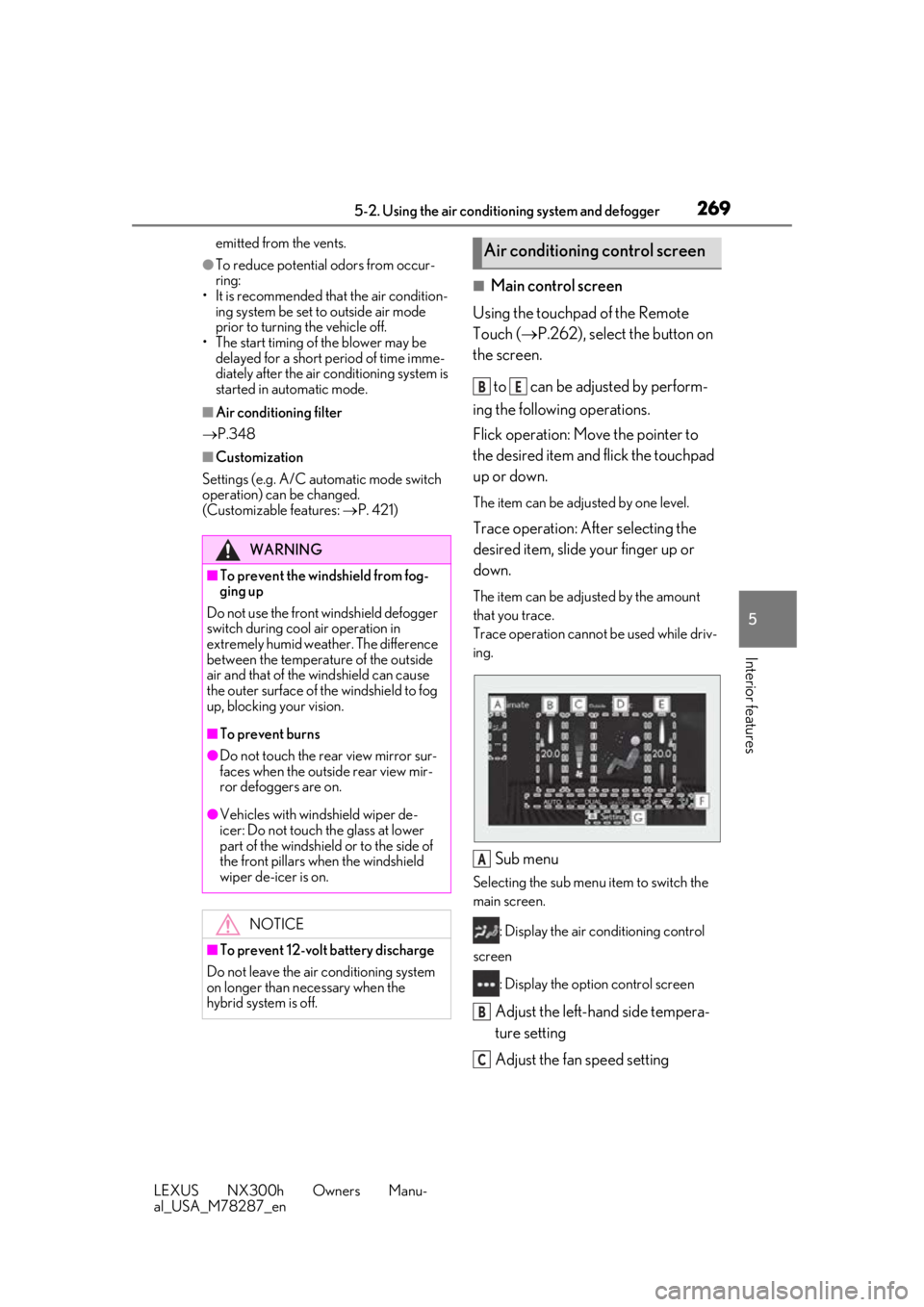
■Main control screen
Using the touchpad of the Remote
Touch ( P.262), select the button on
the screen.
to can be adjusted by perform-
ing the following operations.
Flick operation: Move the pointer to
the desired item and flick the touchpad
up or down.
The item can be adjusted by one level.
Trace operation: After selecting the
desired item, slide your finger up or
down.
The item can be adjusted by the amount
that you trace.
Trace operation cannot be used while driv-
ing.
Sub menu
Selecting the sub menu item to switch the
main screen.
: Display the air conditioning control
screen
: Display the option control screen
Adjust the left-hand side tempera-
ture setting
Adjust the fan speed setting
WARNING
■To prevent the windshield from fog-
ging up
Do not use the front windshield defogger
switch during cool air operation in
extremely humid weather. The difference
between the temperature of the outside
air and that of the windshield can cause
the outer surface of the windshield to fog
up, blocking your vision.
■To prevent burns
●Do not touch the rear view mirror sur-
faces when the outside rear view mir-
ror defoggers are on.
●Vehicles with windshield wiper de-
icer: Do not touch the glass at lower
part of the windshield or to the side of
the front pillars wh en the windshield
wiper de-icer is on.
NOTICE
■To prevent 12-volt battery discharge
Do not leave the air conditioning system
on longer than necessary when the
hybrid system is off.
Air conditioning control screen
BE
A
B
C
Page 274 of 460

2745-2. Using the air conditioning system and defogger
LEXUS NX300h Owners Manu-
al_USA_M78287_en
Turns the heated steering wheel on/off
The indicator light comes on when the
heated steering wheel is operating.
■Operation condition
The power switch is in ON mode.
■Timer function
The heated steering wheel will automati-
cally turn off after about 30 minutes.
■Front
Vehicles without seat ventilators
Each time the switch is pressed, the
operation condition changes as fol-
lows.
Hi (3 segments lit) Mid (2 segments
lit) Lo (1 segment lit) Off
The level indicator (amber) light up
during operation.
Vehicles with seat ventilators
Each time the switch is pressed, the
operation condition changes as fol-
lows.
Hi (3 segments lit) Mid (2 segments
lit) Lo (1 segment lit) Off
The indicator (amber) and level indicator
(green) light up during operation.
■Rear
Each time the switch is pressed, the
operation condition changes as fol-
lows.
Hi (3 segments lit) Mid (2 segments
lit) Lo (1 segment lit) Off
The level indicator (amber) lights up
during operation.
Heated steering wheel
Seat heaters
A
A
A