2019 LEXUS LS500 lights
[x] Cancel search: lightsPage 280 of 512

280 4-5. Using the driving support systems
LS500_OM_(U)_1810 nel or on an iron bridge
• When parallel parking
• When there is a rut or hole in the surface
of the road
• When driving on a metal cover (grating),
such as those used for drainage ditches
• When driving on a steep slope
• If a sensor is hit by a large amount of
water, such as when driving on a flooded
road●
Weather
• If a sensor is covered with ice, snow, dirt,
etc. (when cleared, the system will return
to normal)
• If heavy rain or water strikes a sensor
• When driving in incl ement weather such
as fog, snow or a sandstorm
• When strong winds are blowing ●
Other ultrasonic wave sources
• When vehicle horns, vehicle detectors,
motorcycle engines, air brakes of large
vehicles, the clearance sonar of other
vehicles or other devices which produce
ultrasonic waves are near the vehicle
• If a sticker or an el ectronic component,
such as a backlit license plate (especially
fluorescent type), fog lights, fender pole
or wireless antenna is installed near a
sensor●
Changes in the vehicle posture
• If the vehicle is significantly tilted
• If the front of the vehicle is raised or low-
ered due to the carried load
• If the orientation of a sensor has been
changed due to a collision or other
impact■
Situations in which the Parking Support
Brake function (stati c objects) may not
operate properly
In some situations, such as the following, this
function may not operate properly.
●
Weather
• When a sensor or the area around a sen-
sor is extremely hot or cold • When strong winds are blowing
• If a sensor is covered with ice, snow, dirt,
etc. (when cleared, the system will return
to normal)
• If heavy rain or water strikes a sensor
• When driving in incl ement weather such
as fog, snow or a sandstorm
• When the sensor is frozen (Once the
sensor thaws, the system will return to
normal) ●
Vehicle surroundings
• When an object that cannot be detected
is between the vehicle and a detected
object
• If an object such as a vehicle, motorcycle,
bicycle or pedestrian cuts in front of the
vehicle or runs out from the side of the
vehicle
• The vehicle is approaching a tall or
curved curb.
• On an extremely bumpy road, on an
incline, on gravel, or on grass.
• If objects draw too close to the sensor.
●
Other ultrasonic waves sources
• When vehicle horns, vehicle detectors,
motorcycle engines, air brakes of large
vehicles, the clearance sonar of other
vehicles or other de vices which produce
ultrasonic waves are near the vehicle
• If a sticker or an electronic component,
Page 281 of 512

2814-5. Using the driving support systems
LS500_OM_(U)_1810 4
Driving such as a backlit license plate (especially
fluorescent type), fog lights, fender pole
or wireless antenna is installed near a
sensor●
Changes in the vehicle posture
• If the vehicle is significantly tilted
• If the front of the vehicle is raised or low-
ered due to the carried load
• If the orientation of a sensor has been
changed due to a collision or other
impact
• When equipment that may obstruct a
sensor is installed, such as a bumper pro-
tector (an additional trim strip, etc.), bicy-
cle carrier, or snow plow
• If the suspension has been modified or
tires of a size other than specified are
installed
• If a sensor has been painted or covered
with a sticker, etc.
Page 285 of 512

2854-5. Using the driving support systems
LS500_OM_(U)_1810 4
Driving ●
When equipment that may obstruct a
sensor is installed, such as a towing eye-
let, bumper protector (an additional trim
strip, etc.), bicycle carrier, or snow plow●
If the suspension has been modified or
tires of a size other than specified are
installed●
If the front of the vehicle is raised or low-
ered due to the carried load●
If an electronic component, such as a
backlit license plate (especially fluores-
cent type), fog lights, fender pole or wire-
less antenna is installed near a radar
sensor●
If the orientation of a radar sensor has
been changed●
When multiple vehicles are approaching
with only a small gap between each vehi-
cle●
If a vehicle is approaching the rear of
your vehicle rapidly ●
Situations in which the radar sensor may
not detect a vehicle
• When a vehicle approaches from the
right or left at the rear of the vehicle while
you are turning while backing up
• When turning while backing up
• When backing out of a shallow angle
parking spot • When backing up on a slope with a sharp
change in grade
• When a vehicle turns into the detection
area
Page 288 of 512

288 4-5. Using the driving support systems
LS500_OM_(U)_1810 • People riding a bicycle, skateboard, or
other light vehicle
• Pedestrians wearing oversized clothing
such as a rain coat, long skirt, etc., making
their silhouette obscure
• Pedestrians whose body is partially hid-
den by an object, such as a cart or
umbrella
• Pedestrians which are obscured by dark-
ness, such as at night●
In some situations, such as the following,
pedestrians may not be detected by the
Parking Support Brake function (rear
pedestrians), preventing the function
from operating properly:
• When backing up in inclement weather
(rain, snow, fog, etc.)
• When the rear camera is obscured (dirt,
snow, ice, etc. are attached) or scratched
• When a very bright light, such as the sun,
or the headlights of another vehicle,
shines directly into the rear camera
• When backing up in a place where the
surrounding brightness changes sud-
denly, such as at the entrance or exit of a
garage or underground parking lot
• When backing up in a dim environment
such as during dusk or in an underground
parking lot●
Even though there are no pedestrians in
the detection area, some objects, such as
the following, may be detected, possibly
causing the Parking Support Brake func-
tion (rear pedestri ans) to operate.
• Three dimensional objects, such as a
pole, traffic cone, fence, or parked vehi-
cle
• Moving objects, such as a car or motor-
cycle
• Objects moving toward your vehicle
when backing up, such as flags or pud-
dles (or airborne matter, such as smoke,
steam, rain, or snow)
• Cobblestone or gravel roads, tram rails,
road repairs, white lines, pedestrian
crossings or fallen leaves on the road
• Metal covers (gratings), such as those
used for drainage ditches
• Objects reflected in a puddle or on a wet
road surface
• The roadside or bumps on the road
•Shadows on the road
●
In some situations, such as the following, the Parking Support Brake function (rear
pedestrians) may operate even though
there are no pedestrians in the detection
area.
• When backing up toward the roadside or
a bump on the road
• If the vehicle is signif icantly tilted, such as
when carrying a heavy load
• When backing up toward an
incline/decline
• If the suspension has been modified or
tires of a size othe r than specified are
installed
• If the rear of the vehicle is raised or low-
ered due to the carried load
• If an electronic component, such as a
backlit license plate or rear fog light, is
installed near the rear camera
• If a bumper protector, such as an addi-
tional trim strip, is installed to the rear
bumper
• If the orientation of the rear camera has
been changed
• If a towing eyelet is in stalled to the rear of
the vehicle
• When water is flowing over the rear cam-
era lens
• When the rear camera is obscured (dirt,
snow, ice, etc. are at tached) or scratched
• If there is a flashing light in the detection
area, such as the emergency flashers of
another vehicle
Page 294 of 512

294 4-5. Using the driving support systems
LS500_OM_(U)_1810 ■
When “Check Air Suspension System”
is displayed on th e multi-information
display
The system may not operate properly. Have
the vehicle inspected by your Lexus dealer. ■
Customization
Some functions can be customized.
( P.466)
■
ECB (Electronically Controlled
Brake System) (vehicles with Lexus
Safety System + A)
The electronically controlled system
generates braking force correspond-
ing to the brake operation ■
ABS (Anti-lock Brake System)
Helps to prevent wheel lock when the
brakes are applied suddenly, or if the
brakes are applied while driving on a
slippery road surface ■
Brake assist
Generates an increased level of brak-
ing force after the brake pedal is
depressed when the system detects a
panic stop situation ■
VSC (Vehicle Stability Control)
Helps the driver to control skidding
when swerving sudden ly or turning on
slippery road surfaces. ■
Secondary Collision Brake
When the airbag sensor detects a colli-
sion, the brakes and stop lights are Driving assist systems To keep driving safety and perfor-
mance, the following systems oper-
ate automatically in response to
various driving situations. Be aware,
however, that these systems are
supplementary and should not be
relied upon too heavily when oper-
ating the vehicle.
Summary of the driving assist
systems
Page 301 of 512
3014-6. Driving tips
LS500_OM_(U)_1810 4
Driving Perform the following according to the
driving conditions:
Do not try to forcib ly open a window
or move a wiper that is frozen. Pour
warm water over the frozen area to
melt the ice. Wipe away the water
immediately to prevent it from
freezing.
To ensure proper operation of the
climate control system fan, remove
any snow that has accumulated on
the air inlet vents in front of the
windshield.
Check for and remove any excess
ice or snow that may have accumu-
lated on the exterior lights, vehicle’s
roof, chassis, around the tires or on
the brakes.
Remove any snow or mud from the
bottom of your shoes before getting
in the vehicle.
Accelerate the vehicle slowly, keep a
safe distance between you and the
vehicle ahead, and drive at a reduced
speed suitable to road conditions. Park the vehicle and shift the shift posi-
tion to P without setting the parking
brake. The parking brake may freeze
up, preventing it from being released. If
the vehicle is parked without setting
the parking brake, make sure to block
the wheels.
Failure to do so may be dangerous
because it may cause the vehicle to
move unexpectedly, possibly leading to
an accident.
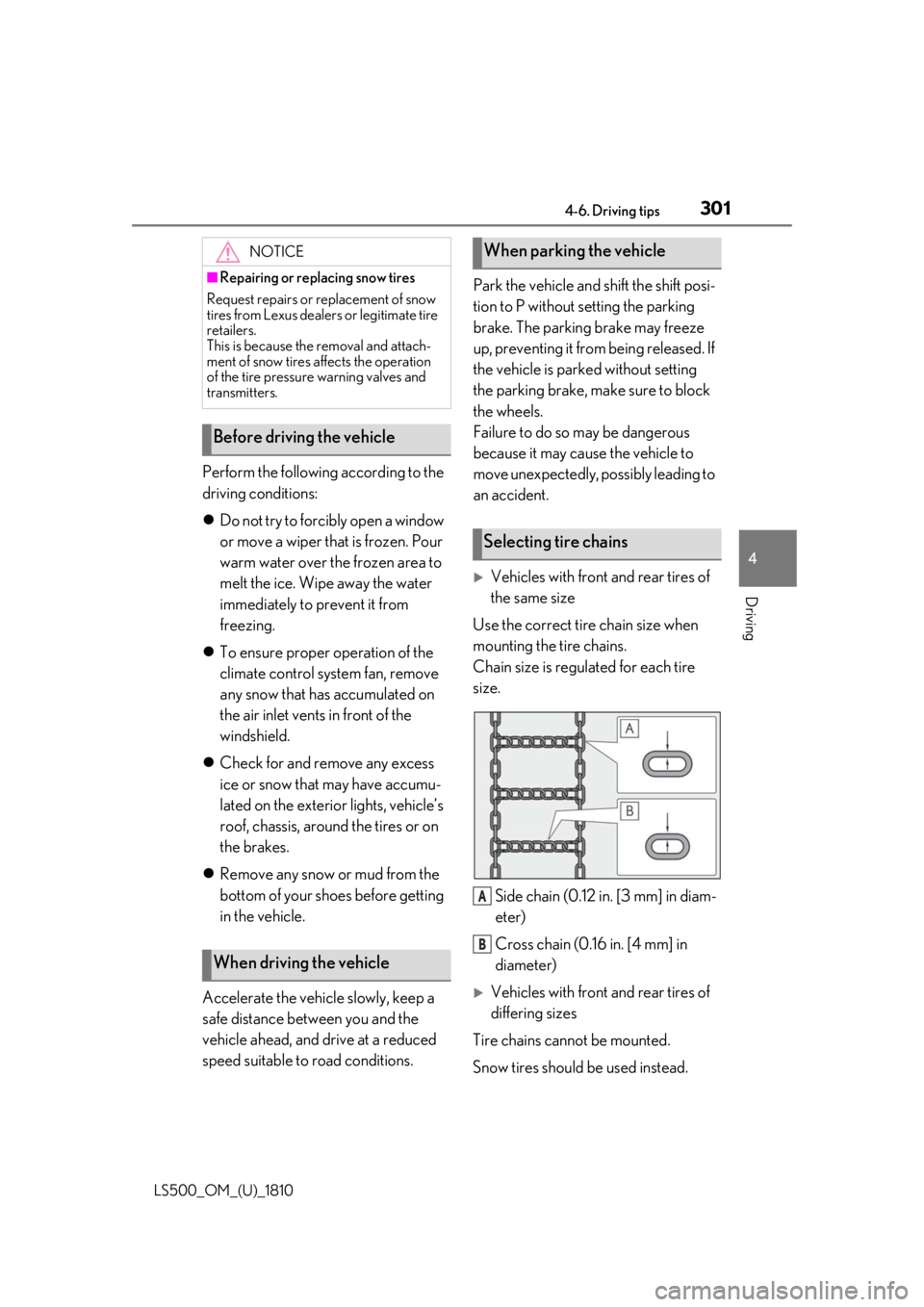
Vehicles with front and rear tires of
the same size
Use the correct tire chain size when
mounting the tire chains.
Chain size is regulated for each tire
size.
Side chain (0.12 in. [3 mm] in diam-
eter)
Cross chain (0.16 in. [4 mm] in
diameter)
Vehicles with front and rear tires of
differing sizes
Tire chains cannot be mounted.
Snow tires should be used instead.NOTICE■
Repairing or replacing snow tires
Request repairs or replacement of snow
tires from Lexus dealers or legitimate tire
retailers.
This is because the removal and attach-
ment of snow tires affects the operation
of the tire pressure warning valves and
transmitters.
Before driving the vehicle
When driving the vehicle When parking the vehicle
Selecting tire chains
A
B
Page 303 of 512

303
LS500_OM_(U)_1810 5 5
Interior features Interior features .
5-1. Remote Touch/Display
Remote Touch ............................ 304
Center Display ........................... 306
Rear Multi Operation Panel
........................................................ 308
5-2. Lexus Climate Concierge
Lexus Climate Concierge ....... 311
5-3. Using the air conditioning system
and defogger
Front automatic air conditioning
system .......................................... 313
Rear automatic air conditioning
system ......................................... 323
Heated steering wheel/seat heat-
ers/seat ventilators ................ 326
5-4. Using the interior lights
Interior lights list.......................... 331
5-5. Using the storage features
List of storage features............ 335
Trunk features............................. 340
5-6. Using the other interior features
Other interior features ........... 343
Garage door opener............... 350
Page 331 of 512
3315-4. Using the interior lights
LS500_OM_(U)_1810 5
Interior features 5-4.Using the interior lights
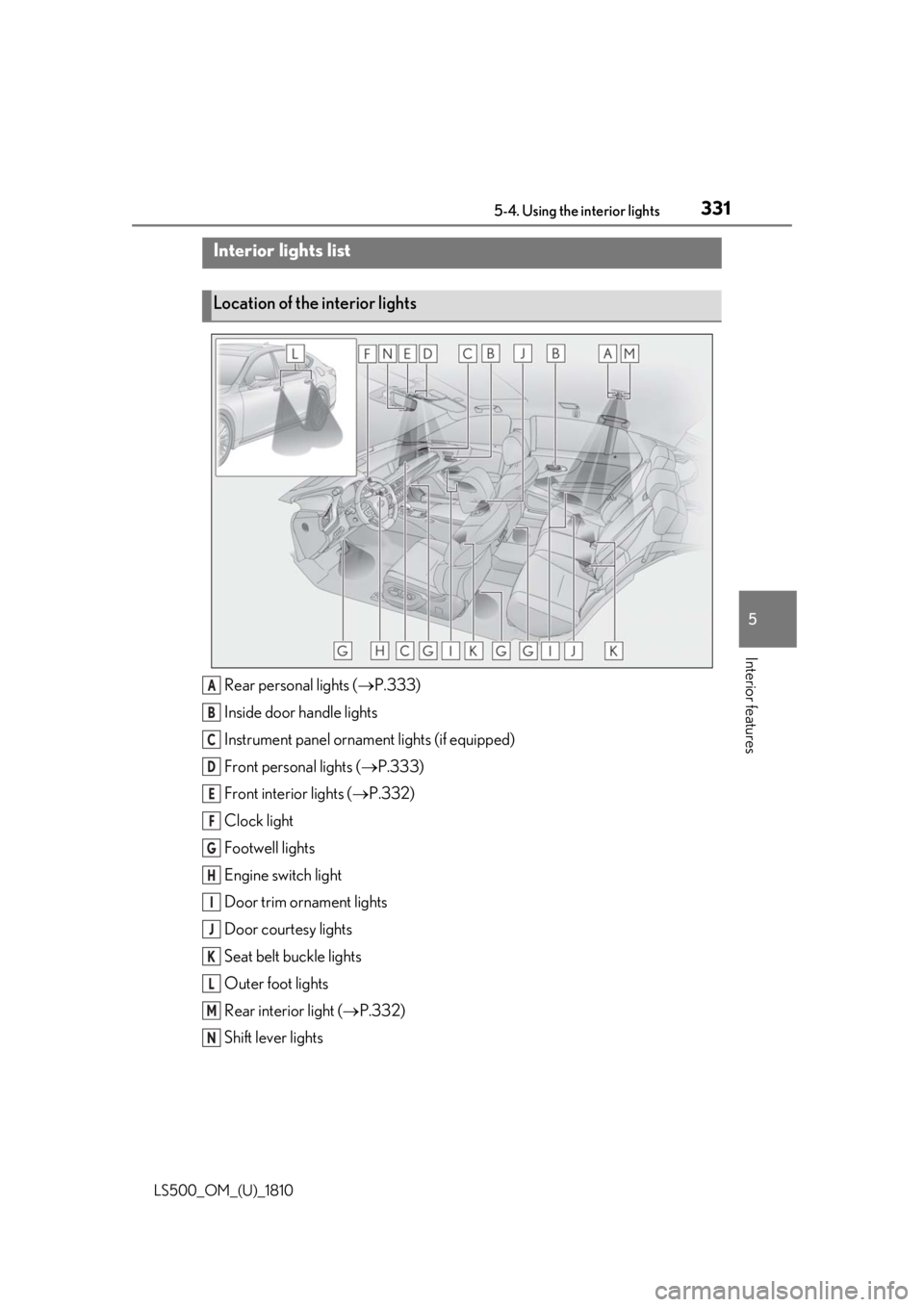
Rear personal lights ( P.333)
Inside door handle lights
Instrument panel orname nt lights (if equipped)
Front personal lights ( P.333)
Front interi or lights ( P.332)
Clock light
Footwell lights
Engine switch light
Door trim ornament lights
Door courtesy lights
Seat belt buckle lights
Outer foot lights
Rear interior light ( P.332)
Shift lever lightsInterior lights list
Location of the interior lights
A
B
C
D
E
F
G
H
I
J
K
L
M
N