2019 LEXUS LS500 lights
[x] Cancel search: lightsPage 75 of 512

752-1. Instrument cluster
LS500_OM_(U)_1810 2
Vehicle status information and indicators ■
Pop-up display
Distance until the next engine oil
change will displayed when a warning
message indicating that oil mainte-
nance should be performed soon or is
required is displayed.
The brightness of the instrument panel
lights can be adjusted.
1 Darker
2 Brighter ■
Brightness of the meters (day mode and
night mode)
The brightness of th e meters changes
between day mode and night mode. ●
Day mode: When the tail lights are off or
when the tail lights are on but the sur-
rounding area is bright
●
Night mode: When the tail lights are on
and the surrounding area is darkChanging the instrument panel
light brightness
Page 79 of 512

792-1. Instrument cluster
LS500_OM_(U)_1810 2
Vehicle status information and indicators
■
Display items
Odometer Displays the total distance the vehicle has
been driven.
Trip meter A/trip meter B Displays the distance the vehicle has been
driven since the meter was last reset. Trip
meters A and B can be used to record and
display different distances independently.
Distance until next engine oil
change Displays the distance the vehicle can be
driven until an oil change is necessary.
■
Changing the display
Each time the “ODO TRIP” switch is
pressed, the displayed item will be changed. When the trip meter is dis-
played, pressing and holding the switch
will reset the trip meter.
■
Pop-up display
The distance until the next engine oil
change will displayed when a warning
message indicating that oil mainte-
nance should be performed soon or is
required is displayed.
The brightness of the instrument panel
lights can be adjusted.
1 Darker
2 Brighter ■
Brightness of the meters (day mode and
night mode)
The brightness of the meters changes
between day mode and night mode.
●
Day mode: When the tail lights are off or WARNING
For example, there is a lag between the
driver’s shifting and the new gear number
appearing on the display. This lag could
cause the driver to downshift again,
causing rapid and excessive engine brak-
ing and possibly an accident resulting in
death or injury.
NOTICE■
To prevent damage to the engine and
its components●
Do not let the indicator needle of the
tachometer enter the red zone, which
indicates the maximum engine speed.●
The engine may be overheating if the
engine coolant temperature gauge is
in the red zone (H). In this case, imme-
diately stop the vehicle in a safe place,
and check the engine after it has
cooled completely. ( P.440)
Odometer and trip meter dis-
play Changing the instrument panel
light brightness
Page 80 of 512

80 2-1. Instrument cluster
LS500_OM_(U)_1810 when the tail lights are on but the sur-
rounding area is bright●
Night mode: When the tail lights are on
and the surrounding area is dark
The display can be switched between
the center and side positions. ■
Display (except F SPORT models)
By selecting menu icons on the
multi-information display, a variety of
driving-related information can be dis-
played. The multi-information display
can also be used to change display set-
tings and other vehicle settings.
Warning or suggestion/advice pop-up
displays are also displayed in certain
situations.
■
Display (F SPORT models)
Main meter in center position
The multi-informatio n display presents
the driver with a variety of driv-
ing-related information.
Warning or suggestion/advice pop-up
displays are also displayed in certain
situations.Changing the main meter loca-
tion Multi-information display
Display and menu icons
Page 86 of 512

86 2-1. Instrument cluster
LS500_OM_(U)_1810 Displays suggestions to the driver in
the following situations. To select a
response to a displayed suggestion,
use the meter control switches. ■
Suggestion to turn off the head-
lights
If the headlights are left on for a certain
amount of time with the headlight
switch in after the engine switch
has been turned off, a suggestion mes-
sage will be displayed asking if you
wish to turn the headlights off.
To turn the headlights off, select “Yes”. If a front door is op ened after the engine
switch is turned off, this suggestion mes-
sage will not be displayed.
■
Customization
Some functions can be customized.
( P.466) WARNING■
Cautions during setting up the dis-
play
As the engine needs to be running
during setting up the display, ensure that
the vehicle is parked in a place with ade-
quate ventilation. In a closed area such as
a garage, exhaust gases including harm-
ful carbon monoxide (CO) may collect
and enter the vehicle. This may lead to
death or a serious health hazard.
NOTICE■
During setting up the display
To prevent battery discharge, ensure that
the engine is running while setting up the
display features.
Suggestion function
Page 98 of 512
98 3-1. Key information
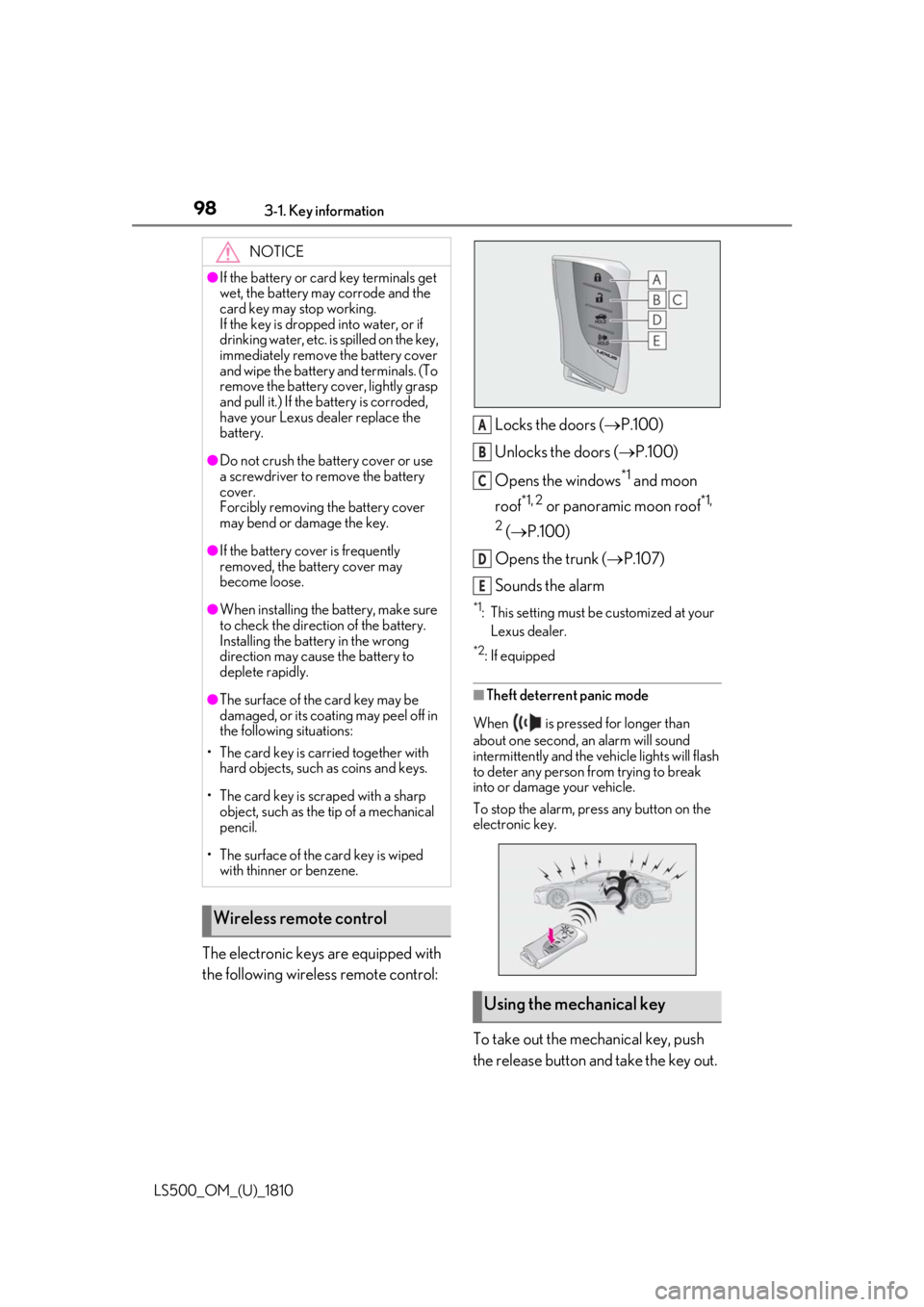
LS500_OM_(U)_1810 The electronic keys are equipped with
the following wireless remote control: Locks the doors ( P.100)
Unlocks the doors ( P.100)
Opens the windows *1
and moon
roof *1, 2
or panoramic moon roof *1,
2
( P.100)
Opens the trunk ( P.107)
Sounds the alarm *1
: This setting must be customized at your
Lexus dealer. *2
: If equipped
■
Theft deterrent panic mode
When is pressed for longer than
about one second, an alarm will sound
intermittently and the vehicle lights will flash
to deter any person from trying to break
into or damage your vehicle.
To stop the alarm, press any button on the
electronic key.
To take out the mechanical key, push
the release button and take the key out.NOTICE●
If the battery or card key terminals get
wet, the battery may corrode and the
card key may stop working.
If the key is dropped into water, or if
drinking water, etc. is spilled on the key,
immediately remove the battery cover
and wipe the battery and terminals. (To
remove the battery co ver, lightly grasp
and pull it.) If the battery is corroded,
have your Lexus dealer replace the
battery.●
Do not crush the battery cover or use
a screwdriver to remove the battery
cover.
Forcibly removing the battery cover
may bend or damage the key.●
If the battery cover is frequently
removed, the battery cover may
become loose.●
When installing the ba ttery, make sure
to check the direction of the battery.
Installing the battery in the wrong
direction may cause the battery to
deplete rapidly.●
The surface of the card key may be
damaged, or its coating may peel off in
the following situations:
• The card key is carried together with
hard objects, such as coins and keys.
• The card key is scraped with a sharp
object, such as the tip of a mechanical
pencil.
• The surface of the card key is wiped
with thinner or benzene.
Wireless remote control
Using the mechanical key A
B
C
D
E
Page 139 of 512

1393-4. Adjusting the steering wheel and mirrors
LS500_OM_(U)_1810 3
Before driving The height of the rear view mirror can
be adjusted to suit your driving pos-
ture.
Adjust the height of the rear view mir-
ror by moving it up and down.
Responding to the level of brightness
of the headlights of vehicles behind, the
reflected light is automatically
reduced.
Turn the automatic anti-glare function
mode on/off When the automatic anti-glare function is
in ON mode, the indicator illuminates.
The function will set to ON mode each
time the engine switch is turned to IGNI-
TION ON mode.
Pressing the button turns the function to
OFF mode. (The indicator also turns
off.)
■
To prevent sensor error
To ensure that the sensors operate properly,
do not touch or cover them.Inside rear view mirror The rear view mirror’s position can
be adjusted to enable sufficient
confirmation of the rear view.
Adjusting the height of rear view
mirror
WARNING■
Caution while driving
Do not adjust the position of the mirror
while driving.
Doing so may lead to mishandling of the
vehicle and cause an accident, resulting
in death or serious injury.
Anti-glare function A
A
Page 153 of 512

153
LS500_OM_(U)_1810 4 4
Driving Driving .
4-1. Before driving
Driving the vehicle ..................... 154
Cargo and luggage ................... 160
Vehicle load limits ...................... 162
Trailer towing ............................... 163
Dinghy towing ............................. 163
4-2. Driving procedures
Engine (ignition) switch ........... 164
Automatic transmission........... 167
Turn signal lever.......................... 173
Parking brake .............................. 174
Brake Hold.................................... 177
4-3. Operating the lights and wipers
Headlight switch ......................... 179
AHB (Automatic High Beam)
......................................................... 182
Windshield wipers and washer
......................................................... 184
4-4. Refueling
Opening the fuel tank cap...... 189
4-5. Using the driving support sys-
tems
Lexus Safety System + A.......... 191
Lexus Safety System + 2.0 ..... 198
PCS (Pre-Collision System) (vehi-
cles with Lexus Safety System +
A) .................................................. 204
PCS (Pre-Collision System) (vehi-
cles with Lexus Safety System +
2.0)................................................ 215 FCTA (Front Cross Traffic Alert)
........................................................ 222
LTA (Lane Tracing Assist) .... 225
Dynamic radar cruise control with
full-speed range...................... 237
RSA (Road Sign Assist).......... 247
BSM (Blind Spot Monitor) .... 250
PKSA (Parking Support Alert)
....................................................... 255
Intuitive parking assist ............. 257
RCTA (Rear cross traffic alert)
function....................................... 263
RCD (Rear Camera Detection)
function....................................... 267
PKSB (Parking Support Brake)
....................................................... 270
Parking Support Brake function
(static objects) ......................... 276
Parking Support Brake function
(rear-crossing vehicles) ...... 282
Parking Support Brake function
(rear pedestrians) .................. 286
Driving mode select switch .. 289
Electronically modulated air sus-
pension ........................................ 291
Driving assist systems.............. 294
4-6. Driving tips
Winter driving tips .................... 300
Page 173 of 512

1734-2. Driving procedures
LS500_OM_(U)_1810 4
Driving changed in the following situations:
When vehicle speed drops (down-
shift only).
When it is necessary to protect the
engine or automatic transmission
when the engine coolant tempera-
ture is low, the automatic transmis-
sion fluid temperature is high or low,
or other reasons.
Also, the gear will not shift when the
vehicle speed is low, even if an upshift
operation is performed. ■
Downshifting restriction warning
buzzer
To help ensure safety and driving perfor-
mance, downshifting operation may some-
times be restricted. In some circumstances,
downshifting may not be possible even
when the paddle shift switch is operated. (A
buzzer will sound twice.)
1 Right turn
2 Lane change to the right (move the
lever partway and release it) The right hand signals will flash 3 times.
3 Lane change to the left (move the
lever partway and release it) The left hand signals will flash 3 times.
4 Left turn ■
Turn signals can be operated when
The engine switch is in IGNITION ON
mode.
■
If the indicator flashes faster than usual
Check that a light bulb in the front or rear
turn signal lights has not burned out.
■
If the turn signals stop flashing before a
lane change has been performed
Operate the lever again.Turn signal lever
Operating instructions