2019 LEXUS LS500 ignition
[x] Cancel search: ignitionPage 346 of 512

346 5-6. Using the other interior features
LS500_OM_(U)_1810 ■
The power outlet can be used when●
12 V
The engine switch is in ACCESSORY or
IGNITION ON mode. ●
120 VAC
The engine switch is in IGNITION ON
mode.
NOTICE■
To avoid damaging the power outlet
Close the power outlet lid when the
power outlet is not in use.
Foreign objects or liquids that enter the
power outlet may cause a short circuit. ■
To prevent the fuse from being blown●
12 V
Do not use an accessory that uses more
than 12 V 10 A.
●
120 VAC
Do not use a 120 VAC appliance that
requires more than 100 W. If a 120 VAC
appliance that consumes more than 100
W is used, the protection circuit will cut
the power supply. ■
To prevent incorrect operation of the
vehicle
When turning the engine switch off,
make sure to disc onnect accessories
designed for charging , such as portable
chargers, power banks, etc. from the
power outlets.
If such an accessory is left connected, the
following may occur: ●
The doors cannot be locked using the
smart access system with push-button
start or wireless remote control. ●
The opening screen will be displayed
on the multi-information display. ●
The interior lights, instrument panel
lights, etc. will illuminate. ■
To prevent the battery from being dis-
charged
Do not use the power outlet longer than
necessary when the engine is not run-
ning. ■
Appliances that may not operate
properly (120 VAC)
The following 120 VAC appliances may
not operate properly even if their power
consumption is under 100 W. ●
Appliances with high initial peak watt-
age
●
Measuring devices that process pre-
cise data
●
Other appliances that require an
extremely stable power supply
Sun visors
Page 348 of 512

348 5-6. Using the other interior features
LS500_OM_(U)_1810 ■
From rear seat
The rear seat power window switches
cannot be used to extend the rear door
sunshades/rear quarter sunshades.
1 Display the home screen and then
touch “Rear Shade/Lamp”.
( P.308)
2 To fully extend/retract a rear
door/rear quarter sunshade, touch
the respective button.
■
Operating conditions●
The engine switch is in IGNITION ON
mode.●
The rear side windows are fully closed.■
Operation of rear door sunshades/rear
quarter sunshades when extended
If a rear door power window switch is oper-
ated when the rear door sunshade/rear
quarter sunshade is extended, the rear door
sunshade/rear quarter sunshade will retract
while the rear window is opening.
■
Operating the rear door/rear quarter
sunshades after turning the engine
switch off
The rear door/rear quarter sunshades can
be operated for a while even after the
engine switch is turned to ACCESSORY
mode or off.
However, they cannot be operated using
the driver’s power window switch after
either front door is opened.
■
Jam protection function
If an object becomes caught between a rear door sunshade and the window frame, the
rear door sunshade will stop and then
extend/retract slightly. ■
When reconnecting the battery
The rear door/rear quarter sunshades will
always be retracted the first time the button
is pressed.
The rear sunshade can be raised and
lowered by operating any of the
switches shown below. WARNING■
When the rear door/rear quarter sun-
shades are being extended or
retracted
Do not place fingers or other objects in
the shade mechanism or in the opening
as injury may result. ■
Jam protection function
Never use any part of your body to inten-
tionally activate the jam protection func-
tion.
NOTICE■
To ensure normal operation of the
sunshades
Observe the following precautions: ●
Do not place excessive load on the
motor or other components.
●
Do not place objects where they may
hinder opening and closing opera-
tions.
●
Do not attach items to the rear
door/rear quarter sunshades.
●
Keep the opening clean and clear of
obstructions.
●
Do not operate the rear door/rear
quarter sunshades continuously for
long periods of time.
Rear sunshade (if equipped)
Page 349 of 512

3495-6. Using the other interior features
LS500_OM_(U)_1810 5
Interior features ■
From front seat
Extend/retract
■
From rear seat
Vehicles without power rear seat
Extend/retract
Vehicles with power rear seat
1 Display the home screen and then
touch “Rear Shade/Lamp”.
( P.308)
2 To fully extend/retract a rear door
sunshade, touch the respective but-
ton. ■
The rear sunshade can be used when
The engine switch is in IGNITION ON
mode. ■
Operating the rear sunshade after turn-
ing the engine switch off
The rear sunshade ca n be operated for a
while even after the engine switch is
switched to ACCESSORY mode or turned
off. ■
Reverse operation feature
To ensure adequate rear visibility, the rear
sunshade automatically lowers when the
shift position is shifted to R.
However, the rear suns hade is raised again
if any of the following occurs: ●
The switch is pressed again.●
The shift position is shifted to P. ●
The shift position is sh ifted out of P and R,
and the vehicle reaches a speed of 9 mph
(15 km/h).
If the engine is turned off when the rear sun-
shade has been lowered due to the reverse
operation feature, it will not be raised even
when the engine is turned on again and the
vehicle reaches a speed of 9 mph (15
km/h). To raise the sunshade again, press
the switch.
WARNING■
When the rear sunshade is being
raised or lowered
Do not place fingers or other objects in
the shade mechanism or in the opening
as injury may result.
NOTICE
■
To ensure normal operation of the
sunshade
Observe the following precautions:
●
Do not place excessive load on the
motor or other components.
●
Do not place objects where they may
hinder opening and closing opera-
tions.
Page 370 of 512
370 6-3. Do-it-yourself maintenance
LS500_OM_(U)_1810 Tire inflation pres-
sure ( P.395) • Tire pressure gauge
•Compressed air
source
Washer fluid
( P.379) • Water or washer
fluid containing anti-
freeze (for winter
use)
• Funnel (used only for
adding water or
washer fluid)
WARNING
The engine compartment contains many
mechanisms and fluids that may move
suddenly, become hot, or become elec-
trically energized. To avoid death or seri-
ous injury, observe the following
precautions. ■
When working on the engine com-
partment●
Keep hands, clothi ng and tools away
from the moving fan and engine drive
belt.●
Be careful not to touch the engine,
radiator, exhaust manifold, etc. right
after driving as they may be hot. Oil
and other fluids may also be hot.
●
Do not leave anything that may burn
easily, such as paper and rags, in the
engine compartment.
●
Do not smoke, cause sparks or expose
an open flame to fuel. Fuel fumes are
flammable.
■
When working near the electric cool-
ing fan or radiator grille
Be sure the engine switch is off.
With the engine switch in IGNITION
ON mode, the electric cooling fan may
automatically start to run if the air condi-
tioning is on and/or the coolant tempera-
ture is high. ( P.378)Items Parts and tools ■
Safety glasses
Wear safety glasses to prevent flying or
falling material, fluid spray, etc. from get-
ting in your eyes.
NOTICE■
If you remove the air cleaner filter
Driving with the air cleaner filter
removed may cause excessive engine
wear due to dirt in the air.
Page 385 of 512

3856-3. Do-it-yourself maintenance
LS500_OM_(U)_1810 6
Maintenance and care before serious problems arise.
The tire pressure detected by the
tire pressure warning system can be
displayed on the multi-information
display. ( P.80)
If the tire pressure drops below a
predetermined level, the driver is
warned by a screen display and a
warning light. ( P.419)
■
Routine tire inflation pressure checks
The tire pressure warning system does not
replace routine tire inflation pressure
checks. Make sure to check tire inflation
pressure as part of your routine of daily
vehicle checks.
■
Tire inflation pressure
●
It may take a few minutes to display the
tire inflation pressure after the engine
switch is turned to IGNITION ON mode.
It may also take a few minutes to display
the tire inflation pres sure after inflation
pressure has been adjusted.
●
Tire inflation pressu re changes with tem-
perature. The displayed values may also be different from the values measured
using a tire pressure gauge. ■
Situations in which the tire pressure
warning system may not operate prop-
erly ●
In the following cases, the tire pressure
warning system may not operate prop-
erly.
• If non-genuine Lexus wheels are used.
• If a tire has been replaced with a tire that
is not an OE (Original Equipment) tire.
• If a tire has been replaced with a tire that
is not of the specified size.
• If tire chains, etc. are installed.
• An auxiliary-supported run-flat tire is
equipped.
• If a window tint that affects the radio wave
signals is installed.
• If there is a lot of snow or ice on the vehi-
cle, particularly around the wheels or
wheel housings.
• If the tire inflation pressure is much higher
than the specified level.
• If wheels not equipped with tire pressure
warning valves and transmitter are used.
• If the ID code on the tire pressure warn-
ing valves and transmitters is not regis-
tered in the tire pressure warning
computer. ●
Performance may be af fected in the fol-
lowing situations.
• When driving near a TV tower, electric
power plant, gas stat ion, radio station,
large display, airport or other facility that
generates strong radi o waves or electri-
cal noise
• When carrying a portable radio, cellular
phone, cordless phone or other wireless
communication device
If tire position information is not correctly
displayed due to the radio wave conditions,
the display may be corrected by changing
the location of the vehicle as the radio wave
conditions may change.
●
When the vehicle is stopped, the time
taken for the warning to start or turn off
may be longer.
●
When the inflation pressure of a tire
drops rapidly, for example when a tire has
burst, the warning may not operate.
Page 389 of 512

3896-3. Do-it-yourself maintenance
LS500_OM_(U)_1810 6
Maintenance and care ■
Initialization procedure●
Make sure to perform the initialization
procedure after adjusting the tire inflation
pressure.
Also, make sure the tires are cold before
performing the initialization procedure or
adjusting the tire inflation pressure.●
If the engine switch is turned off during
initialization, it is not necessary to restart
the initialization pr ocedure from the
beginning as it will begin automatically
when the engine switch is turned back to
IGNITION ON mode.●
If initialization has accidentally been
started when it is not necessary, adjust
the tire inflation pres sure to the specified
level when the tires are cold and then
perform the initia lization procedure
again.●
While the position of each tire is being
determined and the inflation pressures
are not being displayed on the
multi-information display, if the inflation
pressure of a tire drops, the tire pressure
warning light will come on.■
If the tire pressure warning system is not
initialized properly●
In the following situations, initialization
may take longer than usual to be com-
pleted or may not be possible. (Usually,
the vehicle will need to be driven for
approximately 10 to 30 minutes to com-
plete initialization.) If initialization is not
complete after drivin g approximately 30
minutes, continue driving for a while.
• If the vehicle is driven on an unpaved
road, it may take longer to complete ini-
tialization.
• If the vehicle is backed up while perform-
ing initialization, data collected during ini-
tialization will be cleared and it will take
longer than normal to complete.
• If the vehicle is driven in heavy traffic or
another situation where other vehicles
are driven close by, it may take time for
the system to recognize the tire pressure
warning valve and tran smitters of your
vehicle over those of other vehicles.
If initialization is no t complete after driving
for approximately 1 hour, park the vehicle in a safe place for approximately 20 minutes
and then drive the vehicle again. ●
In the following situations, initialization
will not be started or was not completed
properly and the system will not operate
properly. Perform the initialization proce-
dure again.
• If, when attempting to start initialization,
the tire pressure warning light does not
blink 3 times.
• If, when the vehicle has been driven for
about 20 minutes after performing ini-
tialization, the tire pressure warning light
blinks for approximately 1 minute and
then illuminates. ●
If initialization canno t be completed after
performing the above procedure, con-
tact your Lexus dealer.
Every tire pressure warning valve and
transmitter has a unique ID code.
When replacing a tire pressure warn-
ing valve and transmitter, it is necessary
to register the ID codes.
The ID codes can be registered on
of the multi-information display.
1 Park the vehicle in a safe place, turn
the engine switch off, wait 20 min-
utes or more, and then start the
engine. WARNING■
When initializing the tire pressure
warning system
Do not initialize the tire pressure warning
system without first adjusting the tire
inflation pressure to the specified level.
Otherwise, the tire pressure warning
light may not come on even if the tire
inflation pressure is low, or it may come
on when the tire in flation pressure is
actually normal.
Registering ID codes
Page 390 of 512

390 6-3. Do-it-yourself maintenance
LS500_OM_(U)_1810 2 Press or of the meter con-
trol switch to select .
3 Press or to select “Vehicle
Settings” and then press .
4 Press or to select “TPWS”
and then press .
5 Press or to select “Change
Wheel Set”. Then press and hold
until the tire pressure warning
light blinks slowly 3 times.Then a message will be displayed on the
multi-information display.
When registration is being performed, the
tire pressure warning light will blink for
approximately 1 minute then illuminate and
“---” will be displayed for the inflation pres-
sure of each tire on the multi-information
display.
6 Drive straight (with occasional left
and right turns) at approximately
25 mph (40 km/h) or more for
approximately 10 to 30 minutes.Registration is complete when the tire
pressure warning light turns off and the
inflation pressure of each tire is displayed
on the multi-information display.
Registration may take longer than normal
to complete if the vehicle speed cannot be
maintained at approximately 25 mph (40
km/h) or more. If registration cannot be
completed after driving for 1 hour or more, perform the registrati on procedure again
from the beginning. ( P.390)
After registering the ID codes, make sure
to initialize the tire pressure warning sys-
tem. ( P.388)■
When registering ID codes ●
Before performing ID code registration,
make sure that no wheels with tire pres-
sure warning valve and transmitters
installed are near the vehicle. ●
Make sure to initializ e the tire pressure
warning system after registering the ID
codes. If the system is initialized before
registering the ID codes, the initialized
values will be invalid. ●
As the tires will be warm when registra-
tion is completed, ma ke sure to allow the
tires to cool before performing initializa-
tion. ■
Canceling ID code registration ●
To cancel ID code regi stration after it has
been started, turn the engine switch off
before driving the vehicle.
If the vehicle is driven after ID code regis-
tration is started, to cancel registration,
perform the ID code registration start
procedure again and turn the engine
switch off before driving. ●
If ID code registration has been canceled,
the tire pressure warning light will blink
for approximately 1 minute when the
engine switch is tu rned to IGNITION
ON mode and then illuminate. The tire
pressure warning system will be opera-
tional when the tire pressure warning
light turns off.
●
If the warning light does not turn off even
after several minutes have elapsed, ID
code registration may not have been can-
celled correctly. To cancel registration,
perform the ID code registration start
procedure again and then turn the engine
switch off before driving.
■
If ID codes are not registered properly
●
In the following situations, ID code regis-
tration may take longer than usual to be
completed or may not be possible. (Usu-
ally, the vehicle will need to be driven for
Page 412 of 512
412 7-2. Steps to take in an emergency
LS500_OM_(U)_1810 wheels, drive train, axles, steering and
brakes must be in good condition.
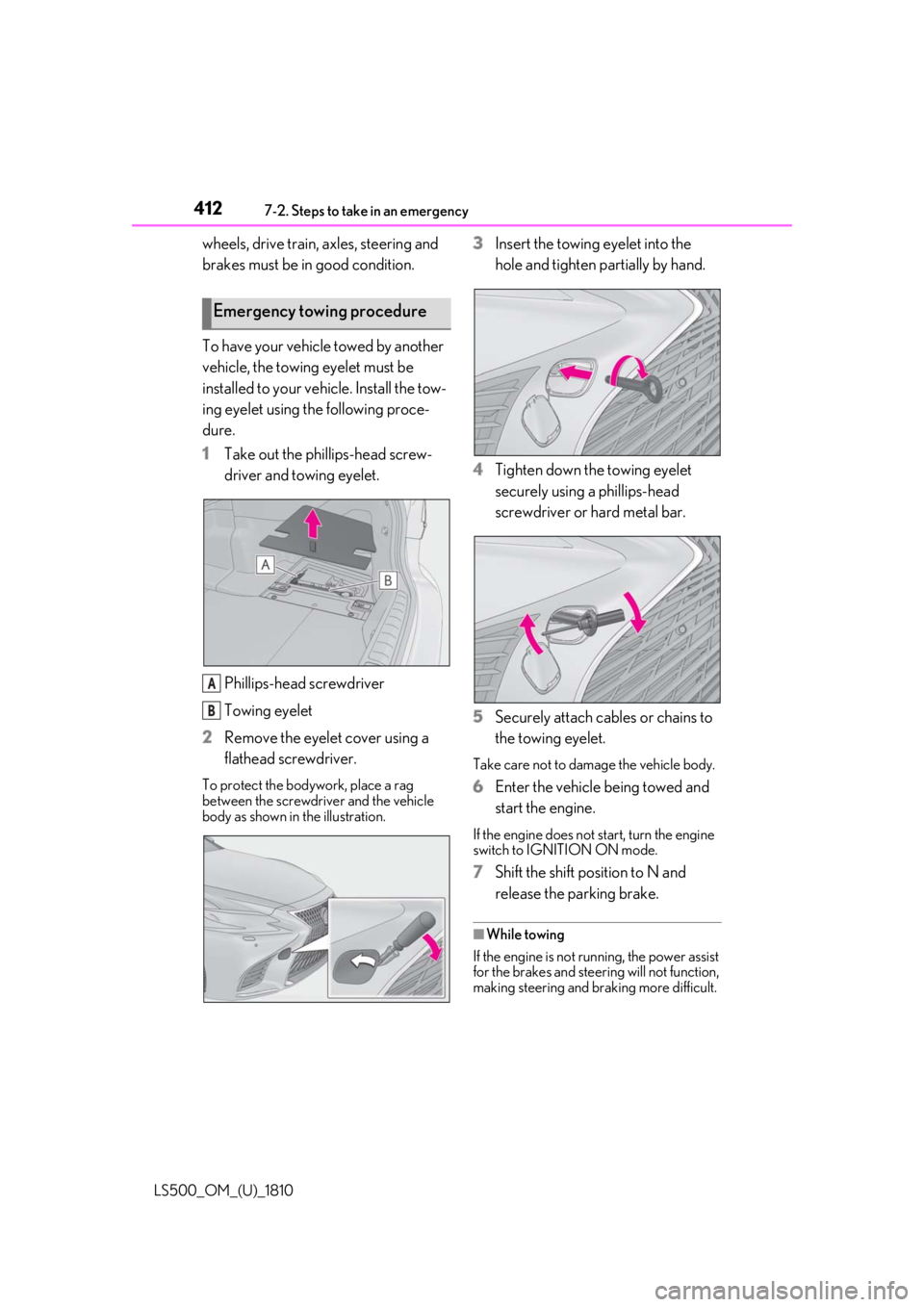
To have your vehicle towed by another
vehicle, the towing eyelet must be
installed to your vehicle. Install the tow-
ing eyelet using the following proce-
dure.
1 Take out the phillips-head screw-
driver and towing eyelet.
Phillips-head screwdriver
Towing eyelet
2 Remove the eyelet cover using a
flathead screwdriver.To protect the bodywork, place a rag
between the screwdriver and the vehicle
body as shown in the illustration. 3 Insert the towing eyelet into the
hole and tighten partially by hand.
4 Tighten down the towing eyelet
securely using a phillips-head
screwdriver or hard metal bar.
5 Securely attach cables or chains to
the towing eyelet. Take care not to damage the vehicle body.
6 Enter the vehicle being towed and
start the engine. If the engine does not start, turn the engine
switch to IGNITION ON mode.
7 Shift the shift position to N and
release the parking brake. ■
While towing
If the engine is not running, the power assist
for the brakes and steering will not function,
making steering and braking more difficult.Emergency towing procedure
A
B