2019 LEXUS LS500 ignition
[x] Cancel search: ignitionPage 268 of 512

268 4-5. Using the driving support systems
LS500_OM_(U)_1810 2 Press or to select “PKSA”
and then press .
3 Press or to select “RCD”
and then press .When the RCD function is disabled, the
RCD OFF indicator ( P.68) illuminates.
If the rear camera detection function
detects a pedestrian in the detection
area, the buzzer and pedestrian detec-
tion will operate as follows:
If a pedestrian is detected in area
Buzzer: Sounds repeatedly
Pedestrian detection icon: Blinks 3
times and then stays on
If a pedestrian is detected in area
Buzzer (When the vehicle is sta-
tionary): Sounds 3 times
Buzzer (When the vehicle is back-
ing up, when a pedestrian
approaches the rear of the vehicle): Sounds repeatedly
Pedestrian detection icon: Blinks 3
times and then stays on
If the system determines that your
vehicle may collide with a pedes-
trian in area
Buzzer: Sounds repeatedly
Pedestrian detection icon: Blinks 3
times and then stays on ■
The rear camera dete ction function is
operational when ●
The engine switch is in IGNITION ON
mode. ●
RCD function is on. ●
The shift position is in R. ■
Setting the buzzer volume
The buzzer volume can be adjusted on the
multi-information display. ( P.256)■
If “Rear Camera Detection Unavailable
Remove the Dirt of Rear Camera” is dis-
played on the multi-information display
A rear camera lens ma y be dirty or covered
with snow or ice. In such cases, if it is
removed from the rear camera lens, the sys-
tem should return to normal. (It may be nec-
essary to drive the vehicle for some time
before the system returns to normal.) ■
If “Rear Camera Detection Unavail-
able” is displayed on the multi-informa-
tion display ●
If this message is di splayed after the bat-
tery has been disconnected and recon-
nected, fully turn the steering wheel to
the left and then the right on level ground.
●
If this message is di splayed only when the
R shift position is selected, the rear cam-
era lens may be dirty. Clean the rear
camera lens.
■
Situations in which the system may not
operate properly
●
Some pedestrians, such as the following,
may not be detected by the rear camera
detection function, preventing the func-
tion from operating properly:When a pedestrian is detected
A
A
B
B C
C
Page 270 of 512
270 4-5. Using the driving support systems
LS500_OM_(U)_1810 *
:If equipped
■
Parking Support Brake function
(static objects) (if equipped)
Ultrasonic sensors are used to detect
static objects, such as a wall, in the
detection area when driving at a low
speed or backing up. ( P.276)■
Parking Support Brake function
(rear-crossing vehicles) (if
equipped)
Rear radar sensors are used to detect
approaching vehicles in the detection
area behind the vehicle when backing
up. ( P.282) ■
Parking Support Brake function
(rear pedestrians) (if equipped)
A rear camera sensor is used to detect
pedestrians in the detection area
behind the vehicle when backing up.
( P.286)PKSB (Parking Support
Brake) *
The Parking Support Brake system
consists of the following functions
that operate when driving at a low
speed or backing up, such as when
parking. When the system deter-
mines that a collision with a
detected object or pedestrian is
high, a warning operates to urge
the driver to take evasive action. If
the system determines that the pos-
sibility of a collision with a detected
object or pedestrian is extremely
high, the brakes are automatically
applied to help avoid the collision or
help reduce the impact of the colli-
sion.
PKSB (Parking Support Brake)
system WARNING■
Limitations of the Parking Support
Brake system
Do not overly rely on the system, as
doing so may lead to an accident. ●
The driver is solely responsible for safe
driving. Always drive carefully, taking
care to observe your surroundings.
The Parking Support Brake system is
designed to provide support to lessen
the severity of collisions. However, it
may not operate in some situations. ●
The Parking Support Brake system is
not designed to stop the vehicle com-
pletely. Additionally, even if the system
has stopped the vehicl e, it is necessary
to depress the brake pedal immedi-
ately as brake control will be canceled
after approximately 2 seconds.
NOTICE■
If “Parking Support Brake Unavail-
able” is displayed on the multi-infor-
mation display and the PKSB OFF
indicator is flashing
If this message is displayed immediately
after the engine swit ch is changed to
IGNITION ON mode, operate the vehi-
cle carefully, paying attention to your sur-
roundings. It may be necessary to drive
the vehicle for a certain amount of time
before the system returns to normal. (If
the system is not return to normal after
driving for a while, clean the rear camera
lens.)
Page 271 of 512

2714-5. Using the driving support systems
LS500_OM_(U)_1810 4
Driving The Parking Support Brake can be
enabled/disabled on the multi-informa-
tion display. All of the Parking Support
Brake functions (static objects,
rear-crossing vehicles, and rear pedes-
trians) are enabled/disabled simultane-
ously.
Use the meter control switches to
enable/disable the parking support
brake. ( P.81)
1 Press or to select .
2 Press or to select
and then press .When the Parking Support Brake is dis-
abled, the PKSB OFF indicator ( P.68)
illuminates.
To re-enable the system when it was dis-
abled, select on the multi-information
display, select and then On. If dis-
abled using this method, the system will not
be re-enabled by turning the engine switch
off and then to IGNITION ON mode.
If the engine output restriction control or
brake control operates, a buzzer will sound
and a message will be displayed on the
Center Display and multi-information dis-
play, to alert the driver. On vehicles with a
head-up display, the head-up display will
display the same message as the
multi-information display.
Depending on the situation, engine output
restriction control will operate to either limit acceleration or restrict output as
much as possible.
Engine output restriction control is
operating (acceleration restriction) Acceleration greater than a certain
amount is restricted by the system.
Center Display (Panoramic view monitor):
No warning displayed
Multi-information display: “Object
Detected Acceleration Reduced”
PKSB OFF indicator: Not illuminated
Buzzer: Does not sound
Engine output restriction control is
operating (output restricted as
much as possible) The system has determined that stron-
ger-than-normal brake operation is neces-
sary.
Center Display (Panoramic view monitor):
“BRAKE!”
Multi-information display: “BRAKE!”
PKSB OFF indicator: Not illuminated
Buzzer: Short beep
Brake control is operating The system determined that emergency
braking is necessary.
Center Display (Panoramic view monitor):
“BRAKE!”
Multi-information display: “BRAKE!”
PKSB OFF indicator: Not illuminated
Buzzer: Short beep
Vehicle stopped by system opera-
tion The vehicle has been stopped by brake
control operation.
Center Display (Panoramic view monitor):
“Press Brake Pedal”Enabling/Disabling the Parking
Support Brake
Displays and buzzers for engine
output restriction control and
brake control
Page 292 of 512

292 4-5. Using the driving support systems
LS500_OM_(U)_1810 To adjust the vehicle height to one
appropriate for road and driving con-
ditions, press the vehicle height adjust-
ment switch.
Turns high mode on/off. When high mode is enabled, the high
mode indicator on the meter will illuminate.
The vehicle height will increase by approxi-
mately 0.8 in. (20 mm) from its normal
position.
When the vehicle height is increased by a
control of access mo de press the vehicle
height adjustment switch twice to
enable/disable high mode. ■
The vehicle height adjustment switch
can be used to change the mode when
The engine switch is in IGNITION ON
mode. ■
System protection function
If the vehicle height is repeatedly increased
and decreased using the vehicle height
adjustment switch, etc ., the system may not
operate temporarily.
In order to improve the ease of enter-
ing and exiting the vehicle, the vehicle
height will increase automatically.
Enter control
If any of the following operations are
performed, the vehicle height will
increase automatically:
When the doors are unlocked using
the smart access system with
push-button start
When the doors are unlocked using
the wireless remote control and
then a door is opened. The vehicle height will increase by approxi-
mately 1.2 in. (30 mm) from its normal
position.
The vehicle height may not increase, if the
vehicle height al ready reaches the
selected height.
The vehicle will return to its normal height
when the vehicle speed reaches approxi-
mately 12 mph (20 km/h).
Exit control
When “Select Parking Height” is set to
“High”, the vehicle height will automati-NOTICE■
Parking precaution
If the vehicle is parked for a long time, the
vehicle height may change due to
changes in the ambient temperature.
When parking the vehicle, make sure
that the area above and below the vehi-
cle is clear, so that the vehicle will not
contact anything if its height changes.
Be careful when parking the vehicle in an
area with a low ceiling or near low hang-
ing objects, as the vehicle height will
increase when passengers exit the vehi-
cle and exit control of access mode
operates.
Selecting the vehicle height Vehicle height control when
entering/exiting the vehicle
(“Access Mode”)
Page 309 of 512

3095-1. Remote Touch/Display
LS500_OM_(U)_1810 5
Interior features
Touch to turn the screen off.Press the buttun to display the
home screen.
Touch to lock the Rear Multi Oper-
ation Panel.
Touch to adjust the brightness of
the screen.
Touch to display the automatic
screen transition settings screen.
( P.309)
Touch to display the rear seat set-
tings screen.• Touch to set the seat return function
linked to the door opening opera-
tion/shift-linked rear seat reclining func-
tion (
P.128 ) on/off.
• For the rear seat with an ottoman (if
equipped): Touch to set the position the
seatback will move to when the seat is
occupied and the door-linked rear seat
return function operates. (
P.128 ) ■
Auto screen change settings
screen
Touch to turn the automatic screen
transition function on/off.
Touch to set whether the screen will
transition to the home screen or
turn off when the automatic screen
transition function operates.
Touch to set the amount of time
(10/30/60/120 seconds) the Rear
Multi Operation Panel must be idle
before the automatic screen transi-
tion function operates. When the screen is off, press the
button to turn the screen on and display
the previously disp layed screen. Press
again to display the home screen.
■
Operating the Rear Multi Operation
Panel ●
When operating the Rear Multi Opera-
tion Panel, only use the tip of a finger. The
Rear Multi Operation Panel cannot be
operated with a fingernail, pen, etc.
●
Use only one finger when operating the
Rear Multi Operation Panel. The Rear
Multi Operation Panel cannot be oper-
ated with multiple fingers.
●
When the engine swit ch is changed to
ACCESSORY or IGNITION ON mode,
if a hand object, liquid or foreign matter is
touching the Rear Multi Operation Panel, A
B
C
D
E A
B
C
Page 314 of 512
314 5-3. Using the air conditioning system and defogger
LS500_OM_(U)_1810 ■
Changing the air flow mode
P.316 ■
Switching between outside air and
recirculated air modes
Press the outside/recirculated air
mode switch. The mode changes as follows each time
the switch is pressed.
automatic mode (outside air
mode) (recirculated air mode)
automatic mode
When the system is switched to automatic
mode, the air conditioning system operates
automatically. ■
Defogging the windshield
Defoggers are used to defog the wind-
shield and front side windows.
Press the windshield defogger switch. Set the outside/reci rculated air mode
switch to outside air mode if the recircu-
lated air mode is used. (It may switch auto-
matically.)
To defog the windshield and the side win-
dows quickly, turn the air flow and tem-
perature up.
To return to the previous mode, press the
windshield defogger switch again when the
windshield is defogged.
■
Defogging the rear window and
outside rear view mirrors
Defoggers are used to defog the rear
window, and to remove raindrops, dew
and frost from the outside rear view
mirrors.
Press the rear window and outside rear
view mirror defoggers switch.
The defoggers will automatically turn off after a while. The operation time changes
according to the ambient temperature and
vehicle speed. ■
Windshield wiper de-icer (if
equipped)
P.319 ■
When the outside temperature exceeds
75°F (24°C) and the air conditioning
system is on ●
In order to reduce the air conditioning
power consumption, the air conditioning
system may switch to recirculated air
mode automatically. This may also
reduce fuel consumption. ●
It is possible to switch to outside air mode
at any time by pressing the outside/recir-
culated air mode switch. ■
Fogging up of the windows
The windows will easily fog up when the
humidity in the vehicle is high. Turning
“A/C” on will dehumidify the air from the
outlets and defog the windshield effectively. ●
If you turn “A/C” off, the windows may
fog up more easily. ●
The windows may fog up if the recircu-
lated air mode is used. ■
Outside/recirculated air mode ●
When driving on dusty roads such as tun-
nels or in heavy traffic, set the out-
side/recirculated air mode switch to the
recirculated air mode. This is effective in
preventing outside air from entering the
vehicle interior. During cooling opera-
tion, setting the recirc ulated air mode will
also cool the vehicle interior effectively.
●
Outside/recirculated air mode may auto-
matically switch depending on the tem-
perature setting or the inside
temperature.
■
Registering air conditioning settings to
electronic keys
●
Unlocking the vehicle using an electronic
key and turning the engine switch to
IGNITION ON mode will recall that
key’s registered air conditioning settings.
Page 329 of 512
3295-3. Using the air conditio ning system and defogger
LS500_OM_(U)_1810 5
Interior features ■
Rear Multi Operation Panel (if
equipped)
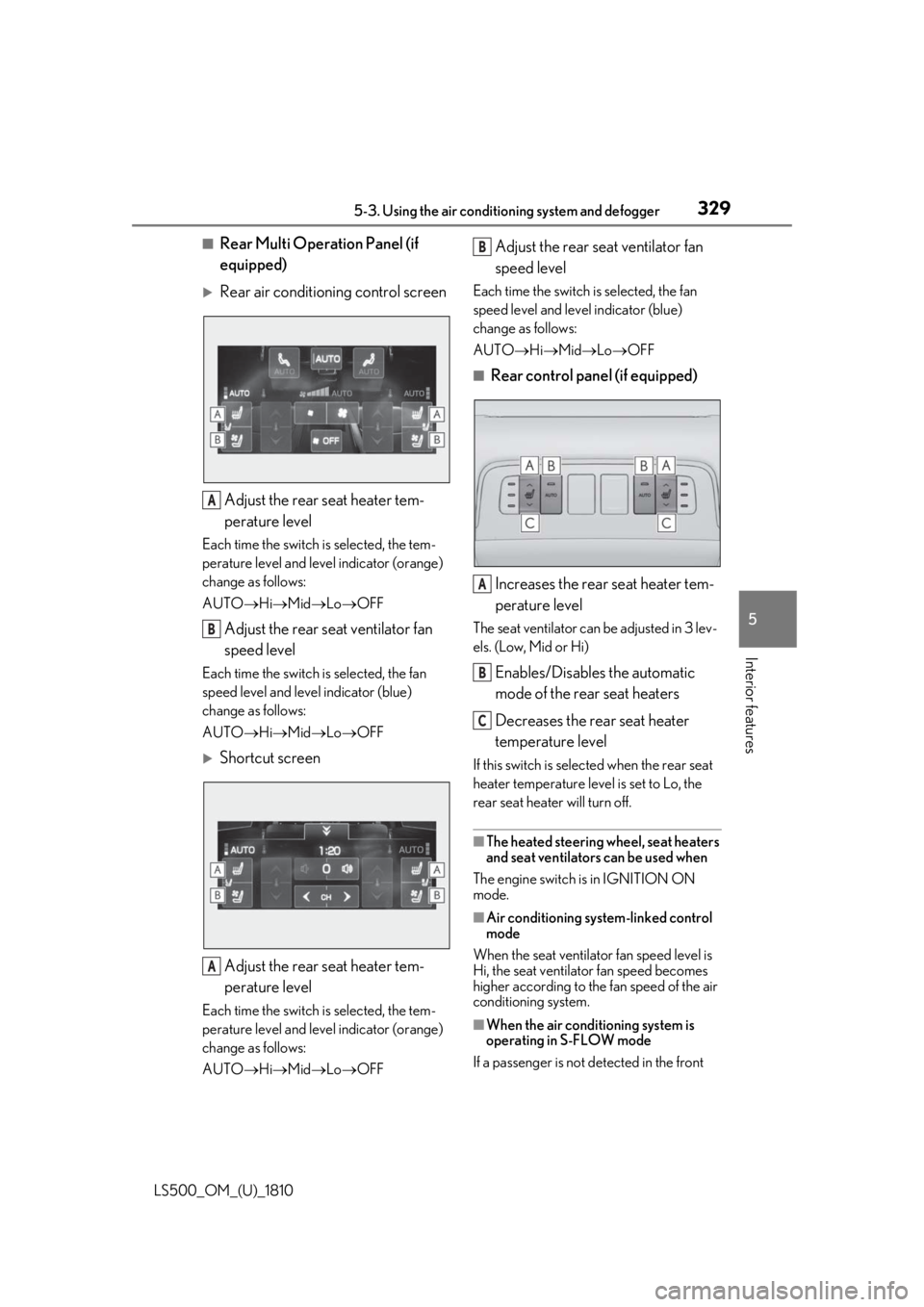
Rear air conditioning control screen
Adjust the rear seat heater tem-
perature levelEach time the switch is selected, the tem-
perature level and leve l indicator (orange)
change as follows:
AUTO Hi Mid Lo OFF
Adjust the rear seat ventilator fan
speed levelEach time the switch is selected, the fan
speed level and leve l indicator (blue)
change as follows:
AUTO Hi Mid Lo OFF
Shortcut screen
Adjust the rear seat heater tem-
perature levelEach time the switch is selected, the tem-
perature level and leve l indicator (orange)
change as follows:
AUTO Hi Mid Lo OFF Adjust the rear seat ventilator fan
speed level Each time the switch is selected, the fan
speed level and level indicator (blue)
change as follows:
AUTO Hi Mid Lo OFF■
Rear control panel (if equipped)
Increases the rear seat heater tem-
perature level The seat ventilator can be adjusted in 3 lev-
els. (Low, Mid or Hi)
Enables/Disables the automatic
mode of the rear seat heaters
Decreases the rear seat heater
temperature level If this switch is select ed when the rear seat
heater temperature level is set to Lo, the
rear seat heater will turn off.
■
The heated steering wheel, seat heaters
and seat ventilators can be used when
The engine switch is in IGNITION ON
mode.
■
Air conditioning system-linked control
mode
When the seat ventilator fan speed level is
Hi, the seat ventilato r fan speed becomes
higher according to the fan speed of the air
conditioning system.
■
When the air conditioning system is
operating in S-FLOW mode
If a passenger is not detected in the front A
B
A B
A
B
C
Page 343 of 512
3435-6. Using the other interior features
LS500_OM_(U)_1810 5
Interior features 5-6.Using the other interior features
The USB charging ports are used to
supply 2.1 A of electricity at 5 V to
external devices.
The USB charging ports are for
charging only. They are not designed
for data transfer or other purposes.
Depending on the external device, it
may not charge properly. Refer to the
manual included with the device
before using a USB charging port. ■
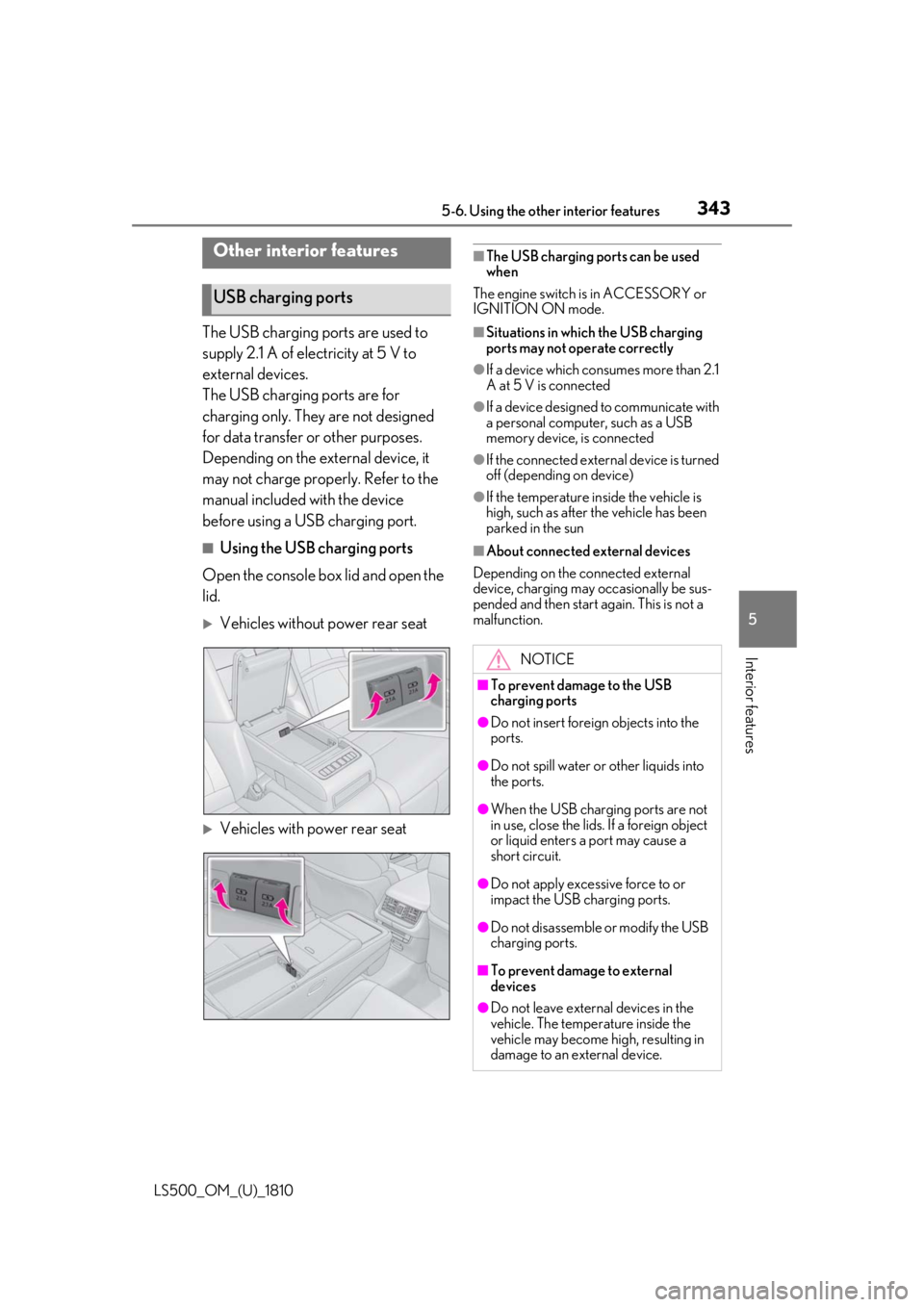
Using the USB charging ports
Open the console box lid and open the
lid.
Vehicles without power rear seat
Vehicles with power rear seat ■
The USB charging ports can be used
when
The engine switch is in ACCESSORY or
IGNITION ON mode. ■
Situations in whic h the USB charging
ports may not operate correctly ●
If a device which consumes more than 2.1
A at 5 V is connected ●
If a device designed to communicate with
a personal computer, such as a USB
memory device, is connected ●
If the connected external device is turned
off (depending on device) ●
If the temperature inside the vehicle is
high, such as after the vehicle has been
parked in the sun ■
About connected external devices
Depending on the connected external
device, charging may occasionally be sus-
pended and then start again. This is not a
malfunction.Other interior features
USB charging ports
NOTICE■
To prevent damage to the USB
charging ports ●
Do not insert foreign objects into the
ports.
●
Do not spill water or other liquids into
the ports.
●
When the USB charging ports are not
in use, close the lids. If a foreign object
or liquid enters a port may cause a
short circuit.
●
Do not apply excessive force to or
impact the USB charging ports.
●
Do not disassemble or modify the USB
charging ports.
■
To prevent damage to external
devices
●
Do not leave external devices in the
vehicle. The temperature inside the
vehicle may become high, resulting in
damage to an external device.