2019 LEXUS LS500 ignition
[x] Cancel search: ignitionPage 186 of 512

186 4-3. Operating the lights and wipers
LS500_OM_(U)_1810 ●
If the wiper is turned to AUTO mode
while the engine switch is in IGNITION
ON mode, the wipers will operate once
to show that AUTO mode is activated.●
If the temperature of the raindrop sensor
is 185°F (85°C) or higher, or 5°F
(-15°C) or lower, automatic operation
may not occur. In this case, operate the
wipers in any mode other than AUTO
mode.■
If no windshield washer fluid sprays
Check that the washer nozzles are not
blocked if there is wash er fluid in the wind-
shield washer fluid reservoir.
■
Front door opening linked windshield
wiper stop function
When is selected and the windshield
wipers are operating, if a front door is
opened while the vehicle is stopped and the
P shift position is sele cted, operation of the
windshield wipers w ill be stopped to pre-
vent anyone near the vehicle from being
sprayed by water from the wipers. When
the front door is closed, wiper operation will
resume.
■
When stopping the engine in an emer-
gency while driving
If the windshield wipers are operating when
the engine is stopped, the windshield wipers
will operate in high speed operation. After
the vehicle is stopped, operation will return
to normal when the engi ne switch is turned to IGNITION ON mode, or operation will
stop when the driver’s door is opened. ■
Outside rear view mirror defogger acti-
vation linked to windshield wiper opera-
tion
The outside rear view mirror defoggers
automatically turn on when you operate the
windshield wipers.
The outside rear view mirror defoggers
automatically turn off approximately 15
minutes after the wipers stop.
For details about the outside rear view mir-
ror defoggers: P.314
WARNING■
Caution regarding the use of wind-
shield wipers in AUTO mode
The windshield wipers may operate
unexpectedly if the sensor is touched or
the windshield is subj ect to vibration in
AUTO mode. Take care that your fingers
or anything else do not become caught
in the windshield wipers. ■
Caution regarding the use of washer
fluid
When it is cold, do not use the washer
fluid until the windshield becomes warm.
The fluid may freeze on the windshield
and cause low visibility. This may lead to
an accident, resulting in death or serious
injury.
NOTICE
■
When there is no washer fluid spray
from the nozzle
Damage to the washer fluid pump may
be caused if the lever is pulled toward
you and held continually.
■
When a nozzle becomes blocked
In this case, contact your Lexus dealer.
Do not try to clear it with a pin or other
object. The nozzle will be damaged.
Page 189 of 512
1894-4. Refueling
LS500_OM_(U)_1810 4
Driving 4-4.Refueling
Close all the doors and windows,
and turn the engine switch off.
Confirm the type of fuel. ■
Fuel types
P.455■
Fuel tank opening for unleaded gasoline
To help prevent incorrect fueling, your vehi-
cle has a fuel tank opening that only accom-
modates the special nozzle on unleaded
fuel pumps.Opening the fuel tank cap Perform the following steps to open
the fuel tank cap:
Before refueling the vehicle
WARNING■
When refueling the vehicle
Observe the following precautions while
refueling the vehicle. Failure to do so may
result in death or serious injury.
●
After exiting the ve hicle and before
opening the fuel door, touch an
unpainted metal surface to discharge
any static electricity. It is important to
discharge static electricity before refu-
eling because sparks resulting from
static electricity can cause fuel vapors
to ignite while refueling.
●
Always hold the grips on the fuel tank
cap and turn it slowly to remove it.
A whooshing sound may be heard
when the fuel tank cap is loosened.
Wait until the sound cannot be heard
before fully removing the cap. In hot
weather, pressurized fuel may spray
out the filler neck and cause injury. ●
Do not allow anyone that has not dis-
charged static electricity from their
body to come close to an open fuel
tank. ●
Do not inhale vaporized fuel.
Fuel contains substances that are
harmful if inhaled. ●
Do not smoke while refueling the vehi-
cle.
Doing so may cause the fuel to ignite
and cause a fire. ●
Do not return to the vehicle or touch
any person or object that is statically
charged.
This may cause static electricity to
build up, resulting in a possible ignition
hazard. ■
When refueling
Observe the following precautions to
prevent fuel overflowing from the fuel
tank: ●
Securely insert the fuel nozzle into the
fuel filler neck. ●
Stop filling the tank after the fuel noz-
zle automatically clicks off. ●
Do not top off the fuel tank.
NOTICE
■
Refueling
Do not spill fuel during refueling.
Doing so may damage the vehicle, such
as causing the emission control system to
operate abnormally or damaging fuel
system components or the vehicle’s
painted surface.
Page 242 of 512
242 4-5. Using the driving support systems
LS500_OM_(U)_1810 increased or decreased as follows:
For the U.S. mainland, Hawaii Fine adjustment: By 1 mph (1.6 km/h) *1
or 1
km/h (0.6mph) *2
each time the switch is
pressed
Large adjustment: Increases or decreases
in 1mph (1.6 km/h) *1
or 1 km/h (0.6 mph) *2
increments for as long as the switch is held
For Canada, Guam and Puerto Rico Fine adjustment: By 1 mph (1.6 km/h) *1
or 1
km/h (0.6mph) *2
each time the switch is
pressed
Large adjustment: Increases or decreases
in 5 mph (8 km/h) *1
or 5 km/h (3.1 mph) *2
increments for as long as the switch is held
In the constant speed control mode
( P.244), the set speed will be
increased or decreased as follows: Fine adjustment: By 1 mph (1.6 km/h) *1
or 1
km/h (0.6 mph) *2
each time the switch is
pressed
Large adjustment: The speed will continue
to change while the switch is held. *1
: When the set speed is shown in “MPH” *2
: When the set speed is shown in “km/h”
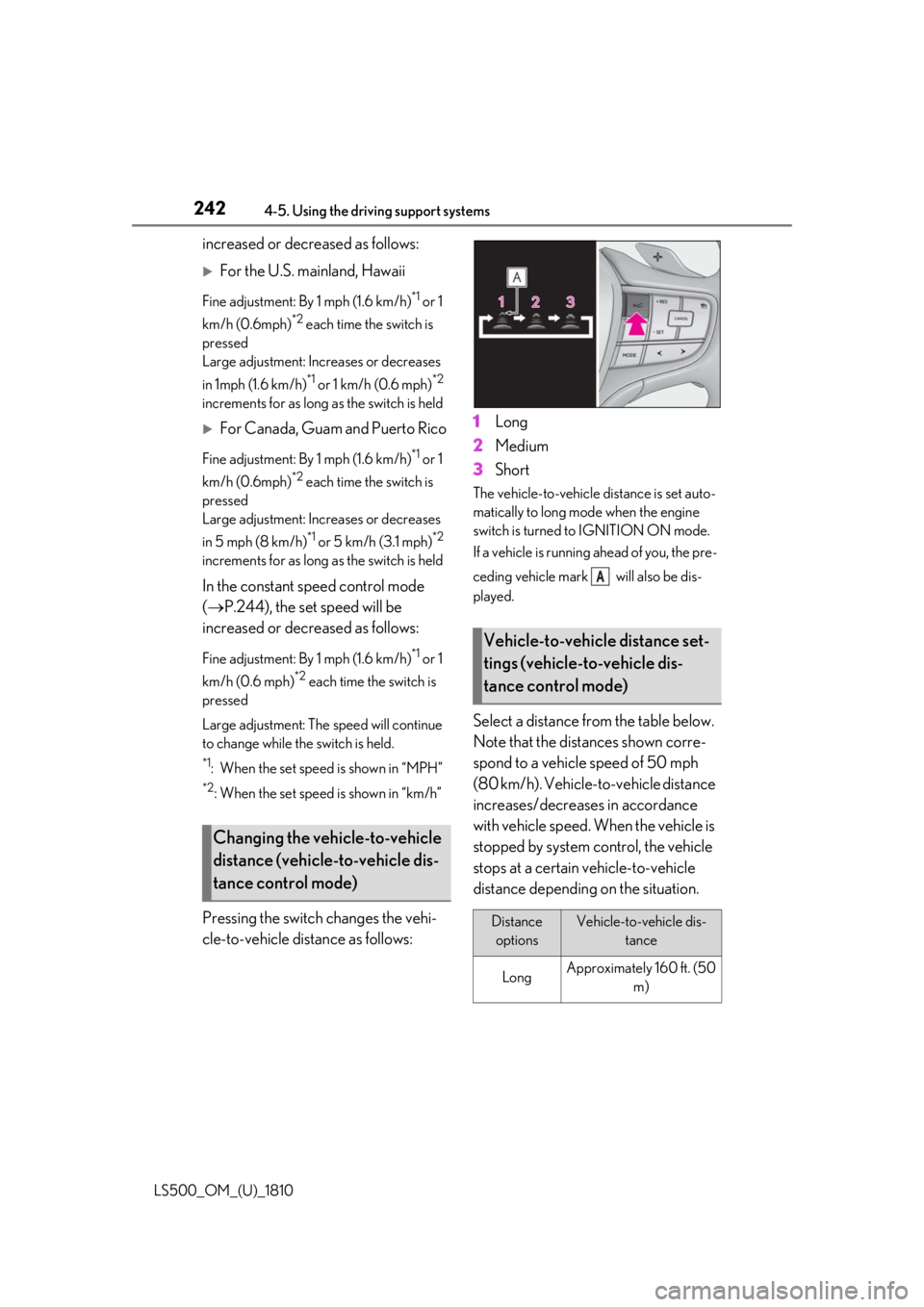
Pressing the switch changes the vehi-
cle-to-vehicle distance as follows: 1 Long
2 Medium
3 Short The vehicle-to-vehicle distance is set auto-
matically to long mode when the engine
switch is turned to IGNITION ON mode.
If a vehicle is running ahead of you, the pre-
ceding vehicle mark will also be dis-
played.
Select a distance from the table below.
Note that the distances shown corre-
spond to a vehicle speed of 50 mph
(80 km/h). Vehicle-to-vehicle distance
increases/decreases in accordance
with vehicle speed. When the vehicle is
stopped by system control, the vehicle
stops at a certain vehicle-to-vehicle
distance depending on the situation.Changing the vehicle-to-vehicle
distance (vehicle-to-vehicle dis-
tance control mode) Vehicle-to-vehicle distance set-
tings (vehicle-to-vehicle dis-
tance control mode)
Distance
options Vehicle-to-vehicle dis-
tance
Long Approximately 160 ft. (50
m) A
Page 249 of 512

2494-5. Using the driving support systems
LS500_OM_(U)_1810 4
Driving turn, etc.■
Conditions in whic h the function may
not operate or detect correctly
In the following situations, RSA does not
operate normally and may not recognize
signs, display the incorrect sign, etc. How-
ever, this does not indicate a malfunction. ●
The front camera is misaligned due to a
strong impact being applied to the sen-
sor, etc.●
Dirt, snow, stickers, etc. are on the wind-
shield near the front camera.●
In inclement weather such as heavy rain,
fog, snow or sand storms●
Light from an oncoming vehicle, the sun,
etc. enters the front camera.●
The sign is dirty, faded, tilted or bent.●
All or part of the sign is hidden by the
leaves of a tree, a pole, etc.●
The sign is only visible to the front camera
for a short amount of time.●
The driving scene (turning, lane change,
etc.) is judged incorrectly.●
Even if it is a sign not appropriate for the
currently traveled lane, such a sign exists
directly after a freeway branches, or in an
adjacent lane just before merging.●
Stickers are attached to the rear of the
preceding vehicle.●
A sign resembling a system compatible
sign is recognized.●
Side road speed signs may be detected
and displayed (if positioned in sight of the
front camera) while the vehicle is travel-
ing on the main road.
●
Roundabout exit road speed signs may
be detected and displayed (if positioned
in sight of the front camera) while travel-
ing on a roundabout.
●
The front of the vehicle is raised or low-
ered due to the carried load.
●
The surrounding brightness is not suffi-
cient or changes suddenly.
●
When a sign intended for trucks, etc. is
recognized. ■
Speed limit sign display
If the engine switch wa s last turned off while
a speed limit sign was displayed on the
multi-information display, the same sign dis-
plays again when the engine switch is
turned to IGNITION ON mode. ■
Customization
Some functions can be customized. (Cus-
tomizable features: P.466)
Page 259 of 512
2594-5. Using the driving support systems
LS500_OM_(U)_1810 4
Driving
■
The system can be operated when
●
The engine switch is in IGNITION ON
mode.
●
Intuitive parking assist function is on.
●
The vehicle speed is less than about 6 mph (10 km/h). ●
A shift position other than P is selected. ■
Setting the buzzer volume
The buzzer volume can be adjusted on the
multi-information display. ( P.256)■
If “Parking Assist Unavailable Clean
Parking Assist Sensor” is displayed on
the multi-information display
A sensor may be covered with ice, snow,
dirt, etc. Remove the ice, snow, dirt, etc.,
from the sensor to return the system to nor-
mal.
Also, due to ice forming on a sensor at low
temperatures, a warn ing message may be
displayed or the sensor may not be able to
detect an object. Once the ice melts, the
system will return to normal. ■
Sensor detection information ●
The following situations may occur
during use.
• The sensors may be able to only detect
objects near the fron t and rear bumpers.
• Depending on the shape of the object
and other factors, the detection distance
may shorten, or detection may be impos-
sible.
• There will be a short delay between
object detection and di splay. Even at low
speeds, there is a possibility that the
object will come within the sensor’s
detection areas befo re the display is
shown and the warning beep sounds.
• It might be difficult to hear the buzzer due
to the volume of the audio system or air
flow noise of the air conditioning system.
• It may be difficult to hear the buzzer if
buzzers for other systems are sounding.
■
Conditions under wh ich the function
may not function correctly
Certain vehicle conditions and the sur-
rounding environment may affect the ability
of a sensor to correctly detect objects. Par-
ticular instances where this may occur are
listed below.
●
There is dirt, snow or ice on a sensor.
(Cleaning the sensors will resolve this
problem.)
●
A sensor is frozen. (Thawing the area will
resolve this problem.) WARNING■
When using intuitive parking assist
In the following situations, the system
may not function correctly due to a sen-
sor malfunction, etc. Have the vehicle
checked by your Lexus dealer. ●
The intuitive parking assist operation
display flashes or shows continuously,
and a buzzer sounds when no objects
are detected.●
If the area around a sensor collides
with something, or is subjected to
strong impact.●
If the bumper or grille collides with
something.●
If the display flashes or is displayed
continuously and a buzzer does not
sound, except when the mute function
has been turned on.●
If a display error occurs, first check the
sensor.
If the error occurs even when there is
no ice, snow or mud on the sensor, it is
likely that the sensor is malfunctioning.■
Notes when washing the vehicle
Do not apply intensive bursts of water or
steam to the sensor area.
Doing so may result in the sensor mal-
functioning.
●
When using a high pressure washer to
wash the vehicle, do not spray the sen-
sors directly, as doing so may cause a
sensor to malfunction.
●
When using steam to clean the vehicle,
do not direct steam too close to the
sensors as doing so may cause a sen-
sor to malfunction.
Page 264 of 512

264 4-5. Using the driving support systems
LS500_OM_(U)_1810 If a vehicle approaching from the right or
left at the rear of the vehicle is detected,
the RCTA icon ( P.265) for the detected
side will be displayed on the Center Dis-
play. This illustration shows an example of a
vehicle approaching from both sides of the
vehicle.
RCTA buzzerIf a vehicle approaching from the right or
left at the rear of the vehicle is detected, a
buzzer will sound. The buzzer also sounds
for approximately 1 second immediately
after the RCTA function is turned on.
Use the meter control switches to
enable/disable the RCTA function.
( P.81)
1 Press or to select .
2 Press or to select “PKSA”
and then press .
3 Press or to select “RCTA”
and then press .When the RCTA function is disabled, the
RCTA OFF indicator ( P.68) illuminates.
(Each time the engine switch is turned off
then changed to IGNITION ON mode,
the RCTA function will be enabled auto-
matically.) ■
Outside rear view mirror indicator visi-
bility
In strong sunlight, the outside rear view mir-
ror indicator may be difficult to see. ■
Hearing the RCTA buzzer
The RCTA buzzer may be difficult to hear
over loud noises, such as if the audio system
volume is high. ■
When “RCTA Not Available” is shown
on the multi-information display
Water, snow, mud, etc., may be attached to
the rear bumper around the sensors.
( P.252) Removing the water, snow, mud,
etc., from the attached to the rear bumper
around the sensors to normal.
Additionally, the function may not function
normally when used in extremely hot or
cold environments.
■
Rear side radar sensors
P.252
■
Operation of the RCTA function
The RCTA function uses rear side radar sensors to detect vehicles approaching
from the right or left at the rear of the ve hicle and alerts the driver of the presence
of such vehicles by flashing the outside rear view mirror indi cators and sounding a
buzzer.Turning the RCTA function
on/off D WARNING■
Cautions regarding the use of the
function
The driver is solely responsible for safe
driving. Always drive safely, taking care
to observe your surroundings.
The RCTA function is only a supplemen-
tary function which alerts the driver that a
vehicle is approaching from the right or
left at the rear of the vehicle. As the
RCTA function may not function cor-
rectly under certai n conditions, the
driver’s own visual confirmation of safety
is necessary. Over re liance on this func-
tion may lead to an accident resulting
death or serious injury.
RCTA function
Page 266 of 512

266 4-5. Using the driving support systems
LS500_OM_(U)_1810 ■
The RCTA function is operational when
The RCTA function operates when all of the
following conditions are met: ●
The engine switch is in IGNITION ON
mode.●
The RCTA function is on.●
The shift position is in R.●
The vehicle speed is less than approxi-
mately 5 mph (8 km/h).●
The approaching vehicle speed is
between approximately 5 mph (8 km/h)
and 18 mph (28 km/h).■
Setting the buzzer volume
The buzzer volume can be adjusted on the
multi-information display. ( P.256)■
Conditions under which the RCTA func-
tion will not detect a vehicle
The RCTA function is not designed to
detect the following types of vehicles and/or
objects: ●
Vehicles approaching from directly
behind●
Vehicles backing up in a parking space
next to your vehicle●
Vehicles that the sensors cannot detect
due to obstructions
●
Guardrails, walls, signs, parked vehicles
and similar stationary objects *
●
Small motorcycles, bicycles, pedestrians,
etc. *
●
Vehicles moving away from your vehicle
●
Vehicles approaching from the parking
spaces next to your vehicle *
*
: Depending on the conditions, detection
of a vehicle and/or object may occur. ■
Conditions under which the RCTA func-
tion may not function correctly ●
The RCTA function may not detect vehi-
cles correctly in the following situations:
• When a sensor is misaligned due to a
strong impact to the sensor or its sur-
rounding area
• When mud, snow, ice, a sticker, etc. is
covering a sensor or its surrounding area
on the rear bumper
• When driving on a road surface that is
wet with standing water during bad
weather, such as heavy rain, snow, or fog
• When multiple vehicles are approaching
with only a small gap between each vehi-
cle
• If a vehicle is approaching the rear of
your vehicle rapidly
• When a towing eyelet is installed to the
rear of the vehicle.
• When backing up on a slope with a sharp
change in grade
• When backing out of a shallow angle
parking spot
• Immediately after the RCTA function is
turned on
• Immediately after the engine is started
Page 267 of 512

2674-5. Using the driving support systems
LS500_OM_(U)_1810 4
Driving with the RCTA function on
• When the sensors cannot detect a vehi-
cle due to obstructions
●
Instances of the RCTA function unneces-
sarily detecting a vehicle and/or object
may increase in the following situations:
• When a vehicle passes by the side of your
vehicle
• When the parking space faces a street
and vehicles are being driven on the
street
• When the distance between your vehicle
and metal objects, such as a guardrail,
wall, sign, or parked vehicle, which may
reflect electrical waves toward the rear of
the vehicle, is short
• When a towing eyelet is installed to the
rear of the vehicle *
: If equipped
Pedestrian detection icon Displayed automatically when a pedestrian
is detected.
RCD OFF icon When the RCD function is disabled, the
RCD OFF icon illuminates. (Each time the
engine switch is turned off then changed to
IGNITION ON mode, the RCD function
will be enabled automatically.)
Use the meter control switches to
enable/disable the RCD function.
( P.81)
1 Press or to select .RCD (Rear Camera Detec-
tion) function *
When the vehicle is backing up, the
rear camera detection function can
detect pedestrians in the detection
area behind the vehicle. If a pedes-
trian is detected, a buzzer will
sound and an icon will be displayed
on the Center Display to inform the
driver of the pedestrian.
Center Display
Turning the RCD function on/off A
B