2019 LEXUS LS500 ECO mode
[x] Cancel search: ECO modePage 241 of 512

2414-5. Using the driving support systems
LS500_OM_(U)_1810 4
Driving When there are no longer any preceding vehicles driving slower than the set
speedThe system accelerates until the set speed is re ached. The system then returns to constant
speed cruising.
1 Press the cruise control main switch
to activate the cruise control.Radar cruise control indicator will come on
and a message will be displayed on the
multi-information displa y. Press the switch
again to deactivate the cruise control.
If the cruise control ma in switch is pressed
and held for 1.5 seconds or more, the sys-
tem turns on in constant speed control
mode. ( P.244)
2 Accelerate or decelerate, with
accelerator pedal operation, to the
desired vehicle speed (at or above
approximately 20 mph [30 km/h])
and press the “-SET” switch to set
the speed.Cruise control “SET” indicator will come
on.
The vehicle speed at the moment the switch is released becomes the set speed.
To change the set speed, press the
“+RES” or “-SET” switch until the
desired set speed is displayed.
1 Increases the speed (Except when
the vehicle has been stopped by
system control in vehicle-to-vehi-
cle distance control mode)
2 Decreases the speed Fine adjustment: Press the switch.
Large adjustment: Pr ess and hold the
switch to change the speed, and release
when the desired speed is reached.
In the vehicle-to-vehicle distance con-
trol mode, the set speed will be Setting the vehicle speed (vehi-
cle-to-vehicle distance control
mode)
Adjusting the set speed
Page 244 of 512
244 4-5. Using the driving support systems
LS500_OM_(U)_1810 ■
Warnings may not occur when
In the following instances, warnings
may not occur even when the vehi-
cle-to-vehicle distance is small.
When the speed of the preceding
vehicle matches or exceeds your
vehicle speed
When the preceding vehicle is trav-
eling at an extremely slow speed
Immediately after the cruise control
speed was set
When depressing the accelerator
pedal
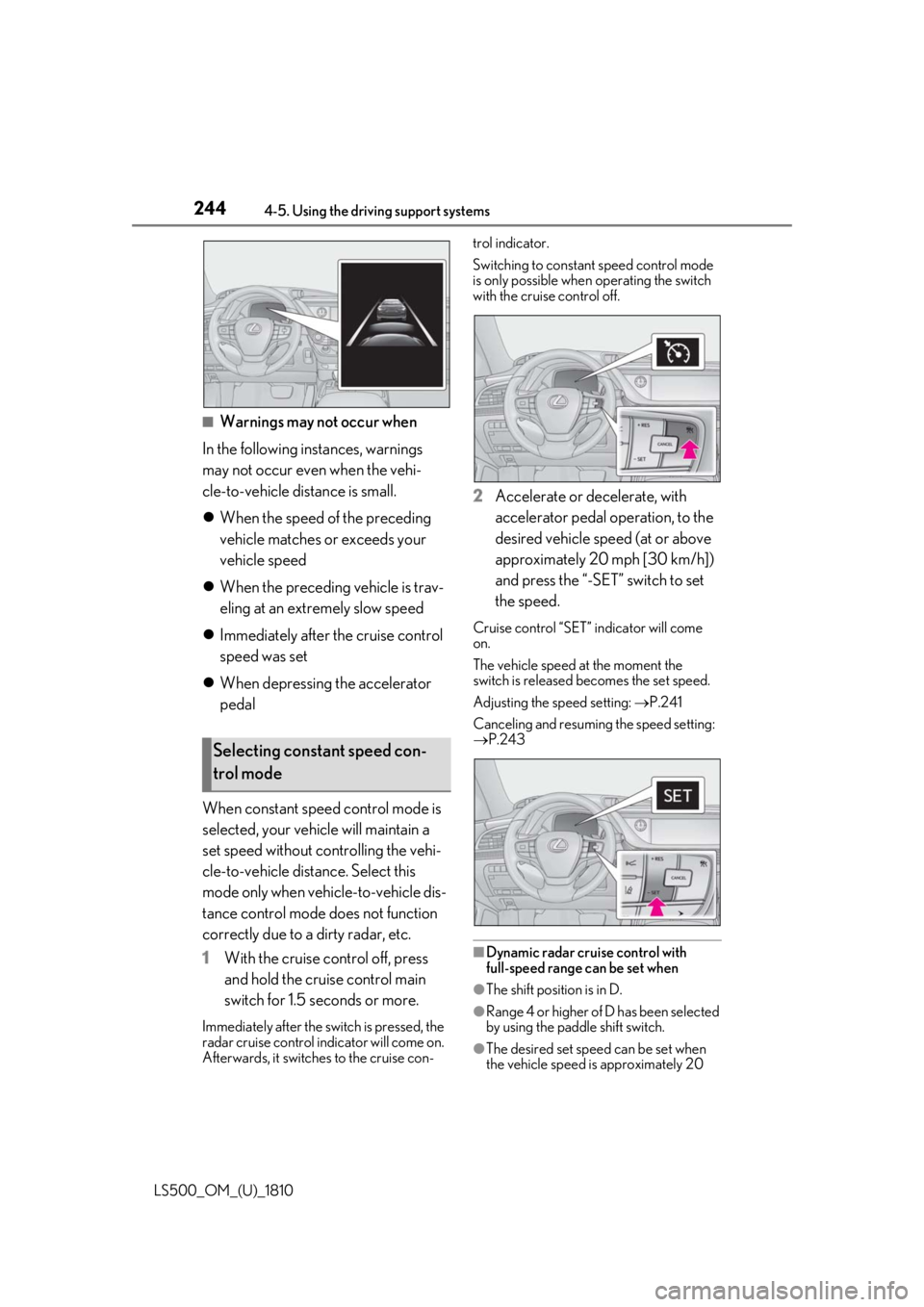
When constant speed control mode is
selected, your vehicle will maintain a
set speed without controlling the vehi-
cle-to-vehicle distance. Select this
mode only when vehicle-to-vehicle dis-
tance control mode does not function
correctly due to a dirty radar, etc.
1 With the cruise control off, press
and hold the cruise control main
switch for 1.5 seconds or more.Immediately after the switch is pressed, the
radar cruise control in dicator will come on.
Afterwards, it switches to the cruise con- trol indicator.
Switching to constant speed control mode
is only possible when operating the switch
with the cruise control off.
2 Accelerate or decelerate, with
accelerator pedal operation, to the
desired vehicle speed (at or above
approximately 20 mph [30 km/h])
and press the “-SET” switch to set
the speed. Cruise control “SET” indicator will come
on.
The vehicle speed at the moment the
switch is released becomes the set speed.
Adjusting the speed setting: P.241
Canceling and resuming the speed setting:
P.243
■
Dynamic radar cruise control with
full-speed range can be set when
●
The shift position is in D.
●
Range 4 or higher of D has been selected
by using the paddle shift switch.
●
The desired set spee d can be set when
the vehicle speed is approximately 20 Selecting constant speed con-
trol mode
Page 245 of 512
![LEXUS LS500 2019 Owners Manual 2454-5. Using the driving support systems
LS500_OM_(U)_1810 4
Driving mph (30 km/h) or more.
(However, when the vehicle speed is set
while driving at below approximately 20
mph [30 km/h], the set s](/manual-img/36/58934/w960_58934-244.png "LEXUS LS500 2019 Owners Manual 2454-5. Using the driving support systems
LS500_OM_(U)_1810 4
Driving mph (30 km/h) or more.
(However, when the vehicle speed is set
while driving at below approximately 20
mph [30 km/h], the set s")
2454-5. Using the driving support systems
LS500_OM_(U)_1810 4
Driving mph (30 km/h) or more.
(However, when the vehicle speed is set
while driving at below approximately 20
mph [30 km/h], the set speed will be set
to approximately 20 mph [30 km/h].)■
Accelerating after setting the vehicle
speed
The vehicle can accelerate by operating the
accelerator pedal. After accelerating, the
set speed resumes. However, during vehi-
cle-to-vehicle distance control mode, the
vehicle speed may decrease below the set
speed in order to maintain the distance to
the preceding vehicle. ■
When the vehicle stops while follow-up
cruising●
Pressing the “+RES” switch while the
vehicle ahead stops w ill resume follow-up
cruising if the vehicle ahead starts off
within approximately 3 seconds after the
switch is pressed.●
If the vehicle ahead starts off within 3 sec-
onds after your vehicle stops, follow-up
cruising will be resumed.■
Automatic cancelation of vehi-
cle-to-vehicle distance control mode
Vehicle-to-vehicle dist ance control mode is
automatically canceled in the following situ-
ations. ●
VSC is activated.●
TRAC is activated for a period of time.●
When the VSC or TRAC system is
turned off.●
When snow mode is set.●
The sensor cannot detect correctly
because it is covered in some way.
●
Pre-collision braking is activated.
●
The parking brake is operated.
●
The vehicle is stopped by system control
on a steep incline.
●
The following are detected when the
vehicle has been stopped by system con-
trol:
• The driver is not wearing a seat belt.
• The driver’s door is opened.
• The vehicle has been stopped for about 3
minutes. If vehicle-to-vehicle distance control mode
is automatically canceled for any reasons
other than the above, there may be a mal-
function in the system. Contact your Lexus
dealer. ■
Automatic cancelation of constant
speed control mode
Constant speed control mode is automati-
cally canceled in the following situations: ●
Actual vehicle speed is more than
approximately 10 mph (16 km/h) below
the set vehicle speed. ●
Actual vehicle speed falls below approxi-
mately 20 mph (30 km/h). ●
VSC is activated. ●
TRAC is activated for a period of time. ●
When the VSC or TRAC system is
turned off. ●
Pre-collision braking is activated.
If constant speed control mode is automati-
cally canceled for any reasons other than
the above, there may be a malfunction in the
system. Contact your Lexus dealer. ■
Brake operation
A brake operation sound may be heard and
the brake pedal response may change, but
these are not malfunctions. ■
Warning messages and buzzers for
dynamic radar cruise control with
full-speed range
Warning messages and buzzers are used to
indicate a system malfunction or to inform
the driver of the need for caution while driv-
ing. If a warning messa ge is shown on the
multi-information displa y, read the message
and follow the instruc-
tions.( P.196,202,425)
■
When the sensor may not be correctly
detecting the vehicle ahead
In the case of the fo llowing and depending
on the conditions, operate the brake pedal
when deceleration of the system is insuffi-
cient or operate the accelerator pedal
when acceleration is required.
As the sensor may not be able to correctly
detect these types of vehicles, the approach
warning ( P.243) may not be activated.
Page 249 of 512

2494-5. Using the driving support systems
LS500_OM_(U)_1810 4
Driving turn, etc.■
Conditions in whic h the function may
not operate or detect correctly
In the following situations, RSA does not
operate normally and may not recognize
signs, display the incorrect sign, etc. How-
ever, this does not indicate a malfunction. ●
The front camera is misaligned due to a
strong impact being applied to the sen-
sor, etc.●
Dirt, snow, stickers, etc. are on the wind-
shield near the front camera.●
In inclement weather such as heavy rain,
fog, snow or sand storms●
Light from an oncoming vehicle, the sun,
etc. enters the front camera.●
The sign is dirty, faded, tilted or bent.●
All or part of the sign is hidden by the
leaves of a tree, a pole, etc.●
The sign is only visible to the front camera
for a short amount of time.●
The driving scene (turning, lane change,
etc.) is judged incorrectly.●
Even if it is a sign not appropriate for the
currently traveled lane, such a sign exists
directly after a freeway branches, or in an
adjacent lane just before merging.●
Stickers are attached to the rear of the
preceding vehicle.●
A sign resembling a system compatible
sign is recognized.●
Side road speed signs may be detected
and displayed (if positioned in sight of the
front camera) while the vehicle is travel-
ing on the main road.
●
Roundabout exit road speed signs may
be detected and displayed (if positioned
in sight of the front camera) while travel-
ing on a roundabout.
●
The front of the vehicle is raised or low-
ered due to the carried load.
●
The surrounding brightness is not suffi-
cient or changes suddenly.
●
When a sign intended for trucks, etc. is
recognized. ■
Speed limit sign display
If the engine switch wa s last turned off while
a speed limit sign was displayed on the
multi-information display, the same sign dis-
plays again when the engine switch is
turned to IGNITION ON mode. ■
Customization
Some functions can be customized. (Cus-
tomizable features: P.466)
Page 264 of 512

264 4-5. Using the driving support systems
LS500_OM_(U)_1810 If a vehicle approaching from the right or
left at the rear of the vehicle is detected,
the RCTA icon ( P.265) for the detected
side will be displayed on the Center Dis-
play. This illustration shows an example of a
vehicle approaching from both sides of the
vehicle.
RCTA buzzerIf a vehicle approaching from the right or
left at the rear of the vehicle is detected, a
buzzer will sound. The buzzer also sounds
for approximately 1 second immediately
after the RCTA function is turned on.
Use the meter control switches to
enable/disable the RCTA function.
( P.81)
1 Press or to select .
2 Press or to select “PKSA”
and then press .
3 Press or to select “RCTA”
and then press .When the RCTA function is disabled, the
RCTA OFF indicator ( P.68) illuminates.
(Each time the engine switch is turned off
then changed to IGNITION ON mode,
the RCTA function will be enabled auto-
matically.) ■
Outside rear view mirror indicator visi-
bility
In strong sunlight, the outside rear view mir-
ror indicator may be difficult to see. ■
Hearing the RCTA buzzer
The RCTA buzzer may be difficult to hear
over loud noises, such as if the audio system
volume is high. ■
When “RCTA Not Available” is shown
on the multi-information display
Water, snow, mud, etc., may be attached to
the rear bumper around the sensors.
( P.252) Removing the water, snow, mud,
etc., from the attached to the rear bumper
around the sensors to normal.
Additionally, the function may not function
normally when used in extremely hot or
cold environments.
■
Rear side radar sensors
P.252
■
Operation of the RCTA function
The RCTA function uses rear side radar sensors to detect vehicles approaching
from the right or left at the rear of the ve hicle and alerts the driver of the presence
of such vehicles by flashing the outside rear view mirror indi cators and sounding a
buzzer.Turning the RCTA function
on/off D WARNING■
Cautions regarding the use of the
function
The driver is solely responsible for safe
driving. Always drive safely, taking care
to observe your surroundings.
The RCTA function is only a supplemen-
tary function which alerts the driver that a
vehicle is approaching from the right or
left at the rear of the vehicle. As the
RCTA function may not function cor-
rectly under certai n conditions, the
driver’s own visual confirmation of safety
is necessary. Over re liance on this func-
tion may lead to an accident resulting
death or serious injury.
RCTA function
Page 268 of 512

268 4-5. Using the driving support systems
LS500_OM_(U)_1810 2 Press or to select “PKSA”
and then press .
3 Press or to select “RCD”
and then press .When the RCD function is disabled, the
RCD OFF indicator ( P.68) illuminates.
If the rear camera detection function
detects a pedestrian in the detection
area, the buzzer and pedestrian detec-
tion will operate as follows:
If a pedestrian is detected in area
Buzzer: Sounds repeatedly
Pedestrian detection icon: Blinks 3
times and then stays on
If a pedestrian is detected in area
Buzzer (When the vehicle is sta-
tionary): Sounds 3 times
Buzzer (When the vehicle is back-
ing up, when a pedestrian
approaches the rear of the vehicle): Sounds repeatedly
Pedestrian detection icon: Blinks 3
times and then stays on
If the system determines that your
vehicle may collide with a pedes-
trian in area
Buzzer: Sounds repeatedly
Pedestrian detection icon: Blinks 3
times and then stays on ■
The rear camera dete ction function is
operational when ●
The engine switch is in IGNITION ON
mode. ●
RCD function is on. ●
The shift position is in R. ■
Setting the buzzer volume
The buzzer volume can be adjusted on the
multi-information display. ( P.256)■
If “Rear Camera Detection Unavailable
Remove the Dirt of Rear Camera” is dis-
played on the multi-information display
A rear camera lens ma y be dirty or covered
with snow or ice. In such cases, if it is
removed from the rear camera lens, the sys-
tem should return to normal. (It may be nec-
essary to drive the vehicle for some time
before the system returns to normal.) ■
If “Rear Camera Detection Unavail-
able” is displayed on the multi-informa-
tion display ●
If this message is di splayed after the bat-
tery has been disconnected and recon-
nected, fully turn the steering wheel to
the left and then the right on level ground.
●
If this message is di splayed only when the
R shift position is selected, the rear cam-
era lens may be dirty. Clean the rear
camera lens.
■
Situations in which the system may not
operate properly
●
Some pedestrians, such as the following,
may not be detected by the rear camera
detection function, preventing the func-
tion from operating properly:When a pedestrian is detected
A
A
B
B C
C
Page 270 of 512
270 4-5. Using the driving support systems
LS500_OM_(U)_1810 *
:If equipped
■
Parking Support Brake function
(static objects) (if equipped)
Ultrasonic sensors are used to detect
static objects, such as a wall, in the
detection area when driving at a low
speed or backing up. ( P.276)■
Parking Support Brake function
(rear-crossing vehicles) (if
equipped)
Rear radar sensors are used to detect
approaching vehicles in the detection
area behind the vehicle when backing
up. ( P.282) ■
Parking Support Brake function
(rear pedestrians) (if equipped)
A rear camera sensor is used to detect
pedestrians in the detection area
behind the vehicle when backing up.
( P.286)PKSB (Parking Support
Brake) *
The Parking Support Brake system
consists of the following functions
that operate when driving at a low
speed or backing up, such as when
parking. When the system deter-
mines that a collision with a
detected object or pedestrian is
high, a warning operates to urge
the driver to take evasive action. If
the system determines that the pos-
sibility of a collision with a detected
object or pedestrian is extremely
high, the brakes are automatically
applied to help avoid the collision or
help reduce the impact of the colli-
sion.
PKSB (Parking Support Brake)
system WARNING■
Limitations of the Parking Support
Brake system
Do not overly rely on the system, as
doing so may lead to an accident. ●
The driver is solely responsible for safe
driving. Always drive carefully, taking
care to observe your surroundings.
The Parking Support Brake system is
designed to provide support to lessen
the severity of collisions. However, it
may not operate in some situations. ●
The Parking Support Brake system is
not designed to stop the vehicle com-
pletely. Additionally, even if the system
has stopped the vehicl e, it is necessary
to depress the brake pedal immedi-
ately as brake control will be canceled
after approximately 2 seconds.
NOTICE■
If “Parking Support Brake Unavail-
able” is displayed on the multi-infor-
mation display and the PKSB OFF
indicator is flashing
If this message is displayed immediately
after the engine swit ch is changed to
IGNITION ON mode, operate the vehi-
cle carefully, paying attention to your sur-
roundings. It may be necessary to drive
the vehicle for a certain amount of time
before the system returns to normal. (If
the system is not return to normal after
driving for a while, clean the rear camera
lens.)
Page 289 of 512
2894-5. Using the driving support systems
LS500_OM_(U)_1810 4
Driving
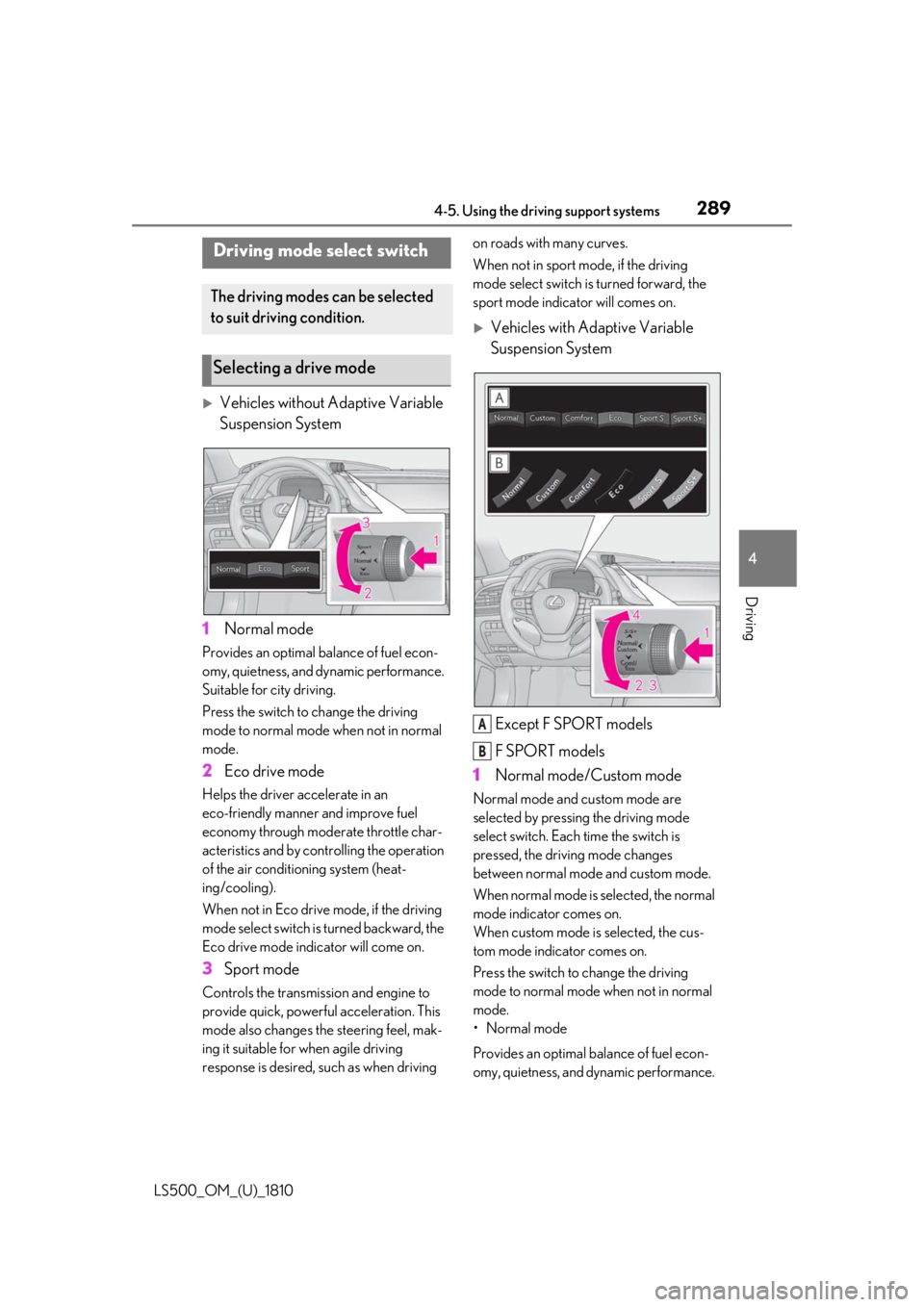
Vehicles without Adaptive Variable
Suspension System
1 Normal modeProvides an optimal ba lance of fuel econ-
omy, quietness, and dynamic performance.
Suitable for city driving.
Press the switch to change the driving
mode to normal mode when not in normal
mode.
2 Eco drive modeHelps the driver accelerate in an
eco-friendly manner and improve fuel
economy through modera te throttle char-
acteristics and by controlling the operation
of the air conditioning system (heat-
ing/cooling).
When not in Eco drive mode, if the driving
mode select switch is turned backward, the
Eco drive mode indicator will come on.
3 Sport modeControls the transmission and engine to
provide quick, powerful acceleration. This
mode also changes the steering feel, mak-
ing it suitable for when agile driving
response is desired, such as when driving on roads with many curves.
When not in sport mode, if the driving
mode select switch is turned forward, the
sport mode indicator will comes on.
Vehicles with Adaptive Variable
Suspension System
Except F SPORT models
F SPORT models
1 Normal mode/Custom mode Normal mode and custom mode are
selected by pressing the driving mode
select switch. Each time the switch is
pressed, the driving mode changes
between normal mode and custom mode.
When normal mode is selected, the normal
mode indicator comes on.
When custom mode is selected, the cus-
tom mode indicator comes on.
Press the switch to change the driving
mode to normal mode when not in normal
mode.
• Normal mode
Provides an optimal ba lance of fuel econ-
omy, quietness, and dynamic performance. Driving mode select switch The driving modes can be selected
to suit driving condition.
Selecting a drive mode
A
B