2019 LEXUS LS500 ECO mode
[x] Cancel search: ECO modePage 290 of 512

290 4-5. Using the driving support systems
LS500_OM_(U)_1810 Suitable for city driving.
When the shift position is in D, an appropri-
ate gear for sporty driving may automati-
cally be selected according to driver
performance and dr iving conditions.
•Custom mode
Allows you to drive with the powertrain,
chassis and air condit ioning system func-
tions set to your preferred settings. Cus-
tom mode settings can only be changed on
the drive mode customization display of
the Center Display. ( P.306)
2 Comfort modeBy controlling the suspension, riding com-
fort is further enhanc ed. Suitable for city
driving.
When not in comfort mode and the driving
mode select switch is turned backward, the
comfort mode indicator comes on.
3 Eco drive modeHelps the driver accelerate in an
eco-friendly manner and improve fuel
economy through modera te throttle char-
acteristics and by controlling the operation
of the air conditioning system (heat-
ing/cooling).
When in comfort mode, if the driving mode
select switch is turned backward, the Eco
drive mode indicator comes on.
4 Sport mode•Sport S mode
Controls the transmission and engine to
provide quick, powerful acceleration. This
mode is suitable for when agile driving
response is desired, such as when driving
on roads with many curves.
When not in Sport S mode, if the driving
mode select switch is turned forward, the
Sport S mode indicator comes on.
•Sport S+ mode
Helps to ensure stee ring performance and
driving stability by simultaneously con- trolling the steering and suspension in
addition to the transmission and engine.
Suitable for sportier driving.
When in Sport S mode, if the driving mode
select switch is turned forward, the Sport
S+ mode indicator comes on. ■
If the driving mode select switch is oper-
ated while the opening screen is being
displayed
If the driving mode sele ct switch is operated
while the opening screen is being displayed,
the driving mode will be changed and the
meter display will chan ge accordingly after
the opening screen operation has com-
pleted. ■
Operation of the air conditioning sys-
tem in Eco drive mode
Eco drive mode controls the heating/cool-
ing operations and fan speed of the air con-
ditioning system to en hance fuel efficiency.
To improve air condit ioning performance,
perform the following operations: ●
Turn off eco air conditioning mode
( P.318)●
Adjust the fan speed ( P.313)●
Turn off Eco drive mode ■
Automatic deactivation of sport mode
and custom mode
If the engine switch is turned off after driv-
ing in sport mode or custom mode, the
drive mode will be changed to normal
mode.
■
Driving mode pop-up display
When the driving mode is changed, the
selected driving mode will be temporarily
displayed on the side display. ( P.307)
Page 295 of 512

2954-5. Using the driving support systems
LS500_OM_(U)_1810 4
Driving automatically controlled to reduce the
vehicle speed and that helps reduce
the possibility of further damage due to
a secondary collision. ■
TRAC (Traction Control)
Helps to maintain drive power and pre-
vent the drive wheels from spinning
when starting the vehicle or accelerat-
ing on slippery roads ■
Hill-start assist control
Helps to reduce the backward move-
ment of the vehicle when starting on an
uphill ■
VGRS (Variable Gear Ratio Steer-
ing) (if equipped)
Adjusts the front wheel turning angle in
accordance with the vehicle speed and
steering wheel movement ■
DRS (Dynamic Rear Steering) (if
equipped)
Contributes to the turning characteris-
tics and responsiveness of the vehicle
by adjusting the rear wheel angle of the
vehicle in accordance with steering
wheel movement. ■
EPS (Electric Power Steering)
Employs an electric motor to reduce
the amount of effort needed to turn the
steering wheel. ■
Active stabilizer suspension sys-
tem (if equipped)
Reduces sway when cornering accord-
ing to steering wheel movement in
order to maintain a stable vehicle pos-
ture. ■
Adaptive Variable Suspension Sys-
tem (if equipped)
By independently controlling the
damping force of th e shock absorbers
for each of the 4 wheels according to
the road and driving conditions, this
system helps riding comfort with supe-
rior vehicle stability, and helps good
vehicle posture.
Also, the damping force changes
depending on the selected driving
mode. ( P.289) ■
LDH (Lexus Dynamic Handling
system) (if equipped)
Provides integrated control of the
VGRS, DRS and EPS. Contributes to
turning characteristics at low speeds,
responsiveness at medium speeds and
safety at high speeds by controlling the
steering angle of the front and rear
wheels in accordance with the steering
wheel operation and vehicle speed. ■
VDIM (Vehicle Dynamics Inte-
grated Management)
Provides integrated control of the
ABS, brake assist, TRAC, VSC,
hill-start assist control, EPS, VGRS (if
equipped), DRS (if equipped), active
stabilizer suspension system (if
equipped) and Adaptive Variable Sus-
pension System (if equipped)
Helps to maintain vehicle stability when
swerving on slippery road surfaces by
controlling the brakes, engine output,
steering assist, and steering ratio
Page 309 of 512

3095-1. Remote Touch/Display
LS500_OM_(U)_1810 5
Interior features
Touch to turn the screen off.Press the buttun to display the
home screen.
Touch to lock the Rear Multi Oper-
ation Panel.
Touch to adjust the brightness of
the screen.
Touch to display the automatic
screen transition settings screen.
( P.309)
Touch to display the rear seat set-
tings screen.• Touch to set the seat return function
linked to the door opening opera-
tion/shift-linked rear seat reclining func-
tion (
P.128 ) on/off.
• For the rear seat with an ottoman (if
equipped): Touch to set the position the
seatback will move to when the seat is
occupied and the door-linked rear seat
return function operates. (
P.128 ) ■
Auto screen change settings
screen
Touch to turn the automatic screen
transition function on/off.
Touch to set whether the screen will
transition to the home screen or
turn off when the automatic screen
transition function operates.
Touch to set the amount of time
(10/30/60/120 seconds) the Rear
Multi Operation Panel must be idle
before the automatic screen transi-
tion function operates. When the screen is off, press the
button to turn the screen on and display
the previously disp layed screen. Press
again to display the home screen.
■
Operating the Rear Multi Operation
Panel ●
When operating the Rear Multi Opera-
tion Panel, only use the tip of a finger. The
Rear Multi Operation Panel cannot be
operated with a fingernail, pen, etc.
●
Use only one finger when operating the
Rear Multi Operation Panel. The Rear
Multi Operation Panel cannot be oper-
ated with multiple fingers.
●
When the engine swit ch is changed to
ACCESSORY or IGNITION ON mode,
if a hand object, liquid or foreign matter is
touching the Rear Multi Operation Panel, A
B
C
D
E A
B
C
Page 315 of 512

3155-3. Using the air conditio ning system and defogger
LS500_OM_(U)_1810 5
Interior features ●
When the engine switch is turned off, the
current air conditioning settings will auto-
matically be registered to the electronic
key that was used to unlock the vehicle.●
The system may not operate correctly if
more than one electr onic key is in the
vicinity or if the smart access system with
push-button start is used to unlock a pas-
senger door.●
The doors that can recall the air condi-
tioning setting *
when unlocked using the
smart access system with push-button
start can be changed. For details, contact
your Lexus dealer. *
: The doors that can recall the driving
position memory are changed at the
same time.■
Operation of the air conditioning sys-
tem in Eco drive mode
In Eco drive mode, the air conditioning sys-
tem is controlled as follows to prioritize fuel
efficiency: ●
Engine speed and compressor operation
controlled to restri ct heating/cooling
capacity●
Fan speed restricted when automatic
mode is selected
To improve air condit ioning performance,
perform the following operations: ●
Turn off eco air conditioning mode
( P.316) ●
Adjust the fan speed●
Turn off Eco drive mode ( P.289)
■
When the outside temperature falls to
nearly 32°F (0°C)
The dehumidification function may not
operate even when “A/C” is selected.
■
Ventilation and air conditioning odors
●
To let fresh air in, set the air conditioning
system to the outside air mode.
●
During use, various odors from inside and
outside the vehicle may enter into and
accumulate in the air conditioning sys-
tem. This may then cause odor to be
emitted from the vents.
●
To reduce potential odors from occur- ring:
• It is recommended that the air condition-
ing system be set to outside air mode
prior to turning the vehicle off.
• The start timing of the blower may be
delayed for a short pe riod of time imme-
diately after the air conditioning system is
started in automatic mode or with the
micro dust and pollen filter on. ●
When parking, the system automatically
switches to outside air mode to encour-
age better air circulation throughout the
vehicle, helping to reduce odors that
occur when starting the vehicle. ■
Using the voice command system
Air conditioning system can be operated
using voice commands. For details, refer to
the “NAVIGATION AND MULTIMEDIA
SYSTEM OWNER’S MANUAL”. ■
Air conditioning filter
P.398 ■
Customization
Some functions can be customized.
( P.466)
WARNING■
To prevent the windshield from fog-
ging up
Do not use the windshield defogger
switch during cool air operation in
extremely humid weather. The difference
between the temperature of the outside
air and that of the windshield can cause
the outer surface of the windshield to fog
up, blocking your vision.
■
When the outside rear view mirror
defoggers are operating
Do not touch the outside rear view mir-
ror surfaces, as they can become very
hot and burn you.
Page 317 of 512

3175-3. Using the air conditio ning system and defogger
LS500_OM_(U)_1810 5
Interior features “A/C”: Set cooling and dehumidification
function
If the “A/C” display is turned off, the system
will blow ambient temperature airor
heated air.
“DUAL”: Adjust the temperature for driver
and passenger seats separately (“DUAL”
mode) ( P.322)
: Set eco air conditioning mode
Vehicles with 4-ZONE climate con-
trol
Sub menu Selecting the sub menu item to switch the
main screen.
: Display the front air conditioning
control screen
: Display the heated steering
wheel/front seat heater/front seat ventila-
tor control screen
: Display the rear air conditioning con-
trol screen
: Display the rear seat heater/rear seat
ventilator control screen
: Display the Lexus Climate Con-
cierge control screen
: Display the option control screen
Adjust the left side seat tempera-
ture setting Select the right side seat air flow
mode : Air flows to the upper body
: Air flows to the upper body and feet
: Air flows to the feet
: Air flows to the feet and the wind-
shield defogger operates
Select the left side seat air flow
mode
Adjust the fan speed setting
Function on/off indicators When the function is on, the indicator illu-
minates on the control screen.
Sub function menu When the sub function button on the
Remote Touch is pressed, the following
functions can be switched on and off.
: Set Lexus Climate Concierge
( P.311)
“AUTO”: Set automatic mode on/off
( P.320)
“OFF”: Turn the fan off
“A/C”: Set cooling and dehumidification
function
If the “A/C” display is turned off, the system
will blow ambient temperature airor
heated air.
“4-ZONE”: Adjust the temperature for the
driver, front passenger and left and right
rear passenger se ats separately
(“4-ZONE” mode) ( P.322)
: Set eco air conditioning mode
Adjust the right side seat tempera-
ture setting A
B C
D
E
F
G
H
Page 318 of 512

318 5-3. Using the air conditioning system and defogger
LS500_OM_(U)_1810 ■
Option control screen
Select on the sub menu to display
the option control screen. The functions can be switched on and off.
When the function is on, the indicator illu-
minates on the screen.
Vehicles with DUAL-ZONE climate
control
Set Lexus Climate Concierge
( P.311)
Adjusting the temperature for
driver and passenger seats sepa-
rately (“DUAL” mode) ( P.322)
Set eco air conditioning modeAir conditioning and heater output is lim-
ited to prioritize fuel economy.
Cooling and dehumidification func-
tionIf the “A/C” indicator is turned off, the sys-
tem will blow ambient temperature airor
heated air.
Select the S-FLOW mode
( P.320)
Prevent ice from building up on the
windshield and wiper blades
(Windshield wiper de-icer) (if
equipped)
Removing pollen from the air (Micro dust and pollen filter)
Vehicles with 4-ZONE climate con-
trol
Set Lexus Climate Concierge
( P.311)
Adjust the temperature for driver,
passenger and rear seats sepa-
rately (“4-ZONE” mode)
( P.322)
Set eco air conditioning mode Air conditioning and heater output is lim-
ited to prioritize fuel economy.
Cooling and dehumidification func-
tion If the “A/C” indicator is turned off, the sys-
tem will blow ambient temperature airor
heated air.
Select the S-FLOW mode
( P.320)
Prevent ice from building up on the
windshield and wiper blades
(Windshield wiper de-icer) (if
equipped)
Removing pollen from the air
(Micro dust and pollen filter) A
B
C
D
E
F
G A
B
C
D
E
F
G
Page 319 of 512

3195-3. Using the air conditio ning system and defogger
LS500_OM_(U)_1810 5
Interior features ■
Side display
Vehicles with DUAL-ZONE climate
control
Display the front seat heaters/front
seat ventilators control screen
( P.327)
Adjust the left side seat tempera-
ture setting
Adjust the fan speed setting
Adjust the right side seat tempera-
ture setting
Set cooling and dehumidification
function on/off
Adjusting the temperature for
driver and passenger seats sepa-
rately (“DUAL” mode) ( P.322)
Select the air flow mode
Vehicles with 4-ZONE climate con-
trol
Display the front seat heaters/front seat ventilators control screen
( P.327)
Adjust the left side seat tempera-
ture setting
Adjust the fan speed setting
Adjust the right side seat tempera-
ture setting
Select the left side seat air flow
mode
Set cooling and dehumidification
function on/off If the “A/C” indicator is turned off, the sys-
tem will blow ambient temperature airor
heated air.
Adjust the temperature for driver,
passenger and rear seats sepa-
rately (“4-ZONE” mode)
( P.322)
Select the right side seat air flow
mode ■
Windshield wiper de-icer (if equipped)
This feature is used to prevent ice from
building up on the windshield and wiper
blades.
The windshield de-icer will automatically
turn off after a while. ■
Eco air conditioning mode
When Eco drive mode is selected using the
driving mode select switch, eco air condi-
tioning mode turns on.
When a drive mode other than Eco drive
mode is selected, eco air conditioning
mode may turn off.
■
Micro dust and pollen filter
Outside air mode switches to
(recirculated air) mode. Pollen is removed
from the air and the air flows to the upper
part of the body.
Usually the system will automatically turn A
B
C
D
E
F
G
A B
C
D
E
F
G
H
Page 329 of 512
3295-3. Using the air conditio ning system and defogger
LS500_OM_(U)_1810 5
Interior features ■
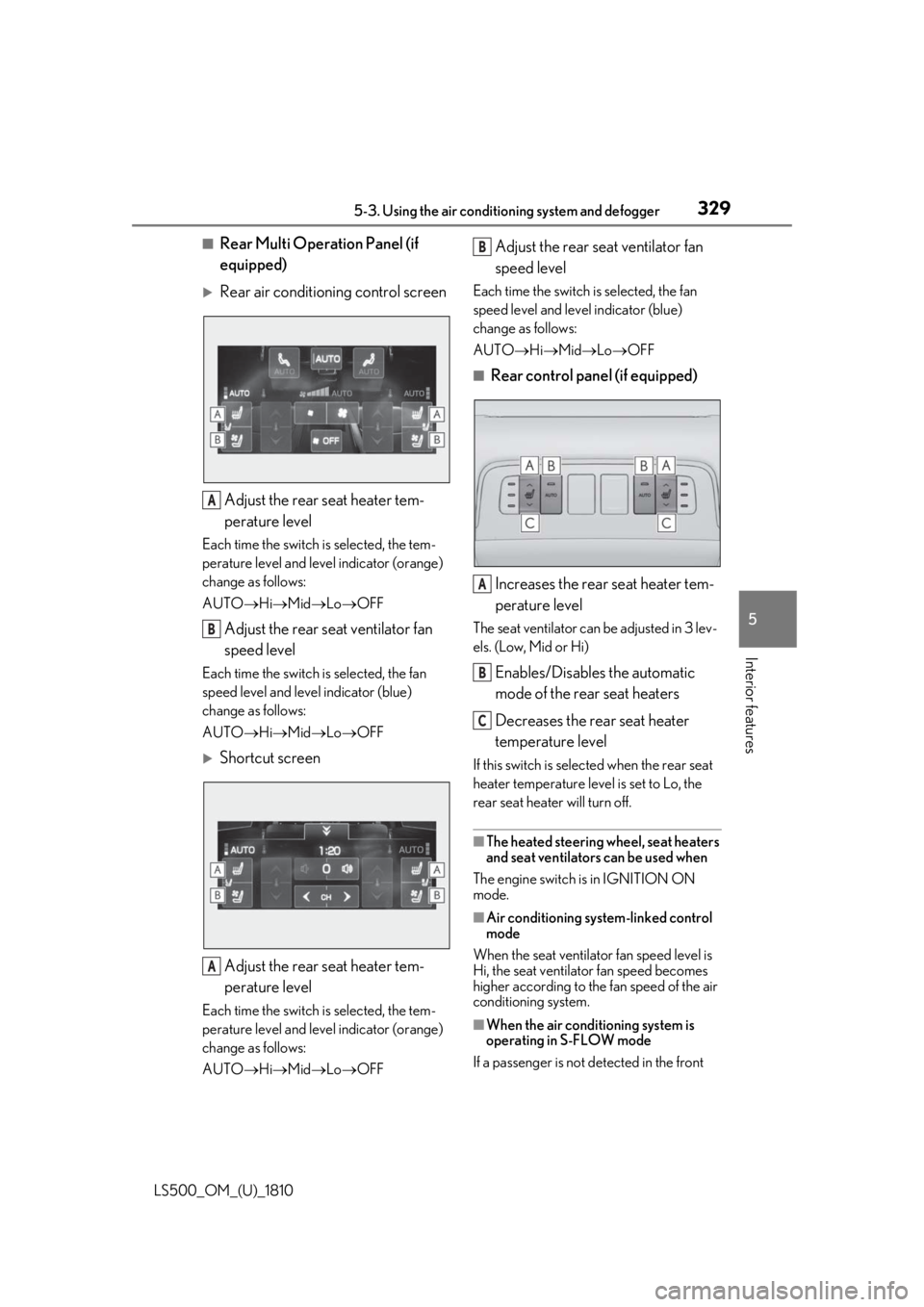
Rear Multi Operation Panel (if
equipped)
Rear air conditioning control screen
Adjust the rear seat heater tem-
perature levelEach time the switch is selected, the tem-
perature level and leve l indicator (orange)
change as follows:
AUTO Hi Mid Lo OFF
Adjust the rear seat ventilator fan
speed levelEach time the switch is selected, the fan
speed level and leve l indicator (blue)
change as follows:
AUTO Hi Mid Lo OFF
Shortcut screen
Adjust the rear seat heater tem-
perature levelEach time the switch is selected, the tem-
perature level and leve l indicator (orange)
change as follows:
AUTO Hi Mid Lo OFF Adjust the rear seat ventilator fan
speed level Each time the switch is selected, the fan
speed level and level indicator (blue)
change as follows:
AUTO Hi Mid Lo OFF■
Rear control panel (if equipped)
Increases the rear seat heater tem-
perature level The seat ventilator can be adjusted in 3 lev-
els. (Low, Mid or Hi)
Enables/Disables the automatic
mode of the rear seat heaters
Decreases the rear seat heater
temperature level If this switch is select ed when the rear seat
heater temperature level is set to Lo, the
rear seat heater will turn off.
■
The heated steering wheel, seat heaters
and seat ventilators can be used when
The engine switch is in IGNITION ON
mode.
■
Air conditioning system-linked control
mode
When the seat ventilator fan speed level is
Hi, the seat ventilato r fan speed becomes
higher according to the fan speed of the air
conditioning system.
■
When the air conditioning system is
operating in S-FLOW mode
If a passenger is not detected in the front A
B
A B
A
B
C