2019 LEXUS LS500 ECO mode
[x] Cancel search: ECO modePage 98 of 512
98 3-1. Key information
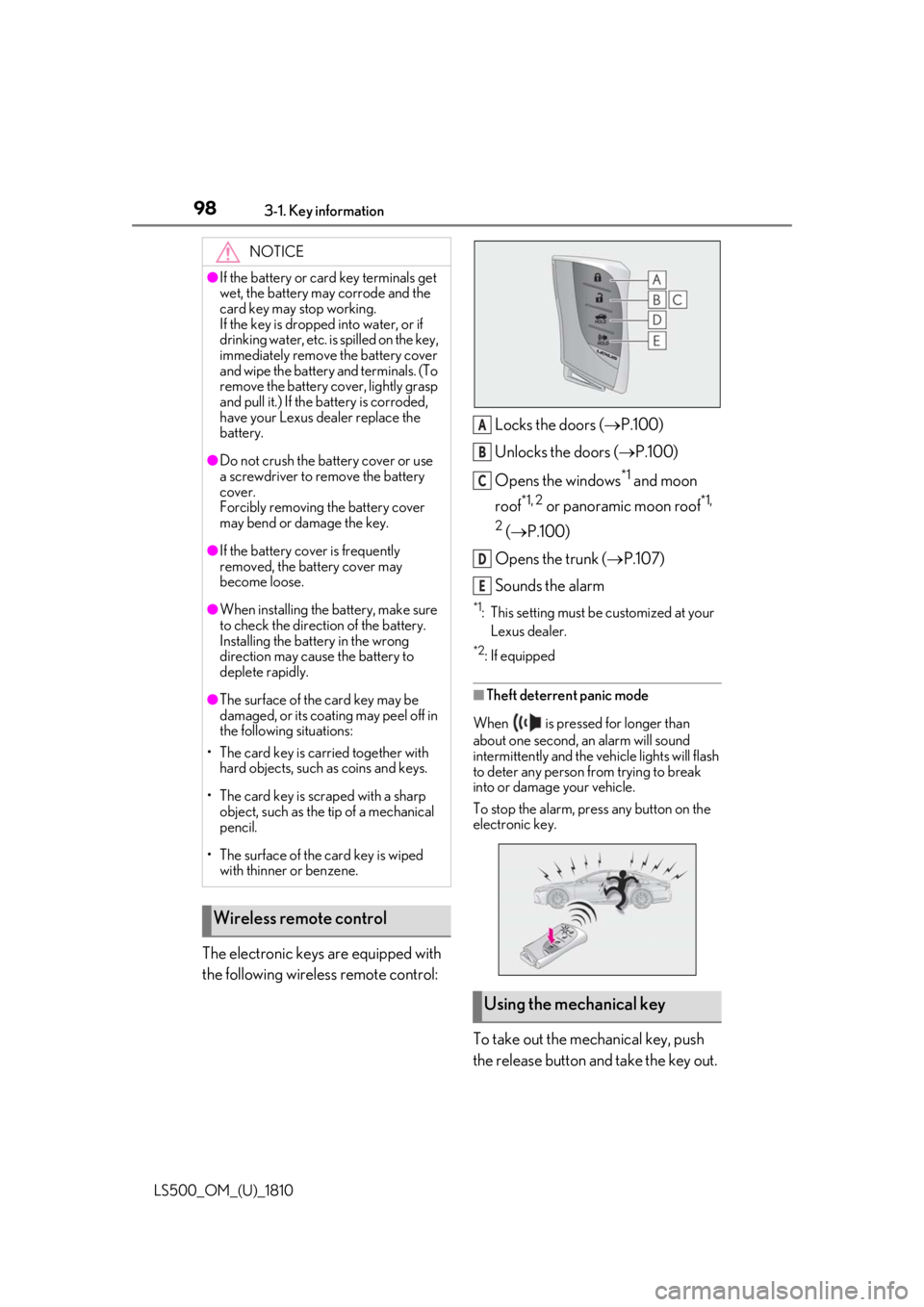
LS500_OM_(U)_1810 The electronic keys are equipped with
the following wireless remote control: Locks the doors ( P.100)
Unlocks the doors ( P.100)
Opens the windows *1
and moon
roof *1, 2
or panoramic moon roof *1,
2
( P.100)
Opens the trunk ( P.107)
Sounds the alarm *1
: This setting must be customized at your
Lexus dealer. *2
: If equipped
■
Theft deterrent panic mode
When is pressed for longer than
about one second, an alarm will sound
intermittently and the vehicle lights will flash
to deter any person from trying to break
into or damage your vehicle.
To stop the alarm, press any button on the
electronic key.
To take out the mechanical key, push
the release button and take the key out.NOTICE●
If the battery or card key terminals get
wet, the battery may corrode and the
card key may stop working.
If the key is dropped into water, or if
drinking water, etc. is spilled on the key,
immediately remove the battery cover
and wipe the battery and terminals. (To
remove the battery co ver, lightly grasp
and pull it.) If the battery is corroded,
have your Lexus dealer replace the
battery.●
Do not crush the battery cover or use
a screwdriver to remove the battery
cover.
Forcibly removing the battery cover
may bend or damage the key.●
If the battery cover is frequently
removed, the battery cover may
become loose.●
When installing the ba ttery, make sure
to check the direction of the battery.
Installing the battery in the wrong
direction may cause the battery to
deplete rapidly.●
The surface of the card key may be
damaged, or its coating may peel off in
the following situations:
• The card key is carried together with
hard objects, such as coins and keys.
• The card key is scraped with a sharp
object, such as the tip of a mechanical
pencil.
• The surface of the card key is wiped
with thinner or benzene.
Wireless remote control
Using the mechanical key A
B
C
D
E
Page 103 of 512

1033-2. Opening, closing and locking the doors and trunk
LS500_OM_(U)_1810 3
Before driving When the door is unlocked, the inside lock
button will pop up.
■
Locking the front doors from the outside
without a key
1 Push down the inside lock button.
2 Close the door.
The door cannot be locked if the engine
switch is in ACCESSORY or IGNITION
ON mode, or the electronic key is left
inside the vehicle. However, the key may not
be detected correctly and the door may be
locked. ■
Door closer (if equipped)
In the event that a door is left slightly open,
the door closer will automatically close it to
the fully closed position. ●
The door closer will operate regardless
of the engine switch mode.●
The door closer will not function if the
door has been clos ed while pulling the
inside or outside door handle.●
The door can be opened by pulling the
inside or outside door handle, even when
the door closer is operating (except
when the lock button is in the lock posi-
tion or the child-protector lock is set).
●
A motor sound may be heard for several
seconds after the door closer closes the
door. This does not indicate a malfunc-
tion.
■
Open door warning buzzer
If a door or the trunk is not fully closed, a
buzzer will sound when the vehicle speed
reaches 3 mph (5 km/h).
The open door(s) or trunk is indicated on
the multi-information display. The door cannot be opened from
inside the vehicle when the lock is set. WARNING■
Door closer (if equipped)
In the event that a d oor is left slightly
open, the door closer will automatically
close it to the fully closed position. It
takes several second s before the door
easy closer begins to operate.
If the child-protector lock is set, the door
closer will not stop during operation even
if an attempt is made to open the door
from inside the vehicle. Be careful not to
catch fingers or anything else in the door.
Failure to do so may result in serious
injury.
NOTICE■
To prevent door closer malfunction (if
equipped)
Do not frequently repeat opening and
closing of doors, or apply excessive force
to a door while the door closer is operat-
ing.
Rear door child-protector lock
Page 106 of 512

106 3-2. Opening, closing and locking the doors and trunk
LS500_OM_(U)_1810 ■
Trunk opener switch
Press the trunk opener switch. If the vehicle is equipped with a power
trunk opener and closer, the trunk lid will
fully open.WARNING●
On an incline, the trunk lid may sud-
denly shut after it opens automatically.
Make sure the trunk lid is fully open
and secure before using the trunk.●
In the following situations, the power
trunk opener and closer may detect an
abnormality and automatic operation
may be stopped. In this case, the trunk
lid has to be operated manually. Take
extra care in this situation, as the
stopped trunk lid ma y suddenly shut,
causing an accident.
• When the trunk lid contacts an obsta-
cle
• When the battery voltage suddenly
drops, such as when the engine switch
is turned to IGNITION ON mode or
the engine is started during automatic
operation●
Do not attach any accessories other
than genuine Lexus parts to the trunk
lid. The power trunk opener and closer
may not operate, caus ing itself to mal-
function, or the trun k lid may suddenly
shut again after it is opened.■
Hands Free Power Trunk Lid (if
equipped)
Observe the following precautions.
Failure to do so may cause serious injury.
●
Exhaust gasses cause the exhaust
pipes to become quite hot. When
operating the Hands Free Power Trunk
Lid, be careful not to touch the exhaust
pipe.
●
Do not operate the Hands Free Power
Trunk Lid if there is little space under
the rear bumper.
■
Jam protection function
Observe the following precautions.
Failure to do so may cause serious injury.
●
Never use any part of your body to
intentionally activate the jam protec-
tion function. ●
The jam protection function may not
work if something gets caught just
before the trunk lid fully closes. Be
careful not to catch fingers or anything
else in the trunk lid. ●
The jam protection function may not
work depending on the shape of the
object that is caught. Be careful not to
catch fingers or anything else.
NOTICE■
To prevent trunk easy closer malfunc-
tions
Do not apply force to the trunk lid while
the trunk easy closer is operating. ■
To prevent damage to the power
trunk opener and closer (vehicles
with power trunk opener and closer) ●
Make sure that there is no luggage or
snow on the trunk lid before operating
the power trunk opener and closer. In
addition, make sure that there is no ice
between the trunk lid and frame that
prevents movement of the trunk lid.
Operating the power trunk opener
and closer when excessive load is
present on the trunk lid may cause a
malfunction.
●
Do not apply excessive force to the
trunk lid while the power trunk opener
and closer is operating.
Opening/closing the trunk
Page 112 of 512

112 3-2. Opening, closing and locking the doors and trunk
LS500_OM_(U)_1810 ■
Effective range (areas within which the
electronic key is detected)
When locking or unlocking the doors
The system can be operated when the
electronic key is within about 2.3 ft. (0.7 m)
of an outside door handle. (Only the doors
detecting the key can be operated.)
When opening the trunk
The system can be operated when the
electronic key is within about 2.3 ft. (0.7 m)
of the trunk release button.
When starting the engine or changing
engine switch modes
The system can be operated when the
electronic key is inside the vehicle. ■
Alarms and warning messages
An alarm sounds and warning messages
are displayed on the multi-information dis-
play to protect against unexpected acci-
dents or theft of the vehicle resulting from
erroneous operation. When a warning mes-
sage is displayed, take appropriate mea-
sures based on the displayed message.
( P.425)
When only an alarm sounds, circumstances
and correction procedures are as follows.
●
When an exterior alarm sounds once for
5 seconds ●
When an interior alarm sounds continu-
ously
■
If “Key Detected in Vehicle” is shown on
the multi-information display
An attempt was made to lock the doors
using the smart access system with
push-button start while the electronic key
was still inside the vehicle. Retrieve the elec-
tronic key from the vehicle and lock the
doors again.
■
Battery-saving function
The battery-saving function will be acti-
vated in order to prevent the electronic key
battery and the battery from being dis-
charged while the vehicle is not in operation
for a long time.
●
In the following situations, the smart
access system with pu sh-button start may A
B
C Situation Correction
procedure
An attempt was made to
lock the vehicle while a
door was open. Close all of the
doors and lock
the doors
again.
The trunk was closed
while the electronic key
was still inside the trunk
and all the doors were
locked. Retrieve the
electronic key
from the trunk
and close the
trunk lid.
Situation Correction
procedure
The engine switch was
turned to ACCESSORY
mode while the driver’s
door was open (The
driver’s door was opened
when the engine switch
was in ACCESSORY
mode). Turn the engine
switch off and
close the
driver’s door.
The engine switch was
turned off while the
driver’s door was open. Close the
driver’s door.
Page 114 of 512

114 3-2. Opening, closing and locking the doors and trunk
LS500_OM_(U)_1810 engine is started or engine switch modes
are changed.●
Do not leave the electronic key on top of
the instrument panel or near the door
pockets when exiting the vehicle.
Depending on the radio wave reception
conditions, it may be detected by the
antenna outside the cabin and the doors
will become lockable from the outside,
possibly trapping the electronic key
inside the vehicle.●
As long as the electron ic key is within the
effective range, the doors may be locked
or unlocked by anyone. However, only
the doors detecting the electronic key
can be used to unlock the vehicle.●
Even if the electronic key is not inside the
vehicle, it may be possible to start the
engine if the electronic key is near the
window.●
The doors may unlock or lock if a large
amount of water spla shes on the door
handle, such as in the rain or in a car
wash, when the electronic key is within
the effective range. (The doors will auto-
matically be locked after approximately
60 seconds if the d oors are not opened
and closed.)●
If the wireless remote control is used to
lock the doors when the electronic key is
near the vehicle, there is a possibility that
the door may not be unlocked by the
entry function. (Use the wireless remote
control to unlock the doors.)●
Touching the door lock sensor while
wearing gloves may delay or prevent lock
operation.●
When the lock operation is performed
using the lock sensor, recognition signals
will be shown up to two consecutive
times. After this, no recognition signals
will be given.
●
If the door handle becomes wet while the
electronic key is within the effective
range, the door may lock and unlock
repeatedly. In this case, follow the follow-
ing correction procedures to wash the
vehicle:
• Place the electronic key in a location 6 ft.
(2 m) or more away from the vehicle.
(Take care to ensure that the key is not stolen.)
• Set the electronic key to battery-saving
mode to disable the smart access system
with push-button start. ( P.113)●
If the electronic key is inside the vehicle
and a door handle becomes wet during a
car wash, a message may be shown on
the multi-information display and a
buzzer will sound outside the vehicle. To
turn off the alarm, lock all the doors. ●
The lock sensor may not work properly if
it comes into contact with ice, snow, mud,
etc. Clean the lock sensor and attempt to
operate it again. ●
A sudden approach to the effective
range or door handle may prevent the
doors from being unlocked. In this case,
return the door handle to the original
position and check that the doors unlock
before pulling the door handle again. ●
If there is another electronic key in the
detection area, it may take slightly longer
to unlock the doors after the door handle
is gripped. ■
When the vehicle is not driven for
extended periods ●
To prevent theft of the vehicle, do not
leave the electronic key within 6 ft. (2 m)
of the vehicle. ●
The smart access system with push-but-
ton start can be deactivated in advance. ●
Setting the electronic key to battery-sav-
ing mode helps to reduce key battery
depletion. ( P.113)■
To operate the system properly ●
Make sure to carry the electronic key
when operating the system. Do not get
the electronic key too close to the vehicle
when operating the system from the out-
side of the vehicle.
Depending on the position and holding
condition of the electr onic key, the key may
not be detected correctly and the system
may not operate properly. (The alarm may
go off accidentally, or the door lock pre-
vention function may not operate.)
●
Do not leave the electr onic key inside the
trunk.
Page 121 of 512

1213-3. Adjusting the seats
LS500_OM_(U)_1810 3
Before driving ■
Using the driver’s seat adjustment
switches to adjust the front passen-
ger’s seat (front passenger mode)
The mode of the driver’s seat adjust-
ment switches can be changed to
adjust the front passenger’s seat.
1 Press the mode change button on
the driver’s side door.The indicator will illuminate when front
passenger mode is selected.
2 Using the seat adjustment switches
on the driver’s seat, adjust the front
passenger’s seat.To cancel front passenger mode, press the
mode change button again.
Front passenger mode will be canceled
automatically if the driv er’s seat adjustment
switches are not operated for approxi-
mately 30 seconds. ■
Using the Center Display (vehicles
with a foldable head restraint)
1 Press the seat switch.
2 Press the sub function button of the
Remote Touch. ( P.304)
3 Select the button for the desired
operation.
Moves the front passenger’s seat
forward and folds the seatback and
head restraint forward
Moves the front passenger’s seat
backward and the seatback and
head restraint to the upright posi-
tion If the rear seat behind the front passenger’s
seat is not in the up right position, it will
move to the upright position before the
front passenger’s seat moves to its upright
position.
To stop the front passen ger seat while it is
moving, select the or button or
press the seat switch.Operating the front passenger’s
seat from the driver’s seat
A
A
B
A B
Page 130 of 512

130 3-3. Adjusting the seats
LS500_OM_(U)_1810 If a seat is not occupi ed, do not operate the
rear seat relaxation system for that seat. ■
Relaxation system●
Operating conditions
• The engine switch is in IGNITION ON
mode.
• The temperature in the cabin is not
extremely high.
• The weight of an occupant is detected on
the rear seat or the rear seat belt is fas-
tened.
Once weight is detect ed on the seat, the
seat will be judged as occupied until a rear
door is opened then closed or the engine
switch is turned off and the doors are
locked. ●
Automatic stop function
• The operation will be canceled automati-
cally after approximately 15 minutes.
• If the door for a seat that the relaxation
system is currently being used is opened,
the relaxation system will stop operating.
The seat and steering wheel are auto-
matically adjusted to allow the driver to
enter and exit the vehicle easily.
Driver’s seat
When all of the following have been
performed, the seat and steering
wheel are automatically adjusted to a
position that allows driver to enter and
exit the vehicle easily.
• The shift position has been shifted to
P.
• The engine switch has been turned
off.
• The driver’s seat belt has been
unfastened. When the driver’s seat adjustment
switches are in front passenger mode
( P.121), the seat and steering wheel will
not move.WARNING■
Using the relaxation system●
Those who are pregnant, have recently
given birth, or suffer from ailments
requiring rest (heart disease etc.)
should consult a doctor before use.
●
Do not allow children to use the relax-
ation function.
●
Do not use immediately after consum-
ing a meal or alcohol, or for an
extended period of time.
●
If you feel sick while using the relax-
ation function, immediately discon-
tinue use. Driving position memory This feature automatically adjusts
the positions of the front seats,
steering wheel, outside rear view
mirrors and head-up display (if
equipped) to make entering and
exiting the vehicle easier or to suit
your preferences.
Up to 3 different driving positions
can be recorded.
Each electronic key (including a
card key) can be registered to
recall your preferred driving posi-
tion.
Power easy access system
Page 131 of 512

1313-3. Adjusting the seats
LS500_OM_(U)_1810 3
Before driving On vehicles with adjustable seat cush-
ion side bolsters, when the driver’s
door is opened with the engine switch
off, the seat cushio n side bolsters will
lower if they are in the default position.
When any of the following has been
performed, the seat and steering
wheel automatically return to their
original positions.
• The engine switch has been turned
to ACCESSORY mode or IGNI-
TION ON mode.
• The driver’s seat belt has been fas-
tened.
Front passenger’s seat
If all of the following have been per-
formed while the vehicle is stopped,
the lumbar support, pelvic support,
shoulder bolster (if equipped), seat-
back side bolster (if equipped), and hip
support (if equipped) will be moved to
their default position. On vehicles with
adjustable seat cushion side bolsters,
the seat cushion side bolsters will
lower.
• The passenger’s seat belt has been
unfastened.
• The front passenger’s door is
opened. ■
Operation of the power easy access sys-
tem ●
When exiting the vehicle, the power easy
access system may not operate if the seat
is already in the rearmost or uppermost
position or close to the rear seat. ●
If the seat position is adjusted during
power easy access syst em operation, the
automatic operation will stop. (The seat
will change to manual operation.) ●
If the seat position is adjusted during or
after the power easy access system oper-
ation when the driver is exiting the vehi-
cle, the power easy access system will not
operate when entering the vehicle. ■
Seat cushion side bolster adjustment (if
equipped)
If the seat cushion side bolsters have been
lowered, when the front door is closed, the
seat cushion side bolsters will move to their
default position.
If the seat is adjusted while the seat cushion
side bolsters are moving to the default posi-
tion, their movement will be temporarily
suspended. (The seat cushion side bolsters
will move to the default position after a cer-
tain amount of time.) ■
Customization
Some functions can be customized.
( P.466)
1 Turn the engine switch to IGNI-
TION ON mode.
2 Check that the shift position is in P.
3 Adjust the driver’s seat, steering
wheel, outside rear view mirrors
and head-up display (if equipped)
to the desired positions.
4 While pressing the “SET” button, or
within 3 seconds after the “SET” Recording a driving position into
memory