Page 49 of 600

491-1. For safe use
1
For safety and security
GS450h_300h_OM_OM30F92E_(EE)
■If the SRS airbags deploy (inflate)
●Slight abrasions, burns, bruising etc., may be sustained from SRS airbags, due to the extremely high speed deployment (inflation) by hot gases.
●A loud noise and white powder will be emitted.
●Parts of the airbag module (steering wheel hub, airbag cover and inflator) as well as theseats, the glove box, parts of the front and re ar pillars, and roof side rails may be hot for several minutes. The airbag itself may also be hot.
●The windshield may crack.
●Vehicles with ERA-GLONASS: If the SRS ai rbags deploy, the system is designed to send an emergency call* to the Public Safety Answer ing Point (PSAP), notifying them
of the vehicle’s location (without needing to push the “SOS” button) and an agent will attempt to speak with the occupants to ascertain the level of emergency and assistancerequired. If the occupants are unable to communicate, the agent automatically treats
the call as an emergency and helps to di spatch the necessary emergency services. ( P. 384)
*: In some cases, the call cannot be made. (P. 386)
■SRS airbag deployment conditions (SRS front airbags)
●The SRS front airbags will deploy in the event of an impact that exceeds the set thresh- old level (the level of force corresponding to an approximately 20 - 30 km/h [12 - 18mph] frontal collision with a fixed wall that does not move or deform).
However, this threshold velocity will be cons iderably higher in the following situations:
• If the vehicle strikes an object, such as a parked vehicle or sign pole, which can move or deform on impact
• If the vehicle is involved in an underride collision, such as a collision in which the front of the vehicle “underrides”, or goes under, the bed of a truck
●Depending on the type of collision, it is possib le that only the seat belt pretensioners will activate.
■SRS airbag deployment conditions (SRS side and curtain shield airbags)
●The SRS side and curtain shield airbags w ill deploy in the event of an impact that exceeds the set threshold level (the level of force corresponding to the impact forceproduced by an approximately 1500 kg [3300 lb.] vehicle colliding with the vehicle
cabin from a direction perpendicular to the vehicle orientation at an approximate speed of 20 - 30 km/h [12 - 18 mph]).
●The SRS side and curtain shield airbags may also deploy in the event of a severe frontal
collision.
Page 54 of 600
541-1. For safe use
GS450h_300h_OM_OM30F92E_(EE)
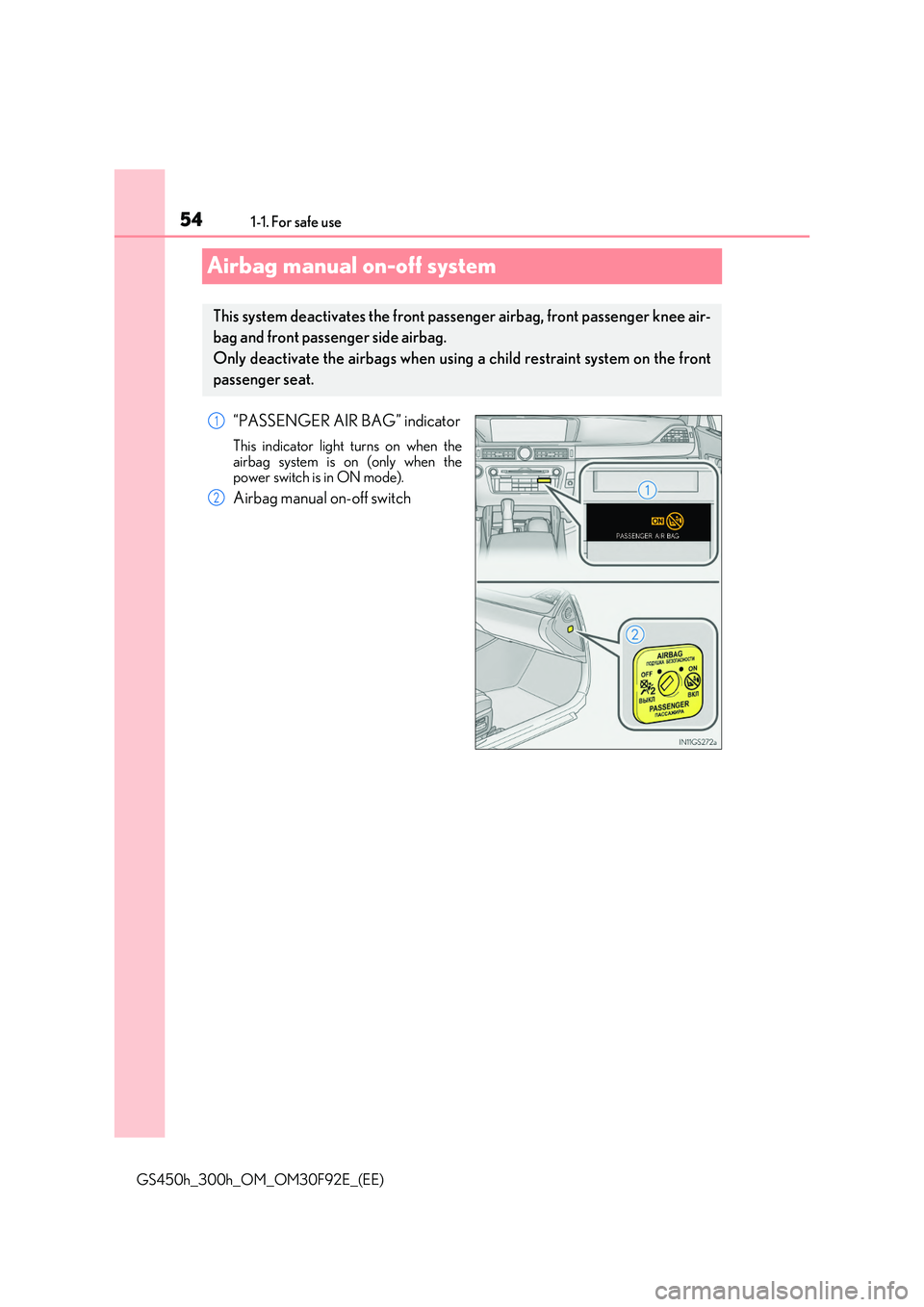
Airbag manual on-off system
“PASSENGER AIR BAG” indicator
This indicator light turns on when the
airbag system is on (only when the power switch is in ON mode).
Airbag manual on-off switch
This system deactivates the front passenger airbag, front passenger knee air-
bag and front passenger side airbag.
Only deactivate the airbags when using a child restraint system on the front
passenger seat.
1
2
Page 55 of 600

551-1. For safe use
1
For safety and security
GS450h_300h_OM_OM30F92E_(EE)
Insert the mechanical key into the cylin-
der and rotate to the “OFF” position.
The “OFF” indicator light turns on (only
when the power switch is in ON mode).
■“PASSENGER AIR BAG” indicator information
If any of the following problems occur, it is possible that there is a malfunction in the sys- tem. Have the vehicle inspected by any au thorized Lexus retailer or Lexus authorized repairer, or any reliable repairer.
●Neither “ON” nor “OFF” comes on.
●The indicator light does not change when the airbag manual on-off switch is switchedto “ON” or “OFF”.
Deactivating the front seat passenge r airbag, front passenger knee air-
bag and front passenger side airbag
WARNING
■When installing a child restraint system
For safety reasons, always install a child rest raint system in a rear seat. In the event that
the rear seat cannot be used, the front seat can be used as long as the airbag manual on-off system is set to off.If the airbag manual on-off system is left on, the strong impact of the airbag deployment
(inflation) may cause serious injury or even death.
■When a child restraint system is not installed on the front passenger seat
Ensure that the airbag manual on-off system is set to on.
If it is left off, the airbag may not deploy in the event of an accident, which may result in serious injury or even death.
Page 101 of 600

1012. Instrument cluster
2
Instrument cluster
GS450h_300h_OM_OM30F92E_(EE)
The indicators inform the driver of the operating state of the vehicle’s various sys-
tems.
Indicators
Turn signal indicator ( P. 231) Rear fog light indicator ( P. 250)
Tail light indicator
( P. 237)
Cruise control indicator
( P. 304, 308)
Headlight high beam indicator ( P. 238)(If equipped)
Dynamic radar cruise control indicator
( P. 296)
(If equipped)
Automatic High Beam indicator ( P. 246)/
Adaptive High-beam System indicator ( P. 242)
Cruise control “SET” indicator ( P. 296, 308)
Front fog light indicator ( P. 250)(If equipped)
LKA indicator (P. 286)
*1
(If equipped)
Lexus parking assist-sensor indicator
*2
Brake hold operated indicator ( P. 235)
*3
(If equipped)
“AFS OFF” indicator ( P. 239)
*3, 4“PASSENGER AIR BAG” indicator
( P. 54)
*2, 5
Slip indicator (P. 326)*6Low outside temperature indicator ( P. 104)
*2VSC OFF indicator ( P. 327)“READY” indicator ( P. 217)
*3, 7
(If equipped)
PCS (Pre-Crash Safety system) warning light ( P. 273) EV indicator (P. 78)
Page 115 of 600

1152. Instrument cluster
2
Instrument cluster
GS450h_300h_OM_OM30F92E_(EE)
■Display off
A blank screen is displayed
*1: Displayed when the item is set in “Drive Info 1”, “Drive Info 2” or “Drive Info 3”.
( P. 562)
*2: The function can be reset by pressing the of the meter control switches for longer
than 1 second when the item to reset is displayed.
If there is more than one item that can be reset, the item selection screen will appear.
The settings of the following items can be changed, refer to P. 561
For functions that can be enabled or disabled, the function switches between on and
off each time is pressed.
■ (Lane-Keeping Assist) (if equipped) ( P. 282)
■ (Pre-Crash Safety system) (if equipped) (P. 270)
■ (Adaptive Front-lighting System) (if equipped) (P. 239)
■ (Blind Spot Monitor) (if equipped) (P. 314)
■
Select to turn the speed warning on and off, or to change the speed at which
the speed warning is displayed.
■ (Road Sign Assi st) (if equipped) (P. 291)
■
Select to set the display mode of the clock.
■
●Oil Maintenance ( P. 408)
●TPMS (Tire pressure warning system) (if equipped) (P. 418)
Settings display
Page 140 of 600

1403-2. Opening, closing and locking the doors and trunk
GS450h_300h_OM_OM30F92E_(EE)
■Operation signals
The emergency flashers flash to indicate that the doors have been locked/unlocked. (Locked: once; Unlocked: twice)
■Security feature
If a door is not opened within approximately 30 seconds after the vehicle is unlocked, the security feature automatically locks the vehicle again.
■Welcome light illumination control
The front position, tail and license plate lights automatically turn on at night when the doors are unlocked using the entry function or wireless remote control if the light switch is in the “AUTO” position.
■When the door cannot be locked by the lock sensor on the upper part of the door han-dle (vehicles with entry function)
■Door lock buzzer
If an attempt to lock the doors is made when a door is not fully closed, a buzzer sounds
continuously for 5 seconds. Fully close the door to stop the buzzer, and lock the vehicle once more.
■Setting the alarm
Locking the doors will set the alarm system. ( P. 91)
■If the smart entry & start system or wireless remote control does not operate properly
●Use the mechanical key to lock and unlock the doors. (P. 527)
●Replace the key battery with a new one if it is depleted. (P. 435)
If the door will not lock even when the topside sensor area is touched, try touching both thetopside and underside sensor areas at the same
time.
Page 181 of 600

1813-3. Adjusting the seats
3
Operation of each component
GS450h_300h_OM_OM30F92E_(EE)
■Operating the driving position memory after turning the power switch off
Driver’s seat: Recorded seat positions can be activated up to 180 seconds after the driver’s door is
opened and another 60 seconds after it is closed again.
Front passenger’s seat: Recorded seat positions can be activated up to 180 seconds after the front passenger’s
door is opened.
■In order to correctly use the driving position memory function
If a seat position is already in the furthest possible position and the seat is operated in the
same direction, the recorded position may be slightly different when it is recalled.
Each electronic key (including a card key) can be registered to recall your pre-
ferred driving position.
■Registering procedure
Record your driving position to button “1”, “2” or “3” before performing the
following:
Carry only the key you want to register, and then close the driver’s door.
If 2 or more keys are in the vehicle, the driving position cannot be recorded
properly.
Check that the shift lever is in P.
Turn the power switch to ON mode.
Recall the driving position that you want to record.
While pressing the recalled but-
ton, press and hold the door lock
switch (either lock or unlock) until
the buzzer sounds.
If the button could not be registered, the buzzer sounds continuously forapproximately 3 seconds.
Memory recall function (driver’s side only)
1
2
3
4
Page 193 of 600
193
3
3-5. Opening, closing the windows and moon roof
Operation of each component
GS450h_300h_OM_OM30F92E_(EE)
Power windows
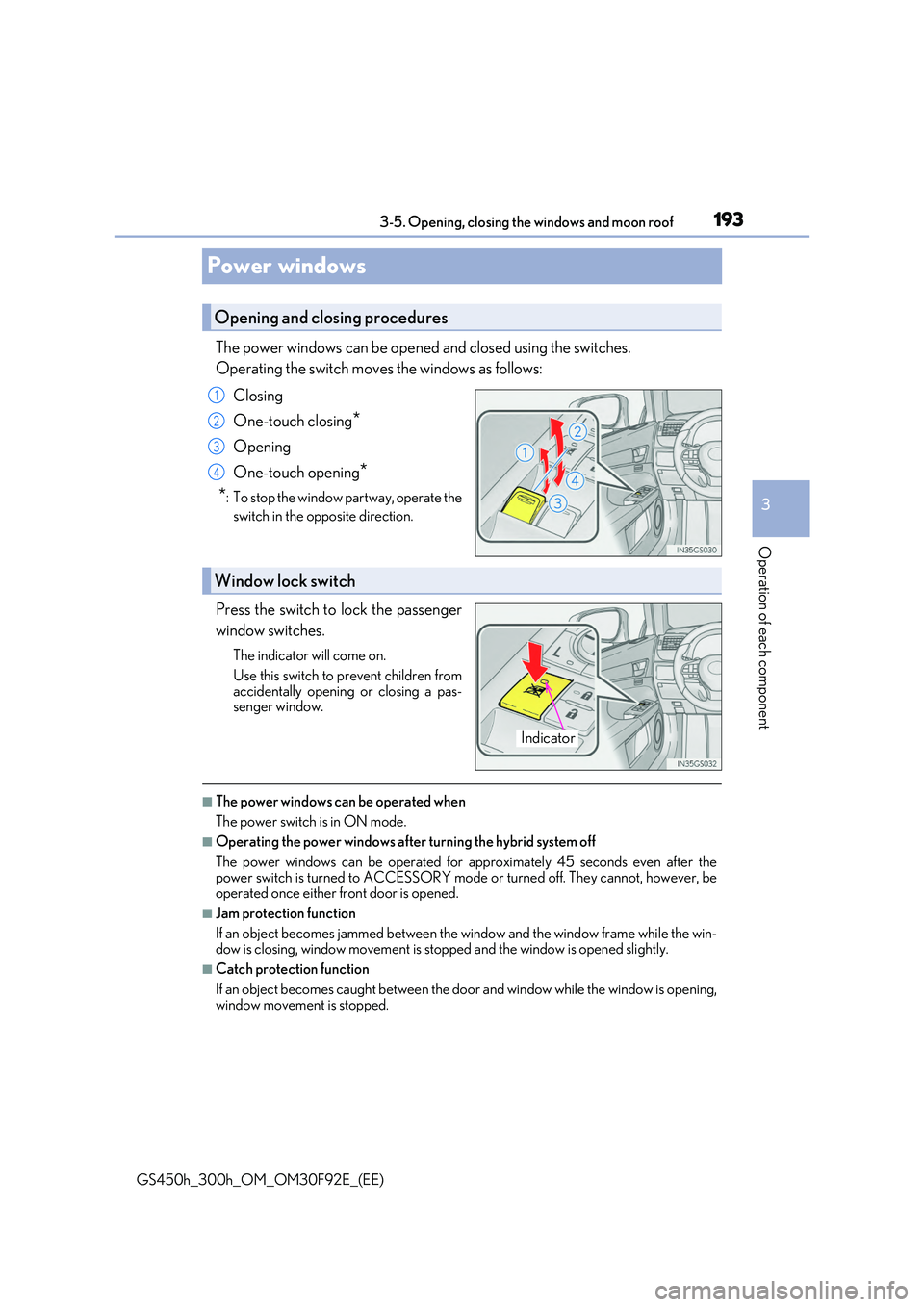
The power windows can be opened and closed using the switches.
Operating the switch moves the windows as follows:
Closing
One-touch closing*
Opening
One-touch opening*
*: To stop the window partway, operate the
switch in the opposite direction.
Press the switch to lock the passenger
window switches.
The indicator will come on.
Use this switch to prevent children from
accidentally opening or closing a pas- senger window.
■The power windows can be operated when
The power switch is in ON mode.
■Operating the power windows after turning the hybrid system off
The power windows can be operated for approximately 45 seconds even after the power switch is turned to ACCESSORY mode or turned off. They cannot, however, be
operated once either front door is opened.
■Jam protection function
If an object becomes jammed between the window and the window frame while the win-
dow is closing, window movement is stop ped and the window is opened slightly.
■Catch protection function
If an object becomes caught between the door and window while the window is opening,
window movement is stopped.
Opening and closing procedures
1
2
3
4
Window lock switch
Indicator