2019 KIA SOUL engine
[x] Cancel search: enginePage 231 of 564
4145
Features of your vehicle
Use the power outlet only when theengine is running and remove the
accessory plug after use. Using the
accessory plug for prolonged peri-
ods of time with the engine off could
cause the battery to discharge.
Only use 12V electric accessories which are less than 10A(Driver’s
side) or 15A(Passenger’s side) in
electric capacity.
Adjust the air-conditioner or heater to the lowest operating level when
using the power outlet.
Close the cover when not in use.
Some electronic devices can cause electronic interference when
plugged into a vehicle’s power out-
let. These devices may cause
excessive audio static and malfunc-
tions in other electronic systems or
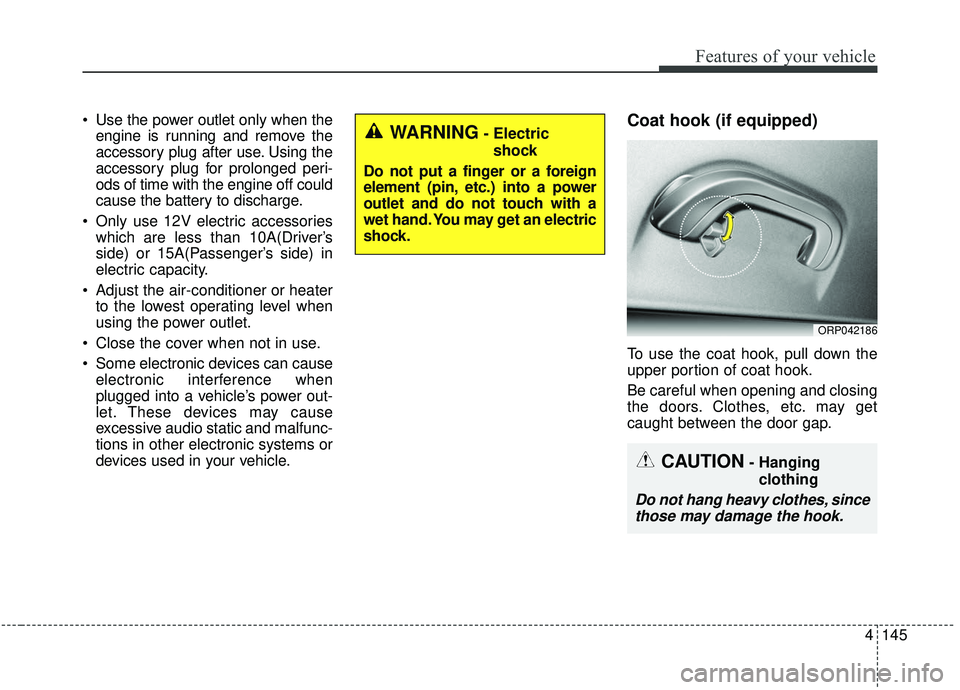
devices used in your vehicle.Coat hook (if equipped)
To use the coat hook, pull down the
upper portion of coat hook.
Be careful when opening and closing
the doors. Clothes, etc. may get
caught between the door gap.
ORP042186
WARNING- Electric
shock
Do not put a finger or a foreign
element (pin, etc.) into a power
outlet and do not touch with a
wet hand. You may get an electric
shock.
CAUTION- Hanging clothing
Do not hang heavy clothes, sincethose may damage the hook.
Page 243 of 564

Audio system
55
1. OFF : The light turns off.
2. MUSIC :
The red light blinks according to the
sound of the audio.
If the audio is not turned on, the
light does not turn on.
3. MOOD : The light color changes automati-
cally at regular interval.
4. +/- : When the lights are on, push the
illumination button to adjust the
light intensity.
If low lighting grade is selected, the
intensity of light may be weak or
may not illuminate according to the
audio volume or selected condition.
The lighting around the front speaker
may not illuminate when the sound of
the audio is low.
Do not use the lights for extended
periods when the engine is not run-
ning.
It may cause battery discharge.
✽ ✽ NOTICE
When the doors are opened, the
lighting system will not operate.
Page 253 of 564
Audio system
15
5
✽ ✽
NOTICE
Refrain from use if the screen is
blank or no sound can be heard as
these signs may indicate product
malfunction. Continued use in this
condition may further damage the
system.
WARNING- Antenna
Do not touch the antenna dur-
ing thunder or lightning
because such an act may cause
electric shock.
CAUTION- LCD Monitor
Do not subject the device to
severe shock or impact. Direct
pressure onto the front side of
the monitor may cause damage
to the LCD or touch screen.
CAUTION
When cleaning the device, make sure to turn off theaudio system and use a dryand smooth cloth.
Do not place beverages close to the audio system. Spillingbeverages may lead to systemmalfunction.
Never use rough materials, chemical cloths, or solvents(alcohol, benzene, thinners,etc.) as such materials maydamage the device panel orcause color/quality deteriora-tion.
Prevent caustic solutions such as perfume and cosmetic oilfrom contacting the dashboardbecause they may cause dam-age or discoloration.
CAUTION
Adjust the volume to levels that allow the driver to hearsounds from outside of thevehicle. Driving in a statewhere external sounds cannotbe heard may lead to acci-dents.
Pay attention to the volume setting when turning thedevice on. A sudden output ofextreme volume upon turningthe device on could lead tohearing impairment. (Adjustthe volume to a suitable levelsbefore turning off the device.)
(Continued)
(Continued) Turn on the car engine before using this device. Do not oper-ate the audio system for longperiods of time only with theignition turned on as suchoperations may lead to batterydischarge.
In case of product malfunc- tion, please contact your placeof purchase or After Servicecenter.
Placing the audio system within an electromagneticenvironment may result innoise interference.
Page 260 of 564
Audio system
5224. Character display range (Unicode)
Filenames: Up to 63 English char-
acters (63 Korean characters)
Foldernames: Up to 31 English characters (31 Korean characters)
Languages supported (Unicode sup-
port)
Korean: 2,604 characters
English: 94 characters
Common Chinese characters: 4,888 characters
Special symbols: 986 characters
✽ ✽ NOTICE
Japanese/Simplified Chinese char-
acters are not supported.
✽ ✽NOTICE
-
Using the USB Devices
• Starting the vehicle while a USB
device is connected can damage
the device. Please disconnect USB
devices before starting the vehicle.
• Starting the vehicle or stopping the engine while an external USB
device is connected can result in
failure of the external USB device
to operate.
• Be cautious of static electricity when connecting/disconnecting
external USB devices.
• An encrypted MP3 player is not recognized when connected as an
external device.
• External USB devices may not be recognized, depending on the state
of the external USB device.
• Only products with byte/sectors formatted at 4 KB or lower are
recognized.
• Only USB devices in FAT12/16/32 format are recognized; NTFS and
ExFAT file systems are not recog-
nized.
• Some USB devices are not recog- nized due to compatibility issues. (Continued)(Continued)
• Do not touch the USB connections.
• Connecting and disconnecting
USB devices rapidly over a short
period of time can cause equip-
ment failure.
• Abnormal sounds may be audible when the USB device is discon-
nected.
• Turn the audio off before connect- ing or disconnecting external USB
devices.
• Recognition may take longer depending on the type, capacity or
file format of the external USB
device. This is not a product mal-
function.
• Use of USB devices for purposes other than playing music files is
prohibited.
• Image display and video playback are not supported.
• Use of USB accessories, including charge and heat though the USB
interface, can lead to reduced
product performance or malfunc-
tions. Do not use USB devices or
accessories for these purposes. (Continued)
Page 279 of 564
Audio system
41
5
Voice Recognition
✽ ✽
NOTICE
-
Using the Voice Recognition
• Voice recognition is a safety tech-
nology that recognizes user voice
commands and executes multime-
dia functions during driving.
• Unfortunately, due to technical limitations, the system is unable to
recognize all voice commands. To
address these limitations, the voice
commands that the system recog-
nizes are displayed on the screen.
Use the displayed commands.
• Because human speech varies, voice recognition is sometimes
unable to properly recognize user
voice commands. In these cases,
repeat the voice command dis-
played on the screen, or use the
button on the screen to execute the
desired function.
Precautions to ensure smooth voice
recognition
If the language setting is Korean,
voice recognition is not supported.
Voice recognition only supports voice commands indicated on-
screen or in the user manual.
For proper voice recognition, speak after the beep, which
sounds after voice notification.
Voice recognition automatically stops in the following events.
1) Outgoing and incoming phone calls.
2) Media (USB, etc.) is connected (voice recognition mode is main-
tained when iPod
®s are connected).
3) Rear camera is activated
(if
equipped)
.
4) Vehicle is started or engine is turned off.
5) Screen transition buttons, such as [RADIO] or [MEDIA], are
selected.
6) When a pop-up message is dis- played on the screen due to
accidental execution of the voice
recognition function. The voice recognition microphone
is located above the driver’s seat.
To ensure proper voice recogni-
tion, state voice commands while
maintaining proper driving posture.
Better voice recognition is possible if you speak naturally and clearly,
as you would in normal conversa-
tion.
In the following situations, outdoor noise may prevent proper voice
recognition.
1) Wind noise from an open win- dow or sunroof may disrupt
voice recognition.
2) Operating the climate blower at a high level may cause wind
noise that disrupts voice recog-
nition. The recommended set-
ting is 3 or below.
3) When passing through tunnels, vehicle echoes may disrupt
voice recognition.
4) When passing over uneven ter- rain, vehicle noise may disrupt
voice recognition.
5) Noise from rain in heavy storms may disrupt voice recognition.
Page 287 of 564
Audio system
49
5
Siri
✽ ✽
NOTICE - Using Siri
• Android device is not supported to
use Siri.
• If you want to use Siri, you have to connect your iOS device to the
multimedia system through
Bluetooth
®Wireless Technology.
(Please check whether your iOS
device supports Siri and turning
Siri On)
• If the iOS version is changed, the functions and response may be dif-
ferent according to the iOS device
and the latest version.
• Siri automatically stops in the fol- lowing events.
1) Outgoing and incoming phone calls.
2) Media (USB, etc.) is connected. (Siri mode is maintained when
iPod
®s are connected)
3) Rear camera is activated
(if
equipped).
4) Vehicle is started or engine is
turned off. (Continued)(Continued)
5) Screen transition buttons, such as RADIO or MEDIA, are
selected.
6) When a pop-up message is dis- played on the screen due to
accidental execution of Siri.
• The microphone is located above the driver’s seat. To ensure proper
Siri, state your voice while main-
taining proper driving posture.
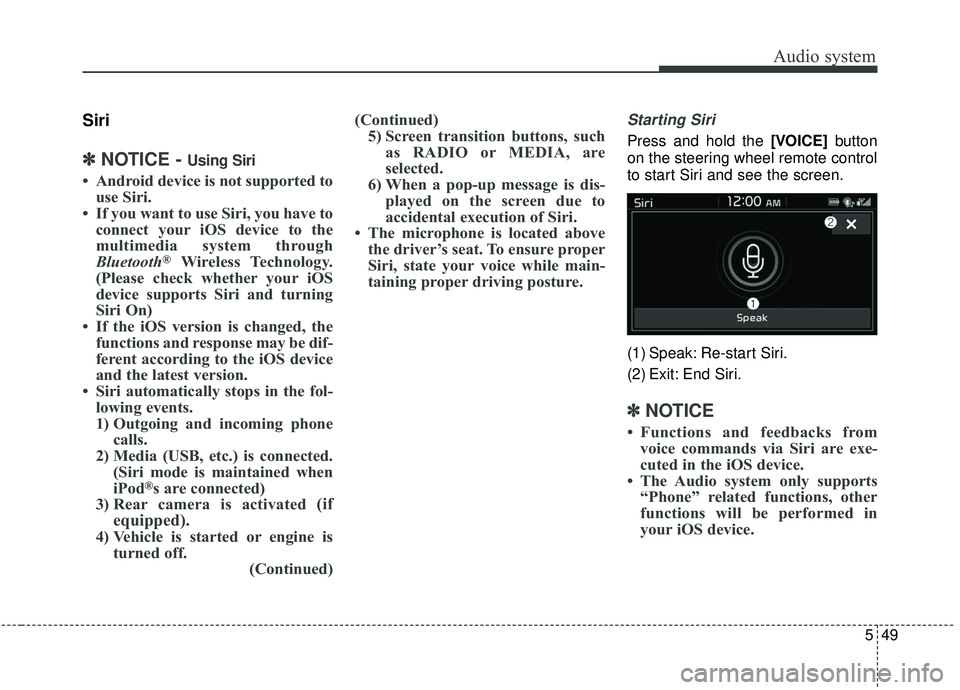
Starting Siri
Press and hold the [VOICE] button
on the steering wheel remote control
to start Siri and see the screen.
(1) Speak: Re-start Siri.
(2) Exit: End Siri.
✽ ✽ NOTICE
• Functions and feedbacks from
voice commands via Siri are exe-
cuted in the iOS device.
• The Audio system only supports “Phone” related functions, other
functions will be performed in
your iOS device.
Page 291 of 564

Driving your vehicle
• Be sure the exhaust system does not leak . . . . . . . . . . 6-3
Before driving . . . . . . . . . . . . . . . . . . . . . . . . . . . . . . 6-4
. . . . . . . . . . . . . . . . . . . . . . . . . 6-4
. . . . . . . . . . . . . . . . . . . . . . . . . . 6-4
. . . . . . . . . . . . . . . . . . . . . . . . . . . . . . . . 6-4
Key positions . . . . . . . . . . . . . . . . . . . . . . . . . . . . . . . 6-6
. . . . . . . . . . . . . . . . . . . . . . 6-6
. . . . . . . . . . . . . . . . . . . . . . . . . 6-6
. . . . . . . . . . . . . . . . . . . . . . . . . . . . 6-7
Engine start/stop button . . . . . . . . . . . . . . . . . . . . . 6-9
. . . . . . . . . . . . . . 6-9
position. . . . . . . . . . . . . . . . . 6-9
. . . . . . . . . . . . 6-11
Manual transaxle . . . . . . . . . . . . . . . . . . . . . . . . . . 6-14
. . . . . . . . . . . . . . . . . . . . 6-14
. . . . . . . . . . . . . . . . . . . . . . . . 6-17
Automatic transaxle . . . . . . . . . . . . . . . . . . . . . . . . 6-19
. . . . . . . . . . . . . . . . . . 6-19
. . . . . . . . . . . . . . . . . . . . . . . . 6-25
Dual Clutch Transmission (DCT) . . . . . . . . . . . . . 6-26
. . . . . . . . . . . . . . 6-26
. . . . . . . . . . . . . . . . . . . . . . . . 6-35
Brake system . . . . . . . . . . . . . . . . . . . . . . . . . . . . . . 6-37
. . . . . . . . . . . . . . . . . . . . . . . . . . . . . . . . 6-37
. . . . . . . . . . . . . . 6-43
. . . . . . . . . . . . 6-47
. . . . . . . . . . . . . . . . . 6-48
Autonomous Emergency Braking (AEB) . . . . . . . 6-50
. . . . . . . . . . . . . . . . . . . 6-50
. . . . . . . . . . . . . . . . . . . . . . . . . . . . . . 6-54
(Front radar) . . . . . . . . . . . . . . . . . . . . . . . . . . . . . . . 6-55
. . . . . . . . . . . . . . . . . . . . . . . . . . . 6-56
. . . . . . . . . . . . . . . . . . . . . . 6-58
Cruise control system. . . . . . . . . . . . . . . . . . . . . . . 6-64
. . . . . . . . . . . . . . . . . . . . . . . . . 6-65
. . . . . . . . . . . . . . . . . . . . . 6-65
. . . . . . . . . . . . . . . . . . 6-66
. . 6-66
. . . . . . . . . . . . . . . . . . . . . . . 6-67
approximately 30 km/h (20 mph) . . . . . . . . . . . . . . 6-67
. . . . . . . . . . . . . . . . . . . . . . . 6-68
Smart Cruise Control system (SCC) . . . . . . . . . . 6-69
. . . . . . . . . 6-75
6
Page 293 of 564
63
Driving your vehicle
Be sure the exhaust system
does not leak.
The exhaust system should be
checked whenever the vehicle is
raised to change the oil or for any
other purpose. If you hear a change
in the sound of the exhaust or if you
drive over something that strikes the
underneath side of the vehicle, have
the exhaust system checked as soon
as possible by an authorized Kia
dealer.
WARNING- Engineexhaust
Do not inhale exhaust fumes or
leave your engine running in an
enclosed area for a prolonged
time. Exhaust fumes contain
carbon monoxide, a colorless,
odorless gas that can cause
unconsciousness and death by
asphyxiation.
WARNING- Open tailgate
Do not drive with the tailgate
open. Poisonous exhaust gases
can enter the passenger com-
partment. If you must drive with
the tailgate open proceed as fol-
lows:
1. Close all windows.
2. Open side vents.
3. Set the air intake control at “Fresh”, the air flow control at
“Floor”or “Face” and the fan
at the highest speed.