2019 KIA SEDONA ESP
[x] Cancel search: ESPPage 372 of 593
Driving your vehicle
58
5
This device complies with
Industry Canada licence-exempt
RSS standard(s).
Operation is subject to the following
conditions:
(1) This device may not cause inter-
ference, and
(2) This device must accept any interference, including interfer-
ence that may cause undesired
operation of the device.
(3) Changes or modifications not expressly approved by the party
responsible for compliance could
void the user's authority to oper-
ate the device.
Page 377 of 593
563
Driving your vehicle
SMART CRUISE CONTROL WITH STOP & GO SYSTEM (IF EQUIPPED)
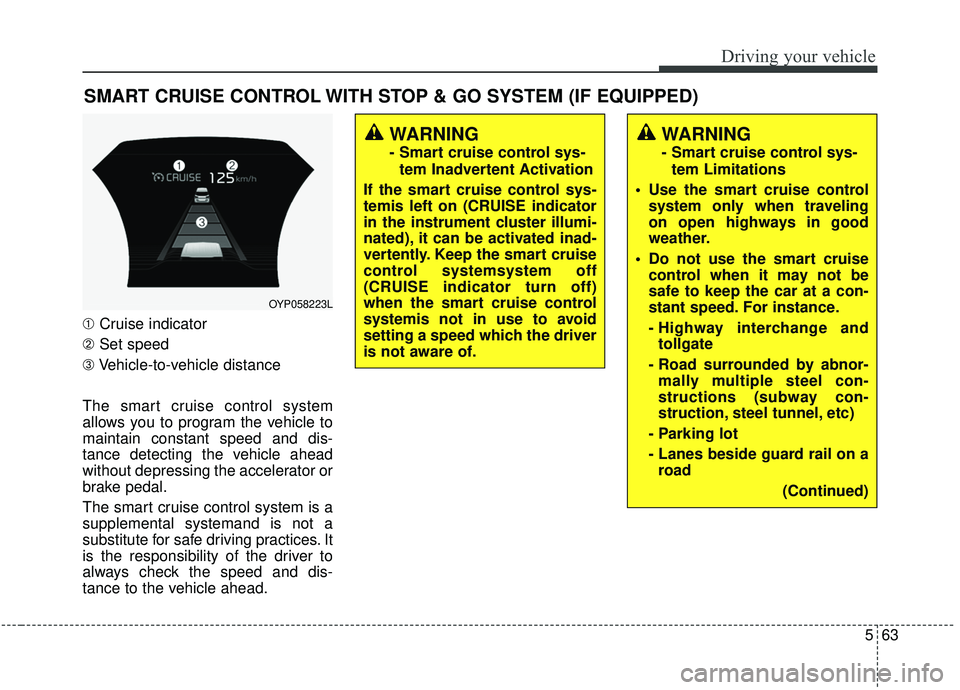
➀Cruise indicator
➁ Set speed
➂ Vehicle-to-vehicle distance
The smart cruise control system
allows you to program the vehicle to
maintain constant speed and dis-
tance detecting the vehicle ahead
without depressing the accelerator or
brake pedal.
The smart cruise control system is a
supplemental systemand is not a
substitute for safe driving practices. It
is the responsibility of the driver to
always check the speed and dis-
tance to the vehicle ahead.
WARNING
- Smart cruise control sys- tem Inadvertent Activation
If the smart cruise control sys-
temis left on (CRUISE indicator
in the instrument cluster illumi-
nated), it can be activated inad-
vertently. Keep the smart cruise
control systemsystem off
(CRUISE indicator turn off)
when the smart cruise control
systemis not in use to avoid
setting a speed which the driver
is not aware of.
WARNING
- Smart cruise control sys- tem Limitations
Use the smart cruise control system only when traveling
on open highways in good
weather.
control when it may not be
safe to keep the car at a con-
stant speed. For instance.
- Highway interchange andtollgate
- Road surrounded by abnor- mally multiple steel con-
structions (subway con-
struction, steel tunnel, etc)
- Parking lot
- Lanes beside guard rail on a road
(Continued)
OYP058223L
Page 379 of 593
565
Driving your vehicle
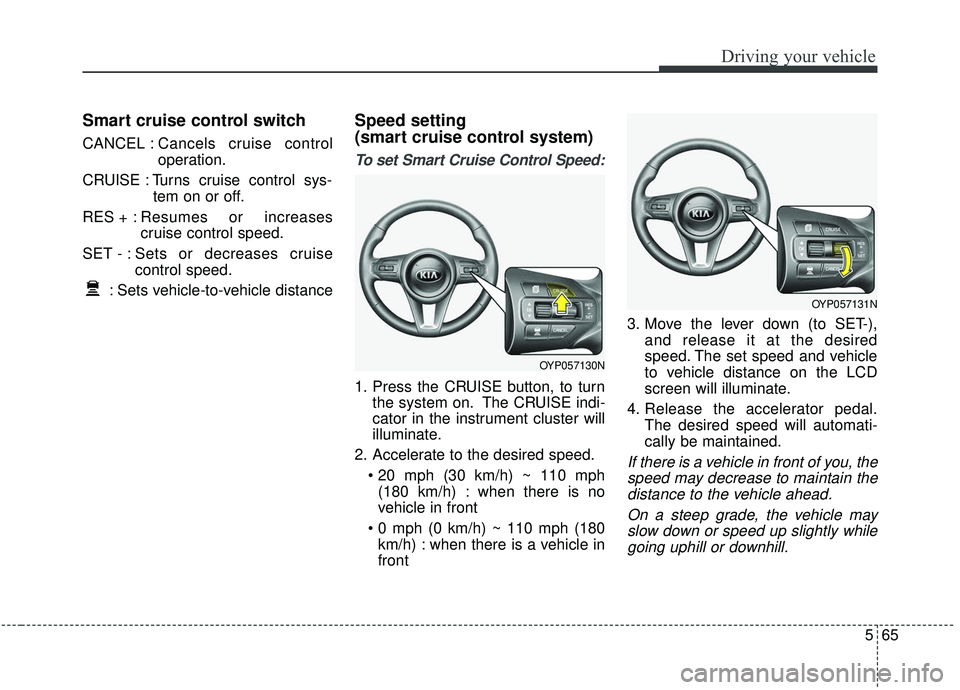
Smart cruise control switch
CANCEL :Cancels cruise control
operation.
CRUISE : Turns cruise control sys- tem on or off.
RES + : Resumes or increases
cruise control speed.
SET - : Sets or decreases cruise control speed.
: Sets vehicle-to-vehicle distance
Speed setting
(smart cruise control system)
To set Smart Cruise Control Speed:
1. Press the CRUISE button, to turn the system on. The CRUISE indi-
cator in the instrument cluster will
illuminate.
2. Accelerate to the desired speed. (180 km/h) : when there is no
vehicle in front
km/h) : when there is a vehicle in
front 3. Move the lever down (to SET-),
and release it at the desired
speed. The set speed and vehicle
to vehicle distance on the LCD
screen will illuminate.
4. Release the accelerator pedal. The desired speed will automati-
cally be maintained.
If there is a vehicle in front of you, thespeed may decrease to maintain thedistance to the vehicle ahead.
On a steep grade, the vehicle mayslow down or speed up slightly whilegoing uphill or downhill.
OYP057131N
OYP057130N
Page 395 of 593

581
Driving your vehicle
- After an engine start, please stopfor several seconds. If system ini-
tialization is not completed, the
smart cruise control system does
not normally operate.
- After an engine start, if any objects are not detected or the sensor
cover is obscured with foreign sub-
stances, there is a possibility that
the smart cruise control system
system may not work.
- The following conditions may cause a malfunction: over-loading
the liftgate, suspension modifica-
tion, tire replacement with unau-
thorized tires or tires with different
tread wear and pressure levels.
- The smart cruise control system cannot guarantee the stop for
every emergency situation.
If an emergency stop is necessary,
you must apply the brakes.
- Keep a safe distance according to road conditions and vehicle speed.
If the vehicle to vehicle distance is
too close during a high-speed driv-
ing, a serious collision may result. - The smart cruise control system
cannot recognize a stopped vehi-
cle, pedestrians or an oncoming
vehicle. Always look ahead cau-
tiously to prevent unexpected and
suddensituations from occurring.
- When other vehicles are changing lanes in front of you frequently, the
smart cruise control system may
not operate appropriately. Always
look ahead cautiously to prevent
unexpected and sudden situations
from occurring.
- The smart cruise control system is not a substitute for safedriving
practices but a convenience func-
tion only. It is the responsibility of
the driver to always check the
speed and the distance to the vehi-
cle ahead.
- Always be aware of the selected speed and vehicle to vehicle dis-
tance.
- Always maintain sufficient braking distance and decelerate your vehi-
cle by applying the brakes if neces-
sary. This device complies with
Industry Canada licence-exempt
RSS standard(s).
Operation is subject to the following
conditions:
(1) This device may not cause inter-
ference, and
(2) This device must accept any
interference, including interfer-
ence that may cause undesired
operation of the device.
(3) Changes or modifications not
expressly approved by the party
responsible for compliance could
void the user's authority to oper-
ate the device.
Page 407 of 593

593
Driving your vehicle
(Continued)
- When the sensors are blockedby other vehicles, walls or park-
ing-lot pillars.
- When the detected vehicle also moves back, as your vehicle
drives back.
- If there are small things like Shopping cart, baby carriage and
pedestrians.
- If there is low height vehicle like sport vehicle.
- When other vehicles are close to your vehicle.
- When the vehicle in the next lane moves two lanes away from
you OR when the vehicle two
lanes away moves to the next
lane from you.
- When driving through a narrow road with many plants.
- When driving on wet surface. (Continued)(Continued)
- The vehicle is driven near areas
containing metal substances
such as a construction zone,
railroad, etc.
- When the surrounding vehicle or structure is driving in a wide
area (desert, field, suburb etc.) This device complies with
Industry Canada licence-exempt
RSS standard(s).
Operation is subject to the following
conditions:
(1) This device may not cause inter-
ference, and
(2) This device must accept any
interference, including interfer-
ence that may cause undesired
operation of the device.
(3) Changes or modifications not
expressly approved by the party
responsible for compliance could
void the user's authority to oper-
ate the device.
Page 411 of 593

597
Driving your vehicle
✽ ✽NOTICE
• It may suggest a break according
to the driver’s driving pattern or
habits even if the driver doesn’t
feel fatigued.
• The driver, who feels fatigued, should take a break, even though
there is no break suggestion by the
Driver Attention Warning system.
✽ ✽ NOTICE
The Driver Attention Warning sys-
tem utilizes the camera sensor on the
front windshield for its operation.
To keep the camera sensor in the
best condition, you should observe
the followings:
- Do not disassemble camera tem-
porarily for tinted window or
attaching any types of coatings and
accessories. If you disassemble a
camera and assemble it again, take
your vehicle to an authorized Kia
dealer and have the system
checked to need a calibration.
- Do not locate any reflective objects (i.e. white paper, mirror)
over the dashboard. Any light
reflection may cause a mal-func-
tion of the Driver Attention
Warning (DAW) system.
- Pay extreme caution to keep the camera sensor out of water.
- Do not arbitrarily disassemble the camera assembly, nor apply any
impact on the camera assembly.
• Playing the vehicle audio system at high volume may offset the
Driver Attention Warning system
warning soundsCAUTION
The Driver Attention Warning
system may not properly oper-ate with limited alerting in thefollowing situations:
Not properly recognize lane (Refer to “LDW”)
Rough or intentionally evasive driving
Large tire pressure deviation, uneven wear, poor wheelalignment, etc.
Severe winding road Uneven road surface condition Windy road The vehicle drives through a windy area.
The vehicle is controlled by the following driving assistsystems:
- Forward Collision-Avoidance Assist (FCA) System
- Smart Cruise Control (SCC) System
WARNING
The Driver Attention Warning
system is not a substitute for
safe driving practices, but a
convenience function only. It is
the responsibility of the driver
to always drive cautiously to
prevent unexpected and sud-
den situations from occurring.
Pay attention to the road condi-
tions at all times.
Page 412 of 593
Driving your vehicle
98
5
LANE DEPARTURE WARNING (LDW) SYSTEM (IF EQUIPPED)
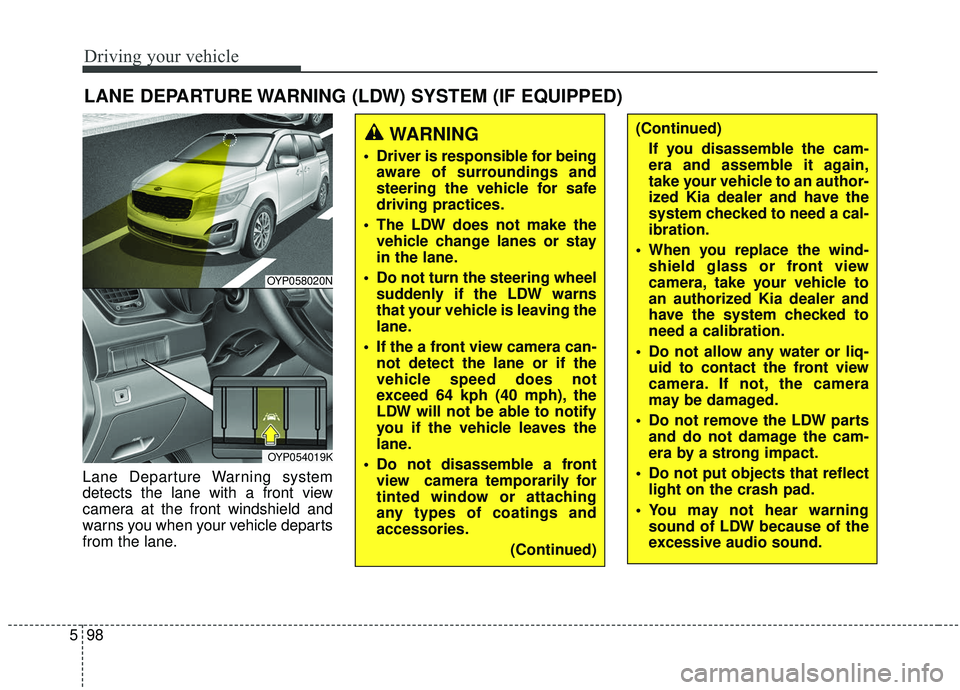
Lane Departure Warning system
detects the lane with a front view
camera at the front windshield and
warns you when your vehicle departs
from the lane.
WARNING
Driver is responsible for being
aware of surroundings and
steering the vehicle for safe
driving practices.
The LDW does not make the vehicle change lanes or stay
in the lane.
Do not turn the steering wheel suddenly if the LDW warns
that your vehicle is leaving the
lane.
If the a front view camera can- not detect the lane or if the
vehicle speed does not
exceed 64 kph (40 mph), the
LDW will not be able to notify
you if the vehicle leaves the
lane.
Do not disassemble a front view camera temporarily for
tinted window or attaching
any types of coatings and
accessories.
(Continued)
(Continued)If you disassemble the cam-
era and assemble it again,
take your vehicle to an author-
ized Kia dealer and have the
system checked to need a cal-
ibration.
When you replace the wind- shield glass or front view
camera, take your vehicle to
an authorized Kia dealer and
have the system checked to
need a calibration.
Do not allow any water or liq- uid to contact the front view
camera. If not, the camera
may be damaged.
Do not remove the LDW parts and do not damage the cam-
era by a strong impact.
Do not put objects that reflect light on the crash pad.
You may not hear warning sound of LDW because of the
excessive audio sound.
OYP058020N
OYP054019K
Page 417 of 593
5103
Driving your vehicle
Your vehicle's fuel economy depends
mainly on your style of driving, where
you drive and when you drive.
Each of these factors affects how
many miles (kilometers) you can get
from a gallon (liter) of fuel. To operate
your vehicle as economically as pos-
sible, use the following driving sug-
gestions to help save money in both
fuel and repairs:
Drive smoothly. Accelerate at amoderate rate. Don't make "jack-
rabbit" starts or full-throttle shifts
and maintain a steady cruising
speed. Don't race between stop-
lights. Try to adjust your speed to
the traffic so you don't have to
change speeds unnecessarily.
Avoid heavy traffic whenever pos-
sible. Always maintain a safe dis-
tance from other vehicles so you
can avoid unnecessary braking.
This also reduces brake wear.
Drive at a moderate speed. The faster you drive, the more fuel your
vehicle uses. Driving at a moderate
speed, especially on the highway,
is one of the most effective ways to
reduce fuel consumption. Don't "ride" the brake pedal. This
can increase fuel consumption and
also increase wear on these com-
ponents. In addition, driving with
your foot resting on the brake pedal
may cause the brakes to overheat,
which reduces their effectiveness
and may lead to more serious con-
sequences.
Take care of your tires. Keep them inflated to the recommended pres-
sure. Incorrect inflation, either too
much or too little, results in unnec-
essary tire wear. Check the tire
pressures at least once a month.
Be sure that the wheels are aligned correctly. Improper align-
ment can result from hitting curbs
or driving too fast over irregular
surfaces. Poor alignment causes
faster tire wear and may also result
in other problems as well as
greater fuel consumption. Keep your vehicle in good condi-
tion. For better fuel economy and
reduced maintenance costs, main-
tain your vehicle in accordance
with the maintenance schedule in
section 7. If you drive your vehicle
in severe conditions, more frequent
maintenance is required (see sec-
tion 7 for details).
Keep your vehicle clean. For maxi- mum service, your vehicle should
be kept clean and free of corrosive
materials. It is especially important
that mud, dirt, ice, etc. not be
allowed to accumulate on the
underside of the vehicle. This extra
weight can result in increased fuel
consumption and also contribute to
corrosion.
Travel lightly. Don't carry unneces- sary weight in your vehicle. Weight
reduces fuel economy.
Don't let the engine idle longer than necessary. If you are waiting
(and not in traffic), turn off your
engine and restart only when
you're ready to go.
ECONOMICAL OPERATION