2019 KIA SEDONA ESP
[x] Cancel search: ESPPage 350 of 593
Driving your vehicle
36
5
Electronic stability control (ESC) will
not prevent accidents. Excessive
speed in turns, abrupt maneuvers
and hydroplaning on wet surfaces
can still result in serious accidents.
Only a safe and attentive driver can
prevent accidents by avoiding
maneuvers that cause the vehicle to
lose traction. Even with ESC
installed, always follow all the normal
precautions for driving - including
driving at safe speeds for the condi-
tions.
The Electronic Stability Control (ESC)
system is an electronic system
designed to help the driver maintain
vehicle control under adverse condi-
tions. It is not a substitute for safe driv-
ing practices. Factors including speed,
road conditions and driver steering
input can all affect whether ESC will be
effective in preventing a loss of control.
It is still your responsibility to drive and
corner at reasonable speeds and to
leave a sufficient margin of safety. When you apply your brakes under
conditions which may lock the wheels,
you may hear a “tik-tik’’ sound from the
brakes, or feel a corresponding sensa-
tion in the brake pedal. This is normal
and it means your ESC is active.
✽ ✽
NOTICE
A click sound may be heard in the
engine compartment when the vehi-
cle begins to move after the engine is
started. These conditions are normal
and indicate that the Electronic
Stability Control System is function-
ing properly.
ESC operation
ESC ON condition
When the ignition is turnedON, ESC and ESC OFF
indicator lights illuminate for
approximately 3 seconds,
then ESC is turned on.
ton for at least half a sec-
ond after turning the igni-
tion ON to turn ESC off.
(ESC OFF indicator will
illuminate). To turn the
ESC on, press the ESC
OFF button (ESC OFF
indicator light will go off).
you may hear a slight tick-
ing sound. This is the ESC
performing an automatic
system self-check and does
not indicate a problem.
-
Page 354 of 593
Driving your vehicle
40
5
✽ ✽
NOTICE
• When operating the vehicle on a
dynamometer, ensure that the
ESC is turned off (ESC OFF light
illuminated). If the ESC is left on,
it may prevent the vehicle speed
from increasing, and result in false
diagnosis.
• Turning the ESC off does not affect ABS or brake system opera-
tion.
Vehicle stability management
(VSM) (if equipped)
This system provides further
enhancements to vehicle stability
and steering responses when a vehi-
cle is driving on a slippery road or a
vehicle detects changes in coeffi-
cient of friction between right wheels
and left wheels when braking.
VSM operation
When the VSM is in operation, ESC
indicator light ( ) blinks.
When the vehicle stability manage-
ment is operating properly, you can
feel a slight pulsation in the vehicle
and/or abnormal steering responses
(EPS). This is only the effect of brake
and EPS control and indicates noth-
ing unusual.
The VSM does not operate when:
Driving on bank road such as gra-
dient or incline
Driving in reverse
ESC OFF indicator light ( ) remains on the instrument cluster
EPS indicator light remains on the instrument cluster
WARNING- Tire/
Wheel size
When replacing tires and
wheels, make sure they are the
same size as the original tires
and wheels installed. Driving
with varying tire or wheel sizes
may diminish any supplemental
safety benefits of the VSM sys-
tem.
Page 355 of 593
541
Driving your vehicle
VSM operation off
If you press the ESC OFF button to
turn off the ESC, the VSM will also
cancel and the ESC OFF indicator
light ( ) illuminates.
To turn on the VSM, press the button
again. The ESC OFF indicator light
goes out.
Malfunction indicator
The VSM can be deactivated even if
you don’t cancel the VSM operation
by pressing the ESC OFF button. It
indicates that a malfunction has
been detected somewhere in the
Electric Power Steering system or
VSM system. If the ESC indicator
light ( ) or EPS warning light
remains on, take your vehicle to an
authorized Kia dealer and have the
system checked.
✽ ✽NOTICE
• The VSM is designed to function
above approximately 22 km/h (13
mph) on curves.
• The VSM is designed to function above approximately 10 km/h (6
mph) when a vehicle is braking on
a split-mu road. The split-mu road
is made of surfaces which have dif-
ferent friction forces.
The Vehicle Stability Management
system is not a substitute for safe
driving practices but a supplemen-
tary function only. It is the respon-
sibility of the driver to always check
the speed and the distance to the
vehicle ahead. Always hold the
steering wheel firmly while driving.
Your vehicle is designed to activate according to the driver’s intention,
even with installed VSM. Always
follow all the normal precautions
for driving at safe speeds for the
conditions – including driving in
clement weather and on a slippery
road.
Page 358 of 593

Driving your vehicle
44
5
The FCA system is designed to
detect and monitor the vehicle ahead
or detect a pedestrian (if equipped)
in the roadway through radar signals
and camera recognition to warn the
driver that a collision is imminent,
and if necessary, apply emergency
braking.✽ ✽
NOTICE
Take the following precautions when
using the forward collision-avoid-
ance assist (FCA):
• This system is only a supplemental
system and it is not intended to,
nor does it replace the need for
extreme care and attention of the
driver. The sensing range and
objects detectable by the sensors
are limited. Pay attention to the
road conditions at all times.
• NEVER drive too fast in accor- dance with the road conditions or
while cornering.
• Always drive cautiously to prevent unexpected and sudden situations
from occurring. FCA does not stop
the vehicle completely and does
not avoid collisions.
System setting and activation
System setting
The driver can activate the FCA by
placing the ignition switch to the ON
position and by selecting 'User
Settings', 'Driver Assistance', and
‘Forward Collision-Avoidance Assist’.
The FCA deactivates, when the driv-
er cancels the system setting.
FORWARD COLLISION-AVOIDANCE ASSIST (FCA) (IF EQUIPPED)
WARNING - Forward
Collision-Avoidance assist
(FCA) Limitations
The FCA system is a supple-
mental system and is not a sub-
stitute for safe driving prac-
tices. It is the responsibility of
the driver to always check the
speed and distance to the vehi-
cle ahead to ensure it is safety
to use the FCA system.
Page 362 of 593

Driving your vehicle
48
5
Brake operation
In an urgent situation, the braking
system enters into the ready status
for prompt reaction against the dri-
ver’s depressing the brake pedal.
The FCA provides additional brak- ing power for optimum braking per-
formance, when the driver
depresses the brake pedal.
The braking control is automatical- ly deactivated, when the driver
sharply depresses the brake pedal,
or when the driver abruptly turns
the steering wheel.
The braking control is automatical- ly canceled, when risk factors dis-
appear.
The driver should always exercise
caution when operating the vehicle,
even though there is no warning
message or warning alarm.
✽ ✽ NOTICE
The FCA operates in accordance
with the risk levels, such as the dis-
tance from the vehicle/passer-by in
front, the speed of the vehicle/pass-
er-by in front, and the driver's vehi-
cle operation. For the system to acti-
vate, do not attempt risky driving.
FCA front radar / camera sensor
In order for the FCA system to oper-
ate properly, always make sure the
sensor or sensor cover is clean and
free of dirt, snow, and debris. Dirt,
snow, or foreign substances on the
lens may adversely affect the sens-
ing performance of the sensor.
WARNING
Never rely solely on the FCA to
stop a collision the drive can It
is the driver's responsibility to
safely maneuver the vehicle
under all conditions.
OYP058140N
OYP058020N
Page 364 of 593

Driving your vehicle
50
5
Remove any dirt, snow, or debris and
clean the radar sensor cover before
operating the FCA system.
The FCA may not properly operate in
an area (e.g. open terrain), where
any substances are not detected
after turning ON the engine.System malfunction
When the FCA is not working prop-
erly, the FCA warning light ( )
will illuminate and the warning
message will appear for a few sec-
onds. After the message disap-
pears, the master warning light
( ) will illuminate. In this case,
have the vehicle inspected by an
authorized Kia dealer.
The FCA warning message may appear along with the illumination
of the ESC warning light.
OYP058198N
WARNING
The FCA is only a supplemental
system for the driver’s conven-
ience.
The driver still maintains
responsibility to control the
vehicle. Do not solely depend
on the FCA system. Rather,
maintain a safe braking dis-
tance, and, if necessary,
depress the brake pedal to
lower the driving speed.
Page 366 of 593

Driving your vehicle
52
5
Limitation of the system
The FCA is an assistant system for a
driver in a certain risky driving condi-
tion and it does not take every
responsibility for all risks from driving
condition.
The FCA monitors the driving situa-
tions through the radar and the cam-
era sensor. Thus, for a situation out
of the sensing range, the FCA may
not normally operate. The driver
should pay great caution in the fol-
lowing situations. The FCA operation
may be limited.
Recognizing vehicles
The sensor may be limited when:
- The radar or the camera is con-
taminated with foreign substances.
- It heavily rains or snows.
- There is interruption by electric waves.
- There is severe irregular reflection from the radar.
- The vehicle in front has a narrow body. (i.e. motor cycle and bicycle)
- The driver’s view is unclear due to the backlight, the reflected light, or
darkness.
- The camera cannot contain the full image of the vehicle in front.
- The vehicle in front is a special vehicle, such as a heavily-loaded
truck or a trailer.
- The outside brightness is greatly changed, such as entering/exiting
the tunnel.
- The vehicle driving is unstable.
- The radar/camera sensor recogni- tion is limited. - The driver's field of view is not well
illuminated (either too dark or too
much reflection or too much back-
light that obscures the field of view)
- There is severe irregular reflection from the radar sensor
- The vehicle in front is driving errat- ically
- The vehicle is driven near areas containing metal substances such
as a construction zone, railroad,
etc.
- Backlight is reflected in the direc- tion of the vehicle (including front
light from the vehicle ahead)
- Moisture on the windshield is not completely removed or frozen.
- The weather is misty.
- The vehicle in front does not turn ON the rear lights, does not have
rear lights, has asymmetric rear
lights, or has rear lights out of
angle.
- The vehicle is on unpaved or uneven rough surfaces, or roads
with sudden gradient changes.
Page 369 of 593
555
Driving your vehicle
Always keep your eyes forward while
driving upward or downward on a
slope, and, if necessary, depress the
brake pedal to reduce your driving
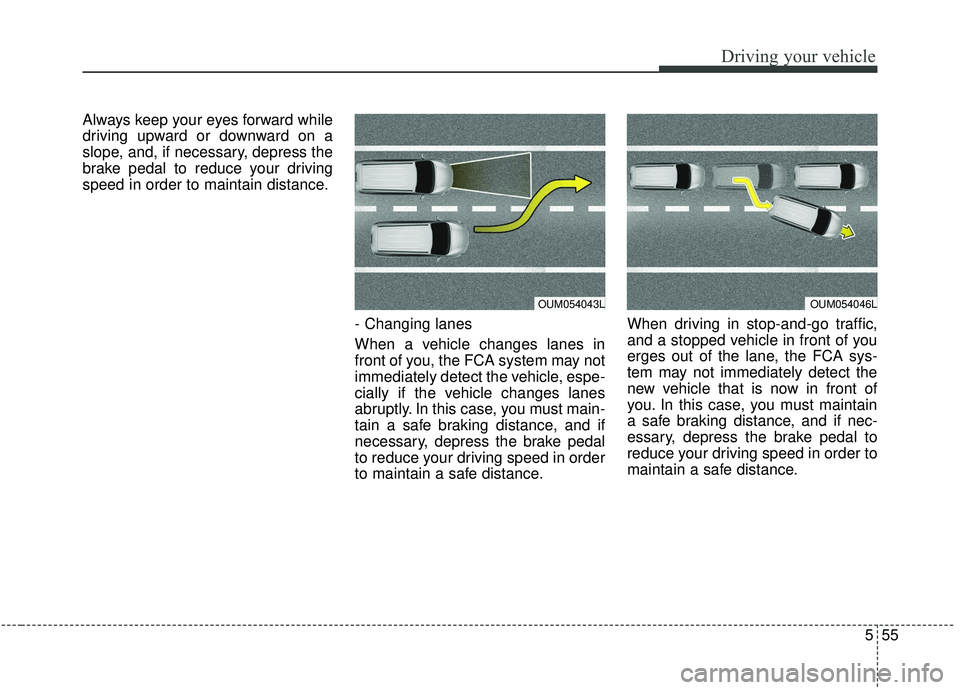
speed in order to maintain distance.- Changing lanes
When a vehicle changes lanes in
front of you, the FCA system may not
immediately detect the vehicle, espe-
cially if the vehicle changes lanes
abruptly. In this case, you must main-
tain a safe braking distance, and if
necessary, depress the brake pedal
to reduce your driving speed in order
to maintain a safe distance.When driving in stop-and-go traffic,
and a stopped vehicle in front of you
erges out of the lane, the FCA sys-
tem may not immediately detect the
new vehicle that is now in front of
you. In this case, you must maintain
a safe braking distance, and if nec-
essary, depress the brake pedal to
reduce your driving speed in order to
maintain a safe distance.
OUM054043LOUM054046L