Page 398 of 580
5133
Driving your vehicle
The brake control may not operate
properly according to the status of
the ESC (Electronic Stability
Control). The same warning mes-
sage is displayed on the instrument
cluster for this case also.
- When the ESC (Electronic StabilityControl) warning light is on.
- When the ESC (Electronic Stability Control) is engaged in a different
function.CAUTION
When the operation condition of the Rear Cross-TrafficCollision Warning System issatisfied the warning willoccur every time a vehicleapproaches the side/rear ofyour stopped (0 km/h vehiclespeed) vehicle.
The system's warning or brake may not operate proper-ly if the left/right of your vehi-cle's rear bumper is blockedby a vehicle or obstacle.
The driver should always use extreme caution while operat-ing the vehicle, whether or notthe warning light on the outsiderearview mirror illuminates orthere is a warning alarm.
Playing the vehicle audio sys- tem at high volume may offsetthe system's warning sounds.
(Continued)
(Continued) The warning of the Rear Cross- Traffic Collision WarningSystem may not sound whileother system's warning sounds.
Page 399 of 580
Driving your vehicle
134
5
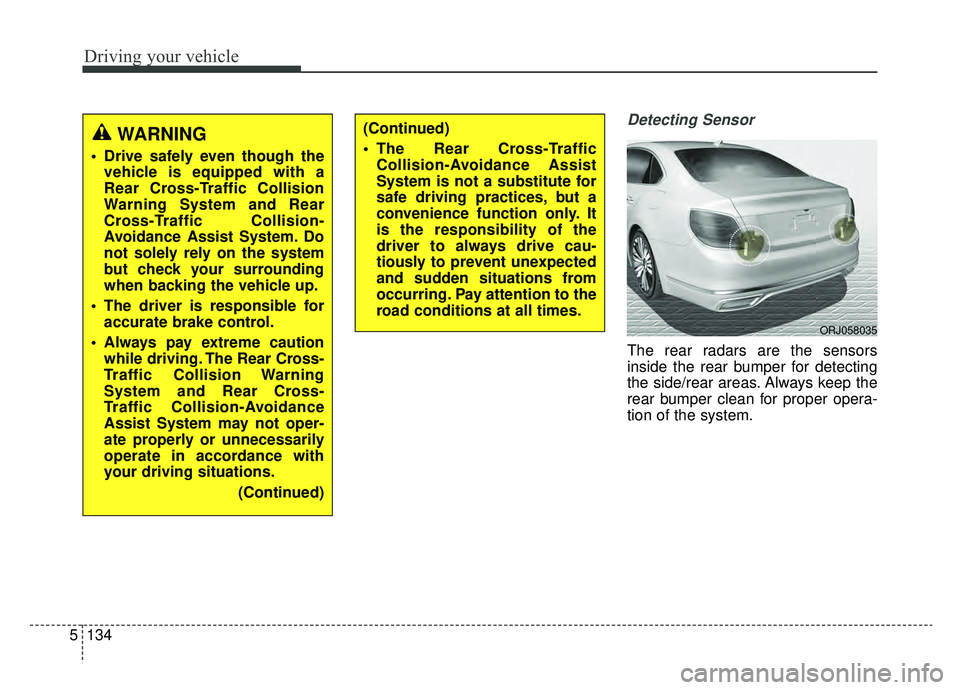
Detecting Sensor
The rear radars are the sensors
inside the rear bumper for detecting
the side/rear areas. Always keep the
rear bumper clean for proper opera-
tion of the system.
(Continued)
The Rear Cross-Traffic
Collision-Avoidance Assist
System is not a substitute for
safe driving practices, but a
convenience function only. It
is the responsibility of the
driver to always drive cau-
tiously to prevent unexpected
and sudden situations from
occurring. Pay attention to the
road conditions at all times.WARNING
Drive safely even though thevehicle is equipped with a
Rear Cross-Traffic Collision
Warning System and Rear
Cross-Traffic Collision-
Avoidance Assist System. Do
not solely rely on the system
but check your surrounding
when backing the vehicle up.
The driver is responsible for accurate brake control.
Always pay extreme caution while driving. The Rear Cross-
Traffic Collision Warning
System and Rear Cross-
Traffic Collision-Avoidance
Assist System may not oper-
ate properly or unnecessarily
operate in accordance with
your driving situations.
(Continued)
ORJ058035
Page 400 of 580
5135
Driving your vehicle
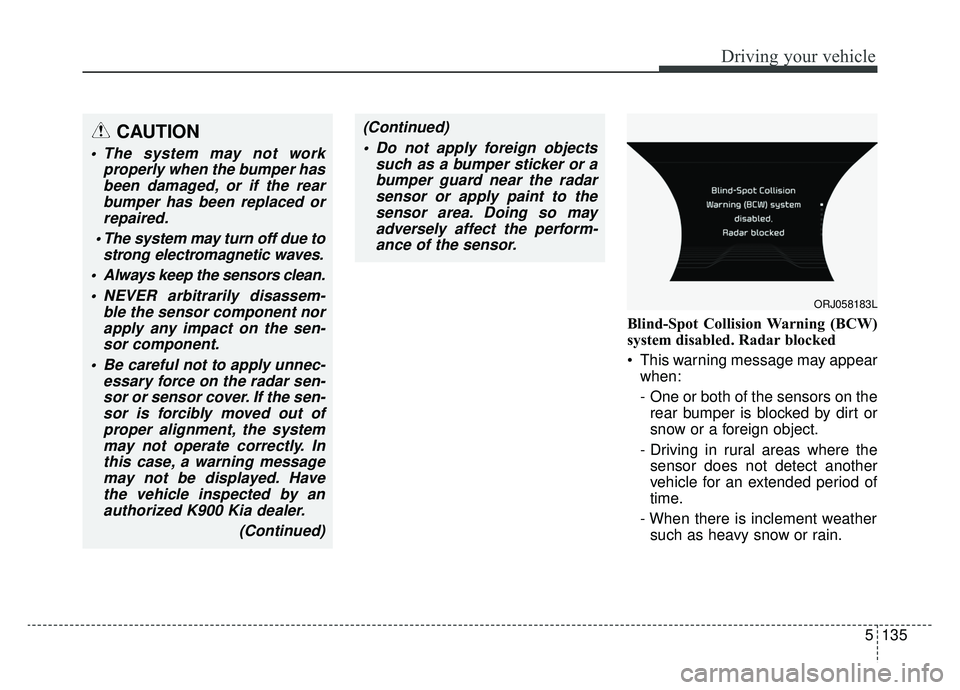
Blind-Spot Collision Warning (BCW)
system disabled. Radar blocked
This warning message may appearwhen:
- One or both of the sensors on therear bumper is blocked by dirt or
snow or a foreign object.
- Driving in rural areas where the sensor does not detect another
vehicle for an extended period of
time.
- When there is inclement weather such as heavy snow or rain.
CAUTION
The system may not work properly when the bumper hasbeen damaged, or if the rearbumper has been replaced orrepaired.
The system may turn off due to strong electromagnetic waves.
Always keep the sensors clean. NEVER arbitrarily disassem- ble the sensor component norapply any impact on the sen-sor component.
Be careful not to apply unnec- essary force on the radar sen-sor or sensor cover. If the sen-sor is forcibly moved out ofproper alignment, the systemmay not operate correctly. Inthis case, a warning messagemay not be displayed. Havethe vehicle inspected by anauthorized K900 Kia dealer.
(Continued)
(Continued) Do not apply foreign objects such as a bumper sticker or abumper guard near the radarsensor or apply paint to thesensor area. Doing so mayadversely affect the perform-ance of the sensor.
ORJ058183L
Page 401 of 580
Driving your vehicle
136
5
If any of these conditions occur, the
light on the BCW switch and the sys-
tem will turn off automatically.
When the BCW canceled warning
message is displayed in the cluster,
check to make sure that the rear
bumper is free from any dirt or snow
in the areas where the sensor is
located. Remove any dirt, snow, or
foreign material that could interfere
with the radar sensors.
After any dirt or debris is removed,
the RCCA system should operate
normally after about 10 minutes of
driving the vehicle.
If the system still does not operate
normally have your vehicle inspected
by an authorized K900 Kia dealer. Turn off the BCW, BCA and RCCW
system (if equipped) when a trailer or
carrier is installed.
- Press the BCW/BCA button (the
indicator on the button extinguish)
- Deactivate the RCCW system by deselecting
"AVN →Settings →Vehicle →
Driving Assist → Blind-spot safety
→ Rear Cross-Traffic Collision
Warning" (if equipped)
If you use BCW, BCA and RCCW
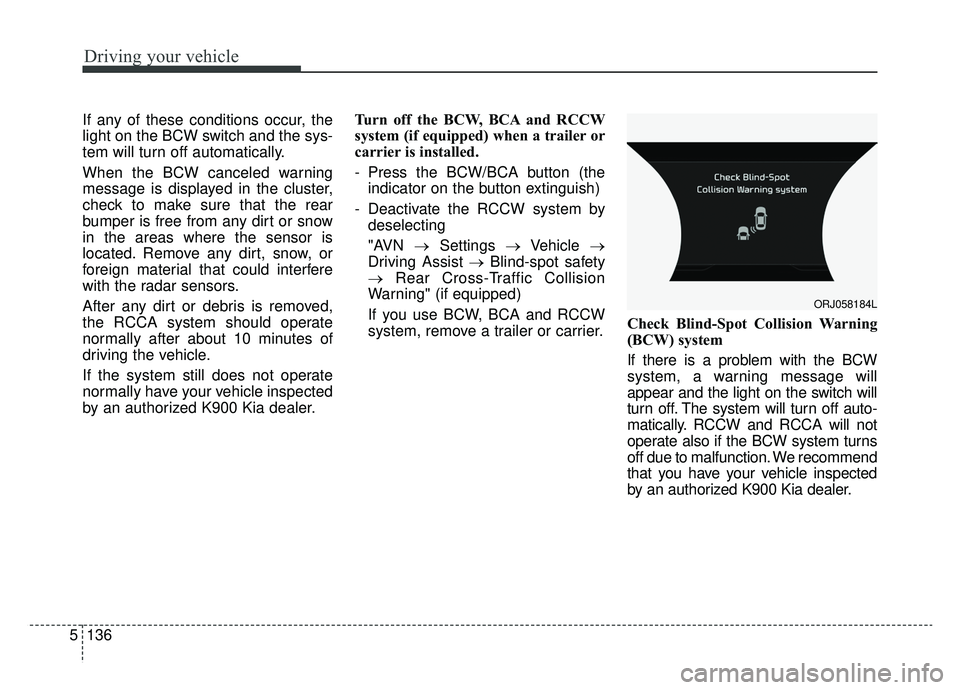
system, remove a trailer or carrier. Check Blind-Spot Collision Warning
(BCW) system
If there is a problem with the BCW
system, a warning message will
appear and the light on the switch will
turn off. The system will turn off auto-
matically. RCCW and RCCA will not
operate also if the BCW system turns
off due to malfunction. We recommend
that you have your vehicle inspected
by an authorized K900 Kia dealer.
ORJ058184L
Page 403 of 580
Driving your vehicle
138
5
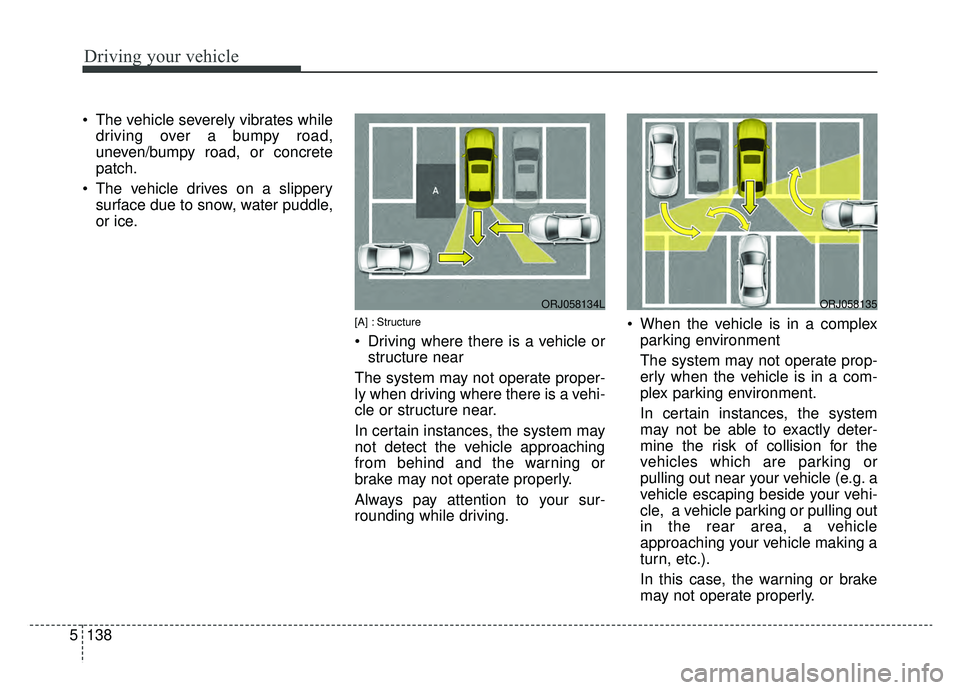
The vehicle severely vibrates while
driving over a bumpy road,
uneven/bumpy road, or concrete
patch.
The vehicle drives on a slippery surface due to snow, water puddle,
or ice.
[A] : Structure
Driving where there is a vehicle orstructure near
The system may not operate proper-
ly when driving where there is a vehi-
cle or structure near.
In certain instances, the system may
not detect the vehicle approaching
from behind and the warning or
brake may not operate properly.
Always pay attention to your sur-
rounding while driving. When the vehicle is in a complex
parking environment
The system may not operate prop-
erly when the vehicle is in a com-
plex parking environment.
In certain instances, the system
may not be able to exactly deter-
mine the risk of collision for the
vehicles which are parking or
pulling out near your vehicle (e.g. a
vehicle escaping beside your vehi-
cle, a vehicle parking or pulling out
in the rear area, a vehicle
approaching your vehicle making a
turn, etc.).
In this case, the warning or brake
may not operate properly.
ORJ058134LORJ058135
Page 404 of 580
![KIA K900 2019 Owners Manual 5139
Driving your vehicle
[A] : Vehicle
When the vehicle is parked diago-nally
The system may not operate proper-
ly when the vehicle is parked diago-
nally.
In certain instances, when the diago-
nal](/manual-img/2/55057/w960_55057-403.png "KIA K900 2019 Owners Manual 5139
Driving your vehicle
[A] : Vehicle
When the vehicle is parked diago-nally
The system may not operate proper-
ly when the vehicle is parked diago-
nally.
In certain instances, when the diago-
nal")
5139
Driving your vehicle
[A] : Vehicle
When the vehicle is parked diago-nally
The system may not operate proper-
ly when the vehicle is parked diago-
nally.
In certain instances, when the diago-
nally parked vehicle is pulled out of
the parking space, the system may
not detect the vehicle approaching
from the rear left/right of your vehi-
cle. In this case, the warning or brake
may not operate properly.
Always pay attention to your sur-
rounding while driving. When the vehicle is on/near a
slope
The system may not operate proper-
ly when the vehicle is on/near a
slope.
In certain instances, the system may
not detect the vehicle approaching
from the rear left/right and the warning
or brake may not operate properly.
Always pay attention to your sur-
rounding while driving.
[A] : Structure, [B] : Wall
Pulling into the parking space where there is a structure
The system may not operate properly
when pulling in the vehicle to the park-
ing space where there is a structure at
the back or side of your vehicle.
In certain instances, when backing
into the parking space, the system
may not detect the vehicle moving in
front of your vehicle. In this case, the
warning or brake may not operate
properly.
Always pay attention to the parking
space while driving.
ORJ058136LORJ058138ORJ058137L
Page 406 of 580
5141
Driving your vehicle
The Driver Attention Warning (DAW),
system is designed to warn the driv-
er of potentially hazardous driving
situations if it detects inattentive driv-
ing practices.System setting and activation
System setting
The Driver Attention Warning sys-tem is set to be in the OFF posi-
tion, when your vehicle is first
delivered to you from the factory.
To turn ON the Driver Attention Warning system, turn on the
engine, and then select 'AVN →
Settings →Vehicle →Driver assis-
tance → DAW(Driver Attention
Warning) →High sensitivity/
Normal Sensitivity/Off ' on the AVN. The driver can select the Driver
Attention Warning system mode.
- Off : The Driver Attention Warningsystem is deactivated.
- Normal Sensitivity : The Driver Attention Warning system alerts
the driver of his/her fatigue level
or inattentive driving practices.
- High sensitivity : The Driver Attention Warning system alerts
the driver of his/her fatigue level
or inattentive driving practices
faster than Normal mode.
The set-up of the Driver Attention Warning system will be main-
tained, as selected, when the
engine is re-started.
DRIVER ATTENTION WARNING (DAW)
Page 407 of 580
Driving your vehicle
142
5
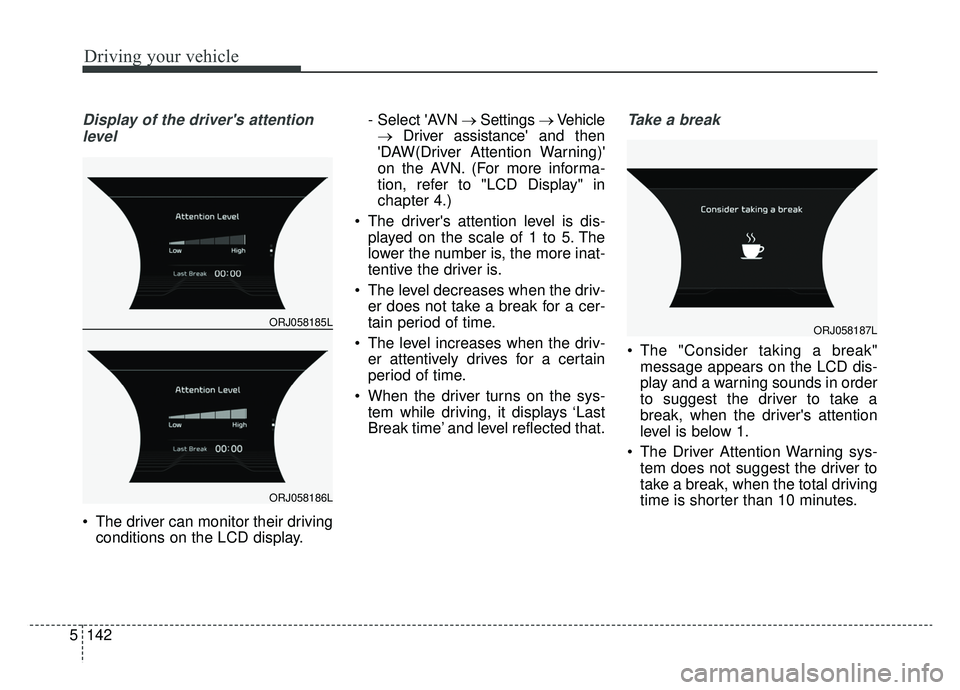
Display of the driver's attention
level
The driver can monitor their driving conditions on the LCD display. - Select 'AVN
→Settings →Vehicle
→ Driver assistance' and then
'DAW(Driver Attention Warning)'
on the AVN. (For more informa-
tion, refer to "LCD Display" in
chapter 4.)
The driver's attention level is dis- played on the scale of 1 to 5. The
lower the number is, the more inat-
tentive the driver is.
The level decreases when the driv- er does not take a break for a cer-
tain period of time.
The level increases when the driv- er attentively drives for a certain
period of time.
When the driver turns on the sys- tem while driving, it displays ‘Last
Break time’ and level reflected that.
Take a break
The "Consider taking a break"message appears on the LCD dis-
play and a warning sounds in order
to suggest the driver to take a
break, when the driver's attention
level is below 1.
The Driver Attention Warning sys- tem does not suggest the driver to
take a break, when the total driving
time is shorter than 10 minutes.
ORJ058185L
ORJ058186L
ORJ058187L