Page 337 of 550
591
Driving your vehicle
1. Turn the smart cruise control sys-tem on (the cruise indicator light
will be on but the system will not
be activated).
2. Push the distance to distance switch for more than 2 seconds.
3. Choose between "Smart Cruise Control" and "Cruise Control".
When the system is canceled using
the CRUISE button or the CRUISE
button is used after the engine is
turned on, the Smart Cruise Control
mode will turn on.Limitations of the system
The smart cruise control system may
have limits to its ability to detect dis-
tance to the vehicle ahead due to
road and traffic conditions.
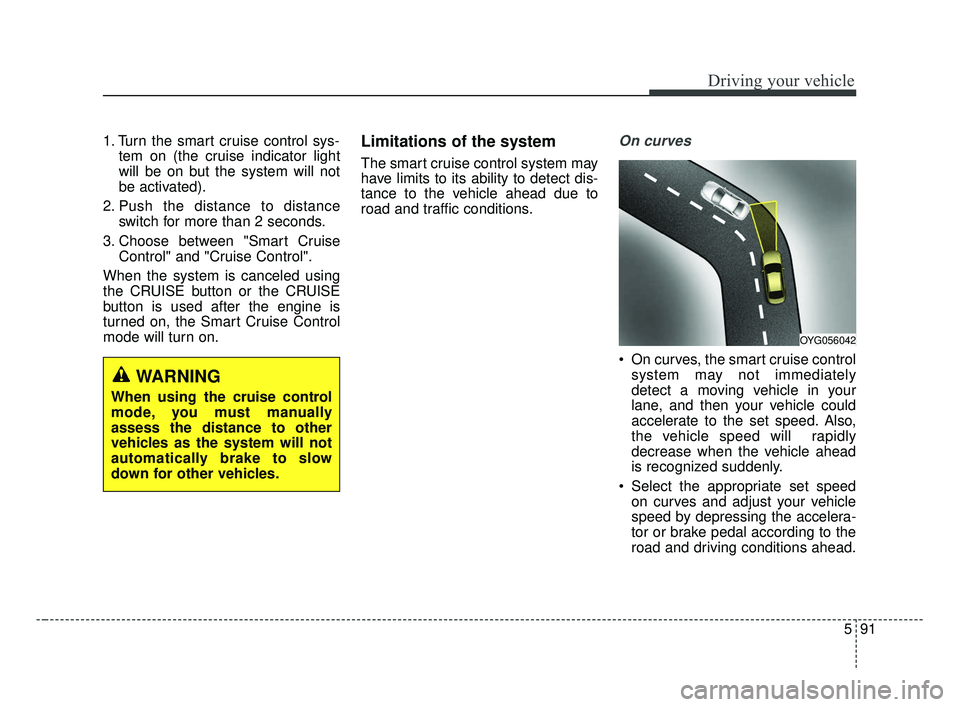
On curves
On curves, the smart cruise control system may not immediately
detect a moving vehicle in your
lane, and then your vehicle could
accelerate to the set speed. Also,
the vehicle speed will rapidly
decrease when the vehicle ahead
is recognized suddenly.
Select the appropriate set speed on curves and adjust your vehicle
speed by depressing the accelera-
tor or brake pedal according to the
road and driving conditions ahead.
WARNING
When using the cruise control
mode, you must manually
assess the distance to other
vehicles as the system will not
automatically brake to slow
down for other vehicles.
OYG056042
BDm CAN (ENG) 5.QXP 7/4/2018 10:16 AM Page 91
Page 341 of 550

595
Driving your vehicle
Always be cautious whenapproaching vehicles that are taller
with higher clearance, or vehicles
carrying loads that stick out of the
back of the vehicle.
OBD058017
WARNING
When using the Smart Cruise
Control take the following pre-
cautions:
If an emergency stop is nec-essary, you must apply the
brakes. The smart cruise con-
trol system may not be able to
completely stop the vehicle or
avoid a collision in every situ-
ation.
Keep a safe distance accord- ing to road conditions and
vehicle speed. If the vehicle to
vehicle distance is too close
during a high-speed driving, a
serious collision may result.
Always maintain sufficient braking distance and deceler-
ate your vehicle by applying
the brakes if necessary.
The Smart Cruise Control sys- tem cannot recognize a
stopped vehicle, pedestrians
or an oncoming vehicle.
(Continued)
WARNING- Inclines andtowing
Do not use the smart cruise
control system on steep
inclines or when towing another
vehicle or trailer since such
extreme loading can interfere
with your vehicle's ability to
maintain the selected speed.
BDm CAN (ENG) 5.QXP 7/4/2018 10:16 AM Page 95
Page 348 of 550

Driving your vehicle
102
5
The Blind-Spot Collision Warning
(BCW) system uses radar sensors in
the rear bumper to monitor and warn
the driver of an approaching vehicle
in the driver's blind spot area.
The system monitors the rear area of
the vehicle and provides information
to the driver with an audible alert and
a indicator on the outside rearview
mirrors. (1) Blind spot area
The BCW range varies relative tovehicle speed. Note that if your
vehicle is traveling much faster
than the vehicles around you, the
warning will not occur. (2) Closing at high speed
The BCW-Closing at high speedfeature will alert you when a vehi-
cle is approaching in an adjacent
lane at a high rate of speed. If the
driver activates the turn signal
when the system detects an
oncoming vehicle, the system
sounds an audible alert. Distance
from approaching vehicle can be
seen differently according to the
relative speed.
(3) RCCW (Rear Cross-Traffic Collision Warning)
The RCCW feature monitors approaching cross traffic from the
left and right side of the vehicle
when your vehicle is in reverse.
The feature will operate when the
vehicle is moving in reverse
below about 10 km/h (6 mph). If
oncoming cross traffic is detected
a warning chime will sound.
Distance from approaching vehi-
cle can be seen differently
according to the relative speed.
BLIND-SPOT COLLISION WARNING (BCW) (IF EQUIPPED)
WARNING
Always be aware of road con- ditions while driving and be
alert for unexpected situa-
tions even though the BCW
system is operating.
The BCW is not a substitute for proper and safe driving.
Always drive safely and use
caution when changing lanes
or backing up the vehicle. The
BCW may not detect every
object alongside the vehicle.
OBD058079L
BDm CAN (ENG) 5.QXP 7/4/2018 10:17 AM Page 102
Page 349 of 550
5103
Driving your vehicle
BCW (Blind-Spot Collision
Warning) / LCA (Lane Change
Assist)
Operating conditions
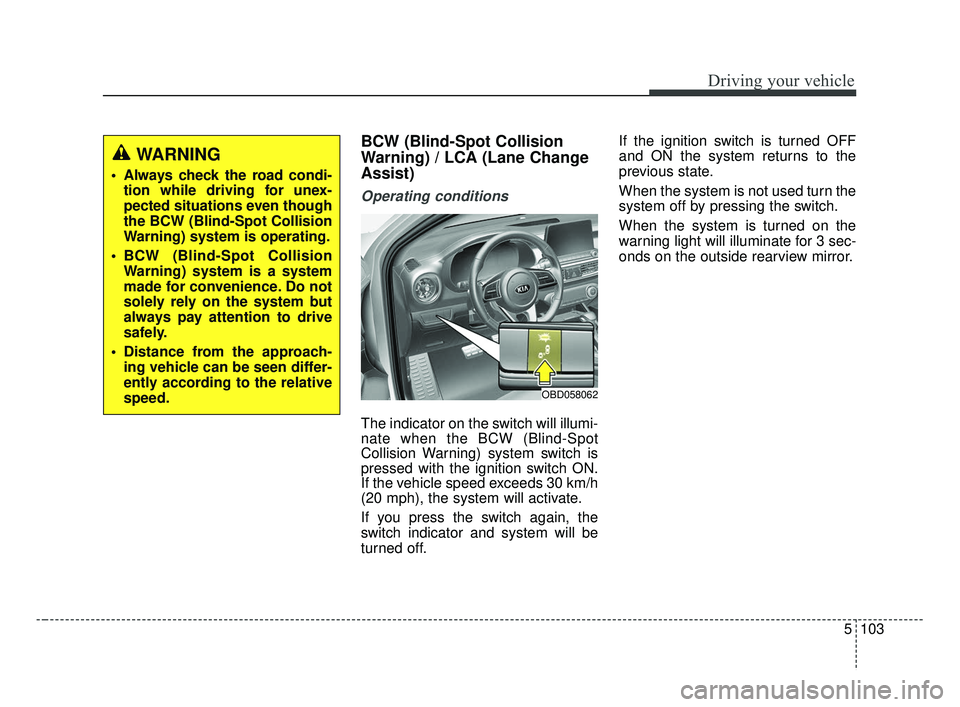
The indicator on the switch will illumi-
nate when the BCW (Blind-Spot
Collision Warning) system switch is
pressed with the ignition switch ON.
If the vehicle speed exceeds 30 km/h
(20 mph), the system will activate.
If you press the switch again, the
switch indicator and system will be
turned off.If the ignition switch is turned OFF
and ON the system returns to the
previous state.
When the system is not used turn the
system off by pressing the switch.
When the system is turned on the
warning light will illuminate for 3 sec-
onds on the outside rearview mirror.
WARNING
Always check the road condi-
tion while driving for unex-
pected situations even though
the BCW (Blind-Spot Collision
Warning) system is operating.
BCW (Blind-Spot Collision Warning) system is a system
made for convenience. Do not
solely rely on the system but
always pay attention to drive
safely.
Distance from the approach- ing vehicle can be seen differ-
ently according to the relative
speed.
OBD058062
BDm CAN (ENG) 5.QXP 7/4/2018 10:17 AM Page 103
Page 350 of 550

Driving your vehicle
104
5
Warning type
The system will activate when:
1.The system is on
2.Vehicle speed is above 30 km/h
(20 mph)
3.Other vehicles are detected in the rear side
First stage alert
If a vehicle is detected within the
boundary of the system, a yellow
warning light will illuminate on the
outside rearview mirror.
Once the detected vehicle is no
longer within the blind spot area, the
warning will turn off according to the
driving conditions of the vehicle.
WARNING
Always check the road condi-tion while driving for unex-
pected situations even
though the Blind-Spot
Collision Warning System
(BCW) is operating.
The Blind-Spot Collision Warning System (BCW) is a
supplemental system to
assist you. Do not entirely rely
on the system. Always pay
attention, while driving, for
your safety.
(Continued)
(Continued)
The Blind-Spot CollisionWarning System (BCW) is not
a substitute for proper and
safe driving. Always drive
safely and use caution when
changing lanes or backing the
vehicle up. The Blind-Spot
Collision Warning System
(BCW) may not detect every
object alongside the vehicle.
OJF055213
1st stage
BDm CAN (ENG) 5.QXP 7/4/2018 10:17 AM Page 104
Page 351 of 550

5105
Driving your vehicle
Second stage alert
A warning chime to alert the driver
will activate when:
1. A vehicle has been detected in theblind spot area by the radar system
(the warning light will illuminate on
the outside rearview mirror (i.e., in
the first stage alert)
AND
2. The turn signal is applied (same side as where the vehicle is being
detected).
When this alert is activated, the
warning light on the outside rearview
mirror will also blink. If you turn off the turn signal indica-
tor, the second stage alert (the warn-
ing chime and the blinking warning
light on the outside rearview mirror)
will be deactivated.
- The second stage alarm can be
deactivated.
To activate the alarm: Go to the User Settings Mode →
Driver Assistance and select
“Blind-Spot Collision Warning” on
the LCD display.
To deactivate the alarm: Go to the User Settings Mode →
Driver Assistance and deselect
“Blind-Spot Collision Warning” on
the LCD display.
Detecting sensor
The sensors are located inside the
rear bumper.
Always keep the rear bumper clean
for the system to work properly.
OJF055215
2nd stage
CAUTION
The warning chime functionhelps alert the driver. Deactivatethis function only when it is nec-essary, refer to “User SettingsMode” in chapter 4.
OBD058039L
BDm CAN (ENG) 5.QXP 7/4/2018 10:17 AM Page 105
Page 352 of 550

Driving your vehicle
106
5
RCCW (Rear Cross-Traffic
Collision Warning)
When your vehicle moves backwards
from a parking position, the sensor
detects approaching vehicles to the
left or right side direction and gives
information to the driver.
Operating conditions To operate
Go to “User Settings \b Driving
Assist and select Rear Cross
Traffic Collision Warning” on the
LCD display.
The system will turn on and stand-
by to activate. If you deactivate this
function in the cluster, the system
will stop.
❈ For more information, refer to “LCD
Display” in chapter 4.
✽ ✽
NOTICE
• If the vehicle is turned off and on
again, the RCCW system will
return to the state right before the
vehicle was turned off.
• The system will activate when vehicle speed is below 10 km/h (6.2
mph) and with the shift lever in R
(Reverse).
• The Rear Cross-Traffic Collision Warning (RCCW) detecting range
is approximately 0.5 m ~ 20 m (1 ft
~ 65 ft) in the direction of both lat-
eral sides of the car.
An approaching vehicle will be
detected if their vehicle speed is
within 4 km/h ~ 36 km/h (2.5 ~
22.5 mph).
Note that the detecting range may
vary under certain conditions. As
always, use caution and pay close
attention to your surroundings
when backing up your vehicle.
OYG056140
BDm CAN (ENG) 5.QXP 7/4/2018 10:17 AM Page 106
Page 353 of 550

5107
Driving your vehicle
Warning typeIf the vehicle detected by the sensors
approaches your vehicle, the warn-
ing chime will sound, the warning
light on the outside rearview mirror
will blink and a message will appear
on the LCD display.
✽ ✽
NOTICE
• The warning chime will turn off:
- When the detected vehicle movesout of the sensing area or
- If your vehicle is moved away from the detected vehicle or
- When the vehicle is right behind your vehicle or
- When the vehicle is not approaching your vehicle or
- When the other vehicle slows down.
• The system may not operate prop- erly due to other factors or cir-
cumstances.
Always pay attention to your sur-
roundings.
• If the sensing area near the rear bumper is blocked by either a wall
or barrier or by a parked vehicle,
the system sensing area may be
reduced.
WARNING
When the BCW system is
being activated, The warning
light on the outside rearview
mirror will illuminate whenev-
er a vehicle is detected at the
rear side by the system.
To avoid accidents, do not
focus only on the warning
light and neglect to see the
surrounding of the vehicle.
Drive safely even though the vehicle is equipped with a
BCW (Blind-Spot Collision
Warning) system. Do not sole-
ly rely on the system but
check for yourself before
changing lanes.
The system may not alert the
driver in some conditions so
always check the surround-
ings while driving.
(Continued)
OBD058063
OJF055196L
OBD058064
BDm CAN (ENG) 5.QXP 7/4/2018 10:17 AM Page 107