2019 INFINITI QX60 Set button
[x] Cancel search: Set buttonPage 14 of 540

1. Vent (P. 4-33)
2. Headlight/fog light/turn signalswitch (P. 2-45)
3. Instrument brightness control
(P. 2-39)
4. Meters and gauges (P. 2-4) Warning and indicator lights (P. 2-8)
Vehicle information display (P. 2-16)
5. Driver supplemental air bag (P.1-50) Horn (P. 2-46)
6. Backup Collision Intervention (BCI)
switch (if so equipped) (P. 5-60)
7. Trip reset switch (P. 2-4)
8. Wiper and washer switch (P. 2-35) Rear wiper and washer switch
(P. 2-35)
9. Rear window and outside mirror
defroster switch (P. 2-39)
10. Center display* Navigation system* (if so equipped)
11. Automatic heater and air condi-
tioner controls (P. 4-43, 4-34)
12. Front passenger supplemental air
bag (P. 1-57)
13. Glove box (P. 2-58)
14. Center multi-function control
buttons*
15. Power outlet (P. 2-53)
16. Shift lever (P. 5-18)
LII2544
INSTRUMENT PANEL
0-6Illustrated table of contents
Page 94 of 540

1. Vent (P. 4-33)
2. Headlight/fog light/turn signalswitch (P. 2-45)
3. Instrument brightness control
(P. 2-39)
4. Meters and gauges (P. 2-4) Warning and indicator lights (P. 2-8)
Vehicle information display (P. 2-16)
5. Driver supplemental air bag (P.1-50) Horn (P. 2-46)
6. Backup Collision Intervention (BCI)
switch (if so equipped) (P. 5-60)
7. Trip reset switch (P. 2-4)
8. Wiper and washer switch (P. 2-35) Rear wiper and washer switch
(P. 2-35)
9. Rear window and outside mirror
defroster switch (P. 2-39)
10. Center display* Navigation system* (if so equipped)
11. Automatic heater and air condi-
tioner controls (P. 4-43, 4-34)
12. Front passenger supplemental
air bag (P. 1-57)
13. Glove box (P. 2-58)
14. Center multi-function control
buttons*
15. Power outlet (P. 2-53)
16. Shift lever (P. 5-18)
LII2544
INSTRUMENT PANEL
2-2Instruments and controls
Page 109 of 540
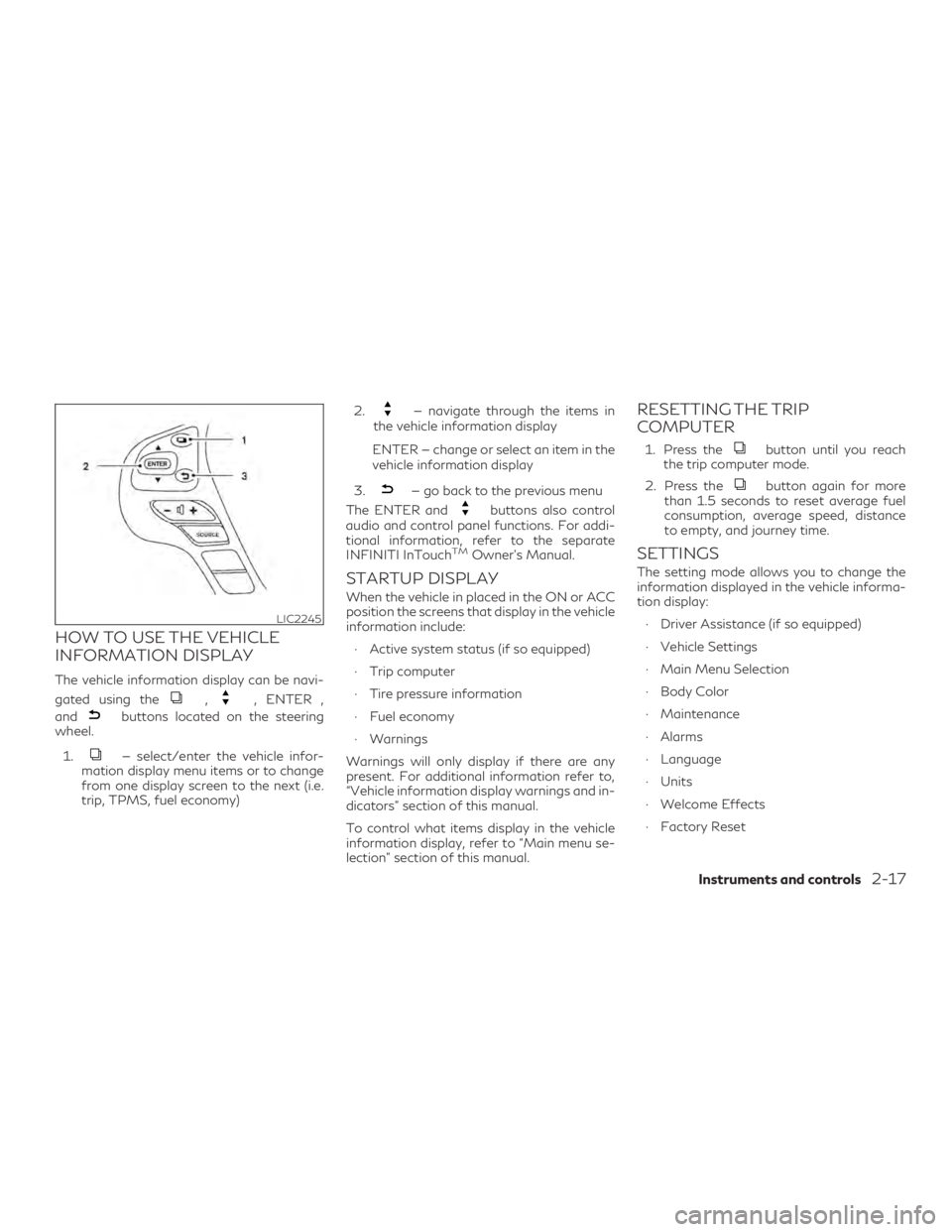
HOW TO USE THE VEHICLE
INFORMATION DISPLAY
The vehicle information display can be navi-
gated using the
,, ENTER ,
and
buttons located on the steering
wheel.
1.
— select/enter the vehicle infor-
mation display menu items or to change
from one display screen to the next (i.e.
trip, TPMS, fuel economy) 2.
— navigate through the items in
the vehicle information display
ENTER — change or select an item in the
vehicle information display
3.
— go back to the previous menu
The ENTER and
buttons also control
audio and control panel functions. For addi-
tional information, refer to the separate
INFINITI InTouch
TMOwner’s Manual.
STARTUP DISPLAY
When the vehicle in placed in the ON or ACC
position the screens that display in the vehicle
information include:
∙ Active system status (if so equipped)
∙ Trip computer
∙ Tire pressure information
∙ Fuel economy
∙ Warnings
Warnings will only display if there are any
present. For additional information refer to,
“Vehicle information display warnings and in-
dicators” section of this manual.
To control what items display in the vehicle
information display, refer to “Main menu se-
lection” section of this manual.
RESETTING THE TRIP
COMPUTER
1. Press thebutton until you reach
the trip computer mode.
2. Press the
button again for more
than 1.5 seconds to reset average fuel
consumption, average speed, distance
to empty, and journey time.
SETTINGS
The setting mode allows you to change the
information displayed in the vehicle informa-
tion display:
∙ Driver Assistance (if so equipped)
∙ Vehicle Settings
∙ Main Menu Selection
∙ Body Color
∙ Maintenance
∙ Alarms
∙ Language
∙ Units
∙ Welcome Effects
∙ Factory Reset
LIC2245
Instruments and controls2-17
Page 121 of 540

ture. The driving mode may change to
2-Wheel Drive (2WD). If this warning is dis-
played, stop the vehicle with the engine idling,
as soon as it is safe to do so. Then if the
warning turns off, you can continue driving.
Tire Size Incorrect: See Owner’s Manual
(if so equipped)
This warning may appear if there is a large
difference between the diameters of the
front and rear wheels. Pull off the road in a
safe area, with the engine idling. Check that
all the tire sizes are the same, that the tire
pressure is correct and that the tires are not
excessively worn.
Door Open
This warning illuminates when a door has
been opened.
Liftgate Open
This warning illuminates when the liftgate
has been opened.
Timer Alert — Have a break?
This indicator appears when the set time is
reached. The time can be set up to six hours.
For additional information, refer to “Settings”
in this section.Low Outside Temperature
This warning appears if the outside tempera-
ture is below 37°F (3°C). The temperature
can be changed to display in Celsius or Fahr-
enheit. For additional information, refer to
“Settings” in this section.
Power will turn off to save the battery
This message appears in the vehicle informa-
tion display after a period of time if the igni-
tion switch is in the ACC or the ON position
and if the vehicle is in P (Park). For additional
information, refer to “Push-button ignition
switch positions” in the “Starting and driving”
section of this manual.
Turn off the lights
This warning appears when the headlights
are left in the ON position when exiting the
vehicle. Place the headlight switch in the OFF
or AUTO position. For additional informa-
tion, refer to “Headlight and turn signal
switch” in this section.
Parking Sensor Error: See Owner’s Manual
This warning illuminates when there is an
error with the system. For additional infor-
mation, refer to “Front and rear sonar sys-
tem” in the “Starting and driving” section of
this manual.Predictive Forward Collision Warning
(PFCW) indicator
This indicator shows when the PFCW system
is engaged.
For additional information, refer to “Warning
systems switch” in this section and “Predic-
tive
Forward Collision Warning (PFCW)” in the
“Starting and driving” section of this manual.
Lane Departure Warning (LDW)/Lane
Departure Prevention (LDP) indicator
(if so equipped)
This indicator shows when the LDW/LDP
system is engaged.
For additional information, refer to ”Warning
systems switch” in this section and “Lane De-
parture Warning (LDW)” and “Lane Depar-
ture Prevention (LDP)” in the “Starting and
driving” section of this manual.
Blind Spot Warning (BSW) and Rear Cross
Traffic Alert (RCTA) (if so equipped)
indicator
This indicator shows when the following sys-
tems (if so equipped) are engaged:
∙ Blind Spot Intervention® (BSI)
∙ Blind Spot Warning (BSW)
∙ Rear Cross Traffic Alert (RCTA)
Instruments and controls2-29
Page 177 of 540

Lockout protection
When the power door lock switch is moved to
the lock position and any door is open, all
doors will lock. With the Intelligent Key left in
the vehicle and any door open, all doors will
unlock automatically and chime will sound
after the door is closed.
These functions help prevent the Intelligent
Key from being accidentally locked inside the
vehicle.
AUTOMATIC DOOR LOCKS
∙ All doors lock automatically when the ve-hicle speed reaches 15 mph (24 km/h).
NOTE:
The automatic door unlock function can be
changed using “Vehicle Settings” of the ve-
hicle information display. For additional in-
formation, refer to “Vehicle information dis-
play” in the “Instruments and controls”
section of this manual.
CHILD SAFETY REAR DOOR
LOCK
Child safety locks help prevent the rear doors
from being opened accidentally, especially
when small children are in the vehicle.
The child safety lock levers are located on the
edge of the rear doors.
When the lever is in the LOCK position, the
door can be opened only from the outside.
WARNING
∙ Radio waves could adversely affect elec- tric medical equipment. Those who use a
pacemaker should contact the electric
medical equipment manufacturer for the
possible influences before use.
∙ The Intelligent Key transmits radio waves when the buttons are pressed. The
FAA advises the radio waves may affect
aircraft navigation and communication
systems. Do not operate the Intelligent
Key while on an airplane. Make sure the
buttons are not operated unintentionally
when the unit is stored for a flight.
The Intelligent Key system can operate all the
door locks using the remote control function
or pushing the request switch on the vehicle
without taking the key out from a pocket or
purse. The operating environment and/or
conditions may affect the Intelligent Key sys-
tem operation.
LPD2374
INFINITI INTELLIGENT KEY SYSTEM
Pre-driving checks and adjustments3-7
Page 185 of 540

NOTE:
The unlocking operation can be changed in
Selective Unlock in “Vehicle Settings” of the
vehicle information display. For additional
information, refer to “Vehicle information
display” in the “Instruments and controls”
section of this manual.
All doors will be locked automatically unless
one of the following operations is performed
within 1 minute after pressing the
but-
ton:
∙ Opening any doors.
∙ Pushing the ignition switch.
The interior light illuminates for a period of
time when a door is unlocked and the room
light switch is in the DOOR position.
The light can be turned off without waiting
by performing one of the following opera-
tions:
∙ Placing the ignition switch in the ON po- sition.
∙ Locking the doors with the Intelligent Key.
∙ Switching the room light switch to the OFF position. ∙ Switching the Auto Room Lamp to the
OFF position in “Vehicle Settings” of the
vehicle information display. For addi-
tional information, refer to “Vehicle infor-
mation display” in the “Instruments and
controls” section of this manual.
Opening windows
The Intelligent Key allows you to simultane-
ously open windows equipped with auto-
matic operation.
∙ To open the windows, press the
button on the Intelligent Key for longer
than 3 seconds after all doors are un-
locked.
The door windows will open while pressing
the
button on the Intelligent Key.
The door windows cannot be closed by using
the Intelligent Key.
Linking the key fob to automatic
drive positioner memory
(if so equipped)
If the vehicle is equipped with automatic drive
positioner, the key fob can be linked to a
memory setting.
For additional information, refer to “Auto-
matic drive positioner” in this section.
Releasing the rear liftgate
The rear liftgate can be opened and closed by
performing the following:
∙ Press the
button for longer than
0.5 seconds to open the rear liftgate.
∙ Press the
button again for longer
than 0.5 seconds to close the rear lift-
gate.
When the
button is pressed during the
open or close process, the liftgate motors will
stop. When the
button is pressed again
for longer than 0.5 seconds, the liftgate will
reverse direction.
LPD2901
Pre-driving checks and adjustments3-15
Page 191 of 540

∙ The first 10 minute timer has expired.
∙ Opening the engine hood.
∙ Shifting the vehicle out of P (Park).
∙ The alarm sounds due to illegal entry intothe vehicle.
∙ Pushing the ignition switch without the Intelligent Key in the vehicle.
∙ Not pressing the brake pedal while press- ing the ignition switch with the Intelligent
Key in the vehicle.
CONDITIONS THE REMOTE
ENGINE START WILL NOT WORK
The Remote Engine Start will not operate if
any of the following conditions are present:
∙ The ignition switch is placed in the ON position.
∙ The hood is not securely closed.
∙ The hazard indicator lights are on.
∙ The engine is still running. The engine must be completely stopped. Wait at
least 6 seconds if the engine goes from
running to off. This is not applicable when
extending engine run time. ∙ The
button is not pressed and held
for at least 2 seconds.
∙ The
button is not pressed and held
within 5 seconds of pressing the lock but-
ton.
∙ The brake is pressed.
∙ The doors are not closed and locked.
∙ The liftgate is open.
∙ The I–Key Indicator Light remains solid is in the vehicle information display.
∙ The alarm sounds due to illegal entry into the vehicle.
∙ Two Remote Engine Starts, or a single Remote Engine Start with an extension,
have already been used.
∙ The vehicle is not in P (Park).
∙ There is a detected registered key already inside of the vehicle.
∙ The Remote Engine Start function has been switched to the OFF position in
Vehicle Settings of the vehicle informa-
tion display. For additional information,
refer to “Vehicle information display” in
the “Instruments and controls” section of
this manual. The Remote Engine Start may display a
warning or indicator in the vehicle informa-
tion display. For additional information, refer
to “Vehicle information display” in the “Instru-
ments and controls” section of this manual.
Pre-driving checks and adjustments3-21
Page 208 of 540

Confirming memory storage
∙ Push the SET switch.
∙ If a memory position has been stored inthe switch (1 or 2) then the indicator light
for the respective switch will stay on for
approximately 5 seconds.
Linking a key fob to a stored
memory position
Each key fob can be linked to a stored
memory position (memory switch 1 or 2) with
the following procedure.
1. Follow steps 1-3 in the “Memory storage function” section for storing the memory
position.
2. The indicator light for the pushed memory switch will come on. While the
indicator light is on for 5 seconds, press
the
button on the key fob. The
hazard lights will flash twice. The indica-
tor light of the linked memory switch will
blink and click twice. After the indicator
light goes off, the key fob is linked to that
memory setting. Once it is linked, when the ignition switch is in
the OFF position, pressing the
button
on the key fob will move the driver’s seat,
steering wheel and outside mirrors to the
linked memory switch position.
NOTE:
If a new memory position is stored in the
linked memory switch, then the key fob will
link the new position and overwrites the pre-
vious position.
ENTRY/EXIT FUNCTION
This system is designed so that the driver’s
seat and automatic operation steering col-
umn will automatically move when the shift
lever is in the P (Park) position. This allows the
driver to get into and out of the driver’s seat
more easily.
The driver’s seat will slide backward and the
steering column will move up:
∙ When the driver’s door is opened with the ignition switch placed in the OFF posi-
tion.
∙ When the ignition switch is changed from ACC to OFF with the driver’s door open. The driver’s seat and steering wheel will re-
turn to the previous position:
∙ When the ignition switch is changed from ACC or ON while the shift lever is in the P
(Park) position.
The entry/exit function can be adjusted or
canceled through “Vehicle Settings” in the ve-
hicle information display by performing the
following: ∙ Switch the Exit Seat Slide from “On” to “Off”.
∙ Switch the Exit Steering Up from “On” to “Off”.
Restarting the entry/exit function
If the battery cable is disconnected, or if the
fuse opens, the stored memory positions will
be lost and some of the functions will be
restricted:
1. Drive the vehicle over 25 mph (40 km/h).
OR 2. Open and close the driver’s door more than two times with the ignition switch
in the OFF position.
The entry/exit function should now work
properly.
3-38Pre-driving checks and adjustments