Page 317 of 540
HOW TO ENABLE/DISABLE THE
BSI SYSTEM
When the BSI system is enabled in the vehicle
information display, the system can be turned
off temporarily by pushing the dynamic driver
assistance switch on the steering wheel.
Perform the following steps to enable or dis-
able the BSI system:1.
Press thebutton until “Settings” dis-
plays in the vehicle information display.
Use the
button to select “Driver As-
sistance.” Then press the ENTER button.
2. Select “Driving Aids” and press the EN- TER button.
3. To set the BSI system to on or off, use the
buttons to navigate in the
menu and use the ENTER button to se-
lect or change an item:
∙ Select “Blind Spot” and press the EN- TER button.
– To turn on the assistance system, use the ENTER button to check box for
“Assistance (BSI)”
– Select “Brightness” and use the EN- TER button to toggle through the
brightness choices —
“Bright/STD/Dark”
LSD2547
Starting and driving5-51
Page 330 of 540
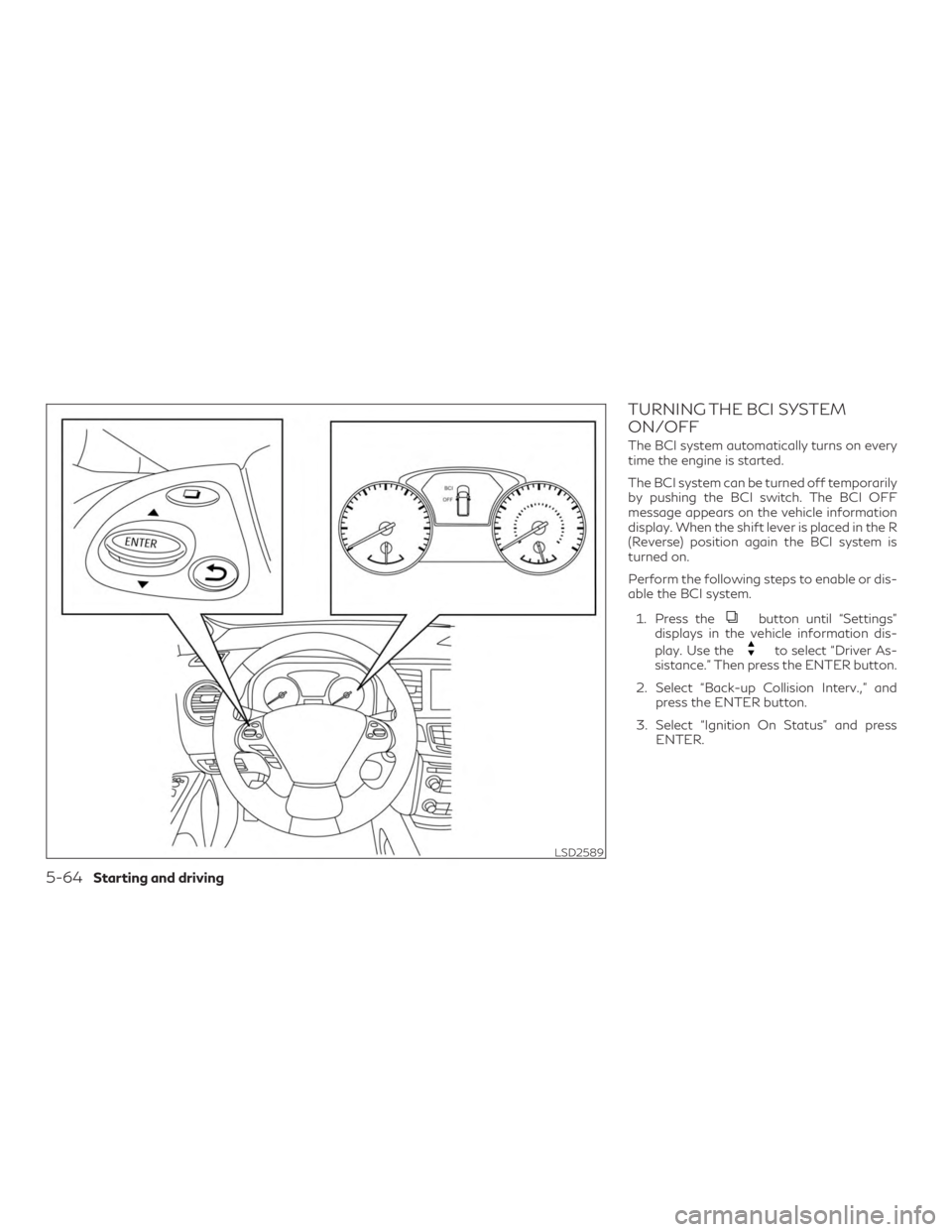
TURNING THE BCI SYSTEM
ON/OFF
The BCI system automatically turns on every
time the engine is started.
The BCI system can be turned off temporarily
by pushing the BCI switch. The BCI OFF
message appears on the vehicle information
display. When the shift lever is placed in the R
(Reverse) position again the BCI system is
turned on.
Perform the following steps to enable or dis-
able the BCI system.1. Press the
button until “Settings”
displays in the vehicle information dis-
play. Use the
to select “Driver As-
sistance.” Then press the ENTER button.
2. Select “Back-up Collision Interv.,” and press the ENTER button.
3. Select “Ignition On Status” and press ENTER.
LSD2589
5-64Starting and driving
Page 337 of 540
HOW TO ENABLE/DISABLE THE
RCTA SYSTEM
When the RCTA system is enabled in the
vehicle information display, the system can
be turned off temporarily by pushing the
warning systems switch. For additional infor-
mation, refer to “Warning systems switch” in
the “Instruments and controls” section of this
manual.
Perform the following steps to enable or dis-
able the RCTA system.1. Press the
button until “Settings”
displays in the vehicle information dis-
play. Use the
button to select
“Driver Assistance.” Then press the EN-
TER button.
2. Select “Driving Aids” and press the EN- TER button.
3. Select “Blind Spot” and press the ENTER button.
4. Select “Blind Spot” and use the ENTER button to turn the system on or off.
LSD2816
Starting and driving5-71
Page 368 of 540

Setting DCA system to ON/OFF:
The DCA can be turned on/off in the vehicle
information display using the buttons on the
steering wheel.1. Press the
button until “Settings”
displays in the vehicle information dis-
play. Use the
button to select
“Driver Assistance.” Then press the EN-
TER button.
2. Select “Driving Aids,” and press the EN- TER button.
3. Select “Forward,” and press the ENTER button.
4. To turn on the “Assistance (DCA)” check the box using the ENTER button.
If the LDP, BSI and DCA systems are set to
off in the vehicle information display and the
dynamic driver assistance switch is pushed,
the LDW indicator, BSI ON indicator light,
and the DCA system switch indicator light
will blink for approximately 2 seconds.
For additional information on LDP and BSI,
refer to “Lane Departure Prevention (LDP)”
and “Blind Spot Intervention® (BSI)” in this
section.
DCA SYSTEM LIMITATIONS
WARNING
∙ This system is only an aid to assist the driver and is not a collision warning or
avoidance device. It is the driver’s re-
sponsibility to stay alert, drive safely and
be in control of the vehicle at all times.
∙ This system will not adapt automatically to road conditions.
∙ As there is a performance limit to the dis- tance control function, never rely solely
on the DCA system. This system does not
correct careless, inattentive or absent-
minded driving, or overcome poor visibil-
ity in rain, fog, or other bad weather. De-
celerate the vehicle speed by depressing
the brake pedal, depending on the dis-
tance to the vehicle ahead and the sur-
rounding circumstances in order to main-
tain a safe distance between vehicles.
∙ The system may not detect the vehicle in front of you in certain road or weather
conditions. To avoid accidents, never use
the DCA system under the following
conditions:
– On roads with sharp curves – On slippery road surfaces such as on
ice or snow, etc.
– During bad weather (rain, fog, snow, etc.)
– When rain, snow or dirt adhere to the sensor area of the front bumper
– On steep downhill roads (frequent braking may result in overheating the
brakes)
– On repeated uphill and downhill roads
∙ Do not use the DCA system if you are towing a trailer. The system may not de-
tect a vehicle ahead.
∙ In some road or traffic conditions, a ve- hicle or object can unexpectedly come
into the sensor detection zone and cause
automatic braking. You may need to con-
trol the distance from other vehicles us-
ing the accelerator pedal. Always stay
alert and avoid using the DCA system
where not recommended in this warning
section.
The following are some conditions in which
the sensor cannot detect the signals: ∙ When the reflector of the vehicle ahead is covered with dirt, snow and road spray
5-102Starting and driving
Page 378 of 540
TURNING THE FEB WITH
PEDESTRIAN DETECTION
SYSTEM ON/OFF
Perform the following steps to enable or dis-
able the FEB with Pedestrian Detection sys-
tem.1. Press the
button until “Settings”
displays in the vehicle information dis-
play. Use the
button to select
“Driver Assistance.” Then press the EN-
TER button.
2. Select “Emergency Braking” and press the ENTER button.
3. Select “System” and press the ENTER button.
When the FEB with Pedestrian Detection
system is turned off, the FEB with Pedestrian
Detection system warning light illuminates.
LSD2817
5-112Starting and driving
Page 386 of 540
TURNING THE PFCW SYSTEM
ON/OFF
Perform the following steps to turn the
PFCW system ON or OFF.1. Press the
button until “Settings”
displays in the vehicle information dis-
play. Use the
button to select
“Driver Assistance.” Then press the EN-
TER button.
2. Select “Emergency Braking” and press the ENTER button.
3. Select “System” and press the ENTER button.
When the PFCW system is turned off, the
FEB with Pedestrian Detection system warn-
ing light illuminates.
NOTE:
∙ The PFCW system will be automatically
turned on when the engine is restarted.
∙ The PFCW system is integrated into the
FEB with Pedestrian Detection system.
There is not a separate selection in the
vehicle information display for the
PFCW system. When the FEB with Pe-
destrian Detection system is turned off,
the PFCW system is also turned off.
LSD2817
5-120Starting and driving
Page 409 of 540

HOW TO ENABLE/DISABLE THE
SONAR SYSTEM
The system is automatically activated when
the ignition is in the ON position and the shift
lever is in the R (Reverse) position.
Perform the following steps to enable or dis-
able the sonar system:1. Press the SETTING button on the control panel and highlight the “Camera/Sonar”
key on the display using the INFINITI
controller then press the ENTER button.
2. Highlight the “Sonar” key then press the ENTER button.
3. To turn the sonar system on or off, high- light the “Sonar” key and press the EN-
TER button. To enable the front sensors
only, highlight “FR Sensor Only” and
press the ENTER button.
NOTE:
The system will not automatically be turned
on when the engine is restarted.
SONAR LIMITATIONS
WARNING
Listed below are the system limitations for
the sonar system. Failure to operate the
vehicle in accordance with these system
limitations could result in serious injury or
death.
∙ Read and understand the limitations of the sonar system as contained in this sec-
tion. Inclement weather may affect the
function of the sonar system; this may
include reduced performance or a false
activation.
∙ The system is deactivated at speeds above 6 mph (10 km/h). It is reactivated
at lower speeds.
∙ Inclement weather or ultrasonic sources such as an automatic car wash, a truck’s
compressed-air brakes or a pneumatic
drill may affect the function of the sys-
tem; this may include reduced perfor-
mance or a false activation.
∙ The system is not designed to prevent contact with small or moving objects. Al-
ways move slowly. The system will not
detect small objects below the bumper or
on the ground. ∙ The system may not detect the following
objects: fluffy objects such as snow,
cloth, cotton, glass-wool, etc.; thin ob-
jects such as rope, wire and chain, etc.; or
wedge-shaped objects.
∙ The system may not detect objects at speeds above 3 mph (5 km/h) and may
not detect certain angular or moving
objects.
SYSTEM TEMPORARILY
UNAVAILABLE
When sonar blockage is detected, the system
will be deactivated automatically.
The system is not available until the condi-
tions no longer exist.
The sonar sensors may be blocked by tempo-
rary ambient conditions such as splashing
water, mist or fog. The blocked condition
may also be caused by objects such as ice,
frost or dirt obstructing the sonar sensors.
Action to take:
When the above conditions no longer exist,
the system will resume automatically.
Starting and driving5-143