2019 Hyundai Tucson Brake switch
[x] Cancel search: Brake switchPage 296 of 546
5-30
Driving your vehicle
Auto Hold (if equipped)
The Auto Hold maintains the vehicle
in a standstill even though the brake
pedal is not depressed after the driv-
er brings the vehicle to a complete
stop by depressing the brake pedal.
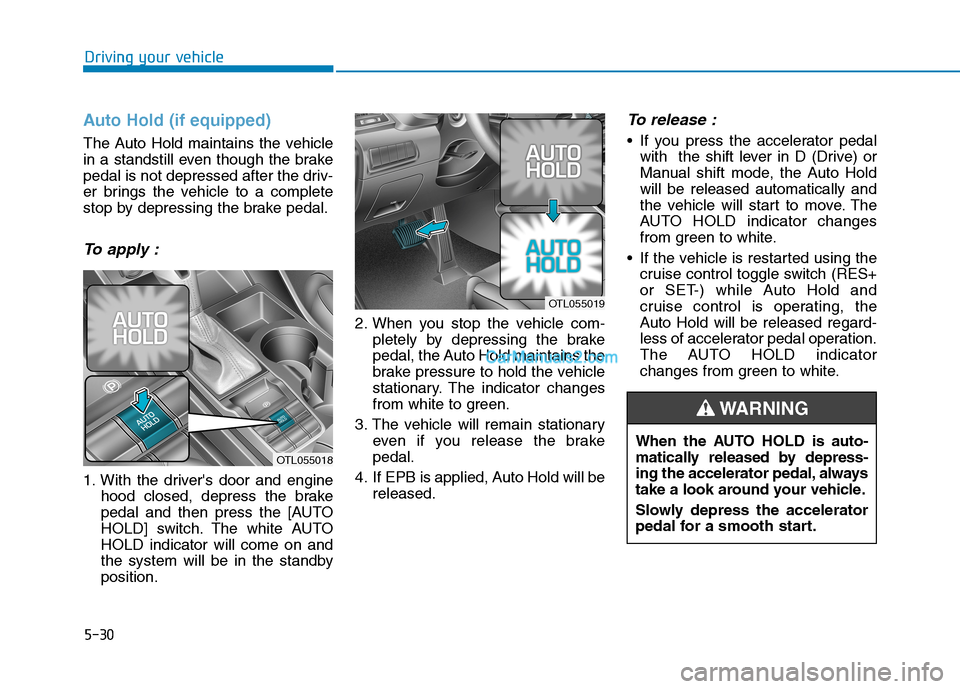
To apply :
1. With the driver's door and engine
hood closed, depress the brake
pedal and then press the [AUTO
HOLD] switch. The white AUTO
HOLD indicator will come on and
the system will be in the standby
position.2. When you stop the vehicle com-
pletely by depressing the brake
pedal, the Auto Hold maintains the
brake pressure to hold the vehicle
stationary. The indicator changes
from white to green.
3. The vehicle will remain stationary
even if you release the brake
pedal.
4. If EPB is applied, Auto Hold will be
released.
To release :
If you press the accelerator pedal
with the shift lever in D (Drive) or
Manual shift mode, the Auto Hold
will be released automatically and
the vehicle will start to move. The
AUTO HOLD indicator changes
from green to white.
If the vehicle is restarted using the
cruise control toggle switch (RES+
or SET-) while Auto Hold and
cruise control is operating, the
Auto Hold will be released regard-
less of accelerator pedal operation.
The AUTO HOLD indicator
changes from green to white.
OTL055018
OTL055019
When the AUTO HOLD is auto-
matically released by depress-
ing the accelerator pedal, always
take a look around your vehicle.
Slowly depress the accelerator
pedal for a smooth start.
WARNING
Page 297 of 546
![Hyundai Tucson 2019 Owners Manual 5-31
Driving your vehicle
5
To cancel :
1. Depress the brake pedal.
2. Press the [AUTO HOLD] switch.
The AUTO HOLD indicator will turn
off.
Information
• The Auto Hold does not operate
when:
- The](/manual-img/35/19694/w960_19694-296.png "Hyundai Tucson 2019 Owners Manual 5-31
Driving your vehicle
5
To cancel :
1. Depress the brake pedal.
2. Press the [AUTO HOLD] switch.
The AUTO HOLD indicator will turn
off.
Information
• The Auto Hold does not operate
when:
- The")
5-31
Driving your vehicle
5
To cancel :
1. Depress the brake pedal.
2. Press the [AUTO HOLD] switch.
The AUTO HOLD indicator will turn
off.
Information
• The Auto Hold does not operate
when:
- The driver's door is opened
- The engine hood is opened
- The shift lever is in P (Park) or R
(Reverse)
- The EPB is applied
• For your safety, the Auto Hold auto-
matically switches to EPB when:
- The driver's door is opened with
the shift lever in D (Drive) or N
(Neutral)
- The engine hood is opened with the
shift lever in D (Drive) or N
(Neutral)
- The vehicle stops for more than 10
minutes
- The vehicle stands on a steep slope
- The vehicle moves several timesIn these cases, the parking brake
warning light comes on, the AUTO
HOLD indicator changes from
green to white, and a warning sound
and a message will appear to inform
you that EPB has been automatical-
ly engaged. Before driving off again,
press foot brake pedal, check the
surrounding area near your vehicle
and release parking brake manually
with the EPB switch.
• While operating Auto Hold, you
may hear mechanical noise.
However, it is normal operating
noise.
If the AUTO HOLD indicator
changes to yellow, the Auto Hold
is not working properly. Contact
an authorized HYUNDAI dealer.
NOTICE
i
OTL055020
To prevent, unexpected and
sudden vehicle movement,
ALWAYS press your foot on the
brake pedal to cancel the Auto
Hold before you:
- Drive downhill.
- Drive the vehicle in R (Reverse).
- Park the vehicle.
WARNING
Page 299 of 546
![Hyundai Tucson 2019 Owners Manual 5-33
Driving your vehicle
5
Press brake pedal to deactivate
AUTO HOLD
If you did not apply the brake pedal
when you release the Auto Hold by
pressing the [AUTO HOLD] switch, a
warning will sound and a](/manual-img/35/19694/w960_19694-298.png "Hyundai Tucson 2019 Owners Manual 5-33
Driving your vehicle
5
Press brake pedal to deactivate
AUTO HOLD
If you did not apply the brake pedal
when you release the Auto Hold by
pressing the [AUTO HOLD] switch, a
warning will sound and a")
5-33
Driving your vehicle
5
Press brake pedal to deactivate
AUTO HOLD
If you did not apply the brake pedal
when you release the Auto Hold by
pressing the [AUTO HOLD] switch, a
warning will sound and a message
will appear.
AUTO HOLD conditions not met.
Close door hood, and liftgate; fas-
ten seatbelt
When you press the [AUTO HOLD]
switch, if the driver's door and engine
hood, liftgate are not closed or the
driver's seat belt is unfastened, a
warning will sound and a message
will appear on the LCD display. At
this moment, press the [AUTO
HOLD] button after closing the dri-
ver's door and engine hood, liftgate
and fastening the seat belt.
Anti-lock Brake System (ABS)
OIK057080LOTL058235N
An Anti-Lock Braking System
(ABS) or an Electronic Stability
Control (ESC) system will not
prevent accidents due to
improper or dangerous driving
maneuvers. Even though vehi-
cle control is improved during
emergency braking, always
maintain a safe distance
between you and objects ahead
of you. Vehicle speeds should
always be reduced during
extreme road conditions. The
braking distance for cars
equipped with ABS or ESC may
be longer than for those without
these systems in the following
road conditions.
WARNING
Page 300 of 546
5-34
Driving your vehicle
ABS is an electronic braking system
that helps prevent a braking skid.
ABS allows the driver to steer and
brake at the same time.
Using ABS
To obtain the maximum benefit from
your ABS in an emergency situation,
do not attempt to modulate your
brake pressure and do not try to
pump your brakes. Depress your
brake pedal as hard as possible.
When you apply your brakes under
conditions which may lock the
wheels, you may hear sounds from
the brakes, or feel a corresponding
sensation in the brake pedal. This is
normal and it means your ABS is
active.
ABS does not reduce the time or dis-
tance it takes to stop the vehicle.
Always maintain a safe distance from
the vehicle in front of you.
ABS will not prevent a skid that
results from sudden changes in
direction, such as trying to take a
corner too fast or making a sudden
lane change. Always drive at a safe
speed for the road and weather con-
ditions.ABS cannot prevent a loss of stabili-
ty. Always steer moderately when
braking hard. Severe or sharp steer-
ing wheel movement can still cause
your vehicle to veer into oncoming
traffic or off the road.
On loose or uneven road surfaces,
operation of the anti-lock brake sys-
tem may result in a longer stopping
distance than for vehicles equipped
with a conventional brake system.
The ABS warning light ( ) will stay
on for several seconds after the igni-
tion switch is in the ON position.
During that time, the ABS will go
through self-diagnosis and the light
will go off if everything is normal. If
the light stays on, you may have a
problem with your ABS. Contact an
authorized HYUNDAI dealer as soon
as possibleDrive your vehicle at reduced
speeds during the following
conditions:
Rough, gravel or snow-cov-
ered roads.
On roads where the road sur-
face is pitted or has different
surface height.
Tire chains are installed on
your vehicle.
The safety features of an ABS
or ESC equipped vehicle should
not be tested by high speed
driving or cornering. This could
endanger the safety of yourself
or others.
Page 302 of 546
5-36
Driving your vehicle
ESC operation
ESC ON condition
When the ignition switch is in the ON
position, the ESC and the ESC OFF
indicator lights illuminate for approxi-
mately three seconds. After both
lights go off, the ESC is enabled.
When operating
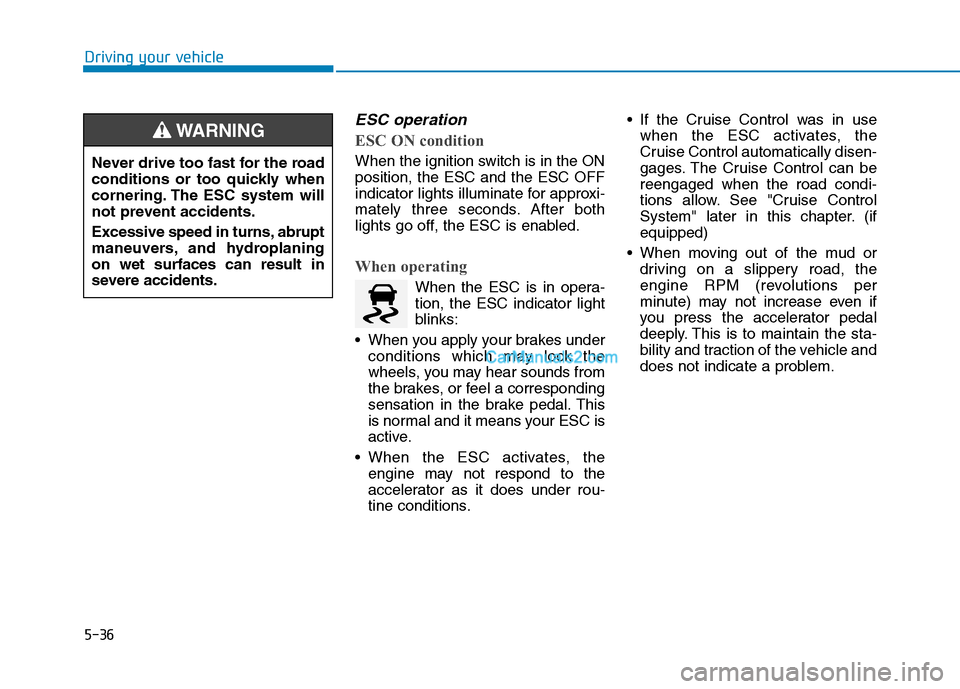
When the ESC is in opera-
tion, the ESC indicator light
blinks:
When you apply your brakes under
conditions which may lock the
wheels, you may hear sounds from
the brakes, or feel a corresponding
sensation in the brake pedal. This
is normal and it means your ESC is
active.
When the ESC activates, the
engine may not respond to the
accelerator as it does under rou-
tine conditions. If the Cruise Control was in use
when the ESC activates, the
Cruise Control automatically disen-
gages. The Cruise Control can be
reengaged when the road condi-
tions allow. See "Cruise Control
System" later in this chapter. (if
equipped)
When moving out of the mud or
driving on a slippery road, the
engine RPM (revolutions per
minute) may not increase even if
you press the accelerator pedal
deeply. This is to maintain the sta-
bility and traction of the vehicle and
does not indicate a problem. Never drive too fast for the road
conditions or too quickly when
cornering. The ESC system will
not prevent accidents.
Excessive speed in turns, abrupt
maneuvers, and hydroplaning
on wet surfaces can result in
severe accidents.
WARNING
Page 303 of 546
5-37
Driving your vehicle
5
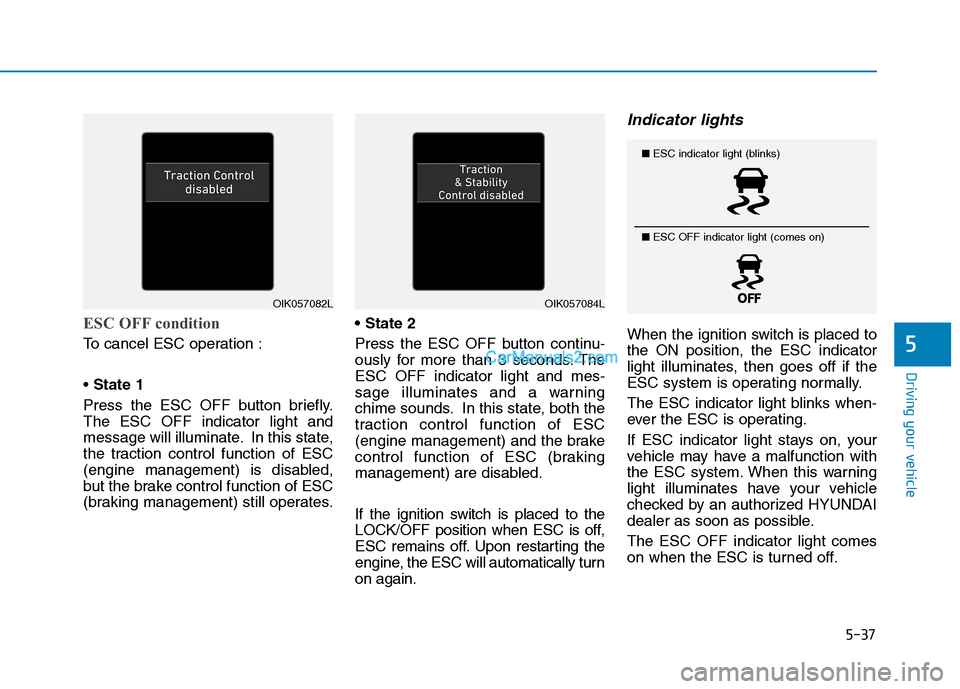
ESC OFF condition
To cancel ESC operation :
State 1
Press the ESC OFF button briefly.
The ESC OFF indicator light and
message will illuminate. In this state,
the traction control function of ESC
(engine management) is disabled,
but the brake control function of ESC
(braking management) still operates.
Press the ESC OFF button continu-
ously for more than 3 seconds. The
ESC OFF indicator light and mes-
sage illuminates and a warning
chime sounds. In this state, both the
traction control function of ESC
(engine management) and the brake
control function of ESC (braking
management) are disabled.
If the ignition switch is placed to the
LOCK/OFF position when ESC is off,
ESC remains off. Upon restarting the
engine, the ESC will automatically turn
on again.
Indicator lights
When the ignition switch is placed to
the ON position, the ESC indicator
light illuminates, then goes off if the
ESC system is operating normally.
The ESC indicator light blinks when-
ever the ESC is operating.
If ESC indicator light stays on, your
vehicle may have a malfunction with
the ESC system. When this warning
light illuminates have your vehicle
checked by an authorized HYUNDAI
dealer as soon as possible.
The ESC OFF indicator light comes
on when the ESC is turned off.
OIK057082LOIK057084L
■ESC indicator light (blinks)
■ ESC OFF indicator light (comes on)
Page 307 of 546
5-41
Driving your vehicle
5
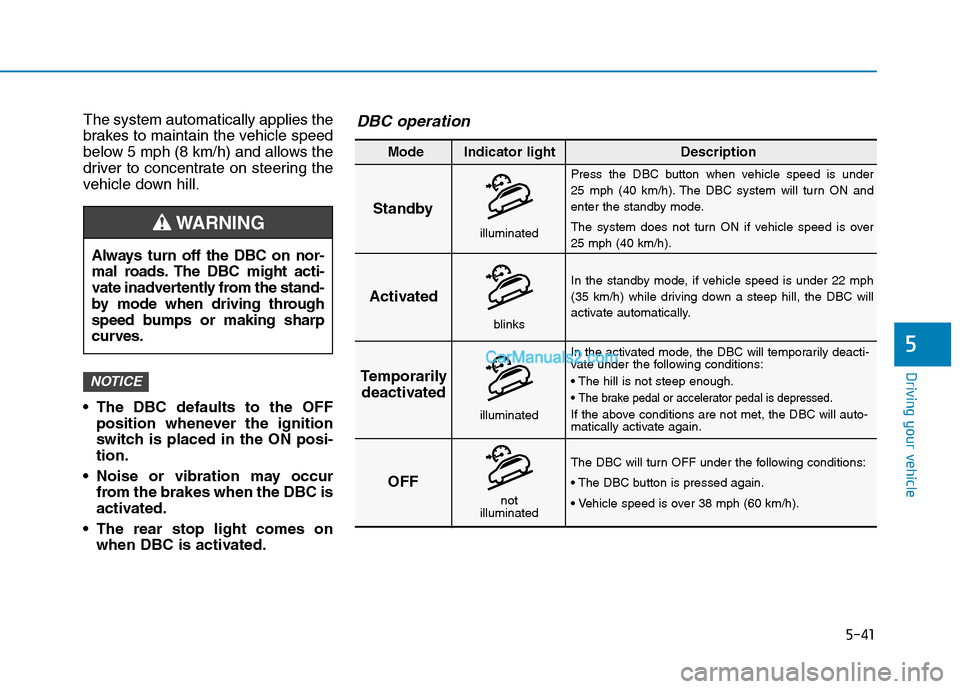
The system automatically applies the
brakes to maintain the vehicle speed
below 5 mph (8 km/h) and allows the
driver to concentrate on steering the
vehicle down hill.
The DBC defaults to the OFF
position whenever the ignition
switch is placed in the ON posi-
tion.
Noise or vibration may occur
from the brakes when the DBC is
activated.
The rear stop light comes on
when DBC is activated.
NOTICE
Always turn off the DBC on nor-
mal roads. The DBC might acti-
vate inadvertently from the stand-
by mode when driving through
speed bumps or making sharp
curves.
WARNING
Standby
Press the DBC button when vehicle speed is under
25 mph (40 km/h). The DBC system will turn ON and
enter the standby mode.
The system does not turn ON if vehicle speed is over
25 mph (40 km/h).
In the standby mode, if vehicle speed is under 22 mph
(35 km/h) while driving down a steep hill, the DBC will
activate automatically.
In the activated mode, the DBC will temporarily deacti-
vate under the following conditions:
The brake pedal or accelerator pedal is depressed.
If the above conditions are not met, the DBC will auto-
matically activate again.
The DBC will turn OFF under the following conditions:
Activated
Temporarily
deactivated
OFF
Mode Indicator light Description
blinks
illuminated
not
illuminated
illuminated
DBC operation
Page 308 of 546
5-42
Driving your vehicle
The DBC may not deactivate on
steep inclines even though the
brake or accelerator pedal is
depressed.
The DBC does not operate
when:
- The shift lever is in P (Park).
- The ESC is activated.
Good Braking Practices
Wet brakes can be dangerous! The
brakes may get wet if the vehicle is
driven through standing water or if it
is washed. Your vehicle will not stop
as quickly if the brakes are wet. Wet
brakes may cause the vehicle to pull
to one side.To dry the brakes, apply the brakes
lightly until the braking action returns
to normal, taking care to keep the
vehicle under control at all times. If
the braking action does not return to
normal, stop as soon as it is safe to
do so and call an authorized
HYUNDAI dealer for assistance.
DO NOT drive with your foot resting
on the brake pedal. Even light, but
constant pedal pressure can result in
the brakes overheating, brake wear,
and possibly even brake failure.
If a tire goes flat while you are driv-
ing, apply the brakes gently and
keep the vehicle pointed straight
ahead while you slow down. When
you are moving slowly enough for it
to be safe to do so, pull off the road
and stop in a safe location.
Keep your foot firmly on the brake
pedal when the vehicle is stopped to
prevent the vehicle from rolling for-
ward.
NOTICE
If the DBC red indicator light
illuminates, the system may
have overheated or have mal-
functioned. When the warning
light illuminates even though
the DBC system has cooled off,
have your vehicle checked by
an authorized HYUNDAI dealer
as soon as possible.
WARNING
Whenever leaving the vehicle or
parking, always come to a com-
plete stop and continue to
depress the brake pedal. Move
the shift lever into the P (Park)
position, then apply the parking
brake, and place the ignition
switch in the OFF position.
Vehicles parked with the park-
ing brake not applied or not
fully engaged may roll inadver-
tently and may cause injury to
the driver and others. ALWAYS
apply the parking brake before
exiting the vehicle.
WARNING