2019 Hyundai Tucson USB
[x] Cancel search: USBPage 17 of 685
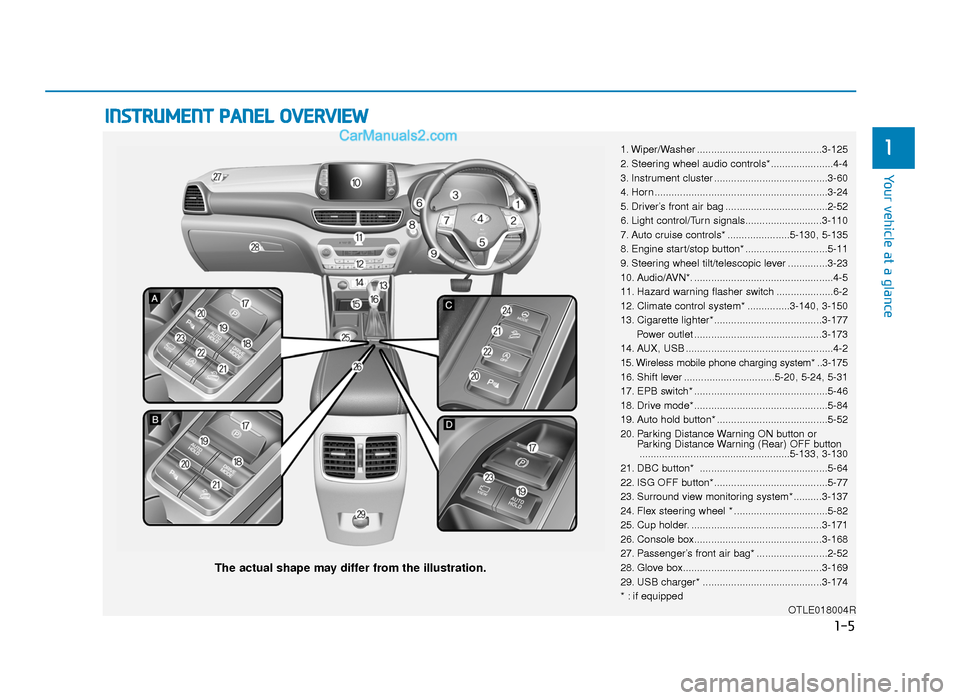
INSTRUMENT PANEL OVERVIEW
1. Wiper/Washer ............................................3-125
2. Steering wheel audio controls*......................4-4
3. Instrument cluster ........................................3-60
4. Horn .............................................................3-24
5. Driver’s front air bag ....................................2-52
6. Light control/Turn signals...........................3-110
7. Auto cruise controls* ......................5-130, 5-135
8. Engine start/stop button* .............................5-11
9. Steering wheel tilt/telescopic lever ..............3-23
10. Audio/AVN*. .................................................4-5
11. Hazard warning flasher switch ....................6-2
12. Climate control system* ...............3-140, 3-150
13. Cigarette lighter*......................................3-177Power outlet .............................................3-173
14. AUX, USB ....................................................4-2
15. Wireless mobile phone charging system* ..3-175
16. Shift lever ................................5-20, 5-24, 5-31
17. EPB switch* ...............................................5-46
18. Drive mode* ...............................................5-84
19. Auto hold button* .......................................5-52
20. Parking Distance Warning ON button or Parking Distance Warning (Rear) OFF button.....................................................5-133, 3-130
21. DBC button* .............................................5-64
22. ISG OFF button*........................................5-77
23. Surround view monitoring system* ..........3-137
24. Flex steering wheel * .................................5-82
25. Cup holder. ..............................................3-171
26. Console box.............................................3-168
27. Passenger’s front air bag* .........................2-52
28. Glove box.................................................3-169
29. USB charger* ..........................................3-174
* : if equipped OTLE018004R
The actual shape may differ from the illustration.
1-5
Your vehicle at a glance
1
TLe UK 1.qxp 5/10/2018 11:27 AM Page 5
Page 95 of 685
Convenient features of your vehicle
3
Storage compartment ........................................3-168
Centre console storage ...............................................3-168
Sliding armrest ...............................................................3-168
Glove box ........................................................................\
3-169
Cool box........................................................................\
...3-169
Sunglass holder .............................................................3-169
Interior features.................................................3-171
Ashtray ........................................................................\
....3-171
Cup holder.......................................................................3\
-171
Sunvisor ........................................................................\
...3-172
Power outlet ...................................................................3-173\
USB charger ...................................................................3-174\
Wireless mobile phone charging system ................3-175
Cigarette lighter ............................................................3-177
Clock ........................................................................\
.........3-177
Clothes hanger ..............................................................3-178
Floor mat anchor(s)......................................................3-178
Luggage net (holder) ...................................................3-179
Cargo security screen..................................................3-180
Luggage tray ..................................................................3-182
Exterior features ...............................................3-183
Roof rack ........................................................................\
3-183
3
TLe UK 3a(~109).qxp 6/12/2018 2:20 PM Page 3
Page 266 of 685
3-174
Convenient features of your vehicle
(Continued)
• Some electronic devices can cause electronic interference
when plugged into a vehicle’s
power outlet. These devices may
cause excessive audio static
and malfunctions in other elec-
tronic systems or devices used
in your vehicle.
• Push the plug in as far as it will go. If good contact is not made,
the plug may overheat and the
fuse may open.
• Plug in battery equipped electrical/ electronic devices with reverse
current protection. The current
from the battery may flow into the
vehicle's electrical/electronic sys-
tem and cause system malfunc-
tion.
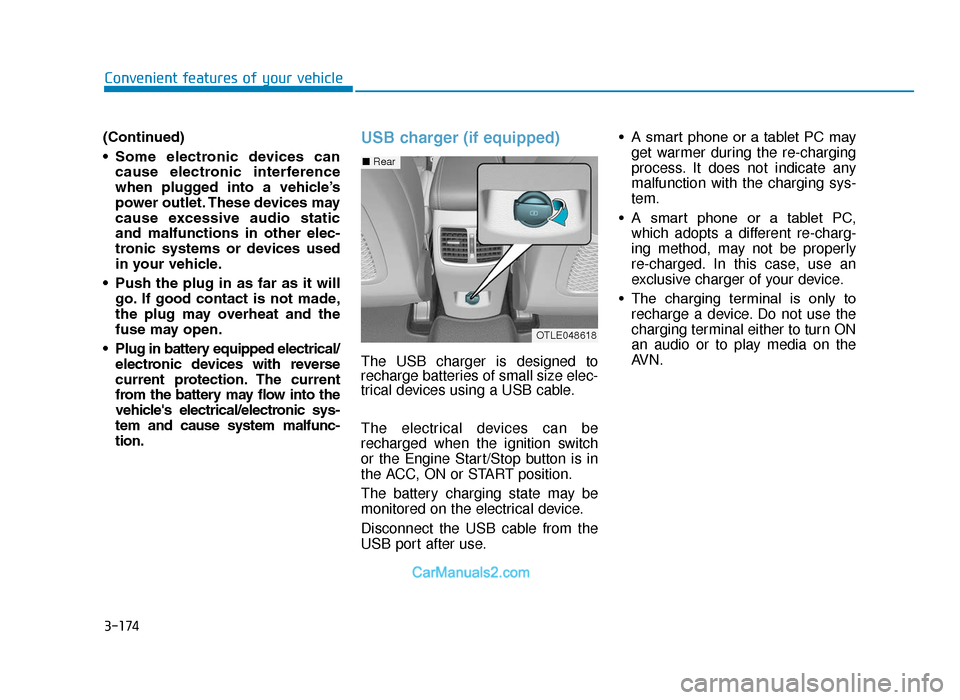
USB charger (if equipped)
The USB charger is designed to
recharge batteries of small size elec-
trical devices using a USB cable.
The electrical devices can be
recharged when the ignition switch
or the Engine Start/Stop button is in
the ACC, ON or START position.
The battery charging state may be
monitored on the electrical device.
Disconnect the USB cable from the
USB port after use. • A smart phone or a tablet PC may
get warmer during the re-charging
process. It does not indicate any
malfunction with the charging sys-
tem.
• A smart phone or a tablet PC, which adopts a different re-charg-
ing method, may not be properly
re-charged. In this case, use an
exclusive charger of your device.
• The charging terminal is only to recharge a device. Do not use the
charging terminal either to turn ON
an audio or to play media on the
AVN.
■ Rear
OTLE048618
TLe UK 3b(110~).qxp 6/12/2018 2:42 PM Page 174
Page 276 of 685
Multimedia System
Multimedia system .................................................4-2
AUX, USB and iPod®port ...............................................4-2
Antenna ........................................................................\
.......4-3
Steering wheel audio control .........................................4-4
Audio / Video / Navigation system (AVN) ..................4-5
Bluetooth®Wireless Technology hands-free ............4-5
How Vehicle Audio Works ...............................................4-6
Audio (without touch screen) ............................4-15
System layout - control panel.....................................4-15
System layout - steering wheel remote control.....4-17
Turning the system on or off ......................................4-20
Turning the display on or off ......................................4-20
Getting to know the basic operations .......................4-21
Radio ......................................................................4-\
22
Turning on the radio ......................................................4-22
Changing the radio mode ..............................................4-23
Scanning for available radio stations.........................4-23
Searching for radio stations ........................................4-24
Saving radio stations ......................................................4-24
Listening to saved radio stations ................................4-24
Media player .........................................................4-25
Using the media player..................................................4-25
Using the USB mode ......................................................4-26
Using the iPod mode ......................................................4-28
Using the AUX mode ......................................................4-31
Bluetooth...............................................................4-32
Connecting Bluetooth devices .....................................4-32
Using a Bluetooth audio device...................................4-35
Using a Bluetooth phone ..............................................4-37
Setup ......................................................................4-\
43
Display........................................................................\
........4-43
Sound ........................................................................\
.........4-43
Date/Time ........................................................................\
.4-44
Bluetooth ........................................................................\
...4-44
System ........................................................................\
.......4-44
System status icons .............................................4-45
Audio system specifications...............................4-46
USB ........................................................................\
.............4-46
Bluetooth ........................................................................\
...4-47
Trademarks ...........................................................4-48
Declaration of conformity ..................................4-49
CE RED for EU .................................................................4-49
4
TLe UK 4.qxp 5/10/2018 12:03 PM Page 1
Page 277 of 685
Information
• If you install an aftermarket HIDheadlamp, your vehicle’s audio and
electronic device may malfunction.
• Prevent chemicals such as perfume, cosmetic oil, sun cream, hand clean-
er, and air freshener from contacting
the interior parts because they may
cause damage or discolouration.
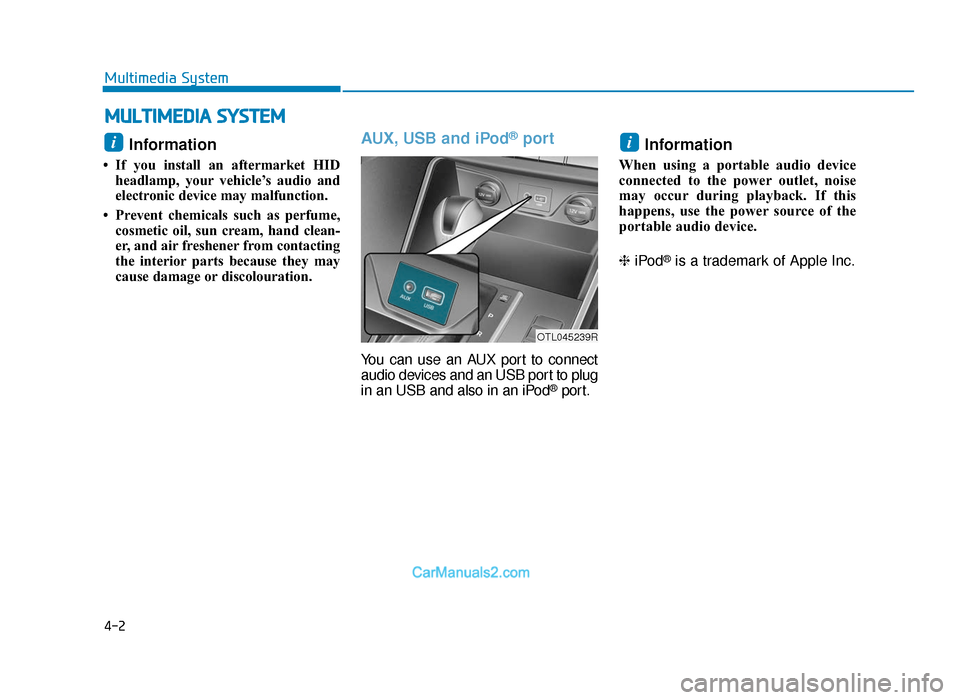
AUX, USB and iPod®port
You can use an AUX port to connect
audio devices and an USB port to plug
in an USB and also in an iPod
®port.
Information
When using a portable audio device
connected to the power outlet, noise
may occur during playback. If this
happens, use the power source of the
portable audio device.
❈ iPod
®is a trademark of Apple Inc.
ii
MULTIMEDIA SYSTEM
4-2
Multimedia System
OTL045239R
TLe UK 4.qxp 5/10/2018 12:03 PM Page 2
Page 285 of 685
4-10
Multimedia System
Information-Using the USB
device
• Connect the USB device after turning on the engine. The USB device may
become damaged if it is already con-
nected when the ignition is turned
on.The USB device may not operate
properly if the car ignition is turned
on or off with the USB device con-
nected.
• Heed caution to static electricity when connecting/disconnecting USB
devices.
• Encoded MP3 Players will not be recognised when connected as an
external device.
• When connecting an external USB device, the device may not properly
recognise the USB is in some states.
• Only products formatted with byte/sectors under 64Kbyte will be
recognised.
• This device recognises USB devices formatted in FAT 12/16/32 file for-
mats. This device does not recognise
files in NTFS file format.
• Some USB devices may not be sup- ported due to compatibility issues.
(Continued)(Continued)
• Avoid contact between the USB con- nector with bodily parts or foreign
objects.
• Repeated connecting/disconnecting of USB devices within short periods
of time may result in product mal-
function.
• A strange noise may occur when dis- connecting the USB.
• Make sure to connect/disconnect external USB devices with the audio
power turned off.
• The amount of time required to recognise the USB device may differ
depending on the type, size or file for-
mats stored in the USB. Such differ-
ences in time are not indications of
malfunctions.
• The device only supports USB devices used to play music files.
• USB images and videos are not sup- ported.
• Do not use the USB I/F to charge batteries or USB accessories that
generate heat. Such acts may lead to
worsened performance or damage
to the device.
(Continued)(Continued)
• The device may not recognise the USB device if separately purchased
USB hubs and extension cables are
being used. Connect the USB direct-
ly with the multimedia terminal of
the vehicle.
• When using mass storage USB devices with separate logical drives,
only files saved to the root drive can
be played.
• Files may not properly operate if application programs are installed
to the USBs.
• The device may not operate normal- ly if MP3 Players, mobile phones,
digital cameras, or other electronic
devices (USB devices not recognised
as portable disk drives) are connect-
ed with the device.
• Charging through the USB may not work for some mobile devices.
• The device may not support normal operation when using a USB memo-
ry type besides (Metal Cover Type)
USB Memory.
(Continued)i
TLe UK 4.qxp 5/10/2018 12:04 PM Page 10
Page 286 of 685
4-11
Multimedia System
4
(Continued)
• The device may not support normaloperation when using formats such
as HDD Type, CF, or SD Memory.
• The device will not support files locked by DRM (Digital Rights
Management.)
• USB memory sticks used by con- necting an Adaptor (SD Type or CF
Type) may not be properly recog-
nised.
• The device may not operate proper- ly when using USB HDDs or USBs
subject to connection failures
caused by vehicle vibrations. (e.g. i-
stick type)
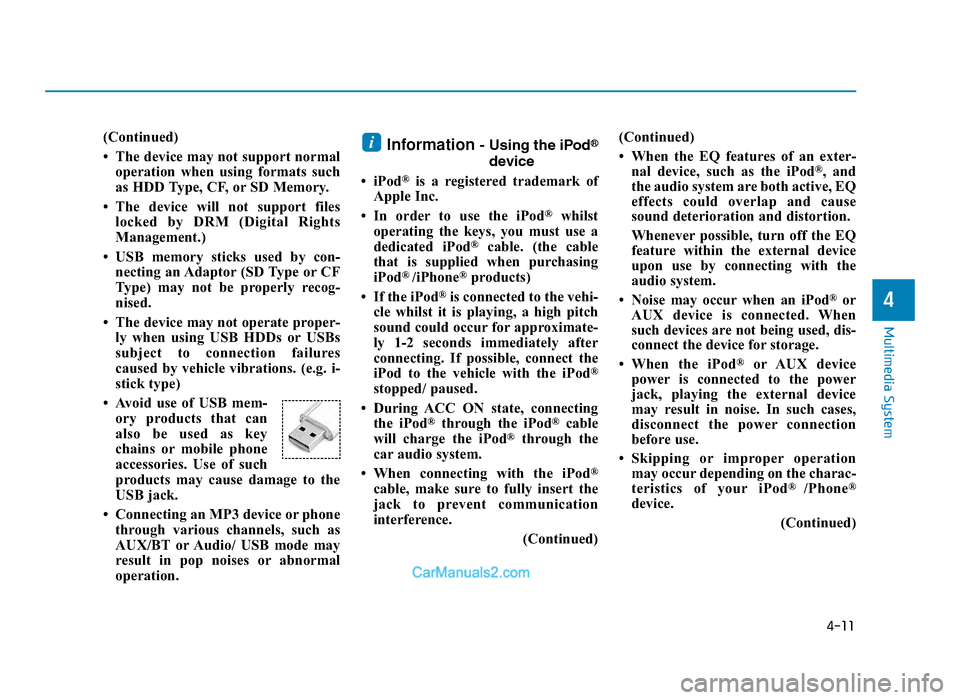
• Avoid use of USB mem- ory products that can
also be used as key
chains or mobile phone
accessories. Use of such
products may cause damage to the
USB jack.
• Connecting an MP3 device or phone through various channels, such as
AUX/BT or Audio/ USB mode may
result in pop noises or abnormal
operation.Information- Using the iPod®
device
• iPod
®is a registered trademark of
Apple Inc.
• In order to use the iPod
®whilst
operating the keys, you must use a
dedicated iPod
®cable. (the cable
that is supplied when purchasing
iPod
® /iPhone®products)
• If the iPod
®is connected to the vehi-
cle whilst it is playing, a high pitch
sound could occur for approximate-
ly 1-2 seconds immediately after
connecting. If possible, connect the
iPod to the vehicle with the iPod
®
stopped/ paused.
• During ACC ON state, connecting the iPod
®through the iPod®cable
will charge the iPod®through the
car audio system.
• When connecting with the iPod
®
cable, make sure to fully insert the
jack to prevent communication
interference. (Continued)(Continued)
• When the EQ features of an exter-
nal device, such as the iPod
®, and
the audio system are both active, EQ
effects could overlap and cause
sound deterioration and distortion.
Whenever possible, turn off the EQ
feature within the external device
upon use by connecting with the
audio system.
• Noise may occur when an iPod
®or
AUX device is connected. When
such devices are not being used, dis-
connect the device for storage.
• When the iPod
®or AUX device
power is connected to the power
jack, playing the external device
may result in noise. In such cases,
disconnect the power connection
before use.
• Skipping or improper operation may occur depending on the charac-
teristics of your iPod
® /Phone®
device.
(Continued)
i
TLe UK 4.qxp 5/10/2018 12:04 PM Page 11
Page 287 of 685
4-12
Multimedia System
(Continued)
• If your iPhone
®is connected to both
the Bluetooth®Wireless Technology
and USB, the sound may not be
properly played. In your iPhone
®,
select the Dock connector or
Bluetooth
®Wireless Technology to
change the sound output (source).
• iPod mode cannot be operated when the iPod
®cannot be recognised due
to versions that do not support com-
munication protocols.
• For fifth generation iPod
®Nano
devices, the iPod®may not be recog-
nised when the battery level is low.
Please charge the iPod
®for use.
• Search/play orders shown within the iPod
®device may differ with the
orders shown within the audio sys-
tem.
• If the iPod
®malfunctions due to an
iPod®device defect, reset the iPod®
and try again. (To learn more, refer to
your iPod®manual)
(Continued) (Continued)
• Some iPod
®s may not sync with the
System depending on its version. If
the Media is removed before the
Media is recognised, then the system
may not properly restore the previ-
ously operated mode. (iPod
®charg-
ing is not supported.)
Information- Using the AUX
device
• If an external device connector is connected with the AUX terminal,
then AUX mode will automatically
operate. Once the connector is dis-
connected, the previous mode will
be restored.
• AUX mode can be used only when an external audio player (cam-
corder, car VCR, etc.) has been con-
nected.
• The AUX volume can be controlled separately from other audio modes.
• Connecting a connector jack to the AUX terminal without an external
device will convert the system to
AUX mode, but only output noise.
When an external device is not
being used, also remove the connec-
tor jack.
• When the external device power is connected to the power jack, play-
ing the external device may output
noise. In such cases, disconnect the
power connection before use.
• Fully insert the AUX cable to the AUX jack upon use.i
TLe UK 4.qxp 5/10/2018 12:04 PM Page 12