2019 Hyundai Tucson brakes
[x] Cancel search: brakesPage 460 of 685
5-136
Driving your vehicle
Information
• During normal cruise control opera-tion, when the SET switch is activat-
ed or reactivated after applying the
brakes, the cruise control will ener-
gize after approximately 3 seconds.
This delay is normal.
• To activate cruise control, depress the brake pedal at least once after
turning the ignition switch to the
ON position or starting the engine.
This is to check if the brake switch
which is important part to cancel
cruise control is in normal condi-
tion.
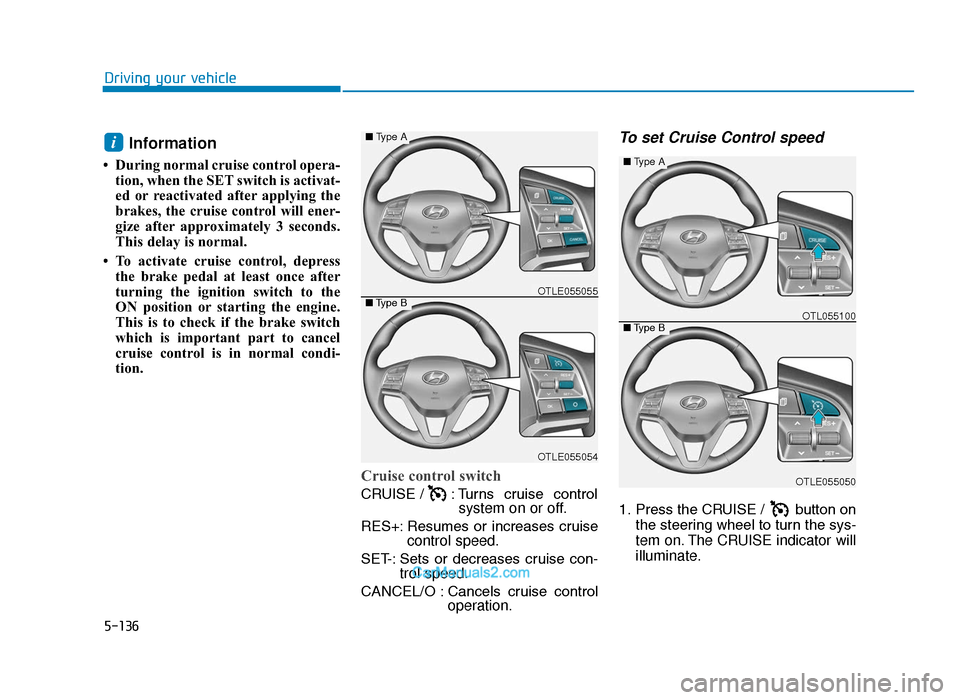
Cruise control switch
CRUISE / : Turns cruise control system on or off.
RES+: Resumes or increases cruise control speed.
SET-: Sets or decreases cruise con- trol speed.
CANCEL/O : Cancels cruise control operation.
To set Cruise Control speed
1. Press the CRUISE / button on
the steering wheel to turn the sys-
tem on. The CRUISE indicator will
illuminate.
i
OTLE055050
■Type A
■Type BOTL055100
OTLE055054
■Type A
■Type BOTLE055055
TLe UK 5.qxp 5/10/2018 12:29 PM Page 136
Page 479 of 685
5-155
Driving your vehicle
5
To convert to Cruise Control
mode
The driver may choose to only use
the conventional Cruise Control
mode (speed control function) by
doing as follows:
1. Turn the Smart Cruise ControlSystem on (the cruise indicator
light will be on but the system will
not be activated).
2. Push and hold the Vehicle-to- Vehicle Distance button for more
than 2 seconds.
3. Choose between "Smart Cruise Control" and "Cruise Control".
When the system is cancelled using
the CRUISE/ /button or
the CRUISE/ button is used
after the engine is turned on, the
Smart Cruise Control mode will turn
on.
Limitations of the system
The Smart Cruise Control system
may have limits to its ability to detect
distance to the vehicle ahead due to
road and traffic conditions.
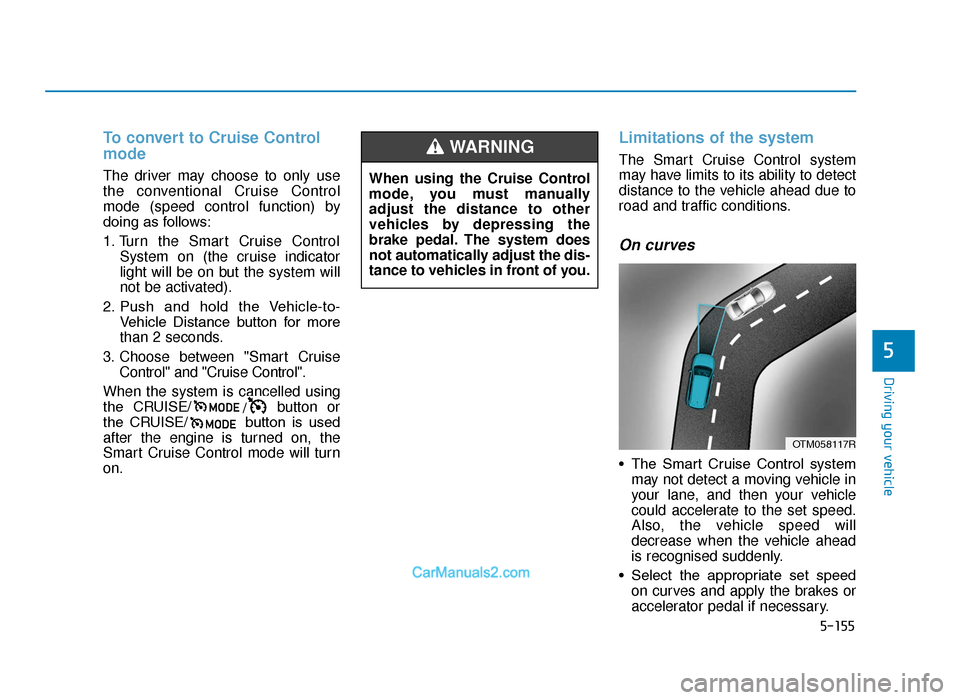
On curves
• The Smart Cruise Control system may not detect a moving vehicle in
your lane, and then your vehicle
could accelerate to the set speed.
Also, the vehicle speed will
decrease when the vehicle ahead
is recognised suddenly.
• Select the appropriate set speed on curves and apply the brakes or
accelerator pedal if necessary.
OTM058117R
When using the Cruise Control
mode, you must manually
adjust the distance to other
vehicles by depressing the
brake pedal. The system does
not automatically adjust the dis-
tance to vehicles in front of you.
WARNING
TLe UK 5.qxp 5/10/2018 12:32 PM Page 155
Page 483 of 685
5-159
Driving your vehicle
5
The Smart Cruise Control system
may not operate temporarily due
to:
• Electrical interference
• Modifying the suspension
• Differences of tyre abrasion ortyre pressure
• Installing different type of tyres
NOTICE(Continued)
•Vehicles moving in front of you
with a frequent lane change
may cause a delay in the sys-
tem's reaction or may cause
the system to react to a vehicle
actually in an adjacent lane.
Always drive cautiously to pre-
vent unexpected and sudden
situations from occurring.
•Always be aware of the select-
ed speed and vehicle to vehi-
cle distance. The driver
should not solely rely on the
system but always pay atten-
tion to driving conditions and
control your vehicle speed.
•The Smart Cruise Control sys-
tem may not recognise com-
plex driving situations so
always pay attention to driv-
ing conditions and control
your vehicle speed.
When using the Smart Cruise
Control take the following pre-
cautions:
•If an emergency stop is nec-
essary, you must apply the
brakes. The vehicle cannot be
stopped at every emergency
situation by using the Smart
Cruise Control system.
•Keep a safe distance accord-
ing to road conditions and
vehicle speed. If the vehicle to
vehicle distance is too close
during a high-speed driving, a
serious collision may result.
•Always maintain sufficient
braking distance and deceler-
ate your vehicle by applying
the brakes if necessary.
•The Smart Cruise Control sys-
tem cannot recognise a
stopped vehicle, pedestrians or
an oncoming vehicle. Always
look ahead cautiously to pre-
vent unexpected and sudden
situations from occurring. (Continued)
WARNING
TLe UK 5.qxp 5/10/2018 12:32 PM Page 159
Page 485 of 685
5-161
Driving your vehicle
5
Information
The ESC system (if equipped) must be
turned OFF before rocking the vehi-
cle.
If you are still stuck after rocking
the vehicle a few times, have the
vehicle pulled out by a tow vehicle
to avoid engine overheating, pos-
sible damage to the transaxle, and
tyre damage. See "Towing" in
chapter 6.
Smooth cornering
Avoid braking or gear changing in
corners, especially when roads are
wet. Ideally, corners should always
be taken under gentle acceleration.
Driving at night
Night driving presents more hazards
than driving in the daylight. Here are
some important tips to remember:
• Slow down and keep more dis-tance between you and other vehi-
cles, as it may be more difficult to
see at night, especially in areas
where there may not be any street
lights.
• Adjust your mirrors to reduce the glare from other driver's head-
lamps.
• Keep your headlamps clean and properly aimed. Dirty or improperly
aimed headlamps will make it
much more difficult to see at night.
• Avoid staring directly at the head- lamps of oncoming vehicles. You
could be temporarily blinded, and it
will take several seconds for your
eyes to readjust to the darkness.
Driving in the rain
Rain and wet roads can make driving
dangerous. Here are a few things to
consider when driving in the rain or on
slick pavement:
• Slow down and allow extra followingdistance. A heavy rainfall makes it
harder to see and increases the dis-
tance needed to stop your vehicle.
• Turn OFF your Cruise Control. (if equipped)
• Replace your windscreen wiper blades when they show signs of
streaking or missing areas on the
windscreen.
• Be sure your tyres have enough tread. If your tyres do not have
enough tread, making a quick stop
on wet pavement can cause a skid
and possibly lead to an accident.
See "Tyre Replacement" in chap-
ter 7.
• Turn on your headlamps to make it easier for others to see you.
• Driving too fast through large pud- dles can affect your brakes. If you
must go through puddles, try to
drive through them slowly.
NOTICE
i
TLe UK 5.qxp 5/10/2018 12:32 PM Page 161
Page 486 of 685
5-162
Driving your vehicle
• If you believe your brakes may be wet, apply them lightly whilst driv-
ing until normal braking operation
returns.
Hydroplaning
If the road is wet enough and you are
going fast enough, your vehicle may
have little or no contact with the road
surface and actually ride on the
water. The best advice is SLOW
DOWN when the road is wet.
The risk of hydroplaning increas-
es as the depth of tyre tread
decreases, refer to "Tyre
Replacement" in chapter 7.
Driving in flooded areas
Avoid driving through flooded areas
unless you are sure the water is no
higher than the bottom of the wheel
hub. Drive through any water slowly.
Allow adequate stopping distance
because brake performance may be
reduced.
After driving through water, dry the
brakes by gently applying them sev-
eral times whilst the vehicle is mov-
ing slowly.
Highway driving
Tyres
Adjust the tyre inflation, as specified.
Under-inflation may overheat or
damage the tyres.
Do not install worn-out or damaged
tyres, which may reduce traction or
fail the braking operation.
Information
Never over-inflate your tyres above
the maximum inflation pressure, as
specified on your tyres.
Fuel, engine coolant and engineoil
Driving at a high speed consumes
more fuel than driving at a slow
speed, such as in an urban area. Do
not forget to check both the engine
coolant and engine oil.
Drive belt
A loose or damaged drive belt may
overheat the engine.
i
TLe UK 5.qxp 5/10/2018 12:32 PM Page 162
Page 488 of 685
5-164
Driving your vehicle
The severe weather conditions of
winter quickly wear out tyres and
cause other problems. To minimise
winter driving problems, you should
take the following suggestions:
Information
Snow tyres and tyre chains for the
national language (Bulgarian,
Hungarian, Icelandic, Polish) see the
Appendix, chapter I.
Snow or icy conditions
You need to keep sufficient distance
between your vehicle and the vehicle
in front of you.
Apply the brakes gently. Speeding,
rapid acceleration, sudden brake
applications, and sharp turns are
potentially very hazardous practices.
During deceleration, use engine
braking to the fullest extent. Sudden
brake applications on snowy or icy
roads may cause skids to occur.
To drive your vehicle in deep snow, it
may be necessary to use snow tyres
or to install tyre chains on your tyres.
Always carry emergency equipment.
Some of the items you may want to
carry include tyre chains, tow straps
or chains, a flashlight, emergency
flares, sand, a shovel, jumper cables,
a window scraper, gloves, ground
cloth, coveralls, a blanket, etc.
Snow tyres
If you mount snow tyres on your vehi-
cle, make sure to use radial tyres of
the same size and load range as the
original tyres. Mount snow tyres on
all four wheels to balance your vehi-
cle’s handling in all weather condi-
tions. The traction provided by snow
tyres on dry roads may not be as
high as your vehicle's original equip-
ment tyres. Check with the tyre deal-
er for maximum speed recommenda-
tions.
Information
Do not install studded tyres without
first checking local and municipal regu-
lations for possible restrictions against
their use.
i
i
WINTER DRIVING
Snow tyres should be equivalent
in size and type to the vehicle's
standard tyres. Otherwise, the
safety and handling of your vehi-
cle may be adversely affected.
WARNING
TLe UK 5.qxp 5/10/2018 12:32 PM Page 164
Page 492 of 685
5-168
Driving your vehicle
Do not let your parking brake
freeze
Under some conditions your parking
brake can freeze in the engaged
position. This is most likely to hap-
pen when there is an accumulation
of snow or ice around or near the
rear brakes or if the brakes are wet.
When there is the risk that your park-
ing brake may freeze, temporarily
apply it with the shift lever in P
(Park). Also, block the rear wheels in
advance, so the vehicle may not roll.
Then, release the parking brake. Do not let ice and snow accumu-
late underneath
Under some conditions, snow and
ice can build up under the fenders
and interfere with the steering. When
driving in such conditions during the
severe winter, you should check
underneath the vehicle on a regular
basis, so that moving the front
wheels and the steering components
is unblocked.
Carry emergency equipment
In accordance with weather condi-
tions, you should carry appropriate
emergency equipment, whilst driv-
ing. Some of the items you may want
to carry include tyre chains, tow
straps or chains, flashlight, emer-
gency flares, sand, shovel, jumper
cables, window scraper, gloves,
ground cloth, coveralls, blanket, etc.Do not place objects or materials
in the engine compartment
Putting objects or materials in the
engine compartment may cause an
engine failure or combustion,
because those may block the engine
cooling. Such damage will not be
covered by the manufacturer’s war-
ranty.
TLe UK 5.qxp 5/10/2018 12:32 PM Page 168
Page 495 of 685
5-171
Driving your vehicle
5
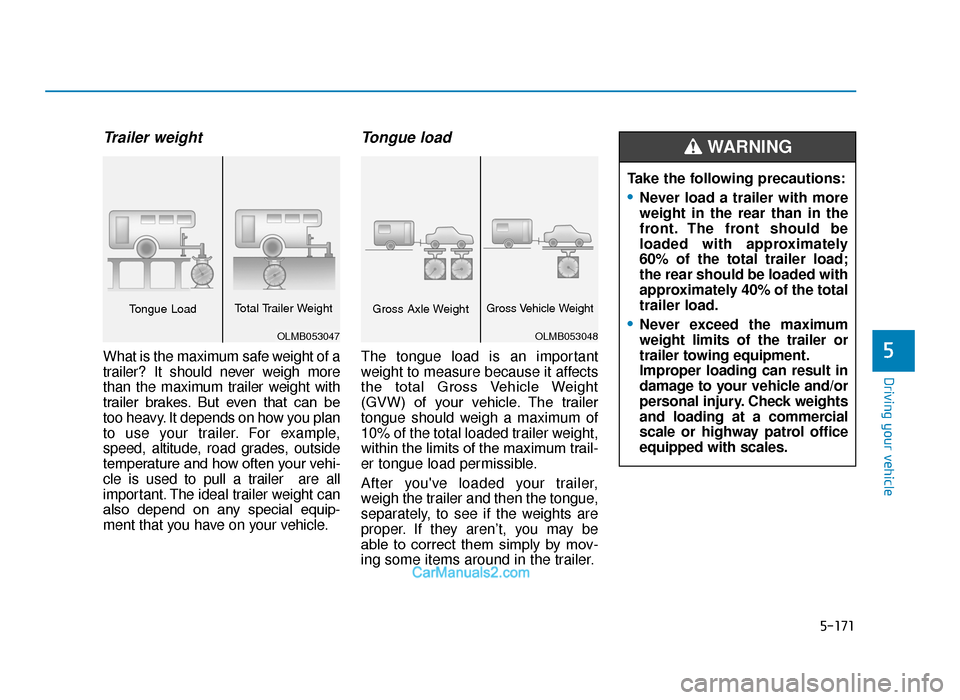
Trailer weight
What is the maximum safe weight of a
trailer? It should never weigh more
than the maximum trailer weight with
trailer brakes. But even that can be
too heavy. It depends on how you plan
to use your trailer. For example,
speed, altitude, road grades, outside
temperature and how often your vehi-
cle is used to pull a trailer are all
important. The ideal trailer weight can
also depend on any special equip-
ment that you have on your vehicle.
Tongue load
The tongue load is an important
weight to measure because it affects
the total Gross Vehicle Weight
(GVW) of your vehicle. The trailer
tongue should weigh a maximum of
10% of the total loaded trailer weight,
within the limits of the maximum trail-
er tongue load permissible.
After you've loaded your trailer,
weigh the trailer and then the tongue,
separately, to see if the weights are
proper. If they aren’t, you may be
able to correct them simply by mov-
ing some items around in the trailer.Take the following precautions:
•Never load a trailer with more
weight in the rear than in the
front. The front should be
loaded with approximately
60% of the total trailer load;
the rear should be loaded with
approximately 40% of the total
trailer load.
•Never exceed the maximum
weight limits of the trailer or
trailer towing equipment.
Improper loading can result in
damage to your vehicle and/or
personal injury. Check weights
and loading at a commercial
scale or highway patrol office
equipped with scales.
WARNING
OLMB053048
Gross Axle WeightGross Vehicle Weight
OLMB053047
Tongue Load
Total Trailer Weight
TLe UK 5.qxp 5/10/2018 12:32 PM Page 171