2019 Hyundai Ioniq Plug-in Hybrid 12v battery
[x] Cancel search: 12v batteryPage 30 of 599
H30
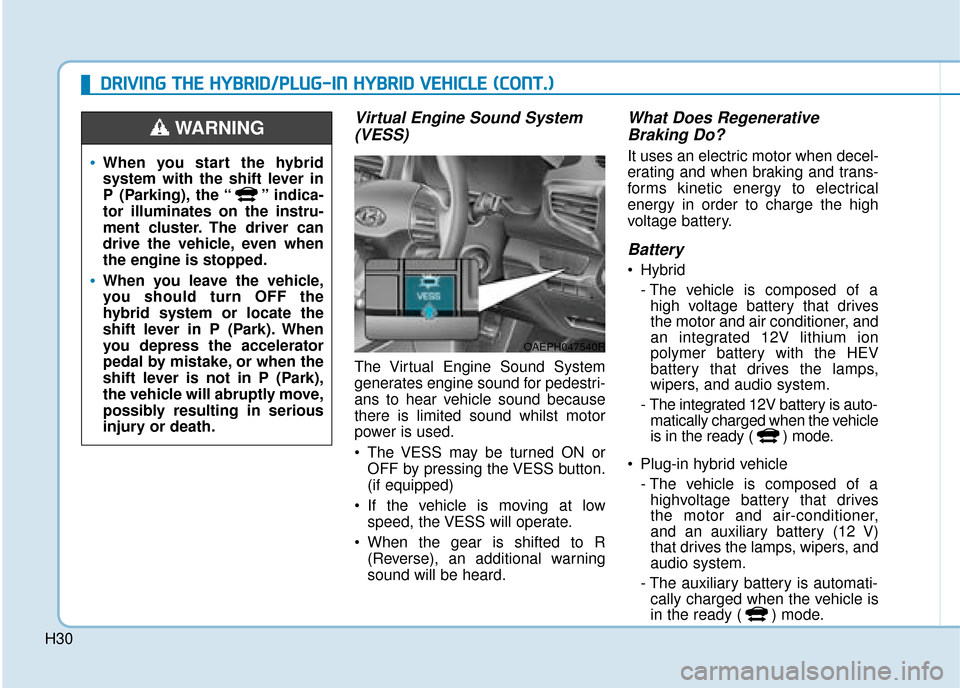
Virtual Engine Sound System(VESS)
The Virtual Engine Sound System
generates engine sound for pedestri-
ans to hear vehicle sound because
there is limited sound whilst motor
power is used.
The VESS may be turned ON or
OFF by pressing the VESS button.
(if equipped)
If the vehicle is moving at low speed, the VESS will operate.
When the gear is shifted to R (Reverse), an additional warning
sound will be heard.
What Does RegenerativeBraking Do?
It uses an electric motor when decel-
erating and when braking and trans-
forms kinetic energy to electrical
energy in order to charge the high
voltage battery.
Battery
Hybrid
- The vehicle is composed of ahigh voltage battery that drives
the motor and air conditioner, and
an integrated 12V lithium ion
polymer battery with the HEV
battery that drives the lamps,
wipers, and audio system.
- The integrated 12V battery is auto- matically charged when the vehicle
is in the ready ( ) mode.
Plug-in hybrid vehicle - The vehicle is composed of ahighvoltage battery that drives
the motor and air-conditioner,
and an auxiliary battery (12 V)
that drives the lamps, wipers, and
audio system.
- The auxiliary battery is automati- cally charged when the vehicle is
in the ready ( ) mode.
When you start the hybrid
system with the shift lever in
P (Parking), the “ ” indica-
tor illuminates on the instru-
ment cluster. The driver can
drive the vehicle, even when
the engine is stopped.
When you leave the vehicle,
you should turn OFF the
hybrid system or locate the
shift lever in P (Park). When
you depress the accelerator
pedal by mistake, or when the
shift lever is not in P (Park),
the vehicle will abruptly move,
possibly resulting in serious
injury or death.
WARNING
D
D R
RI
IV
V I
IN
N G
G
T
T H
H E
E
H
H Y
Y B
BR
RI
ID
D /
/P
P L
LU
U G
G-
-I
IN
N
H
H Y
Y B
BR
RI
ID
D
V
V E
EH
H I
IC
C L
LE
E
(
( C
C O
O N
NT
T.
.)
)
OAEPH047540R
Page 70 of 599

1-4
Your vehicle at a glance
I
IN
N T
TE
ER
R I
IO
O R
R
O
O V
VE
ER
R V
V I
IE
E W
W
-
-
H
H Y
Y B
BR
RI
ID
D
V
V E
EH
H I
IC
C L
LE
E
1. Door lock/unlock button ....................3-14
2. Driver position memory system ........3-18
3. Outside rearview mirror folding
switch ................................................3-26
4. Outside rearview mirror control switch ................................................3-25
5. Central door lock switch ....................3-14
6. Power window switches ....................3-27
7. Power window lock switch ................3-30
8. Headlamp levelling device ..............3-112
9. Instrument panel illumination control switch ......................................3-46
10. Blind-Spot Collision Warning (BCW) system................................................5-41
11. Lane keeping assist (LKA) system....5-63
12. ESC OFF button ..............................5-33
13. Fuel filler door opener ....................3-38
14. 12V battery reset switch ....................6-5
15. Bonnet release lever........................3-35
16. Fuse box ..........................................7-41
17. Steering wheel ................................3-20
18. Seat ..................................................2-4
OAEPH017008LThe actual shape may differ from the illustration.
Page 234 of 599
3-88
Convenient features of your vehicle
6. Service Interval
To activate or deactivate the service
interval function.
If the service interval menu is acti-
vated, you may adjust the time and
distance.
Information
To use the service interval menu, we
recommend that you consult a
HYUNDAI authorised repairer. If the service interval is activated and
the time and distance is adjusted,
messages are displayed in the fol-
lowing situations each time the vehi-
cle is turned on.
- Service in
: Displayed to inform the driver theremaining mileage and days to
service.
- Service required : Displayed when the mileage anddays to service has been reached
or passed.
Information
If any of the following conditions
occur, the mileage and number of days
to service may be incorrect.
- The battery cable is disconnected.
- The fuse switch is turned off.
- The battery is discharged. 7. Other Features
Battery Saver+
To activate or deactivate the Aux.
Battery Saver+ function.
When activated, the high voltage bat-
tery is used to keep the 12V battery
charged.
For more information, refer to the
"Hybrid System Overview" provid-
ed in the front of the owner’s man-
ual.
i
i
Page 242 of 599
3-96
Convenient features of your vehicle
If the service interval is activated and
the time and distance is adjusted,
messages are displayed in the fol-
lowing situations each time the vehi-
cle is turned on.
- Service in : Displayed to inform the driver theremaining mileage and days to
service.
- Service required : Displayed when the mileage anddays to service has been reached
or passed.
Information
If any of the following conditions
occur, the mileage and number of days
to service may be incorrect.
- The battery cable is disconnected.
- The fuse switch is turned off.
- The battery is discharged. 7. Other Features
Battery Saver+
To activate or deactivate the Aux.
Battery Saver+ function.
When activated, the high voltage bat-
tery is used to keep the 12V battery
charged.
For more information, refer to the
“Hybrid System Overview” provided
in the front of the owner’s manual.
- Off: The average fuel economy will
not reset automatically whenever
refuelling.
- After Ignition: When the engine has been OFF for 4 hours or longer the
average fuel economy will reset
automatically.
- After Refuelling: The average fuel economy will reset automatically
after adding 1.6 gallons (6 litres) of
fuel or more and after driving speed
exceeds 1 mph (1 km/h).
For more information, refer to
"Trip Computer" in this chapter.
To select the fuel economy unit.
(km/L, L/100, MPG)
To select the temperature unit.
(°C,°F)
To select the tyre pressure unit.
(psi, kPa, bar)
To select language.
8. Reset
You can reset the menus in the User
Settings Mode. All menus in the User
Settings Mode are reset to factory
settings, except language and serv-
ice interval.
i
Page 297 of 599

3-151
Convenient features of your vehicle
3
Power outlet (if equipped)
The power outlet is designed to pro-
vide power for mobile telephones or
other devices designed to operate
with vehicle electrical systems. The
devices should draw less than 180
W(Watts) with the engine running.To prevent damage to the Power
Outlets :
Use the power outlet only when
the engine is running and remove
the accessory plug after use.
Using the accessory plug for pro-
longed periods of time with the
engine off could cause the battery
to discharge.
Only use 12V electric accessories which are less than 180 W(Watts)
in electric capacity.
Adjust the air-conditioner or heater to the lowest operating
level when using the power outlet.
Close the cover when not in use.
Some electronic devices can cause electronic interference
when plugged into a vehicle’s
power outlet. These devices may
cause excessive audio static
and malfunctions in other elec-
tronic systems or devices used
in your vehicle.
Push the plug in as far as it will go. If good contact is not made,
the plug may overheat and the
fuse may open. Plug in battery equipped electri-
cal/electronic devices with
reverse current protection. The
current from the battery may
flow into the vehicle's electri-
cal/electronic system and cause
system malfunction.
NOTICE
OAE046426R
Avoid electrical shocks. Do not
place your fingers or foreign
objects (pin, etc.) into a power
outlet or touch the power outlet
with a wet hand.
WARNING
Page 465 of 599

6-4
I
IF
F
T
T H
H E
E
E
E N
N G
GI
IN
N E
E
W
W I
IL
L L
L
N
N O
O T
T
S
S T
T A
A R
RT
T
What to do in an emergency
Hybrid vehicle
Be sure the shift lever is in P
(Park). The vehicle starts only
when the shift lever is in P (Park).
This vehicle does not have a regu- lar 12V battery that needs periodic
replacement. It is lithium ion poly-
mer type integrated into the HEV
high voltage battery. The vehicle
has a 12V battery protection sys-
tem that cuts 12V battery from
vehicle draw to prevent full dis-
charge. If vehicle will not start, first
try pressing the 12V Battery Reset
switch (left side of the steering
wheel near the fuel door open
switch) to reconnect the 12V bat-
tery, but you must start vehicle
within 15 seconds of pressing the
12V Battery Reset switch. After
starting vehicle, operate the vehi-
cle safely outdoors in ready mode
stopped and/or drive it for 30 min-
utes total to charge the 12V battery
fully. Check the fuel level and add fuel if
necessary.
If the vehicle still does not start, we
recommend that you call a HYUNDAI
authorised repairer for assistance.
Plug-in hybrid vehicle
Be sure the shift lever is in P (Park). The vehicle starts only
when the shift lever is in P (Park).
Check the battery connections to be sure they are clean and tight.
Turn on the interior light. If the light dims or goes out when you operate
the starter, the battery is drained.
Do not push or pull the vehicle to
start it. This could cause damage to
your vehicle. See instructions for
"Jump Starting" provided in this
chapter.
Check the fuel level and add fuel if necessary.
If the vehicle still does not start, we
recommend that you call a HYUNDAI
authorised repairer for assistance. Push or pull starting the vehicle
may cause the catalytic convert-
er to overload which can lead to
damage to the emission control
system.
CAUTION
Push or pull starting the vehicle
may cause the catalytic con-
verter to overload which can
lead to damage to the emission
control system.
CAUTION
Page 466 of 599

6-5
What to do in an emergency
Before jump starting
This vehicle does not have a regular
12V battery that needs periodic
replacement. It is lithium ion polymer
type integrated into the HEV high
voltage battery. The vehicle has a
12V battery protection system that
cuts 12V battery from vehicle draw to
prevent full discharge.
Using the 12V battery resetswitch
1. Press the 12V Battery Reset
switch to reconnect the 12V bat-
tery.
2. Start the vehicle within 15 sec- onds of pressing the 12V Battery
Reset switch.
3. After starting vehicle ( indica- tor on), operate the vehicle safely
outdoors in ready mode stopped
and/or drive it for 30 minutes total
to charge the 12V battery fully. If you do not start the vehicle imme-
diately after pressing the 12V Battery
Reset switch, the power of 12V bat-
tery is automatically disconnected
after few seconds to save the 12V
battery from additional discharge. If
the 12V battery is disconnected prior
to starting the vehicle, press the 12V
Battery Reset switch again and then
immediately start the vehicle as
explained.
Repeated use of the 12V Battery
Reset switch without a sufficient
engine ON cycle (30 Min+) may
cause over discharge of the 12V bat-
tery, which will prevent the vehicle
from starting. If the 12V battery is
over discharged to a point that the
reset does not work, try to jump-start
the vehicle.
Information
After starting the vehicle ( indica-
tor on), the 12V battery is being
charged whether the engine is running
or not. Although there is no engine-
sound, it is unnecessary to depress the
accelerator pedal.
i
I
I
F
F
T
T H
H E
E
1
1 2
2
V
V O
O L
LT
T
B
B A
A T
TT
TE
ER
R Y
Y
I
IS
S
D
D I
IS
S C
C H
H A
AR
RG
G E
ED
D
(
( H
H Y
Y B
BR
RI
ID
D
V
V E
EH
H I
IC
C L
LE
E )
)
6
OAEPH047037R
Page 467 of 599

6-6
The following items may need to be
reset after the battery has been dis-
charged or the battery has been dis-
connected.
See chapter 3 or 4 for:
Power Windows
Trip Computer
Climate Control System
Clock
Audio System
Sunroof
Driver Position Memory System
External power source using 12V
battery
The use of external power acces-
sories may reduce performance
and function of the vehicle.
Especially, the use of dash cam-
eras may shut off the power of the
vehicle prior to the dash camera's
automatic shut-down.
If the power of the vehicle is shut
off, start the vehicle as explained.
(refer to "Using the 12V Battery
Reset Switch")Jump starting
In the event vehicle still does not
have a functional 12V battery (check
if interior lights will not turn on) then
you can try a jump start to the engine
compartment jumper terminals using
a 12V booster pack or jumper cables
from another vehicle's 12V battery
according to the following instruc-
tions.1. Position the vehicles close enough
that the jumper cables will reach,
but do not allow the vehicles to
touch.
2. Avoid fans or any moving parts in the engine compartment at all
times, even when the vehicles are
turned off.
3. Turn off all electrical devices such as radios, lights, air conditioning,
etc. Put the vehicles in P (Park)
and set the parking brake. Turn
both vehicles OFF.
NOTICE
What to do in an emergency
Jump starting can be danger-
ous if done incorrectly. Follow
the jump starting procedure in
this section to avoid serious
injury or damage to your vehi-
cle. If in doubt about how to
properly jump start your vehi-
cle, we strongly recommend
that you have a service techni-
cian or towing service do it for
you.
CAUTION