2019 Hyundai Ioniq Plug-in Hybrid ABS
[x] Cancel search: ABSPage 105 of 599

2-28
Safety system of your vehicle
If you are not able to smoothly pull
enough of the seat belt out from
the retractor, firmly pull the seat
belt out and release it. After
release, you will be able to pull the
belt out smoothly.
Height adjustment
You can adjust the height of the
shoulder belt anchor to one of the
four different positions for maximum
comfort and safety.
The shoulder portion should be
adjusted so it lies across your chest
and midway over your shoulder near-
est the door, not over your neck.
NOTICE
OAE036074R
Improperly positioned seat
belts may increase the risk of
serious injury in an accident.
Take the following precautions
when adjusting the seat belt:
Position the lap portion of the
seat belt as low as possible
across your hips, not on your
waist, so that it fits snugly.
This allows your strong pelvic
bones to absorb the force of
the crash, reducing the
chance of internal injuries. (Continued)
WARNING
(Continued)
Position one arm under the
shoulder belt and the other over
the belt, as shown in the illus-
tration.
Always position the shoulder
belt anchor into the locked
position at the appropriate
height.
Never position the shoulder
belt across your neck or face.
Page 139 of 599

2-62
Safety system of your vehicle
Why didn’t my air bag go off in
a collision?
There are certain types of accidents
in which the air bag would not be
expected to provide additional protec-
tion. These include rear impacts, sec-
ond or third collisions in multiple
impact accidents, as well as low
speed impacts. Damage to the vehicle
indicates a collision energy absorp-
tion, and is not an indicator of whether
or not an air bag should have inflated.
Air bag collision sensors
To reduce the risk of an air bag
deploying unexpectedly and
causing serious injury or death:
Do not hit or allow any objects to
impact the locations where air
bags or sensors are installed.
Do not perform maintenance
on or around the air bag sen-
sors. If the location or angle of
the sensors is altered, the air
bags may deploy when they
should not or may not deploy
when they should.
Do not install bumper guards or replace the bumper with a
non-genuine part. This may
adversely affect the collision
and air bag deployment per-
formance.
(Continued)
WARNING
(Continued)
Place the ignition switch to
the LOCK/OFF or ACC posi-
tion, when the vehicle is being
towed to prevent inadvertent
air bag deployment.
We recommend that all air bag
repairs are conducted by a
HYUNDAI authorised repairer.
Page 144 of 599
2-67
Safety system of your vehicle
2
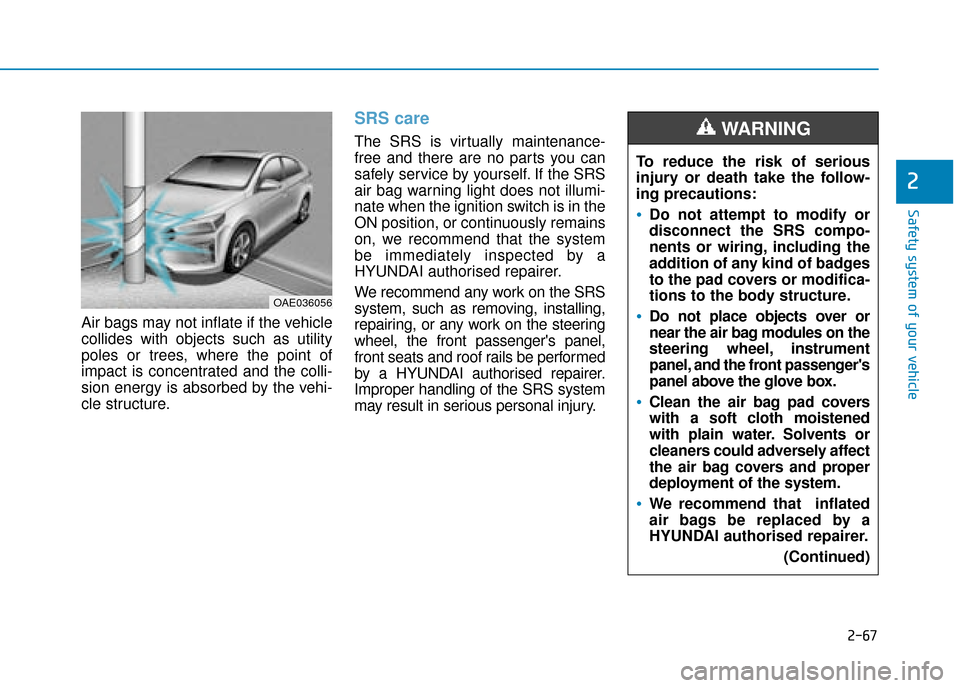
Air bags may not inflate if the vehicle
collides with objects such as utility
poles or trees, where the point of
impact is concentrated and the colli-
sion energy is absorbed by the vehi-
cle structure.
SRS care
The SRS is virtually maintenance-
free and there are no parts you can
safely service by yourself. If the SRS
air bag warning light does not illumi-
nate when the ignition switch is in the
ON position, or continuously remains
on, we recommend that the system
be immediately inspected by a
HYUNDAI authorised repairer.
We recommend any work on the SRS
system, such as removing, installing,
repairing, or any work on the steering
wheel, the front passenger's panel,
front seats and roof rails be performed
by a HYUNDAI authorised repairer.
Improper handling of the SRS system
may result in serious personal injury.
OAE036056
To reduce the risk of serious
injury or death take the follow-
ing precautions:
Do not attempt to modify or
disconnect the SRS compo-
nents or wiring, including the
addition of any kind of badges
to the pad covers or modifica-
tions to the body structure.
Do not place objects over or
near the air bag modules on the
steering wheel, instrument
panel, and the front passenger's
panel above the glove box.
Clean the air bag pad covers
with a soft cloth moistened
with plain water. Solvents or
cleaners could adversely affect
the air bag covers and proper
deployment of the system.
We recommend that inflated
air bags be replaced by a
HYUNDAI authorised repairer.(Continued)
WARNING
Page 201 of 599
3-55
Convenient features of your vehicle
3
Also, the vehicle will not stop in as
short a distance with only a portion
of the brake system working.
If the brakes fail whilst you are driv-
ing, shift to a lower gear for addition-
al engine braking and stop the vehi-
cle as soon as it is safe to do so.Regenerative BrakeWarning Light
This warning light illuminates :
When the regenerative brake does
not operate and the brake does not
perform well. This causes the Brake
Warning light (red) and Regenerative
Brake Warning Light (yellow) to illu-
minate simultaneously.
In this case, drive safely and we rec-
ommend that you have your vehicle
inspected by a HYUNDAI authorised
repairer.
The operation of the brake pedal may
be more difficult than normal and the
braking distance can increase.
Anti-lock Brake System(ABS) Warning Light
This warning light illuminates:
Once you turn the ignition switch or
the Engine Start/Stop button to the
ON position.
- It illuminates for approximately 3seconds and then goes off.
When there is a malfunction with the ABS (The normal braking sys-
tem will still be operational without
the assistance of the anti-lock
brake system).
In this case, we recommend that
you have the vehicle inspected by
a HYUNDAI authorised repairer.
Parking Brake & Brake Fluid
Warning Light
Driving the vehicle with a warn-
ing light ON is dangerous. If the
Parking Brake & Brake Fluid
Warning Light illuminates with
the parking brake released, it
indicates that the brake fluid
level is low.
In this case, we recommend
that you have the vehicle
inspected by a HYUNDAI autho-
rised repairer.
WARNING
Page 202 of 599
3-56
Convenient features of your vehicle
Electronic Brake ForceDistribution (EBD)System Warning Light
These two warning lights illuminate
at the same time whilst driving:
When the ABS and regular brake
system may not work normally.
In this case, we recommend that
you have the vehicle inspected by
a HYUNDAI authorised repairer.Information - Electronic
Brake Force Distribution
(EBD) System Warning Light
When the ABS Warning Light is on or
both ABS and Parking Brake & Brake
Fluid Warning Lights are on, the
speedometer, odometer, or tripmeter
may not work. Also, the EPS Warning
Light may illuminate and the steering
effort may increase or decrease.
In this case, we recommend you have
the vehicle inspected by a HYUNDAI
authorised repairer as soon as possi-
ble.
Electric Power Steering (EPS)W arning Light
This warning light illuminates:
Once you turn the ignition switch or
the Engine Start/Stop button to the
ON position.
- It illuminates for approximately 3seconds and then goes off.
When there is a malfunction with the EPS.
In this case, we recommend that
you have the vehicle inspected by
a HYUNDAI authorised repairer.
i
Electronic Brake Force
Distribution (EBD) System
Warning Light
When both ABS and Parking
Brake & Brake Fluid Warning
Lights are on, the brake system
will not work normally and you
may experience an unexpected
and dangerous situation during
sudden braking.
(Continued)
WARNING
(Continued)
In this case, avoid high speed
driving and abrupt braking.
We recommend you have the
vehicle inspected by a
HYUNDAI authorised repairer
as soon as possible.
Page 270 of 599

3-124
Convenient features of your vehicle
The following objects may not be
recognised by the sensor:
Sharp or slim objects such asropes, chains or small poles.
Objects, which tend to absorb sen- sor frequency such as clothes,
spongy material or snow.
Parking Distance Warning(Reverse) system precautions
The Parking Distance Warning
(Reverse) system may not operate
consistently in some circum-
stances depending on the speed of
the vehicle and the shapes of the
objects detected.
The Parking Distance Warning (Reverse) system may malfunction
if the vehicle bumper height or sen-
sor installation has been modified
or damaged. Any non-factory
installed equipment or accessories
may also interfere with the sensor
performance.
The sensor may not recognise objects less than 40 cm (15 in)
from the sensor, or it may sense an
incorrect distance. Use caution. When the sensor is blocked with
snow, dirt, debris, or ice, the
Parking Distance Warning
(Reverse) system may be inopera-
tive until the snow or ice melts, or
the debris is removed. Use a soft
cloth to wipe debris away from the
sensor.
Do not push, scratch or strike the sensor with any hard objects that
could damage the surface of the
sensor. Sensor damage could
occur.
Do not spray the sensors or its sur- rounding area directly with a high
pressure washer. Doing so may
cause the sensors to fail to operate
normally.
Parking Distance Warning
(Reverse/Forward) system
(if equipped)
The Parking Distance Warning
(Reverse/Forward) system assists the
driver during movement of the vehicle
by chiming if any object is sensed with-
in approximately 100 cm (40 in) in front
and 120 cm (47 in) behind the vehicle.
Your new vehicle warranty does
not cover any accidents or dam-
age to the vehicle or injuries to
its occupants related to a
Parking Distance Warning
(Reverse) system. Always drive
safely and cautiously.
WARNING
OAEE046414
OAEE046413
■
Front sensor
■Rear sensor
Sensors
Sensors
Page 273 of 599

3-127
Convenient features of your vehicle
3
Detecting range may decrease when:
Outside air temperature isextremely hot or cold.
Undetectable objects smaller than 1 m and narrower than 14 cm in
diameter.
The following objects may not be
recognised by the sensor:
Sharp or slim objects such asropes, chains or small poles.
Objects, which tend to absorb sen- sor frequency such as clothes,
spongy material or snow.
Parking Distance Warning(Reverse/Forward) system pre-cautions
The Parking Distance Warning
(Reverse/Forward) system may not
operate consistently in some cir-
cumstances depending on the
speed of the vehicle and the
shapes of the objects detected.
The Parking Distance Warning (Reverse/Forward) system may
malfunction if the vehicle bumper
height or sensor installation has
been modified or damaged. Any
non-factory installed equipment or
accessories may also interfere with
the sensor performance.
The sensor may not recognise objects less than 40 cm (15 in)
from the sensor, or it may sense an
incorrect distance. Use caution.
When the sensor is blocked with snow, dirt, debris, or ice, the
Parking Distance Warning
(Reverse/Forward) system may be
inoperative until the snow or ice
melts, or the debris is removed.
Use a soft cloth to wipe debris
away from the sensor. Do not push, scratch or strike the
sensor with any hard objects that
could damage the surface of the
sensor. Sensor damage could occur.
Do not spray the sensors or its sur- rounding area directly with a high
pressure washer. Doing so may
cause the sensors to fail to operate
normally.
Your new vehicle warranty does
not cover any accidents or dam-
age to the vehicle or injuries to
its occupants related to a
Parking Distance Warning
(Reverse/Forward) system.
Always drive safely and cau-
tiously.
WARNING
Page 345 of 599

Driving your vehicle
Before driving.........................................................5-4
Before entering the vehicle ...........................................5-4
Before starting .................................................................5-4
Ignition switch ........................................................5-5
Key ignition switch ............................................................5-6
Engine Start/Stop button ................................................5-9
Dual clutch transmission .....................................5-15
Dual clutch transmission operation ............................5-15
Paddle shifter ...................................................................5-23
Parking ........................................................................\
.......5-24
Good driving practices ...................................................5-24
Coasting guide (Plug-in hybrid vehicle) ..........5-26
Braking system.....................................................5-27
Power brakes ...................................................................5-27
Disc brakes wear indicator ...........................................5-28
Parking brake ...................................................................5-28
Anti-lock Brake System (ABS) ....................................5-31
Electronic Stability Control (ESC)................................5-33
Vehicle Stability Management (VSM).........................5-36
Hill-Start Assist Control (HAC) ....................................5-38
Emergency Stop Signal (ESS) ......................................5-38
Good braking practices ................................................5-39
Blind-spot collision warning (BCW) system ....5-40
BCW ........................................................................\
............5-41
RCCW (Rear Cross-Traffic Collision Warning) .........5-43
Detecting sensor .............................................................5-46
Limitations of the system .............................................5-47
Forward collision-avoidance assist (FCA)
system....................................................................5-49\
System setting and activation......................................5-49
FCA warning message and system control ..............5-51
FCA sensor ......................................................................5-\
54
System malfunction ........................................................5-55
Limitations of the system .............................................5-57
Lane Keeping Assist (LKA) system ...................5-62
LKA operation ..................................................................5-63
Warning light and message ..........................................5-67
Limitations of the System .............................................5-68
LKA System function change.......................................5-69
Driver attention warning (DAW) system ..........5-70
System setting and activation......................................5-70
Resetting the system .....................................................5-72
System standby ...............................................................5-72
System malfunction ........................................................5-73
Speed limit control system .................................5-75
Speed Limit Control operation .....................................5-75
5