Page 166 of 472
3-81
Convenient features of your vehicle
3
To flash the high beam headlights,
pull the lever towards you, then
release the lever. The high beams
will remain ON as long as you hold
the lever towards you.
Turn signals and lane change
signals
To signal a turn, push down on the
lever for a right turn or up for a left
turn in position (A).To signal a lane change, move the
turn signal lever slightly and hold it in
position (B). The lever will return to
the OFF position when released or
when the turn is completed.
If an indicator stays on and does not
flash or if it flashes abnormally, one of
the turn signal bulbs may be burned
out and will require replacement.
OLF044088R
OLF044088L
■Right Hand Drive
■Left Hand Drive
OLF044091R
OLF044091L
■Right Hand Drive
■Left Hand Drive
Page 167 of 472

3-82
Convenient features of your vehicle
One-touch lane change function
(if equipped)
To activate an One-Touch Lane
Change function, move the turn sig-
nal lever slightly and then release it.
The lane change signals will blink 3,
5 or 7 times.
You can activate/deactivate the One
Touch Turn Signal function or choose
the number of blinking (3, 5, or 7)
from the User Settings Mode on the
LCD display.
For more details, refer to "LCD
Display" in this chapter.
If the turn signal indicator stays
on and does not flash, or if it flash-
es abnormally, a bulb may be
burned out or have a poor electri-
cal connection in the circuit. The
bulb may require replacement.
Rear fog light (if equipped)
Vehicle with front fog light
To turn on the rear fog light:
Position the light switch in the park-
ing light position, turn the light switch
(1) to the front fog light position, and
then turn the light switch (1) to the
rear fog light position.
To turn the rear fog lights off, do one
of the following:
• Turn off the parking light switch.
Turn the light switch to the rear fog
light position again.
When the light switch is in the
parking light position, if you turn off
the front fog light, the rear fog light
will also turn off.
Vehicle without front fog light
To turn on the rear fog light:
Position the light switch in the head-
lamp position, and then turn the light
switch (1) to the rear fog light position.
To turn the rear fog lights off, do one
of the following:
Turn off the headlamp switch.
Turn the light switch to the rear fog
light position again.
NOTICE
OLF044195L
Page 168 of 472

3-83
Convenient features of your vehicle
3
Front fog light (if equipped)
Fog lights are used to provide
improved visibility when visibility is
poor due to fog, rain or snow, etc.
1. Turn on the park light.
2. Move the light switch (1) to the
front fog light position.3. To turn off the front fog light, turn
the light switch to the front fog light
position again or turn off the park-
ing light.
When in operation, the fog lights
consume large amounts of vehicle
electrical power. Only use the fog
lights when visibility is poor.
Battery saver function
The purpose of this feature is to pre-
vent the battery from being dis-
charged. The system automatically
turns off the parking lights when the
driver removes the ignition key or
turns the engine off (for smart key)
and opens the driver-side door.
With this feature, the parking lights
will turn off automatically if the driver
parks on the side of road at night.
If necessary, to keep the lights on
when the ignition key is removed or
the engine is turned off (for smart
key), perform the following:
1) Open the driver-side door.
2) Turn the parking lights OFF and
ON again using the light switch on
the steering column.
NOTICE
OIB047008R
OIB047008L
■Right Hand Drive
■Left Hand Drive
Page 169 of 472

Headlamp delay function
(if equipped)
If the key is removed from the ignition
switch or placed in the ACC or
LOCK/OFF position with the head-
lights ON, the headlights (and/or
parking lights) remain on for about 5
minutes. However, with the engine off
if the driver’s door is opened and
closed, the headlights (and/or parking
lights) are turned off after 15 seconds.
The headlights (and/or parking
lights) can be turned off by pressing
the lock button on the remote key (or
smart key) twice or turning the light
switch to the OFF or AUTO position.
However, if you turn the light switch
to the AUTO position when it is dark
outside, the headlights will not be
turned off.If the driver gets out of the vehicle
through other doors (except dri-
ver's door), the battery saver func-
tion does not operate and the
headlamp delay function does not
turn off automatically. Therefore, It
causes the battery to be dis-
charged. In this case, make sure
to turn off the lamp before getting
out of the vehicle.
Daytime running light (DRL)
(if equipped)
The Daytime Running Lights (DRL)
can make it easier for others to see
the front of your vehicle during the
day, especially after dawn and before
sunset.
The DRL system will turn the dedi-
cated lamp OFF when:
1. The headlights or front fog lights
are in the ON position.
2. The engine is turned off.
NOTICE
3-84
Convenient features of your vehicle
Page 170 of 472

Headlamp leveling device
To adjust the headlamp beam level
according to the number of the pas-
sengers and loading weight in the
luggage area, turn the beam leveling
switch.The higher the number of the switch
position, the lower the headlamp
beam level. Always keep the head-
lamp beam at the proper leveling
position, or headlights may dazzle
other road users.
Listed below are the examples of
proper switch settings. For loading
conditions other than those listed
below, adjust the switch position so
that the beam level may be the near-
est as the condition obtained accord-
ing to the list.
Interior lights
Do not use the interior lights for
extended periods when the engine
is turned off or the battery will dis-
charge.
Interior lamp AUTO cut
The interior lamps will automatically
go off approximately 20 minutes after
the engine is turned off and the
doors closed. If a door is opened, the
lamp will go off 40 minutes after the
engine is turned off. If the doors are
locked by the remote key or smart
key and the vehicle enters the armed
stage of the theft alarm system, the
lamps will go off five seconds later.
NOTICE
3-85
Convenient features of your vehicle
3
OGS045064L
Loading condition Switch position
Driver only 0
Driver + Front passenger 0
Full passengers
(including driver)1
Full passengers (including
driver) + Maximum permis-
sible loading2
Driver + Maximum permis-
sible loading 3
Do not use the interior lights
when driving in the dark. The
interior lights may obscure your
view and cause an accident.
WARNING
Page 171 of 472

Front lamps
(1) Front Map Lamp
(2) Front Room Lamp
Front Map Lamp:
Press either the right or left lens to
turn the map lamp on or off. This light
produces a spot beam for convenient
use as a map lamp at night or as a
personal lamp for the driver and the
front passenger.
Front Room Lamp:
The Front Room Lamp Switch acti-
vates the front and rear room lamps
when the switch is pressed in either of
the three positions indicated below:
: The front or rear room lamps
come on when the front or rear
doors are opened if the engine
is running or not. When doors
are unlocked by the remote
key or smart key, the front and
rear lamps come on for
approximately 15 seconds as
long as any door is not
opened. The front and rear
room lamps go out gradually
after approximately 15 sec-
onds if the door is closed.
However, if the ignition switch
is in the ON position or all
doors are locked, the front and
rear lamps will turn off immedi-
ately. If a door is opened with
the ignition switch in the ACC
position or the LOCK/OFF
position, the front and rear
lamps stay on for about 20
minutes. However, if a door is
opened with the ignition switch
in the ON position, the lamps
stays on continuously.
3-86
Convenient features of your vehicle
OGC044052
OIB044015/Q
■Type A
■Type B
Page 186 of 472

3-101
Convenient features of your vehicle
3
Fan speed control
Turn the knob to the right to increase
the fan speed and airflow. Turn the
knob to the left to decrease fan
speed and airflow.
Air conditioning (A/C)
(if equipped)
Press the A/C button to turn the air
conditioning system on (indicator
light will illuminate). Press the button
again to turn the air conditioning sys-
tem off.
System operation
Ventilation
1. Select the Face Level mode.
2. Set the air intake control to the
outside (fresh) air position.
3. Set the temperature control to the
desired position.
4. Set the fan speed control to the
desired speed.
Heating
1. Select the Floor Level mode.
2. Set the air intake control to the
outside (fresh) air position.
3. Set the temperature control to the
desired position.
4. Set the fan speed control to the
desired speed.
5. If dehumidified heating is desired,
turn the air conditioning system (if
equipped) on.
If the windshield fogs up, select the
Floor & Defrost mode or select
the Front Defroster mode.OGC044205
OGS045085L
Page 188 of 472
3-103
Convenient features of your vehicle
3
Air conditioning system operation
tips
If the vehicle has been parked in
direct sunlight during hot weather,
open the windows for a short time
to let the hot air inside the vehicle
escape.
After sufficient cooling has been
achieved, switch back from the
recirculated air to the fresh outside
air position.
To help reduce moisture inside of
the windows on rainy or humid
days, decrease the humidity inside
the vehicle by operating the air
conditioning system with the win-
dows closed.
Use the air conditioning system
every month only for a few minutes
to ensure maximum system per-
formance. If you operate air conditioner
excessively, the difference between
the temperature of the outside air
and that of the windshield could
cause the outer surface of the
windshield to fog up, causing loss
of visibility. In this case, set the
mode selection knob or button to
the position and fan speed
control to the lower speed.
System maintenance
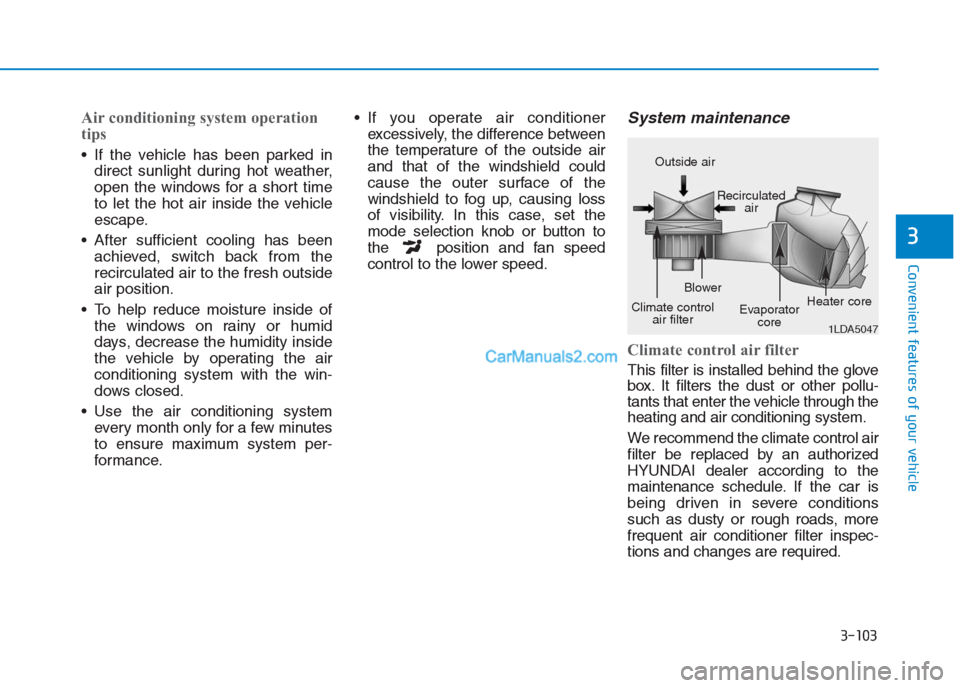
Climate control air filter
This filter is installed behind the glove
box. It filters the dust or other pollu-
tants that enter the vehicle through the
heating and air conditioning system.
We recommend the climate control air
filter be replaced by an authorized
HYUNDAI dealer according to the
maintenance schedule. If the car is
being driven in severe conditions
such as dusty or rough roads, more
frequent air conditioner filter inspec-
tions and changes are required.
1LDA5047
Outside air
Recirculated
air
Climate control
air filterBlower
Evaporator
coreHeater core
