Page 146 of 472

3-61
Convenient features of your vehicle
3
KEY OUT Indicator
Light (if equipped)
When the Engine Start/Stop button
is in the ACC or ON position, if any
door is open, the system checks for
the smart key.
This indicator light blinks:
When the smart key is not in the
vehicle and any door is open with the
ignition switch or Engine Start/Stop
button in the ACC or ON position.
- At this time, if you close all doors,
the chime will also sound for
approximately 5 seconds.
- The indicator will go off while the
vehicle is moving.
Warning Messages
(for Type B, if equipped)
Shift to "P" position
(for smart key system and auto-
matic transaxle)
This warning message is displayed if
you try to turn off the engine without
the shift lever in P (Park) position.
At this time, the Engine Start/Stop
button turns to the ACC position (If
you press the Engine Start/Stop but-
ton once more, it will turn to the ON
position).
Low Key Battery
(for smart key system)
This warning message is displayed if
the battery of the smart key is dis-
charged when the Engine Start/Stop
button is in the OFF position.
OGS045108
OLF044126L
KEY
OUT
Page 149 of 472
3-64
Convenient features of your vehicle
Key not detected
(for smart key system)
This warning message is displayed if
the smart key is not detected when
you press the Engine Start/Stop but-
ton.
Press start button again
(for smart key system)
This message is displayed if you
were unable to start the vehicle when
the Engine Start/Stop button was
pressed.
If this occurs, attempt to start the
engine by pressing the Engine
Start/Stop button again.
If the warning message appears
each time you press the Engine
Start/Stop button, have your vehicle
inspected by an authorized Hyundai
dealer.
Press “START” button with key
(for smart key system)
This warning message is displayed if
you press the Engine Start/Stop but-
ton while the warning message “Key
not detected” is displayed.
At this time, the immobilizer indicator
light will blink.
OGS045114OGS048137LOGS048121L
Page 152 of 472
3-67
Convenient features of your vehicle
3
Low Fuel
This warning message is displayed if
the fuel tank is almost out of fuel.
When this message is displayed, the
vehicle range is approximately 50
km.
When this message is displayed, the
low fuel level warning light in the
cluster will come on.
It is recommended to look for the
nearest fueling station and refuel as
soon as possible.
Engine has overheated
This warning message illuminates
with a warning chime when the
engine coolant temperature is
above 120°C (248°F). This means
that the engine is overheated and
may be damaged.
If your vehicle is overheated, refer
to “Overheating” in chapter 6.
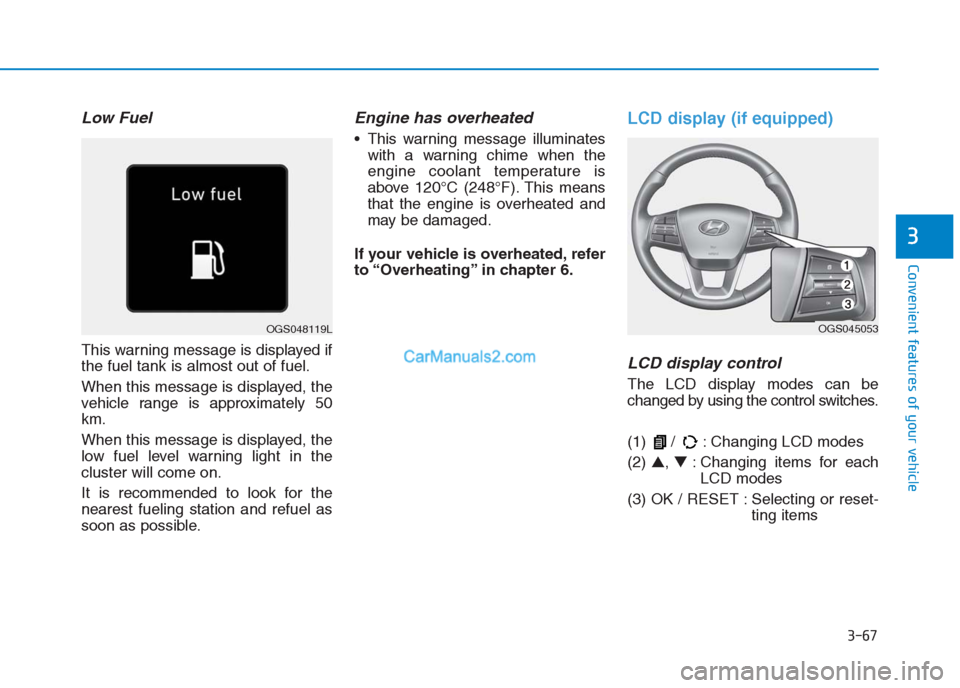
LCD display (if equipped)
LCD display control
The LCD display modes can be
changed by using the control switches.
(1) / : Changing LCD modes
(2) ▲, ▼: Changing items for each
LCD modes
(3) OK / RESET : Selecting or reset-
ting items
OGS048119LOGS045053
Page 157 of 472

3-72
Convenient features of your vehicle
ItemsExplanation
Wiper/Lights Display
You can activate or deactivate the Wiper/ Light mode.
When activated, the LCD display shows the selected Wiper/Light mode whenever you changed the
mode.
Auto Rear Wiper (reverse)You can activate or deactivate the rear wiper while the vehicle is in reverse with the front wiper ON.
Gear Position Pop-up
If you select this function, the current shift gear position is displayed in the cluster for about 2 sec-
onds when shifting into other positions (P/R/N/D).
If you do not select this function, the shift gear Pop-up is not displayed in the cluster.
Convenience Lights
ItemsExplanation
One Touch Turn Signal
The one touch turn signal function will be deactivated.
The turn signal indicator will blink 3, 5, or 7 times when the turn signal lever is
moved slightly.
For more details, refer to “Light” in this chapter.
Headlamp Delay
The headlamp delay function will be activated.
The headlamp delay function will be deactivated.
For more details, refer to “Light” in this chapter.
Page 162 of 472

3-77
Convenient features of your vehicle
3
The accumulated driving information
will continue to be counted while the
engine is still running (for example,
when the vehicle is in traffic or
stopped at a stop light).
Information
The vehicle must be driven for a min-
imum of 300 meters (0.19 miles) since
the last ignition key cycle before the
average fuel economy will be recalcu-
lated.
Drive Info display
This display shows the trip distance
(1), the average fuel economy (2),
and the total driving time (3).The information is combined for each
ignition cycle. However, when the
engine has been OFF for 4 hours or
longer the Drive Info screen will
reset.
To manually reset the information,
press and hold the OK button when
viewing the Drive Info. The trip dis-
tance, the average fuel economy,
and total driving time will reset simul-
taneously.
The driving information will continue
to be counted while the engine is still
running (for example, when the vehi-
cle is in traffic or stopped at a stop
light.)
Information
The vehicle must be driven for a min-
imum of 300 meters (0.19 miles) since
the last ignition key cycle before the
average fuel economy will be recalcu-
lated.
Digital Speedometer
This message shows the speed of
the vehicle.
In case of type A, the digital
speedometer is displayed when
“SPEED” sets “ON” in the cluster.
Pressing the RESET button for more
than 1 second, when the “SPEED”
“OFF” is displayed, the digital
speedometer is displayed.
i
i
OGS048166L/OPDE046136
■Type A■Type BOLF044085R
■Type A
Page 163 of 472
3-78
Convenient features of your vehicle
L LI
IG
GH
HT
T
Exterior lights
Lighting control
To operate the lights, turn the knob at
the end of the control lever to one of
the following positions:(1) OFF position
(2) AUTO light position (if equipped)
(3) Parking light position
(4) Headlight position
Headlight position ( )
When the light switch is in the head
light position, the headlights, license
plate light and instrument panel lights
are turned ON.
OLF044084R
OLF044084L
■Right Hand Drive
■Left Hand Drive
OLF044087R
OLF044087L
■Right Hand Drive
■Left Hand Drive
Page 164 of 472
3-79
Convenient features of your vehicle
3
Information
The ignition switch must be in the ON
position to turn on the headlights.
Parking light position ( )
When the light switch is in the park-
ing light position, the parking (posi-
tion) light, license plate light and
instrument panel lights are turned
ON.
AUTO light position (if equipped)
When the light switch is in the AUTO
position, the parking (position) light
and headlights will be turned ON or
OFF automatically depending on the
amount of light outside the vehicle.
i
OLF044086R
OLF044086L
■Right Hand Drive
■Left Hand DriveOLF044085R
OLF044085L
■Right Hand Drive
■Left Hand Drive
Page 165 of 472

3-80
Convenient features of your vehicle
Even with the AUTO light feature in
operation, it is recommended to
manually turn ON the lights when
driving at night or in a fog, or when
you enter dark areas, such as tun-
nels and parking facilities.
• Do not cover or spill anything on
the sensor (1) located on the
instrument panel.
Do not clean the sensor using a
window cleaner, the cleanser may
leave a light film which could
interfere with sensor operation.
If your vehicle has window tint
or other types of metallic coat-
ing on the front windshield, the
AUTO light system may not work
properly.
High beam operation
To turn on the high beam headlamp,
push the lever away from you. The
lever will return to its original position.The high beam indicator will light
when the headlamp high beams are
switched on.
To turn off the high beam headlamp,
pull the lever towards you. The low
beams will turn on.
NOTICE
Do not use high beam when there
are other vehicles approaching
you. Using high beam could
obstruct the other driver's vision.
WARNING
OLF044192R
OLF044192L
■Right Hand Drive
■Left Hand Drive