Page 186 of 624
184
uuInterior Lights/Convenience Items uIn-Bed Convenience Items
Controls
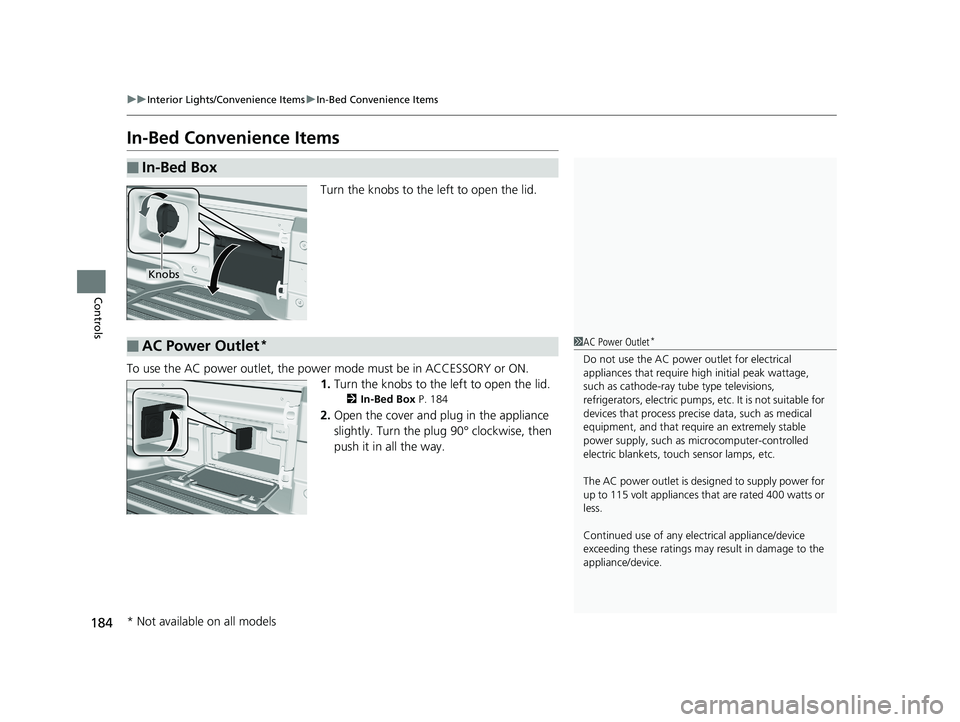
In-Bed Convenience Items
Turn the knobs to the left to open the lid.
To use the AC power outlet, the powe r mode must be in ACCESSORY or ON.
1. Turn the knobs to the left to open the lid.
2 In-Bed Box P. 184
2.Open the cover and plug in the appliance
slightly. Turn the plug 90° clockwise, then
push it in all the way.
■In-Bed Box
Knobs
■AC Power Outlet*1 AC Power Outlet*
Do not use the AC power outlet for electrical
appliances that require hi gh initial peak wattage,
such as cathode-ray tube type televisions,
refrigerators, electric pumps, etc. It is not suitable for
devices that process precis e data, such as medical
equipment, and that require an extremely stable
power supply, such as microcomputer-controlled
electric blankets, touc h sensor lamps, etc.
The AC power outlet is desi gned to supply power for
up to 115 volt appliances that are rated 400 watts or
less.
Continued use of any elec trical appliance/device
exceeding these ratings may result in damage to the
appliance/device.
* Not available on all models
Page 187 of 624
Continued185
uuInterior Lights/Convenience Items uIn-Bed Convenience Items
Controls
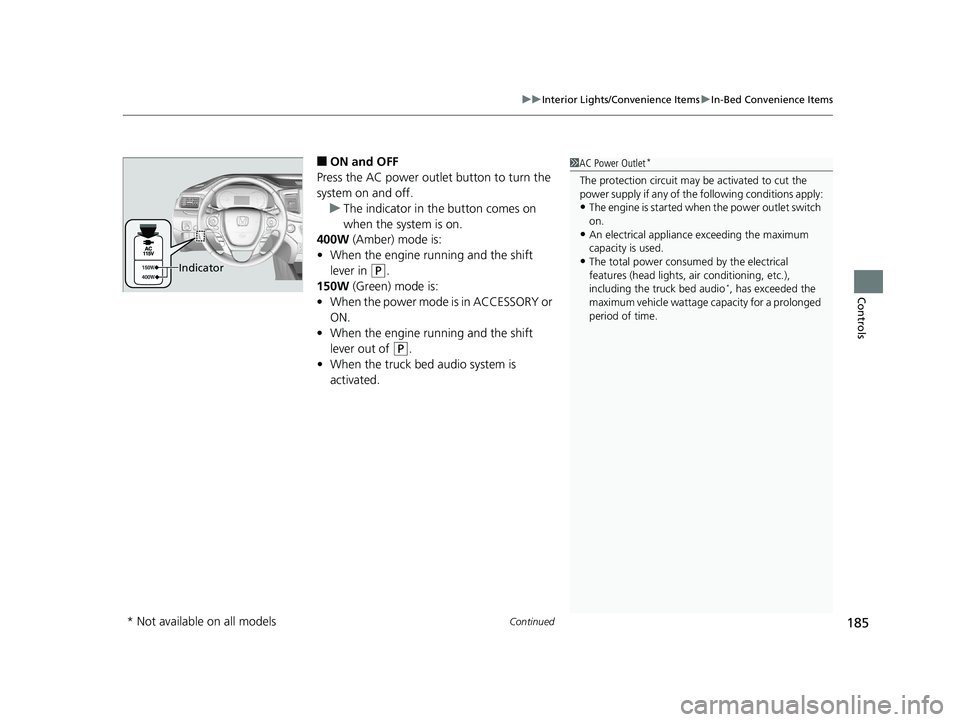
■ON and OFF
Press the AC power outlet button to turn the
system on and off. u The indicator in th e button comes on
when the system is on.
400W (Amber) mode is:
• When the engine running and the shift
lever in
(P.
150W (Green) mode is:
• When the power mode is in ACCESSORY or
ON.
• When the engine running and the shift
lever out of
(P.
• When the truck bed audio system is
activated.
1AC Power Outlet*
The protection circuit may be activated to cut the
power supply if any of th e following conditions apply:
•The engine is started when the pow er outlet switch
on.
•An electrical appliance exceeding the maximum
capacity is used.
•The total power consumed by the electrical
features (head lights, air conditioning, etc.),
including the truck bed audio
*, has exceeded the
maximum vehicle wattage capacity for a prolonged
period of time.
Indicator
* Not available on all models
Page 188 of 624
uuInterior Lights/Convenience Items uIn-Bed Convenience Items
186
Controls
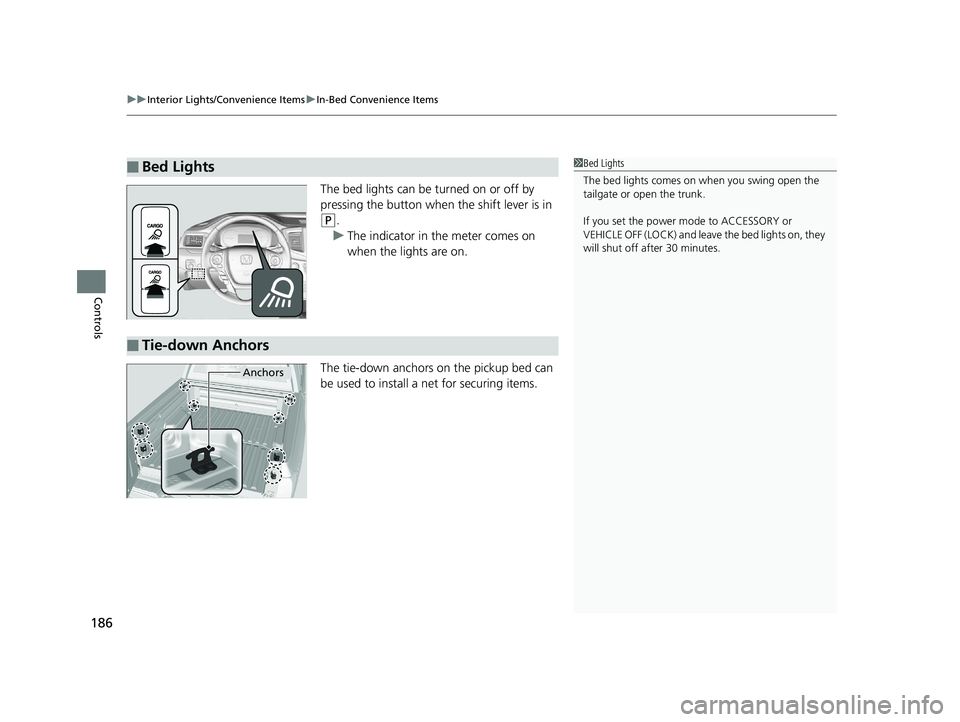
The bed lights can be turned on or off by
pressing the button when the shift lever is in
(P.
u The indicator in the meter comes on
when the lights are on.
The tie-down anchors on the pickup bed can
be used to install a net for securing items.
■Bed Lights1 Bed Lights
The bed lights comes on when you swing open the
tailgate or open the trunk.
If you set the power mode to ACCESSORY or
VEHICLE OFF (LOCK) and leave the bed lights on, they
will shut off after 30 minutes.
■Tie-down Anchors
Anchors
Page 189 of 624
187
uuInterior Lights/Convenience Items uIn-Bed Convenience Items
Controls
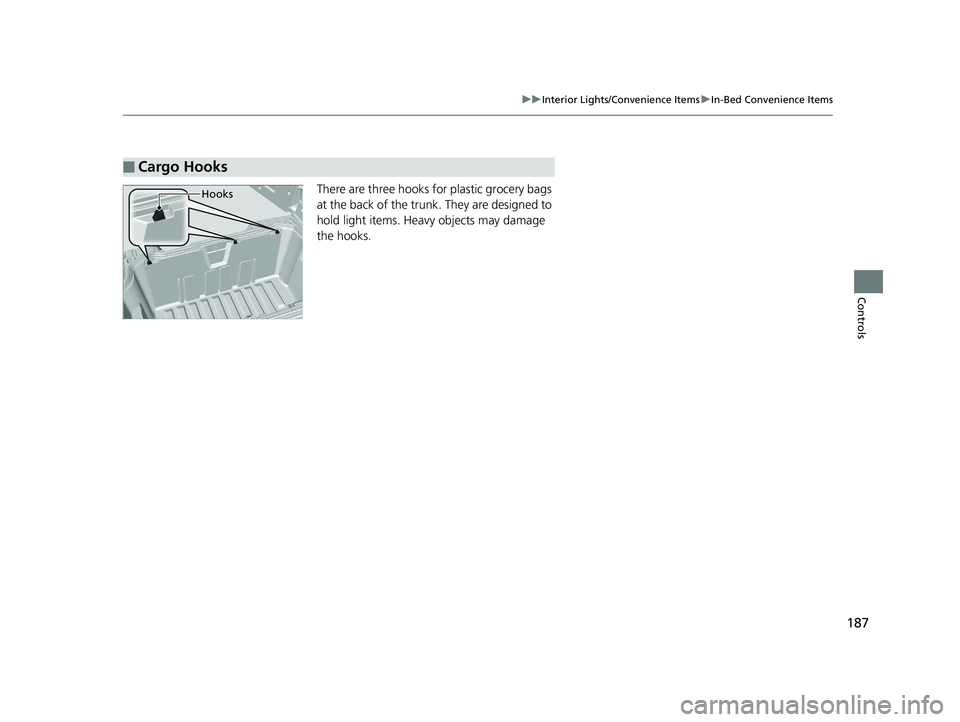
There are three hooks for plastic grocery bags
at the back of the trunk. They are designed to
hold light items. Heavy objects may damage
the hooks.
■Cargo Hooks
Hooks
Page 203 of 624

201
uuAudio System uUSB Port(s)
Continued
Features
USB Port(s)
Install the iPod USB connector or the USB flash drive to the USB port.
■On the front console compartment
The USB port (1.5A) is for charging devices,
playing audio files and connecting compatible
phones with Apple CarPlay or Android Auto.
The USB port (1.0A) is for playing audio files
on a USB flash drive, connecting a mobile
phone, and charging devices.
■In the consol e compartment
The USB port (1.0A) is for playing audio files
on a USB flash drive, connecting a mobile
phone, and charging devices.
The USB port (2.5A) is only for charging
devices.
1 USB Port(s)
•Do not leave the iPod or USB flash drive in the
vehicle. Direct sunlight and high temperatures may
damage it.
•We recommend using an ex tension cable with the
USB port.
•Do not connect the iPod or USB flash drive using a
hub.
•Do not use a device such as a card reader or hard disk
drive, as the device or your files may be damaged.
•We recommend keeping y our data backed up
before using the device in your vehicle.
•Displayed messages may vary depending on the
device model and software version.
If the audio system does not recognize the iPod, try
reconnecting it a few times or reboot the device. To
reboot, follow the manufac turer’s instructions
provided with the iPod or visit www.apple.com/ipod.
The USB port can supply up to 1.0A/1.5A/2.5A of
power. It does not output 1.0A/1.5A/2.5A unless the
device requests.
For amperage details, read the operating manual of
the device that ne eds to be charged.
Set the power mode to ACCESSORY or ON first.
This port is for battery charge only. You cannot play
music even if you have conne cted a music player to it.
Under certain condi tions, a device connected to the
port may generate noise in the radio you are listening
to.
USB charge
On the front console compartment
Models with
color audio
systemModels with
Display
Audio
Models with Display Audio
Models with color audio system
In the console compartment
Models
with
Display
AudioModels
with
color
audio
system
Models with Display Audio
Models with color audio system
Page 248 of 624

246
uuAudio System Basic Operation uVoice Control Operation
Features
Voice Control Operation
Your vehicle has a voice control system that allows hands-free operation.
The voice control system uses the (Tal k) and (hang-up/back) buttons on the
steering wheel and a microphone near the map lights on the ceiling.
To achieve optimum voice recognition when using the voice control system:
• Make sure the correct screen is displa yed for the voice command that you are
using.
The system recognizes only certain commands.
Available navigation commands.
2 Voice Portal Screen P. 247
•Close the windows.
• Adjust the dashboard and side vents so air does not blow onto the microphone
on the ceiling.
• Speak clearly in a clear, natural speakin g voice without pausing between words.
• Reduce any background noise if possible. The system may misinterpret your
command if more than one person is speaking at the same time.
■Voice Recognition
1Voice Control Operation
When you press the button, a helpful prompt asks
what you would like to do. Press and release the
button again to bypass th is prompt and give a
command.
1 Voice Recognition
The voice control system can only be used from the
driver’s seat because the microphone unit removes
noises from the front passenger’s side.
Page 303 of 624
301
uuGeneral Information on the Audio System uRecommended CDs
Features
■Protecting CDs
Follow these precautions when handling or storing CDs:
• Store a CD in its case when it is not being played.
• When wiping a CD, use a soft clean cloth from the center to the outside edge.
• Handle a CD by its edge. Never touch either surface.
• Never insert foreign obje cts into the CD player.
• Keep CDs out of direct sunlight and extreme heat.
• Do not place stabilizer rings or labels on the CD.
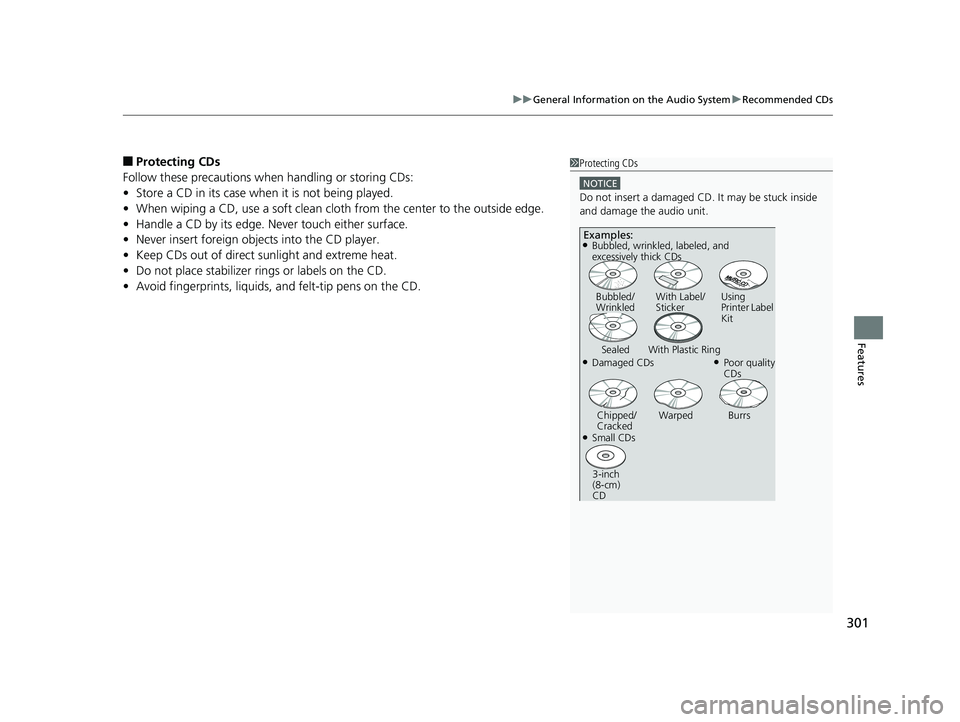
• Avoid fingerprints, liquids, and felt-tip pens on the CD.1Protecting CDs
NOTICE
Do not insert a damaged CD. It may be stuck inside
and damage the audio unit.
Examples:
●Damaged CDs Bubbled/
Wrinkled
With Label/
Sticker Using
Printer Label
Kit
Sealed With Plastic Ring●Poor quality
CDs
Chipped/
Cracked Warped Burrs
●Small CDs
3-inch
(8-cm)
CD
●Bubbled, wrinkled, labeled, and
excessively thick CDs
Page 328 of 624
326
uuCustomized Features u
Features
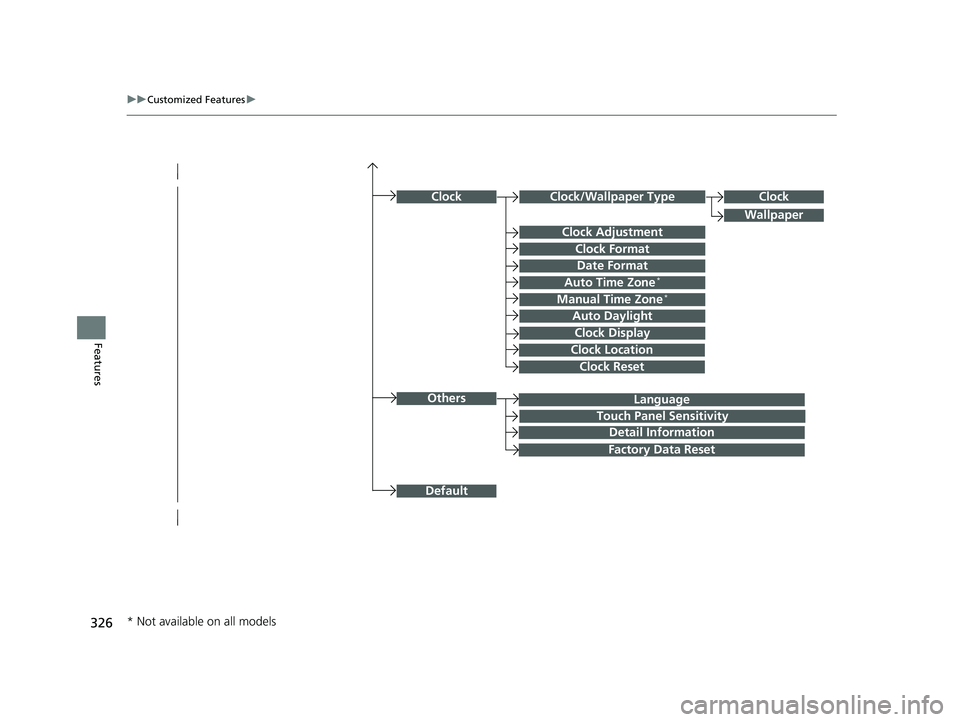
Language
Default
Others
Clock/Wallpaper Type
Date Format
Clock Adjustment
ClockClock
Wallpaper
Manual Time Zone*
Auto Daylight
Clock Display
Touch Panel Sensitivity
Clock Format
Auto Time Zone*
Detail Information
Factory Data Reset
Clock Reset
Clock Location
* Not available on all models