Page 324 of 624
322
uuCustomized Features u
Features
*1:Default Setting
Setup
GroupCustomizable FeaturesDescriptionSelectable Settings
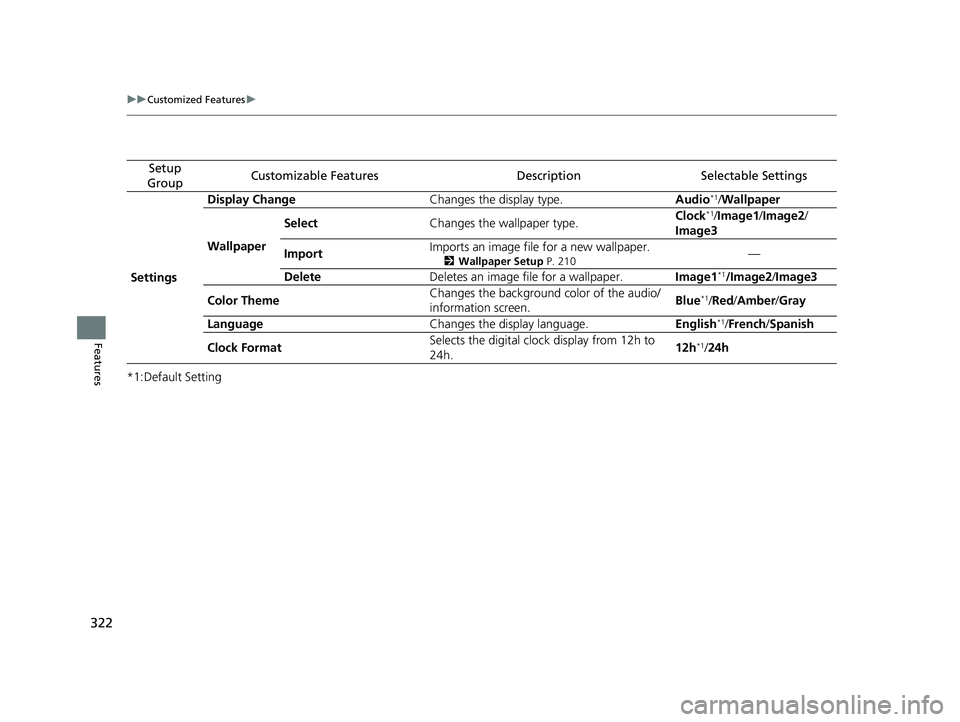
Settings Display Change
Changes the display type. Audio
*1/Wallpaper
Wallpaper Select
Changes the wallpaper type. Clock*1/
Image1/ Image2/
Image3
Import Imports an image file for a new wallpaper.
2
Wallpaper Setup P. 210—
Delete Deletes an image file for a wallpaper. Image1
*1/Image2/Image3
Color Theme Changes the background color of the audio/
information screen.
Blue
*1/
Red/ Amber /Gray
Language Changes the display language. English
*1/French /Spanish
Clock Format Selects the digital clock display from 12h to
24h. 12h
*1/
24h
Page 325 of 624
323
uuCustomized Features u
Continued
Features
*1:Default Setting
Setup
GroupCustomizable FeaturesDescriptionSelectable Settings
Phone
Setup
Bluetooth
Setup
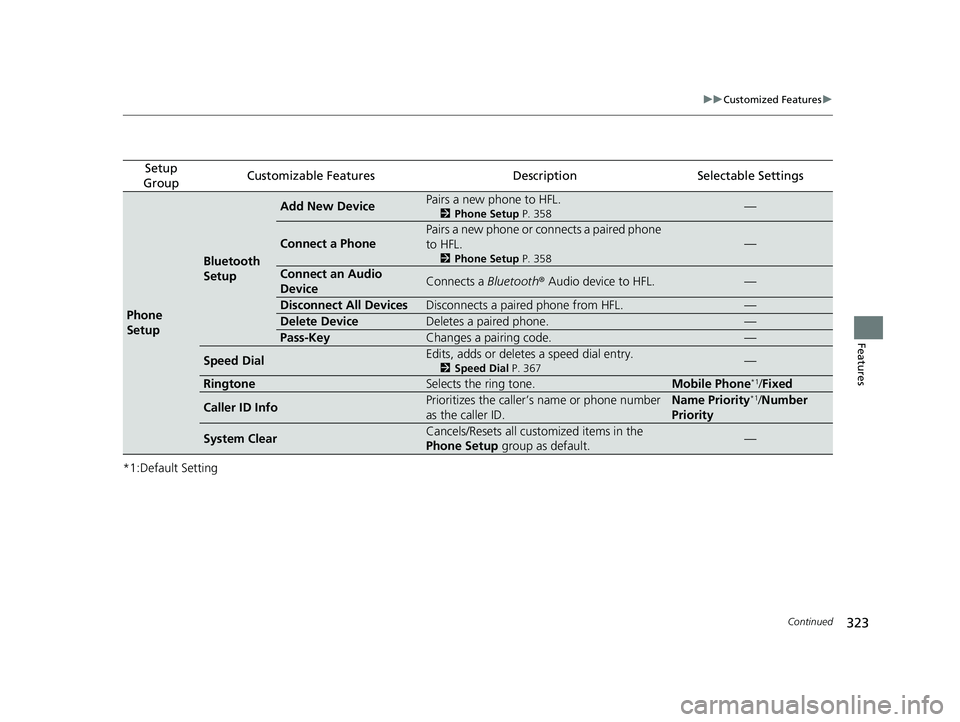
Add New DevicePairs a new phone to HFL.
2 Phone Setup P. 358—
Connect a Phone
Pairs a new phone or connects a paired phone
to HFL.
2Phone Setup P. 358
—
Connect an Audio
DeviceConnects a Bluetooth® Audio device to HFL.—
Disconnect All DevicesDisconnects a paired phone from HFL.—
Delete DeviceDeletes a paired phone.—
Pass-KeyChanges a pairing code.—
Speed DialEdits, adds or deletes a speed dial entry.
2Speed Dial P. 367—
RingtoneSelects the ring tone.Mobile Phone*1/Fixed
Caller ID InfoPrioritizes the caller’s name or phone number
as the caller ID.Name Priority*1/Number
Priority
System ClearCancels/Resets all customized items in the
Phone Setup group as default.—
Page 331 of 624
329
uuCustomized Features u
Continued
Features
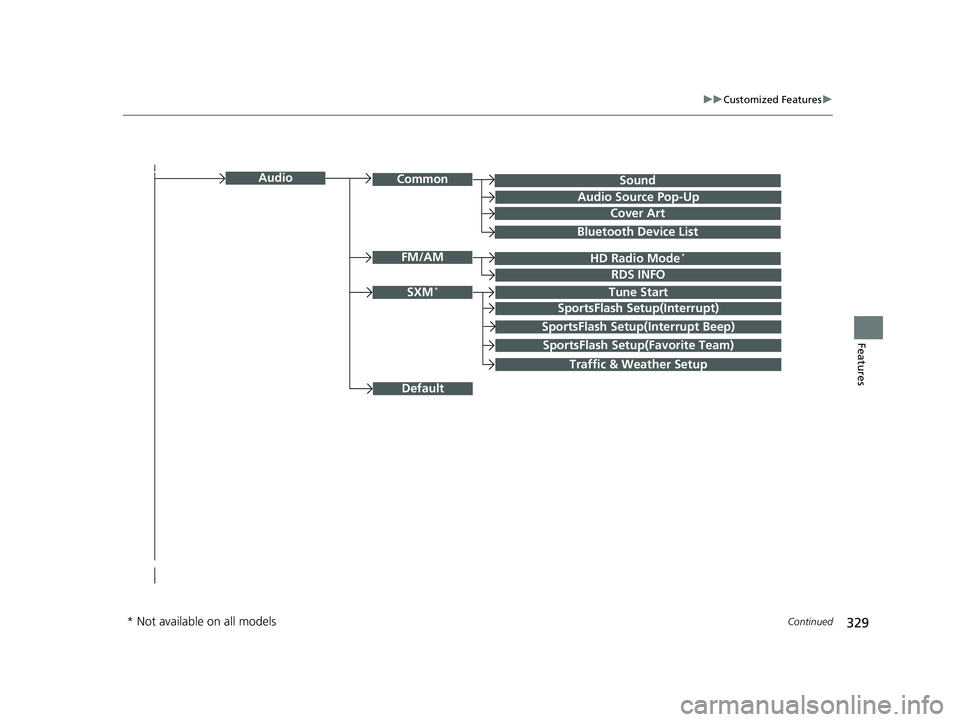
SoundAudioCommon
Audio Source Pop-Up
Cover Art
HD Radio Mode*FM/AM
RDS INFO
SXM*Tune Start
SportsFlash Setup(Interrupt)
SportsFlash Setup(Interrupt Beep)
SportsFlash Setup(Favorite Team)
Traffic & Weather Setup
Bluetooth Device List
Default
* Not available on all models
Page 333 of 624
331
uuCustomized Features u
Continued
Features
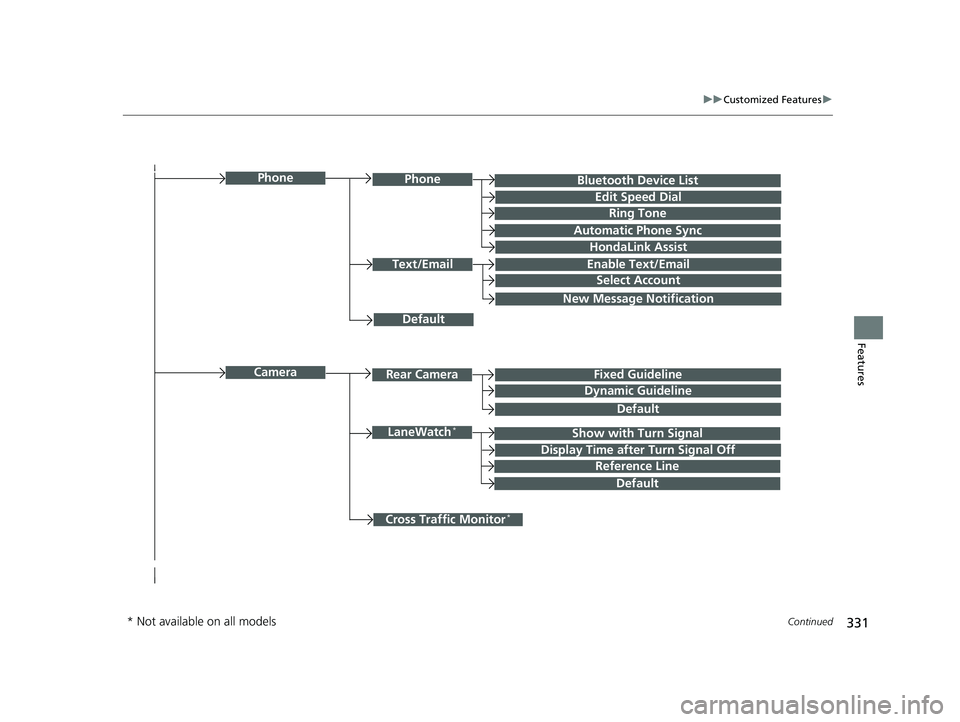
Bluetooth Device List
Default
PhonePhone
Edit Speed Dial
Ring Tone
Automatic Phone Sync
HondaLink Assist
Text/EmailEnable Text/Email
Select Account
New Message Notification
Cross Traffic Monitor*
Camera
Show with Turn SignalLaneWatch*
Display Time after Turn Signal Off
Reference Line
Default
Rear CameraFixed Guideline
Dynamic Guideline
Default
* Not available on all models
Page 334 of 624
332
uuCustomized Features u
Features
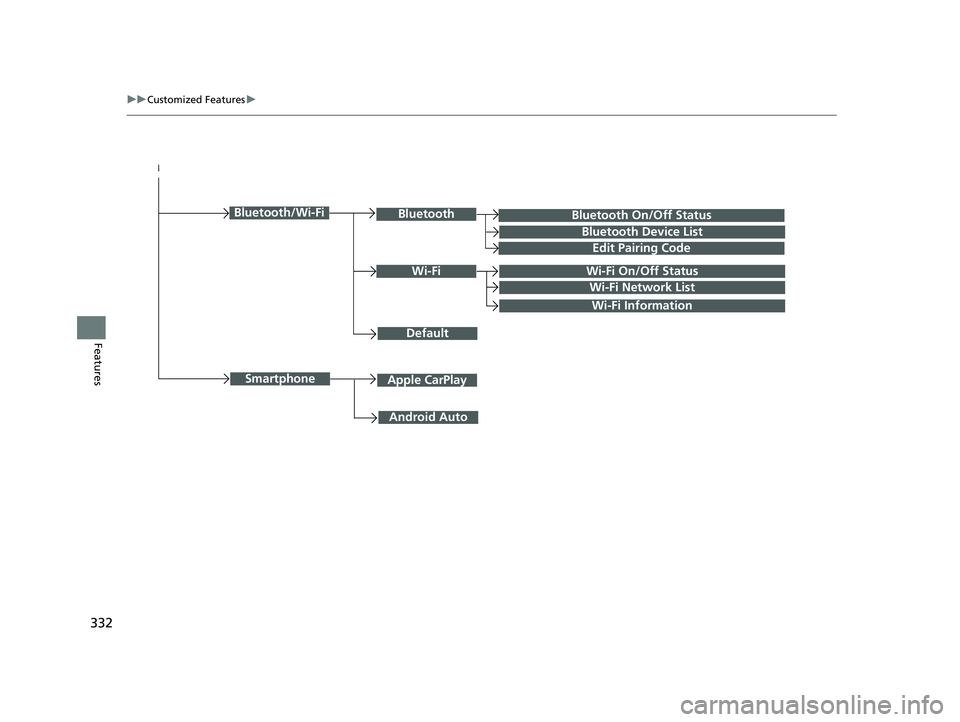
Bluetooth On/Off Status
Default
Bluetooth/Wi-FiBluetooth
Bluetooth Device List
Edit Pairing Code
Wi-FiWi-Fi On/Off Status
Wi-Fi Network List
Wi-Fi Information
Android Auto
SmartphoneApple CarPlay
Page 335 of 624
333
uuCustomized Features u
Continued
Features
■List of customizable options
*1:Default Setting Setup
Group Customizable Features Desc
ription Selectable Settings
System
Display
Display
Settings
BrightnessChanges the brightness of the audio/information
screen.—
ContrastChanges the contrast of th e audio/information screen.—
Black LevelChanges the black level of the audio/information
screen.—
Background ColorChanges the background color of the audio/
information screen.Blue*1/ Amber /Red/
Violet
Sound/
Beep
Guidance VolumeChanges the sound volume.
Adjusts the guidance volume of the navigation system.1~6*1~11
Text Message VolumeChanges the text/e-mail message reading volume.1~6*1~11
Voice Recog. VolumeChanges the volume of the voice prompt.1~6*1~11
Beep VolumeChanges the beep volume.Off*1/1 /2 /3
Page 344 of 624
342
uuCustomized Features u
Features
*1:Default SettingSetup
Group Customizable Features Description Selectable Settings
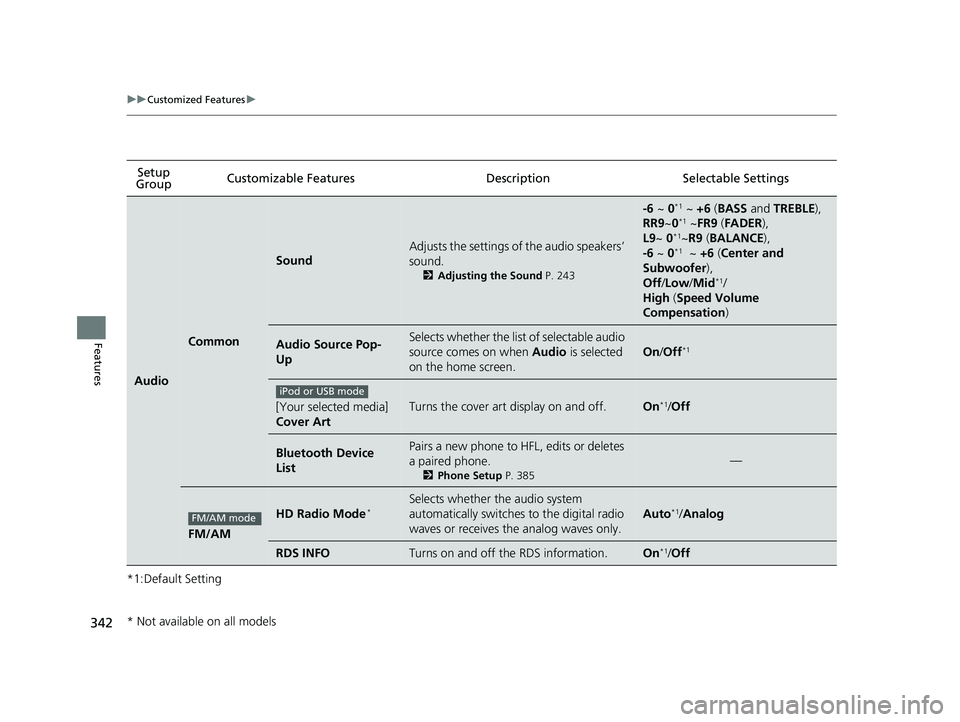
Audio
Common
Sound
Adjusts the settings of the audio speakers’
sound.
2
Adjusting the Sound P. 243
-6 ~ 0*1 ~ +6 (BASS and TREBLE ),
RR9 ~0*1 ~FR9 (FADER ),
L9 ~ 0*1~R9 (BALANCE ),
-6 ~ 0*1 ~ +6 (Center and
Subwoofer),
Off /Low /Mid
*1/
High (Speed Volume
Compensation )
Audio Source Pop-
UpSelects whether the list of selectable audio
source comes on when Audio is selected
on the home screen.
On /Off*1
[Your selected media]
Cover ArtTurns the cover art display on and off.On*1/ Off
Bluetooth Device
ListPairs a new phone to HFL, edits or deletes
a paired phone.
2 Phone Setup P. 385
—
FM/AM
HD Radio Mode*Selects whether the audio system
automatically switches to the digital radio
waves or receives the analog waves only.
Auto*1/Analog
RDS INFOTurns on and off the RDS information.On*1/Off
iPod or USB mode
FM/AM mode
* Not available on all models
Page 347 of 624
345
uuCustomized Features u
Continued
Features
*1:Default SettingSetup
Group Customizable Features Desc
ription Selectable Settings
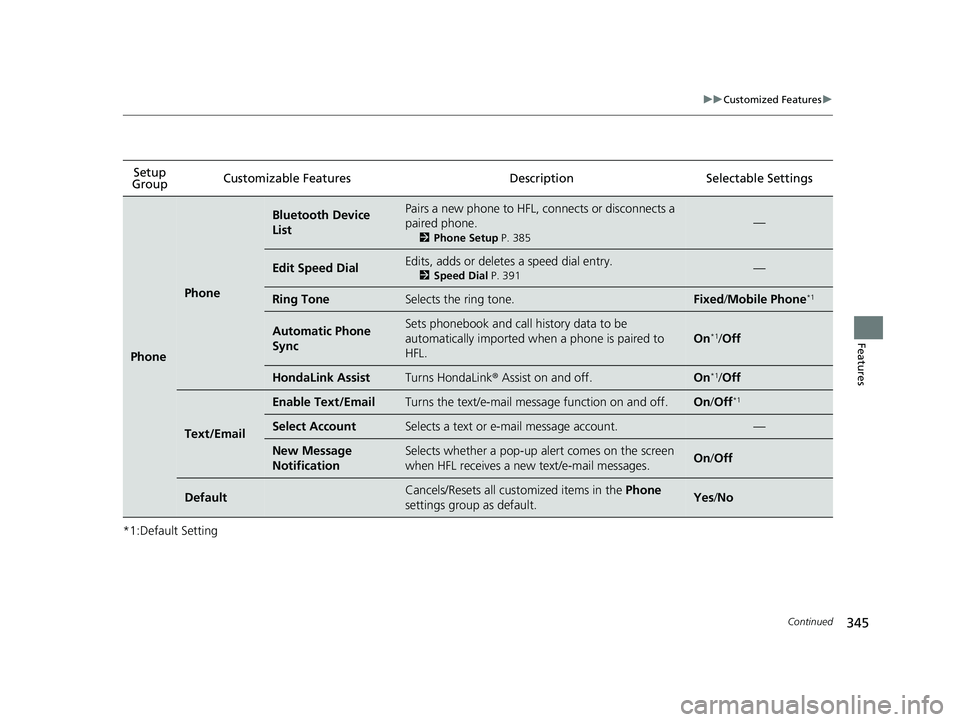
Phone
Phone
Bluetooth Device
ListPairs a new phone to HFL, connects or disconnects a
paired phone.
2Phone Setup P. 385
—
Edit Speed DialEdits, adds or deletes a speed dial entry.
2Speed Dial P. 391—
Ring ToneSelects the ring tone.Fixed/Mobile Phone*1
Automatic Phone
SyncSets phonebook and call history data to be
automatically imported when a phone is paired to
HFL.
On*1/Off
HondaLink AssistTurns HondaLink ® Assist on and off.On*1/Off
Text/Email
Enable Text/EmailTurns the text/e-mail message function on and off.On /Off*1
Select AccountSelects a text or e-mail message account.—
New Message
NotificationSelects whether a pop-up alert comes on the screen
when HFL receives a new text/e-mail messages.On /Off
DefaultCancels/Resets all customized items in the Phone
settings group as default.Yes /No