2019 HONDA CLARITY FUEL CELL charging
[x] Cancel search: chargingPage 292 of 551
290
uuGeneral Information on the Audio System uHonda App License Agreement
Features
E. Information Collection and Storage
1. Information Collection , Use, Transmission and Storage of Data.
Consent to Use of Data: You ag ree that HONDA and PROVIDERS may
collect and use your information gathered in any manner as part of product support services related to the SOFTWARE or related services.
HONDA may share such information with third parties, including, without limitation, PROV IDERS, third party software and service s
suppliers, their affiliates and/or their design ated agents, solely to improve their products or to provide services or technologies to you.
HONDA, third party software and systems supp liers, their affiliates and/or their designated agent may disclose this information to others,
but not in a form that pe rsonally identifies you.
2. Information Storage.
Depending on the type of multimedia system you have in your VEHICLE, certain information may be stored for ease
of use of the SOFTWARE including, without limitation, search hi story, location history in certain applications, previous and saved
destinations, map locations within certain applications, and device numbers and contact information.
(a) Vehicle Health Information.
Your VEHICLE may remotely trans mit information regarding the status and health of your VEHICLE
(“VEHICLE INFORMATION”) to HONDA without notification to you. VEHICLE INFORMATION may contain VEHICLE maintenance and
malfunction status that is derived from VEHICLE diagnostic data and includes, but is not limited to, status of powered doors and windows,
battery life data, battery charging data, VEHICLE speed, coolant temperat ure, air compressor revolution, output power, warning codes,
diagnostic trouble codes, fuel injection volume, and engine rotati ons per minute. VEHICLE HEALTH INFORMATION may be used by HONDA
for research and development, to deliver HO NDA SERVICES and information to you, and to contact you, and is retained only for a period
of time necessary to fulfill these goals.
(b) VEHICLE Geolocation Data (non-navigation/map based).
If you opt-in to geolocation-based SERVICES, your vehicle’s geolocation data
(latitude and longitude) will be automatically sent from your VEHICLE to HONDA and PROVIDERS.
(c) You understand that the inputting or uploading of information to your VEHICLE’s multimedia system or the SOFTWARE or SERVICES is
at your own risk and that HONDA is not resp onsible for unauthorized access to or use of any personal or other information. All information
uploaded to the SOFTWARE and SERVICES may be stored on your VEHI CLES’s multimedia system and you understand that the security and
safety of your VEHICLE’s multimedia system is your sole responsibility.
19 CLARITY FCV CSS-31TRT6200.book 290 ページ 2019年1月17日 木曜日 午前11 時54分
Page 381 of 551
![HONDA CLARITY FUEL CELL 2019 Owners Manual (in English) Continued379
uuWhen Driving uShifting
Driving
■If you want to keep the transmission in (N position [car wash mode]
With the power system on:
1. Depress the brake pedal.
2. Make sure the READY indic](/manual-img/13/34492/w960_34492-380.png "HONDA CLARITY FUEL CELL 2019 Owners Manual (in English) Continued379
uuWhen Driving uShifting
Driving
■If you want to keep the transmission in (N position [car wash mode]
With the power system on:
1. Depress the brake pedal.
2. Make sure the READY indic")
Continued379
uuWhen Driving uShifting
Driving
■If you want to keep the transmission in (N position [car wash mode]
With the power system on:
1. Depress the brake pedal.
2. Make sure the READY indicator is on.
3. Press
(N. Within six seconds press and hold (N for two seconds.
u This puts the vehicle in car wash mode which must be used when your vehicle
is pulled through a conveyor type automatic car wash where you or an
attendant do not remain in the vehicle.
If you want to cancel car wash mode, select a position other than
(N.
If you want to reduce fuel consumption in car wash mode:
Press the POWER button during car wash mode.
u Make sure the READY indicator is off.
u The gear position remains in
(N with the power mode in ACCESSORY for 15
minutes, then, it auto matically changes to
(P and the power mode changes to
OFF.
Manually changing to
(P cancels ACCESSORY mode. The (P indicator comes on
and the power mode changes to OFF. You must always shift to
(P when car wash
mode is no longer needed.
1 If you want to keep the transmission in (N position [car wash
mode]
To keep the vehicle in
(N position, you can also
follow this procedure:
While the power system is on, select
( N, and then
within five seconds, press the POWER button.
Note that the transmiss ion may not stay in
(N
position while any of the following indicators is on:
•POWER SYSTEM indicator
•Transmission system indicator
•12-volt battery charging system indicator
19 CLARITY FCV CSS-31TRT6200.book 379 ページ 2019年1月17日 木曜日 午前11 時54分
Page 429 of 551
Continued427
uuBraking uBrake System
Driving
Your vehicle is equipped with disc brakes at all four wheels. The brake assist system
increases the stopping force when you depress the brake pedal hard in an
emergency situation. The an ti-lock brake system (ABS) helps you retain steering
control when brak ing very hard.
2Brake Assist System P. 431
2 Anti-lock Brake System (ABS) P. 430
■Foot Brake1Foot Brake
Check the brakes after driving through deep water,
or if there is a buildup of road surface water. If
necessary, dry the brakes by lightly depressing the
pedal several times.
If you hear a continuous me tallic friction sound when
applying the brakes, this is caused by the brake wear
indicator rubbing on the brake rotor and indicates
that the brake pads need to be replaced. Have the
vehicle checked by an authorized Honda Clarity Fuel
Cell dealer. If you hear onl y an occasional squeak or
squeal when you initially a pply the brake pedal, this
may be normal and caus ed by high frequency
vibration of the brake pads against the rotating brake
disc.
Constantly using the brak e pedal while going down a
long hill builds up heat, which reduces the brake
effectiveness.
To help reduce heat build -up in the brakes when
descending a long slope, use regenerative braking to
slow the vehicle down.
When the high voltage battery is recharging,
regenerative braking may not be possible.
2 POWER/CHARGE Gauge P. 117
2 High Voltage Battery Charge Level Gauge
P. 118
Do not rest your foot on the brake pedal while
driving, as it will lightly apply the brakes and cause
them to lose effectiveness over time and reduce pad
life. It will also conf use drivers behind you.
19 CLARITY FCV CSS-31TRT6200.book 427 ページ 2019年1月17日 木曜日 午前11 時54分
Page 480 of 551
478
uu12-Volt Battery uCharging the 12-Volt Battery
Maintenance
Charging the 12-Volt Battery
Disconnect both battery cables to prevent da maging your vehicle’s electrical system.
Always disconnect the negative (–) cable first, and reconnect it last.1 12-Volt Battery
When replacing the battery, the replacement must be
of the same specifications.
Consult an authorized Honda Clarity Fuel Cell dealer
for more information.
19 CLARITY FCV CSS-31TRT6200.book 478 ページ 2019年1月17日 木曜日 午前11 時54分
Page 490 of 551
488
uuAccessories and Modifications uModifications
Maintenance
Modifications
Do not modify your vehicle in a manner that may affect its handling, stability, or
reliability, or install non-genuine Honda parts or accessories that may have a similar
effect.
Even minor modifications to vehicle systems can affect overall vehicle performance.
Always make sure all equipment is prop erly installed and maintained, and do not
make any modification to your vehicle or its systems that might cause your vehicle
to no longer meet federal, state, prov ince, territory, and local regulations.
The on-board diagnostic port (OBD-II/SAE J1962 connector) installed on this vehicle
is intended to be used with automobile system diagnostic devices or with other
devices that Honda has approved. Use of any other type of device may adversely
affect the vehicle’s electronic systems or allow them to be compromised, possibly
resulting in a system malfunction, drained battery, or other unexpected problems.
Do not modify or attempt to repair your vehicle’s high-voltage hybrid power system
or otherwise modify vehicle electrical systems. Disassembling or modifying electrical
equipment can result in a crash or a fire.
If you ever need to replace your vehicle’s high-voltage battery assembly outside of
warranty coverage, we highly recommend that you only use a genuine Honda high-
voltage battery assembly. Genuine Hond a high-voltage battery assemblies are
designed to work with your vehicle’s hybrid power system and have been designed,
engineered and manufactured to avoid ov ercharging situations. Non-genuine high-
voltage battery assemblies may not have be en similarly designed, engineered and
manufactured, and installation of such assemb lies could result in overcharging, fires,
loss of power, or other conditions that may increase the likelihood of a crash or
injury.
19 CLARITY FCV CSS-31TRT6200.book 488 ページ 2019年1月17日 木曜日 午前11 時54分
Page 491 of 551
489
Handling the Unexpected
This chapter explains how to handle unexpected troubles.
If a Tire Goes FlatTemporarily Repairi ng a Flat Tire....... 490
Handling of the Jack ......................... 502
Power System Won’t Start Checking the Procedure ................... 503
If the Smart Entry Remote Battery is Weak .......................................... 504
Emergency Power System Off........... 505
Jump Starting .................................... 506
Overheating How to Handle Overheating ............. 509
If Hydrogen Gas is Leaking .............. 511Indicator, Coming On/Blinking
If the 12-Volt Battery Charging System Indicator Comes On ....................... 513
If the Brake System Indicator (Red) Comes On or Blinks ....................................... 514
If the Electric Power Steering (EPS) System Indicator Comes On ........................... 514If the Brake System Indicator (Red) Comes On or Blinks at the Same Time
When the Brake System Indicator
(Amber) Comes On ...................... 515
If the Low Tire Pressure/TPMS Indicator
Comes On or Blinks ....................... 516
If the Transmission System Indicator Blinks along with the Warning Message .... 517
Fuses Fuse Locations ................................. 518
Inspecting and Changing Fuses ........ 525
Emergency Towing ........................... 526
When You Cannot Unlock the Hydrogen Fuel Lid .............................................. 527
When You Cannot Open the Trunk .. 528
19 CLARITY FCV CSS-31TRT6200.book 489 ページ 2019年1月17日 木曜日 午前11 時54分
Page 508 of 551
506
Handling the Unexpected
Jump Starting
Turn off the power to electric devices, such as audio and lights. Turn off the power
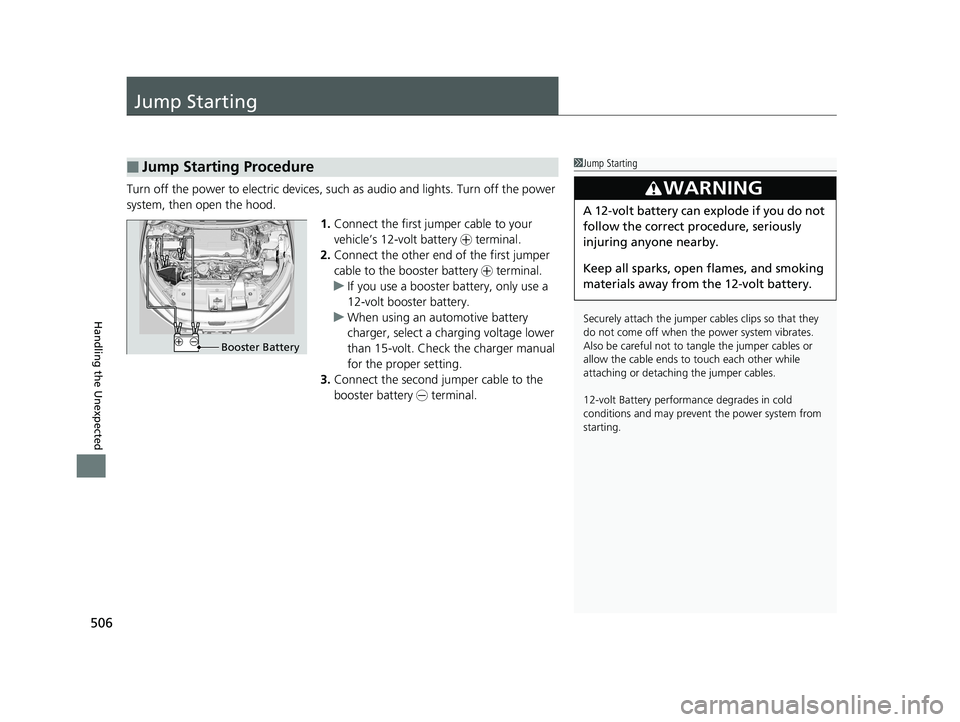
system, then open the hood.1.Connect the first jump er cable to your
vehicle’s 12-volt battery + terminal.
2. Connect the other end of the first jumper
cable to the booster battery + terminal.
u If you use a booster battery, only use a
12-volt booster battery.
u When using an automotive battery
charger, select a charging voltage lower
than 15-volt. Check the charger manual
for the proper setting.
3. Connect the second jumper cable to the
booster battery - terminal.
■Jump Starting Procedure1Jump Starting
Securely attach the jumper cables clips so that they
do not come off when the power system vibrates.
Also be careful not to ta ngle the jumper cables or
allow the cable ends to touch each other while
attaching or detaching the jumper cables.
12-volt Battery performa nce degrades in cold
conditions and may prevent the power system from
starting.
3WARNING
A 12-volt battery can explode if you do not
follow the correct procedure, seriously
injuring anyone nearby.
Keep all sparks, open flames, and smoking
materials away from the 12-volt battery.
Booster Battery
19 CLARITY FCV CSS-31TRT6200.book 506 ページ 2019年1月17日 木曜日 午前11 時54分
Page 515 of 551
513
Handling the Unexpected
Indicator, Coming On/Blinking
If the 12-Volt Battery Charging System Indicator
Comes On
■Reasons for the indicator to come on
Comes on when the 12-volt battery is not being charged.
■What to do when th e indicator comes on
Turn off the climate control system, rear defogger, and other electrical
systems, and immediately contact an authorized Honda Clarity Fuel Cell
dealer for repairs.
1 If the 12-Volt Battery Chargi ng System Indicator Comes On
If you need to stop temporarily, do not turn off the
power system. Restarting the power system may
rapidly discharge the battery.
19 CLARITY FCV CSS-31TRT6200.book 513 ページ 2019年1月17日 木曜日 午前11 時54分