2019 HONDA CIVIC SEDAN apple carplay
[x] Cancel search: apple carplayPage 396 of 679
394
Features
Bluetooth® HandsFreeLink ®
Bluetooth® HandsFreeLink ® (HFL) allows you to place and receive phone calls using
your vehicle’s audio system, without handling your cell phone.
Using HFL
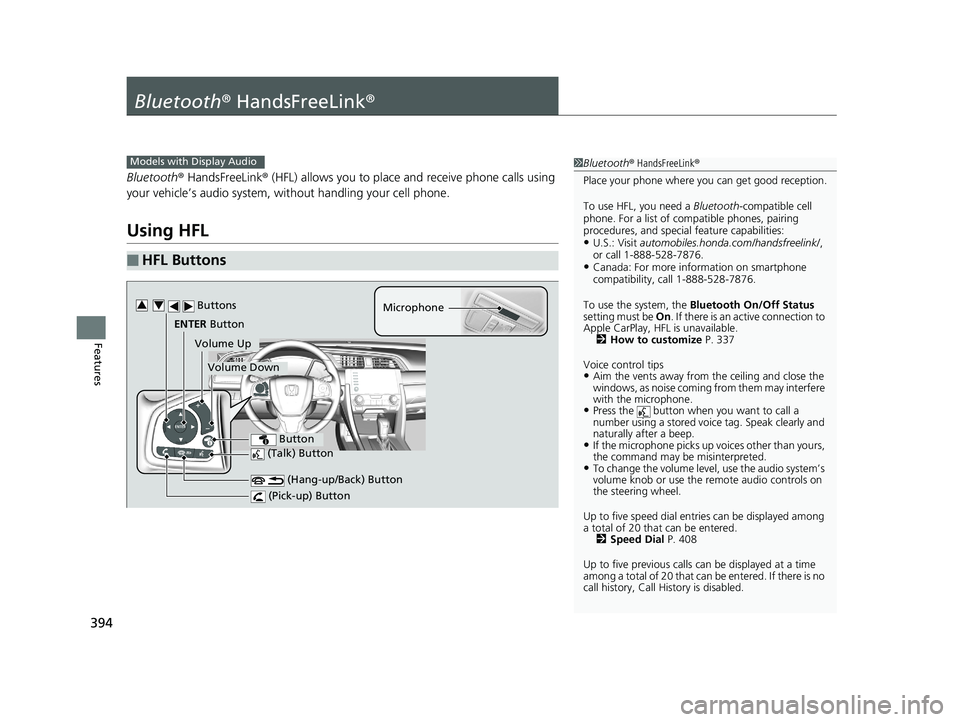
■HFL Buttons
1 Bluetooth ® HandsFreeLink ®
Place your phone where y ou can get good reception.
To use HFL, you need a Bluetooth-compatible cell
phone. For a list of compatible phones, pairing
procedures, and special feature capabilities:
•U.S.: Visit automobiles.honda.com /handsfreelink/,
or call 1-888-528-7876.
•Canada: For more info rmation on smartphone
compatibility, call 1-888-528-7876.
To use the system, the Bluetooth On/Off Status
setting must be On . If there is an active connection to
Apple CarPlay, H FL is unavailable.
2 How to customize P. 337
Voice control tips
•Aim the vents away from the ceiling and close the
windows, as noise coming fr om them may interfere
with the microphone.
•Press the button when you want to call a
number using a stored voic e tag. Speak clearly and
naturally after a beep.
•If the microphone picks up vo ices other than yours,
the command may be misinterpreted.
•To change the volume level, use the audio system’s
volume knob or use the remote audio controls on
the steering wheel.
Up to five speed dial entries can be displayed among
a total of 20 that can be entered. 2 Speed Dial P. 408
Up to five previous calls can be displayed at a time
among a total of 20 that can be entered. If there is no
call history, Call History is disabled.
Models with Display Audio
(Talk) Button
Microphone
(Hang-up/Back) Button
(Pick-up) Button
ENTER Button
Button
Buttons34
Volume Up
Volume Down
19 CIVIC 4D HCM_HMIN_J (KA KL KC)-31TBA6301.book 394 ページ 2018年10月26日 金曜日 午前7時42分
Page 404 of 679
uuBluetooth ® HandsFreeLink ®u HFL Menus
402
Features
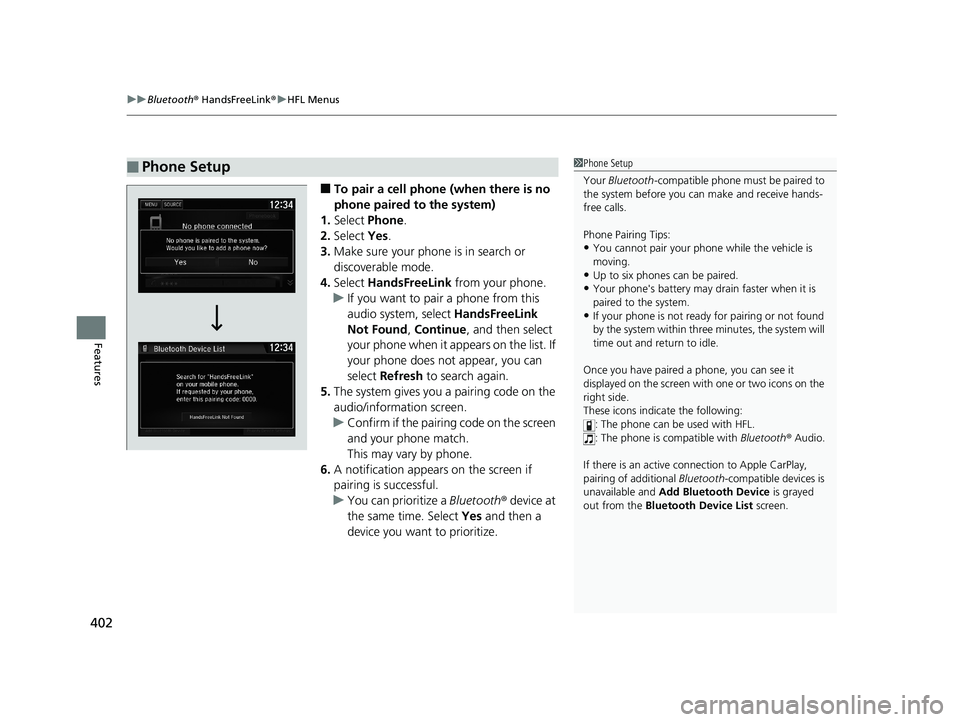
■To pair a cell phone (when there is no
phone paired to the system)
1. Select Phone .
2. Select Yes.
3. Make sure your phone is in search or
discoverable mode.
4. Select HandsFreeLink from your phone.
u If you want to pair a phone from this
audio system, select HandsFreeLink
Not Found , Continue , and then select
your phone when it appears on the list. If
your phone does not appear, you can
select Refresh to search again.
5. The system gives you a pairing code on the
audio/information screen.
u Confirm if the pairing code on the screen
and your phone match.
This may vary by phone.
6. A notification appears on the screen if
pairing is successful.
u You can prioritize a Bluetooth ® device at
the same time. Select Yes and then a
device you want to prioritize.
■Phone Setup1 Phone Setup
Your Bluetooth -compatible phone must be paired to
the system before you ca n make and receive hands-
free calls.
Phone Pairing Tips:
•You cannot pair your phone while the vehicle is
moving.
•Up to six phones can be paired.
•Your phone's battery may dr ain faster when it is
paired to the system.
•If your phone is not ready for pairing or not found
by the system within three minutes, the system will
time out and return to idle.
Once you have paired a phone, you can see it
displayed on the screen with one or two icons on the
right side.
These icons indicate the following: : The phone can be used with HFL.
: The phone is compatible with Bluetooth ® Audio.
If there is an active c onnection to Apple CarPlay,
pairing of additional Bluetooth -compatible devices is
unavailable and Add Bluetooth Device is grayed
out from the Bluetooth Device List screen.
19 CIVIC 4D HCM_HMIN_J (KA KL KC)-31TBA6301.book 402 ページ 2018年10月26日 金曜日 午前7時42分
Page 417 of 679
Continued415
uuBluetooth ® HandsFreeLink ®u HFL Menus
Features
■To delete all modified voice tags
1. Press the button.
2. Select Settings .
3. Select System.
4. Select the Voice Recog tab.
5. Select Phonebook Phonetic
Modification .
6. Select the phone you want to delete
phonetic modification.
u The contact name list appears.
7. Select Delete All.
8. You will receive a confirmation message on
the screen, then select Yes.
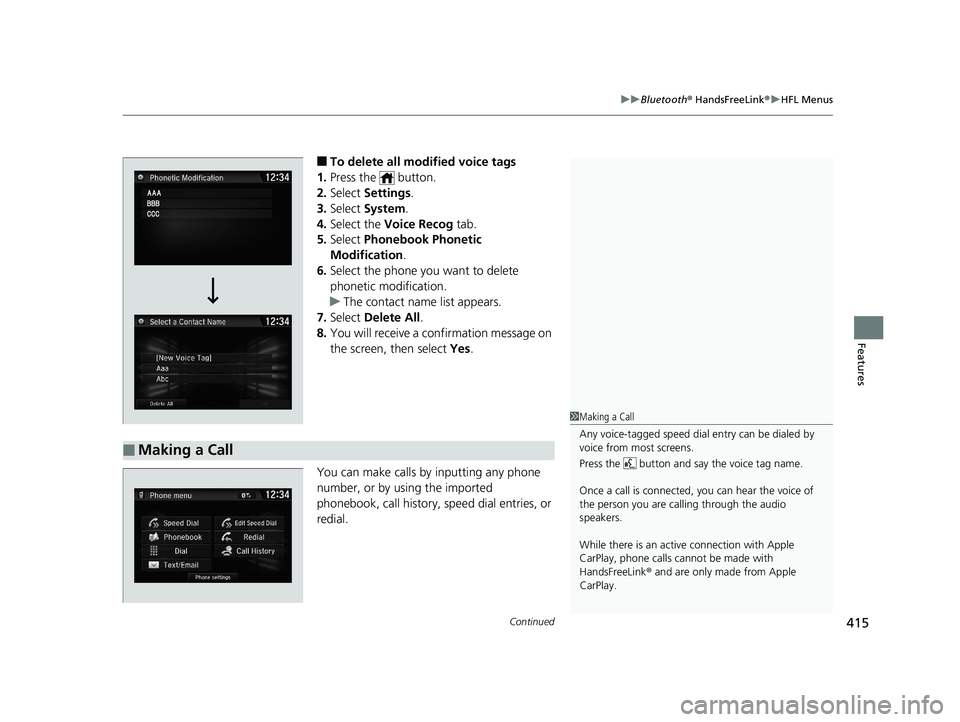
You can make calls by inputting any phone
number, or by using the imported
phonebook, call history, speed dial entries, or
redial.
■Making a Call
1 Making a Call
Any voice-tagged speed dial entry can be dialed by
voice from most screens.
Press the button and say the voice tag name.
Once a call is connected, you can hear the voice of
the person you are call ing through the audio
speakers.
While there is an active connection with Apple
CarPlay, phone calls ca nnot be made with
HandsFreeLink ® and are only made from Apple
CarPlay.
19 CIVIC 4D HCM_HMIN_J (KA KL KC)-31TBA6301.book 415 ページ 2018年10月26日 金曜日 午前7時42分
Page 669 of 679

Index
667
Index
Index
Numbers
7-Speed Manual Shift Mode................... 448
Operation ............................................... 449
A
ABS (Anti-lock Brake System) .................. 535
Accelerator Position Meter ..................... 120
Accessories and Modifications ................ 604
Accessory Power Socket ........................... 194
Adaptive Cruise Control (ACC) .......... 91, 499
Adaptive Cruise Control (ACC) with Low Speed Follow (LSF) ........................... 91, 483
Adaptive Damper System ........................ 455
Adding the Coolant ................................. 568
Additives
Coolant .................................................. 567
Engine Oil ............................................... 560
Washer ................................................... 571
Additives, Engine Oil ............................... 560
Adjusting
Armrest .................................................. 187
Clock ...................................................... 134
Front Head Restraints .............................. 183
Front Seats.............................................. 180
Mirrors.................................................... 178
Rear Seats ............................................... 186
Steering Wheel ....................................... 177
Temperature ........................................... 118
Adjusting the Clock ................................. 134
Adjusting the Sound ........................ 226, 261 Agile Handling Assist
............................... 461
Air Conditioning System (Climate Control
System) .................................................... 204
Changing the Mode ................................ 207
Defrosting the Windshield and
Windows ............................................... 208
Dust and Pollen Filter ............................... 598
Recirculation/Fresh Air Mode ................... 207
Sensor ..................................................... 211
Synchronization Mode ............................. 210
Using Automatic Climate Control ............ 204
Air Pressure ............................... 585, 655, 657
Airbags ........................................................ 46
Advanced Airbags ..................................... 52
After a Collision ......................................... 49
Airbag Care ............................................... 59
Event Data Recorder .................................... 0
Front Airbags (SRS) .................................... 49
Indicator .............................................. 57, 82
Passenger Front Airbag Off Indicator ......... 58
Sensors ...................................................... 46
Side Airbags .............................................. 53
Side Curtain Airbags .................................. 55
AM/FM Radio .................................... 228, 268
Android Auto ............................................ 305
Anti-lock Brake System (ABS) .................. 535
Indicator .................................................... 82
Apple CarPlay ........................................... 302
Armrest ..................................................... 187
Audio Remote Controls ............................ 218 Audio System
............................ 214, 221, 239
Adjusting the Sound........................ 226, 261
Audio/Information Screen................ 222, 240
Changing the Home Screen Icon Layout ................................................... 244
Changing the Screen Interface ................ 258
Closing Apps ........................................... 260
Customizing the Meter............................ 245
Display Setup .................................. 227, 262
Error Messages ........................................ 309
General Information ................................ 312
Home Screen........................................... 251
iPod ................................................ 230, 280
Limitations for Manual Operation .............................. 263, 369, 396
Menu Customize ..................................... 259
MP3/WMA/AAC .............................. 233, 289
Reactivating ............................................ 217
Recommended Devices............................ 313
Remote Controls ..................................... 218
Security Code .......................................... 217
Selecting an Audio Source ....................... 263
Status Area ............................................. 257
Theft Protection ...................................... 217
USB Flash Drives ...................................... 313
USB Port(s) .............................................. 215
Wallpaper Setup.............................. 224, 249
Audio/Information Screen ............... 222, 240
Authorized Manuals ................................ 665
Auto Door Locking/Unlocking ................. 149
Customize ....................................... 130, 362
19 CIVIC 4D HCM_HMIN_J (KA KL KC)-31TBA6301.book 667 ページ 2018年10月26日 金曜日 午前7時42分