Page 387 of 727
385
uuCustomized Features u
Continued
Features
Vehicle
Meter Setup
Adjust Outside Temp. Display
“Trip A” Reset Timing
“Trip B” Reset Timing
Reverse Alert Tone*
Config. of Instrument Panel
Adjust Alarm Volume
Turn By Turn Auto Display
Fuel Efficiency Backlight
TPMS Calibration
Driver Assist
System SetupBlind Spot Info*
Head-up Warning*
Traffic Sign Recognition System
Forward Collision Warning Distance
ACC Forward Vehicle Detect Beep
Lane Keeping Assist Suspend Beep
Road Departure Mitigation Setting
Driver Attention Monitor
Speed/Distance Units
Tachometer
Language Selection
* Not available on all models
Page 391 of 727
389
uuCustomized Features u
Continued
Features
*1:Default SettingSetup
Group Customizable Features Descri
ption Selectable Settings
System
LanguageChanges the display language.
English (United
States)*1/Spanish /
French /
Touch Panel
SensitivitySets the sensitivity of the touch panel screen.High/Normal*1
System
VolumesSystem VolumesChanges the system sounds volume.—
Reading/
WarningVerbal
ReminderTurns the verbal re minders on and off.ON*1/OFF
Config. of
Instrument
Panel
Select configurationSelects whether the apps display comes on or not
on the driver information interface.Config.1*1/Config.2 /
Config.3
SecurityPasswordSet the value of password display.ON*1/ OFF
Unknown sources—ON /OFF*1
* Not available on all models
Page 394 of 727
392
uuCustomized Features u
Features
*1:Default SettingSetup
Group Customizable Features
DescriptionSelectable Settings
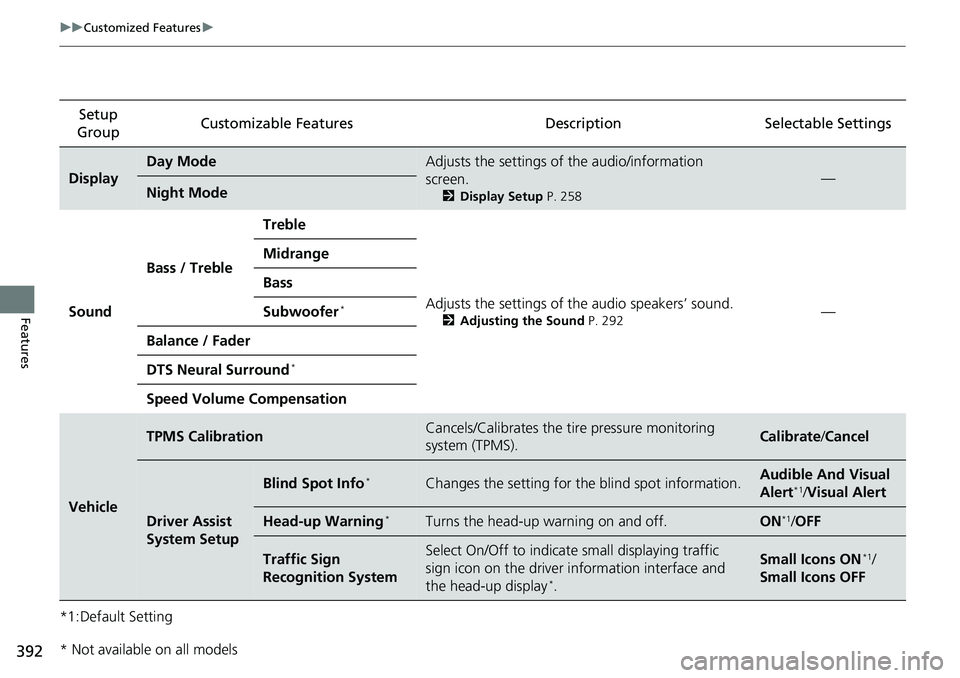
Display
Day ModeAdjusts the settings of the audio/information
screen.
2Display Setup P. 258
—Night Mode
Sound Bass / Treble Treble
Adjusts the settings of the audio speakers’ sound.
2Adjusting the Sound P. 292—
Midrange
Bass
Subwoofer*
Balance / Fader
DTS Neural Surround
*
Speed Volume Compensation
Vehicle
TPMS CalibrationCancels/Calibrates the tire pressure monitoring
system (TPMS).Calibrate
/Cancel
Driver Assist
System Setup
Blind Spot Info*Changes the setting for th e blind spot information.Audible And Visual
Alert*1/Visual Alert
Head-up Warning*Turns the head-up warning on and off.ON*1/OFF
Traffic Sign
Recognition SystemSelect On/Off to indicate small displaying traffic
sign icon on the driver information interface and
the head-up display
*.
Small Icons ON*1/
Small Icons OFF
* Not available on all models
Page 395 of 727
393
uuCustomized Features u
Continued
Features
*1:Default SettingSetup
Group Customizable Features
DescriptionSelectable Settings
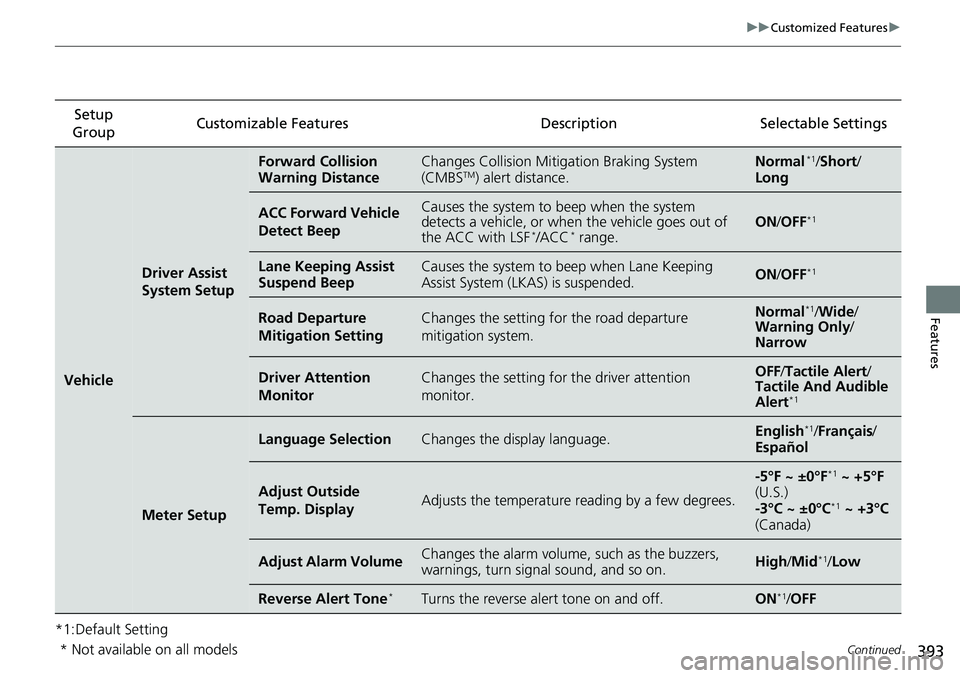
Vehicle
Driver Assist
System Setup
Forward Collision
Warning DistanceChanges Collision Mitigation Braking System
(CMBSTM) alert distance.Normal*1/ Short /
Long
ACC Forward Vehicle
Detect BeepCauses the system to beep when the system
detects a vehicle, or when the vehicle goes out of
the ACC with LSF
*/ACC* range.ON /OFF*1
Lane Keeping Assist
Suspend BeepCauses the system to beep when Lane Keeping
Assist System (LKAS) is suspended.ON /OFF*1
Road Departure
Mitigation SettingChanges the setting fo r the road departure
mitigation system.Normal*1/ Wide /
Warning Only /
Narrow
Driver Attention
MonitorChanges the setting for the driver attention
monitor.OFF /Tactile Alert /
Tactile And Audible
Alert
*1
Meter Setup
Language SelectionChanges the display language.English*1/ Français /
Español
Adjust Outside
Temp. DisplayAdjusts the temperature reading by a few degrees.
-5°F ~ ±0°F*1 ~ +5°F
(U.S.)
-3°C ~ ±0°C
*1 ~ +3°C
(Canada)
Adjust Alarm VolumeChanges the alarm volume, such as the buzzers,
warnings, turn signal sound, and so on.High /Mid*1/ Low
Reverse Alert Tone*Turns the reverse alert tone on and off.ON*1/OFF
* Not available on all models
Page 459 of 727
457
uuBefore Driving uMaximum Load Limit
Continued
Driving
Maximum Load Limit
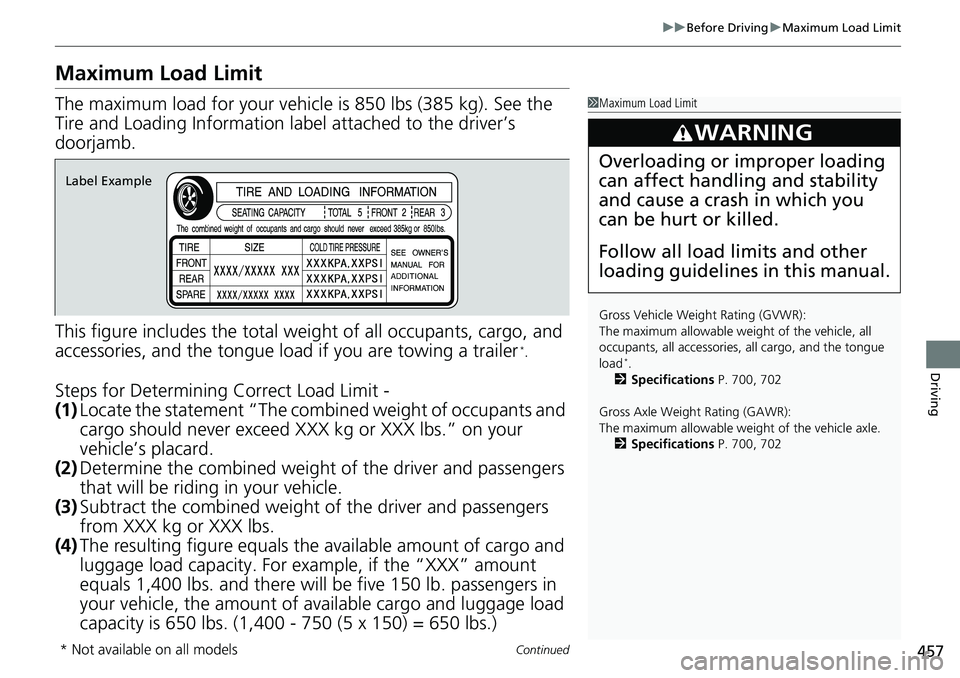
The maximum load for your vehicl e is 850 lbs (385 kg). See the
Tire and Loading Information la bel attached to the driver’s
doorjamb.
This figure includes the total weig ht of all occupants, cargo, and
accessories, and the tongue load if you are towing a trailer
*.
Steps for Determining Correct Load Limit -
(1) Locate the statement “The comb ined weight of occupants and
cargo should never exceed XXX kg or XXX lbs.” on your
vehicle’s placard.
(2) Determine the combined weight of the driver and passengers
that will be riding in your vehicle.
(3) Subtract the combined weight of the driver and passengers
from XXX kg or XXX lbs.
(4) The resulting figure equals the available amount of cargo and
luggage load capacity. For example, if the “XXX” amount
equals 1,400 lbs. and there will be five 150 lb. passengers in
your vehicle, the am ount of available cargo and luggage load
capacity is 650 lbs. (1,400 - 750 (5 x 150) = 650 lbs.)
1 Maximum Load Limit
Gross Vehicle Weight Rating (GVWR):
The maximum allowable wei ght of the vehicle, all
occupants, all a ccessories, all cargo, and the tongue
load
*.
2 Specifications P. 700, 702
Gross Axle Weight Rating (GAWR):
The maximum allowable wei ght of the vehicle axle.
2 Specifications P. 700, 702
3WARNING
Overloading or improper loading
can affect handling and stability
and cause a crash in which you
can be hurt or killed.
Follow all load limits and other
loading guidelines in this manual.
Label Example
* Not available on all models
Page 461 of 727
459Continued
Driving
Towing a Trailer
Your vehicle is not designed to tow a trailer. Attempting to do so can void your
warranties.
Towing Preparation
Your vehicle can tow a trailer if you carefully observe the load limits, use the proper
equipment, and follow the towing guidelin es. Check the load limits before driving.
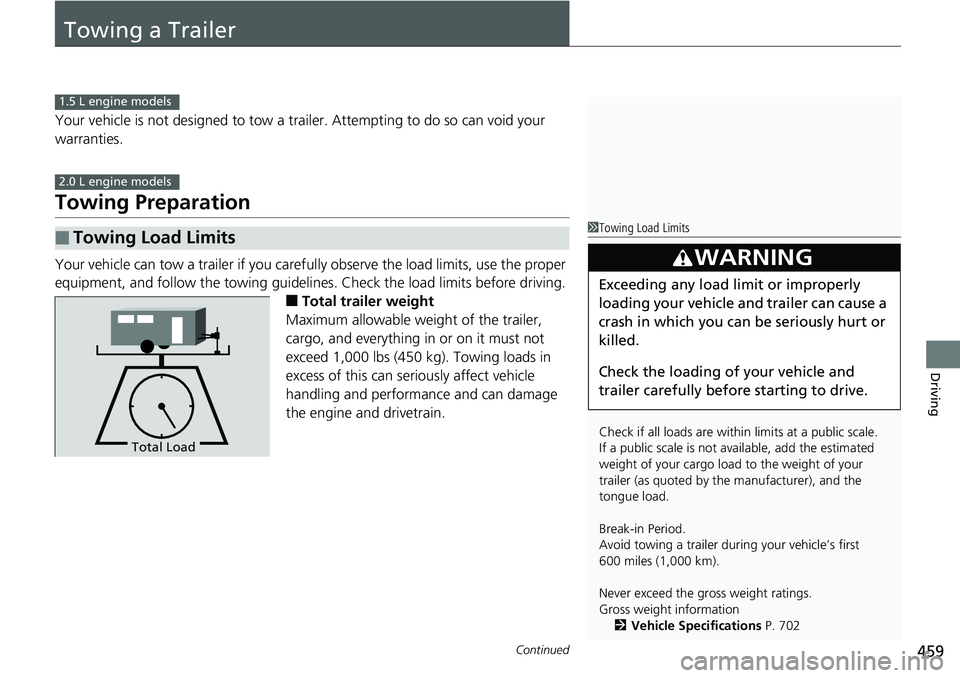
■Total trailer weight
Maximum allowable weight of the trailer,
cargo, and everything in or on it must not
exceed 1,000 lbs (450 kg). Towing loads in
excess of this can seriously affect vehicle
handling and performance and can damage
the engine and drivetrain.
■Towing Load Limits
1.5 L engine models
2.0 L engine models
1 Towing Load Limits
Check if all loads are within limits at a public scale.
If a public scale is not available, add the estimated
weight of your cargo load to the weight of your
trailer (as quoted by th e manufacturer), and the
tongue load.
Break-in Period.
Avoid towing a trailer dur ing your vehicle’s first
600 miles (1,000 km).
Never exceed the gross weight ratings.
Gross weight information 2 Vehicle Specifications P. 702
3WARNING
Exceeding any load limit or improperly
loading your vehicle and trailer can cause a
crash in which you can be seriously hurt or
killed.
Check the loading of your vehicle and
trailer carefully before starting to drive.
Total Load
Page 471 of 727

Continued469
uuWhen Driving uStarting the Engine
Driving
You can remotely start the engine using the button on the remote.
■To start the engine
When started remotely, the engine automati cally shuts off after 10 minutes of idling
and/or the brake pedal and ENGINE START/STOP button have not been pressed
simultaneously.
To extend the run time for another 10 mi nutes during the first run, press the
button, then press an d hold the button.
u Some exterior lights flash six times if a 10-minute extension request was
transmitted successfully.
■Remote Engine Start with Vehicle Feedback*1 Remote Engine Start with Vehicle Feedback*
The remote engine start may violate local laws.
Before using the remote e ngine start, check your
local laws.
If there are buildings an d obstacles between your
vehicle and the remote, th e range will be reduced.
The range may be less when the vehicle is running.
This distance may vary by external electrical
interference.
The engine may not start by the remote engine start
if:
•You have disabled a remo te engine start setting
using the audio/information screen.
•The power mode is not in VEHICLE OFF.•The transmission is in a position other than ( P.
•The hood is open, or any door or the trunk is
unlocked.
3WARNING
Engine exhaust contains toxic carbon
monoxide.
Breathing carbon monoxide can kill you or
cause unconsciousness.
Never use the remote engine starter when
the vehicle is parked in a garage or other
area with limited ventilation.
Press the button, th en press and hold
the button.
Some exterior lights flash once.
Go within the range,
and try again.
LED: Blinks when any button is pressed.
Some exterior lights flash six
times if the engine runs
successfully. Some exterior lights will not
flash if the engine runs
unsuccessfully.
* Not available on all models
Page 477 of 727
475
uuWhen Driving uShifting
Continued
Driving
Shifting
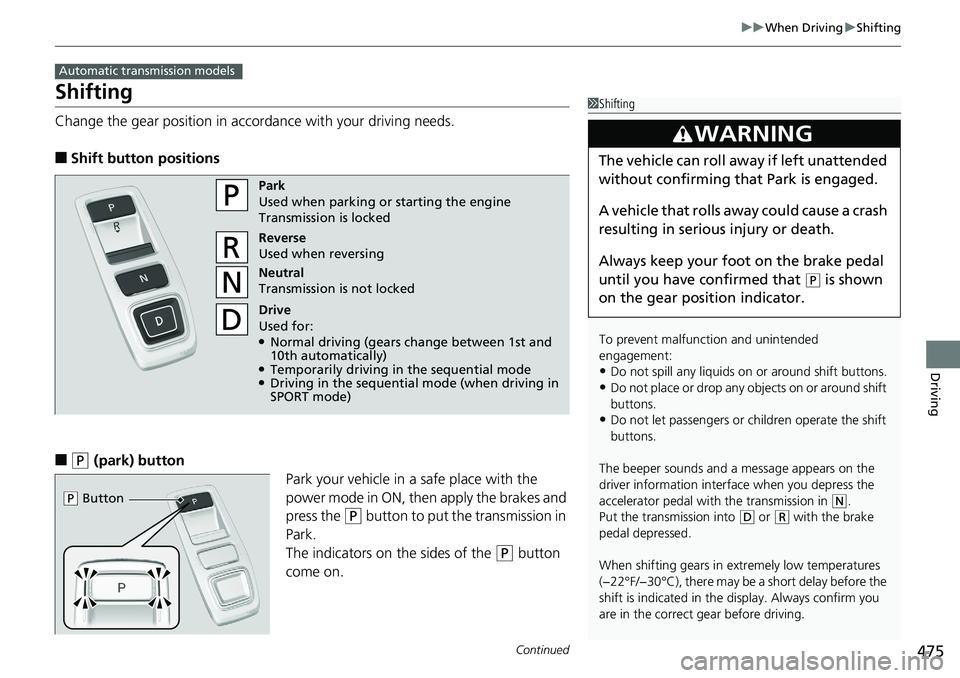
Change the gear position in accordance with your driving needs.
■Shift button positions
■(P (park) button
Park your vehicle in a safe place with the
power mode in ON, then apply the brakes and
press the
(P button to put the transmission in
Park.
The indicators on the sides of the
(P button
come on.
Automatic transmission models
1 Shifting
To prevent malfunc tion and unintended
engagement:
•Do not spill any liquids on or around shift buttons.•Do not place or drop any objects on or around shift
buttons.
•Do not let passengers or ch ildren operate the shift
buttons.
The beeper sounds and a message appears on the
driver information interf ace when you depress the
accelerator pedal with the transmission in
( N.
Put the transmission into
( D or (R with the brake
pedal depressed.
When shifting gears in extremely low temperatures
(−22°F/−30°C), there may be a short delay before the
shift is indicated in the di splay. Always confirm you
are in the correct gear before driving.
3WARNING
The vehicle can roll aw ay if left unattended
without confirming that Park is engaged.
A vehicle that rolls away could cause a crash
resulting in serious injury or death.
Always keep your foot on the brake pedal
until you have confirmed that
( P is shown
on the gear position indicator.
Park
Used when parking or starting the engine
Transmission is locked
Reverse
Used when reversing
Neutral
Transmission is not locked
Drive
Used for:
●Normal driving (gears change between 1st and
10th automatically)
●Temporarily driving in the sequential mode●Driving in the sequential mode (when driving in
SPORT mode)
( P Button