2019 GMC SIERRA automat
[x] Cancel search: automatPage 25 of 477

GMC Sierra/Sierra Denali Owner Manual (GMNA-Localizing-U.S./Canada/
Mexico-1500-11698638) - 2019 - CRC - 5/13/19
24 In Brief
yorz:Use the thumbwheel to
scroll up or down in a list. Press the
thumbwheel to select.
SorT: Press to move between
the interactive display zones in the
cluster. Press the thumbwheel to
select.
See Driver Information Center (DIC)
(Midlevel and Uplevel) 0163 or
Driver Information Center (DIC)
(Base Level) 0161.
Forward Collision Alert
(FCA) System
If equipped, FCA may help avoid or
reduce the harm caused by
front-end crashes. FCA provides a
green indicator,
V, when a vehicle
is detected ahead. This indicator
displays amber when following a
vehicle much too closely. When
approaching a vehicle ahead too
quickly, FCA provides a flashing red
alert on the windshield and rapidly
beeps or pulses the driver seat.
See Forward Collision Alert (FCA)
System 0265.
Forward Automatic
Braking (FAB)
If the vehicle has Forward Collision
Alert (FCA), it also has FAB, which
includes Intelligent Brake
Assist (IBA). When the system
detects a vehicle ahead in your path
that is traveling in the same
direction that you may be about to
crash into, it can provide a boost to
braking or automatically brake the vehicle. This can help avoid or
lessen the severity of crashes when
driving in a forward gear.
See
Forward Automatic Braking
(FAB) 0268.
Front Pedestrian Braking
(FPB) System
If equipped, the FPB system may
help avoid or reduce the harm
caused by front-end crashes with
nearby pedestrians when driving in
a forward gear. FPB displays an
amber indicator,
~, when a nearby
pedestrian is detected directly
ahead. When approaching a
detected pedestrian too quickly,
FPB provides a red flashing alert on
the windshield and rapidly beeps or
pulses the driver seat. FPB can
provide a boost to braking or
automatically brake the vehicle.
See Front Pedestrian Braking (FPB)
System 0269.
Page 28 of 477

GMC Sierra/Sierra Denali Owner Manual (GMNA-Localizing-U.S./Canada/
Mexico-1500-11698638) - 2019 - CRC - 5/13/19
In Brief 27
Slide Switch
Express-Open/Express-Close :To
express-open the sunroof, fully
press and release
I(1). Press and
release
I(1) again to stop the
movement. To express-close the
sunroof, fully press and release
K(1). Press and releaseK(1)
again to stop the movement.
Open/Close (Manual Mode) : To
open the sunroof, press and
hold
I(1). ReleaseI(1) to stop
the movement. Press and
hold
K(1) to close the sunroof.
Release
K(1) to stop the
movement. Tilt Switch
Vent :
From the closed position,
press
J(2) to vent the sunroof.
Press
K(2) to close the vent.
When the sunroof is opened, an air
deflector will automatically raise.
The air deflector will retract when
the sunroof is closed.
The sunroof also has a sunshade,
which can be pulled forward to block
sun rays. The sunshade must be
opened and closed manually.
The sunroof has an automatic
reversal system that is only active
when the sunroof is operated in
express-close mode.
If an object is in the path while
express-closing, the reversal system
will detect an object, stop, and open
the sunroof again.
See Sunroof 066.
Performance and
Maintenance
Traction Control/
Electronic Stability
Control
The vehicle has a Traction Control
System (TCS) that limits wheel spin
and the StabiliTrak/Electronic
Stability Control (ESC) system that
assists with directional control of the
vehicle in difficult driving conditions.
Both systems come on
automatically when the vehicle is
started and begins to move.
.
To turn off TCS, press and
release
gon the center stack.
The traction off light
idisplays
in the instrument cluster. The
appropriate Driver Information
Center (DIC) message displays.
Page 29 of 477

GMC Sierra/Sierra Denali Owner Manual (GMNA-Localizing-U.S./Canada/
Mexico-1500-11698638) - 2019 - CRC - 5/13/19
28 In Brief
.To turn off both TCS and
StabiliTrak/ESC, press and
hold
guntiliandgilluminate
in the instrument cluster and the
appropriate DIC message
displays.
. Press and release
gagain to
turn on both systems.
StabiliTrak/ESC will automatically
turn on if the vehicle exceeds
56 km/h (35 mph). Traction control
will remain off.
See Traction Control/Electronic
Stability Control 0247.
Tire Pressure Monitor
This vehicle may have a Tire
Pressure Monitor System (TPMS).
The low tire pressure warning light
alerts to a significant loss in
pressure of one of the vehicle's
tires. If the warning light comes on,
stop as soon as possible and inflate
the tires to the recommended
pressure shown on the Tire and
Loading Information label. See
Vehicle Load Limits 0212. The
warning light will remain on until the
tire pressure is corrected.
The low tire pressure warning light
may come on in cool weather when
the vehicle is first started, and then
turn off as the vehicle is driven. This
may be an early indicator that the
tire pressures are getting low and
the tires need to be inflated to the
proper pressure.
The TPMS does not replace normal
monthly tire maintenance. Maintain
the correct tire pressures.
See Tire Pressure Monitor System
0 374.
Tire Fill Alert (If Equipped)
This feature provides visual and
audible alerts outside the vehicle to
help when inflating an underinflated tire to the recommended cold tire
pressure. See
“Tire Fill Alert (If
Equipped)” underTire Pressure
Monitor Operation 0375.
Fuel (Gasoline - Except
L87 6.2L Engine)
Regular Unleaded Fuel
Use only Regular 87 octane —
(R+M)/2 —or higher unleaded
gasoline in your vehicle. TOP TIER
Detergent Gasoline is
recommended. Do not use gasoline
with an octane rating lower as it will
result in reduced performance and
lower fuel economy. See
Recommended Fuel (Except 6.2L
V8 Engine) 0276 or
Recommended Fuel (6.2L
V8 Engine) 0277.
Page 31 of 477

GMC Sierra/Sierra Denali Owner Manual (GMNA-Localizing-U.S./Canada/
Mexico-1500-11698638) - 2019 - CRC - 5/13/19
30 In Brief
2. Fully press the acceleratorpedal slowly three times within
five seconds.
3. If the display changes to 100%, the system is reset.
See Engine Oil Life System 0328.
Driving for Better Fuel
Economy
Driving habits can affect fuel
mileage. Here are some driving tips
to get the best fuel economy
possible:
.
Set the climate controls to the
desired temperature after the
engine is started, or turn them
off when not required.
. Avoid fast starts and accelerate
smoothly.
. Brake gradually and avoid
abrupt stops.
. Avoid idling the engine for long
periods of time.
. When road and weather
conditions are appropriate, use
cruise control. .
Always follow posted speed
limits or drive more slowly when
conditions require.
. Keep vehicle tires properly
inflated.
. Combine several trips into a
single trip.
. Replace the vehicle's tires with
the same TPC Spec number
molded into the tire's sidewall
near the size.
. Follow recommended scheduled
maintenance.
Roadside Assistance
Program
U.S.: 1-888-881-3302
TTY Users (U.S. Only):
1-888-889-2438
Canada: 1-800-268-6800
New GMC owners are automatically
enrolled in the Roadside Assistance
Program.
See Roadside Assistance Program
0 442.
Page 32 of 477

GMC Sierra/Sierra Denali Owner Manual (GMNA-Localizing-U.S./Canada/
Mexico-1500-11698638) - 2019 - CRC - 5/13/19
Keys, Doors, and Windows 31
Keys, Doors, and
Windows
Keys and Locks
Keys . . . . . . . . . . . . . . . . . . . . . . . . . . . 31
Remote Keyless Entry (RKE)System . . . . . . . . . . . . . . . . . . . . . . . 34
Remote Keyless Entry (RKE) System Operation (Keyless
Access) . . . . . . . . . . . . . . . . . . . . . . 34
Remote Keyless Entry (RKE) System Operation (Key
Access) . . . . . . . . . . . . . . . . . . . . . . 42
Remote Vehicle Start . . . . . . . . . . 44
Door Locks . . . . . . . . . . . . . . . . . . . . 45
Power Door Locks . . . . . . . . . . . . . 46
Delayed Locking . . . . . . . . . . . . . . . 46
Automatic Door Locks . . . . . . . . . 47
Lockout Protection . . . . . . . . . . . . . 47
Safety Locks . . . . . . . . . . . . . . . . . . . 47
Doors
Tailgate . . . . . . . . . . . . . . . . . . . . . . . . 48
Power Assist Steps . . . . . . . . . . . . 54
Vehicle Security
Vehicle Security . . . . . . . . . . . . . . . . 55
Vehicle Alarm System . . . . . . . . . 55
Immobilizer . . . . . . . . . . . . . . . . . . . . 56 Immobilizer Operation . . . . . . . . . 56
Exterior Mirrors
Convex Mirrors . . . . . . . . . . . . . . . . 57
Manual Mirrors . . . . . . . . . . . . . . . . . 57
Power Mirrors . . . . . . . . . . . . . . . . . . 58
Folding Mirrors . . . . . . . . . . . . . . . . . 58
Heated Mirrors . . . . . . . . . . . . . . . . . 59
Automatic Dimming Mirror . . . . . 59
Blind Spot Mirrors . . . . . . . . . . . . . . 59
Reverse Tilt Mirrors . . . . . . . . . . . . 60
Interior Mirrors
Interior Rearview Mirrors . . . . . . . 61
Manual Rearview Mirror . . . . . . . . 61
Automatic Dimming Rearview
Mirror . . . . . . . . . . . . . . . . . . . . . . . . . 61
Rear Camera Mirror . . . . . . . . . . . . 61
Windows
Windows . . . . . . . . . . . . . . . . . . . . . . . 63
Manual Windows . . . . . . . . . . . . . . 64
Power Windows . . . . . . . . . . . . . . . 64
Rear Windows . . . . . . . . . . . . . . . . . 66
Sun Visors . . . . . . . . . . . . . . . . . . . . . 66
Roof
Sunroof . . . . . . . . . . . . . . . . . . . . . . . . 66
Keys and Locks
Keys
{Warning
Leaving children in a vehicle with
the ignition key is dangerous and
children or others could be
seriously injured or killed. They
could operate the power windows
or other controls or make the
vehicle move. The windows will
function with the keys in the
ignition, and children or others
could be caught in the path of a
closing window. Do not leave
children in a vehicle with the
ignition key.
Page 38 of 477
GMC Sierra/Sierra Denali Owner Manual (GMNA-Localizing-U.S./Canada/
Mexico-1500-11698638) - 2019 - CRC - 5/13/19
Keys, Doors, and Windows 37
Keyless Unlocking/Locking from
the Passenger Doors
When the doors are locked and the
RKE transmitter is within 1 m (3 ft)
of the door handle, pressing the
lock/unlock button on a passenger
door handle will unlock all doors.
Pressing the lock/unlock button will
cause all doors to lock if any of the
following occur:
.The lock/unlock button was used
to unlock all doors.
. Any vehicle door has been
opened and all doors are now
closed.
Disable/Enable Keyless Unlocking
of Exterior Door Handles and
Tailgate
If equipped, keyless unlocking of the
exterior door handles and tailgate
can be disabled and enabled.
Disabling Keyless Unlocking:
With the vehicle off, press and
hold
QandKon the RKE
transmitter at the same time for
approximately three seconds. The
turn signal lamps will flash four times quickly to indicate access is
disabled. Using any exterior handle
to unlock the doors or open the
tailgate will cause the turn signal
lamps to flash four times quickly,
indicating access is disabled.
If disabled, disarm the alarm system
before starting the vehicle.
Enabling Keyless Unlocking:
With the vehicle off, press and
hold
QandKon the RKE
transmitter at the same time for
approximately three seconds. The
turn signal lamps will flash twice
quickly to indicate access is
enabled.
Passive Locking
This feature will lock the vehicle
several seconds after all doors are
closed, if the vehicle is off and at
least one RKE transmitter has been
removed from the interior, or none
remain in the interior.
If other electronic devices interfere
with the RKE transmitter signal, the
vehicle may not detect the RKE
transmitter inside the vehicle. If passive locking is enabled, the
doors may lock with the RKE
transmitter inside the vehicle. Do
not leave the RKE transmitter in an
unattended vehicle.
To customize the doors to
automatically lock when exiting the
vehicle, see
“Remote Lock, Unlock,
Start” under Vehicle Personalization
0 170.
Temporary Disable of Passive
Locking
Temporarily disable passive locking
by pressing and holding
Kon the
interior door switch with a door open
for at least four seconds, or until
three chimes are heard. Passive
locking will then remain disabled
until
Qon the interior door is
pressed, or until the vehicle is
turned on.
Remote Left in Vehicle Alert
When the vehicle is turned off and
an RKE transmitter is left in the
vehicle, the horn will chirp three
Page 45 of 477

GMC Sierra/Sierra Denali Owner Manual (GMNA-Localizing-U.S./Canada/
Mexico-1500-11698638) - 2019 - CRC - 5/13/19
44 Keys, Doors, and Windows
2. Press and slide the batterydown toward the pocket of the
transmitter in the direction of
the key ring. Do not use a
metal object
3. Remove the battery.
4. Insert the new battery, positive side facing up. Replace with a
CR2032 or equivalent battery.
5. Push together the transmitter back cover top side first, and
then the bottom toward the
key ring.
Remote Vehicle Start
If equipped with the remote start
feature, the climate control system
will come on when the vehicle is
started remotely, depending on the
outside temperature.
The rear defog and heated and
ventilated seats, if equipped, may
also come on. See Heated and
Ventilated Front Seats 076 and
Vehicle Personalization 0170.
If equipped, the automatic heated
steering wheel may also come on.
See Heated Steering Wheel 0133.
Laws in some communities may
restrict the use of remote starters.
Check local regulations for any
requirements on remote starting of
vehicles.
Do not use remote start if the
vehicle is low on fuel. The vehicle
may run out of fuel.
The vehicle cannot be remote
started if:
. The RKE transmitter is inside
the vehicle. .
The hood is not closed.
. There is an emission control
system malfunction and the lamp
is on.
. The ignition is in any mode other
than off.
. The hazard warning flashers
are on.
. Two remote starts or a remote
start with an extension have
been used.
. The vehicle is not in P (Park).
The engine will turn off during a
remote vehicle start if:
. The coolant temperature gets
too high.
. The oil pressure gets low.
The RKE transmitter range may be
reduced while the vehicle is running.
Other conditions can affect the
performance of the transmitter. See
Remote Keyless Entry (RKE)
System 034.
Page 47 of 477
GMC Sierra/Sierra Denali Owner Manual (GMNA-Localizing-U.S./Canada/
Mexico-1500-11698638) - 2019 - CRC - 5/13/19
46 Keys, Doors, and Windows
Warning (Continued)
the vehicle. Locking the
doors can help prevent this
from happening.
There are several ways to lock and
unlock the vehicle.
From outside:
. Use the Remote Keyless Entry
(RKE) transmitter.
. Use Keyless Access,
if equipped.
. Use the key in the driver door or
the passenger door, if equipped.
From inside, use the power door
locks or the manual door locks. To
lock the door with the manual door
locks, push down on the manual
lock knob.
From inside, pull the door handle
once to unlock the door. Pull the
handle again to open the door.
See Vehicle Alarm System 055. Free-Turning Locks
The door key lock cylinder turns
freely when either the wrong key is
used, or the correct key is not fully
inserted. The free-turning door lock
feature prevents the lock from being
forced open. To reset the lock, turn
it to the vertical position with the
correct key fully inserted. Remove
the key and insert it again. If this
does not reset the lock, turn the key
halfway around in the cylinder and
repeat the reset procedure.
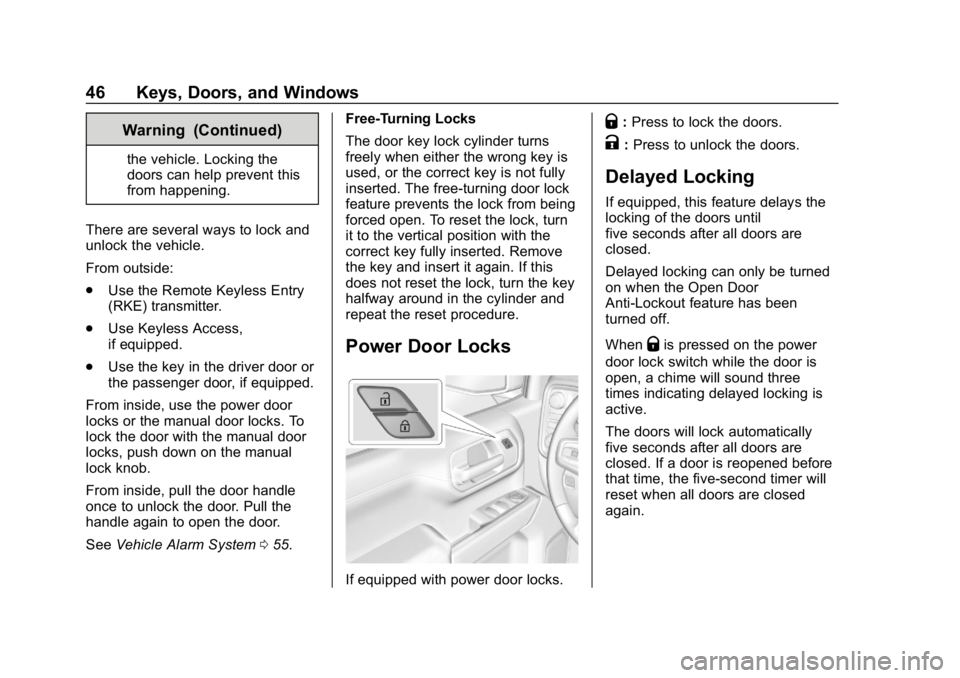
Power Door Locks
If equipped with power door locks.
Q:
Press to lock the doors.
K:Press to unlock the doors.
Delayed Locking
If equipped, this feature delays the
locking of the doors until
five seconds after all doors are
closed.
Delayed locking can only be turned
on when the Open Door
Anti-Lockout feature has been
turned off.
When
Qis pressed on the power
door lock switch while the door is
open, a chime will sound three
times indicating delayed locking is
active.
The doors will lock automatically
five seconds after all doors are
closed. If a door is reopened before
that time, the five-second timer will
reset when all doors are closed
again.