Page 39 of 477

GMC Sierra/Sierra Denali Owner Manual (GMNA-Localizing-U.S./Canada/
Mexico-1500-11698638) - 2019 - CRC - 5/13/19
38 Keys, Doors, and Windows
times after all doors are closed. To
turn on or off seeVehicle
Personalization 0170.
Remote No Longer in Vehicle Alert
If the vehicle is on with a door open
and then all doors are closed, the
vehicle will check for RKE
transmitters inside. If an RKE
transmitter is not detected, the
Driver Information Center (DIC) will
display NO REMOTE DETECTED
and the horn will chirp three times.
This occurs only once each time the
vehicle is driven. To turn on or off
see Vehicle Personalization 0170.
Key Access
To access a vehicle with a dead
transmitter battery, see Door Locks
0 45.
Programming Transmitters to
the Vehicle
Only RKE transmitters programmed
to the vehicle will work. If a
transmitter is lost or stolen, a
replacement can be purchased and
programmed through your dealer.
The vehicle can be reprogrammed so that lost or stolen transmitters no
longer work. Each vehicle can have
up to eight transmitters matched
to it.
Programming with Recognized
Transmitters
A new transmitter can be
programmed to the vehicle when
there are two recognized
transmitters.
To program, the vehicle must be off
and all transmitters, both currently
recognized and new, must be
with you.
1. Remove the key from a recognized transmitter.
2. Place the two recognized transmitters in the cupholder or
on the passenger seat.
3. Insert the vehicle key into the key lock cylinder on the driver
door handle. Then turn the key
counterclockwise, to the unlock
position, five times within
10 seconds.
The DIC displays READY FOR
REMOTE#3, 4, 5 ETC.
Transmitter Pocket without Bucket
Seats
Page 40 of 477

GMC Sierra/Sierra Denali Owner Manual (GMNA-Localizing-U.S./Canada/
Mexico-1500-11698638) - 2019 - CRC - 5/13/19
Keys, Doors, and Windows 39
Transmitter Pocket with BucketSeats
4. Place the new transmitter in the transmitter pocket/insert.
5. Press ENGINE START/STOP. When the transmitter is
learned, the DIC display will
show that it is ready to program
the next transmitter.
6. Remove the transmitter from the transmitter pocket and
press
KorQon the
transmitter.
To program additional
transmitters, repeat Steps 4–6. When all additional transmitters
are programmed, press and
hold ENGINE START/STOP for
approximately 12 seconds to
exit programming mode.
7. Return the key back into the transmitter.
Programming without Recognized
Transmitters
If two currently recognized
transmitters are not available, follow
this procedure to program up to
eight transmitters. This feature is
not available in Canada. This
procedure will take approximately
30 minutes to complete. The vehicle
must be off and all transmitters to
be programmed must be with you. 1. Remove the vehicle key from the transmitter.
2. Insert the vehicle key into the key lock cylinder on the driver
door handle; then turn the key
counterclockwise, to the unlock
position, five times within
10 seconds. The DIC displays REMOTE
LEARN PENDING,
PLEASE WAIT.
3. Wait for 10 minutes until the DIC displays PRESS ENGINE
START BUTTON TO LEARN,
then press ENGINE
START/STOP.
The DIC will again display
REMOTE LEARN PENDING,
PLEASE WAIT.
4. Repeat Step 3 two additional times. After the third time all
previously known transmitters
will no longer work with the
vehicle. Remaining transmitters
can be relearned during the
next steps.
The DIC should now display
READY FOR REMOTE # 1.
Page 41 of 477

GMC Sierra/Sierra Denali Owner Manual (GMNA-Localizing-U.S./Canada/
Mexico-1500-11698638) - 2019 - CRC - 5/13/19
40 Keys, Doors, and Windows
Transmitter Pocket without BucketSeatsTransmitter Pocket with BucketSeats
5. Place the new transmitter in the transmitter pocket/insert.
6. Press ENGINE START/STOP. When the transmitter is
learned, the DIC display will
show that it is ready to program
the next transmitter.
7. Remove the transmitter from the transmitter pocket/insert
and press
KorQon the
transmitter.
To program additional
transmitters, repeat Steps 5–7. When all additional transmitters
are programmed, press and
hold ENGINE START/STOP for
approximately 12 seconds to
exit programming mode.
8. Return the key back into the transmitter.
Starting the Vehicle with a Low
Transmitter Battery
If the transmitter battery is weak or if
there is interference with the signal,
the DIC may display NO REMOTE
DETECTED or NO REMOTE KEY
WAS DETECTED PLACE KEY IN
TRANSMITTER POCKET THEN
START YOUR VEHICLE when
starting the vehicle.
Page 42 of 477
GMC Sierra/Sierra Denali Owner Manual (GMNA-Localizing-U.S./Canada/
Mexico-1500-11698638) - 2019 - CRC - 5/13/19
Keys, Doors, and Windows 41
To start the vehicle:
Transmitter Pocket without BucketSeats
Transmitter Pocket with BucketSeats
1. Place the transmitter in the transmitter pocket/insert.
2. With the vehicle in P (Park) or N (Neutral) press the brake
pedal and ENGINE
START/STOP.
Replace the transmitter battery
as soon as possible.
Battery Replacement
Replace the battery in the
transmitter soon if the DIC displays
REPLACE BATTERY IN
REMOTE KEY.
Caution
When replacing the battery, do
not touch any of the circuitry on
the transmitter. Static from your
body could damage the
transmitter.
To replace the battery: 1. Press the button on the RKE transmitter to remove the key.
Never pull the key out without
pressing the button.
Page 109 of 477
GMC Sierra/Sierra Denali Owner Manual (GMNA-Localizing-U.S./Canada/
Mexico-1500-11698638) - 2019 - CRC - 5/13/19
108 Seats and Restraints
the child restraint. SeeSecuring
Child Restraints (With the Seat Belt
in the Front Outboard Seat) 0122 or
Securing Child Restraints (In the
Center Front Seat) 0122 or
Securing Child Restraints (With the
Seat Belt in the Rear Seat) 0118.
Lower Anchors
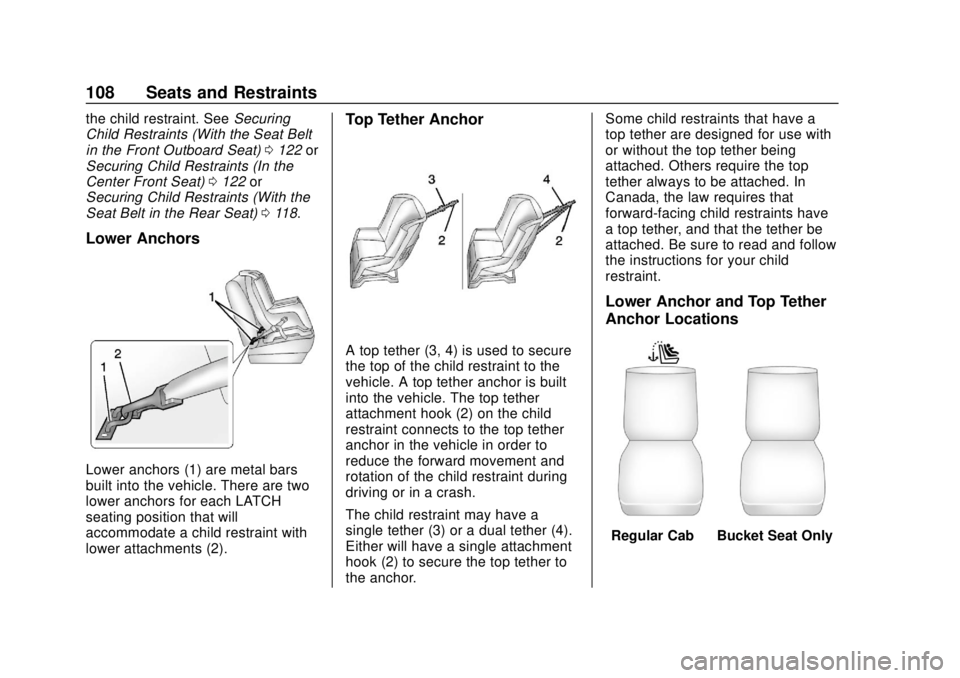
Lower anchors (1) are metal bars
built into the vehicle. There are two
lower anchors for each LATCH
seating position that will
accommodate a child restraint with
lower attachments (2).
Top Tether Anchor
A top tether (3, 4) is used to secure
the top of the child restraint to the
vehicle. A top tether anchor is built
into the vehicle. The top tether
attachment hook (2) on the child
restraint connects to the top tether
anchor in the vehicle in order to
reduce the forward movement and
rotation of the child restraint during
driving or in a crash.
The child restraint may have a
single tether (3) or a dual tether (4).
Either will have a single attachment
hook (2) to secure the top tether to
the anchor. Some child restraints that have a
top tether are designed for use with
or without the top tether being
attached. Others require the top
tether always to be attached. In
Canada, the law requires that
forward-facing child restraints have
a top tether, and that the tether be
attached. Be sure to read and follow
the instructions for your child
restraint.
Lower Anchor and Top Tether
Anchor Locations
Regular Cab
—Bucket Seat Only
Page 129 of 477
GMC Sierra/Sierra Denali Owner Manual (GMNA-Localizing-U.S./Canada/
Mexico-1500-11698638) - 2019 - CRC - 5/13/19
128 Storage
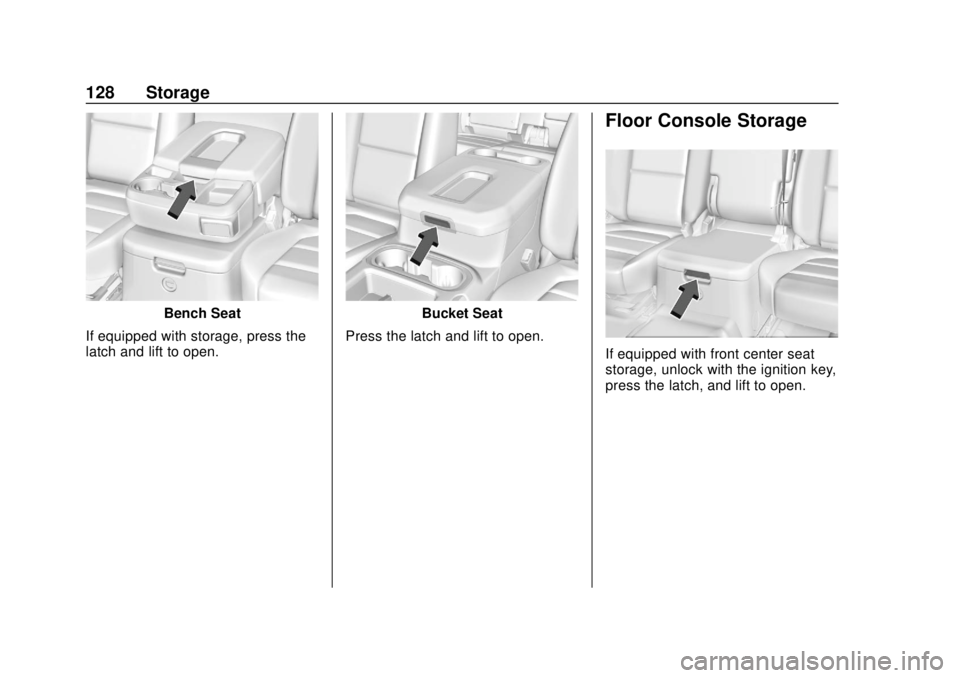
Bench Seat
If equipped with storage, press the
latch and lift to open.Bucket Seat
Press the latch and lift to open.
Floor Console Storage
If equipped with front center seat
storage, unlock with the ignition key,
press the latch, and lift to open.