2019 FORD TRANSIT lock
[x] Cancel search: lockPage 323 of 529

Automatic Transmission
You must use the correct fluid for
automatic transmission that requires
MERCON® LV transmission fluid.
Capacities Quantity
Variant
13.1 qt (12.4 L)
All.
Materials Specification
Name
MERCON® LV WSS-M2C938-A
Motorcraft® MERCON® LV Automatic Transmission
Fluid (U.S.)
Motorcraft® MERCON® LV Automatic Transmission
Fluid / Huile pour boîte automatique MERCON® LV
Motorcraft® (Canada)
XT-10-QLVC (U.S.)
CXT-10-LV6 (Canada)
Locks
Materials Specification
Name
-
Motorcraft® Penetrating and Lock Lubricant (U.S.)
Motorcraft® Penetrating Fluid / Liquide dégrippant
Motorcraft® (Canada)
XL-1 (U.S.)
CXC-51-A (Canada)
Grease
Materials Specification
Name
ESA-M1C75-B
Motorcraft® Premium Long-Life Grease (U.S.)
Motorcraft® Premium Long-Life Grease / Graisse
longue durée de qualité première Motorcraft®
(Canada)
XG-1-E1 (U.S. & Canada)
320
2019 Transit (TTH) Canada/United States of America, Vehicles Built From: 02-01-2019, KK3J 19A321 AB enUSA, Edition date: 201812, First-Printing Capacities and Specifications
Page 329 of 529

Materials
Specification
Name
WSS-M2C942-A
Motorcraft® SAE 75W-85 Premium Synthetic
Hypoid Gear Lubricant (U.S.)
Motorcraft® SAE 75W-85 Premium Synthetic
Hypoid Gear Lubricant / Huile synthétique de haute
qualité pour engrenages hypoïdes SAE 75W-85
Motorcraft® (Canada)
XY-75W85-QL (U.S. & Canada)
EST-M2C118-A
Motorcraft® Additive Friction Modifier (U.S.)
Motorcraft® Additive Friction Modifier / Additif
modificateur de friction Motorcraft® (Canada)
XL-3 (U.S.)
CXL-3 (Canada)
Automatic Transmission
You must use the correct fluid for
automatic transmission that requires
MERCON® LV transmission fluid.
Capacities Quantity
Variant
13.1 qt (12.4 L)
All.
Materials Specification
Name
MERCON® LV WSS-M2C938-A
Motorcraft® MERCON® LV Automatic Transmission
Fluid (U.S.)
Motorcraft® MERCON® LV Automatic Transmission
Fluid / Huile pour boîte automatique MERCON® LV
Motorcraft® (Canada)
XT-10-QLVC (U.S.)
CXT-10-LV6 (Canada)
Locks
326
2019 Transit (TTH) Canada/United States of America, Vehicles Built From: 02-01-2019, KK3J 19A321 AB enUSA, Edition date: 201812, First-Printing Capacities and Specifications
Page 330 of 529

Materials
Specification
Name
-
Motorcraft® Penetrating and Lock Lubricant (U.S.)
Motorcraft® Penetrating Fluid / Liquide dégrippant
Motorcraft® (Canada)
XL-1 (U.S.)
CXC-51-A (Canada)
Grease
Materials Specification
Name
ESA-M1C75-B
Motorcraft® Premium Long-Life Grease (U.S.)
Motorcraft® Premium Long-Life Grease / Graisse
longue durée de qualité première Motorcraft®
(Canada)
XG-1-E1 (U.S. & Canada)
CAPACITIES AND
SPECIFICATIONS - 3.7L
Use oil and fluid that meets the defined
specification and viscosity grade.
If you do not use oil and fluid that meets
the defined specification and viscosity
grade, it could result in:
• Component damage not covered by
the vehicle Warranty.
• Longer engine cranking periods.
• Increased emission levels. •
Reduced engine performance.
• Reduced fuel economy.
• Reduced brake performance.
Air Conditioning System WARNING: The air conditioning
refrigerant system contains refrigerant
under high pressure. Only qualified
personnel should service the air
conditioning refrigerant system. Opening
the air conditioning refrigerant system
can cause personal injury.
Capacities Refrigerant Oil
Refrigerant
Variant
9.5 fl oz (280 ml)
39.2 oz (1.11 kg)
Vehicles with rear air conditioning.
5.4 fl oz (160 ml)
28.2 oz (0.8 kg)
Vehicles without rear air conditioning.
327
2019 Transit (TTH) Canada/United States of America, Vehicles Built From: 02-01-2019, KK3J 19A321 AB enUSA, Edition date: 201812, First-Printing Capacities and Specifications
Page 335 of 529
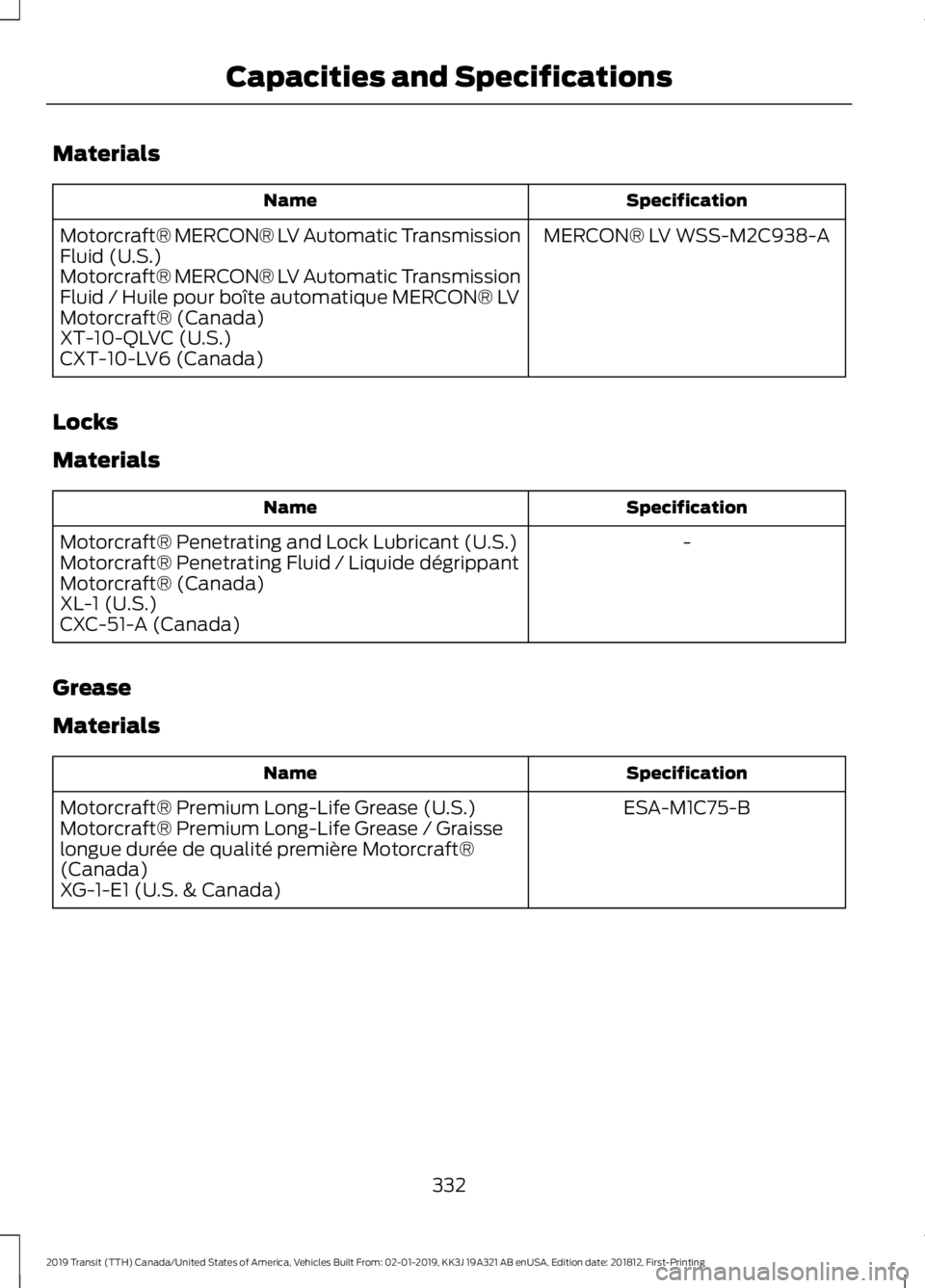
Materials
Specification
Name
MERCON® LV WSS-M2C938-A
Motorcraft® MERCON® LV Automatic Transmission
Fluid (U.S.)
Motorcraft® MERCON® LV Automatic Transmission
Fluid / Huile pour boîte automatique MERCON® LV
Motorcraft® (Canada)
XT-10-QLVC (U.S.)
CXT-10-LV6 (Canada)
Locks
Materials Specification
Name
-
Motorcraft® Penetrating and Lock Lubricant (U.S.)
Motorcraft® Penetrating Fluid / Liquide dégrippant
Motorcraft® (Canada)
XL-1 (U.S.)
CXC-51-A (Canada)
Grease
Materials Specification
Name
ESA-M1C75-B
Motorcraft® Premium Long-Life Grease (U.S.)
Motorcraft® Premium Long-Life Grease / Graisse
longue durée de qualité première Motorcraft®
(Canada)
XG-1-E1 (U.S. & Canada)
332
2019 Transit (TTH) Canada/United States of America, Vehicles Built From: 02-01-2019, KK3J 19A321 AB enUSA, Edition date: 201812, First-Printing Capacities and Specifications
Page 338 of 529

Eject: Press to eject a CD.
A
OK and Arrow buttons:
Press OK to confirm menu selections. Press to scroll
through the menu choices.
B
Information:
Press to access any available radio or CD information.
C
TUNE:
Press to manually search through the radio frequency band.
D
Number block:
In radio mode, you can store your favorite radio stations. To
store a radio station, tune to the station, then press and hold a preset button
until sound returns. In CD mode, select a track. In phone mode, enter a phone
number.
E
CLOCK:
If not in phone mode, press to display the clock.
F
Function buttons:
Select different functions of the audio system depending
on which mode you are in (such as Radio mode or CD mode).
G
335
2019 Transit (TTH) Canada/United States of America, Vehicles Built From: 02-01-2019, KK3J 19A321 AB enUSA, Edition date: 201812, First-Printing Audio SystemE216052
Page 342 of 529

Eject: Press to eject a CD.
A
OK and Arrow buttons:
Press OK to confirm menu selections. Press to scroll
through the menu choices.
B
Information:
Press to access any available radio or CD information.
C
TUNE:
Press to manually search through the radio frequency band.
D
Number block:
In radio mode, you can store your favorite radio stations. To
store a radio station, tune to the station, then press and hold a preset button
until sound returns. In CD mode, select a track. In phone mode, enter a phone
number.
E
CLOCK:
If not in phone mode, press to display the clock.
F
Function buttons:
Select different functions of the audio system depending
on which mode you are in (such as Radio mode or CD mode).
G
Seek, Fast Forward and Reverse:
In radio mode, select a frequency band
and press either button. The system stops at the first station it finds in that
direction. Press and hold to quickly seek up or down the frequency band. In
media mode, press to select the previous or next track. Press and hold either
button to move quickly forward or backward through the current track.
H
VOL and Power:
Press to switch the system on and off. Turn to adjust the
volume.
I
MENU:
Press to access different audio system features. See Menu Structure
later in this chapter.
J
SOUND:
Press to access settings for Treble, Midrange, Bass, Fade or Balance.
Use the up and down arrow buttons to select the various settings. When you
make your selection, press the left and right arrow buttons to change the
settings. Press
OK to set or press MENU to exit. Sound settings can be set for
each audio source independently.
K
PHONE:
Press to access the phone features of the SYNC system. See your
SYNC information.
L
MEDIA:
Press to open the media source menu. You can press this multiple
times to change to CD or to a SYNC-Media device or scroll through the media
sources using the arrow buttons. Press
OK to select a source.
M
RADIO:
Press this multiple times to select a radio band. Press and hold to
select the autostore function. Press to return to the main screen of the active
radio band.
N
339
2019 Transit (TTH) Canada/United States of America, Vehicles Built From: 02-01-2019, KK3J 19A321 AB enUSA, Edition date: 201812, First-Printing Audio System
Page 344 of 529

SOUND: Press the button to adjust the sound settings for bass, treble, balance
and fade.
C
Seek, Fast Forward and Reverse:
In radio mode, select a frequency band
and press either button.The system stops at the first station it finds in that
direction. Press and hold to quickly seek up or down the frequency band. In
media mode, press to select the previous or next track. Press and hold either
button to move quickly forward or backward through the current track.
D
Dial and end call:
Press the button to make or end a call.
D
Numeric keypad:
Press the button to recall a previously stored station. To
store a favorite station press and hold until the sound returns. In Phone mode,
use these keys to dial the number.
E
Clock:
Press the button to select clock setup.
F
Information:
Press the button to access the complete information if it does
not fit the display.
G
On, Off and Volume:
Press the button to switch the audio system on or off.
Turn the dial to adjust the volume.
H
MENU:
: Press the button to access different audio system features, depending
on which mode has been selected.
I
Voice Pass-Through
and Phone: Press the button to say commands to your
cell phone or to access the Bluetooth phone feature of the system by pressing
PHONE
then MENU. When paired further presses of this button will display
phone name, signal strength and the battery level.
J
MEDIA:
Press the button to access Bluetooth audio streaming, USB or Aux
input playback.
K
RADIO:
Press the button to select different radio bands. Press to cancel the
menu or list browsing.
L
Cursor up and down:
Press a button to scroll through on-screen choices. In
radio mode press to manual tune.
M
OK, Play and Pause:
Press the button to confirm on-screen selections. Press
to play or pause during playback with compatible external devices.
N
Sound Button
This allows you to adjust the sound
settings (for example bass, treble, balance
and fade).
1. Press the
MINbutton.
2. Use the up and down arrow buttons to
select the required level. Waveband Button
Press the
MINbutton to select from the
wavebands available (AM, FM1,FM2). You
can use the button to return to radio
reception when you have been listening to
another source.
341
2019 Transit (TTH) Canada/United States of America, Vehicles Built From: 02-01-2019, KK3J 19A321 AB enUSA, Edition date: 201812, First-Printing Audio System
Page 350 of 529

Display: Shows the status of the current mode selected.
A
Clock:
Press to display the clock.
B
Seek, Fast Forward and Reverse:
In radio mode, select a frequency band
and press either button. The system stops at the first station it finds in that
direction. Press and hold to quickly seek up or down the frequency band. In
media mode, press to select the previous or next track. Press and hold either
button to move quickly forward or backward through the current track.
C
Numeric keypad:
In radio mode, you can store your favorite radio stations. To
store a radio station, tune to the station, then press and hold a preset button
until sound returns.
D
VOL and Power:
Press to switch the system on and off. Turn to adjust the
volume.
E
MENU:
Press to access different audio system features.
F
SOUND:
Press to access settings for Treble, Midrange, Bass, Fade or Balance.
G
AUX:
Press to access the auxiliary features, it will also cancel the menu or list
browsing.
H
RADIO:
Press this multiple times to select a radio band. Press and hold to
select the autostore function. Press to return to the main screen of the active
radio band.
I
Arrow left and right:
Press to scroll through the menu choices.
J
Mute:
Press to mute the sound.
K
Clock Button
This allows you to adjust the clock settings.
Press the
Clock button until the following message is displayed. Action and Description
Message
Use the cursor up or down arrow buttons to set the correct
hour.
Set Hour
Press the
Clock button again until the following message is displayed.
Use the cursor up or down arrow buttons to set the correct
minutes.
Set Minutes
347
2019 Transit (TTH) Canada/United States of America, Vehicles Built From: 02-01-2019, KK3J 19A321 AB enUSA, Edition date: 201812, First-Printing Audio System