2019 FORD RANGER warning
[x] Cancel search: warningPage 61 of 512

Note:
Not every feature applies to every
vehicle in every market. When they are
available for your vehicle, then they appear
in your information display, providing
choices to switch them on or off, or to select
a more specific setting.
• Various vehicle speed limits so the
MyKey driver cannot exceed certain
speeds. The information display shows
warnings followed by an audible tone
when the MyKey driver reaches the set
speed. You cannot override the set
speed by fully depressing the
accelerator pedal. WARNING: Do not set MyKey
maximum speed limit to a limit that will
prevent the driver from maintaining a
safe speed considering posted speed
limits and prevailing road conditions. The
driver is always responsible to drive in
accordance with local laws and
prevailing conditions. Failure to do so
could result in accident or injury. •
Various vehicle speed reminders so
MyKey drivers know when their vehicle
speed approaches the limits. Warnings
appear in your information display and
a tone sounds when the MyKey drivers
exceed the set vehicle speed.
• The audio system's maximum volume
limits to 45% so MyKey drivers can
concentrate on the road. A message
appears in the information display
when MyKey drivers attempt to exceed
the limited volume. MyKey also
disables the automatic volume control.
Note:
If your vehicle includes an
AM/FM radio or a very basic audio
system, then the radio may not limit.
• Always on setting. This setting forces
certain features to remain on and
active for MyKey drivers. For example,
E911 or emergency assistance and the
do not disturb features stay on even if
a MyKey driver uses the feature's
control to switch it off. When selected,
you will not be able to turn off Advance
Trac or traction control (if your vehicle
has this feature).
CREATING A MYKEY
Use the information display to create a
MyKey:
1. Insert the key you want to program into
the ignition. If your vehicle is equipped
with a push-button start, place the
remote control into the backup slot.
See
Passive Key Backup Position
(page 56).
2. Switch the ignition on.
3. Access the main menu in the information display and then scroll
through the menus to change the
settings of your MyKey. From the
MyKey menu select the option Create
MyKey. See
Information Displays
(page 90).
58
Ranger (TFG) Canada/United States of America, enUSA, Edition date: 201809, Fourth-Printing MyKey
™
Page 68 of 512

PASSIVE ANTI-THEFT
SYSTEM
Principle of Operation
The system prevents someone from
starting the engine with an incorrectly
coded key.
Coded Keys
If you lose a key, you can purchase a
replacement from an authorized dealer. If
possible, provide them with the key
number from the tag provided with the
original keys. You can also obtain extra
keys from an authorized dealer.
Note:
Have all of your remaining keys
erased and recoded if you lose a key. Have
replacement keys coded together with your
remaining keys. See an authorized dealer
for further information.
Note: Do not shield your keys with metal
objects. This may prevent the receiver from
recognizing a coded key.
Note: Do not leave a duplicate coded key
in the vehicle. Always take your keys and
lock all doors when leaving the vehicle.
Arming the Engine Immobilizer
When you switch the ignition off, the
engine immobilizer will arm automatically
after a short time.
Disarming the Engine Immobilizer
When you switch the ignition on, the engine
immobilizer will disarm automatically if
you use a correctly coded key.
If you are unable to start the engine with a
correctly coded key, have your vehicle
checked by an authorized dealer. ANTI-THEFT ALARM
Alarm System
Perimeter Alarm
The perimeter alarm is a deterrent against
unauthorized access to your vehicle
through the doors, luggage compartment
and the hood.
Panic Alarm (If Equipped)
The alarm can be activated using the
remote control.
Triggering the Alarm
•
If someone opens a door or the hood
without a valid key or remote control.
• If you switch the ignition on without a
valid key.
If the alarm sounds, the alarm horn sounds
for 30 seconds and the hazard warning
lamps flash for five minutes.
Any further attempts to carry out one of
the above will sound the alarm again.
Arming the Alarm
Press the lock button once to lock your
vehicle and arm the alarm.
Disarming the Alarm
Disarm the alarm by any of the following
actions:
• Unlock the doors with the key and
switch the ignition on with a correctly
coded key within 12 seconds.
• Unlock the doors or luggage
compartment using the remote control.
65
Ranger (TFG) Canada/United States of America, enUSA, Edition date: 201809, Fourth-Printing Security
Page 69 of 512
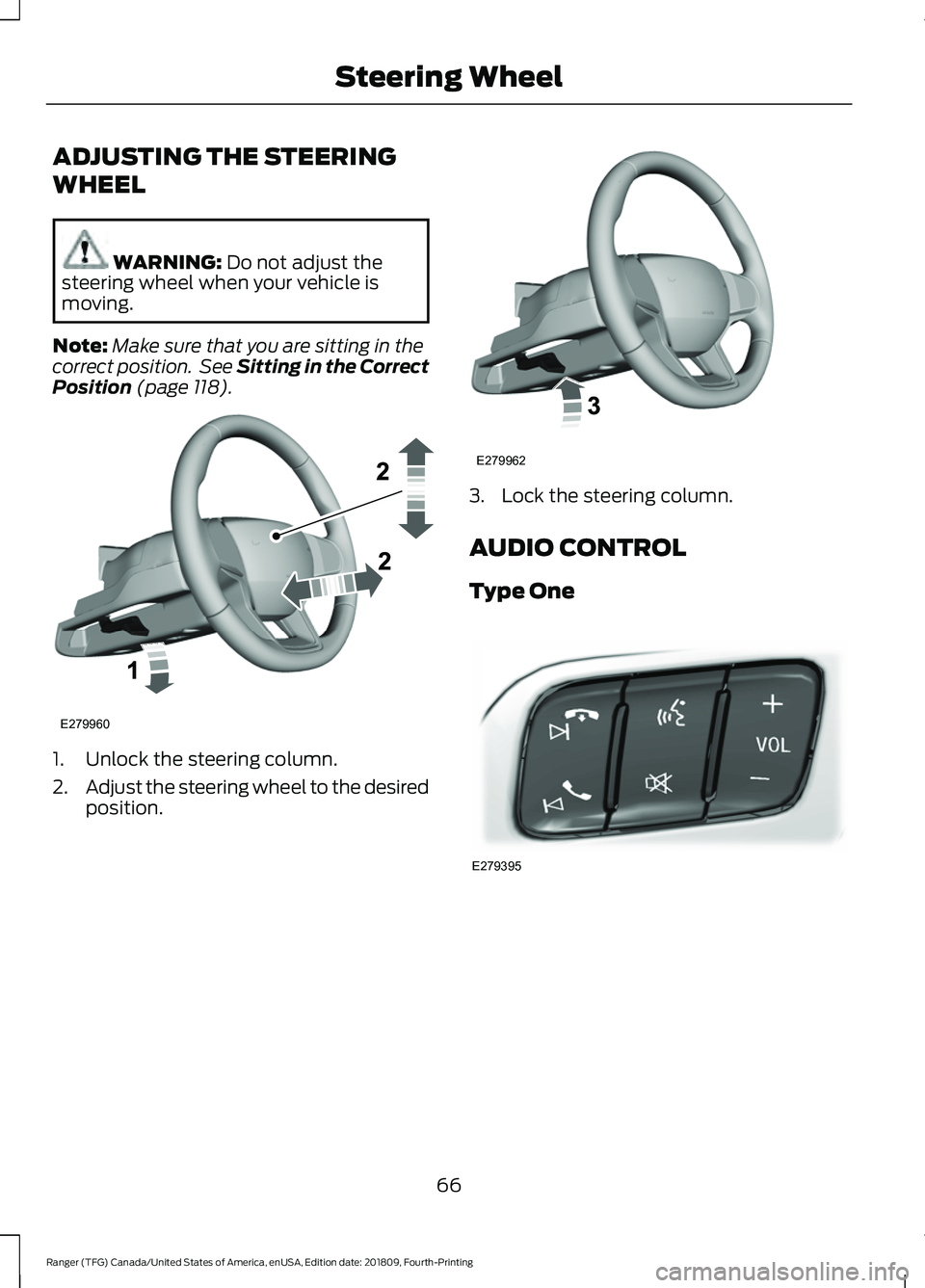
ADJUSTING THE STEERING
WHEEL
WARNING: Do not adjust the
steering wheel when your vehicle is
moving.
Note: Make sure that you are sitting in the
correct position. See Sitting in the Correct
Position
(page 118). 1. Unlock the steering column.
2.
Adjust the steering wheel to the desired
position. 3. Lock the steering column.
AUDIO CONTROL
Type One
66
Ranger (TFG) Canada/United States of America, enUSA, Edition date: 201809, Fourth-Printing Steering WheelE279960 E279962 E279395
Page 75 of 512

Flashing the Headlamp High Beam
Slightly pull the lever toward you and
release it to flash the headlamps.
AUTOLAMPS
WARNING: The system does not
relieve you of your responsibility to drive
with due care and attention. You may
need to override the system if it does not
turn the headlamps on in low visibility
conditions, for example daytime fog. When the lighting control is in the
autolamps position, the headlamps turn
on in low light situations, or when the
wipers turn on. The headlamps remain on for a period of
time after you switch the ignition off. Use
the information display controls to adjust
the period of time that the headlamps
remain on.
Note:
If you switch the autolamps on, you
cannot switch the high beams on until the
system turns the low beams on.
Windshield Wiper Activated
Headlamps
When you switch the autolamps on, the
headlamps turn on within 10 seconds of
switching the wipers on. They turn off
approximately 60 seconds after you switch
the windshield wipers off.
The headlamps do not turn on with the
wipers:
• During a single wipe.
• When using the windshield washers.
• If the wipers are in intermittent mode.
Note: If you switch the autolamps and the
autowipers on, the headlamps turn on when
the windshield wipers continuously operate.
INSTRUMENT LIGHTING
DIMMER
Note: When disconnecting the battery or
when it runs out of charge, the illuminated
components turn to the maximum setting.
72
Ranger (TFG) Canada/United States of America, enUSA, Edition date: 201809, Fourth-Printing LightingE242675 E142451
Page 76 of 512

Vehicles With Front Fog Lamps
Press repeatedly or press and hold until
you reach the desired level.
Vehicles Without Front Fog Lamps
Press repeatedly or press and
hold to dim.
A
Press repeatedly or press and
hold to brighten.
B DAYTIME RUNNING LAMPS WARNING: The daytime running
lamps system does not activate the rear
lamps and may not provide adequate
lighting during low visibility driving
conditions. Make sure you switch the
headlamps on, as appropriate, during all
low visibility conditions. Failure to do so
may result in a crash.
Type One - Conventional (Non-
Configurable)
The daytime running lamps turn on when:
1. Switching the ignition on.
2. The transmission is not in park (P) for vehicles with automatic transmissions,
or releasing the parking brake for
vehicles with manual transmissions.
3. The lighting control is in the off, parking
lamp or autolamps positions.
4. The headlamps are off.
Type Two - Configurable
Switch the daytime running lamps on or
off using the information display. See
Information Displays
(page 90).
The daytime running lamps turn on when:
1. The lamps are on in the information display.
2. Switching the ignition on.
3. The transmission is not in park (P) for vehicles with automatic transmissions,
or releasing the parking brake for
vehicles with manual transmissions.
4. The lighting control is in the autolamps
position.
5. The headlamps are off.
The other lighting control switch positions
do not turn on the daytime running lamps.
73
Ranger (TFG) Canada/United States of America, enUSA, Edition date: 201809, Fourth-Printing LightingE231828 AB
E165366
Page 77 of 512

If the daytime running lamps are off in the
information display, the lamps stay off in
all switch positions.
AUTOMATIC HIGH BEAM
CONTROL (IF EQUIPPED)
WARNING:
The system does not
relieve you of your responsibility to drive
with due care and attention. You may
need to override the system if it does not
turn the high beams on or off.
The system turns on high beams if it is dark
enough and no other traffic is present. If it
detects an approaching vehicle ’s
headlamps or tail lamps, or street lighting
ahead, the system turns off high beams
before they can distract other road users.
Low beams remain on.
Note: The system may not operate properly
if the sensor is blocked. Keep the windshield
free from obstruction or damage.
Note: The system may not operate properly
in cold or inclement conditions. You can
switch on the high beams by overriding the
system.
Note: If the system detects a blockage, for
example bird droppings, bug splatter, snow
or ice, the system goes into low beam mode
until you clear the blockage. A message may
appear in the information display if the
camera is blocked.
Note: Using much larger tires or equipping
vehicle accessories such as snowplows can
modify your vehicle's ride height and
degrade automatic high beam control
performance.
A camera sensor, centrally mounted
behind the windshield of your vehicle,
continuously monitors conditions to turn
the high beams on and off. Once the system is active, the high beams
turn on if:
•
The ambient light level is low enough.
• There is no traffic in front of your
vehicle.
• The vehicle speed is greater than
approximately
32 mph (51 km/h).
The system turns the high beams off if:
• The ambient light level is high enough
that high beams are not required.
• The system detects an approaching
vehicle's headlamps or tail lamps.
• The vehicle speed falls below
approximately
27 mph (44 km/h).
• The system detects severe rain, snow
or fog.
• The camera is blocked.
Switching the System On and Off
Switch the system on using the information
display. See Information Displays (page
90
). Switch the lighting control to the
autolamps position. See
Autolamps
(page 72).
Overriding the System
Push the lever away from you to switch
between high beam and low beam.
74
Ranger (TFG) Canada/United States of America, enUSA, Edition date: 201809, Fourth-Printing LightingE142451
Page 80 of 512

POWER WINDOWS
WARNING: Do not leave children
or pets unattended in your vehicle.
Failure to follow this instruction could
result in personal injury or death. WARNING:
When closing the
power windows, verify they are free of
obstruction and make sure that children
and pets are not in the proximity of the
window openings.
Note: If you operate the switches often
during a short period of time the system
might become inoperable for a certain time
to prevent damage due to overheating.
Note: If you operate both the switch on the
relevant door and the switch for that
window on the driver ’s door at the same
time, the window stops moving.
Note: You may hear a pulsing noise when
you open just one of the windows. Lower
the opposite window slightly to reduce this
noise. Driver Door Switches (Double Cab)
Press the switch to open the
window.
A
Lift the switch to close the
window.
B
77
Ranger (TFG) Canada/United States of America, enUSA, Edition date: 201809, Fourth-Printing Windows and MirrorsA
B
E131466
Page 83 of 512

EXTERIOR MIRRORS
Power Exterior Mirrors (If Equipped)
WARNING:
Do not adjust the
mirrors when your vehicle is moving. This
could result in the loss of control of your
vehicle, serious personal injury or death. Left-hand side.
A
Off.B
Right-hand side.
C Press the arrows to adjust the mirror.
Fold Away Exterior Mirrors
Push the mirror toward the door window
glass.
Make sure that you fully engage the mirror
in its support when returning it to its
original position.
Power-Folding Mirrors
(If Equipped)
The power folding mirrors operate with the
ignition on.
Note: The mirrors no longer operate if you
switch the ignition off.
80
Ranger (TFG) Canada/United States of America, enUSA, Edition date: 201809, Fourth-Printing Windows and MirrorsE131480
A
B
C E131481