2019 FORD RANGER warning
[x] Cancel search: warningPage 126 of 512
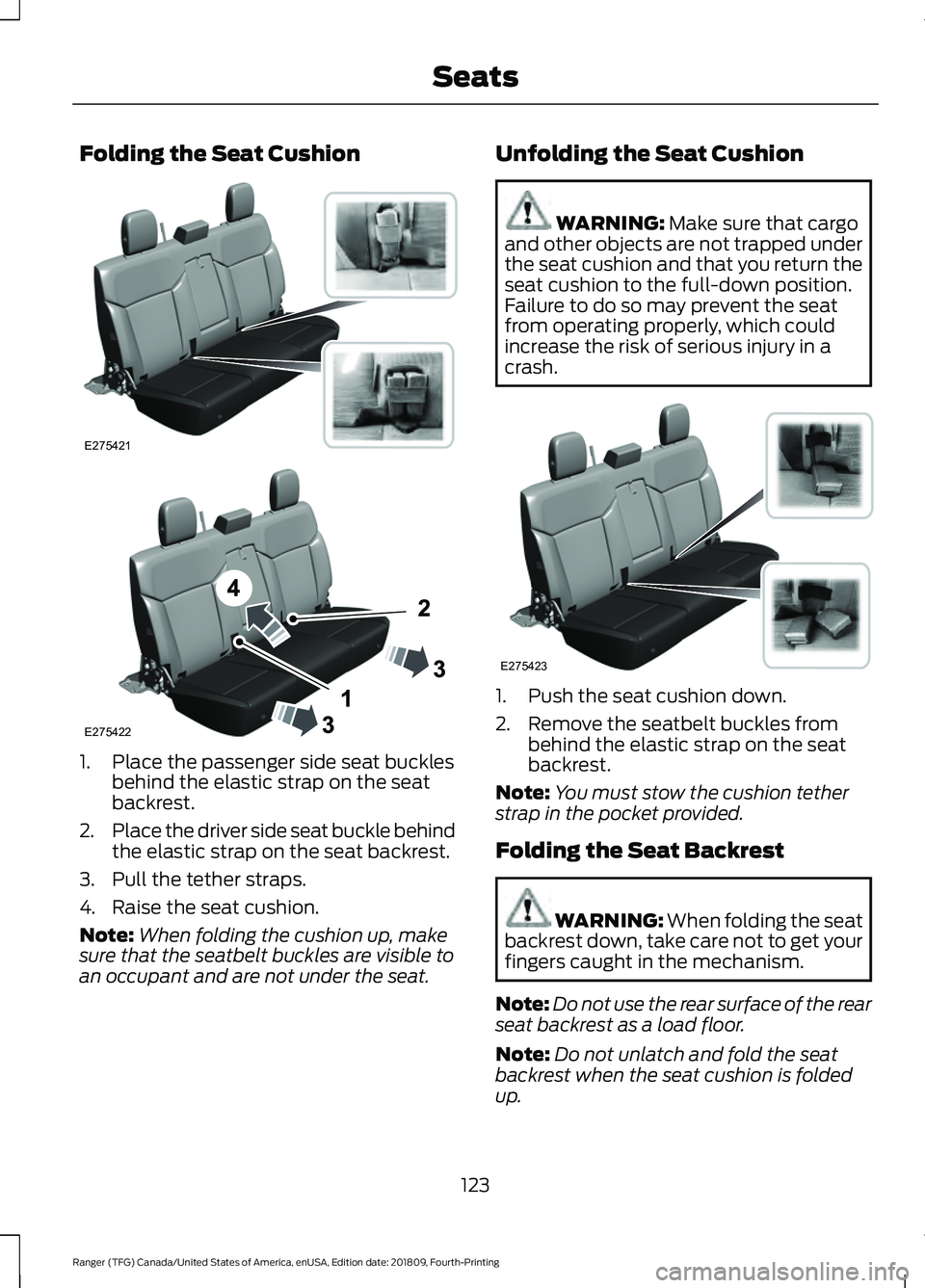
Folding the Seat Cushion
1. Place the passenger side seat buckles
behind the elastic strap on the seat
backrest.
2. Place the driver side seat buckle behind
the elastic strap on the seat backrest.
3. Pull the tether straps.
4. Raise the seat cushion.
Note: When folding the cushion up, make
sure that the seatbelt buckles are visible to
an occupant and are not under the seat. Unfolding the Seat Cushion WARNING: Make sure that cargo
and other objects are not trapped under
the seat cushion and that you return the
seat cushion to the full-down position.
Failure to do so may prevent the seat
from operating properly, which could
increase the risk of serious injury in a
crash. 1. Push the seat cushion down.
2. Remove the seatbelt buckles from
behind the elastic strap on the seat
backrest.
Note: You must stow the cushion tether
strap in the pocket provided.
Folding the Seat Backrest WARNING:
When folding the seat
backrest down, take care not to get your
fingers caught in the mechanism.
Note: Do not use the rear surface of the rear
seat backrest as a load floor.
Note: Do not unlatch and fold the seat
backrest when the seat cushion is folded
up.
123
Ranger (TFG) Canada/United States of America, enUSA, Edition date: 201809, Fourth-Printing SeatsE275421 E275422 E275423
Page 127 of 512

1. Pull the release strap up.
2. Push the seat backrest forward.
Unfolding the Seat Backrest
WARNING: Make sure that the
seats and the seat backrests are secure
and fully locked in their catches.
Note: When unfolding the seat backrest,
make sure that the seatbelts are visible to
an occupant and not caught behind the
seat.
HEATED SEATS
(IF EQUIPPED) WARNING: People who are unable
to feel pain to their skin because of
advanced age, chronic illness, diabetes,
spinal cord injury, medication, alcohol
use, exhaustion or other physical
conditions, must use caution when using
the heated seat. The heated seat may cause burns even at low temperatures,
especially if used for long periods of time.
Do not place anything on the seat that
may block the heat, such as a blanket or
cushion. This can cause the heated seat
to overheat. Do not puncture the seat
with pins, needles or other pointed
objects. This damages the heating
element and can cause the heated seat
to overheat. An overheated seat may
cause serious personal injury.
Do not do the following:
• Place heavy objects on the seat.
• Operate the heated seat if water or any
other liquid spills on the seat. Allow the
seat to dry thoroughly.
• Operate the heated seats unless the
engine is running. Doing so could drain
your vehicle battery. Press the heated seat symbol to cycle
through the various heat settings and off.
More indicator lights indicate warmer
settings.
The heated seats only operate when you
switch the ignition on.
The maximum temperature is reached
after five or six minutes. It is regulated
thermostatically.
The heated seats remain on until you either
switch the heated seats off or you switch
the ignition off.
124
Ranger (TFG) Canada/United States of America, enUSA, Edition date: 201809, Fourth-Printing SeatsE275420 E146322
Page 128 of 512

UNIVERSAL GARAGE DOOR
OPENER (IF EQUIPPED)
HomeLink Wireless Control
System WARNING:
Do not use the system
with any garage door opener that does
not have the safety stop and reverse
feature as required by U.S. Federal
Safety Standards (this includes any
garage door opener manufactured
before April 1, 1982). A garage door
opener which cannot detect an object,
signaling the door to stop and reverse,
does not meet current federal safety
standards. Using a garage door opener
without these features increases the risk
of serious injury or death.
Note: Make sure that the garage door and
security device are free from obstruction
when you are programming. Do not program
the system with the vehicle in the garage.
Note: Make sure you keep the original
remote control transmitter for use in other
vehicles as well as for future system
programming.
Note: We recommend that upon the sale
or lease termination of your vehicle, you
erase the programmed function buttons for
security reasons. See Erasing the Function
Button Codes
later in this section.
Note: You can program a maximum of
three devices. To change or replace any of
the three devices after it has been initially
programmed, you must first erase the
current settings. See Erasing the Function
Button Codes
. The universal garage door opener replaces
the common hand-held garage door
opener with a three-button transmitter
integrated into the driver
’s sun visor.
The system includes two primary features,
a garage door opener and a platform for
remote activation of devices within the
home. You can program garage doors as
well as entry gate operators, security
systems, entry door locks and home or
office lighting.
Additional system information can be
found online at www.homelink.com,
www.youtube.com/user/HomeLinkGentex
or by calling the toll-free help line at
1-800-355-3515.
In-Vehicle Programming
This process is to program your in-vehicle
HomeLink function button with your
hand-held transmitter.
Note: The programming steps below
assume you will be programming HomeLink
that was not previously programmed. If your
HomeLink was previously programmed, you
may need to erase your HomeLink buttons.
See Erasing the Function Button Codes.
Note: Put a new battery in the hand-held
transmitter. This allows for quicker training
and accurate transmission of the
radio-frequency signal.
125
Ranger (TFG) Canada/United States of America, enUSA, Edition date: 201809, Fourth-Printing Garage Door OpenerE188211
Page 132 of 512

12 Volt DC Power Point
WARNING: Do not plug optional
electrical accessories into the cigar
lighter socket. Incorrect use of the cigar
lighter can cause damage not covered
by the vehicle warranty, and can result
in fire or serious injury.
Note: When you switch the ignition on, you
can use the socket to power 12 volt
appliances with a maximum current rating
of 15 amps.
Note: If the power supply does not work
after you switch the ignition off, switch the
ignition on.
Note: Do not hang any accessory from the
accessory plug.
Note: Do not use the power point over the
vehicle capacity of 12 volt DC 180 watts or
a fuse may blow.
Note: Always keep the power point caps
closed when not in use.
Do not insert objects other than an
accessory plug into the power point. This
damages the power point and may blow
the fuse.
Run the vehicle for full capacity use of the
power point.
To prevent the battery from running out of
charge:
• Do not use the power point longer than
necessary when the vehicle is not
running.
• Do not leave devices plugged in
overnight or when you park your vehicle
for extended periods. USB Port and Power Point
Locations
USB Ports and Power Points may be in the
following locations:
•
On the lower instrument panel.
• Inside the center console.
• On the front of the center console.
• On the rear of the center console.
• In the cargo area.
• On the passenger side floor panel.
• 3rd row on the quarter trim panels.
Note: Some of the USB ports may not have
data transfer capabilities.
Note: Incorrect use of the USB ports can
cause damage not covered by the vehicle
warranty.
110 Volt AC Power Point WARNING: Do not keep electrical
devices plugged in the power point
whenever the device is not in use. Do not
use any extension cord with the 110 volt
AC power point, since it will defeat the
safety protection design. Doing so may
cause the power point to overload due
to powering multiple devices that can
reach beyond the 150 watt load limit and
could result in fire or serious injury.
Note: The power point turns off when you
switch off the ignition, when the vehicle is
not in accessory mode or when the battery
voltage drops below 11 volts.
You can use the power point for electric
devices that require up to 150 watts. It is
on the rear of the center console.
129
Ranger (TFG) Canada/United States of America, enUSA, Edition date: 201809, Fourth-Printing Auxiliary Power Points
Page 136 of 512

GENERAL INFORMATION
WARNING: Extended idling at high
engine speeds can produce very high
temperatures in the engine and exhaust
system, creating the risk of fire or other
damage. WARNING: Do not park, idle or
drive your vehicle on dry grass or other
dry ground cover. The emission system
heats up the engine compartment and
exhaust system, creating the risk of fire. WARNING: Do not start the engine
in a closed garage or in other enclosed
areas. Exhaust fumes can be toxic.
Always open the garage door before you
start the engine. WARNING:
Exhaust leaks may
result in entry of harmful and potentially
lethal fumes into the passenger
compartment. If you smell exhaust
fumes inside your vehicle, have your
vehicle inspected immediately. Do not
drive if you smell exhaust fumes. WARNING:
Switching off the
engine when your vehicle is still moving
results in a significant decrease in
braking assistance. Higher effort is
required to apply the brakes and to stop
your vehicle. A significant decrease in
steering assistance could also occur. The
steering does not lock, but higher effort
could be required to steer your vehicle.
When you switch the ignition off, some
electrical circuits, for example airbags,
also turn off. If you unintentionally switch
the ignition off, shift into neutral (N) and
restart the engine. If you disconnect the battery, your vehicle
may exhibit some unusual driving
characteristics for approximately
5 mi
(8 km) after you reconnect it. This is
because the engine management system
must realign itself with the engine. You
can disregard any unusual driving
characteristics during this period.
The powertrain control system meets all
Canadian interference-causing equipment
standard requirements regulating the
impulse electrical field or radio noise.
When you start the engine, avoid pressing
the accelerator pedal before and during
operation. Only use the accelerator pedal
when you have difficulty starting the
engine.
IGNITION SWITCH
(IF EQUIPPED) Note:
Make sure the key is clean before
inserting it into any lock cylinder.
Note: Do not leave the key in the ignition
for an extended period of time when the
engine is not running. This is to prevent the
vehicle battery from losing charge.
133
Ranger (TFG) Canada/United States of America, enUSA, Edition date: 201809, Fourth-Printing Starting and Stopping the EngineE247596
Page 137 of 512

Switching the Ignition Off
Turn the key to position 0.
Switching the Ignition to
Accessory Mode
Turn the key to position
I. Electrical
accessories, for example the radio, operate
without the engine running.
Switching the Ignition On
Turn the key to position
II. All electrical
circuits and accessories are operational
and the warning lamps and indicators
illuminate.
Starting the Engine
Turn the key to position
III. Release the
key when the engine starts.
PUSH BUTTON IGNITION
SWITCH
(IF EQUIPPED)
Switching the Ignition On to
Accessory Mode Press the push button ignition switch once
without your foot on the brake or clutch
pedal. It is on the instrument panel near
the steering wheel. All electrical circuits
and accessories are operational and the
warning lamps and indicators illuminate. Press the push button ignition switch again
without your foot on the brake or clutch
pedal to switch the ignition off.
Note:
The system may not function if the
passive key is close to metal objects or
electronic devices, for example keys or a cell
phone.
Note: The ignition turns off if you leave your
vehicle unattended. This is to prevent the
vehicle battery from losing charge.
Note: A valid passive key must be inside
your vehicle to switch the ignition on and
start the engine.
Starting The Engine - Vehicles with
Manual Transmission
(If Equipped)
1. Fully press the clutch pedal.
2. Press the push button ignition switch.
Note: If you release the clutch pedal during
engine starting, the engine stops cranking.
Starting The Engine - Vehicles with
Automatic Transmission
(If Equipped)
1. Fully press the brake pedal.
2. Shift into park (P).
3. Press the push button ignition switch.
Note: If you release the brake pedal during
engine starting, the engine stops cranking.
Vehicles with a Diesel Engine
(If
Equipped)
Note: The engine does not crank until the
glow plug indicator turns off. This may take
several seconds in extremely cold
conditions.
134
Ranger (TFG) Canada/United States of America, enUSA, Edition date: 201809, Fourth-Printing Starting and Stopping the EngineE144447
Page 138 of 512

Failure to Start - Vehicles with
Manual Transmission (If Equipped)
The system does not function if:
• The passive key frequencies are
jammed.
• The key battery has no charge.
If you are unable to start the engine, do the
following:
1. Insert the passive key into the backup position. See
Passive Key Backup
Position (page 56).
2. With the passive key in this position, you can use the push button ignition
switch to switch the ignition on and
start the engine.
If the engine does not crank after you fully
press the clutch pedal and press the push
button ignition switch, do the following:
1. Fully press the clutch pedal and the brake pedal.
2. Press the push button ignition switch.
Stopping the Engine When Your
Vehicle is Stationary - Vehicles
with Manual Transmission (If Equipped)
Press the push button ignition switch.
Note: The ignition, all electrical circuits and
all warning lamps and indicators turn off.
Stopping the Engine When Your
Vehicle is Stationary - Vehicles
with Automatic Transmission
(If
Equipped)
1. Fully press the brake pedal.
2. Shift into park (P).
3. Press the push button ignition switch.
Note: The ignition, all electrical circuits and
all warning lamps and indicators turn off. Stopping the Engine When Your
Vehicle is Moving - Vehicles with
Manual Transmission
(If Equipped) WARNING:
Switching off the
engine when your vehicle is still moving
results in a significant decrease in
braking assistance. Higher effort is
required to apply the brakes and to stop
your vehicle. A significant decrease in
steering assistance could also occur. The
steering does not lock, but higher effort
could be required to steer your vehicle.
When you switch the ignition off, some
electrical circuits, for example airbags,
also turn off. If you unintentionally switch
the ignition off, shift into neutral (N) and
restart the engine.
1. Press and hold the push button ignition
switch until the engine stops, or press
it three times within two seconds.
2. Shift into neutral and use the brakes to
bring your vehicle to a safe stop.
3. Press the push button ignition switch.
Stopping the Engine When Your
Vehicle is Moving - Vehicles with
Automatic Transmission
(If Equipped) WARNING:
Switching off the
engine when your vehicle is still moving
results in a significant decrease in
braking assistance. Higher effort is
required to apply the brakes and to stop
your vehicle. A significant decrease in
steering assistance could also occur. The
steering does not lock, but higher effort
could be required to steer your vehicle.
When you switch the ignition off, some
electrical circuits, for example airbags,
also turn off. If you unintentionally switch
the ignition off, shift into neutral (N) and
restart the engine.
135
Ranger (TFG) Canada/United States of America, enUSA, Edition date: 201809, Fourth-Printing Starting and Stopping the Engine
Page 139 of 512

1.
Press and hold the push button ignition
switch until the engine stops, or press
it three times within two seconds.
2. Shift into neutral and use the brakes to
bring your vehicle to a safe stop.
3. Shift into park (P).
4. Press the push button ignition switch.
Fast Restart
The system allows you to start the engine
within 10 seconds of switching it off, even
if it does not detect a valid passive key. Within 10 seconds of switching the engine
off, fully press the brake or clutch pedal
and press the push button ignition switch.
After 10 seconds, you can no longer start
the engine if the system does not detect a
valid passive key.
When you start the engine, it remains
running until you press the push button
ignition switch, even if your vehicle does
not detect a valid passive key. If you open
and close a door when the engine is
running, the system searches for a valid
passive key.
Starting System Information Messages Action
Message
Displays if you switch the ignition on and do not start the
engine.
Full Accessory Power
Active
Displays when you start the engine as a reminder to fully
press the brake pedal.
To START Press Brake
Displays when you start the engine as a reminder to fully
press the clutch pedal.
To START Press Clutch
Displays when you start the engine as a reminder to fully
press the brake and clutch pedals.
To START Press Brake
and Clutch
Displays if the engine fails to start.
Cranking Time Exceeded
Displays if the system does not detect a valid passive key.
No Key Detected
Displays if you are unable to start the engine with a correctly
coded key. The system has detected a fault that requires
service. Have your vehicle checked as soon as possible.
Starting System Fault
Displays for 10 seconds if you switch the engine off and the
system does not detect a valid passive key. After 10 seconds,
you can no longer start the engine if the system does not
detect a valid passive key.
Restart Now or Key is
Needed
Key Outside Vehicle Audible
Warning
Sounds when you remove the passive key
from your vehicle and the engine is running. 136
Ranger (TFG) Canada/United States of America, enUSA, Edition date: 201809, Fourth-Printing Starting and Stopping the Engine