2019 FORD FIESTA pairing phone
[x] Cancel search: pairing phonePage 359 of 443
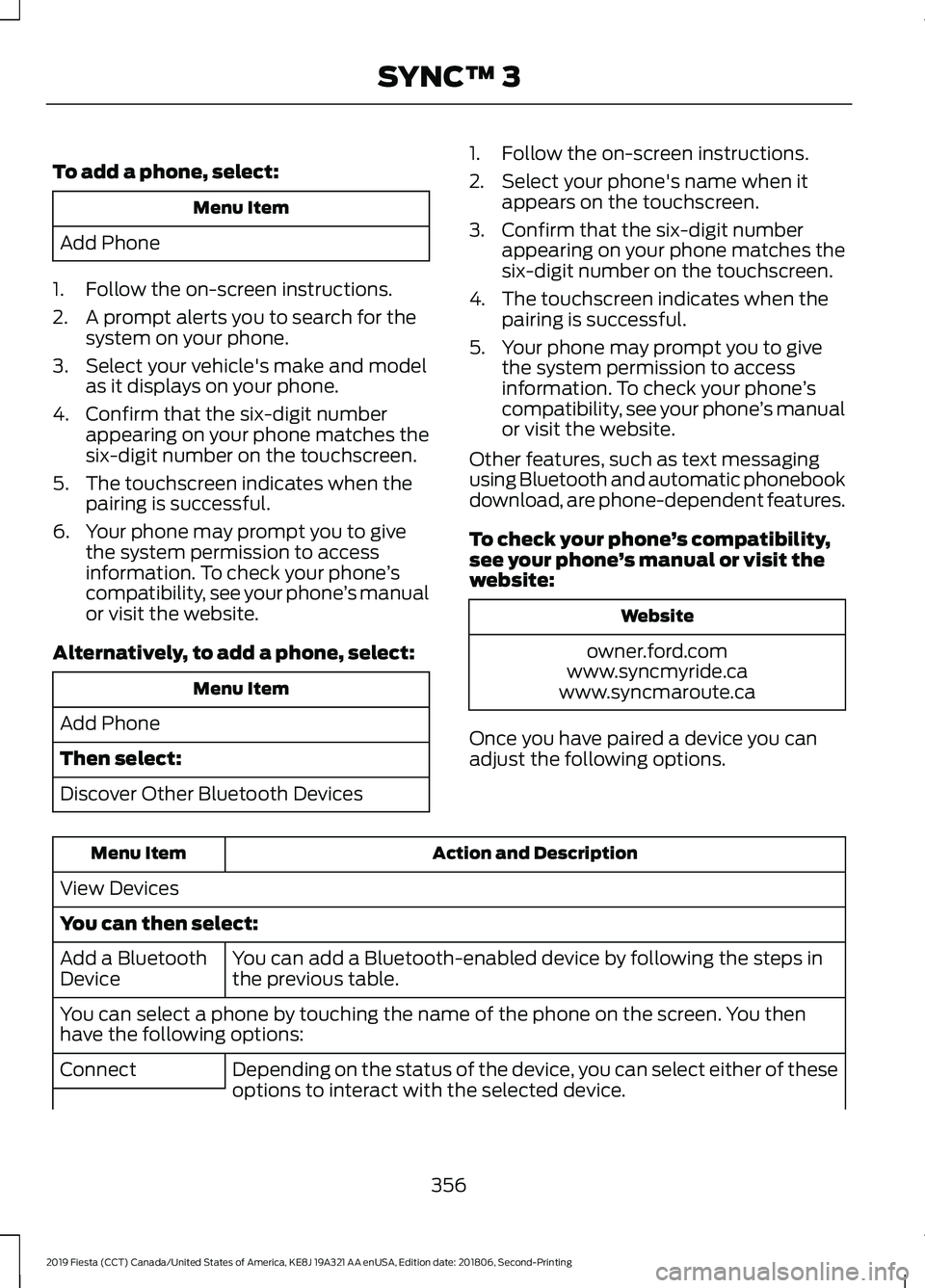
To add a phone, select:
Menu Item
Add Phone
1. Follow the on-screen instructions.
2. A prompt alerts you to search for the system on your phone.
3. Select your vehicle's make and model as it displays on your phone.
4. Confirm that the six-digit number appearing on your phone matches the
six-digit number on the touchscreen.
5. The touchscreen indicates when the pairing is successful.
6. Your phone may prompt you to give the system permission to access
information. To check your phone ’s
compatibility, see your phone ’s manual
or visit the website.
Alternatively, to add a phone, select: Menu Item
Add Phone
Then select:
Discover Other Bluetooth Devices 1. Follow the on-screen instructions.
2. Select your phone's name when it
appears on the touchscreen.
3. Confirm that the six-digit number appearing on your phone matches the
six-digit number on the touchscreen.
4. The touchscreen indicates when the pairing is successful.
5. Your phone may prompt you to give the system permission to access
information. To check your phone ’s
compatibility, see your phone ’s manual
or visit the website.
Other features, such as text messaging
using Bluetooth and automatic phonebook
download, are phone-dependent features.
To check your phone ’s compatibility,
see your phone ’s manual or visit the
website: Website
owner.ford.com
www.syncmyride.ca
www.syncmaroute.ca
Once you have paired a device you can
adjust the following options. Action and Description
Menu Item
View Devices
You can then select: You can add a Bluetooth-enabled device by following the steps in
the previous table.
Add a Bluetooth
Device
You can select a phone by touching the name of the phone on the screen. You then
have the following options:
Depending on the status of the device, you can select either of these
options to interact with the selected device.
Connect
356
2019 Fiesta (CCT) Canada/United States of America, KE8J 19A321 AA enUSA, Edition date: 201806, Second-Printing SYNC™ 3
Page 373 of 443
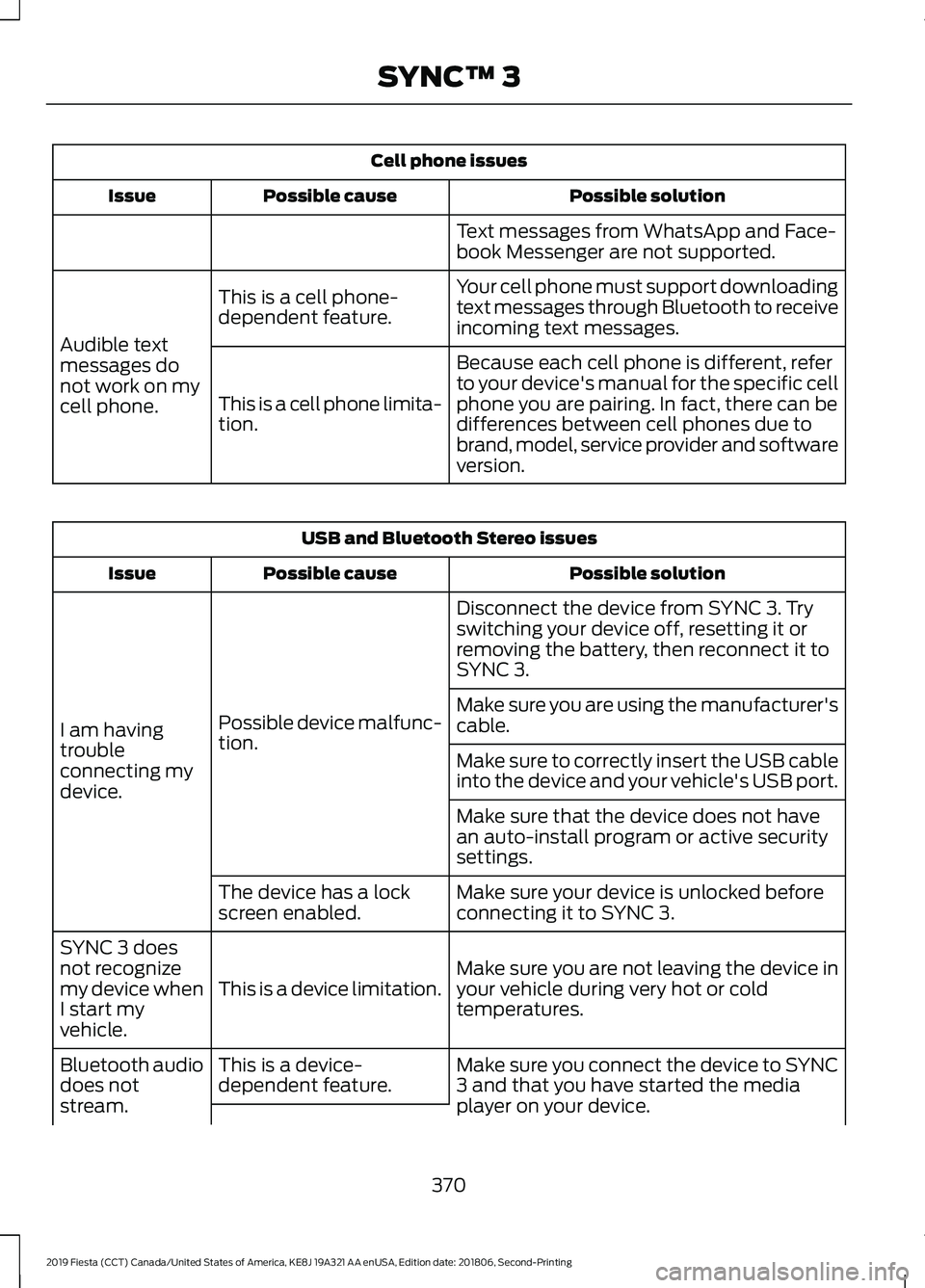
Cell phone issues
Possible solution
Possible cause
Issue
Text messages from WhatsApp and Face-
book Messenger are not supported.
Your cell phone must support downloading
text messages through Bluetooth to receive
incoming text messages.
This is a cell phone-
dependent feature.
Audible text
messages do
not work on my
cell phone. Because each cell phone is different, refer
to your device's manual for the specific cell
phone you are pairing. In fact, there can be
differences between cell phones due to
brand, model, service provider and software
version.
This is a cell phone limita-
tion. USB and Bluetooth Stereo issues
Possible solution
Possible cause
Issue
Disconnect the device from SYNC 3. Try
switching your device off, resetting it or
removing the battery, then reconnect it to
SYNC 3.
Possible device malfunc-
tion.
I am having
trouble
connecting my
device. Make sure you are using the manufacturer's
cable.
Make sure to correctly insert the USB cable
into the device and your vehicle's USB port.
Make sure that the device does not have
an auto-install program or active security
settings.
Make sure your device is unlocked before
connecting it to SYNC 3.
The device has a lock
screen enabled.
Make sure you are not leaving the device in
your vehicle during very hot or cold
temperatures.
This is a device limitation.
SYNC 3 does
not recognize
my device when
I start my
vehicle.
Make sure you connect the device to SYNC
3 and that you have started the media
player on your device.
This is a device-
dependent feature.
Bluetooth audio
does not
stream.
370
2019 Fiesta (CCT) Canada/United States of America, KE8J 19A321 AA enUSA, Edition date: 201806, Second-Printing SYNC™ 3
Page 440 of 443

Parking Brake.................................................134
All Vehicles............................................................ 134
Vehicles With Automatic Transmission................................................... 134
Vehicles With Manual Transmission...........134
Passive Anti-Theft System
.........................65
SecuriLock®........................................................... 65
PATS See: Passive Anti-Theft System..................... 65
Perchlorate........................................................13
Personalized Settings..................................88 Measure Units....................................................... 88
Switching Chimes Off........................................ 88
Personal Safety System ™
..........................37
How Does the Personal Safety System
Work?................................................................... 37
Phone...............................................................337 During a Phone Call.......................................... 340
Making Calls........................................................ 339
Pairing Your Cell Phone for the First Time................................................................... 337
Phone Menu........................................................ 338
Receiving Calls................................................... 340
Smartphone Connectivity............................... 341
Text Messaging.................................................... 341
Power Door Locks See: Locking and Unlocking.............................. 57
Power Windows...............................................77 Accessory Delay.................................................... 78
Bounce-Back
.......................................................... 77
One-Touch Close.................................................. 77
One-Touch Open.................................................. 77
Rear Window Lock................................................ 77
Protecting the Environment........................16
Puncture See: Changing a Road Wheel....................... 238
R
Rear Parking Aid
............................................139
Rear Seats.......................................................106 Folding the Seatback....................................... 106
Unfolding the Seatback................................... 107
Rear Under Floor Storage..........................149 Adjustable Load Floor...................................... 149
Rear View Camera
........................................142
Enhanced Park Aids or Park Pilot.................145
Manual Zoom....................................................... 144Switching the Rear View Camera Off.........144
Switching the Rear View Camera On..........143
System Settings..................................................
144
Using the Rear View Camera......................... 143
Rear View Camera See: Rear View Camera.................................... 142
Rear Window Wiper and Washers............71 Intermittent Wipe.................................................. 71
Rear Window Washer.......................................... 71
Reverse Gear Wipe................................................ 71
Rear Wiper Blades See: Changing the Rear Wiper Blades.......194
Refueling..........................................................120 Refueling System Overview........................... 120
Refueling System Warning.............................. 122
Refueling Your Vehicle...................................... 120
Remote Control...............................................47 Car Finder................................................................. 51
Integrated Keyhead Transmitter..................... 47
Intelligent Access Transmitter........................ 48
Programming a New Integrated Keyhead Transmitter........................................................ 48
Replacing the Battery......................................... 49
Reprogramming the Unlocking Function.............................................................. 48
Sounding a Panic Alarm..................................... 51
Remote Start
.................................................102
Removing a Headlamp..............................196
Repairing Minor Paint Damage...............216
Replacement Parts Recommendation........................................13
Collision Repairs.................................................... 14
Scheduled Maintenance and Mechanical Repairs.................................................................. 14
Warranty on Replacement Parts..................... 14
Replacing a Lost Key or Remote Control..............................................................51
Reporting Safety Defects (Canada Only)...............................................................170
Reporting Safety Defects (U.S. Only)...............................................................170
Roadside Assistance..................................160 Vehicles Sold in Canada: Getting Roadside
Assistance......................................................... 161
Vehicles Sold in the United States: Getting Roadside Assistance................................... 160
Vehicles Sold in the United States: Using Roadside Assistance................................... 160
437
2019 Fiesta (CCT) Canada/United States of America, KE8J 19A321 AA enUSA, Edition date: 201806, Second-Printing Index
Page 442 of 443

T
Tailgate
See: Manual Liftgate.......................................... 60
Technical Specifications See: Capacities and Specifications............243
The Better Business Bureau (BBB) Auto Line Program (U.S. Only)........................167
Tire Care...........................................................219
Glossary of Tire Terminology.......................... 221
Important information for 205/40R17 low-profile tires and wheels...................... 219
Information About Uniform Tire Quality Grading.............................................................. 219
Information Contained on the Tire Sidewall............................................................ 222
Temperature A B C............................................ 220
Traction AA A B C.............................................. 220
Treadwear............................................................ 220
Tire Pressure Monitoring System...........234 Changing Tires With a Tire Pressure
Monitoring System....................................... 236
Understanding Your Tire Pressure Monitoring System ...................................... 236
Tires See: Wheels and Tires...................................... 219
Towing a Trailer.............................................155
Towing the Vehicle on Four Wheels...........................................................155
Emergency Towing............................................. 155
Recreational Towing.......................................... 156
Towing..............................................................155
Traction Control
............................................136
Principle of Operation....................................... 136
Transmission Code Designation
.............247
Transmission Specifications - 5-Speed Manual Transmission..............................244
Transmission Specifications - Automatic Transmission..............................................243
Transmission..................................................128
Transporting the Vehicle............................155
Trip Computer
..................................................87
U
Under Hood Overview - 1.6L Duratec-16V Ti-VCT (Sigma).........................................183
USB Port
..........................................................272 Using Cruise Control...................................146
Switching Cruise Control Off......................... 146
Switching Cruise Control On.......................... 146
Using MyKey With Remote Start Systems..........................................................55
Using Snow Chains.....................................234
Using Stability Control...............................138
Using Summer Tires
...................................234
Using SYNC™ With Your Media Player............................................................294
Accessing Your USB Song Library...............298
Bluetooth Devices and System Settings............................................................ 300
Connecting Your Digital Media Player to the USB Port.......................................................... 294
Media Menu Features....................................... 297
Media Voice Commands................................ 295
USB 2..................................................................... 300
Voice Commands for Audio Sources..........301
Using SYNC™ With Your Phone.............277 Accessing Features through the Phone
Menu.................................................................. 282
Accessing Your Phone Settings................... 285
Bluetooth Devices............................................. 286
Making Calls......................................................... 281
Pairing a Phone for the First Time...............278
Pairing Subsequent Phones.......................... 279
Phone Options during an Active Call..........281
Phone Voice Commands................................ 279
Receiving Calls..................................................... 281
System Settings................................................. 287
Text Messaging................................................... 283
Using Traction Control
................................136
Switching the System Off............................... 136
System Indicator Lights and Messages.......................................................... 136
Using a Switch..................................................... 136
Using the Information Display Controls............................................................. 136
Using Voice Recognition............................275 Apps........................................................................\
326
Automatic Blower Motor Speed Reduction......................................................... 327
Climate Control.................................................. 323
Entertainment
..................................................... 322
General................................................................... 321
Initiating a Voice Session................................ 275
Navigation............................................................. 325
439
2019 Fiesta (CCT) Canada/United States of America, KE8J 19A321 AA enUSA, Edition date: 201806, Second-Printing Index