2019 FORD F-150 4WD
[x] Cancel search: 4WDPage 328 of 644

Engine Temperature while Plowing
Your engine may run at a higher
temperature than normal because the
attached snowplow blade restricts airflow
to the radiator:
•
If you are driving more than 15 mi
(24 km) at temperatures above
freezing, angle the plow blade either
full left or full right to provide
maximum airflow to the radiator.
• If you are driving less than
15 mi
(24 km) at speeds up to 45 mph
(72 km/h) in cold weather, you do not
need to worry about blade position to
provide maximum airflow.
Transmission Operation while
Plowing WARNING: Do not spin the wheels
at over
34 mph (55 km/h). The tires may
fail and injure a passenger or bystander.
• Shift transfer case to
4L (4WD Low)
when plowing in small areas at speeds
below
5 mph (8 km/h).
• Shift transfer case to
4H (4WD High)
when plowing larger areas or light snow
at higher speeds. Do not exceed 15 mph
(24 km/h)
.
• Do not shift the transmission from a
forward gear to
R (Reverse) until the
engine is at idle and the wheels have
stopped.
Outside Air Temperature While
Plowing
While plowing with your vehicle, the plow
blade can block the sensor airflow and
cause the outside air temperature reading
to be inaccurate. A Ford wiring kit is available to relocate the
Outside Air Temperature sensor to the
plow blade frame to provide more
accurate outside air temperature readings.
Contact an authorized dealer for more
information.
325
F-150 (TFC) Canada/United States of America, enUSA, Edition date: 201808, Third-Printing- Driving Hints
Page 412 of 644

11.
Set all four tires to the recommended
air pressure as indicated on the
Safety Compliance Certification
Label, affixed to either the door hinge
pillar, door-latch post, or the door
edge that meets the door-latch post,
next to the driver seating position or
Tire Label located on the B-Pillar or
the edge of the driver door.
CHANGING A ROAD WHEEL WARNING: If the tire pressure
monitor sensor becomes damaged it
may not function.
Note: The use of tire sealant may damage
your tire pressure monitoring system and
should only be used in roadside
emergencies.
Note: The tire pressure monitoring system
indicator light illuminates when the spare
tire is in use. To restore the full function of
the monitoring system, all road wheels
equipped with tire pressure monitoring
sensors must be mounted on this vehicle.
If you get a flat tire when driving, do not
apply the brake heavily. Instead, gradually
decrease your speed. Hold the steering
wheel firmly and slowly move to a safe
place on the side of the road.
Have a flat serviced by an authorized
dealer in order to prevent damage to the
system sensors.
See Tire Pressure
Monitoring System (page 403). Replace
the spare tire with a road tire as soon as
possible. During repairing or replacing of
the flat tire, have the authorized dealer
inspect the system sensor for damage. Dissimilar Spare Wheel and Tire
Assembly Information WARNING:
Failure to follow these
guidelines could result in an increased
risk of loss of vehicle control, injury or
death.
If you have a dissimilar spare wheel and
tire, then it is intended for temporary use
only. This means that if you need to use it,
you should replace it as soon as possible
with a road wheel and tire assembly that
is the same size and type as the road tires
and wheels that were originally provided
by Ford.
A dissimilar spare wheel and tire assembly
is defined as a spare wheel and tire
assembly that is different in brand, size or
appearance from the road tires and
wheels.
Full-size dissimilar spare
When driving with the full-size dissimilar
spare wheel and tire assembly, do not:
• Exceed
70 mph (113 km/h).
• Use more than one dissimilar spare
wheel and tire assembly at a time.
• Use snow chains on the end of the
vehicle with the dissimilar spare wheel
and tire assembly.
When driving with the full-size dissimilar
spare wheel and tire assembly, 4WD
functionality may be limited, especially
when driving in a mechanically locked 4WD
mode. You may experience the following:
• Additional noise from the transfer case
or other drive components.
• Difficulty shifting out of a mechanically
locked 4WD mode.
409
F-150 (TFC) Canada/United States of America, enUSA, Edition date: 201808, Third-Printing- Wheels and Tires
Page 413 of 644
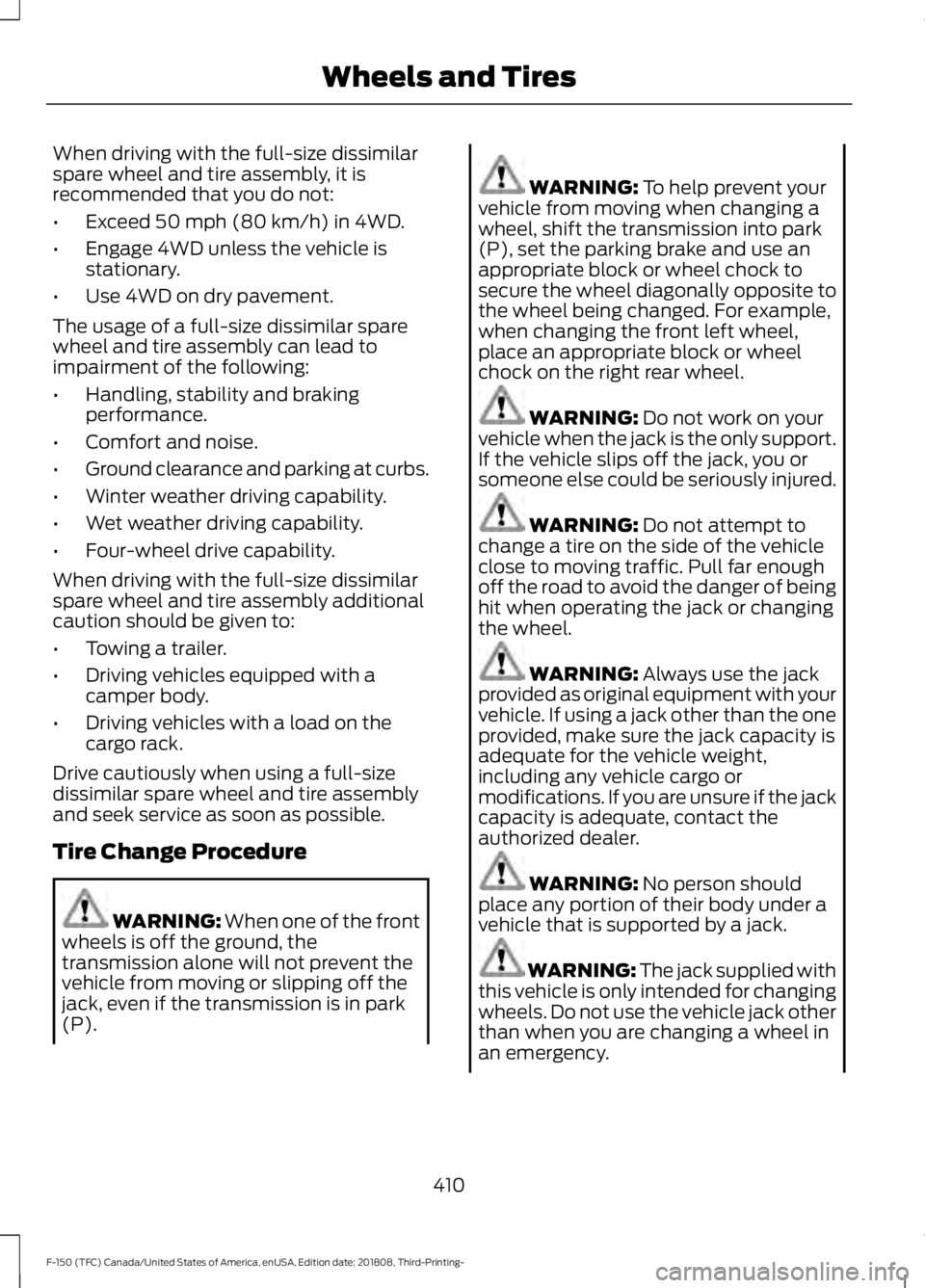
When driving with the full-size dissimilar
spare wheel and tire assembly, it is
recommended that you do not:
•
Exceed 50 mph (80 km/h) in 4WD.
• Engage 4WD unless the vehicle is
stationary.
• Use 4WD on dry pavement.
The usage of a full-size dissimilar spare
wheel and tire assembly can lead to
impairment of the following:
• Handling, stability and braking
performance.
• Comfort and noise.
• Ground clearance and parking at curbs.
• Winter weather driving capability.
• Wet weather driving capability.
• Four-wheel drive capability.
When driving with the full-size dissimilar
spare wheel and tire assembly additional
caution should be given to:
• Towing a trailer.
• Driving vehicles equipped with a
camper body.
• Driving vehicles with a load on the
cargo rack.
Drive cautiously when using a full-size
dissimilar spare wheel and tire assembly
and seek service as soon as possible.
Tire Change Procedure WARNING:
When one of the front
wheels is off the ground, the
transmission alone will not prevent the
vehicle from moving or slipping off the
jack, even if the transmission is in park
(P). WARNING:
To help prevent your
vehicle from moving when changing a
wheel, shift the transmission into park
(P), set the parking brake and use an
appropriate block or wheel chock to
secure the wheel diagonally opposite to
the wheel being changed. For example,
when changing the front left wheel,
place an appropriate block or wheel
chock on the right rear wheel. WARNING:
Do not work on your
vehicle when the jack is the only support.
If the vehicle slips off the jack, you or
someone else could be seriously injured. WARNING:
Do not attempt to
change a tire on the side of the vehicle
close to moving traffic. Pull far enough
off the road to avoid the danger of being
hit when operating the jack or changing
the wheel. WARNING:
Always use the jack
provided as original equipment with your
vehicle. If using a jack other than the one
provided, make sure the jack capacity is
adequate for the vehicle weight,
including any vehicle cargo or
modifications. If you are unsure if the jack
capacity is adequate, contact the
authorized dealer. WARNING:
No person should
place any portion of their body under a
vehicle that is supported by a jack. WARNING: The jack supplied with
this vehicle is only intended for changing
wheels. Do not use the vehicle jack other
than when you are changing a wheel in
an emergency.
410
F-150 (TFC) Canada/United States of America, enUSA, Edition date: 201808, Third-Printing- Wheels and Tires
Page 630 of 644

3
360 Degree Camera...................................246
Camera Views..................................................... 247
Front Camera...................................................... 248
Side Camera........................................................ 248
4
4WD See: Four-Wheel Drive...................................... 218
A
A/C See: Climate Control.......................................... 147
About This Manual
...........................................7
ABS See: Brakes........................................................... 228
ABS driving hints See: Hints on Driving With Anti-Lock
Brakes................................................................ 229
Accessories....................................................557 Exterior Style........................................................ 557
Interior Style......................................................... 557
Lifestyle.................................................................. 557
Peace of Mind..................................................... 558
Accessories See: Replacement Parts
Recommendation............................................ 14
ACC See: Using Adaptive Cruise Control...........250
Active Park Assist
........................................239
Automatic Steering into Parking
Space.................................................................. 241
Deactivating the Park Assist Feature.........242
Troubleshooting the System......................... 242
Using Active Park Assist................................. 240
Adjustable Pedals
.........................................90
Adjusting the Headlamps........................369 Horizontal Aim Adjustment........................... 370
Vertical Aim Adjustment................................ 369
Adjusting the Pedals....................................90
Adjusting the Steering Wheel - Vehicles With: Manual Adjustable Steering
Column...........................................................86 Adjusting the Steering Wheel - Vehicles
With: Power Adjustable Steering
Column...........................................................86
End of Travel Position......................................... 87
Memory Feature.................................................... 87
Airbag Disposal...............................................57
Air Conditioning See: Climate Control.......................................... 147
Air Filter See: Changing the Engine Air Filter -
Diesel................................................................. 374
See: Changing the Engine Air Filter - Gasoline............................................................ 374
Alarm See: Anti-Theft Alarm........................................ 83
Ambient Lighting
...........................................98
Adjusting the Brightness................................... 98
Switching Ambient Lighting Off..................... 98
Switching Ambient Lighting On..................... 98
Anti-Theft Alarm............................................83 Arming the Alarm................................................. 83
Disarming the Alarm........................................... 83
Using the System................................................. 83
Appendices...................................................586
Apps.................................................................526 ........................................................................\
.......... 526
SiriusXM Traffic and Travel Link................... 528
At a Glance........................................................18
Audible Warnings and Indicators.............114 Airbag Secondary Warning.............................. 114
Beltminder Warning............................................ 114
Door Ajar Warning............................................... 114
Headlamps On Warning................................... 114
Key in Ignition Warning...................................... 114
Keyless Warning Alert........................................ 114
Parking Brake On Warning............................... 115
Rear Park Aid Warning....................................... 114
Service AdvanceTrac Warning........................ 115
Audio Control...................................................87 Media........................................................................\
88
Seek, Next or Previous....................................... 88
Audio System
................................................453
General Information......................................... 453
Audio Unit - Vehicles With: Touchscreen Display..........................................................455
Adjusting the Volume...................................... 456
Changing Radio Stations............................... 456
Selecting the Audio Modes........................... 456
627
F-150 (TFC) Canada/United States of America, enUSA, Edition date: 201808, Third-Printing- Index
Page 637 of 644
Recommended Settings for Heating...........151
Hints on Driving With Anti-Lock Brakes............................................................229
Home Screen................................................492
Hood Lock See: Opening and Closing the Hood..........350
I
Ignition Switch................................................174
In California (U.S. Only).............................333
Information Display Control......................89
Information Displays
....................................116
General Information........................................... 116
Information Messages
................................128
4WD........................................................................\
. 145
Active Park............................................................ 129
Adaptive Cruise Control................................... 129
AdvanceTrac and Traction Control..............130
Airbag...................................................................... 130
Alarm and Security.............................................. 131
Battery and Charging System......................... 131
Blind Spot Information and Cross Traffic Alert System.................................................... 132
Diesel Messages.................................................. 132
Doors and Locks.................................................. 135
Driver Alert............................................................. 135
Drivetrain................................................................ 136
Engine..................................................................... 136
Fuel........................................................................\
.. 136
Keys and Intelligent Access............................. 137
Lane Keeping System....................................... 138
Maintenance........................................................ 138
MyKey...................................................................... 139
Off Road................................................................. 139
Park Aid.................................................................. 140
Park Brake............................................................. 140
Power Steering..................................................... 141
Pre-Collision Assist............................................. 141
Pro Trailer Backup Assist................................. 142
Remote Start........................................................ 143
Seats........................................................................\
143
Side-Wind.............................................................. 143
Starting System ................................................. 144
Tire Pressure Monitoring System.................144
Trailer...................................................................... 144
Installing Child Restraints...........................22 Child Seats.............................................................. 22Combining Seatbelt and LATCH Lower
Anchors for Attaching Child Safety
Seats.................................................................... 30
Front Seat Tether Strap Attachment (Regular Cab).................................................... 31
Rear Seat Tether Strap Attachment (Crew Cab and Super Cab)....................................... 32
Use of Inboard Lower Anchors from the Outermost Seating Positions (Center
Seating Use) .................................................... 30
Using Inflatable Seatbelts (Rear Seat Outermost Positions).................................... 26
Using Lap and Shoulder Belts (Except Front Center Position of Super Cab and Crew
Cab)...................................................................... 22
Using Lap and Shoulder Belts (Front Center Position of Super Cab and Crew
Cab)...................................................................... 24
Using Lower Anchors and Tethers for CHildren (LATCH)........................................... 29
Using Tether Straps............................................ 30
Instrument Cluster
.......................................107
Instrument Lighting Dimmer.....................94
Instrument Panel
............................................18
Interior Lamps.................................................97
Front Interior Lamp.............................................. 97
Rear Interior Lamps............................................ 98
Interior Mirror
.................................................104
Automatic Dimming Mirror............................. 105
Manual Dimming Mirror................................... 104
Introduction.........................................................7
J
Jump Starting the Vehicle........................328 Connecting the Jumper Cables.................... 328
Jump Starting...................................................... 329
Preparing Your Vehicle..................................... 328
Removing the Jumper Cables....................... 329
K
Keyless Entry....................................................73 SECURICODE™ KEYLESS ENTRY
KEYPAD............................................................... 73
Keyless Starting
.............................................175
Ignition Modes...................................................... 175
Keys and Remote Controls.........................58
634
F-150 (TFC) Canada/United States of America, enUSA, Edition date: 201808, Third-Printing- Index
Page 643 of 644

Using Cruise Control...................................249
Canceling the Set Speed................................ 250
Changing the Set Speed................................. 249
Resuming the Set Speed................................ 250
Setting the Cruise Speed................................ 249
Switching Cruise Control Off........................ 250
Switching Cruise Control On......................... 249
Using Four-Wheel Drive.............................218 4WD Indicator Lights........................................ 218
Driving Off-Road With Truck and Utility Vehicles............................................................. 222
How Your Vehicle Differs From Other Vehicles.............................................................. 221
Using the 2-Speed Automatic 4WD System............................................................... 219
Using the Electronic Shift on the Fly 4WD system................................................................ 218
Using Hill Descent Control.......................236 Hill descent modes........................................... 236
Using MyKey With Remote Start Systems..........................................................68
Using Power Running Boards....................84
Automatic Power Deploy.................................. 84
Automatic Power Stow..................................... 84
Bounce-back......................................................... 85
Enabling and Disabling...................................... 85
Manual Power Deploy........................................ 84
Using Snow Chains.....................................402
Using Stability Control...............................234 AdvanceTrac ™ with Roll Stability Control ™
(RSC™)............................................................ 234
Using SYNC™ With Your Media Player..............................................................471
Audio Voice Commands................................... 471
Media Sources...................................................... 471
Using SYNC™ With Your Phone...........466 Accessing Features through the Phone
Menu.................................................................. 467
Pairing a Phone.................................................. 466
Phone Controls................................................... 467
Phone Voice Commands................................ 467
Using Traction Control...............................232 Switching the System Off .............................. 232
System Indicator Lights and Messages......................................................... 232
Using Voice Recognition...........................464 Audio Voice Commands................................. 494Climate Voice Commands.............................
495
Initiating a Voice Session............................... 464
Mobile App Voice Commands..................... 498
Navigation Voice Commands....................... 497
Phone Voice Commands................................ 495
SiriusXM Traffic and Travel Link Voice Commands..................................................... 498
System Interaction and Feedback..............465
Voice Settings Commands............................ 499
Utilizing the Mediation/Arbitration Program (Canada Only)
........................335
V
Vehicle Care....................................................377 General Information.......................................... 377
Vehicle Certification Label.......................426
Vehicle Identification Number................425
Vehicle Storage............................................383 Battery................................................................... 384
Body....................................................................... 384
Brakes.................................................................... 384
Cooling system................................................... 384
Engine.................................................................... 384
Fuel system......................................................... 384
General.................................................................. 384
Miscellaneous..................................................... 385
Removing Vehicle From Storage.................385
Tires........................................................................\
384
Ventilated Seats
...........................................164
Ventilation See: Climate Control.......................................... 147
VIN See: Vehicle Identification Number............425
Voice Control
...................................................88
W
Warning Lamps and Indicators................110 Adaptive Cruise Control Indicator.................110
Anti-Lock Braking System............................... 110
Automatic Headlamp High Beam Indicator............................................................. 110
Automatic Regen Control Off......................... 110
Auto-Start-Stop Indicator............................... 110
Battery....................................................................... 111
Blind Spot Monitor............................................... 111
Brake System Warning Lamp........................... 111
640
F-150 (TFC) Canada/United States of America, enUSA, Edition date: 201808, Third-Printing- Index