2019 FORD EXPEDITION warning light
[x] Cancel search: warning lightPage 380 of 583
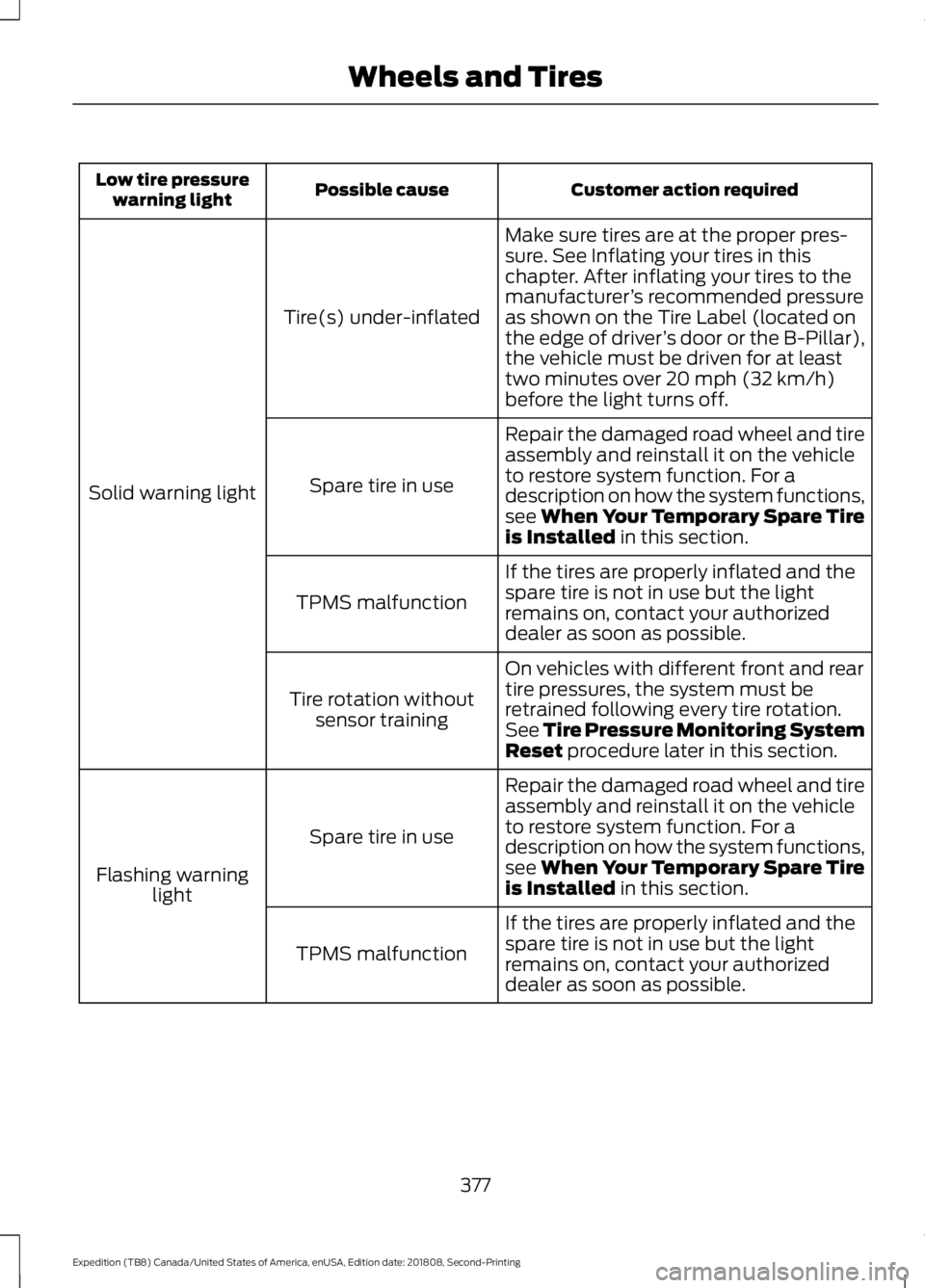
Customer action required
Possible cause
Low tire pressure
warning light
Make sure tires are at the proper pres-
sure. See Inflating your tires in this
chapter. After inflating your tires to the
manufacturer’s recommended pressure
as shown on the Tire Label (located on
the edge of driver ’s door or the B-Pillar),
the vehicle must be driven for at least
two minutes over 20 mph (32 km/h)
before the light turns off.
Tire(s) under-inflated
Solid warning light Repair the damaged road wheel and tire
assembly and reinstall it on the vehicle
to restore system function. For a
description on how the system functions,
see When Your Temporary Spare Tire
is Installed
in this section.
Spare tire in use
If the tires are properly inflated and the
spare tire is not in use but the light
remains on, contact your authorized
dealer as soon as possible.
TPMS malfunction
On vehicles with different front and rear
tire pressures, the system must be
retrained following every tire rotation.
See Tire Pressure Monitoring System
Reset
procedure later in this section.
Tire rotation without
sensor training
Repair the damaged road wheel and tire
assembly and reinstall it on the vehicle
to restore system function. For a
description on how the system functions,
see When Your Temporary Spare Tire
is Installed
in this section.
Spare tire in use
Flashing warning light
If the tires are properly inflated and the
spare tire is not in use but the light
remains on, contact your authorized
dealer as soon as possible.
TPMS malfunction
377
Expedition (TB8) Canada/United States of America, enUSA, Edition date: 201808, Second-Printing Wheels and Tires
Page 381 of 583
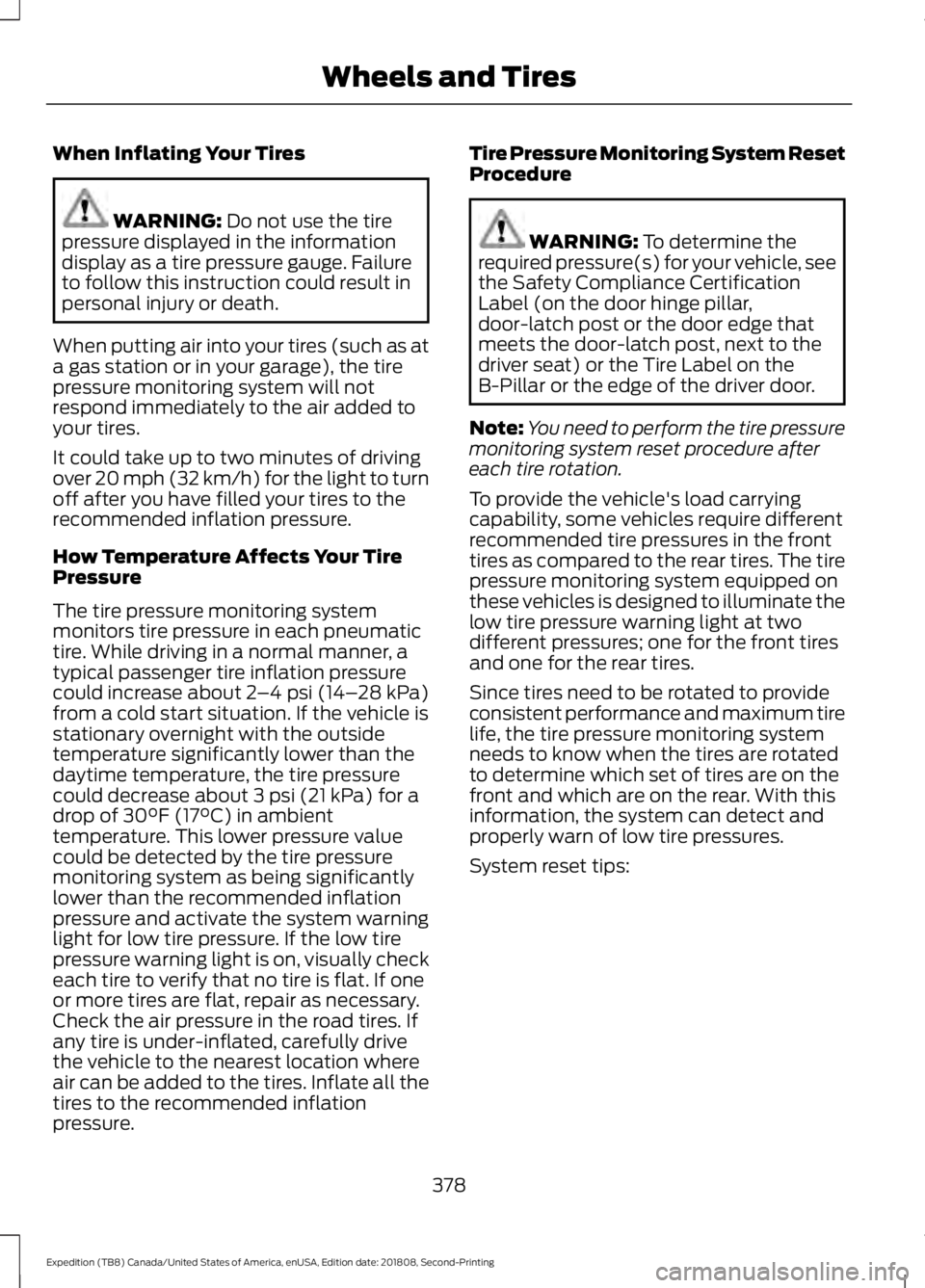
When Inflating Your Tires
WARNING: Do not use the tire
pressure displayed in the information
display as a tire pressure gauge. Failure
to follow this instruction could result in
personal injury or death.
When putting air into your tires (such as at
a gas station or in your garage), the tire
pressure monitoring system will not
respond immediately to the air added to
your tires.
It could take up to two minutes of driving
over 20 mph (32 km/h) for the light to turn
off after you have filled your tires to the
recommended inflation pressure.
How Temperature Affects Your Tire
Pressure
The tire pressure monitoring system
monitors tire pressure in each pneumatic
tire. While driving in a normal manner, a
typical passenger tire inflation pressure
could increase about
2 –4 psi (14– 28 kPa)
from a cold start situation. If the vehicle is
stationary overnight with the outside
temperature significantly lower than the
daytime temperature, the tire pressure
could decrease about
3 psi (21 kPa) for a
drop of 30°F (17°C) in ambient
temperature. This lower pressure value
could be detected by the tire pressure
monitoring system as being significantly
lower than the recommended inflation
pressure and activate the system warning
light for low tire pressure. If the low tire
pressure warning light is on, visually check
each tire to verify that no tire is flat. If one
or more tires are flat, repair as necessary.
Check the air pressure in the road tires. If
any tire is under-inflated, carefully drive
the vehicle to the nearest location where
air can be added to the tires. Inflate all the
tires to the recommended inflation
pressure. Tire Pressure Monitoring System Reset
Procedure WARNING:
To determine the
required pressure(s) for your vehicle, see
the Safety Compliance Certification
Label (on the door hinge pillar,
door-latch post or the door edge that
meets the door-latch post, next to the
driver seat) or the Tire Label on the
B-Pillar or the edge of the driver door.
Note: You need to perform the tire pressure
monitoring system reset procedure after
each tire rotation.
To provide the vehicle's load carrying
capability, some vehicles require different
recommended tire pressures in the front
tires as compared to the rear tires. The tire
pressure monitoring system equipped on
these vehicles is designed to illuminate the
low tire pressure warning light at two
different pressures; one for the front tires
and one for the rear tires.
Since tires need to be rotated to provide
consistent performance and maximum tire
life, the tire pressure monitoring system
needs to know when the tires are rotated
to determine which set of tires are on the
front and which are on the rear. With this
information, the system can detect and
properly warn of low tire pressures.
System reset tips:
378
Expedition (TB8) Canada/United States of America, enUSA, Edition date: 201808, Second-Printing Wheels and Tires
Page 383 of 583
11.
Set all four tires to the recommended
air pressure as indicated on the
Safety Compliance Certification
Label, affixed to either the door hinge
pillar, door-latch post, or the door
edge that meets the door-latch post,
next to the driver seating position or
Tire Label located on the B-Pillar or
the edge of the driver door.
CHANGING A ROAD WHEEL WARNING: If the tire pressure
monitor sensor becomes damaged it
may not function.
Note: You should only use tire sealants in
roadside emergencies as they may cause
damage to the tire pressure monitoring
system sensor.
Note: The tire pressure monitoring system
indicator light illuminates when the spare
tire is in use. To restore the full function of
the monitoring system, all road wheels
equipped with tire pressure monitoring
sensors must be mounted on this vehicle.
If you get a flat tire when driving, do not
apply the brake heavily. Instead, gradually
decrease your speed. Hold the steering
wheel firmly and slowly move to a safe
place on the side of the road.
Have a flat serviced by an authorized
dealer in order to prevent damage to the
system sensors.
See Tire Pressure
Monitoring System (page 374). Replace
the spare tire with a road tire as soon as
possible. During repairing or replacing of
the flat tire, have the authorized dealer
inspect the system sensor for damage. Dissimilar Spare Wheel and Tire
Assembly Information WARNING:
Failure to follow these
guidelines could result in an increased
risk of loss of vehicle control, injury or
death.
If you have a dissimilar spare wheel and
tire, then it is intended for temporary use
only. This means that if you need to use it,
you should replace it as soon as possible
with a road wheel and tire assembly that
is the same size and type as the road tires
and wheels that were originally provided.
If the dissimilar spare tire or wheel is
damaged, it should be replaced rather than
repaired.
A dissimilar spare wheel and tire assembly
is defined as a spare wheel and tire
assembly that is different in brand, size or
appearance from the road tires and
wheels.
Full-size dissimilar spare
When driving with the full-size dissimilar
spare wheel and tire assembly, do not:
• Exceed
70 mph (113 km/h).
• Use more than one dissimilar spare
wheel and tire assembly at a time.
• Use snow chains on the end of the
vehicle with the dissimilar spare wheel
and tire assembly.
When driving with the full-size dissimilar
spare wheel and tire assembly, it is
recommended that you do not:
• Exceed
50 mph (80 km/h) in 4WD.
• Engage 4WD unless the vehicle is
stationary.
• Use 4WD on dry pavement.
380
Expedition (TB8) Canada/United States of America, enUSA, Edition date: 201808, Second-Printing Wheels and Tires
Page 386 of 583
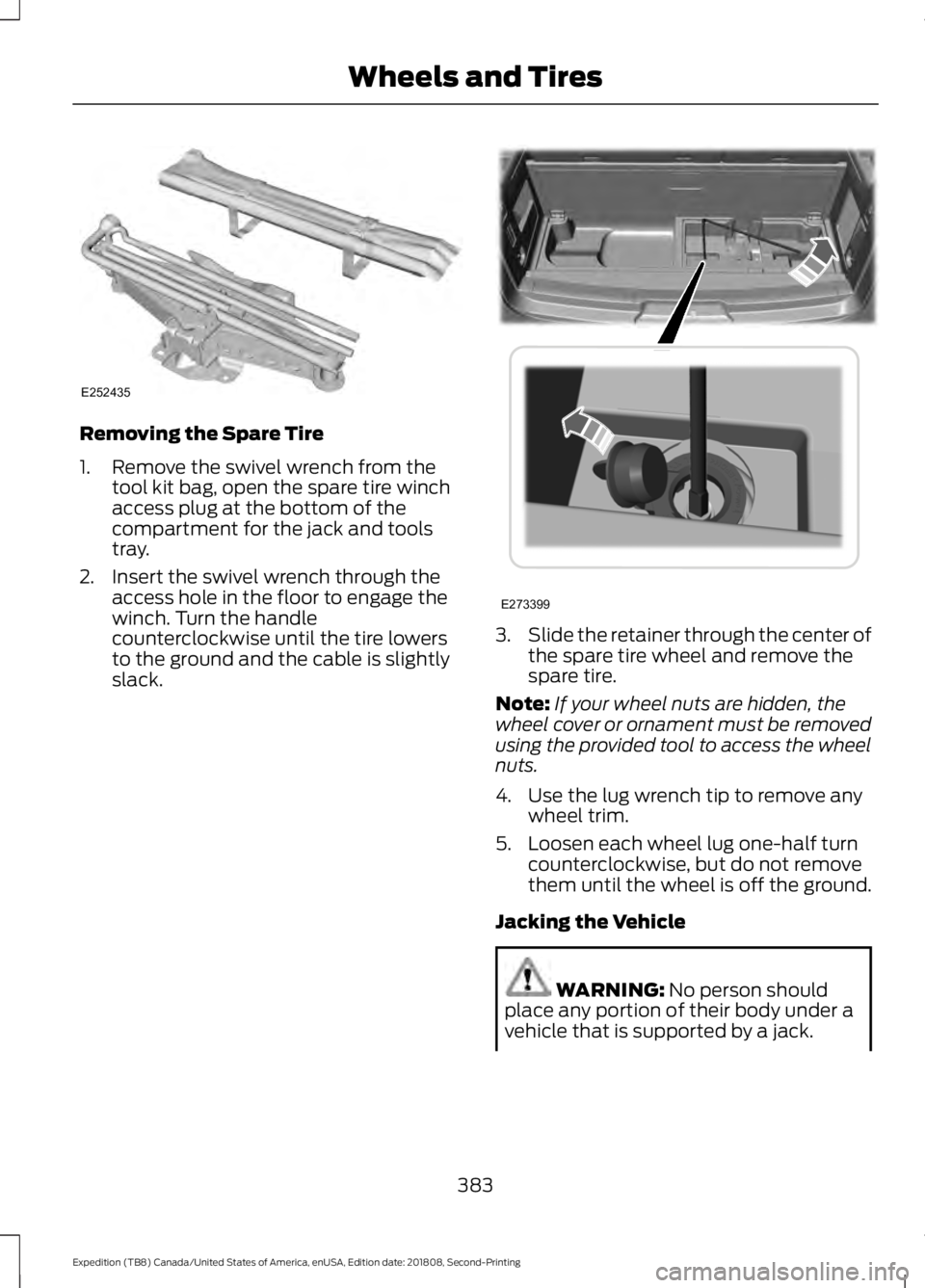
Removing the Spare Tire
1. Remove the swivel wrench from the
tool kit bag, open the spare tire winch
access plug at the bottom of the
compartment for the jack and tools
tray.
2. Insert the swivel wrench through the access hole in the floor to engage the
winch. Turn the handle
counterclockwise until the tire lowers
to the ground and the cable is slightly
slack. 3.
Slide the retainer through the center of
the spare tire wheel and remove the
spare tire.
Note: If your wheel nuts are hidden, the
wheel cover or ornament must be removed
using the provided tool to access the wheel
nuts.
4. Use the lug wrench tip to remove any wheel trim.
5. Loosen each wheel lug one-half turn counterclockwise, but do not remove
them until the wheel is off the ground.
Jacking the Vehicle WARNING: No person should
place any portion of their body under a
vehicle that is supported by a jack.
383
Expedition (TB8) Canada/United States of America, enUSA, Edition date: 201808, Second-Printing Wheels and TiresE252435 E273399
Page 402 of 583

Always handle discs by their edges only.
Clean the disc with an approved CD
cleaner only. Wipe it from the center of
the disc toward the edge. Do not clean in
a circular motion.
Do not expose discs to direct sunlight or
heat sources for extended periods.
MP3 and WMA Track and Folder
Structure
Audio systems capable of recognizing and
playing MP3 and WMA individual tracks
and folder structures work as follows:
•
There are two different modes for MP3
and WMA disc playback: MP3 and
WMA track mode (system default) and
MP3 and WMA folder mode.
• MP3 and WMA track mode ignores any
folder structure on the MP3 and WMA
disc. The player numbers each MP3
and WMA track on the disc (noted by
the MP3 or WMA file extension) from
T001 to a maximum of T255. The
maximum number of playable MP3 and
WMA files may be less depending on
the structure of the CD and exact
model of radio present.
• MP3 and WMA folder mode represents
a folder structure consisting of one
level of folders. The CD player numbers
all MP3 and WMA tracks on the disc
(noted by the MP3 or WMA file
extension) and all folders containing
MP3 and WMA files, from F001 (folder)
T001 (track) to F253 T255.
• Creating discs with only one level of
folders helps with navigation through
the disc files.
If you are burning your own MP3 and WMA
discs, it is important to understand how
the system reads the structures you create.
While various files may be present (files
with extensions other than MP3 and
WMA), only files with the MP3 and WMA extension are played; other files are
ignored by the system. This enables you to
use the same MP3 and WMA disc for a
variety of tasks on your work computer,
home computer and your in-vehicle
system.
In track mode, the system displays and
plays the structure as if it were only one
level deep (all MP3 and WMA files play,
regardless of being in a specific folder). In
folder mode, the system only plays the
MP3 and WMA files in the current folder.
AUDIO UNIT - VEHICLES
WITHOUT: TOUCHSCREEN
DISPLAY
WARNING: Driving while
distracted can result in loss of vehicle
control, crash and injury. We strongly
recommend that you use extreme
caution when using any device that may
take your focus off the road. Your
primary responsibility is the safe
operation of your vehicle. We
recommend against the use of any
hand-held device while driving and
encourage the use of voice-operated
systems when possible. Make sure you
are aware of all applicable local laws
that may affect the use of electronic
devices while driving.
Note: Some features, such as satellite
radio, may not be available in your location.
Check with an authorized dealer.
Accessing the Apps Menu Press and release the button to
access the apps menu. Follow
the on-screen prompts to make
your selection.
399
Expedition (TB8) Canada/United States of America, enUSA, Edition date: 201808, Second-Printing Audio SystemE249410
Page 570 of 583
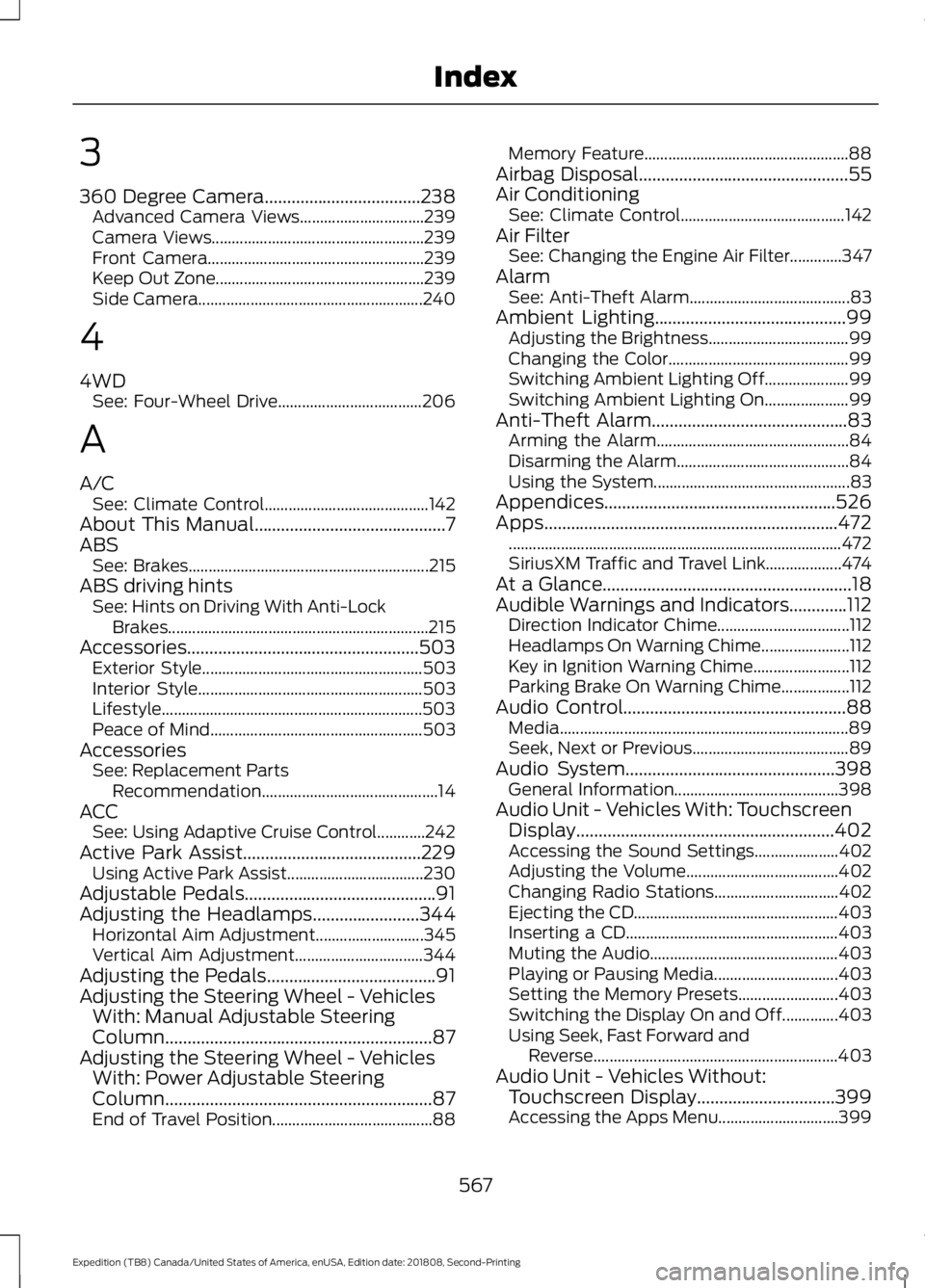
3
360 Degree Camera...................................238
Advanced Camera Views............................... 239
Camera Views..................................................... 239
Front Camera...................................................... 239
Keep Out Zone.................................................... 239
Side Camera........................................................ 240
4
4WD See: Four-Wheel Drive.................................... 206
A
A/C See: Climate Control......................................... 142
About This Manual...........................................7
ABS See: Brakes............................................................ 215
ABS driving hints See: Hints on Driving With Anti-Lock
Brakes................................................................. 215
Accessories....................................................503 Exterior Style....................................................... 503
Interior Style........................................................ 503
Lifestyle................................................................. 503
Peace of Mind..................................................... 503
Accessories See: Replacement Parts
Recommendation............................................ 14
ACC See: Using Adaptive Cruise Control............242
Active Park Assist........................................229 Using Active Park Assist.................................. 230
Adjustable Pedals...........................................91
Adjusting the Headlamps........................344 Horizontal Aim Adjustment........................... 345
Vertical Aim Adjustment................................ 344
Adjusting the Pedals......................................91
Adjusting the Steering Wheel - Vehicles With: Manual Adjustable Steering
Column............................................................87
Adjusting the Steering Wheel - Vehicles With: Power Adjustable Steering
Column............................................................87
End of Travel Position........................................ 88Memory Feature...................................................
88
Airbag Disposal...............................................55
Air Conditioning See: Climate Control......................................... 142
Air Filter See: Changing the Engine Air Filter.............347
Alarm See: Anti-Theft Alarm........................................ 83
Ambient Lighting
...........................................99
Adjusting the Brightness................................... 99
Changing the Color............................................. 99
Switching Ambient Lighting Off..................... 99
Switching Ambient Lighting On..................... 99
Anti-Theft Alarm............................................83 Arming the Alarm................................................ 84
Disarming the Alarm........................................... 84
Using the System................................................. 83
Appendices....................................................526
Apps..................................................................472 ........................................................................\
........... 472
SiriusXM Traffic and Travel Link................... 474
At a Glance........................................................18
Audible Warnings and Indicators.............112 Direction Indicator Chime................................. 112
Headlamps On Warning Chime...................... 112
Key in Ignition Warning Chime........................ 112
Parking Brake On Warning Chime.................112
Audio Control
..................................................88
Media........................................................................\
89
Seek, Next or Previous....................................... 89
Audio System
...............................................398
General Information......................................... 398
Audio Unit - Vehicles With: Touchscreen Display..........................................................402
Accessing the Sound Settings..................... 402
Adjusting the Volume...................................... 402
Changing Radio Stations............................... 402
Ejecting the CD................................................... 403
Inserting a CD..................................................... 403
Muting the Audio............................................... 403
Playing or Pausing Media............................... 403
Setting the Memory Presets......................... 403
Switching the Display On and Off..............403
Using Seek, Fast Forward and Reverse............................................................. 403
Audio Unit - Vehicles Without: Touchscreen Display
...............................399
Accessing the Apps Menu.............................. 399
567
Expedition (TB8) Canada/United States of America, enUSA, Edition date: 201808, Second-Printing Index
Page 576 of 583
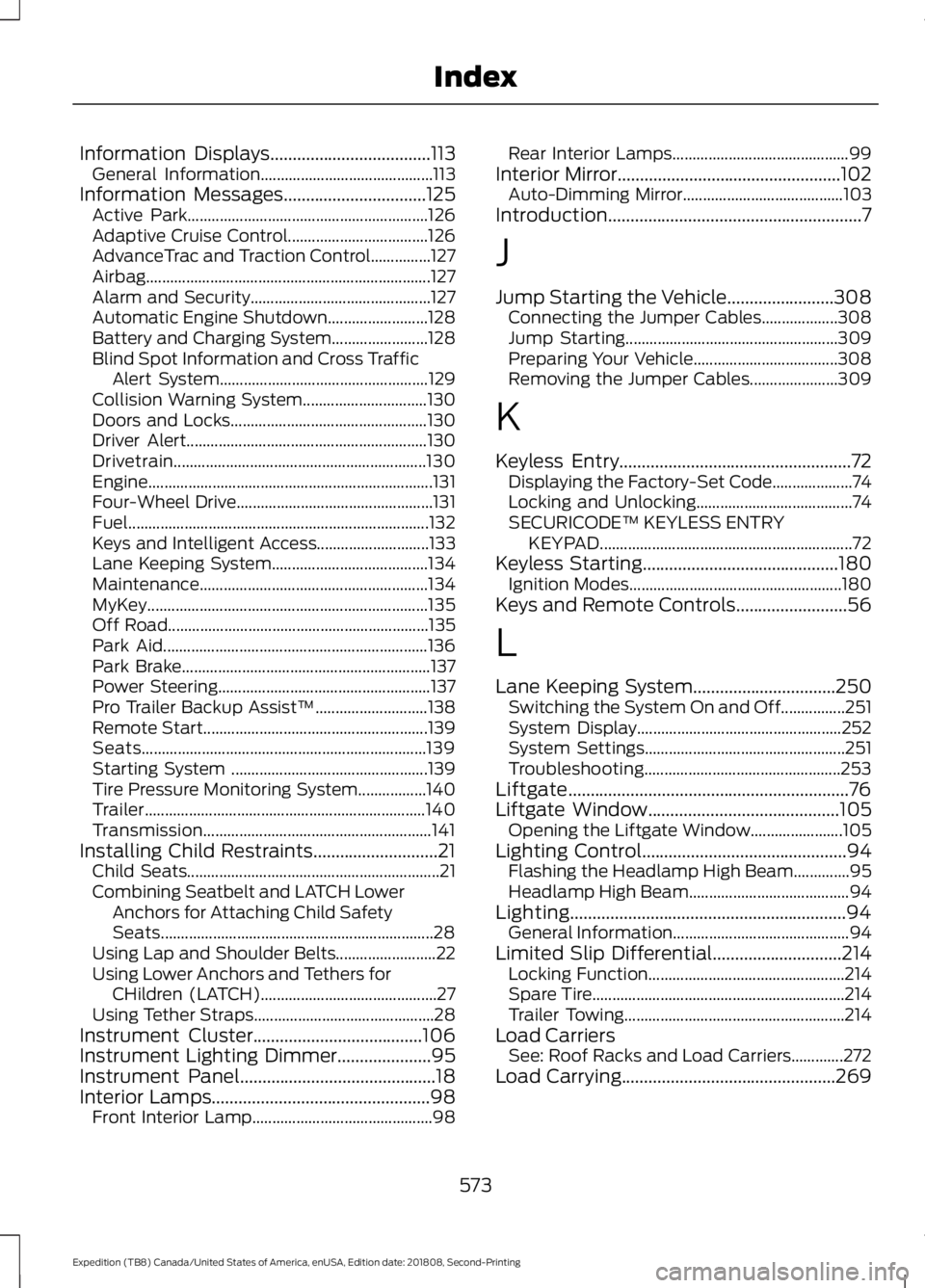
Information Displays....................................113
General Information........................................... 113
Information Messages
................................125
Active Park............................................................ 126
Adaptive Cruise Control................................... 126
AdvanceTrac and Traction Control...............127
Airbag....................................................................... 127
Alarm and Security............................................. 127
Automatic Engine Shutdown......................... 128
Battery and Charging System........................ 128
Blind Spot Information and Cross Traffic Alert System.................................................... 129
Collision Warning System............................... 130
Doors and Locks................................................. 130
Driver Alert............................................................ 130
Drivetrain............................................................... 130
Engine....................................................................... 131
Four-Wheel Drive................................................. 131
Fuel........................................................................\
... 132
Keys and Intelligent Access............................ 133
Lane Keeping System....................................... 134
Maintenance......................................................... 134
MyKey...................................................................... 135
Off Road................................................................. 135
Park Aid.................................................................. 136
Park Brake.............................................................. 137
Power Steering..................................................... 137
Pro Trailer Backup Assist™............................ 138
Remote Start........................................................ 139
Seats....................................................................... 139
Starting System ................................................. 139
Tire Pressure Monitoring System.................140
Trailer...................................................................... 140
Transmission......................................................... 141
Installing Child Restraints............................21 Child Seats............................................................... 21
Combining Seatbelt and LATCH Lower Anchors for Attaching Child Safety
Seats.................................................................... 28
Using Lap and Shoulder Belts......................... 22
Using Lower Anchors and Tethers for CHildren (LATCH)............................................ 27
Using Tether Straps............................................. 28
Instrument Cluster
......................................106
Instrument Lighting Dimmer.....................95
Instrument Panel
............................................18
Interior Lamps.................................................98 Front Interior Lamp............................................. 98Rear Interior Lamps............................................
99
Interior Mirror
..................................................102
Auto-Dimming Mirror........................................ 103
Introduction.........................................................7
J
Jump Starting the Vehicle........................308 Connecting the Jumper Cables................... 308
Jump Starting..................................................... 309
Preparing Your Vehicle.................................... 308
Removing the Jumper Cables...................... 309
K
Keyless Entry
....................................................72
Displaying the Factory-Set Code.................... 74
Locking and Unlocking....................................... 74
SECURICODE™ KEYLESS ENTRY KEYPAD............................................................... 72
Keyless Starting
............................................180
Ignition Modes..................................................... 180
Keys and Remote Controls.........................56
L
Lane Keeping System
................................250
Switching the System On and Off................251
System Display................................................... 252
System Settings.................................................. 251
Troubleshooting................................................. 253
Liftgate...............................................................76
Liftgate Window
...........................................105
Opening the Liftgate Window....................... 105
Lighting Control
..............................................94
Flashing the Headlamp High Beam..............95
Headlamp High Beam........................................ 94
Lighting..............................................................94 General Information............................................ 94
Limited Slip Differential.............................214 Locking Function................................................. 214
Spare Tire............................................................... 214
Trailer Towing....................................................... 214
Load Carriers See: Roof Racks and Load Carriers.............272
Load Carrying
................................................269
573
Expedition (TB8) Canada/United States of America, enUSA, Edition date: 201808, Second-Printing Index
Page 580 of 583
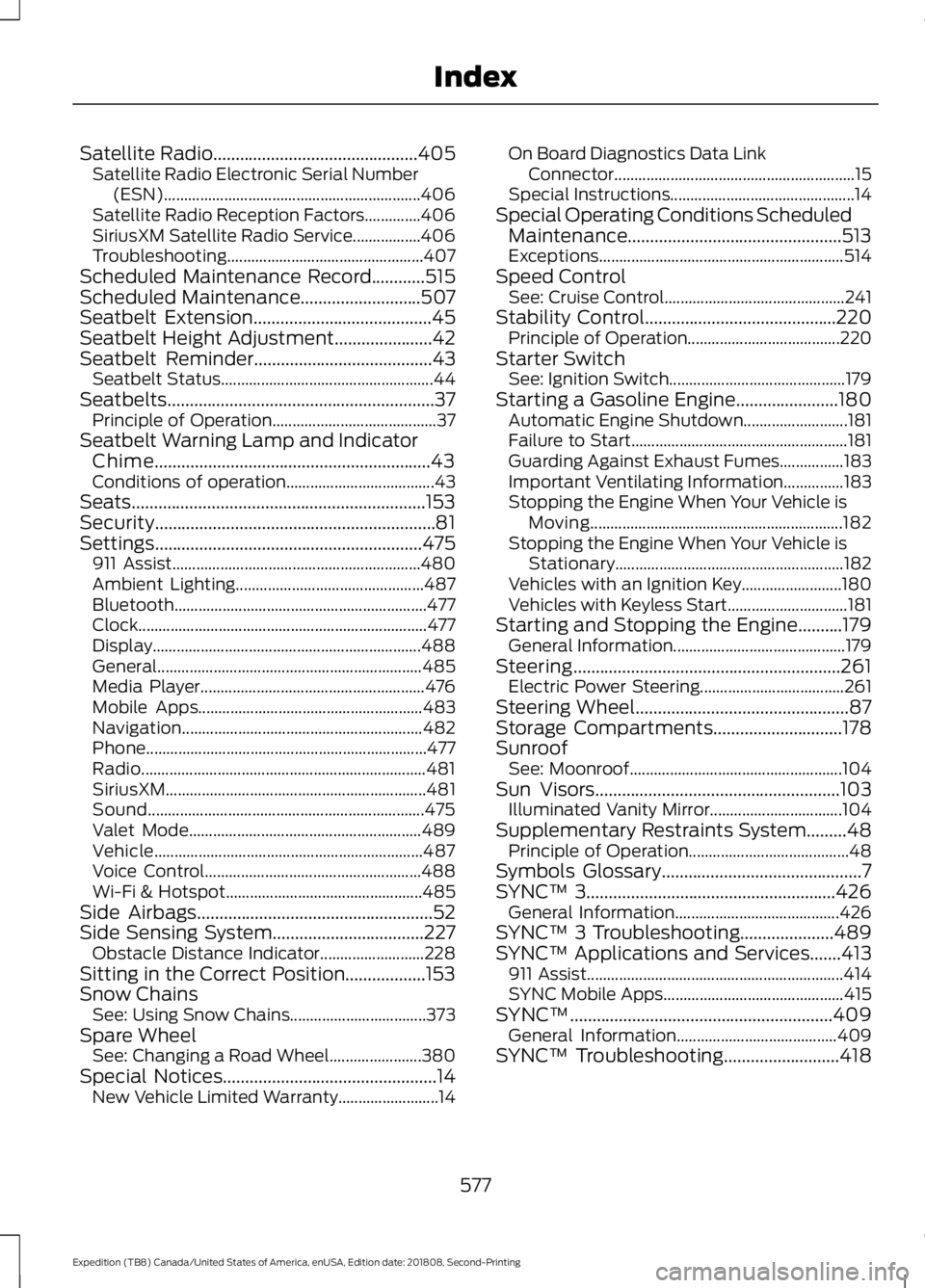
Satellite Radio..............................................405
Satellite Radio Electronic Serial Number
(ESN)................................................................ 406
Satellite Radio Reception Factors..............406
SiriusXM Satellite Radio Service.................406
Troubleshooting................................................. 407
Scheduled Maintenance Record
............515
Scheduled Maintenance...........................507
Seatbelt Extension........................................45
Seatbelt Height Adjustment
......................42
Seatbelt Reminder........................................43
Seatbelt Status..................................................... 44
Seatbelts............................................................37 Principle of Operation......................................... 37
Seatbelt Warning Lamp and Indicator Chime..............................................................43
Conditions of operation..................................... 43
Seats..................................................................153
Security...............................................................81
Settings ............................................................
475
911 Assist.............................................................. 480
Ambient Lighting............................................... 487
Bluetooth............................................................... 477
Clock........................................................................\
477
Display................................................................... 488
General.................................................................. 485
Media Player........................................................ 476
Mobile Apps........................................................ 483
Navigation............................................................ 482
Phone...................................................................... 477
Radio....................................................................... 481
SiriusXM................................................................. 481
Sound..................................................................... 475
Valet Mode.......................................................... 489
Vehicle................................................................... 487
Voice Control...................................................... 488
Wi-Fi & Hotspot................................................. 485
Side Airbags.....................................................52
Side Sensing System
..................................227
Obstacle Distance Indicator.......................... 228
Sitting in the Correct Position..................153
Snow Chains See: Using Snow Chains.................................. 373
Spare Wheel See: Changing a Road Wheel....................... 380
Special Notices
................................................14
New Vehicle Limited Warranty......................... 14On Board Diagnostics Data Link
Connector............................................................ 15
Special Instructions.............................................. 14
Special Operating Conditions Scheduled Maintenance................................................513
Exceptions............................................................. 514
Speed Control See: Cruise Control............................................. 241
Stability Control...........................................220 Principle of Operation...................................... 220
Starter Switch See: Ignition Switch............................................ 179
Starting a Gasoline Engine.......................180 Automatic Engine Shutdown.......................... 181
Failure to Start...................................................... 181
Guarding Against Exhaust Fumes................183
Important Ventilating Information...............183
Stopping the Engine When Your Vehicle is Moving............................................................... 182
Stopping the Engine When Your Vehicle is Stationary......................................................... 182
Vehicles with an Ignition Key......................... 180
Vehicles with Keyless Start.............................. 181
Starting and Stopping the Engine..........179 General Information........................................... 179
Steering............................................................261 Electric Power Steering.................................... 261
Steering Wheel................................................87
Storage Compartments
.............................178
Sunroof See: Moonroof..................................................... 104
Sun Visors
.......................................................103
Illuminated Vanity Mirror................................. 104
Supplementary Restraints System.........48 Principle of Operation........................................ 48
Symbols Glossary
.............................................7
SYNC™ 3........................................................426
General Information......................................... 426
SYNC™ 3 Troubleshooting.....................489
SYNC™ Applications and Services
.......413
911 Assist................................................................ 414
SYNC Mobile Apps............................................. 415
SYNC™...........................................................409 General Information........................................ 409
SYNC™ Troubleshooting..........................418
577
Expedition (TB8) Canada/United States of America, enUSA, Edition date: 201808, Second-Printing Index