Page 261 of 583
•
Box trailers that have a width greater
than 8.5 ft (2.6 m) at the front may
cause early alerts when you pass a
vehicle.
• Clam shell or V-Nose box trailers with
a width greater than
8.5 ft (2.6 m) at
the front may cause delayed alerts
when a vehicle traveling the same
speed as your vehicle merges lanes.
System Errors
If the system detects a fault, a warning
lamp illuminates and a message displays.
See
Information Messages (page 125).
Switching the System On and Off
You can switch the system off using the
information display.
See General
Information (page 113). When you switch
the system off, a warning lamp illuminates
and a message displays. When you switch
the system on or off, the alert indicators
flash twice.
Note: The system remembers the last
setting when you start your vehicle.
Note: The system may not correctly operate
when towing a trailer. For vehicles with a
trailer tow module and tow bar approved
by us, the system turns off when you attach
a trailer. For vehicles with an aftermarket
trailer tow module or tow bar, we
recommend that you switch the system off
when you attach a trailer.
To permanently switch the system off,
contact an authorized dealer. CROSS TRAFFIC ALERT
(IF
EQUIPPED) WARNING:
Do not use the cross
traffic alert system as a replacement for
using the interior and exterior mirrors or
looking over your shoulder before
reversing out of a parking space. The
cross traffic alert system is not a
replacement for careful driving. WARNING:
The system may not
operate properly during severe weather
conditions, for example snow, ice, heavy
rain and spray. Always drive with due
care and attention. Failure to take care
may result in a crash.
The system is designed to alert you of
vehicles approaching from the sides when
you shift into reverse (R).
Using the Cross Traffic Alert
System
The system is designed to detect vehicles
that approach with a speed up to
37 mph
(60 km/h). Coverage decreases when the
sensors are partially, mostly or fully
obstructed. Slowly reversing helps increase
the coverage area and effectiveness.
The system turns on when you start the
engine and you shift into reverse (R). The
system turns off when you shift out of
reverse (R).
258
Expedition (TB8) Canada/United States of America, enUSA, Edition date: 201808, Second-Printing Driving Aids
Page 262 of 583
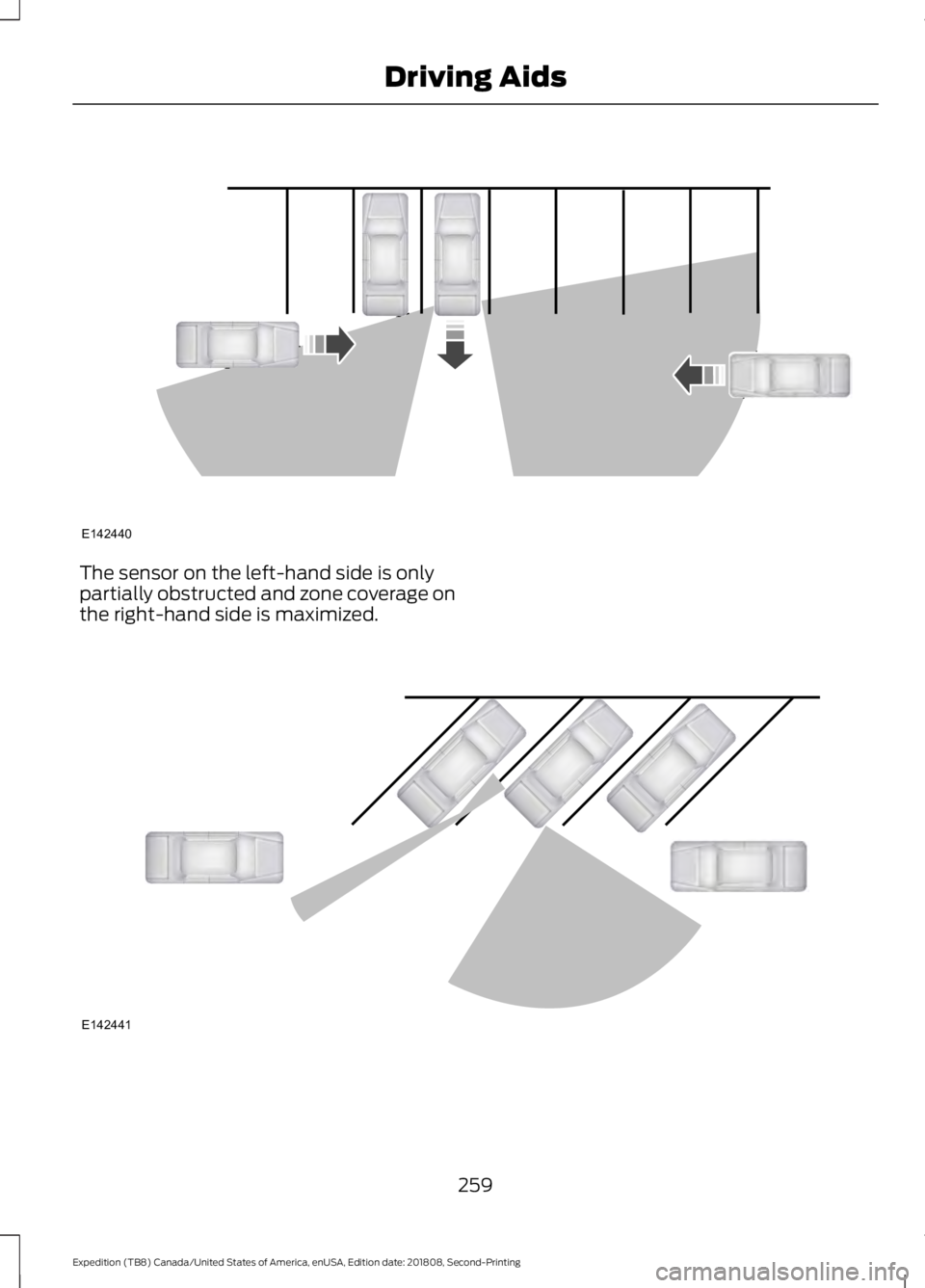
The sensor on the left-hand side is only
partially obstructed and zone coverage on
the right-hand side is maximized.
259
Expedition (TB8) Canada/United States of America, enUSA, Edition date: 201808, Second-Printing Driving AidsE142440 E142441
Page 263 of 583
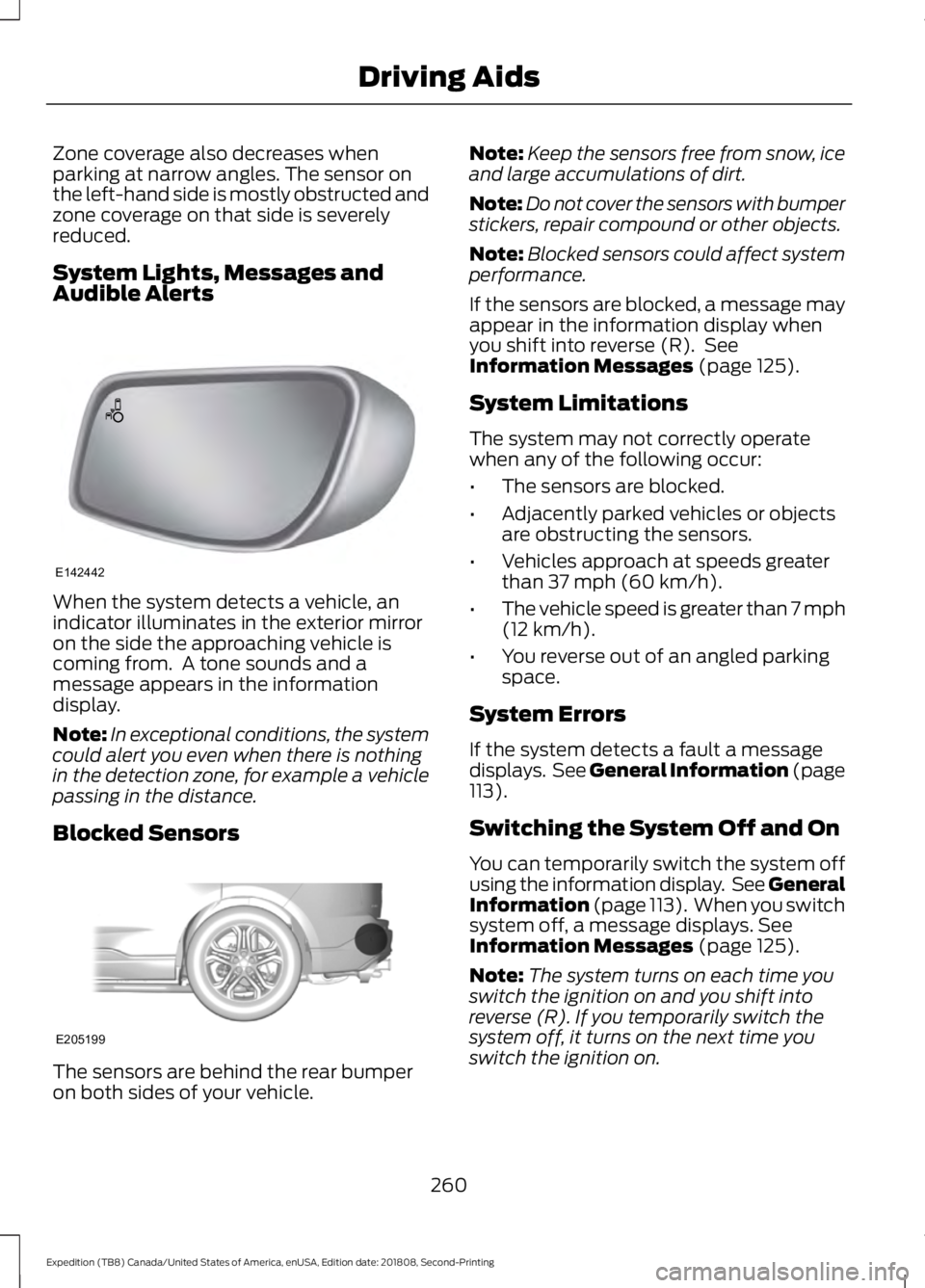
Zone coverage also decreases when
parking at narrow angles. The sensor on
the left-hand side is mostly obstructed and
zone coverage on that side is severely
reduced.
System Lights, Messages and
Audible Alerts
When the system detects a vehicle, an
indicator illuminates in the exterior mirror
on the side the approaching vehicle is
coming from. A tone sounds and a
message appears in the information
display.
Note:
In exceptional conditions, the system
could alert you even when there is nothing
in the detection zone, for example a vehicle
passing in the distance.
Blocked Sensors The sensors are behind the rear bumper
on both sides of your vehicle. Note:
Keep the sensors free from snow, ice
and large accumulations of dirt.
Note: Do not cover the sensors with bumper
stickers, repair compound or other objects.
Note: Blocked sensors could affect system
performance.
If the sensors are blocked, a message may
appear in the information display when
you shift into reverse (R). See
Information Messages (page 125).
System Limitations
The system may not correctly operate
when any of the following occur:
• The sensors are blocked.
• Adjacently parked vehicles or objects
are obstructing the sensors.
• Vehicles approach at speeds greater
than
37 mph (60 km/h).
• The vehicle speed is greater than 7 mph
(12 km/h)
.
• You reverse out of an angled parking
space.
System Errors
If the system detects a fault a message
displays. See General Information (page
113
).
Switching the System Off and On
You can temporarily switch the system off
using the information display. See
General
Information (page 113). When you switch
system off, a message displays. See
Information Messages (page 125).
Note: The system turns on each time you
switch the ignition on and you shift into
reverse (R). If you temporarily switch the
system off, it turns on the next time you
switch the ignition on.
260
Expedition (TB8) Canada/United States of America, enUSA, Edition date: 201808, Second-Printing Driving AidsE142442 E205199
Page 267 of 583
•
If required, you can switch Active
Braking on or off.
• If required, you can switch the entire
Pre-Collision Assist feature on or off.
Note: Active braking automatically turns
on every time you switch the ignition on.
Note: We recommended that you switch
the system off if you install a snow plow or
similar object in such a way that it may
block the radar sensor. Your vehicle
remembers the setting across key cycles.
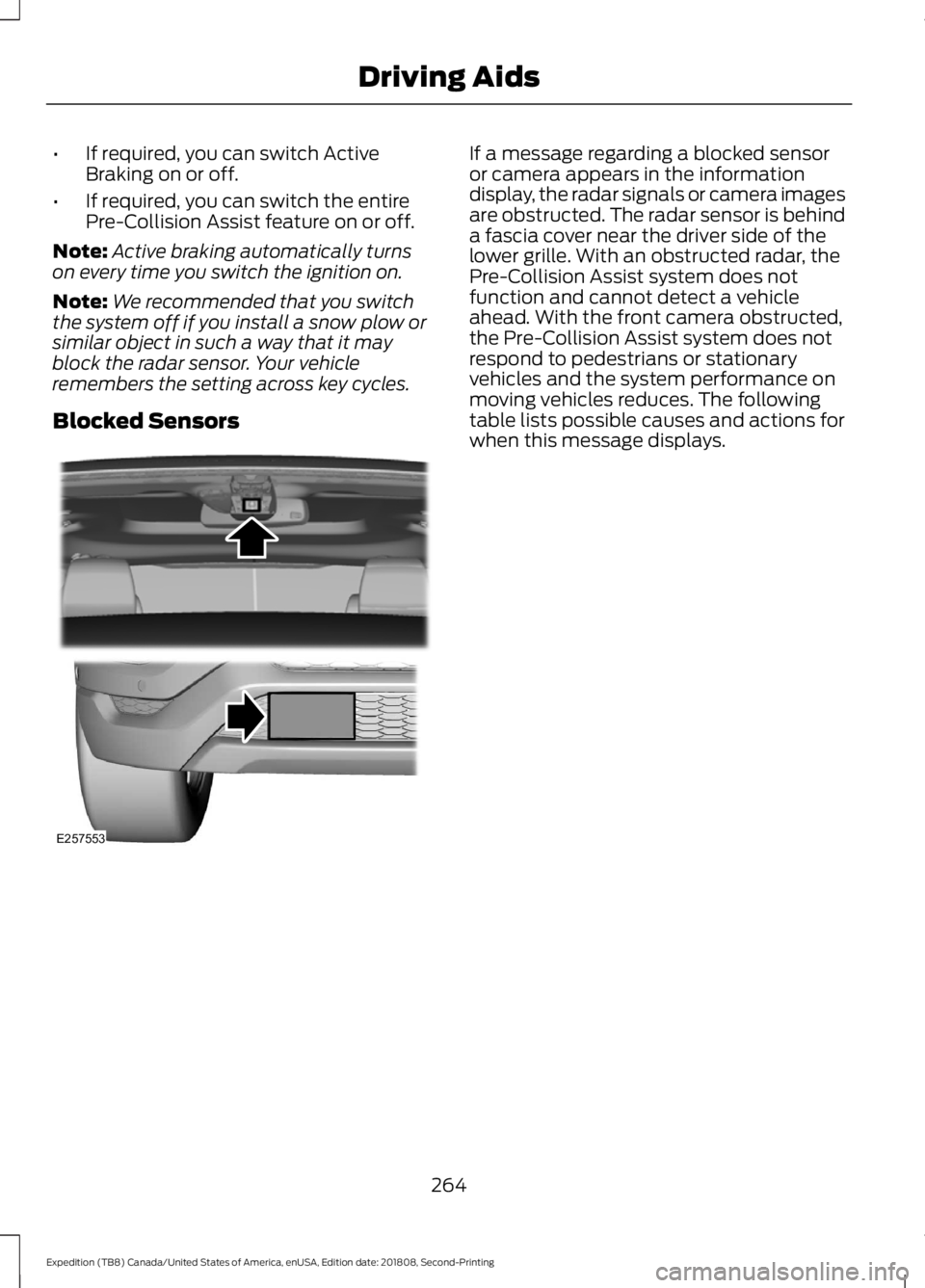
Blocked Sensors If a message regarding a blocked sensor
or camera appears in the information
display, the radar signals or camera images
are obstructed. The radar sensor is behind
a fascia cover near the driver side of the
lower grille. With an obstructed radar, the
Pre-Collision Assist system does not
function and cannot detect a vehicle
ahead. With the front camera obstructed,
the Pre-Collision Assist system does not
respond to pedestrians or stationary
vehicles and the system performance on
moving vehicles reduces. The following
table lists possible causes and actions for
when this message displays.
264
Expedition (TB8) Canada/United States of America, enUSA, Edition date: 201808, Second-Printing Driving AidsE257553
Page 268 of 583
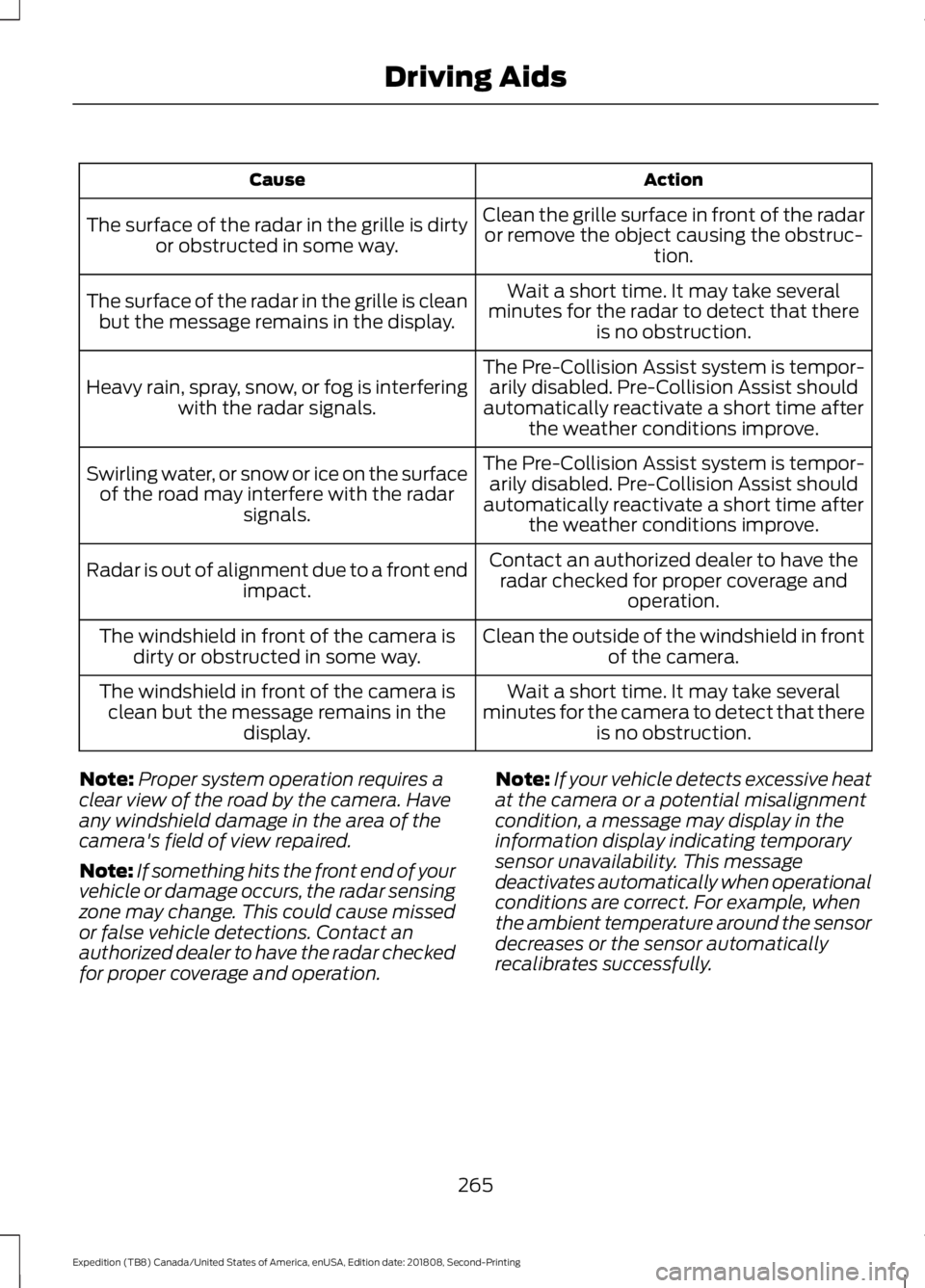
Action
Cause
Clean the grille surface in front of the radaror remove the object causing the obstruc- tion.
The surface of the radar in the grille is dirty
or obstructed in some way.
Wait a short time. It may take several
minutes for the radar to detect that there is no obstruction.
The surface of the radar in the grille is clean
but the message remains in the display.
The Pre-Collision Assist system is tempor-arily disabled. Pre-Collision Assist should
automatically reactivate a short time after the weather conditions improve.
Heavy rain, spray, snow, or fog is interfering
with the radar signals.
The Pre-Collision Assist system is tempor-arily disabled. Pre-Collision Assist should
automatically reactivate a short time after the weather conditions improve.
Swirling water, or snow or ice on the surface
of the road may interfere with the radar signals.
Contact an authorized dealer to have theradar checked for proper coverage and operation.
Radar is out of alignment due to a front end
impact.
Clean the outside of the windshield in frontof the camera.
The windshield in front of the camera is
dirty or obstructed in some way.
Wait a short time. It may take several
minutes for the camera to detect that there is no obstruction.
The windshield in front of the camera is
clean but the message remains in the display.
Note: Proper system operation requires a
clear view of the road by the camera. Have
any windshield damage in the area of the
camera's field of view repaired.
Note: If something hits the front end of your
vehicle or damage occurs, the radar sensing
zone may change. This could cause missed
or false vehicle detections. Contact an
authorized dealer to have the radar checked
for proper coverage and operation. Note:
If your vehicle detects excessive heat
at the camera or a potential misalignment
condition, a message may display in the
information display indicating temporary
sensor unavailability. This message
deactivates automatically when operational
conditions are correct. For example, when
the ambient temperature around the sensor
decreases or the sensor automatically
recalibrates successfully.
265
Expedition (TB8) Canada/United States of America, enUSA, Edition date: 201808, Second-Printing Driving Aids
Page 324 of 583
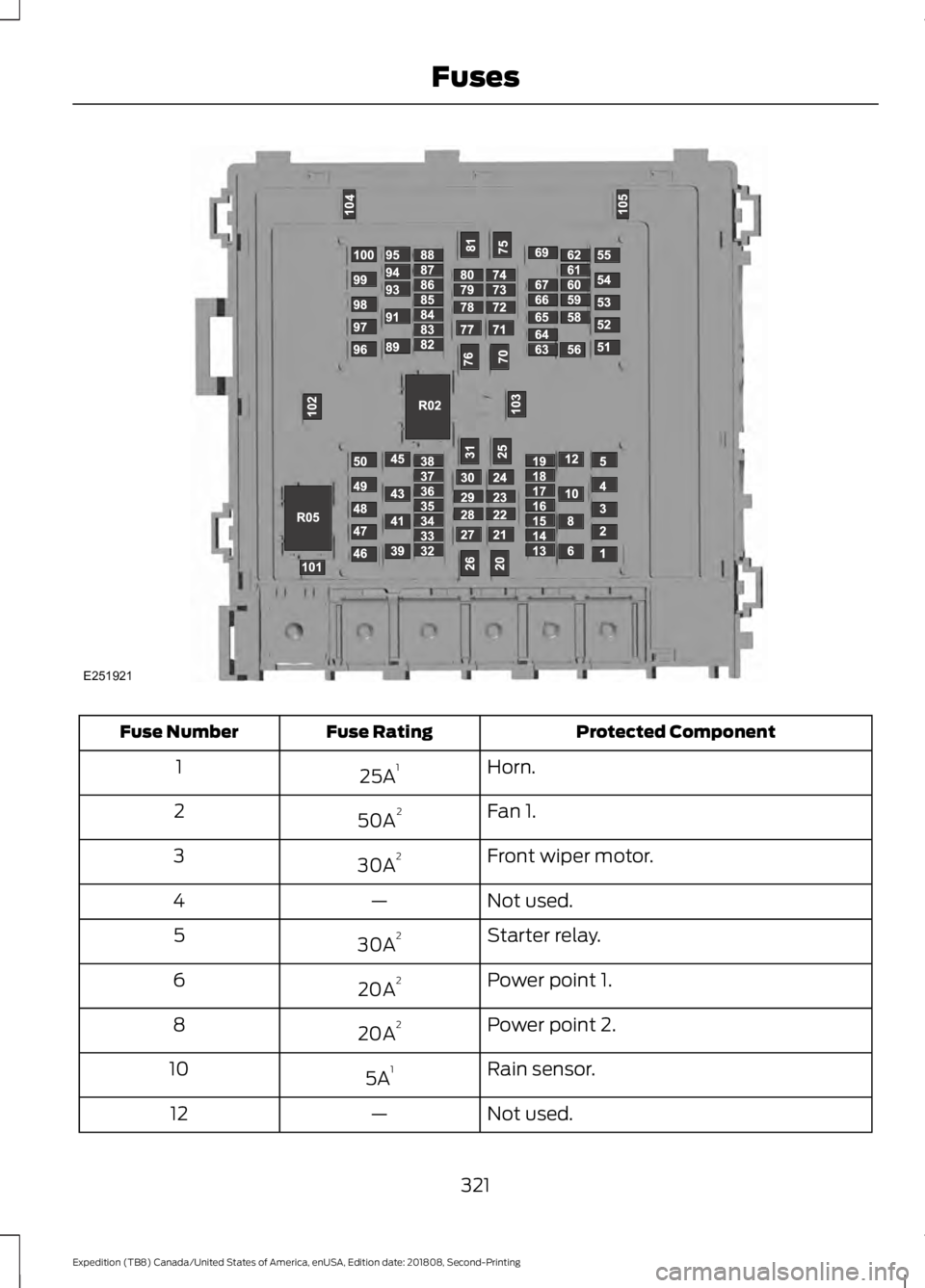
Protected Component
Fuse Rating
Fuse Number
Horn.
25A 1
1
Fan 1.
50A 2
2
Front wiper motor.
30A 2
3
Not used.
—
4
Starter relay.
30A 2
5
Power point 1.
20A 2
6
Power point 2.
20A 2
8
Rain sensor.
5A 1
10
Not used.
—
12
321
Expedition (TB8) Canada/United States of America, enUSA, Edition date: 201808, Second-Printing FusesE251921
Page 330 of 583
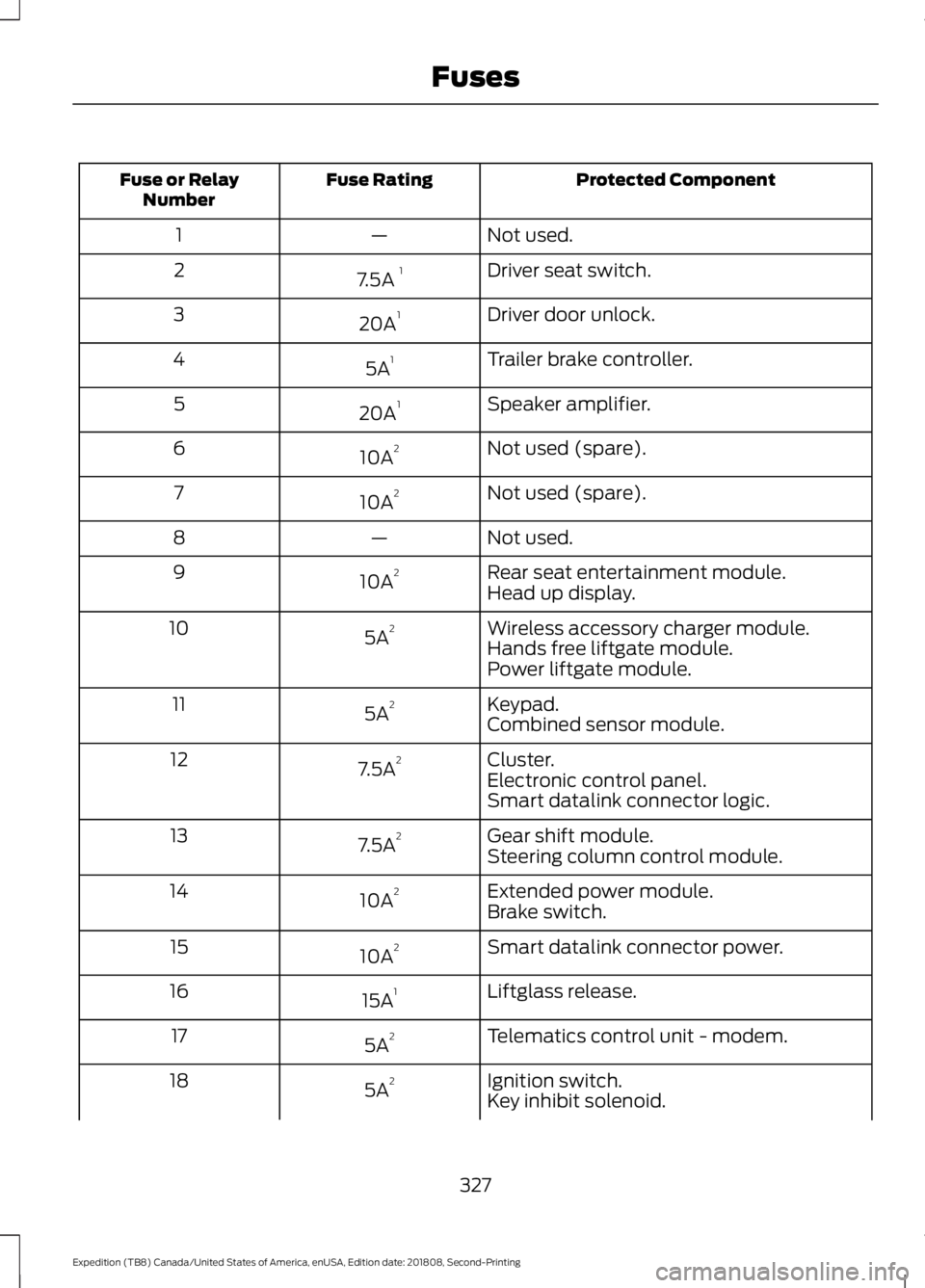
Protected Component
Fuse Rating
Fuse or Relay
Number
Not used.
—
1
Driver seat switch.
7.5A 1
2
Driver door unlock.
20A 1
3
Trailer brake controller.
5A 1
4
Speaker amplifier.
20A 1
5
Not used (spare).
10A 2
6
Not used (spare).
10A 2
7
Not used.
—
8
Rear seat entertainment module.
10A 2
9
Head up display.
Wireless accessory charger module.
5A 2
10
Hands free liftgate module.
Power liftgate module.
Keypad.
5A 2
11
Combined sensor module.
Cluster.
7.5A 2
12
Electronic control panel.
Smart datalink connector logic.
Gear shift module.
7.5A 2
13
Steering column control module.
Extended power module.
10A 2
14
Brake switch.
Smart datalink connector power.
10A 2
15
Liftglass release.
15A 1
16
Telematics control unit - modem.
5A 2
17
Ignition switch.
5A 2
18
Key inhibit solenoid.
327
Expedition (TB8) Canada/United States of America, enUSA, Edition date: 201808, Second-Printing Fuses
Page 331 of 583
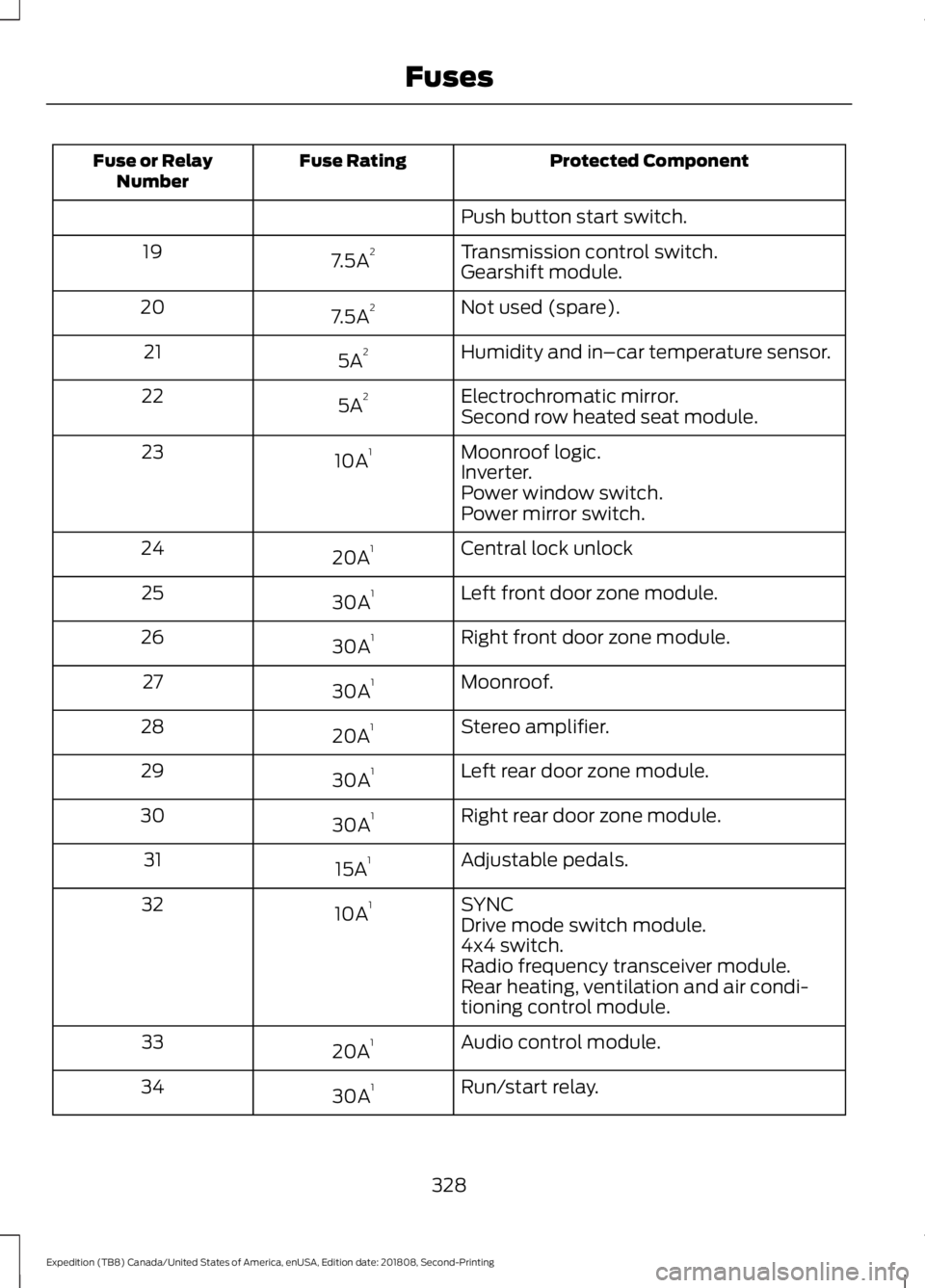
Protected Component
Fuse Rating
Fuse or Relay
Number
Push button start switch.
Transmission control switch.
7.5A 2
19
Gearshift module.
Not used (spare).
7.5A 2
20
Humidity and in–car temperature sensor.
5A 2
21
Electrochromatic mirror.
5A 2
22
Second row heated seat module.
Moonroof logic.
10A 1
23
Inverter.
Power window switch.
Power mirror switch.
Central lock unlock
20A 1
24
Left front door zone module.
30A 1
25
Right front door zone module.
30A 1
26
Moonroof.
30A 1
27
Stereo amplifier.
20A 1
28
Left rear door zone module.
30A 1
29
Right rear door zone module.
30A 1
30
Adjustable pedals.
15A 1
31
SYNC
10A 1
32
Drive mode switch module.
4x4 switch.
Radio frequency transceiver module.
Rear heating, ventilation and air condi-
tioning control module.
Audio control module.
20A 1
33
Run/start relay.
30A 1
34
328
Expedition (TB8) Canada/United States of America, enUSA, Edition date: 201808, Second-Printing Fuses