2019 FORD EXPEDITION jump cable
[x] Cancel search: jump cablePage 199 of 583
•
Incorrect fuel for climatic conditions.
• Incorrect engine oil viscosity for
climactic conditions.
Note: Some vehicles have a lifetime fuel
filter that is integrated with the fuel tank.
Regular maintenance or replacement is not
needed.
Note: If these checks do not help you
correct the concern, have your vehicle
checked as soon as possible.
Noise Emissions Warranty,
Prohibited Tampering Acts and
Maintenance
On January 1, 1978, Federal regulation
became effective governing the noise
emission on trucks over 10,000 lb
(4,536 kg) Gross Vehicle Weight Rating
(GVWR). The preceding statements
concerning prohibited tampering acts and
maintenance, and the noise warranty
found in the Warranty Guide, are
applicable to complete chassis cabs over
10,000 lb (4,536 kg)
GVWR.
CATALYTIC CONVERTER WARNING:
Do not park, idle or
drive your vehicle on dry grass or other
dry ground cover. The emission system
heats up the engine compartment and
exhaust system, creating the risk of fire. WARNING:
The normal operating
temperature of the exhaust system is
very high. Never work around or attempt
to repair any part of the exhaust system
until it has cooled. Use special care when
working around the catalytic converter.
The catalytic converter heats up to a very
high temperature after only a short
period of engine operation and stays hot
after the engine is switched off. WARNING:
Exhaust leaks may
result in entry of harmful and potentially
lethal fumes into the passenger
compartment. If you smell exhaust
fumes inside your vehicle, have your
vehicle inspected immediately. Do not
drive if you smell exhaust fumes.
Your vehicle has various emission control
components and a catalytic converter that
enables it to comply with applicable
exhaust emission standards.
To make sure that the catalytic converter
and other emission control components
continue to work properly:
• Do not crank the engine for more than
10 seconds at a time.
• Do not run the engine with a spark plug
lead disconnected.
• Do not push-start or tow-start your
vehicle. Use booster cables. See Jump
Starting the Vehicle
(page 308).
• Use only the specified fuel listed.
• Do not switch the ignition off when your
vehicle is moving.
• Avoid running out of fuel.
• Have the items listed in scheduled
maintenance information performed
according to the specified schedule.
Note: Resulting component damage may
not be covered by the vehicle Warranty.
The scheduled maintenance items listed
in scheduled maintenance information are
essential to the life and performance of
your vehicle and to its emissions system.
If you use anything other than Ford,
Motorcraft or Ford-authorized parts for
maintenance replacements or for service
of components affecting emission control,
such non-Ford parts should be equivalent
to genuine Ford Motor Company parts in
performance and durability.
196
Expedition (TB8) Canada/United States of America, enUSA, Edition date: 201808, Second-Printing Engine Emission Control
Page 204 of 583
Stay in Neutral Mode - Console Shifter
Stay in Neutral mode allows your vehicle
to stay in neutral when you exit your
vehicle. Extended usage of Stay in Neutral
mode may result in a battery voltage
reduction to a level where the vehicle may
no longer start. Your vehicle must be
stationary to enter this mode.
Note:
Stay in neutral mode is a temporary
vehicle state with the ignition off. Once in
this mode, sufficient battery voltage must
be maintained or your vehicle returns to
park. Do not tow your vehicle in this mode.
Note: Always put your vehicle in Stay in
Neutral mode if you want your vehicle to
stay in neutral when you exit or turn off your
vehicle. Refer to the Return to Park section
for more information.
Note: Do not use this feature for towing
your vehicle. WARNING: When doing this
procedure, you need to take the
transmission out of park (P) which
means your vehicle can roll freely. To
avoid unwanted vehicle movement,
always fully apply the parking brake prior
to doing this procedure. Use wheels
chocks if appropriate. To enter Stay in Neutral mode:
•
Move the transmission selector to
neutral (N).
• A message appears in your information
display screen prompting you to press
the manual (M) button.
• Press the manual (M) button again to
enter Stay in Neutral mode.
•This step can be completed as long
as the message prompts you to
remain in Neutral (N).
• A confirmation message appears
in the information display when
your vehicle has entered Stay in
Neutral mode.
To exit Stay in Neutral mode, apply the
brake and select a different gear. See
Putting your vehicle in or out of gear for
more information.
Stay in Neutral Mode - Console Shifter -
No Start
Use this feature to move your transmission
from the park position in the event of a no
start situation. If your vehicle has a dead
battery, an external power source is
required. Do not tow your vehicle in this
mode.
Note: This feature only functions if your
12-volt battery has power and the starter
can spin the engine. If vehicle battery
voltage is not sufficient, an external 12-volt
power source (for example, jumper cables,
battery charger or jump pack) may be
required for this feature to function.
Note: Once in this mode, sufficient battery
voltage must be maintained or your vehicle
returns to park.
201
Expedition (TB8) Canada/United States of America, enUSA, Edition date: 201808, Second-Printing Transmission
Page 311 of 583
4. You can attempt to start the vehicle
by pressing the brake pedal and
START/STOP, or press START/STOP
without pressing the brake pedal.
5. If the vehicle does not start, repeat steps 1 through 4.
JUMP STARTING THE VEHICLE WARNING:
Batteries normally
produce explosive gases which can
cause personal injury. Therefore, do not
allow flames, sparks or lighted
substances to come near the battery.
When working near the battery, always
shield your face and protect your eyes.
Always provide correct ventilation. WARNING:
Keep batteries out of
reach of children. Batteries contain
sulfuric acid. Avoid contact with skin,
eyes or clothing. Shield your eyes when
working near the battery to protect
against possible splashing of acid
solution. In case of acid contact with skin
or eyes, flush immediately with water for
a minimum of 15 minutes and get prompt
medical attention. If acid is swallowed,
call a physician immediately. WARNING:
Use only adequately
sized cables with insulated clamps.
Note: To avoid reverse polarity connections,
make sure that you correctly identify the
positive (+) and negative (-) terminals on
both the disabled and booster vehicles
before connecting the cables. Stay clear of
moving parts.
Preparing Your Vehicle
Do not attempt to push-start your
automatic transmission vehicle. Note:
Attempting to push-start a vehicle
with an automatic transmission may cause
transmission damage.
Note: Use only a 12-volt supply to start your
vehicle.
Note: Do not disconnect the battery of the
disabled vehicle as this could damage the
vehicle electrical system.
Park the booster vehicle close to the hood
of the disabled vehicle, making sure the
two vehicles do not touch.
Connecting the Jumper Cables WARNING:
Do not use fuel lines,
engine valve covers, windshield wiper
arms, the intake manifold, or hood latch
as ground points. WARNING:
Do not connect the
end of the second cable to the negative
(-) terminal of the battery to be jumped.
A spark may cause an explosion of the
gases that surround the battery.
Note: Do not attach the end of the positive
cable to the studs or L-shaped eyelet
located above the positive (+) terminal of
your vehicle ’s battery. High current may flow
through and cause damage to the fuses.
Note: In the illustration, the bottom vehicle
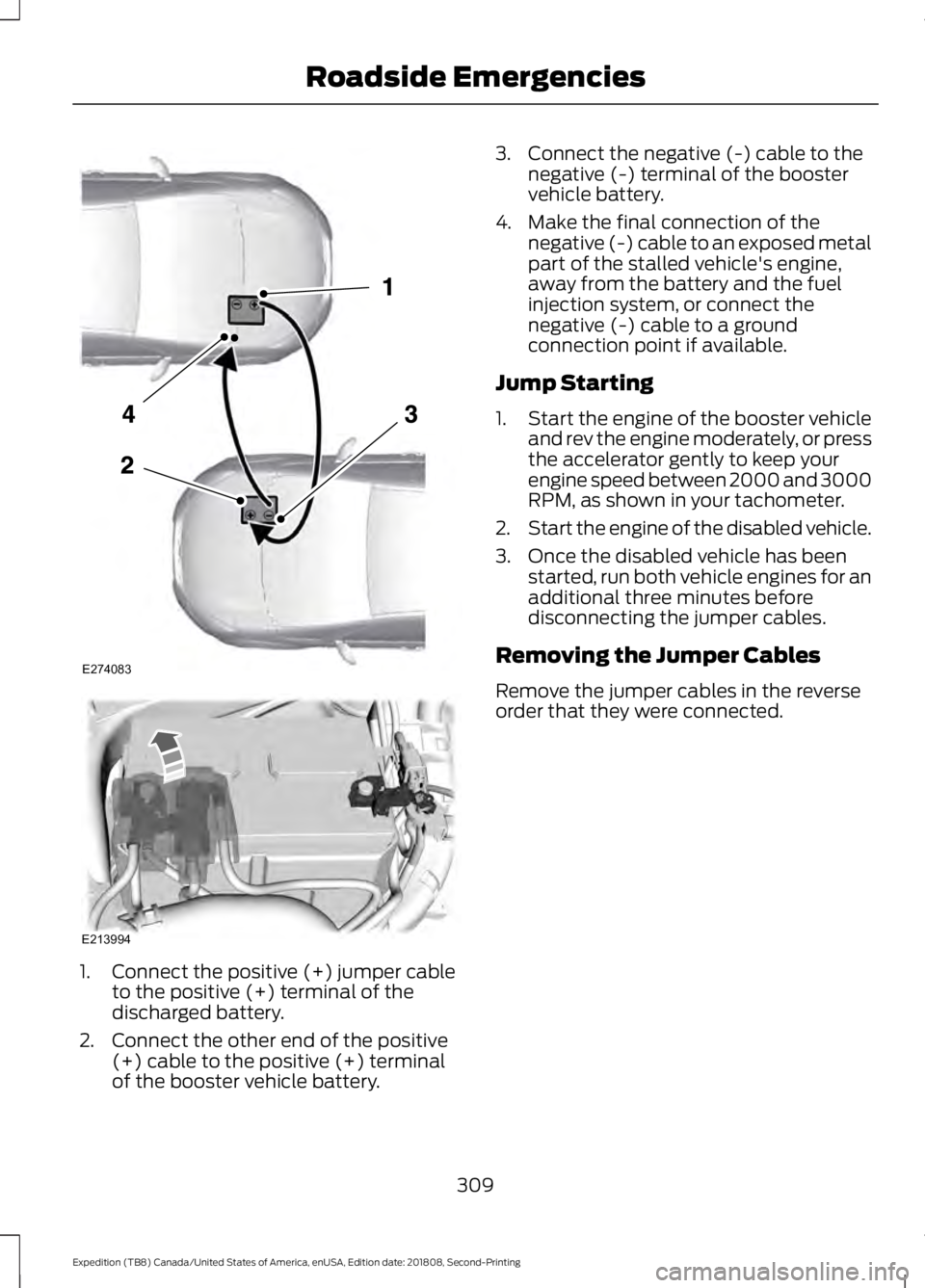
represents the booster vehicle.
308
Expedition (TB8) Canada/United States of America, enUSA, Edition date: 201808, Second-Printing Roadside Emergencies
Page 312 of 583
1.
Connect the positive (+) jumper cable
to the positive (+) terminal of the
discharged battery.
2. Connect the other end of the positive (+) cable to the positive (+) terminal
of the booster vehicle battery. 3. Connect the negative (-) cable to the
negative (-) terminal of the booster
vehicle battery.
4. Make the final connection of the negative (-) cable to an exposed metal
part of the stalled vehicle's engine,
away from the battery and the fuel
injection system, or connect the
negative (-) cable to a ground
connection point if available.
Jump Starting
1. Start the engine of the booster vehicle
and rev the engine moderately, or press
the accelerator gently to keep your
engine speed between 2000 and 3000
RPM, as shown in your tachometer.
2. Start the engine of the disabled vehicle.
3. Once the disabled vehicle has been started, run both vehicle engines for an
additional three minutes before
disconnecting the jumper cables.
Removing the Jumper Cables
Remove the jumper cables in the reverse
order that they were connected.
309
Expedition (TB8) Canada/United States of America, enUSA, Edition date: 201808, Second-Printing Roadside EmergenciesE274083 E213994
Page 313 of 583
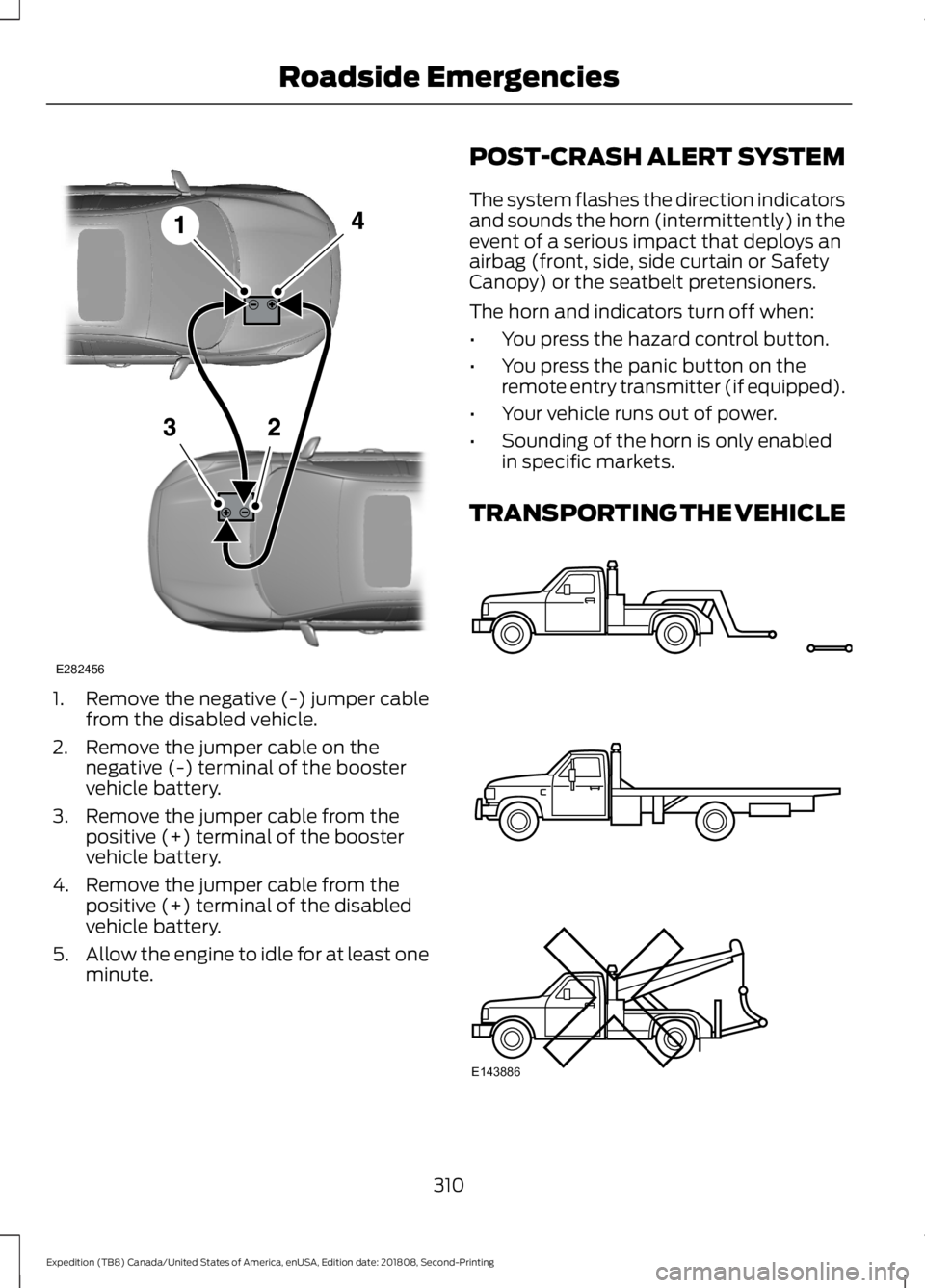
1. Remove the negative (-) jumper cable
from the disabled vehicle.
2. Remove the jumper cable on the negative (-) terminal of the booster
vehicle battery.
3. Remove the jumper cable from the positive (+) terminal of the booster
vehicle battery.
4. Remove the jumper cable from the positive (+) terminal of the disabled
vehicle battery.
5. Allow the engine to idle for at least one
minute. POST-CRASH ALERT SYSTEM
The system flashes the direction indicators
and sounds the horn (intermittently) in the
event of a serious impact that deploys an
airbag (front, side, side curtain or Safety
Canopy) or the seatbelt pretensioners.
The horn and indicators turn off when:
•
You press the hazard control button.
• You press the panic button on the
remote entry transmitter (if equipped).
• Your vehicle runs out of power.
• Sounding of the horn is only enabled
in specific markets.
TRANSPORTING THE VEHICLE 310
Expedition (TB8) Canada/United States of America, enUSA, Edition date: 201808, Second-Printing Roadside EmergenciesE282456 E143886
Page 576 of 583
Information Displays....................................113
General Information........................................... 113
Information Messages
................................125
Active Park............................................................ 126
Adaptive Cruise Control................................... 126
AdvanceTrac and Traction Control...............127
Airbag....................................................................... 127
Alarm and Security............................................. 127
Automatic Engine Shutdown......................... 128
Battery and Charging System........................ 128
Blind Spot Information and Cross Traffic Alert System.................................................... 129
Collision Warning System............................... 130
Doors and Locks................................................. 130
Driver Alert............................................................ 130
Drivetrain............................................................... 130
Engine....................................................................... 131
Four-Wheel Drive................................................. 131
Fuel........................................................................\
... 132
Keys and Intelligent Access............................ 133
Lane Keeping System....................................... 134
Maintenance......................................................... 134
MyKey...................................................................... 135
Off Road................................................................. 135
Park Aid.................................................................. 136
Park Brake.............................................................. 137
Power Steering..................................................... 137
Pro Trailer Backup Assist™............................ 138
Remote Start........................................................ 139
Seats....................................................................... 139
Starting System ................................................. 139
Tire Pressure Monitoring System.................140
Trailer...................................................................... 140
Transmission......................................................... 141
Installing Child Restraints............................21 Child Seats............................................................... 21
Combining Seatbelt and LATCH Lower Anchors for Attaching Child Safety
Seats.................................................................... 28
Using Lap and Shoulder Belts......................... 22
Using Lower Anchors and Tethers for CHildren (LATCH)............................................ 27
Using Tether Straps............................................. 28
Instrument Cluster
......................................106
Instrument Lighting Dimmer.....................95
Instrument Panel
............................................18
Interior Lamps.................................................98 Front Interior Lamp............................................. 98Rear Interior Lamps............................................
99
Interior Mirror
..................................................102
Auto-Dimming Mirror........................................ 103
Introduction.........................................................7
J
Jump Starting the Vehicle........................308 Connecting the Jumper Cables................... 308
Jump Starting..................................................... 309
Preparing Your Vehicle.................................... 308
Removing the Jumper Cables...................... 309
K
Keyless Entry
....................................................72
Displaying the Factory-Set Code.................... 74
Locking and Unlocking....................................... 74
SECURICODE™ KEYLESS ENTRY KEYPAD............................................................... 72
Keyless Starting
............................................180
Ignition Modes..................................................... 180
Keys and Remote Controls.........................56
L
Lane Keeping System
................................250
Switching the System On and Off................251
System Display................................................... 252
System Settings.................................................. 251
Troubleshooting................................................. 253
Liftgate...............................................................76
Liftgate Window
...........................................105
Opening the Liftgate Window....................... 105
Lighting Control
..............................................94
Flashing the Headlamp High Beam..............95
Headlamp High Beam........................................ 94
Lighting..............................................................94 General Information............................................ 94
Limited Slip Differential.............................214 Locking Function................................................. 214
Spare Tire............................................................... 214
Trailer Towing....................................................... 214
Load Carriers See: Roof Racks and Load Carriers.............272
Load Carrying
................................................269
573
Expedition (TB8) Canada/United States of America, enUSA, Edition date: 201808, Second-Printing Index