2019 FORD E SERIES key
[x] Cancel search: keyPage 123 of 329
Vehicles Sold in Canada: GettingRoadside Assistance
To fully assist you should you have avehicle concern, Ford Motor Company ofCanada, Limited offers a complimentaryroadside assistance program. This programis eligible within Canada or the continentalUnited States.
The service is available 24 hours a day,seven days a week.
This program is separate from the NewVehicle Limited Warranty, but the coverageis concurrent with the powertrain coverageperiod of your vehicle. Canadian roadsidecoverage and benefits may differ from theU.S. coverage.
If you require more information, please callus in Canada at 1-800-665-2006, or visitour website at www.ford.ca.
HAZARD FLASHERS
Note:If used when the vehicle is notrunning, the battery loses charge. As a result,there may be insufficient power to restartyour vehicle.
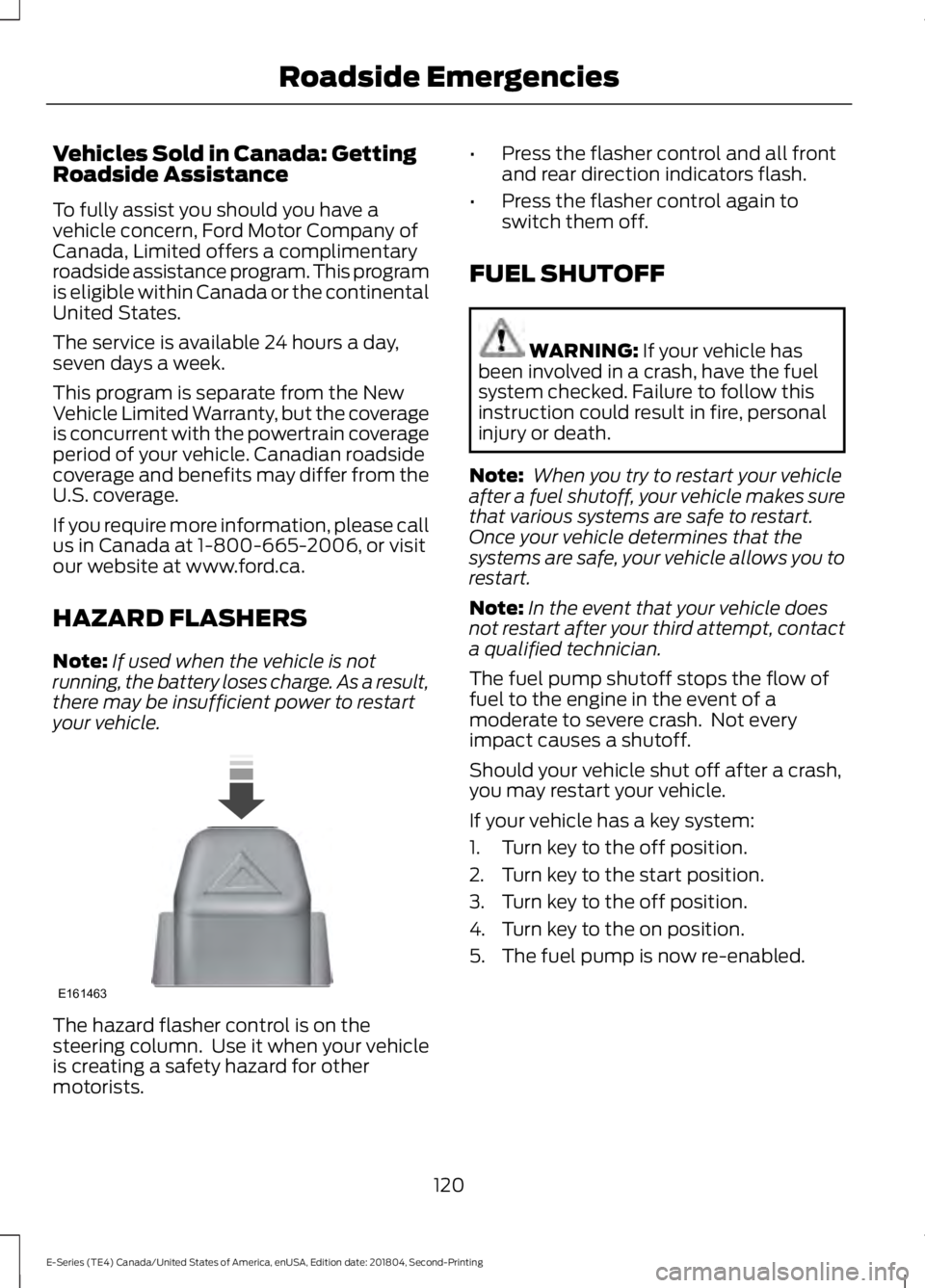
The hazard flasher control is on thesteering column. Use it when your vehicleis creating a safety hazard for othermotorists.
•Press the flasher control and all frontand rear direction indicators flash.
•Press the flasher control again toswitch them off.
FUEL SHUTOFF
WARNING: If your vehicle hasbeen involved in a crash, have the fuelsystem checked. Failure to follow thisinstruction could result in fire, personalinjury or death.
Note: When you try to restart your vehicleafter a fuel shutoff, your vehicle makes surethat various systems are safe to restart.Once your vehicle determines that thesystems are safe, your vehicle allows you torestart.
Note:In the event that your vehicle doesnot restart after your third attempt, contacta qualified technician.
The fuel pump shutoff stops the flow offuel to the engine in the event of amoderate to severe crash. Not everyimpact causes a shutoff.
Should your vehicle shut off after a crash,you may restart your vehicle.
If your vehicle has a key system:
1. Turn key to the off position.
2. Turn key to the start position.
3. Turn key to the off position.
4. Turn key to the on position.
5. The fuel pump is now re-enabled.
120
E-Series (TE4) Canada/United States of America, enUSA, Edition date: 201804, Second-Printing
Roadside EmergenciesE161463
Page 194 of 329

How Temperature Affects Your TirePressure
The tire pressure monitoring systemmonitors tire pressure in each pneumatictire. When driving in a normal manner, atypical passenger tire inflation pressuremay increase about 2–4 psi (14–28 kPa)from a cold start situation. If the vehicle isstationary overnight with the outsidetemperature significantly lower than thedaytime temperature, the tire pressure maydecrease about 3 psi (21 kPa) for a drop of30°F (17°C) in ambient temperature. Thislower pressure value may be detected bythe tire pressure monitoring system asbeing significantly lower than therecommended inflation pressure andactivate the system warning light for lowtire pressure. If the low tire pressurewarning light is on, visually check each tireto verify that no tire is flat. If one or moretires are flat, repair as necessary. Checkthe air pressure in the road tires. If any tireis under-inflated, carefully drive the vehicleto the nearest location where air can beadded to the tires. Inflate all the tires tothe recommended inflation pressure.
Tire Pressure Monitoring System ResetProcedure
WARNING: To determine therequired pressure(s) for your vehicle, seethe Safety Compliance CertificationLabel (on the door hinge pillar,door-latch post or the door edge thatmeets the door-latch post, next to thedriver seat) or the Tire Label on theB-Pillar or the edge of the driver door.
Note:You need to perform the tire pressuremonitoring system reset procedure aftereach tire rotation.
To provide the vehicle's load carryingcapability, some vehicles require differentrecommended tire pressures in the fronttires as compared to the rear tires. The tirepressure monitoring system on thesevehicles illuminate the low tire pressurewarning light at two different pressures:one for the front tires and one for the reartires.
Since tires need to be rotated to provideconsistent performance and maximum tirelife, the tire pressure monitoring systemneeds to know when the tires are rotatedto determine which set of tires are on thefront and which are on the rear. With thisinformation, the system can detect andproperly warn of low tire pressures.
System reset tips:
•To reduce the chances of interferencefrom another vehicle, perform thesystem reset procedure at least 3 ft(1 m) away from another vehicleundergoing the system reset procedureat the same time.
•Do not wait more than two minutesbetween resetting each tire sensor orthe system can time-out and you haveto repeat the entire procedure on allfour wheels.
•A double horn sounds indicating theneed to repeat the procedure.
Performing the System Reset Procedure- Single Rear Wheel
Read the entire procedure beforeattempting.
1. Drive the vehicle above 20 mph(32 km/h) for at least two minutes,then park in a safe location where youcan easily get to all four tires and haveaccess to an air pump.
2.Place the ignition in the off position andkeep the key in the ignition.
191
E-Series (TE4) Canada/United States of America, enUSA, Edition date: 201804, Second-Printing
Wheels and Tires
Page 226 of 329
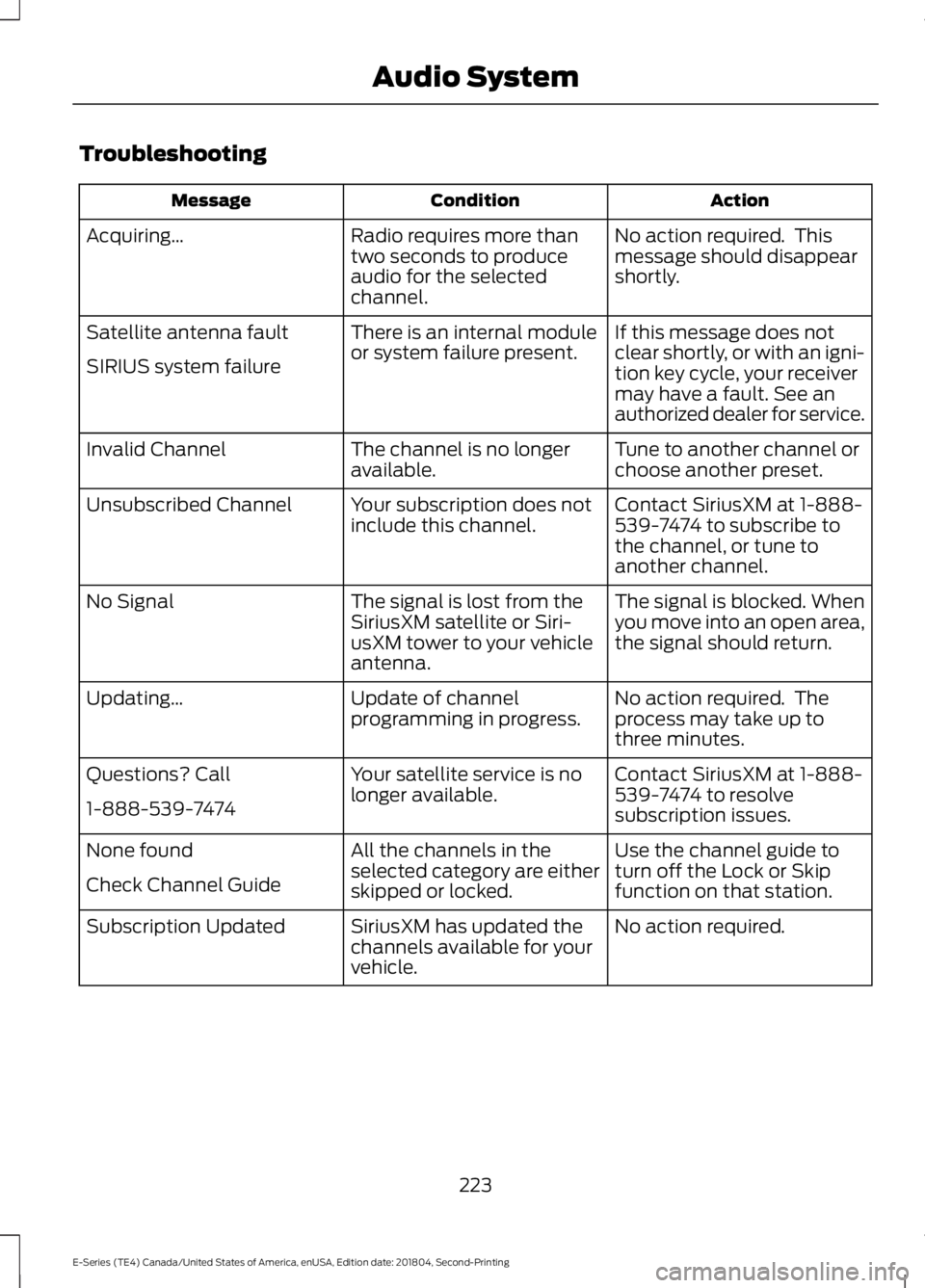
Troubleshooting
ActionConditionMessage
No action required. Thismessage should disappearshortly.
Radio requires more thantwo seconds to produceaudio for the selectedchannel.
Acquiring…
If this message does notclear shortly, or with an igni-tion key cycle, your receivermay have a fault. See anauthorized dealer for service.
There is an internal moduleor system failure present.Satellite antenna fault
SIRIUS system failure
Tune to another channel orchoose another preset.The channel is no longeravailable.Invalid Channel
Contact SiriusXM at 1-888-539-7474 to subscribe tothe channel, or tune toanother channel.
Your subscription does notinclude this channel.Unsubscribed Channel
The signal is blocked. Whenyou move into an open area,the signal should return.
The signal is lost from theSiriusXM satellite or Siri-usXM tower to your vehicleantenna.
No Signal
No action required. Theprocess may take up tothree minutes.
Update of channelprogramming in progress.Updating…
Contact SiriusXM at 1-888-539-7474 to resolvesubscription issues.
Your satellite service is nolonger available.Questions? Call
1-888-539-7474
Use the channel guide toturn off the Lock or Skipfunction on that station.
All the channels in theselected category are eitherskipped or locked.
None found
Check Channel Guide
No action required.SiriusXM has updated thechannels available for yourvehicle.
Subscription Updated
223
E-Series (TE4) Canada/United States of America, enUSA, Edition date: 201804, Second-Printing
Audio System
Page 239 of 329

Action and DescriptionMessage
Repeat entering letters to narrow yoursearch. When you are satisfied withyour entry press the right arrow key onthe bezel.SYNC will jump to the phonebookcontact name that matches your entry.Press OK.In addition to the Phonebook entryname, the phone number label (Work,Cell, Home or Other) shows on thedisplay. If there are multiple phonenumber entries for a particular Phone-book name, you can scroll through thedifferent phone labels at this time.Once you have the desired phone labelon the screen press OK.The phone number that is stored underthe selected label will be shown on thedisplay. Press OK to dial this number.
Press the OK button to send, download, read and delete text
messages.1TEXT MESSAGE
View your cell phone's status, set ring tones, select your messagenotification, change phonebook entries and automatically download
your cell phone content among other features.1
PHONE SETNGS
Access the SYNC Services portal where you can request various
types of information, for example traffic reports and directions.2SYNC Services
Automatically place an emergency call to a 911 operator following
a crash.3911 Assist
Create and receive a diagnostic report card on your vehicle.2Vehicle Health
Interact with SYNC-capable mobile applications on your smart-phone.APPLICATIONS
Access Bluetooth Devices menu listings and advanced menu listings.SYS SETTINGS
Press the OK button to exit the phone menu.EXIT MENU
1 This is a cell phone-dependent feature.2 This is an optional feature and available in the United States only.3 This is an optional feature and available in the United States and Canada only.
236
E-Series (TE4) Canada/United States of America, enUSA, Edition date: 201804, Second-Printing
SYNC™
Page 258 of 329

Voice command
1,2The system searches for aspecific artist/track/albumfrom the music indexedthrough the USB port.
SearchTrack ___| SearchSong ___
1,2This allows you to makeyour previous commandmore specific. By using thiscommand you can filterthough a previous selec-tion, such as an artist toplay only specific album.
Refinealbum ___
The system compiles aplaylist and then plays similarmusic to what is currentlyplaying from the USB portusing indexed metadatainformation.
SimilarMusic
Autoplay Off
Turn autoplay on to listen tomusic processed duringindexing. Turn autoplay off toallow the indexing process tofinish before the system playsany of your music.
Autoplay[on]
1 ___ is a dynamic listing, meaning that itcould be the name of anything, such as agroup, artist or song. For example youcould say "Play artist The Beatles".2 This voice command is not available untilindexing is complete.3 This voice command is only available infolder mode.
Bluetooth Audio Command Guide
Press the voice button and say:
Voice command
Bluetooth Audio
You can then say any of the following:
[Phone] Connections | [Media] Connec-tions | [Bluetooth] Connections
Pause
Play
[Play] Next Track | [Play] Next Song
[Play] Previous Track | [Play] PreviousSong
Media Menu Features
The media menu allows you to select yourmedia source, how to play your music, forexample by artist, genre, shuffle or repeat,and to add, connect or delete devices.
Press the AUX button, then the Menubutton to enter the Media Menu.
255
E-Series (TE4) Canada/United States of America, enUSA, Edition date: 201804, Second-Printing
SYNC™
Page 322 of 329

A
A/CSee: Climate Control..........................................66About This Manual...........................................5ABSSee: Brakes..............................................................91ABS driving hintsSee: Hints on Driving With Anti-LockBrakes...................................................................91Accessories......................................................271Exterior Style.........................................................271Interior Style..........................................................271Peace of Mind.......................................................271AccessoriesSee: Replacement PartsRecommendation............................................12Adjusting the Headlamps.........................156Vertical Aim Adjustment Procedure...........156Adjusting the Steering Wheel....................47Airbag Disposal...............................................38Air ConditioningSee: Climate Control..........................................66Air FilterSee: Changing the Engine Air Filter..............159Appendices....................................................294At a Glance........................................................16Audible Warnings and Indicators..............57Fail-Safe Cooling Warning Chime..................57Headlamps On Warning Chime......................57Key in Ignition Warning Chime.........................57Parking Brake On Warning Chime..................57Shift to Park Warning Chime............................57Audio System.................................................214General Information..........................................214Audio Unit - Vehicles With: AM/FM/CD/SYNC..............................................................216Accessing CD or MP3 Mode............................217Accessing the Auxiliary MediaSources..............................................................216Accessing the Folders........................................217Accessing the Menu...........................................217Accessing the Phone Features.......................217Adjusting the Volume........................................217Changing Radio Stations.................................218Ejecting the CD....................................................218Fast Forwarding the Media.............................218Inserting a CD.......................................................218
Muting the Audio................................................218Playing or Pausing Media................................218Rewinding the Media.........................................218Scanning the Audio...........................................218Selecting a Frequency Band..........................218Setting the Memory Presets...........................218Switching Shuffle Mode On and Off...........218Switching the Audio Unit On and Off.........218Using Seek, Fast Forward andReverse..............................................................219Audio Unit - Vehicles With: AM/FM.......215Accessing the Clock Settings.........................215Accessing the Sound Settings.......................216Adjusting the Volume........................................216Changing Radio Stations.................................216Selecting the Audio Modes.............................216Setting the Memory Presets...........................216Switching the Audio Unit On and Off.........216Using Seek, Fast Forward andReverse..............................................................216Automatic Transmission.............................87Brake-Shift Interlock..........................................88If Your Vehicle Gets Stuck In Mud orSnow....................................................................89Putting your vehicle in or out of gear:...........87Automatic Transmission FluidCheck.............................................................149Automatic Transmission Fluid Filter............152Checking Automatic TransmissionFluid....................................................................149Auxiliary Power Points..................................72110 Volt AC Power Point.....................................7212 Volt DC Power Point.......................................72Locations..................................................................72Auxiliary Switches........................................272
B
BatterySee: Changing the 12V Battery......................153Bonnet LockSee: Opening and Closing the Hood............141Booster Seats..................................................22Types of Booster Seats......................................23Brake Fluid Check.........................................152Brakes..................................................................91General Information.............................................91Breaking-In.......................................................116
319
E-Series (TE4) Canada/United States of America, enUSA, Edition date: 201804, Second-Printing
Index
Page 325 of 329

GearboxSee: Transmission................................................87General Information on RadioFrequencies...................................................39General Maintenance Information........276Multi-point Inspection......................................278Owner Checks and Services...........................277Protecting Your Investment...........................276Why Maintain Your Vehicle?..........................276Why Maintain Your Vehicle at YourDealership?.....................................................276Getting Assistance Outside the U.S. andCanada...........................................................127Getting the Services You Need................124Away From Home...............................................124
H
HandbrakeSee: Parking Brake...............................................92Hazard Flashers............................................120Headlamp AdjustingSee: Adjusting the Headlamps......................156Headlamp RemovalSee: Removing a Headlamp...........................157HeadrestSee: Head Restraints..........................................69Head Restraints..............................................69HeatingSee: Climate Control..........................................66Hints on Controlling the InteriorClimate............................................................67Defogging the Side Windows in ColdWeather...............................................................67General Hints.........................................................67Quickly Cooling the Interior..............................67Quickly Heating the Interior..............................67Recommended Settings for Cooling.............67Recommended Settings for Heating............67Vehicle Stationary for Extended PeriodsDuring Extreme High AmbientTemperatures....................................................67Hints on Driving With Anti-LockBrakes...............................................................91Hood LockSee: Opening and Closing the Hood............141
I
Ignition Switch.................................................74In California (U.S. Only)..............................125Information Displays.....................................58General Information............................................58Information Messages.................................63Brake System.........................................................63Fuel............................................................................63Maintenance..........................................................64Tire.............................................................................64Traction Control....................................................64Trailer........................................................................65Transmission..........................................................65Installing Child Restraints............................18Child Seats...............................................................18Using Lap and Shoulder Belts..........................19Using Tether Straps..............................................21Instrument Cluster.........................................53Instrument Lighting Dimmer.....................50Instrument Panel............................................16Interior Mirror....................................................52Automatic Dimming Mirror...............................52Manual Dimming Mirror.....................................52Introduction........................................................5
J
Jump Starting the Vehicle..........................121Connecting the Jumper Cables......................121Jump Starting.......................................................122Preparing Your Vehicle.......................................121Removing the Jumper Cables........................122
K
Keys and Remote Controls.........................39
L
Lighting Control..............................................49Flashing the Headlamp High Beam..............50Headlamp High Beam........................................49Lighting..............................................................49General Information............................................49Limited Slip Differential..............................90Load Carrying..................................................99
322
E-Series (TE4) Canada/United States of America, enUSA, Edition date: 201804, Second-Printing
Index
Page 327 of 329

Reprogramming the Remote Control..........40Sounding the Panic Alarm.................................41Removing a Headlamp...............................157Repairing Minor Paint Damage...............165Replacement PartsRecommendation........................................12Collision Repairs....................................................12Scheduled Maintenance and MechanicalRepairs..................................................................12Warranty on Replacement Parts.....................12Replacing a Lost Key or RemoteControl..............................................................41Reporting Safety Defects (CanadaOnly)...............................................................129Reporting Safety Defects (U.S.Only)...............................................................129Roadside Assistance....................................119Vehicles Sold in Canada: Getting RoadsideAssistance........................................................120Vehicles Sold in the United States: GettingRoadside Assistance.....................................119Vehicles Sold in the United States: UsingRoadside Assistance.....................................119Roadside Emergencies................................119Running-InSee: Breaking-In...................................................116Running Out of Fuel......................................79Filling a Portable Fuel Container...................80
S
Safety Precautions.........................................77Satellite Radio................................................221Satellite Radio Electronic Serial Number(ESN).................................................................222Satellite Radio Reception Factors...............222SiriusXM Satellite Radio Service..................222Troubleshooting.................................................223Scheduled Maintenance Record...........283Scheduled Maintenance...........................276Seatbelt Extension.........................................31Seatbelt Height Adjustment.....................30Seatbelts............................................................27Principle of Operation.........................................27Seatbelt Warning Lamp and IndicatorChime..............................................................30Conditions of operation.....................................30Seats...................................................................69
Security..............................................................45Sitting in the Correct Position...................69Snow ChainsSee: Using Snow Chains..................................187Spare WheelSee: Changing a Road Wheel........................192Special Notices................................................12Fleet Telematics Modem....................................13FordPass Connect.................................................13New Vehicle Limited Warranty.........................12Notice to Owners of Pickup Trucks andUtility Type Vehicles........................................13On Board Diagnostics Data LinkConnector............................................................13Special Instructions..............................................12Using your Vehicle as an Ambulance.............13Special Operating Conditions ScheduledMaintenance...............................................281Exceptions............................................................283Speed ControlSee: Cruise Control..............................................96Starter SwitchSee: Ignition Switch.............................................74Starting a Gasoline Engine..........................74Failure to Start.......................................................75Guarding Against Exhaust Fumes..................75Important Ventilating Information.................75Stopping the Engine When Your Vehicle isMoving..................................................................75Stopping the Engine When Your Vehicle isStationary...........................................................75Starting and Stopping the Engine............74General Information............................................74Steering.............................................................98Steering Wheel................................................47Sun Visors.........................................................52Illuminated Vanity Mirror...................................52Supplementary Restraints System.........32Principle of Operation.........................................32Symbols Glossary.............................................5SYNC™ Applications andServices........................................................243911 Assist...............................................................243SYNC Services: Traffic, Directions &Information (TDI) (If Equipped, UnitedStates Only)....................................................247Vehicle Health Report (If Equipped, UnitedStates Only)....................................................245
324
E-Series (TE4) Canada/United States of America, enUSA, Edition date: 201804, Second-Printing
Index