Page 62 of 490
Outside Mirrors Folding Feature
All outside mirrors are hinged and may be moved either
forward or rearward to resist damage. The hinges have
three detent positions:
•Full forward position
• Full rearward position
• Normal position
Heated Mirrors — If Equipped
These mirrors are heated to melt frost or ice. This
feature will be activated whenever you turn on the
rear window defroster (if equipped). Refer to “Climate
Controls” in “Getting To Know Your Vehicle” for further
information.
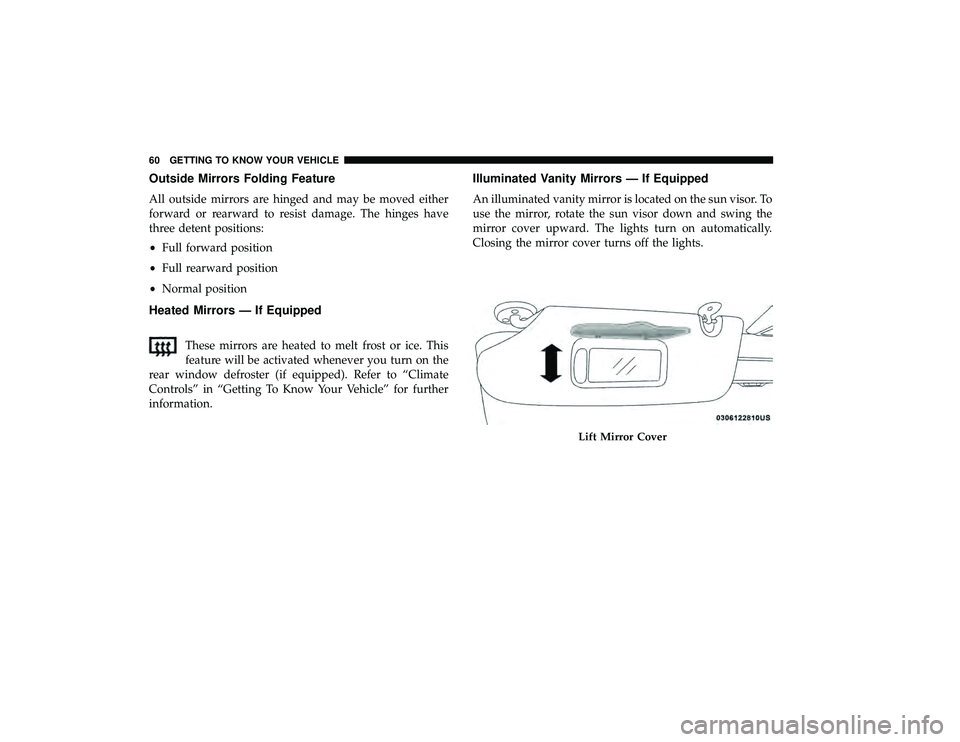
Illuminated Vanity Mirrors — If Equipped
An illuminated vanity mirror is located on the sun visor. To
use the mirror, rotate the sun visor down and swing the
mirror cover upward. The lights turn on automatically.
Closing the mirror cover turns off the lights.
Lift Mirror Cover
60 GETTING TO KNOW YOUR VEHICLE
Page 63 of 490
EXTERIOR LIGHTS
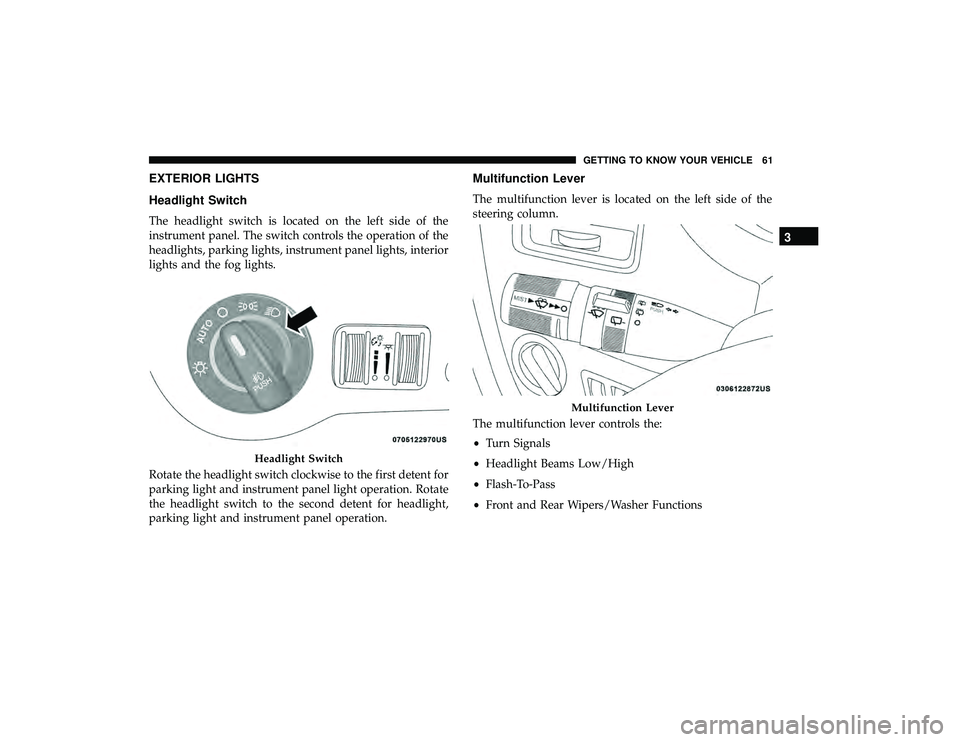
Headlight Switch
The headlight switch is located on the left side of the
instrument panel. The switch controls the operation of the
headlights, parking lights, instrument panel lights, interior
lights and the fog lights.
Rotate the headlight switch clockwise to the first detent for
parking light and instrument panel light operation. Rotate
the headlight switch to the second detent for headlight,
parking light and instrument panel operation.
Multifunction Lever
The multifunction lever is located on the left side of the
steering column.
The multifunction lever controls the:
•Turn Signals
• Headlight Beams Low/High
• Flash-To-Pass
• Front and Rear Wipers/Washer Functions
Headlight Switch
Multifunction Lever
3
GETTING TO KNOW YOUR VEHICLE 61
Page 64 of 490
Daytime Running Lights (DRL) — If Equipped
The headlights on your vehicle will illuminate when the
engine is started and the transmission is in any gear except
PARK. This provides a constant�lights on�condition until
the ignition is turned OFF. The lights illuminate at less than
half of normal intensity. If the parking brake is applied, the
Daytime Running Lights (DRL) will turn off. Also, if a turn
signal is activated, the DRL lamp on the same side of the
vehicle may turn off for the duration of the turn signal
activation. Once the turn signal is no longer active, the DRL
lamp will illuminate.
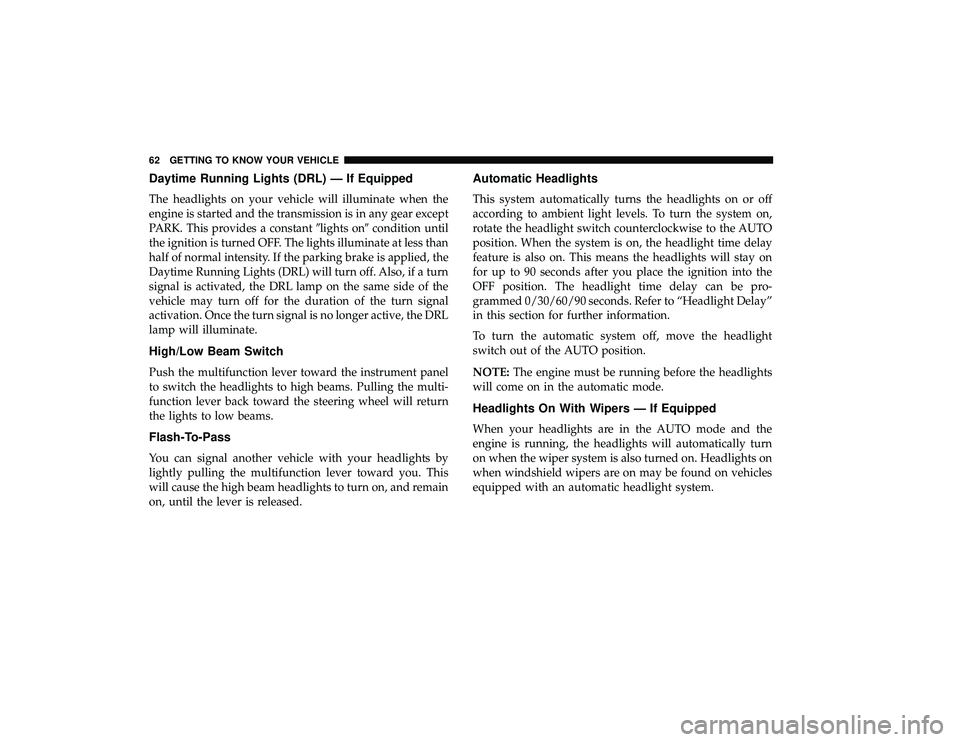
High/Low Beam Switch
Push the multifunction lever toward the instrument panel
to switch the headlights to high beams. Pulling the multi-
function lever back toward the steering wheel will return
the lights to low beams.
Flash-To-Pass
You can signal another vehicle with your headlights by
lightly pulling the multifunction lever toward you. This
will cause the high beam headlights to turn on, and remain
on, until the lever is released.
Automatic Headlights
This system automatically turns the headlights on or off
according to ambient light levels. To turn the system on,
rotate the headlight switch counterclockwise to the AUTO
position. When the system is on, the headlight time delay
feature is also on. This means the headlights will stay on
for up to 90 seconds after you place the ignition into the
OFF position. The headlight time delay can be pro-
grammed 0/30/60/90 seconds. Refer to “Headlight Delay”
in this section for further information.
To turn the automatic system off, move the headlight
switch out of the AUTO position.
NOTE: The engine must be running before the headlights
will come on in the automatic mode.
Headlights On With Wipers — If Equipped
When your headlights are in the AUTO mode and the
engine is running, the headlights will automatically turn
on when the wiper system is also turned on. Headlights on
when windshield wipers are on may be found on vehicles
equipped with an automatic headlight system.
62 GETTING TO KNOW YOUR VEHICLE
Page 65 of 490

NOTE:The Headlights with Wipers feature can be turned
on or off through the instrument cluster display — if
equipped. Refer to “Instrument Cluster Display” in “Get-
ting To Know Your Instrument Panel” for further informa-
tion.
Headlight Delay — If Equipped
This feature provides the safety of headlight illumination
for up to 90 seconds after exiting your vehicle.
To activate the delay feature, turn OFF the ignition switch
while the headlights are still on. Then turn off the head-
lights within 45 seconds. The 90 second delay interval
begins when the headlight switch is turned off. If the
headlights or parking lights are turned back on or the
ignition switch is turned ON, the delay will be cancelled.
When exiting the vehicle the driver can choose to have the
headlights remain on for 30, 60 or 90 seconds or not remain
on. To change the timer setting, see an authorized dealer.
The headlight delay time is programmable on vehicles
equipped with an instrument cluster display. Refer to
“Instrument Cluster Display” in “Getting To Know Your
Instrument Panel” for further information.
If the headlights are turned off before the ignition, they will
turn off in the normal manner. NOTE:
The headlights must be turned off within 45 sec-
onds of turning the ignition OFF to activate this feature.
Lights-On Reminder
If the headlights or the parking lights are left on, or if the
dimmer control is in the extreme top position after the
ignition switch is turned OFF, a chime will sound when the
driver’s door is opened.
Front Fog Lights — If Equipped
To activate the front fog lights, turn on the parking lights or
the low beam headlights and push in the headlight switch
control knob. Pushing the headlight switch control knob in
a second time will turn the front fog lights off.
Turn Signals
Move the multifunction lever up or down and the arrows
on each side of the instrument cluster display will flash to
show proper operation of the front and rear turn signal
lights.
NOTE: If either light remains on and does not flash, or
there is a very fast flash rate, check for a defective outside
light bulb. If an indicator fails to light when the lever is
moved, it would suggest that the indicator bulb is defec-
tive.
3
GETTING TO KNOW YOUR VEHICLE 63
Page 66 of 490

Turn Signal Warning
If the vehicle electronics sense that the vehicle has traveled
at over 18 mph (29 km/h) for about 1 mile (1.6 km) with the
turn signals on, a chime will sound to alert the driver.
Lane Change Assist
Tap the lever up or down once, without moving beyond
the detent, and the turn signal (right or left) will flash three
times then automatically turn off.
Battery Protection
This feature provides battery protection to avoid wearing
down the battery if the headlights or parking lights are left
on for extended periods of time when the ignition is in the
OFF position. After eight minutes of the ignition being in
the OFF position and the headlight switch in any position
other than OFF or AUTO, the lights will turn off automati-
cally until the next cycle of the ignition or headlight switch.
The battery protection feature will be disabled if the
ignition is placed in any position other than OFF during the
eight minute delay.
INTERIOR LIGHTS
Courtesy/Interior Lighting
At the forward end of the overhead console are two
courtesy lights (standard dome light has two buttons).
These interior lights are turned on when a door or the
liftgate is opened, the remote keyless entry key fob is
activated, or when the dimmer control is moved to the
extreme top.
The interior lights will automatically turn off in approxi-
mately 10 minutes for the first activation and 90 seconds
every activation thereafter until the engine is started, if one
of the following occur:
•A door, sliding door or the liftgate is left open.
• Any overhead reading light is left on.
NOTE: The ignition must be cycled to the OFF position for
this feature to operate.
The courtesy lights also function as reading lights. Push in
on each lens to turn these lights on while inside the vehicle.
Push a second time to turn each light off. You may adjust
the direction of these lights by pushing the outside ring,
which is identified with four directional arrows (LED
lamps only).
64 GETTING TO KNOW YOUR VEHICLE
Page 67 of 490
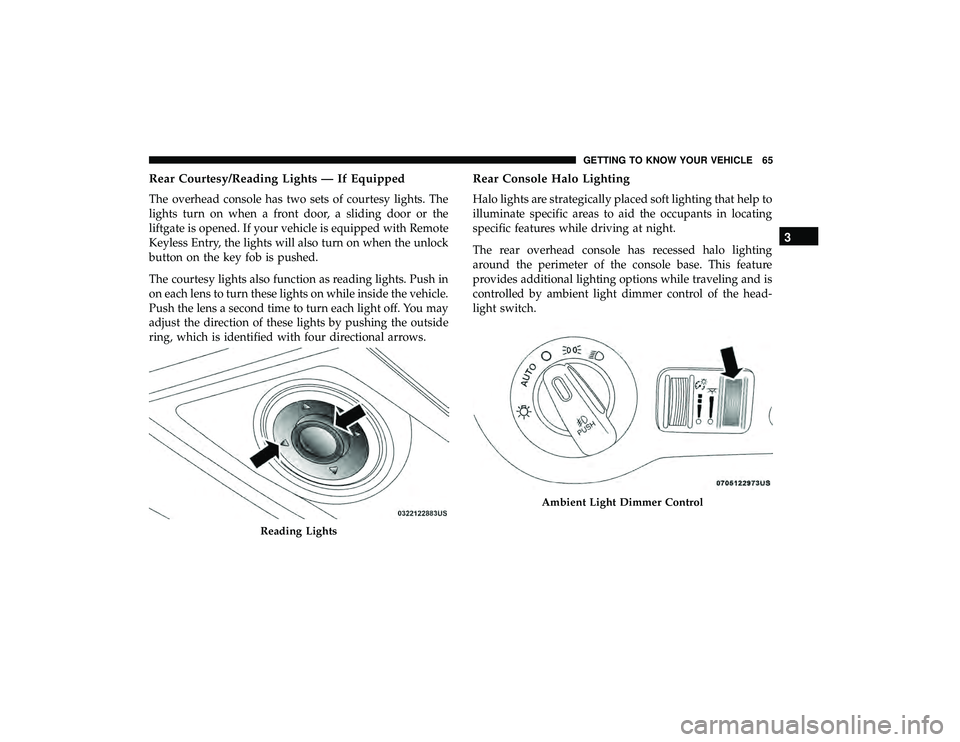
Rear Courtesy/Reading Lights — If Equipped
The overhead console has two sets of courtesy lights. The
lights turn on when a front door, a sliding door or the
liftgate is opened. If your vehicle is equipped with Remote
Keyless Entry, the lights will also turn on when the unlock
button on the key fob is pushed.
The courtesy lights also function as reading lights. Push in
on each lens to turn these lights on while inside the vehicle.
Push the lens a second time to turn each light off. You may
adjust the direction of these lights by pushing the outside
ring, which is identified with four directional arrows.
Rear Console Halo Lighting
Halo lights are strategically placed soft lighting that help to
illuminate specific areas to aid the occupants in locating
specific features while driving at night.
The rear overhead console has recessed halo lighting
around the perimeter of the console base. This feature
provides additional lighting options while traveling and is
controlled by ambient light dimmer control of the head-
light switch.
Reading Lights
Ambient Light Dimmer Control
3
GETTING TO KNOW YOUR VEHICLE 65
Page 68 of 490

Dimmer Controls
The dimmer switch is located next to the headlight switch.
With the parking lights or headlights on, rotating the left
dimmer control upward will increase the brightness of the
instrument panel lights.
Rotating the left dimmer control completely upward to the
second detent (extreme top position) will turn on the
interior lights. The interior lights will remain on when the
dimmer control is in this position.
Rotating the left dimmer control to the off position (ex-
treme bottom) will turn the interior lights off, and will
remain off when the doors or liftgate are opened.
Parade Mode (Daytime Brightness Feature)
Rotate the dimmer control upward to the first detent. This
feature brightens all text displays such as the odometer,
instrument cluster display, and radio when the parking
lights or headlights are on.
WINDSHIELD WIPER AND WASHERS
The wipers and washers are operated by a switch within
the multifunction lever. Rotate the end of the multifunction
lever to select the desired wiper speed.
Instrument Panel Dimmer Control
Washer And Wiper Controls
66 GETTING TO KNOW YOUR VEHICLE
Page 109 of 490
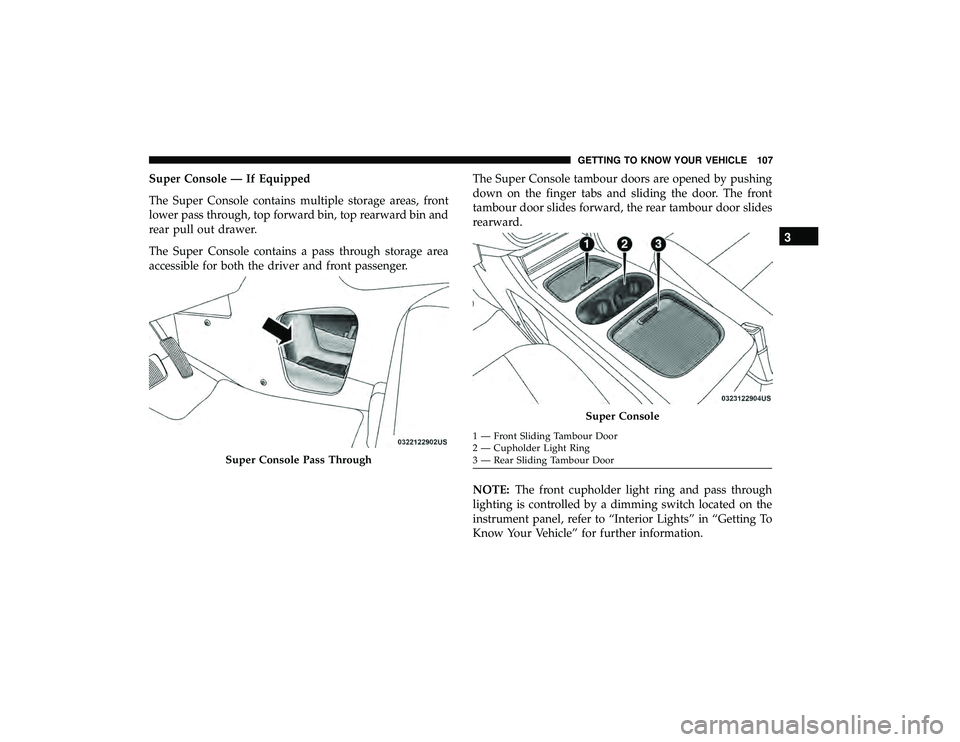
Super Console — If Equipped
The Super Console contains multiple storage areas, front
lower pass through, top forward bin, top rearward bin and
rear pull out drawer.
The Super Console contains a pass through storage area
accessible for both the driver and front passenger.The Super Console tambour doors are opened by pushing
down on the finger tabs and sliding the door. The front
tambour door slides forward, the rear tambour door slides
rearward.
NOTE:
The front cupholder light ring and pass through
lighting is controlled by a dimming switch located on the
instrument panel, refer to “Interior Lights” in “Getting To
Know Your Vehicle” for further information.
Super Console Pass Through
Super Console
1 — Front Sliding Tambour Door
2 — Cupholder Light Ring
3 — Rear Sliding Tambour Door
3
GETTING TO KNOW YOUR VEHICLE 107