Page 285 of 598

Electronically Shifted Transfer Case (Three-
Position Switch) — If Equipped
This is an electronic shift transfer case and it is operated by the
AWD Control Switch, which is located on the center console.
This electronically shifted transfer case provides three
mode positions:
•All-wheel drive automatic range (AWD AUTO)
• All-wheel drive low range (LOW RANGE)
• Neutral (NEUTRAL) This electronically shifted transfer case is designed to be
driven in the AWD AUTO position for normal street and
highway conditions on dry hard surfaced roads.
For variable driving conditions, the AWD AUTO mode can
be used. In this mode, the front axle is engaged, but the
vehicle’s power is sent to the rear wheels. All-wheel drive
will be automatically engaged when the vehicle senses a
loss of traction.
When additional traction is required, the transfer case
LOW RANGE position can be used to lock the front and
rear driveshafts together forcing the front and rear wheels
to rotate at the same speed. This is accomplished by
rotating the AWD Control Switch to the desired position.
Refer to “Shifting Procedure” for specific shifting instruc-
tions. The LOW RANGE position is designed for loose,
slippery road surfaces only. Driving in the LOW RANGE
position on dry hard surfaced roads may cause increased
tire wear and damage to the driveline components.
AWD Control Switch (Three-Position)
6
STARTING AND OPERATING 283
Page 391 of 598
CavityCartridge Fuse Micro Fuse Description
F90/F91 –20 Amp Yellow Power Outlet (Rear Seats) Selectable
F92 –10 Amp Red Rear Console Lamp — If Equipped
F93 –20 Amp Yellow Cigar Lighter
F94 –10 Amp Red Shifter/Transfer Case Module
F95 –10 Amp Red Rear Camera / Blind Spot Sensor — If
Equipped
F96 –10 Amp Red Rear Seat Heater Switch/Flashlamp Charger
— If Equipped
F97 –20 Amp Yellow Rear Heated Seats & Heated Steering Wheel
— If Equipped
F98 –20 Amp Yellow Ventilated Seats/Front Heated Seats — If
Equipped
F99 –10 Amp Red Climate Control/Driver Assistance Systems
Module/HALF/Park Assist
F100 –10 Amp Red Active Damping — If Equipped
F101 –15 Amp Blue In Car Temperature Sensor/Humidity Sensor
F102 –15 Amp Blue Spare
F103 –10 Amp Red Cabin Heater (Diesel Engine Only)/Rear
HVAC — If Equipped
F104 –20 Amp Yellow Power Outlets (Instrument Panel/Center
Console/Rear Cargo — If Equipped)
7
IN CASE OF EMERGENCY 389
Page 408 of 598
In order to move the vehicle in cases where the transmis-
sion will not shift out of PARK (such as a dead battery), a
Manual Park Release is available.
Follow these steps to use the Manual Park Release:
1. Firmly apply the parking brake.
2. Open the center console and locate the Manual ParkRelease cover, remove it by snapping the cover away
from the console hinges. 3. Press and maintain firm pressure on the brake pedal.
4. Using a screwdriver or similar tool, push the metal latch
in towards the tether strap.
Manual Park Release Cover
Release Latch
406 IN CASE OF EMERGENCY
Page 535 of 598

The right-hand control is a rocker-type switch with a
push-button in the center and controls the volume and
mode of the sound system. Pushing the top of the rocker
switch increases the volume, and pushing the bottom of the
rocker switch decreases the volume.
Pushing the center button makes the radio switch between
the various modes available (AM/FM/SXM or Media etc.)
The left-hand control is a rocker-type switch with a push-
button in the center. The function of the left-hand control is
different depending on which mode you are in.
The following describes the left-hand control operation in
each mode.
Radio Operation
Pushing the top of the switch will “Seek” up for the next
listenable station and pushing the bottom of the switch will
“Seek” down for the next listenable station.
The button located in the center of the left-hand control
will tune to the next preset station that you have pro-
grammed in the radio preset button.
Media Mode
Pushing the top of the switch once goes to the next track on
the selected media (AUX/USB/Bluetooth). Pushing the
bottom of the switch once goes to the beginning of the
current track, or to the beginning of the previous track if it
is within eight seconds after the current track begins to
play.
IPOD/USB/MP3 CONTROL — IF EQUIPPED
This feature allows an iPod or external USB device to be
plugged into the USB port, located inside the storage area
on the center stack of the instrument panel.
iPod control supports Mini, 4G, Photo, Nano, 5G iPod and
iPhone devices. Some iPod software versions may not fully
support the iPod control features. Please visit Apple’s
website for software updates.
For further information, refer to the Uconnect Owner ’s
Manual Supplement.
Connecting The iPod Or External USB Device
Use the connection cable to connect an iPod or external
USB device to the vehicles USB/AUX connector port which
is located in the center console.
10
MULTIMEDIA 533
Page 536 of 598
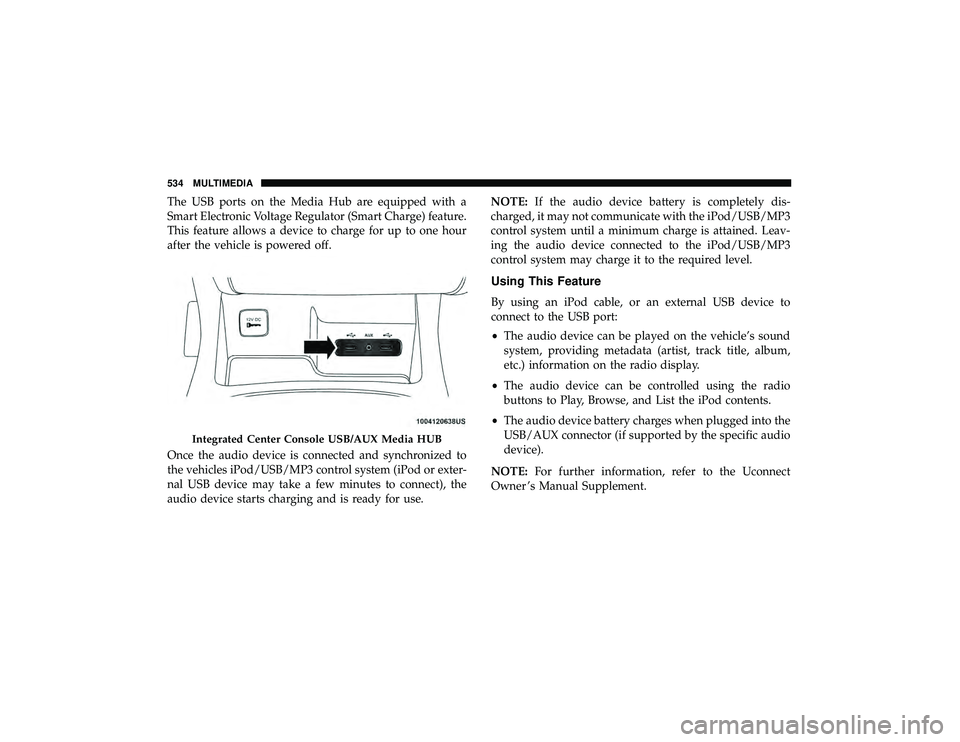
The USB ports on the Media Hub are equipped with a
Smart Electronic Voltage Regulator (Smart Charge) feature.
This feature allows a device to charge for up to one hour
after the vehicle is powered off.
Once the audio device is connected and synchronized to
the vehicles iPod/USB/MP3 control system (iPod or exter-
nal USB device may take a few minutes to connect), the
audio device starts charging and is ready for use.NOTE:
If the audio device battery is completely dis-
charged, it may not communicate with the iPod/USB/MP3
control system until a minimum charge is attained. Leav-
ing the audio device connected to the iPod/USB/MP3
control system may charge it to the required level.
Using This Feature
By using an iPod cable, or an external USB device to
connect to the USB port:
• The audio device can be played on the vehicle’s sound
system, providing metadata (artist, track title, album,
etc.) information on the radio display.
• The audio device can be controlled using the radio
buttons to Play, Browse, and List the iPod contents.
• The audio device battery charges when plugged into the
USB/AUX connector (if supported by the specific audio
device).
NOTE: For further information, refer to the Uconnect
Owner ’s Manual Supplement.
Integrated Center Console USB/AUX Media HUB
534 MULTIMEDIA
Page 537 of 598
Second Row USB Charging Port
Second row USB connector ports can be used for charging
purposes only. Use the connection cable to connect an iPod
or external USB device to the vehicle’s USB charging ports
which are located either on the rear of the front center
console and/or in the second row center console.
UCONNECT REAR SEAT ENTERTAINMENT (RSE)
SYSTEM — IF EQUIPPED
Your Rear Seat Entertainment System is designed to give
your family years of enjoyment. You can play your favorite
CDs, DVDs or Blu-ray Discs, listen to audio over the
wireless headphones, or plug and play a variety of stan-
dard video games or audio devices.
Please review this Owner’s Manual to become familiar
with its features and operation.
Front Center Console Rear USB Ports
Second Row Center Console USB Port
10
MULTIMEDIA 535
Page 540 of 598

Blu-ray Disc Player
Play A Blu-ray Disc
The Blu-ray disc player is located in the center console.
1. Insert a Blu-ray disc into the VES disc player with thelabel facing as indicated on the Blu-ray player. The radio
automatically selects the appropriate mode after the disc
is recognized and displays the menu screen, the lan-
guage screen, or starts playing the first track. 2. To watch a Blu-ray disc on Rear 1 for driver’s side rear
passengers, ensure the Remote Control and Headphone
switch is on Rear 1.
3. To watch a Blu-ray disc on Rear 2 for passenger side rear passengers, ensure the Remote Control and Headphone
switch is on Rear 2.
NOTE:
• To view a Blu-ray disc on the radio, press the “Media”
button on the touchscreen, and then press the “Disc”
button. Press the “Play” button, and then the “full
screen” button.
• Viewing a Blu-ray disc on the radio screen is not
available in all states/provinces. The vehicle must be
stopped, and the gear selector must be in the PARK
position for vehicles with automatic transmission.
Blu-ray Disc Player Location
538 MULTIMEDIA


